
If you want a faster, more comfortable typing setup without giving up the number pad, a numpad-equipped mechanical keyboard is a smart upgrade. It can improve workflow for spreadsheets, data entry, coding, and general office use.
Below, we focus on well-rounded options for productivity, balancing layout, switch feel, connectivity, battery life, and useful extras like knobs or hotkeys.
Best 10 Mechanical Keyboard for Productivity with Numpad Picks for 2026
Feature-Packed 98-Key

- 98-key layout with numpad support
- Smart display and programmable knob
- Wireless BT/2.4G/USB-C connectivity
Best For: users who want a compact productivity board with extra controls and display features
Speed-Focused 96%

- 96% layout with numpad and navigation keys
- 8000 Hz polling in 2.4G and wired modes
- Up to 600 hours battery life
Best For: workers and power users who want a compact numpad keyboard with fast response and long battery life
Full-Size Shortcut Board

- 108-key layout with numpad and 4 hotkeys
- Gasket mount with 5-layer noise dampening
- Tri-mode USB-C, Bluetooth, and 2.4GHz
Best For: users who want a full-size productivity keyboard with dedicated shortcut keys and a cushioned typing feel
Programmable Compact 96%

- 96% layout with numpad and F-keys
- Programmable knob plus QMK support
- 8000 Hz wired polling rate
Best For: people who want a wired compact numpad keyboard with advanced remapping and a programmable knob
Editor’s Pick
LINGBAO K108 Pro Wireless Full-Size Mechanical Keyboard

- Full-size layout with numpad and tri-mode connectivity
- Hot-swappable design with linear switches and PBT keycaps
- 10000mAh battery, smart screen, and multifunction knob
Best For: People who want a customizable full-size wireless board for work and daily typing
Compact Productivity Choice
Keychron K4 96% Wireless Mechanical Keyboard

- 96% layout keeps the numpad in a space-saving design
- Bluetooth 5.1 and wired USB-C support multiple devices
- Mac and Windows compatibility with extra keycaps included
Best For: Compact desks and users who need a numpad without a full-size footprint
Office Workhorse
EPOMAKER TH99 Tri-Mode Wireless Mechanical Keyboard

- 1800 layout includes numpad and function keys
- Tri-mode wireless with an 8000mAh battery
- Gasket mount and sound-dampening layers for softer typing
Best For: Productivity-focused users who want a compact layout with numpad and a cushioned typing feel
Best with Extra Features
YUNZII B98 PRO 96% Wireless Mechanical Keyboard

- Compact 96% layout with dedicated numpad
- QMK/VIA support for remaps, macros, and profiles
- Tri-mode wireless plus 8000mAh battery
Best For: people who want a customizable productivity keyboard with numpad and wireless convenience
Most Customizable
Keychron J3 SE Pink Blue 96% Keyboard
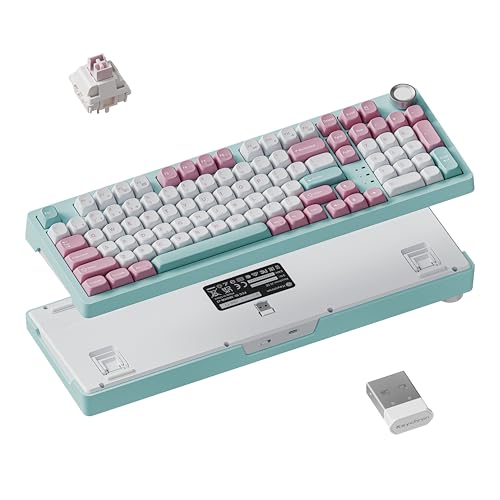
- 96% layout keeps a numpad in a smaller footprint
- QMK and Launcher support key remaps and macros
- Bluetooth, 2.4GHz, and wired connectivity
Best For: Mac, Windows, and Linux users who want deep customization and a numpad
Best Full-Size Value
Kisnt KN104 Wireless Full-Size Keyboard

- Full-size 100% layout with dedicated numpad
- Tri-mode connectivity with USB-C, 2.4GHz, and Bluetooth
- Hot-swappable switches plus programmable keys
Best For: spreadsheet, accounting, and heavy data work on a standard full-size board
Feature-Packed 98-Key – Smart Display Compact Pro
If you want a mechanical keyboard for productivity with numpad and also like extra controls, the RK ROYAL KLUDGE S98 packs a lot into a compact 98-key layout. It keeps the number pad while adding a smart display and knob, plus wireless options that make it easy to move between devices on a desk or laptop setup.
Best For: People who want a compact productivity board with a numpad, media control, and a customizable display.
Pros:
- 98-key layout keeps the numpad while saving space versus a full-size board.
- Smart display can show GIFs, date, connection mode, battery status, and more.
- Knob makes it easy to adjust volume, brightness, RGB, and connection mode.
- Sound-damping layers and top-mount design aim for a creamy, reduced-noise typing feel.
Cons:
- More of a feature-heavy board than a simple office keyboard.
- Linear switches may not suit users who prefer a tactile feel.
The S98 is a strong pick if you want productivity-friendly numpad access but also value personalization and desk utility. Its compact format, wireless flexibility, and extra controls make it practical for daily use without feeling basic.
Speed-Focused 96% – Ultra 8K Workhorse
The Keychron K4 Ultra 8K is a mechanical keyboard for productivity with numpad that keeps a 96% layout while adding very fast wireless and wired performance. It is aimed at users who want their number pad, arrow keys, and navigation cluster in a smaller footprint, with enough battery life and customization to suit a work-focused desk.
Best For: Workers and power users who want a compact numpad keyboard with high polling rate, long battery life, and cross-platform support.
Pros:
- 96% layout preserves the numpad, function row, arrows, and navigation keys.
- 8000 Hz polling rate in 2.4 GHz and wired modes for very responsive input.
- Up to 600 hours of battery life with backlight off.
- Works with macOS, Windows, and Linux, with web-based remapping and macros.
Cons:
- 8K mode is tied to specific wired/2.4 GHz performance conditions.
- Tactile switch choice may not be ideal if you want a very light or linear feel.
This is a practical upgrade for anyone who needs a compact board for spreadsheets, data entry, or multitasking and still wants premium speed. The K4 Ultra 8K balances desk efficiency with serious responsiveness and customization.
Full-Size Shortcut Board – Quiet Gasket Pro
If you prefer a mechanical keyboard for productivity with numpad but want the most desk-friendly shortcut setup, the Redragon K745 PRO goes full-size with 108 keys and four extra hotkeys. Its gasket mount and noise-dampening layers are designed for a softer, quieter typing feel, which can be appealing in shared workspaces.
Best For: Users who want a full-size productivity keyboard with dedicated shortcut keys and a cushioned typing feel.
Pros:
- 108-key full-size layout includes a numpad and four extra hotkeys.
- Tri-mode connectivity supports USB-C, Bluetooth, and 2.4GHz wireless.
- Gasket mounting and 5-layer noise dampening aim for a creamy, thocky sound.
- Hot-swappable socket and PRO software allow deeper customization.
Cons:
- Full-size footprint takes more desk space than compact 96% boards.
- The gaming styling may be more than some office users want.
The K745 PRO makes sense when you want a true all-in-one keyboard for typing, shortcuts, and device switching. It offers the most traditional layout here, with the added benefit of a softer feel and customizable hotkeys.
Programmable Compact 96% – Knob Control Editor
The Keychron V5 8K is a mechanical keyboard for productivity with numpad that keeps a compact 96% footprint while adding a programmable knob and full QMK support. It is a strong fit for users who want to save desk space without giving up the number pad, function row, or flexible workflow controls.
Best For: People who want a wired compact numpad keyboard with advanced remapping and a programmable knob.
Pros:
- 96% layout retains the numpad, F-keys, and navigation keys in a smaller body.
- 8000 Hz polling rate offers very fast wired responsiveness.
- Programmable knob can control volume, brightness, or custom macros.
- QMK and Launcher web support make remapping and macro setup straightforward.
Cons:
- Wired-only connectivity may not suit users who want wireless flexibility.
- 8K polling requires stronger system hardware per the product notes.
This is a highly practical choice if your workflow benefits from macros, quick adjustment controls, and a compact layout with numpad access. The V5 8K feels especially well suited to office, programming, and general productivity tasks where customization matters.
Editor’s Pick – LINGBAO K108 Pro Wireless Full-Size Mechanical Keyboard
If you want a mechanical keyboard for productivity with numpad that also feels premium on the desk, the LINGBAO K108 Pro is built around a full-size layout, wireless flexibility, and a smooth typing sound. Its tri-mode connectivity, hot-swap support, and large battery make it practical for everyday work while still leaving room for customization.
Best For: Users who want a full-size wireless keyboard with numpad, lots of customization, and a refined typing feel.
Pros:
- Tri-mode connection supports 2.4G wireless, Bluetooth, and wired use.
- Full-size layout includes a number pad plus a smart screen and multifunction knob.
- Hot-swappable sockets support 3-pin and 5-pin switches for easy DIY changes.
- 5-layer gasket structure and PBT keycaps are designed for a softer, more durable typing experience.
Cons:
- The smart screen’s time calibration requires driver installation.
- RGB lighting and screen features add complexity for users who want a simple office board.
- Battery life drops when RGB lighting is enabled.
This is a strong fit if you want a feature-rich productivity keyboard that keeps the numpad while adding wireless convenience and customization. It leans more premium and playful than a basic office board, but the full-size format and comfortable linear switches make it a practical work companion.
Compact Productivity Choice – Keychron K4 96% Wireless Mechanical Keyboard
The Keychron K4 is a solid mechanical keyboard for productivity with numpad if you want a smaller desktop footprint without giving up the number pad. Its 96% layout keeps the essentials together, while Bluetooth, wired USB-C, and Mac/Windows support make it easy to use across common work setups.
Best For: Office users and multitaskers who want a compact full-keyboard layout with broad Mac and Windows compatibility.
Pros:
- 96% layout gives you a numpad in a more compact design.
- Bluetooth 5.1 supports up to 3 devices with easy switching.
- Works in both wireless and wired USB-C modes.
- Includes Mac-specific layout support and extra keycaps for Mac and Windows.
Cons:
- Backlighting is white LED only, not RGB.
- Wireless mode uses 6KRO rather than full NKRO.
- Battery life is best with backlighting disabled.
The K4 version 2 is a practical pick when you want a productivity-focused keyboard with a numpad but don’t want a full-size board taking up too much space. It prioritizes compatibility, portability, and dependable typing over flashy extras.
Office Workhorse – EPOMAKER TH99 Tri-Mode Wireless Mechanical Keyboard
If you’re shopping for a mechanical keyboard for productivity with numpad, the EPOMAKER TH99 is aimed squarely at efficient workflow. Its compact 1800 layout keeps the number pad and function keys in reach, while the tri-mode wireless setup, large battery, and gasket-mounted build make it suited to long work sessions.
Best For: Users who want a compact but fully featured productivity keyboard with a numpad and strong typing comfort.
Pros:
- 1800 layout includes a full numpad and separate function keys.
- Tri-mode connectivity supports Bluetooth 5.0, 2.4G, and wired use.
- 8000mAh battery is rated for very long use with backlight off.
- Gasket mount, sound-dampening layers, and PBT keycaps are built for a creamy, comfortable typing feel.
Cons:
- It is still a feature-heavy keyboard, so it may be more than basic office users need.
- Backlight use reduces the runtime versus the quoted no-light battery life.
- Customization software may add setup steps for mapping and lighting changes.
The TH99 stands out as a well-rounded work keyboard because it balances desk efficiency with comfort and customization. It gives you the productivity essentials, plus the quieter gasket-style typing experience many users prefer for daily office work.
Best with Extra Features – YUNZII B98 PRO 96% Wireless Mechanical Keyboard
If you want a mechanical keyboard for productivity with numpad that still feels premium, the YUNZII B98 PRO is built around a compact 96% layout with the number pad intact. It combines tri-mode wireless connectivity, QMK/VIA customization, and a gasket-mounted typing feel, so it can handle office work, macros, and long typing sessions without taking up full-size desk space.
Best For: Users who want a customizable productivity board with a numpad, wireless flexibility, and a softer typing feel.
Pros:
- 96% layout keeps a dedicated numpad while staying more compact than a traditional full-size board.
- QMK/VIA support lets you remap keys, build macros, and save multiple profiles.
- Tri-mode connectivity works over Bluetooth, 2.4GHz, or USB-C across multiple devices.
- 8000mAh battery is designed for long stretches between charges.
Cons:
- The cat knob style and RGB features may feel more playful than minimalist.
- Customization options can be more than some buyers need for basic office use.
Overall, the B98 PRO is a strong fit if you want a feature-rich productivity keyboard that still leaves room for creative personalization. Its big advantage is packing numpad utility, hot-swap flexibility, and wireless convenience into one compact layout.
Most Customizable – Keychron J3 SE Pink Blue 96% Keyboard
The Keychron J3 SE is a practical mechanical keyboard for productivity with numpad if you want a compact layout without giving up data-entry speed. Its 96% design, hot-swappable switches, and QMK-based customization make it a flexible option for mixed work setups, while tri-mode connectivity helps it move easily between desktop and mobile devices.
Best For: Mac, Windows, and Linux users who want a customizable 96% board with a numpad and flexible connectivity.
Pros:
- Compact 96% layout includes a numpad while saving desk space versus a full-size board.
- QMK firmware and Keychron Launcher support remaps, macros, and custom keymaps.
- Tri-mode connectivity includes Bluetooth 5.2, 2.4GHz, and wired use.
- Hot-swappable design supports most 3-pin and 5-pin MX-style switches.
Cons:
- The pink/blue colorway is more style-forward than neutral office-first designs.
- Its customization depth may be more involved than some buyers need for simple typing.
In short, the J3 SE stands out when customization matters as much as the numpad itself. It is especially appealing for users who want one keyboard that can adapt across operating systems and workflows.
Best Full-Size Value – Kisnt KN104 Wireless Full-Size Keyboard
The Kisnt KN104 is a straightforward mechanical keyboard for productivity with numpad if you prefer a traditional full-size layout. It keeps the number pad, adds a knob for quick volume and backlight control, and uses a gasket-mounted build with sound-dampening materials to aim for a smoother, quieter everyday typing experience.
Best For: Spreadsheet work, accounting, coding, and anyone who wants a standard full-size keyboard with a numpad.
Pros:
- Full-size 100% layout preserves the dedicated numpad for data entry and office work.
- Tri-mode connectivity supports USB-C, 2.4GHz, and Bluetooth 5.0.
- Knob control makes it easy to adjust volume and backlight.
- Hot-swappable switches and programmable keys add useful customization.
Cons:
- Its larger footprint takes up more desk space than 96% options.
- Driver programming is Windows-only in wired/2.4G mode.
The KN104 is the most conventional choice here, and that is a strength if you simply want a dependable full-size productivity keyboard with numpad. It focuses on practical extras like wireless flexibility, customization, and a softer sound profile rather than trying to reinvent the layout.
How We Picked the Best Mechanical Keyboard for Productivity with Numpad
We prioritized models that make sense as a Mechanical Keyboard for Productivity with Numpad, not just gaming boards with extra keys. That means strong layout efficiency, dependable connectivity, comfortable typing acoustics, and practical features such as hot-swap sockets, programmable layers, and multi-device support.
We also favored keyboards that are easy to live with at a desk: stable builds, clear legends, useful companion software, and layouts that keep the numpad accessible without wasting too much space.
Quick Comparison
If you want the shortest path to the right choice, start with your priority: wireless convenience, compact desk footprint, typing comfort, or full-size familiarity. 96% layouts are the sweet spot for many buyers because they preserve the numpad while trimming width. Full-size boards are better for users who want a traditional office layout and maximum key separation.
Key Buying Factors for a Mechanical Keyboard for Productivity with Numpad
Layout and Desk Space
Choose 96% if you want a smaller footprint without losing the numpad. Choose full-size if you use number entry heavily and prefer a standard office layout with more spacing between clusters.
Switch Feel and Noise
For shared offices, look for quieter linear or tactile options, plus sound-dampening foam or gasket mounting. If you type all day, a lighter, smoother switch can reduce fatigue.
Connectivity and Battery Life
Tri-mode support is ideal for people who switch between laptop, desktop, and tablet. Wired mode still matters for low-latency use and uninterrupted work, while strong battery life reduces charging hassle.
Programmability and Shortcuts
Hotkeys, knobs, QMK/VIA support, and remapping tools can save time in spreadsheets, editing apps, and business software. These features are especially useful on a Mechanical Keyboard for Productivity with Numpad because they help you keep common actions close at hand.
Build Quality and Comfort
Look for a stable chassis, good keycap material, and reliable stabilizers. A comfortable typing angle and solid wrist placement often matter more than flashy lighting for day-to-day office work.
Who Should Buy Which Mechanical Keyboard for Productivity with Numpad?
Choose a 96% wireless board if you want the best balance of compactness and function. Pick a full-size keyboard if you rely on the numpad constantly and don’t mind a larger footprint. If you value customization, go for a hot-swappable, programmable model. If your office is quiet, prioritize dampened, lower-noise designs. For the most versatile setup, choose a tri-mode board with long battery life and a knob or shortcut keys for faster control.
