
Finding the right mechanical keyboard for daily work is less about flashy RGB and more about comfort, layout, and reliable typing feel. The best options make long sessions easier while keeping shortcuts and navigation close at hand.
In this roundup, we focus on value-first boards that suit productivity, whether you want a full-size layout, wireless flexibility, or a quieter switch type for shared spaces.
Best 10 Mechanical Keyboard for Productivity Under 100 Picks for 2026
Quiet Office Pick
Cherry KC 200 MX Mechanical Office Keyboard

- Tactile MX2A Brown switches
- Full-size with office shortcut keys
- Metal surface with durable keycaps
Best For: Office typing with a refined, tactile feel
Customization Pick
Redragon K668 Hot-Swap RGB Keyboard

- Hot-swappable 3-pin and 5-pin support
- Four remappable shortcut hotkeys
- Full-size layout with RGB and software control
Best For: Power users who want customization and shortcut control
Minimal Premium Pick
Logitech G413 SE Mechanical Keyboard

- Tactile switches with PBT keycaps
- Brushed aluminum top case
- White LED backlight and anti-ghosting
Best For: Users who want a sturdy, understated premium keyboard
Accessibility Pick
Adesso AKB-670UB Mechanical Keyboard

- Large-print keys for easier visibility
- Multi-OS layout with productivity hotkeys
- Copilot AI shortcut for quick access
Best For: Users who want readable keys and shortcut-friendly productivity
Compact Creamy 99-Key Pick
HUO JI E-Yooso Hot-Swap Gasket Keyboard
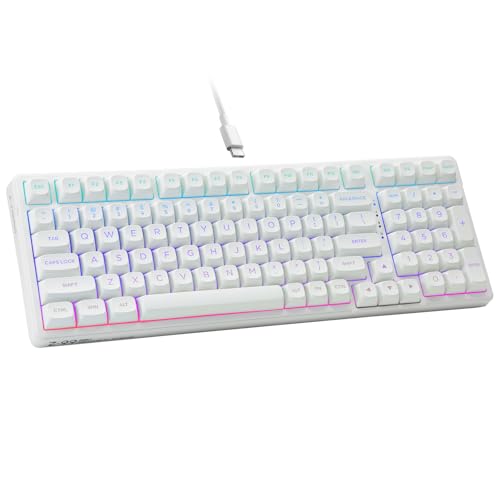
- 99-key layout saves desk space while keeping full functionality.
- Hot-swappable PCB and included puller support easy customization.
- Foam layers and gasket design aim for a quieter, creamy feel.
Best For: Space-saving customization and quieter everyday typing
Office-Focused Full-Size Choice
Keychron C2 Retro Brown Full-Size Wired Keyboard
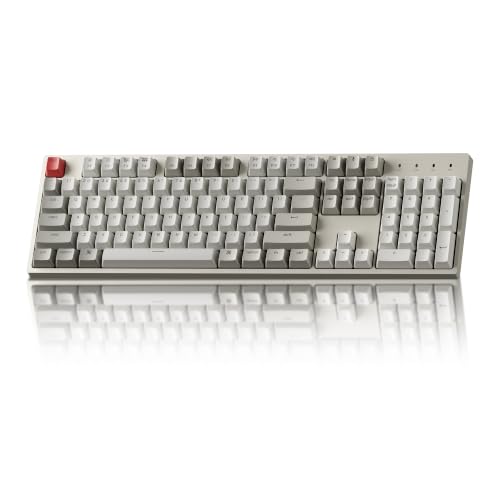
- 104-key layout with number pad suits spreadsheets and office work.
- Mac and Windows support includes extra keycaps for both systems.
- Tactile Brown switches and adjustable feet support comfortable typing.
Best For: Mac or Windows users who want a classic full-size office keyboard
Compact Quiet-Tone Option
E-YOOSO Z-99 LED Creamy Quiet Keyboard

- 99-key layout fits more easily on crowded desks.
- Foam layers and gasket design aim to reduce hollow sound.
- Ergonomic kickstands and Mac/Windows support improve daily use.
Best For: Quiet, compact typing with basic ergonomic flexibility
Triple-Mode Everyday Pick
Merdia Wireless Mechanical Keyboard, 100 Keys

- Triple-mode USB-C, 2.4G, and Bluetooth connectivity
- Brown switches and hot-swappable support
- 100-key layout with rechargeable battery
Best For: People who need a flexible office keyboard for multiple devices
Compact Desk-Saver
Newmen GM611 60% Wired Mechanical Keyboard

- Compact 60% layout saves desk space
- N-key rollover and anti-ghosting support
- Macros and key bindings via software
Best For: Compact workspaces and portable wired typing setups
Premium Typing Choice
RK ROYAL KLUDGE R98 Pro Wired Mechanical Keyboard

- 98-key layout with numpad and volume knob
- Gasket mount with foam for softer acoustics
- Hot-swappable linear switches and PBT caps
Best For: Typists who want a fuller, more refined wired keyboard experience
Quiet Office Pick – Cherry KC 200 MX Mechanical Office Keyboard
If you want a mechanical keyboard for productivity under 100 that feels refined at a desk, the Cherry KC 200 MX is built for office typing first. Its MX2A Brown switches deliver tactile feedback without a click, while the full-size layout, media shortcuts, and durable metal surface make it a practical everyday workboard.
Best For: Office users who want tactile mechanical typing, a full-size layout, and a clean wired setup.
Pros:
- MX2A Brown switches provide a noticeable tactile feel without click noise.
- Full-size layout includes dedicated calculator and volume shortcut keys.
- Aluminum surface, laser-etched keycaps, and fold-out feet add durability.
- Full N-key rollover and anti-ghosting support accurate input.
Cons:
- Wired USB-A connection keeps it firmly desk-bound.
- Not the quietest option if you prefer non-tactile switches.
Overall, this is a strong pick if your priority is dependable typing comfort and a professional office feel rather than gaming extras. It balances durability, shortcuts, and tactile feedback in a straightforward package.
Customization Pick – Redragon K668 Hot-Swap RGB Keyboard
For a mechanical keyboard for productivity under 100 that also gives you room to tweak, the Redragon K668 stands out. It adds four dedicated hotkeys, hot-swappable switch support, and software customization, so you can tailor shortcuts, lighting, and even macros to your workflow.
Best For: Users who want a customizable full-size keyboard with shortcut keys and hot-swap flexibility.
Pros:
- Hot-swappable sockets support 3-pin and 5-pin switches without soldering.
- Four dedicated hotkeys can be reassigned in the pro software.
- Full-size 108-key layout includes anti-ghosting for accurate typing.
- Two keycap sets and RGB lighting add flexibility and visual variety.
Cons:
- RGB-heavy styling is less understated for office environments.
- Stock linear switches may not suit users who want a tactile bump.
This is a good fit if productivity means shortcuts, customization, and the option to change switches later. It is more feature-rich than minimal, but that can be a real advantage for power users.
Minimal Premium Pick – Logitech G413 SE Mechanical Keyboard
The Logitech G413 SE is a simple, durable option if you want a mechanical keyboard for productivity under 100 with a premium build. Its tactile switches, PBT keycaps, and brushed aluminum top case make it feel solid on a desk, while the white LED backlight keeps the layout easy to read.
Best For: Buyers who want a sturdy, no-frills mechanical keyboard with a premium finish.
Pros:
- Tactile mechanical switches support comfortable everyday typing.
- PBT keycaps are heat- and wear-resistant for long-term use.
- Brushed aluminum-magnesium alloy top case adds rigidity.
- 6-key rollover anti-ghosting helps keep input reliable.
Cons:
- Only white LED lighting, not full RGB.
- Full-size layout is less compact for smaller desks.
This is a strong choice if you value durability and a clean, understated look more than flashy features. It offers a polished typing experience with just enough extras for reliable daily work.
Accessibility Pick – Adesso AKB-670UB Mechanical Keyboard
If you need a mechanical keyboard for productivity under 100 that is easier to read and quicker to navigate, the Adesso AKB-670UB is worth a look. It uses blue switches for a tactile, audible feel, adds large-print keys, and includes multimedia plus Windows hotkeys to speed up everyday tasks.
Best For: Typists who want large-print keys, multi-OS support, and built-in productivity shortcuts.
Pros:
- Large-print keys improve visibility and contrast.
- Multi-OS layout works across Windows, macOS, and Linux.
- Built-in multimedia and Windows hotkeys support faster workflow access.
- Copilot AI hotkey gives quick access to an AI assistant.
Cons:
- Blue switches are audible and may be too loud for shared spaces.
- Plastic enclosure is less premium than metal-bodied alternatives.
This model makes sense if readability and shortcut access matter as much as typing feel. It is especially practical for users who want clear legends and a keyboard that adapts across operating systems.
Compact Creamy 99-Key Pick – HUO JI E-Yooso Hot-Swap Gasket Keyboard
If you want a mechanical keyboard for productivity under 100 that still feels customizable, this 99-key HUO JI model is built to save desk space without losing full keyboard functionality. Its hot-swappable PCB, pre-lubed linear switches, and gasket structure are all aimed at making long typing sessions smoother and quieter.
Best For: Buyers who want a space-saving, customizable wired keyboard with a softer typing sound for work and everyday use.
Pros:
- 99-key 96% layout keeps the numpad and function coverage in a smaller footprint.
- Hot-swappable design makes switch replacement easy without soldering.
- Pre-lubed linear switches and layered foam aim for smooth, creamy typing with reduced noise.
- RGB lighting and double-shot PBT keycaps add flexibility and durability.
Cons:
- Wired-only connection may not suit those wanting wireless convenience.
- RGB effects may be more than some productivity-focused users need.
- The linear switch feel is less tactile than a brown-switch office board.
This is a strong fit if you want a compact board that still feels premium and adjustable. For productivity, the main appeal is the smaller footprint, full key access, and dampened sound profile.
Office-Focused Full-Size Choice – Keychron C2 Retro Brown Full-Size Wired Keyboard
The Keychron C2 is a straightforward mechanical keyboard for productivity under 100 if you prefer a full-size layout with a number pad and dedicated function keys. It focuses on practical typing comfort with an inclined frame, adjustable feet, and tactile Brown switches rather than flashy extras.
Best For: Office users and Mac or Windows typists who want a full-size wired board with a classic feel.
Pros:
- 104-key full-size layout includes a number pad for spreadsheets and data entry.
- Compatible with both Mac and Windows, with extra keycaps included for each.
- Tactile Keychron Brown switches are rated for up to 50 million keystrokes.
- Inclined frame and two adjustable foot angles help typing comfort.
Cons:
- Non-backlight version may not appeal to users who want lighting.
- Full-size format takes more desk space than compact alternatives.
- Wired connection only, so it is less flexible for mobile setups.
For productivity, this is the most traditional option in the group: full layout, simple setup, and a tactile switch feel that suits long work sessions. It is best if you care more about reliable typing than customization or RGB.
Compact Quiet-Tone Option – E-YOOSO Z-99 LED Creamy Quiet Keyboard
This E-YOOSO board is another mechanical keyboard for productivity under 100, but with a stronger focus on quiet, space-efficient typing and simple workstation compatibility. The 99-key layout, ergonomic kickstands, and sound-dampening foam make it a practical pick for people who want a softer typing experience at their desk.
Best For: Users who want a compact wired keyboard with a quieter sound profile and ergonomic angle adjustments.
Pros:
- 99-key layout keeps full functionality while reducing desk footprint.
- Gasket structure and four foam layers are designed to cut hollow sound and soften typing noise.
- Two-stage kickstands help you find a more comfortable typing angle.
- Compatible with Windows and Mac systems, with included keycap puller and cable.
Cons:
- Single-color backlighting is less flexible than full RGB options.
- Hot-swap support is limited to 3-pin switches.
- Wired-only design may not suit those who prefer a cordless setup.
If your priority is a smaller board that is tuned for calmer typing, this model makes sense. It trades some lighting flair for a more practical, comfort-first setup that fits daily work well.
Triple-Mode Everyday Pick – Merdia Wireless Mechanical Keyboard, 100 Keys
If you want a mechanical keyboard for productivity under 100 that can move between devices with minimal fuss, this Merdia board is built around flexibility. Its triple-mode connectivity supports USB-C wired, 2.4G wireless, and Bluetooth, making it a practical option for a home office setup, laptop use, or light multitasking across a phone, tablet, and computer.
Best For: Users who want one keyboard for office work, multi-device switching, and occasional light gaming.
Pros:
- Triple-mode connectivity with wired, 2.4G, and Bluetooth options
- Brown switches provide a tactile typing feel suited to long typing sessions
- Hot-swappable design supports MX-similar switches for future upgrades
- Rechargeable battery and 100-key layout add everyday convenience
Cons:
- RGB backlighting and gaming styling may be more than some productivity users need
- ABS keycaps are less premium than PBT alternatives
- At 100 keys, it is not as compact as a smaller desk-saving board
Overall, this is a versatile productivity-first choice if you value wireless convenience and the option to swap switches later. The full 100-key layout helps preserve function access while still fitting a budget-conscious roundup.
Compact Desk-Saver – Newmen GM611 60% Wired Mechanical Keyboard
For buyers searching for a mechanical keyboard for productivity under 100 with a smaller footprint, the Newmen GM611 is a straightforward compact wired option. Its 60% layout saves desk space while still offering key features like N-key rollover, anti-ghosting, and programmable customization for users who want a simple work setup with some flexibility.
Best For: Minimal desks, portable setups, and users who want a compact wired board for typing and basic customization.
Pros:
- 60% layout keeps the keyboard compact and portable
- N-key rollover and anti-ghosting help accurate input
- Supports macros and key binding customization through software
- Detachable cable improves portability and storage
Cons:
- No wireless connectivity, so it is less flexible than multi-mode options
- 61-key layout removes dedicated arrow and function keys for some workflows
- Rainbow-style backlighting may be more decorative than practical for office use
This is a good pick if desk space matters more than extra features. It focuses on compactness and basic typing reliability, which makes it a sensible budget-friendly work keyboard.
Premium Typing Choice – RK ROYAL KLUDGE R98 Pro Wired Mechanical Keyboard
If you want a mechanical keyboard for productivity under 100 that feels more refined than a basic office board, the RK R98 Pro brings a lot to the table. It uses a 98-key layout with a numpad, a volume knob, hot-swappable linear switches, and a gasket-mounted design with sound-dampening foam, making it well suited to long typing sessions and desk work.
Best For: Typists and office users who want a fuller layout, better acoustics, and customization in a wired keyboard.
Pros:
- 98-key layout keeps the numpad and most work essentials
- Gasket mount and five layers of foam aim for a softer, quieter feel
- Hot-swappable 3/5-pin support adds upgrade flexibility
- PBT keycaps and an aluminum volume knob give it a more premium feel
Cons:
- Wired-only design may not suit users who want wireless convenience
- Heavier, more feature-rich build may be more than a simple office setup needs
- RGB and gaming styling may not appeal to everyone in a formal workspace
This model stands out if your priority is a comfortable, customizable typing experience without giving up the numpad. It is one of the more polished options in this price range for productivity-focused users.
How We Picked the Best Mechanical Keyboard for Productivity Under 100
To narrow down the best Mechanical Keyboard for Productivity Under 100, we prioritized typing comfort, layout efficiency, connection options, and features that genuinely help with work. That means practical extras like dedicated shortcut keys, hot-swap support, number pads, and solid build materials mattered more than flashy effects.
We also looked for keyboards that balance desk space and usability. Full-size and 96% layouts are great for spreadsheet users, while compact boards suit smaller workstations and travel setups.
Quick Comparison
If you need the fastest decision, choose by use case: full-size boards for data entry and office work, compact boards for minimal desks, wireless models for flexible setups, and hot-swappable boards if you want to customize switches later. For a quieter shared office, brown or linear switches are usually easier to live with than clicky options.
Key Buying Factors for a Mechanical Keyboard for Productivity Under 100
Layout and Size
A full-size keyboard gives you the number pad and function row, which is ideal for spreadsheets and frequent shortcuts. Smaller layouts save space, but make sure you won’t miss the keys you use most.
Switch Type
Brown switches offer a balanced feel for typing, while linear switches tend to feel smoother and can be quieter. Blue switches are more tactile and audible, which some people love but others may find distracting in shared environments.
Connectivity
Wired models are simple, dependable, and usually the best value. Wireless or tri-mode boards are worth considering if you regularly switch between devices or want a cleaner desk.
Work-Friendly Features
Look for volume knobs, dedicated hotkeys, and OS compatibility if you want easier control during the workday. Hot-swap sockets are a bonus for future customization, especially if you are still figuring out your preferred feel.
Build Quality and Comfort
Aluminum plates, gasket mounts, foam dampening, and stable keycaps can make typing feel more refined. These details matter when you spend hours at the keyboard.
Who Should Buy Which Mechanical Keyboard for Productivity Under 100?
If you want the simplest office-ready setup, choose a full-size wired board with brown switches. If you need maximum desk efficiency, a compact or 96% layout is a smart compromise. For mixed work and home use, a wireless tri-mode model adds flexibility. And if you like tuning your gear, a hot-swappable keyboard gives you the most room to grow without pushing past the budget.
