
A good mechanical keyboard should make long typing sessions comfortable without getting in the way of your workflow. The right choice depends on more than switch feel: layout, noise, connection reliability, and desk space all matter.
These 10 options cover quiet wired boards, familiar full-size layouts, compact wireless keyboards, and customizable designs. Use the buying guide below to narrow them down to the features you will actually use.
Best 10 Mechanical Keyboard for Productivity and Typing Picks for 2026
Quiet Office Pick

- Non-clicky MX2A Silent Red switches
- Full-size layout with calculator and volume keys
- Wired USB-A connection
Best For: Quiet, straightforward Windows office typing
Wireless Multi-Device Pick

- Bluetooth, 2.4GHz, and USB-C modes
- 98 keys with display and control knob
- Hot-swappable switches and PBT keycaps
Best For: Multi-device desks that still need a number pad
Wired Customization Pick

- Compact 98-key layout with numpad
- Hot-swappable pre-lubed linear switches
- Detachable volume knob
Best For: Wired desks needing a numpad and switch flexibility
Compact Desk Pick

- 75% layout retains function and arrow keys
- Bluetooth, 2.4GHz, and USB-C connections
- Hot-swappable linear switches
Best For: Small desks and typing without a numpad
Best for Multi-Device Work

- Quiet, low-profile tactile switches
- Pairs with up to three devices
- Adaptive backlighting and USB-C charging
Best For: Switching between devices in a shared workspace
Best Wired Full-Size Pick
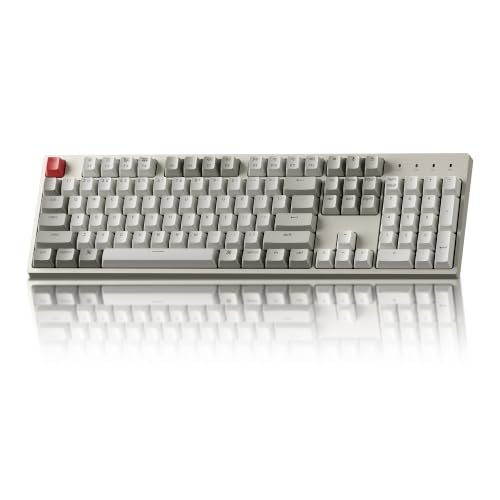
- 104 keys with number pad
- Tactile Brown switches
- Wired USB-C; Mac and Windows keycaps
Best For: Stationary desks that need a full-size wired keyboard
Best Compact Customizable Pick

- 99-key layout retains a number area
- Hot-swappable, pre-lubed linear switches
- Bluetooth, 2.4GHz, or USB-C connection
Best For: Space-conscious users who want switch customization
Best Compact Number Pad

- 100-key layout includes a number pad
- Bluetooth pairs with up to three devices
- USB-C wired mode and Mac/Windows keycaps
Best For: Compact desks that still need a number pad
Best Full-Size Customization

- Full-size 104-key layout
- Hot-swappable MX-style switch sockets
- Wired USB-C; no backlight
Best For: Fixed workstations and switch experimentation
Best Space-Saving Multi-Device Pick

- 81-key layout retains arrow keys
- Bluetooth, 2.4GHz, and USB-C connections
- Hot-swappable switches and media knob
Best For: Compact multi-device setups with customizable typing feel
Quiet Office Pick – Cherry KC 200 MX
If you want a mechanical keyboard for productivity and typing without clicky switches, the wired Cherry KC 200 MX pairs linear MX2A Silent Red switches with a full-size office layout and aluminum plate.
Best For: Windows users who want a quiet, straightforward desk keyboard with a number pad.
Pros:
- MX2A Silent Red switches offer a smooth, non-clicky keystroke.
- Dedicated calculator and volume keys are useful during office work.
- Laser-etched keycaps and a metal plate support everyday durability.
Cons:
- USB-A cable limits placement flexibility.
- Listed compatibility is Windows-focused.
Choose this for its restrained office features rather than wireless flexibility or extensive customization.
The RK Royal Kludge S98 is a mechanical keyboard for productivity and typing across multiple devices, offering Bluetooth 5.0, 2.4GHz wireless, and USB-C wired connections in a 98-key layout.
Best For: People who switch between devices and want a number pad without choosing a traditional full-size layout.
Pros:
- The display shows information such as connection mode and battery status.
- A knob provides quick access to volume and lighting controls.
- Hot-swappable switches and double-shot PBT keycaps add customization and durability.
Cons:
- At a listed 3 pounds, it is not especially light for a portable setup.
- The display and RGB may be unnecessary for a minimal office desk.
Its strongest case is connection flexibility: the extra controls and dampening layers are useful bonuses if you also care about typing feel.
For a mechanical keyboard for productivity and typing that keeps a number pad, the wired RK Royal Kludge R98 Pro uses a compact 98-key layout, pre-lubed linear switches, and a gasket mount with sound-absorbing layers.
Best For: Desk-bound typists who want a numpad, a volume knob, and the option to change switches.
Pros:
- 98-key layout retains the number pad and arrow keys.
- Hot-swap support accepts 3-pin and 5-pin switches.
- Double-shot PBT keycaps and a detachable metal volume knob add practical touches.
Cons:
- USB-C wired operation is less flexible than wireless.
- RGB and a gaming-oriented design may not suit a subdued office setup.
This is a sensible choice if you value a compact numpad layout and adjustable typing feel more than cable-free use.
The Kisnt KN85 is a compact mechanical keyboard for productivity and typing when desk space matters. Its 75% layout keeps function and arrow keys while dropping the number pad, and it connects over Bluetooth, 2.4GHz, or USB-C.
Best For: Small desks and multi-device workflows that do not require a dedicated number pad.
Pros:
- 85-key layout leaves more room beside the keyboard.
- Three connection modes support wireless use or typing while charging.
- Hot-swappable linear switches and a gasket mount allow a softer, customizable feel.
Cons:
- No dedicated number pad for frequent numeric entry.
- Its remapping and macro driver is Windows-only and works in wired or 2.4GHz mode.
Pick the KN85 for its space-saving layout and connection options; choose a numpad model instead if spreadsheets dominate your day.
Best for Multi-Device Work – Logitech MX Mechanical
For a mechanical keyboard for productivity and typing across multiple computers, the Logitech MX Mechanical offers a full-size layout, low-profile tactile switches, and pairing with up to three devices. Its quiet tactile feedback is a practical fit for shared workspaces.
Best For: People who switch between devices and want a quieter, rechargeable full-size keyboard.
Pros:
- Tactile Quiet switches provide a noticeable bump with less typing noise.
- Pairs with up to three devices via Bluetooth Low Energy or the included Logi Bolt receiver.
- Proximity-activated backlighting adjusts to changing light; Fn keys can be customized in Logi Options+.
Cons:
- Battery life is up to 15 days with backlighting, versus up to 10 months with it off.
- The full-size layout takes more desk space than a compact keyboard.
Choose it if cross-device convenience and a lower-profile typing feel matter more than a compact footprint.
Best Wired Full-Size Pick – Keychron C2 Retro
The Keychron C2 is a straightforward mechanical keyboard for productivity and typing when you want a number pad and a dependable wired connection. This non-backlit retro version has tactile Brown switches and includes keycaps for both Mac and Windows.
Best For: Desk-based typists who prefer a full-size layout and do not need wireless connectivity or backlighting.
Pros:
- 104-key layout includes a number pad and function keys.
- USB-C wired connection supplies consistent power without charging.
- Two-level adjustable feet offer 6° and 9° typing angles.
Cons:
- No backlighting for dim rooms.
- Wired-only design limits placement flexibility.
Its appeal is simplicity: tactile typing, Mac and Windows keycap options, and a full-size layout without wireless setup or battery management.
Best Compact Customizable Pick – AULA F99
The AULA F99 brings a different approach to a mechanical keyboard for productivity and typing: its 99-key, 96% layout keeps a number area while using less desk space than a full-size board. Pre-lubed linear switches, hot-swappable sockets, and three connection modes give it room to adapt to work and gaming setups.
Best For: Users who want a space-saving number pad, smooth linear switches, and the option to change switches later.
Pros:
- Bluetooth 5.0, 2.4GHz wireless, and USB-C wired modes support flexible setups.
- Hot-swap PCB accepts compatible 3-pin and 5-pin switches without soldering.
- Gasket structure and five layers of sound-dampening material are designed for a softer, more solid typing feel.
- Double-shot PBT keycaps and a built-in 8000mAh battery.
Cons:
- The compact layout may require adjustment if you are used to standard full-size key spacing.
- The supplied specifications list Windows as the compatible operating system family; confirm compatibility for other systems before buying.
Pick the F99 if layout efficiency and switch customization outweigh the familiarity of a standard full-size office keyboard.
Best Compact Number Pad – Keychron K4 Version 2
If you want a mechanical keyboard for productivity and typing without giving up a number pad, the Keychron K4 packs 100 keys into a 96% layout. Its tactile Apex Brown switches and white backlight suit everyday work.
Best For: Mac and Windows users who want a compact number pad and easy switching between devices.
Pros:
- Pairs with up to three Bluetooth devices and also connects by USB-C.
- Includes Mac and Windows keycaps and Mac function keys.
- Rated for up to 240 hours with the backlight off.
Cons:
- No water resistance.
- Wireless mode supports 6-key rollover rather than wired-mode N-key rollover.
The K4 is a practical space-saving choice if you regularly enter numbers; choose wired mode when full N-key rollover matters.
Best Full-Size Customization – Keychron C2 Retro
For a mechanical keyboard for productivity and typing at a fixed workstation, the Keychron C2 offers a full 104-key layout, tactile Brown switches, and a reliable wired USB-C connection. Its hot-swappable sockets let you change the typing feel without soldering.
Best For: Desk-based Mac or Windows users who want a full-size keyboard they can customize.
Pros:
- Hot-swappable sockets support most MX-style 3-pin and 5-pin switches.
- Includes Mac and Windows keycaps and dedicated Siri or Cortana key.
- Two-level adjustable feet offer a choice of typing angles.
Cons:
- Wired-only connection limits portability.
- This retro version has no backlight.
The C2 makes the most sense if you value a complete layout and switch flexibility over wireless convenience or lighting.
Best Space-Saving Multi-Device Pick – AULA F75 Pro
The AULA F75 Pro is a mechanical keyboard for productivity and typing when desk space is tight and several devices are in play. Its 81-key, 75% layout retains arrow keys, while Bluetooth, 2.4GHz wireless, and USB-C provide connection options.
Best For: Users who want a compact, customizable keyboard with wireless flexibility and media controls.
Pros:
- Connects to up to five devices across its available modes.
- Hot-swappable 3-pin and 5-pin switch support allows solder-free changes.
- Control knob handles volume and playback in office mode.
- Pre-lubed switches, stabilizers, and internal padding target a smoother, less hollow typing feel.
Cons:
- The 75% layout omits a dedicated number pad.
- RGB lighting and gaming-focused controls may be unnecessary for a simple office setup.
Pick the F75 Pro for flexible connections and a smaller footprint; choose a full-size option if frequent number entry is central to your work.
How We Picked the Best Mechanical Keyboard for Productivity and Typing
We focused on features that affect everyday work: switch type, layout, connection options, noise potential, and practical extras such as a number pad, volume knob, or hot-swappable switches. The selection spans straightforward wired office keyboards and more customizable wireless models. Specifications can help narrow your choices, but they cannot guarantee how a keyboard will feel or sound on your desk.
Quick Comparison: Which Layout Fits Your Work?
Full-size: The Cherry KC 200 MX, Logitech MX Mechanical, and both Keychron C2 configurations offer a familiar layout with a number pad. They make sense if you enter figures frequently or do not want to relearn key positions.
Compact with number pad: The RK S98, RK R98 Pro, AULA F99, and Keychron K4 keep a number pad while using less desk space than a conventional full-size board. Check the exact navigation-key placement before buying; compact layouts often rearrange familiar keys.
75% layout: The Kisnt KN85 and AULA F75 Pro leave more room for your mouse while retaining a function row and dedicated arrow keys. They are less convenient if you rely on a number pad every day.
Key Buying Factors for a Mechanical Keyboard for Productivity and Typing
Switch Feel and Noise
Linear switches move smoothly without a tactile bump; tactile switches give feedback as you press. Neither is universally better for typing. If you share a room, consider the Cherry’s Silent Red switches, but remember that keycaps, stabilizers, and your typing force also affect noise. Terms such as “creamy” describe a sound preference, not a measurable promise of quiet operation.
Layout, Connectivity, and Customization
A wired keyboard is simple to set up and does not need charging. Bluetooth and 2.4 GHz wireless can free up desk space; check device compatibility and whether the connection method you want is included. If you switch between computers, look closely at pairing and device-switching features rather than assuming every wireless model works the same way.
Hot-swappable boards let you replace compatible switches without soldering, which is useful if your preferences change. Confirm switch compatibility before ordering replacements. Backlighting, displays, and knobs can be handy, but prioritize key placement, switch feel, and connection reliability first.
Who Should Buy Which Mechanical Keyboard for Productivity and Typing?
For a conventional office setup, start with the quiet-focused Cherry KC 200 MX or the wireless Logitech MX Mechanical. Choose a Keychron C2 if you want a wired full-size layout; its hot-swappable version is the more flexible pick for future switch changes. If you need a number pad but want a smaller footprint, compare the RK S98, RK R98 Pro, AULA F99, and Keychron K4 by connection type and preferred controls. For a compact desk without a number pad, compare the Kisnt KN85 and AULA F75 Pro. The best Mechanical Keyboard for Productivity and Typing is the one whose layout and switch feel suit your work—not the one with the longest feature list.
