
Magnetic screen extenders can turn a MacBook into a compact multi-monitor workstation without the desk clutter of a full setup. For remote work, travel, and daily productivity, they offer a simple way to add screen space fast.
Below, we’ve narrowed down 10 practical options chosen for portability, display quality, and ease of use so you can find the right fit for your MacBook workflow.
Best 10 Magnetic Screen Extenders for Macbook Picks for 2026
Best for Flexible Mounting
16.1" Detachable Magnetic Monitor

- 360° rotatable magnetic stand with detachable screen
- 16.1" 1920x1200 IPS display with 16:10 workspace
- USB-C or HDMI+USB-A plug-and-play connectivity
Best For: Travelers and remote workers who want a flexible dual-screen setup with easy rotation and mounting.
Best for Full Triple-Screen Expansion
14" FHD Triple Screen Extender

- Detachable dual-screen layout for more workspace
- No-clamp base helps avoid pressure on the laptop lid
- 360°/180° screen rotation for flexible positioning
Best For: Users who want a detachable triple-screen extender for compatible laptops and desktop-style multitasking.
Best for Plug-and-Play Dual-Screen Work
APILDELLA 14'' Dual Laptop Screen Extender

- Plug-and-play with USB-C, USB-A, and HDMI
- 14-inch 1080p IPS display with HDR support
- Fits 13-16 inch laptops and folds for travel
Best For: People who want a fast, portable dual-screen setup for Mac, Windows, or Chrome laptops.
Best for Triple-Screen Portability
15.6" Portable Triple Screen Extender
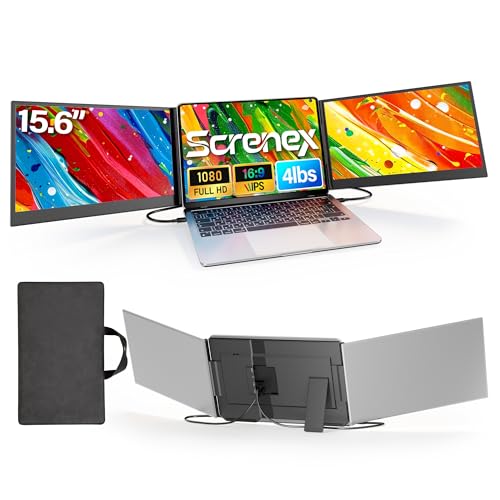
- Two extra 15.6" 1080p IPS displays
- Free-standing design protects the laptop
- Includes carry case and cables for travel
Best For: Travelers and remote workers who want a portable triple-monitor setup.
Best for Easy Setup
Kasorey 15.6" Detachable Monitor Extender

- Single-cable setup on compatible USB-C devices
- 15.6" FHD IPS panel for clear multitasking
- Detachable, foldable design for travel and shared viewing
Best For: MacBook users who want a simple, portable dual-screen extender for work and travel.
Best Heavy-Duty Pick
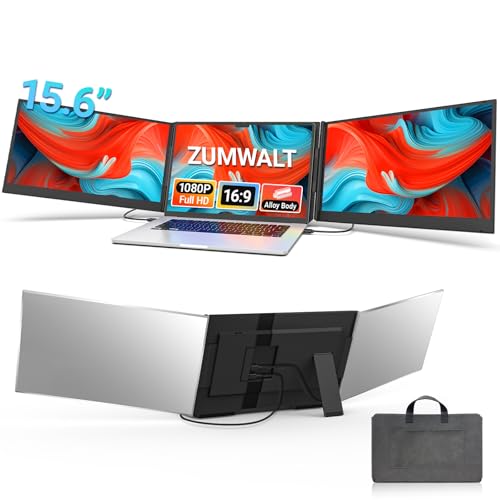
- Three-screen layout expands workspace fast
- 1080p FHD panels keep content sharp
- USB-C plug-and-play setup is travel friendly
Best For: Remote workers and travelers who want a portable triple-monitor boost.
Best Simple Pick
Blackview 14" Triple Screen Extender

- Adds a full triple-monitor layout for multitasking
- 14" 1080P IPS panels with anti-glare help in bright spaces
- USB-C plug-and-play keeps setup quick for travel use
Best For: MacBook users and remote workers who want maximum portable screen space.
Best for Flexible Mounting – 16.1" Detachable Magnetic Monitor
If you want one of the more adaptable magnetic screen extenders for macbook, this 16.1-inch portable monitor stands out for its detachable design, 360° rotating magnetic cover, and plug-and-play setup. It gives you a roomy 16:10 second screen without drivers, making it a practical pick for work, travel, or multitasking.
Best For: Users who want a portable dual-screen setup with flexible mounting, easy rotation, and broad device compatibility.
Pros:
- Detachable frameless screen with a 360° rotatable magnetic stand for landscape or portrait use
- 16.1" 1920×1200 IPS panel with 16:10 aspect ratio for extra vertical workspace
- Plug-and-play connectivity with USB-C or HDMI+USB-A cables included
- Lightweight 2.8 lb build and VESA support add travel and desk flexibility
Cons:
- Not compatible with M1/M2/M3 MacBooks per the listing notes
- At 2.8 lb, it is portable but not the lightest option in this category
- Best functionality depends on having the right ports or using the included cables
This is a strong fit if you value adjustability over minimalism. Among magnetic screen extenders for macbook, it leans toward users who want a larger display, flexible positioning, and straightforward setup for everyday productivity.
Best for Triple-Screen Productivity – KYY 15.6" Laptop Screen Extender
If you want a bigger on-the-go workstation than most magnetic screen extenders for macbook can offer, the KYY X90D is built around a simple one-cable triple-screen setup. It adds two 15.6-inch 1080p IPS displays, which makes it a strong fit for multitasking, meetings, and mobile editing when screen space matters more than absolute minimalism.
Best For: MacBook users and other laptop owners who want a portable dual-screen add-on for serious multitasking, with a straightforward single-cable connection.
Pros:
- Two 15.6-inch 1080p IPS panels give you a true multi-window workspace.
- One USB-C cable connection keeps setup cleaner for travel and desk use.
- 360° rotation and a built-in kickstand add flexibility for sharing and viewing.
- Broad compatibility covers macOS, Windows, Chrome OS, Android, and Linux.
Cons:
- Drivers are required, so it is not as effortless as fully plug-and-play options.
- Its dual-screen design is bulkier than slimmer magnetic screen extenders for macbook.
- Designed for 12"–17" laptops, so fit and portability may vary by setup.
Overall, the KYY X90D is a practical choice if your priority is productivity rather than a minimalist attachment. It gives MacBook users a lot more screen real estate than many magnetic screen extenders for macbook, but you should be ready for the added size and driver setup.
Best for Full Triple-Screen Expansion – 14" FHD Triple Screen Extender
If you want a portable way to add serious screen space, this triple-display extender is a practical alternative to magnetic screen extenders for macbook setups that need more room for multitasking. The stretchable base, detachable panels, and plug-and-play design make it appealing for users who want a compact setup without permanent clamps pressing against the laptop lid.
Best For: Mac, Windows, and Chrome users who want a detachable triple-screen setup for work, travel, or productivity—while noting the MacBook M1/M2/M3 compatibility limitation.
Pros:
- Ergonomic base design avoids clamping pressure on the laptop
- Dual detachable 14" FHD screens with 360° horizontal and 180° vertical rotation
- Stretchable base and hidden storage make it easier to pack away and carry
- Plug-and-play convenience for compatible Windows, Mac, and Chrome devices
Cons:
- Not compatible with MacBook M1/M2/M3 models
- At 5.2 lbs with both screens attached, it’s less travel-friendly than single-panel options
- Compatibility issues may require customer support troubleshooting
For buyers comparing magnetic screen extenders for macbook, this model stands out more for its triple-screen flexibility and pressure-free support than for minimalist portability. It makes the most sense if your priority is workspace expansion and you have a compatible laptop.
Best for Multitaskers – Triple-Screen Laptop Extender
If you want magnetic screen extenders for macbook-style productivity but need more workspace than a basic side panel can provide, this triple-screen laptop monitor extender is a strong pick. It adds a portable 14-inch FHD IPS display with solid color and brightness for coding, spreadsheets, travel work, and light gaming.
Best For: Remote workers, coders, and frequent travelers who want a triple-screen setup for a 13″-17.3″ laptop.
Pros:
- Triple-screen design boosts multitasking and keeps several apps visible at once
- 14-inch 1080p IPS panel with 100% sRGB for sharper, more vibrant visuals
- Plug-and-play USB-C setup keeps desk setup and travel use simple
- Adjustable kickstand and flexible viewing modes improve stability and comfort
Cons:
- Base M1/M2/M3/M4 MacBooks need an H5 adapter for dual-screen extension
- Bulkier than a single-screen clip-on extender, so it’s less minimalist
This is a practical choice if you want a portable multi-monitor boost rather than the slimmest accessory. For shoppers comparing magnetic screen extenders for macbook, it stands out most for productivity-first workflows and a more immersive expanded desktop.
Best for Plug-and-Play Dual-Screen Work – APILDELLA 14'' Dual Laptop Screen Extender
If you want one of the more practical magnetic screen extenders for macbook-style productivity setups, this APILDELLA 14-inch dual-screen extender is built for quick docking, easy travel, and simple multi-monitor work. It adds a portable 1080p second display without drivers, and the adjustable 13-16 inch fit makes it a flexible option for mixed laptop use.
Best For: Remote workers, travelers, and students who want an instant dual-screen setup for Mac, Windows, or Chrome laptops.
Pros:
- Plug-and-play setup with USB-C, USB-A, and HDMI support
- 1080p IPS panel with HDR, low blue light, and adjustable display settings
- Fits 13-16 inch laptops and folds for easier transport
- Extend and mirror modes help with multitasking and presentations
Cons:
- Heavier and bulkier than a simple clip-on travel monitor
- Brightness may require extra power from the first USB-C port
- Not a true magnetic attachment system, despite the roundup keyword
For buyers comparing magnetic screen extenders for macbook use, this model stands out more for convenience and compatibility than ultra-minimal design. It’s a solid choice if you care most about getting a dependable second screen fast, with enough flexibility for office work and travel.
Best for Everyday Use – 15.6" Triple Screen Extender
If you want a more flexible alternative to magnetic screen extenders for macbook, this 15.6-inch triple-screen extender adds serious workspace without a complicated setup. It’s aimed at users who need more room for spreadsheets, coding, side-by-side research, or presentations, while still keeping a portable, travel-friendly design.
Best For: Mac and multi-device users who want a plug-and-play triple-screen setup with rotation, detachment, and strong multitasking value.
Pros:
- 235° horizontal and 90° vertical rotation for landscape, portrait, or stacked layouts
- Detachable design lets you use one side independently when traveling
- 1080P IPS panels with anti-glare, low-blue-light, and built-in speakers
- Plug-and-play connectivity with USB-C, USB-A, or HDMI support
Cons:
- Compatibility notes can be confusing, especially for some Mac chip versions
- At 15.6 inches per panel, it adds noticeable bulk compared with simpler add-ons
- HDMI use requires an extra USB-A to USB-C power connection
For buyers comparing magnetic screen extenders for macbook, this model stands out more for flexibility and sheer screen space than minimalist portability. If your priority is maximum multitasking and a setup that can adapt to different work modes, it’s a strong option to consider.
Best for Triple-Screen Portability – 15.6" Portable Triple Screen Extender
If you want magnetic screen extenders for macbook-style productivity without carrying a bulky desk setup, this 15.6-inch triple-monitor extender is built for fast mobile multitasking. It gives you two extra 1080p IPS panels, a free-standing design that avoids clamping stress, and a carry case for working in cafés, hotels, or at home.
Best For: Travelers, remote workers, and creators who want a lightweight triple-screen setup with simple plug-and-play use.
Pros:
- Ultra-thin, aluminum build with a dedicated carry case for portability
- Free-standing design helps protect the laptop hinge and screen
- Dual 15.6" IPS panels with 1080p resolution for clearer multitasking
- Includes cables and supports quick plug-and-play setup on compatible systems
Cons:
- M1–M4 MacBooks need the extra H5-T cable and driver setup
- Best experience requires a laptop with two full-function USB-C ports
- Less compact than a single-screen extender if you travel very light
Overall, this is a strong pick for buyers who want a practical, travel-ready alternative to magnetic screen extenders for macbook use, especially if they value speed, protection, and a true multi-monitor workflow.
Best for Easy Setup – Kasorey 15.6" Detachable Monitor Extender
If you want a quick way to add more screen space without a complicated dock, the Kasorey extender is a practical pick among magnetic screen extenders for macbook users who value plug-and-play convenience. It connects with a single USB-C cable on compatible devices, folds into a travel-friendly frame, and works across laptops, Mac, Android, and even consoles.
Best For: MacBook users and travelers who want a simple, portable dual-screen setup for work, meetings, and multitasking.
Pros:
- Single-cable setup on compatible USB-C laptops keeps installation simple
- 15.6″ 1080p IPS panel delivers a sharp, usable second screen for productivity
- Detachable design and 2.84 lb weight make it easier to pack and carry
- Adjustable kickstand and 192° rotation help with comfort and sharing
Cons:
- Not the lightest option if you want the most compact travel accessory
- Some Macs and other devices may need extra cables instead of true one-cable use
- Requires compatibility checks before buying, especially for older ports
Overall, this is a strong choice if you want portable expansion more than a fancy desk setup. For buyers comparing magnetic screen extenders for macbook, it stands out for easy setup, solid display quality, and flexible use across different devices.
Best Heavy-Duty Pick – 15.6" Triple Portable Monitor
If you want a travel-friendly way to add serious screen space, this 15.6-inch triple portable monitor is a strong alternative to magnetic screen extenders for macbook users who need more room for multitasking. It delivers 1080p FHD resolution, USB-C plug-and-play setup, and broad compatibility with Mac, Windows, and Android devices.
Best For: Remote workers, multitaskers, and frequent travelers who want a portable multi-monitor setup with minimal desk clutter.
Pros:
- Triple-screen design gives you a big boost in workspace without a permanent desk setup
- 1080p FHD panels help keep text, spreadsheets, and browser windows clear
- USB-C plug-and-play connectivity keeps setup simple for travel and hybrid work
- Compatible with 12" to 17.3" laptops, including Mac-based setups
Cons:
- Bulkier than single-panel magnetic screen extenders for macbook
- May be overkill if you only need one extra screen
- Best results depend on having the right ports and power setup
Overall, this is a practical pick for buyers who care more about productivity than minimalism. If you are comparing magnetic screen extenders for macbook, this model stands out by offering a fuller multi-monitor workflow instead of just adding a slim side display.
Best Simple Pick – Blackview 14" Triple Screen Extender
If you want a portable way to add serious screen space, this Blackview model is a strong alternative to magnetic screen extenders for macbook users who need more than a simple side panel. It delivers a true triple-monitor layout, 1080P IPS visuals, and plug-and-play setup, making it a practical fit for travel, remote work, coding, and multitasking on the go.
Best For: MacBook users and other laptop owners who want a travel-friendly triple-screen setup for productivity-heavy work.
Pros:
- Triple-screen design adds a lot of workspace without a desk-bound setup.
- 14" 1080P IPS panels with 300 nits brightness and anti-glare help in bright environments.
- USB-C plug-and-play support keeps setup fast on compatible laptops and devices.
- Lightweight 3 lb build and travel-focused shell suit frequent movers.
Cons:
- Works best with laptops that have the right port combination for dual-screen output.
- Bulkier than a single magnetic screen extender and less minimalist for everyday carry.
- May be overkill if you only need one extra display.
For buyers comparing magnetic screen extenders for macbook, this Blackview option stands out when productivity matters more than simplicity. It’s a better match if you want a more immersive, desktop-like workflow rather than just a lightweight add-on screen.
How We Picked These Magnetic Screen Extenders for Macbook
We focused on models that make sense for MacBook users first: stable attachment or mounting, sensible portability, and display sizes that are realistic for commuting or hybrid work. We also favored units with common resolution targets like 1080p or better, plug-and-play setup, and broad laptop compatibility for users who may switch between a MacBook and another device.
Because Magnetic Screen Extenders for Macbook are often used on the move, we gave extra weight to lightweight builds, detachable designs, and models that pack down cleanly in a bag. Features like USB-C connectivity, adjustable stands, and slim bezels were also important because they affect day-to-day convenience more than marketing claims.
Quick Comparison: What Matters Most
The main trade-off is usually between screen size and portability. Larger panels can feel more productive, but smaller or thinner models are easier to carry and less likely to feel awkward on a compact MacBook setup. Resolution matters too: 1080p is usually the sweet spot for value, while higher-resolution displays are better if you spend long hours reading text or editing content.
Another practical comparison point is how the extender is supported. Some designs rely on a more rigid dual-arm or stand system, while others are better for travel because they detach more easily. If you plan to use the display in coffee shops, hotels, or client sites, a foldable or lightweight design may be the better long-term choice.
Key Buying Factors for Magnetic Screen Extenders for Macbook
Compatibility and Fit
Check both the MacBook size and the screen extender’s supported laptop range. A secure fit matters more than extra features, especially if you use a 13-inch MacBook Air or a larger MacBook Pro.
Display Quality
Look for a sharp panel, good brightness, and an IPS-style viewing experience if available. These details help when you’re comparing documents, spreadsheets, timelines, or browser windows side by side.
Connectivity
USB-C is the most convenient option for most MacBook owners because it can reduce cable clutter. Still, some setups may need HDMI or a second cable depending on your ports and power requirements.
Portability and Build
For travel, weight and thickness matter as much as screen size. A slim design is easier to carry, while a more robust frame may be worth it if you use the extender daily at a fixed desk.
Setup and Adjustability
Choose a system that you can attach and align quickly. Rotating, detachable, or adjustable designs are useful if you share the device, move between workspaces, or want to change viewing angles often.
Who Should Buy Which Magnetic Screen Extenders for Macbook?
If you want the most convenient all-around option, choose a lightweight magnetic screen extender with USB-C support and a 14- to 15.6-inch display. That size usually gives MacBook users a strong balance of workspace and portability.
If you travel often, prioritize slimmer models with detachable panels and simple cable management. If you work primarily from a desk, a larger or more adjustable extender can be the better pick because stability and viewing comfort matter more than packability.
For budget-conscious buyers, a straightforward 1080p model is usually enough for email, web apps, docs, and multitasking. For heavier productivity, look for better brightness, a cleaner hinge or stand system, and a display that stays comfortable during long sessions.
