
A heavy graphics card can slowly pull on a PCIe slot, especially in modern builds with larger coolers and glass-sided cases. A good support bracket helps keep the card level and reduces strain on the motherboard and card mount.
Below, we focus on magnetic, adjustable options that are easy to place, stable once installed, and suited to a wide range of GPU sizes and case layouts.
Best 10 Magnetic GPU Support Bracket Picks for 2026
Premium ARGB Pick
ASUS ROG Herculx GPU Anti-Sag Holder
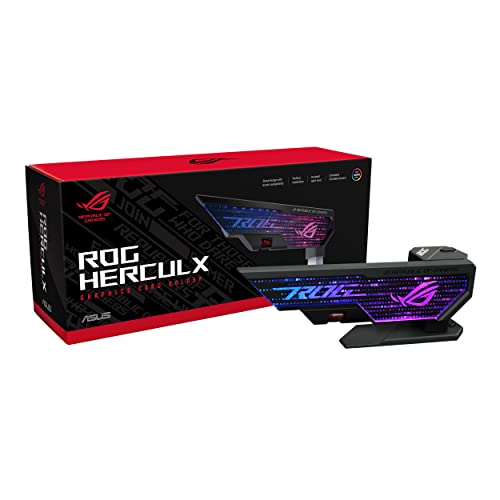
- Zinc alloy build with premium finish
- Toolless 72-128 mm height adjustment
- Includes spirit level and Aura Sync RGB
Best For: premium builds that want easy setup and RGB flair
Magnetic Budget Pick
GPU Support Bracket L 74-120mm

- Magnetic non-slip base for stable placement
- Aluminum alloy body with anodized finish
- Fits ATX, M-ATX, and ITX cases
Best For: simple, budget-minded sag support with magnetic mounting
Extra Tall Support Pick
Tall GPU Support Bracket 4.53-8.27 in

- Tall 4.53"-8.27" adjustment range
- All-aluminum metal construction
- Hidden magnet base and tool-free setup
Best For: large, heavy GPUs that need extra height
White Finish Pick
GPU Support Bracket White L 74-120mm

- White finish for lighter PC builds
- Magnetic base with non-slip support
- 74-120 mm adjustable height with level
Best For: light-themed systems that need discreet GPU support
Compact Magnetic Clamp
Aivalas Adjustable GPU Support

- Magnetic base sticks to PSU shrouds.
- Rubber ends help prevent slipping.
- Adjustable aluminum build for broad case compatibility.
Best For: Users who want a discreet, adjustable support brace.
Tool-Free Leveling Brace

- Hidden magnet helps it stand securely on metal surfaces.
- Anodized aluminum alloy adds durability and rust resistance.
- Includes a small level for easier alignment.
Best For: Shoppers who want a compact bracket with a level included.
Long-Reach Support Bar

- Adjusts from 10 mm to 190 mm.
- Hidden magnet improves base stability.
- Anti-slip pads and mini level aid installation.
Best For: People who need a taller adjustable support bracket.
All-Metal Magnetic Support
Oddtone Adjustable GPU Sag Bracket

- All-aluminum design for long-term durability
- Hidden magnet helps stabilize the stand
- Tool-free install with cushioned contact pad
Best For: Builders wanting a sturdy magnetic GPU brace with simple setup
High-Capacity 70-120mm Stand

- 70-120mm range with 0.5mm adjustment steps
- Strong magnet anchors the stand to the chassis
- Silicone pads help protect the card and case
Best For: Larger builds needing precise, tall GPU support
Compact 50-80mm Stand
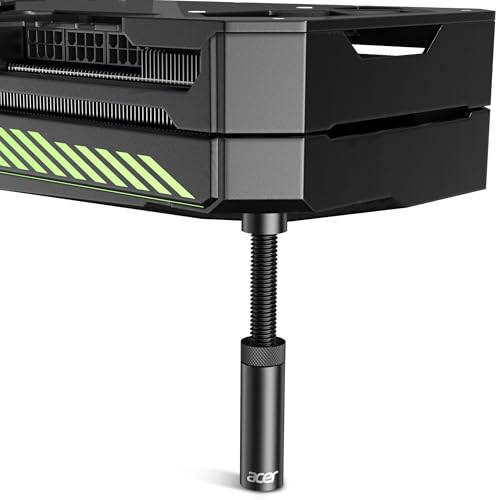
- 50-80mm range for smaller case layouts
- 0.5mm increments for precise adjustment
- Magnetic base and tool-free setup
Best For: Compact builds needing a shorter magnetic GPU support
Premium ARGB Pick – ASUS ROG Herculx GPU Anti-Sag Holder
The ASUS ROG Herculx is a magnetic gpu support bracket alternative if you want a premium anti-sag stand with a polished install. Its 72-128 mm height range, toolless adjustment wheel, and included spirit level make it easy to dial in a stable fit in a wide range of desktop cases without using PCIe slots.
Best For: Builders who want a premium, toolless GPU support with ARGB styling and wide compatibility.
Pros:
- Solid zinc alloy construction for a sturdy, premium feel
- Toolless height adjustment with a release button and wheel
- Includes a spirit level for easier setup
- Doesn’t occupy PCIe slots and supports 72-128 mm height
Cons:
- More expensive than basic support brackets
- ARGB styling may be unnecessary for non-RGB builds
If you want a cleaner, feature-rich support option, this bracket stands out for its materials and setup aids. It’s a strong fit for users who value both stability and presentation in a gaming PC.
Magnetic Budget Pick – GPU Support Bracket L 74-120mm
This magnetic gpu support bracket is aimed at simple, stable sag prevention with a no-fuss design. It uses a magnetic non-slip base, aluminum alloy construction, and screw adjustment to fit many ATX, M-ATX, and ITX cases while keeping the graphics card supported.
Best For: Buyers who want a straightforward magnetic GPU brace with a wide adjustment range.
Pros:
- Magnetic base helps keep the stand stable in the chassis
- Aluminum alloy body is anodized and rust-resistant
- Adjusts from 74 mm to 120 mm for broad compatibility
- Includes a small level and tool-free fixing module
Cons:
- Shorter support range than extra-tall GPU braces
- Basic black finish is more functional than flashy
For the money, this model covers the core job well: hold the card level and stay put. It’s a practical choice if you want magnetic mounting and a simple, durable build.
Extra Tall Support Pick – Tall GPU Support Bracket 4.53-8.27 in
When a card needs more reach, this magnetic gpu support bracket offers an extra-tall adjustable range and a heavy-duty metal build. The hidden magnet base, tool-free twist adjustment, and 4.53″-8.27″ height range make it a good fit for larger GPU setups that need stronger end support.
Best For: Owners of large, heavy graphics cards that need a taller anti-sag stand.
Pros:
- Extra-tall 4.53″-8.27″ adjustment range
- All-aluminum metal construction for long-lasting support
- Hidden magnet base helps with easier installation
- Tool-free height adjustment via twist nut
Cons:
- May be more stand than smaller builds need
- Basic black metal design is purely functional
This is the one to consider if standard-height braces come up short. Its taller range and sturdy material choice make it better suited to bigger cards and larger cases.
White Finish Pick – GPU Support Bracket White L 74-120mm
This magnetic gpu support bracket keeps the same practical anti-sag features as the black version, but in a white finish for cleaner-looking builds. It uses a hidden magnetic base, aluminum alloy construction, and a screw-adjustable 74-120 mm range, plus it includes a small level to help confirm alignment after installation.
Best For: Builders who want a white anti-sag bracket that blends into lighter PC themes.
Pros:
- White finish is a better match for light-colored builds
- Magnetic non-slip base improves stability
- Adjustable 74-120 mm range works with many cases
- Includes a level for checking bracket alignment
Cons:
- Same height range as similar compact models
- Mostly a utility part rather than a feature-heavy accessory
If appearance matters as much as support, this white version is the cleaner pick. It delivers the same type of stable, tool-free-friendly support while blending better into bright builds.
Compact Magnetic Clamp – Aivalas Adjustable GPU Support
If you want a magnetic gpu support bracket that stays out of the way, the Aivalas model is a simple anti-sag fix for heavier graphics cards. Its aluminum body, adjustable height, and magnetic rubberized base make it a practical choice for cases where you want support without adding visual clutter.
Best For: Builders who want a discreet, height-adjustable brace with a magnetic base for ATX, M-ATX, or ITX cases.
Pros:
- Magnetic base can stick to PSU shrouds for easier placement.
- Rubber ends help improve grip and reduce slipping.
- Height-adjustable design works across a wide range of chassis layouts.
- Aluminum construction is made for sturdy long-term support.
Cons:
- Support height is limited to the stated 2-7/8" to 4-3/4" range.
- Requires manual twisting to set the correct height.
Overall, this is a straightforward anti-sag bracket that focuses on function and a low-profile look. If your GPU fits within the supported height range, it offers an easy way to add stability without much fuss.
Tool-Free Leveling Brace – Uyubao L-Size GPU Support
This magnetic gpu support bracket is built for simple installation and stable positioning in a desktop case. The Uyubao bracket uses an aluminum alloy body, a hidden magnetic base, and a screw-adjusted height range that covers common ATX, M-ATX, and ITX setups.
Best For: Buyers who want an aluminum anti-sag bracket with a magnetic base, scratch protection, and an included level.
Pros:
- Hidden magnetic base helps it stand more securely on metal surfaces.
- Aluminum alloy construction is anodized and rust-resistant.
- Includes a small level to help check alignment after installation.
- Cushioning anti-scratch pad adds protection during setup.
Cons:
- Height range is fixed between 7.4 cm and 12 cm.
- Compact size may not suit every case or GPU layout.
As a support accessory, it leans toward convenience and durability rather than extra features. If you want a magnetic gpu support bracket that is easy to position and built from anodized aluminum, this one is a solid fit.
Long-Reach Support Bar – JOYJOM 19cm GPU Brace
The JOYJOM model is a magnetic gpu support bracket aimed at users who want a taller adjustable brace with a clean look. Its hard-anodized aluminum body, hidden magnet, and anti-slip pads make it a practical support option for keeping a graphics card level inside compatible cases.
Best For: Users who need a taller adjustable GPU brace with a hidden magnet and included mini level.
Pros:
- Adjusts from 10 mm to 190 mm for broad height compatibility.
- Hidden magnet improves stability on metal case or PSU surfaces.
- Anti-slip rubber pads help protect the card from scratches.
- Includes a mini bubble spirit level for setup checks.
Cons:
- Length should be checked carefully before buying.
- Single-bracket design may not be ideal for very heavy or unusually shaped cards.
For a simple anti-sag solution, this bracket covers the basics well while offering a generous adjustment range. If your case setup can accommodate a 19 cm support, it provides a stable and tidy way to prop up a GPU.
All-Metal Magnetic Support – Oddtone Adjustable GPU Sag Bracket
If you’re shopping for a magnetic gpu support bracket, the Oddtone model focuses on durability, easy setup, and a clean anti-sag solution for modern PC builds. Its all-aluminum construction, hidden bottom magnet, and tool-free adjustment make it a straightforward option for keeping a graphics card level.
Best For: Builders who want a sturdy, all-metal GPU brace with simple magnetic placement and wide chassis compatibility.
Pros:
- All-aluminum metal design is built for long-term durability.
- Hidden bottom magnet helps keep the stand stable inside the case.
- Tool-free fixing module makes installation quick and simple.
- Anti-scratch cushioned pad adds a more careful contact point.
Cons:
- Height range is not stated in the supplied notes.
- Compatibility is described broadly rather than by exact case models.
The Oddtone bracket is a practical pick if you value a rigid build and magnetic footing over extra features. It reads like a solid, no-nonsense support stand for preventing GPU sag without complicating the install.
High-Capacity 70-120mm Stand – acer GPU Support Bracket
This magnetic gpu support bracket is aimed at users who want a higher-load, adjustable stand with a broad height range. The acer GPU support bracket combines an aluminum alloy body, 0.5mm adjustment steps, and a strong bottom magnet for stable anti-sag support in compatible cases.
Best For: Users with larger builds who need a tall, tool-free GPU brace with precise height tuning.
Pros:
- 70-120mm height range suits many case setups.
- 0.5mm adjustment increments allow fine height calibration.
- Strong bottom magnet helps anchor the stand to the chassis.
- Silicone pads on top and bottom help reduce contact damage.
Cons:
- Designed as the L size, so it may be too tall for smaller cases.
- Like the other model, compatibility details are general rather than specific.
Overall, this acer stand is the better fit if you want a wider adjustment span and more precision during setup. The magnetic base and tool-free design make it a convenient way to support a heavier graphics card.
Compact 50-80mm Stand – acer GPU Sag Bracket
For smaller builds, this magnetic gpu support bracket offers the same adjustable acer design in a shorter 50-80mm format. It keeps the aluminum alloy construction, 0.5mm adjustment increments, and tool-free setup, making it easier to fit cases where taller supports may be excessive.
Best For: Compact to mid-size cases that need a shorter adjustable GPU holder with magnetic stability.
Pros:
- 50-80mm height range is better suited to tighter builds.
- 0.5mm increments support precise height tuning.
- Magnetic base helps keep the bracket firmly positioned.
- Tool-free hand-tightening makes installation quick.
Cons:
- Shorter range may not work for taller GPU sag setups.
- Specific chassis compatibility still depends on case layout.
If your case does not need a tall stand, this version is the more space-conscious choice. It keeps the same magnetic, padded, adjustable approach while better matching lower-clearance installs.
How We Picked the Best Magnetic GPU Support Bracket Options
We prioritized brackets that combine solid build quality, stable base design, broad height adjustment, and practical installation. For this category, the best options are the ones that hold firmly without interfering with fans, cables, or case airflow.
We also looked for models that suit different GPU weights and chassis styles, from compact cases to taller towers. A reliable Magnetic GPU Support Bracket should be easy to position, stay put, and offer enough adjustability for current high-end cards.
Quick Comparison
If you want the simplest summary: pick a taller, heavy-duty stand for oversized GPUs; choose a compact adjustable bracket for tighter builds; and consider aluminum or zinc-alloy construction if you want a more premium, rigid feel. Magnetic bases are especially useful when you need repositioning flexibility during installation.
Key Buying Factors for a Magnetic GPU Support Bracket
Height Range
Measure the distance from the case floor or shroud to the underside of your graphics card before buying. A bracket that fits the right height range is more important than brand name alone.
Base Stability
Look for a magnetic base paired with non-slip padding or a broad footprint. Magnet strength helps, but the bracket still needs enough surface contact to resist shifting over time.
Material and Rigidity
Metal brackets generally feel sturdier than lightweight plastic options and are a better match for large GPUs. Aluminum and zinc alloy are common choices for durability and long-term support.
Clearance and Compatibility
Make sure the stand will not block case fans, front-panel cables, or GPU power connectors. Some builds benefit from a slim vertical design, while others need a wider base and more room to adjust.
Installation Ease
Tool-free adjustment and simple height locking are valuable if you plan to upgrade hardware later or move the bracket between systems.
Who Should Buy Which Magnetic GPU Support Bracket?
Buy a heavy-duty model if you run a large, high-end graphics card with noticeable sag. Choose a compact adjustable bracket if your case is smaller or your GPU sits close to other components. If you want the most flexible setup, a Magnetic GPU Support Bracket is a smart choice because it is easy to reposition during assembly and tuning.
For most builders, the best pick is the one that matches your GPU’s weight, your case’s internal clearance, and the height range required for a secure, level install.
