
If you work from airports, hotels, cafes, or client sites, extra screen space can make a MacBook feel much more efficient. The best travel-ready screen extenders add productivity without turning your bag into a desktop setup.
This roundup focuses on compact, portable options that are easier to pack, quicker to connect, and practical for mobile workflows.
Best 10 Macbook Screen Extenders for Travel Picks for 2026
Best for Triple-Screen Travel Setup
Macsecor 14'' Triple Laptop Extender
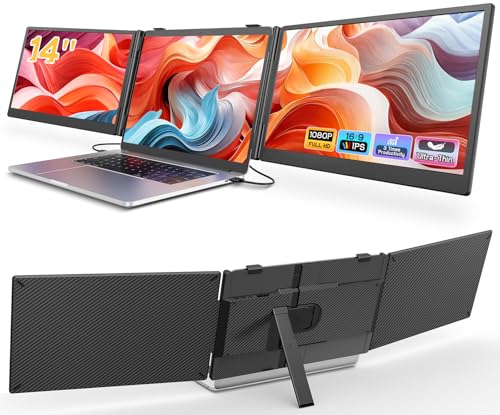
- Triple-screen layout for serious multitasking
- 14-inch FHD IPS panels with anti-glare comfort
- Plug-and-play design with broad OS compatibility
Best For: Travelers and remote workers who want maximum screen space in a portable setup.
Best for Plug-and-Play Travel
InnoView 15.6" FHD Portable Monitor

- USB-C and HDMI plug-and-play setup
- Folds into a protective stand case
- Good travel size for MacBook users
Best For: Travelers and remote workers who want a simple, portable second screen for a MacBook.
Best for Flexible Travel Setups
15.6" FHD Triple Screen Extender
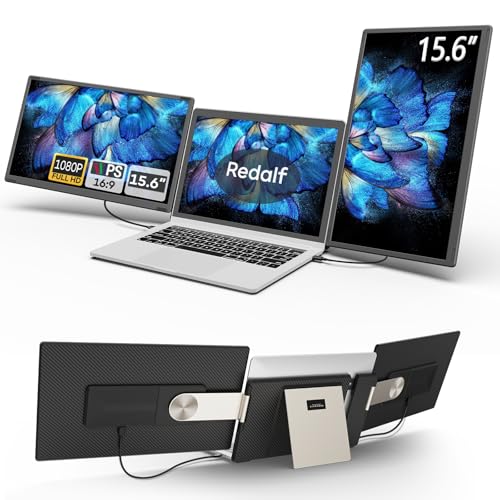
- 235°/90° adjustable design for versatile viewing
- Detachable panels help make travel packing easier
- 15.6-inch 1080P IPS screens for a clearer workspace
Best For: Travelers who want an adaptable multi-screen setup for productivity on the road.
Best for Easy Travel Setup
APILDELLA 14'' Dual Screen Extender

- Foldable, travel-friendly dual-screen design
- Plug-and-play with USB-C, USB-A, and HDMI
- 1080p IPS display with extend and mirror modes
Best For: Travelers who want a simple dual-screen setup for a MacBook on the go.
Best Triple-Screen Pick
domyfan 15.6" Triple Laptop Screen Extender

- Adds three 15.6" FHD IPS screens for multitasking
- Slim 3.9 lb design with travel sleeve for portability
- Plug-and-play support via HDMI, USB-A, and USB-C
Best For: Travelers who want a big multi-screen setup and can confirm Mac compatibility.
Best for Triple-Screen Travel Setup – Macsecor 14'' Triple Laptop Extender
If you want a portable way to add real screen space on the road, this is one of the more capable macbook screen extenders for travel. The dual-cable, plug-and-play design keeps setup simple, while the triple-screen layout gives you enough room for spreadsheets, code, timelines, and reference windows without constant tab switching.
Best For: Travelers, remote workers, and MacBook users who want a compact triple-monitor setup for hotels, co-working spaces, and temporary desks.
Pros:
- Triple-screen design boosts multitasking without needing a separate monitor stand.
- 14-inch FHD IPS panels with anti-glare and blue light filtering are easier on the eyes.
- Works with a wide range of laptops and supports multiple display modes.
- Portable, ultra-slim build is easier to pack than bulkier desktop extenders.
Cons:
- Some MacBook models may need an extra H5 cable for full compatibility.
- Triple-screen use adds bulk compared with single-screen travel monitors.
Overall, this is a strong pick if your priority is maximum workspace in a travel-friendly package. For users comparing macbook screen extenders for travel, it stands out for sheer productivity, but it makes the most sense if you’re comfortable carrying a more specialized setup.
Best for Plug-and-Play Travel – InnoView 15.6" FHD Portable Monitor
If you want one of the more practical macbook screen extenders for travel, this 15.6-inch InnoView monitor keeps setup simple with USB-C and HDMI input, a protective case stand, and a size that fits easily into a backpack.
Best For: Travelers, remote workers, and students who want a lightweight second screen for a MacBook without dealing with driver installs or complicated setup.
Pros:
- Plug-and-play connection with USB-C or HDMI
- 15.6-inch FHD IPS panel with wide viewing angles
- Protective cover doubles as a travel-friendly stand
- Works with MacBook plus phones, tablets, and game consoles
Cons:
- Some devices may need separate power for stable use
- USB-C DP Alt Mode or Thunderbolt support is required for single-cable setups
Overall, this is a solid pick if you need macbook screen extenders for travel that prioritize easy connectivity and portability over advanced extras. It’s a straightforward second monitor for work on the go, especially when you want a bigger screen without adding much bulk.
Best for Flexible Travel Setups – 15.6" FHD Triple Screen Extender
If you want macbook screen extenders for travel that can do more than just add one extra panel, this 15.6-inch triple-screen extender is built for flexible, on-the-go multitasking. The detachable design makes it easier to pack for trips, while the plug-and-play setup keeps it simple when you need a fast mobile workstation.
Best For: Travelers and remote workers who want a highly adjustable, multi-screen setup for a MacBook or other compatible laptop.
Pros:
- 235° horizontal and 90° vertical rotation for multiple viewing layouts
- Detachable screens make it more travel-friendly than many bulkier extenders
- 15.6-inch 1080P IPS panels offer solid clarity and color for work or streaming
- Plug-and-play connection reduces setup hassle on the road
Cons:
- May be too bulky for ultra-light travelers compared with a single portable monitor
- Mac compatibility is limited, so not all MacBook chip generations are supported
- HDMI use requires an extra power cable, which adds cable management
For macbook screen extenders for travel, this model stands out when you need maximum screen space without giving up portability entirely. It’s a stronger fit for productivity-focused trips than for minimalist packing.
Best for Dual-Screen Productivity – KYY 15.6" USB-C Triple Monitor Extender
If you want a serious productivity boost from one of the more capable macbook screen extenders for travel, the KYY X90D gives you two 15.6-inch 1080p IPS panels in a foldable setup that can turn a laptop into a mobile triple-screen workstation. It’s a strong fit for travelers who want more screen space for spreadsheets, research, editing, or multitasking on the go, as long as you’re comfortable with the driver requirement.
Best For: Travelers and remote workers who want the biggest jump in screen space for a mobile desk setup.
Pros:
- Two 15.6" 1080p IPS displays deliver a lot of usable workspace
- One-cable USB-C connection keeps travel setup simpler
- 360° screen rotation and a built-in kickstand improve flexibility
- Works with macOS, Windows, Chrome OS, Android, and Linux
Cons:
- Drivers must be downloaded before use
- Bulkier than a single portable monitor for light packers
- Best experience depends on laptop port compatibility
For travelers who need maximum productivity rather than the smallest possible carry, this KYY model stands out among macbook screen extenders for travel because it prioritizes full dual-display expansion and a cleaner one-cable setup.
Best for Easy Travel Setup – APILDELLA 14'' Dual Screen Extender
If you want macbook screen extenders for travel that are simple to pack and quick to set up, the APILDELLA 14” dual monitor is a practical choice. It adds a second 1080p FHD screen, supports plug-and-play use, and folds down for easier carry on business trips, coworking days, or remote work from the road.
Best For: Travelers who want a lightweight dual-screen setup for a MacBook without a complicated install process.
Pros:
- Foldable 14-inch design with a hidden structure that’s easier to travel with
- Plug-and-play connectivity with USB-C, USB-A, and HDMI support
- 1080p IPS panel with HDR, low blue light, and adjustable display settings
- Extend and mirror modes help you multitask on the go
Cons:
- Requires the right cable and power setup for full brightness
- Best suited to 13-16 inch laptops, so it is not universal
- Large enough to add productivity, but still bulkier than a single portable monitor
This APILDELLA model stands out for travelers who want straightforward screen expansion without extra software or a steep setup curve. For macbook screen extenders for travel, it’s a strong pick if you value compatibility, portability, and an easy second-screen workflow.
Best Triple-Screen Pick – domyfan 15.6" Triple Laptop Screen Extender
If you want a bigger workspace on the road, the domyfan 15.6-inch triple monitor is a strong option among macbook screen extenders for travel. It adds three FHD IPS screens, packs into a travel sleeve, and supports plug-and-play use for many laptops and devices, making it a practical setup for airports, hotels, and mobile workstations.
Best For: Travelers who want a large, multi-screen productivity boost and can confirm their Mac setup is compatible.
Pros:
- Triple 15.6" FHD 1080p IPS displays for a major workspace expansion
- Ultra-slim design at 0.16" and 3.9 lbs, with a travel sleeve included
- Plug-and-play connection options via HDMI, USB-A, and USB-C
- Works across Windows, Mac, Android, and select consoles
Cons:
- Not compatible with Mac M1/M2/M3/M4 chips
- Needs compatible USB-C ports and may require alternate cabling on some laptops
- Bulkier than a single portable monitor, so it's less minimal for light packing
For travelers who need serious screen real estate, this is one of the more capable macbook screen extenders for travel, but Mac buyers should verify chipset and port compatibility before ordering.
Best for Portable Triple-Screen Travel Workstations – KEFEYA 15.6" Triple Monitor Extender
If you want a more efficient setup on the road, this KEFEYA extender is a strong option among macbook screen extenders for travel. Its detachable triple-screen design, 15.6-inch FHD panels, and included carrying bag make it easier to turn a laptop into a mobile workstation without committing to a bulky desktop-style monitor setup.
Best For: Remote workers, multitaskers, and travelers who need multiple screens for spreadsheets, calls, and content on the go.
Pros:
- Triple-screen layout gives you a major productivity boost for multitasking.
- Detachable design and leather bag improve portability for travel.
- 15.6″ 1080p IPS panels with 120% sRGB deliver solid color and clarity.
- Plug-and-play setup helps you get started quickly without driver installs.
Cons:
- Not compatible with standard Mac M1/M2/M3/M4 chips without a separate adapter.
- Triple-screen setups can be more cumbersome than single-screen travel monitors.
- May be overkill if you only need occasional second-screen use.
For buyers comparing macbook screen extenders for travel, this model stands out when maximum workspace matters more than minimal size. It’s best suited to users who want a true mobile command center and don’t mind checking compatibility before buying.
Best for Extra Screen Real Estate – CIDETTY 14" FHD Laptop Screen Extender
If you want a practical way to add more screen space without hauling a full portable monitor setup, the CIDETTY Laptop Screen Extender is a solid option for macbook screen extenders for travel. Its 14-inch 1080p IPS panel is designed for easy plug-and-play use over HDMI or USB-C, making it a straightforward add-on for working in hotels, airports, or coffee shops.
Best For: Travelers who want a lightweight dual- or triple-screen setup for a MacBook and prefer fast setup over advanced calibration.
Pros:
- 14-inch FHD IPS display adds usable screen space without a bulky desk monitor
- USB-C and HDMI connectivity keep setup flexible across Mac, Windows, and Android
- Plug-and-play design is convenient for frequent travel and quick work sessions
- Built-in speakers add a little extra functionality on the go
Cons:
- Screen size may feel small compared with larger portable monitors
- Dual/triple-monitor capability may be more than some travelers need
- Not the lightest choice if you want the simplest single-screen carry
For travelers who prioritize more workspace in a portable form, this CIDETTY model fits well into the macbook screen extenders for travel category. It is most appealing when you want quick productivity gains without a complicated docking setup.
Best for Easy Plug-and-Play – KEFEYA 14" FHD Dual Screen Extender
If you want more screen space without carrying a bulky setup, this KEFEYA model is a practical pick among macbook screen extenders for travel. It adds a 14-inch 1080p IPS display, supports multiple display modes, and is designed for quick plug-and-play use on the road.
Best For: Remote workers, frequent travelers, and Mac users who want a simple dual-screen upgrade for productivity, streaming, or light creative work.
Pros:
- Plug-and-play setup with USB-C and HDMI support
- 14″ FHD IPS panel with 1080p resolution and 60Hz refresh rate
- Works across a wide range of devices, including Mac, Windows, Android, and consoles
- 180° rotation and multiple display modes for flexible travel use
Cons:
- HDMI use requires an extra USB-A to USB-C power connection
- Not as compact as a single portable monitor when packed
- Best suited to productivity, not color-critical professional editing
For travelers who need a quick dual-screen boost, this KEFEYA extender hits a strong balance of portability, compatibility, and ease of use. It stands out as a straightforward option in macbook screen extenders for travel if you want more workspace without a complicated setup.
Best Simple Pick – 14" FHD Portable Dual Laptop Monitor
If you want one of the more practical macbook screen extenders for travel, this 14-inch portable dual monitor is built around simplicity: plug it in, extend your workspace, and stop bouncing between tabs on the road. The 1080p IPS panel, portrait mode, and broad device support make it a strong fit for airport lounges, hotels, and temporary workstations.
Best For: Remote workers, frequent travelers, and MacBook users who want a portable second screen with minimal setup.
Pros:
- Plug-and-play setup with included Type-C, HDMI, and USB cables
- 14" FHD IPS display with 1080p resolution and 60Hz refresh rate
- Foldable 0.9" profile and 2.34 lb weight travel well
- Compatible with Mac, Windows, Chrome, Android, and more
Cons:
- HDMI use requires an extra USB-A-to-USB-C power connection
- Needs a full-featured USB-C or HDMI port to work properly
- Some devices, including certain Surface models, may not be supported
For travelers who need more screen space without carrying a bulky monitor, this is a sensible pick among macbook screen extenders for travel. It focuses on easy setup, decent portability, and enough display quality to make multitasking feel much less cramped.
How We Picked These Macbook Screen Extenders for Travel
We prioritized models that make sense on the road: lighter builds, slim profiles, simple setup, and broad MacBook compatibility. We also looked at screen size, resolution, connection options, and whether the design is realistic for frequent packing and unpacking.
For Macbook Screen Extenders for Travel, the best choices balance display quality with convenience. A great travel model should deliver enough workspace to justify carrying it, but not require extra adapters, bulky stands, or complicated drivers.
Quick Comparison: What Matters Most
In this category, the main trade-offs are portability versus screen size, and simplicity versus flexibility. Smaller 14-inch models are usually easier to carry and better for tight setups, while 15.6-inch options give you more usable workspace for spreadsheets, code, or side-by-side documents.
Single-screen extenders are typically lighter and faster to deploy. Dual- and triple-screen setups add far more space, but they are better suited to users who travel with a larger bag and need a more desktop-like workflow.
Key Buying Factors for Macbook Screen Extenders for Travel
Portability and Weight
Check the folded size, overall weight, and whether the extender can stay attached to your laptop without making it awkward to carry. Travel-friendly models should fit in a backpack and tolerate frequent movement.
Connection Type
USB-C is the simplest option when your MacBook supports video over USB-C. HDMI can help with compatibility, but may require extra cables or a power source. If you want fewer accessories, look for plug-and-play models that minimize setup.
Display Quality
1080p is usually the practical baseline for portable monitors. IPS panels are useful for wider viewing angles, and higher brightness helps in brighter hotels, airports, or co-working spaces.
Stability and Adjustability
Travel use means constant setup on different tables. A good extender should feel secure, allow comfortable viewing angles, and avoid wobbling when you type.
Who Should Buy Which Macbook Screen Extenders for Travel?
If you mainly need a lighter, simpler setup for emails, writing, and browser-based work, a 14-inch single or dual-screen extender is often the best fit. If you manage multiple apps at once, work in spreadsheets, or want a more stationary portable workstation, a 15.6-inch dual or triple-screen model may be worth the extra bulk.
Choose the most compact option if you travel often and pack light. Choose the larger, feature-rich option if productivity matters more than minimalism and you have room for the extra gear.
