
When setting up your MacBook Pro workspace, the right lighting can make all the difference in your productivity and comfort. Choosing from various options, you can enhance your environment while minimizing eye strain. From premium LED lamps to ergonomic monitor light bars, there are plenty of choices to take into account. Let’s explore the top 10 desk lighting setups that can transform your workspace into an efficient haven.
Logitech Litra Glow Premium LED Streaming Light

If you’re a content creator who relies on video conferencing or streaming, the Logitech Litra Glow Premium LED Streaming Light is an essential addition to your MacBook Pro desk setup. With TrueSoft technology, it delivers balanced, full-spectrum lighting that guarantees natural skin tones and a radiant look. The frameless diffuser casts flattering light, eliminating harsh shadows for perfect webcam clarity. You can easily adjust brightness and color temperature, customizing the ambiance from warm to cool. Plus, its portable USB-powered design and flexible 3-way monitor mount let you position it just right, enhancing your streaming experience effortlessly.
Best For: Content creators, streamers, and professionals engaging in video conferencing who seek high-quality, adjustable lighting for improved visual presentation.
Pros:
- TrueSoft technology provides natural skin tones and excellent color accuracy for a professional appearance.
- Adjustable brightness and color temperature settings allow for personalized lighting, making it suitable for various environments.
- Portable and easy to mount with a 3-way monitor mount, enhancing usability and flexibility in different setups.
Cons:
- USB-powered design may limit placement options if a power source is not readily available.
- May require software (Logitech G HUB app) for full functionality, which could be a barrier for some users.
- Price point may be higher than basic lighting solutions, making it less accessible for casual users.
BenQ ScreenBar Pro LED Monitor Light Bar (Black)

The BenQ ScreenBar Pro LED Monitor Light Bar (Black) is an essential addition for anyone seeking an ergonomic and efficient workspace, especially if you often work late into the night. With its ultrawide lighting of over 1000lx central brightness, you’ll notice improved visibility without glare. The adjustable brightness and color temperature let you customize your experience, while the motion sensor automatically turns it on when you’re nearby. It fits various monitor sizes and has a space-saving design, making it a versatile choice. Plus, its asym-light technology minimizes eye strain, enhancing your productivity and comfort during long hours of work.
Best For: Individuals working late into the night who seek an ergonomic and glare-free workspace enhancement.
Pros:
- High brightness and adjustable settings allow for customized lighting to fit various tasks and preferences.
- Ultrasonic motion sensor ensures automatic operation, enhancing convenience and energy efficiency.
- Asym-light technology minimizes eye strain, making it suitable for long work hours.
Cons:
- Higher initial cost compared to standard desk lamps may not fit all budgets.
- Limited to specific monitor sizes and thicknesses, which may exclude some users.
- Requires USB-C connection, which might not be compatible with all setups without additional adapters.
BenQ ScreenBar Halo 2 LED Monitor Light Bar

For those who spend long hours in front of a screen, the BenQ ScreenBar Halo 2 LED Monitor Light Bar is a game-changer. Its enhanced backlight minimizes contrast between your screen and surroundings, promoting eye relaxation. With glare-free front lighting using ASYM-Light Technology, you can work comfortably without reflections. Customize your lighting with stepless brightness and color temperatures ranging from 2700K to 6500K, all easily controlled via a wireless remote. The durable design clamps securely to various monitors, saving desk space while ensuring long-lasting illumination. With eye-care technology, it reduces fatigue, making your workspace not just productive, but also comfortable.
Best For: The BenQ ScreenBar Halo 2 LED Monitor Light Bar is best for professionals and students who spend extended hours in front of screens and require comfortable, adjustable lighting to reduce eye strain.
Pros:
- Customizable lighting settings with a wide color temperature range and stepless brightness levels for personalized comfort.
- Eye-care technology that minimizes fatigue with glare-free illumination and flicker-free LEDs, enhancing productivity.
- Space-saving design that securely clamps to various monitor sizes, preserving valuable desk space.
Cons:
- Limited compatibility with very thick monitors that exceed the clamp’s maximum thickness.
- Wireless controller dependency may lead to inconvenience if the remote is misplaced or runs out of battery.
- Higher price point compared to standard monitor lights, which may not fit all budgets.
1300 Lumens Ring Light with Stand for Desk and Laptop
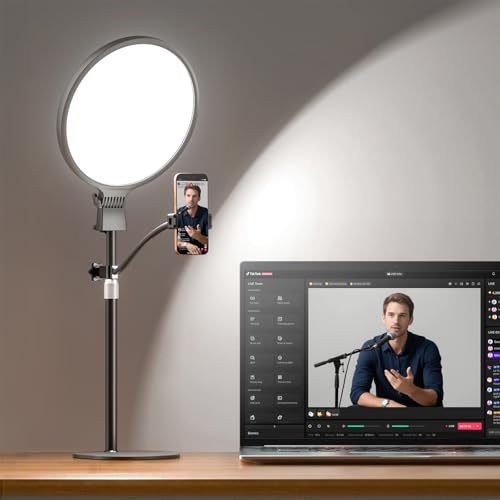
Designed specifically for content creators and professionals, the 1300 Lumens Ring Light with Stand elevates your desk setup by providing superior lighting for video calls, streaming, and recording. Delivering 1300 lumens, it’s 2.8X brighter than standard ring lights, ensuring shadow-free visuals with true-to-life colors. The eye-friendly design features smoother illumination, reducing harsh shadows during long sessions. With 30 adjustable options and a stable aluminum stand, you can customize the lighting to suit any environment, from cozy to bright. Plus, the 360° flexible phone holder allows for versatile shooting angles, making it an essential addition to your workspace.
Best For: Influencers, content creators, and professionals who require high-quality lighting for video production and streaming.
Pros:
- Highly Bright: Delivers 1300 lumens, providing 2.8X more brightness than standard ring lights for clear visuals.
- Customizable Settings: Offers 30 lighting options with different color temperatures and brightness levels to suit various environments.
- Sturdy Design: Features a solid base and aluminum stand for stability, along with a versatile phone holder for different shooting angles.
Cons:
- Limited Compatibility: The phone holder is only suitable for devices up to 3.54 inches, which may exclude some larger smartphones.
- Price Point: Higher brightness and features may come at a premium price compared to basic ring lights.
- Setup Space: Requires a decent amount of desk space due to its stand and size, which may not be ideal for small workspaces.
Quntis Computer Monitor Lamp, USB Reading LED Task Lamp

Searching for the perfect lighting solution that enhances your workspace? The Quntis Computer Monitor Lamp is designed just for you. Its eye protection features, certified to IEC standards, eliminate harmful blue light and reduce eye strain. The innovative, asymmetrical design illuminates your desk without causing screen glare, while the weighted clip saves valuable space. With adaptive lighting that adjusts to your environment, it guarantees you’re never over or under-lit. Plus, the high-quality LEDs provide vibrant, true-to-life colors, perfect for reading, working, or gaming. Elevate your productivity with this versatile lamp that caters to all your lighting needs.
Best For: The Quntis Computer Monitor Lamp is best for students, designers, and office workers who spend long hours in front of screens and require optimal lighting for comfort and productivity.
Pros:
- Eye protection features actively reduce harmful blue light and minimize eye strain.
- Adaptive lighting automatically adjusts to surrounding brightness, preventing visual fatigue.
- High-quality illumination with 78 LED beads ensures vibrant colors and minimizes shadows.
Cons:
- Limited color temperature range may not suit everyone’s preferences for warm or cool lighting.
- Requires USB power, which may limit placement options if outlets are not nearby.
- Weighted clip design may not be compatible with all monitor sizes or types.
Zoom Adjustable Desk Lighting for Video Calls

If you want to elevate your video calls and guarantee you always look your best on camera, the Zoom Adjustable Desk Lighting is a game-changer. With 30 light modes and a Color Rendering Index of 97.8, this desk ring light guarantees your face is perfectly illuminated. You can adjust the color temperature between 3000K and 6500K and choose from 10 brightness levels to suit any setting. Its sturdy metal base and 360° rotation let you position it just right. Compatible with various devices, this versatile lighting solution enhances your Zoom meetings, live streams, and content creation like never before.
Best For: Individuals who frequently participate in video calls, live streams, or content creation and want to improve their on-camera appearance with adjustable lighting.
Pros:
- 30 customizable light modes and a high CRI of 97.8 for optimal skin tone representation.
- Adjustable color temperature and brightness levels for various settings and preferences.
- Sturdy design with a 360° rotation feature for flexible positioning and easy use.
Cons:
- Requires a USB power supply, which may limit outdoor usage without an appropriate power source.
- The height adjustment range may not be suitable for all users, depending on their workspace.
- Some users may find the 10 brightness levels insufficient for their specific lighting needs.
Vari LED Studio Lamp for Home Office

For anyone setting up a home office or study area, the Vari LED Studio Lamp stands out as an excellent choice. This modern desk lamp, with its sleek black design, fits perfectly into any workspace. Its 10-watt LED light offers adjustable color temperatures—warm, natural, and cool—allowing you to customize your environment. You can easily control brightness with one-touch technology, and the lamp’s flexible pivot points guarantee precise positioning. Weighing just 5.73 pounds, it’s easy to move. Plus, it retains your preferred settings after being powered off, making it a user-friendly addition to your productive workspace.
Best For: Individuals looking to enhance their home office or study area with adjustable lighting and modern design.
Pros:
- Versatile lighting options with adjustable color temperatures for different tasks and moods.
- User-friendly design featuring one-touch brightness control and easy one-handed adjustments.
- Memory function that retains your preferred settings even after the lamp is turned off.
Cons:
- Corded electric power source may limit placement options compared to battery-operated lamps.
- Weight of 5.73 pounds might be cumbersome for some users when repositioning.
- Limited color temperature settings compared to some higher-end lamps with more options.
Steelcase Eclipse Light – Desk Light for Virtual Meetings

The Steelcase Eclipse Light stands out as an exceptional choice for anyone engaged in virtual meetings, thanks to its built-in dimmer that lets you adjust brightness to suit your environment. Its versatile positioning allows you to direct light exactly where you need it, enhancing clarity and professionalism. The warm glow reduces eye strain, making long meetings more comfortable. Plus, its superior color performance eliminates shadows, ensuring you look your best on camera. With a sleek design, it fits perfectly in both residential and commercial settings, making it a practical addition to your workspace.
Best For: The Steelcase Eclipse Light is best for professionals engaged in virtual meetings who require enhanced lighting for clarity and comfort.
Pros:
- Adjustable brightness with a built-in dimmer for personalized lighting.
- Versatile positioning allows for directed light, eliminating shadows on video calls.
- Warm glow reduces eye strain, making it ideal for long work sessions.
Cons:
- Corded power source may limit placement options compared to battery-operated lights.
- Weight of 4.5 pounds may make it less portable for those who need to move it frequently.
- Price point might be higher than standard desk lamps for budget-conscious buyers.
Pzloz LED Desk Lamp for Office and Home

Looking for the perfect lighting solution to enhance your workspace? The Pzloz LED Desk Lamp is your go-to option. With 25 light combinations, including five color temperatures and brightness levels, it caters to all your needs, whether you’re reading, studying, or crafting. Its adjustable design features 360° standing and foldable swing arms, allowing you to direct light exactly where you need it. Plus, the wireless remote control makes switching modes effortless. Enjoy energy-efficient lighting that reduces eye strain without glare or flicker. Elevate your productivity and comfort with this versatile lamp for both office and home use.
Best For: Those seeking a versatile and adjustable lighting solution for their workspace, suitable for activities like reading, studying, and crafting.
Pros:
- Offers a wide range of 25 light combinations for tailored lighting needs.
- Features a convenient wireless remote control for easy operation.
- Energy-efficient LED technology reduces eye strain and enhances comfort.
Cons:
- The clamp design may not be suitable for all desk setups.
- Some users may find the initial setup or adjustments challenging.
- Limited color options for those who prefer warmer hues beyond the provided range.
Premium LED Desk Lamp for Home Office

If you’re working long hours on your MacBook Pro, the eye-caring technology of a premium LED desk lamp can make a world of difference. Its soft, ambient lighting reduces harsh contrasts, minimizing eye strain during video calls or late-night projects. With 50 adjustable modes, you can customize lighting for any task, from reading to live streaming. The user-friendly controls let you adjust brightness and color temperature effortlessly. Plus, its modern design and durable build guarantee stability and flexibility. With a lifespan of up to 100,000 hours and a solid warranty, this lamp is a valuable addition to your home office setup.
Best For: Those who spend long hours working on computers and require customizable lighting to reduce eye strain and enhance productivity.
Pros:
- Adjustable lighting with 50 modes and 5 color temperatures allows for personalized work environments.
- Eye-caring technology minimizes eye strain, making it perfect for extended use during video calls and late-night projects.
- Modern design with stability and flexibility ensures it fits seamlessly into any home office setup.
Cons:
- Higher initial cost compared to standard desk lamps.
- The reliance on an adapter may limit portability for those who prefer a wireless option.
- Some users may find the adjustment knob less intuitive than traditional switches.
Factors to Consider When Choosing Macbook Pro Desk Lighting Setups
When you’re setting up your MacBook Pro desk, choosing the right lighting is essential for productivity. You’ll want to take into account factors like the type of lighting, adjustable brightness, and color temperature to suit your needs. Don’t forget about eye comfort and space-saving designs to create the perfect workspace.
Lighting Type Selection
Selecting the right lighting for your MacBook Pro desk setup can greatly impact your productivity and comfort. Start by considering energy-efficient LED lights, which often last over 50,000 hours. Look for options with adjustable color temperature settings between 2700K and 6500K to match the time of day and your tasks, enhancing your workspace ambiance. A high Color Rendering Index (CRI ≥ 95) is essential for accurate color representation, especially if you’re into design or photography. Additionally, choose fixtures with dimming capabilities to reduce eye strain during long sessions. Finally, think about the design and mounting options of your lighting fixtures to maximize desk space and minimize screen glare, ensuring a suitable working environment.
Adjustable Brightness Control
Adjustable brightness control is an essential factor for optimizing your MacBook Pro desk lighting setup. It lets you customize light intensity based on your tasks, which can greatly reduce eye strain during long hours of work. Many lighting solutions offer multiple brightness levels, so you can easily switch between bright settings for detailed tasks and dimmer options for relaxation. This flexibility creates an ideal environment for video calls and streaming, ensuring you’re well-lit without harsh glare. Some setups even use smart technology to automatically adjust brightness based on ambient light, enhancing comfort and energy efficiency. Tailoring your lighting conditions can improve focus and productivity, helping you work more effectively in your workspace.
Color Temperature Options
Choosing the right color temperature for your MacBook Pro desk lighting can greatly enhance your workspace experience. You have options ranging from warm (around 2700K) to cool (up to 6500K) to customize your lighting based on your tasks. Warmer temperatures (2700K-3000K) create a cozy atmosphere, perfect for reading or casual use. If you need a balanced light for everyday tasks, neutral temperatures (around 4000K-4500K) promote alertness without being harsh. For detailed work, cooler temperatures (5000K-6500K) mimic daylight, enhancing focus and visibility—ideal for design or video editing. Many modern lighting setups even feature adjustable settings, making it easy to switch between temperatures to suit your current activity or time of day.
Eye Comfort Features
When it comes to creating a comfortable workspace for your MacBook Pro, eye comfort features should be a top priority. Look for lighting options that provide flicker-free illumination to minimize eye discomfort during long sessions. Choose lamps with a high Color Rendering Index (CRI ≥ 95) for accurate color representation, vital for precise tasks. Reducing harmful blue light exposure is also important, as it helps lessen eye strain and potential long-term vision issues. Adjustable color temperature settings, ranging from 3000K to 6500K, allow you to mimic natural light cycles for a more pleasant environment. Finally, opt for designs that use asymmetrical lighting technology to illuminate your workspace without causing glare on your screen, enhancing your overall visual comfort.
Space-Saving Designs
Creating an organized workspace goes beyond eye comfort; space-saving designs play an essential role in maximizing efficiency, especially in smaller areas. Consider options like clamp-on or monitor-mounted lamps, which utilize vertical space and keep your desk clutter-free. Many modern lamps feature adjustable arms and compact footprints, allowing you to position light exactly where you need it without sacrificing surface area. Integrated designs, such as light bars paired with monitors, streamline setups and enhance aesthetics. Lightweight and portable lighting options cater to your dynamic workspace needs, allowing for easy relocation. Plus, efficient LED technology often provides higher brightness while consuming less energy, making these solutions both sustainable and perfect for limited spaces.
Compatibility With Accessories
To guarantee your desk lighting setup enhances your MacBook Pro experience, it’s crucial to take into account compatibility with your accessories. First, verify your lighting equipment connects via USB, as many modern lights are designed for easy integration. Next, consider the weight and design to avoid interfering with your MacBook’s portability and workspace look. Adjustable features like brightness and color temperature controls can help you create an ideal environment that complements your display. Additionally, select lights that provide glare-free illumination to maintain screen visibility and reduce eye strain. Finally, if you opt for monitor-mounted lights, confirm they fit your MacBook Pro’s screen dimensions to prevent any obstruction of view or functionality.
Power Source Considerations
Choosing the right desk lighting setup for your MacBook Pro goes beyond compatibility with accessories; power source considerations play a key role in your overall experience. First, think about whether you want USB-powered lights for easy connectivity. These can streamline your power management alongside your laptop. If you prefer consistent brightness, corded electric lights are ideal for extended use, eliminating the hassle of frequent battery changes. Pay attention to wattage, as higher wattage often means brighter illumination, essential for detailed tasks. Verify your lighting setup matches your workspace’s power supply specifications to avoid overloads. Finally, opt for energy-efficient options like LED lights, which save power and reduce electricity costs in your home office.
User-Friendly Controls
When it comes to desk lighting for your MacBook Pro, user-friendly controls can make all the difference in your workflow. Look for lighting setups that offer touch buttons, knobs, or remote controls, allowing you to adjust brightness and color temperature easily. Many advanced systems also feature memory functions, so you can quickly access your preferred settings without hassle. Adjustable options enhance versatility, catering to tasks like reading or video conferencing. If you enjoy smart technology, consider lamps that let you control the lighting through mobile apps or voice commands. Finally, ergonomically designed interfaces guarantee smooth adjustments, promoting efficiency while you work on your MacBook Pro. Choose wisely, and transform your workspace!
