
Working from home or on the move? The right MacBook Pro accessories can make a big difference in comfort, privacy, and daily productivity.
This roundup focuses on compact, useful add-ons that improve your remote setup without adding clutter.
Best 8 Macbook Pro Accessories for Remote Work Picks for 2026
Best for Ports and 4K Displays
Anker 7-in-2 USB-C Hub for MacBook

- 7-in-2 expansion adds HDMI, USB-A, SD, and microSD
- 4K@60Hz output for external monitor setups
- Compact design keeps the MagSafe port accessible
Best For: Remote workers who want a simple, portable hub for monitors and everyday accessories.
Best for a Dual-Screen Laptop Setup
CloudValley Magnetic Phone Holder

- Adds a second-screen spot beside your MacBook
- Foldable aluminum build is easy to pack and travel with
- Supports MagSafe phones and non-MagSafe devices
Best For: Remote workers who want a slim, attachable phone mount for calls and multitasking.
Best Multiport Hub for Desk Docking
USB C Adapter HDMI Hub for MacBook Pro/Air

- 4K HDMI makes monitor hookup simple
- Adds USB-A, USB-C, and audio in one dongle
- Thunderbolt port supports charging and fast data
Best For: Remote workers who want a compact all-in-one hub for a cleaner MacBook desk setup.
Best for Privacy Cover
CloudValley Ultra-Thin Webcam Cover
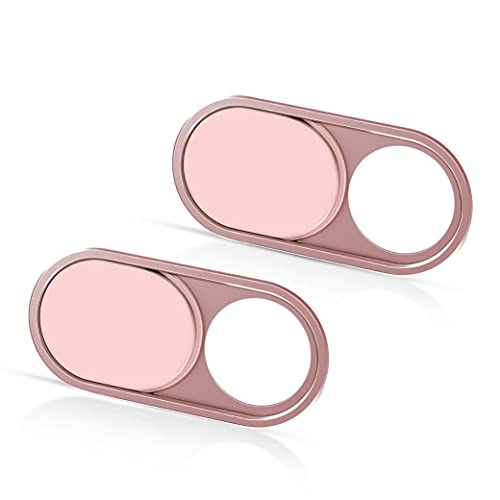
- 0.6mm thin profile for MacBook Pro-friendly use
- Easy peel-and-press installation
- Comes with 2 covers and broad device compatibility
Best For: Remote workers who want a simple webcam privacy cover for their MacBook Pro.
Best for All-in-One Connectivity
USB C Hub for MacBook Pro/Air 8-in-2

- Adds HDMI, USB-A/USB-C, Thunderbolt 3, and SD/microSD ports
- 100W PD passthrough supports charging while connected
- Compact travel-friendly hub for desk and remote setups
Best For: Remote workers who want one compact hub to cover monitors, charging, and basic peripherals.
Best for Shortcut Productivity
JCPal MacOS Shortcut Guide Cover

- Over 60 MacOS shortcuts printed on the keys
- Ultra-thin 0.3mm silicone with spill protection
- Fits recent MacBook Pro, Air, and MacBook Neo models
Best For: Remote workers who want a built-in shortcut cheat sheet on their MacBook keyboard.
Best for Screen Protection
UPPERCASE GhostBlanket 13" Screen Liner
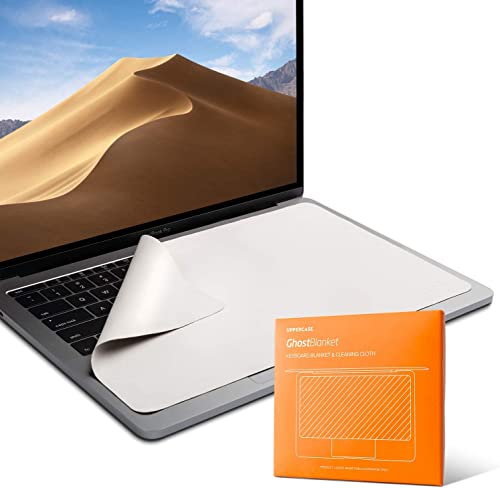
- Prevents keyboard imprints and oil transfer
- Works as a microfiber cleaning cloth
- Thin, durable, easy-to-store design
Best For: Remote workers who want extra screen protection and quick cleaning in one simple accessory.
Best for Screen & Keyboard Protection
2 Pack Microfiber MacBook Liners

- Helps reduce fingerprints, dust, and key imprints
- Fits select 13-inch and 14-inch MacBook models
- Includes two individually packaged microfiber cloths
Best For: Remote workers who want a slim liner that protects and cleans their MacBook setup.
Best for Ports and 4K Displays – Anker 7-in-2 USB-C Hub for MacBook
If you need one of the more practical macbook pro accessories for remote work, this Anker hub adds the ports most MacBook setups miss without taking up much desk space. It combines HDMI, USB-A, SD/microSD, and USB-C expansion in a compact body that is easy to toss in a laptop bag.
Best For: Remote workers who want a lightweight hub for charging, external displays, and everyday peripherals on a MacBook.
Pros:
- Turns a pair of USB-C ports into a useful 7-in-2 workstation hub
- Supports 4K@60Hz HDMI output for crisp external monitor use
- Includes USB-A, SD, and microSD slots for older accessories and quick file transfers
- Designed to fit MacBook models without blocking the MagSafe port
Cons:
- Not compatible with MacBook Neo
- M1 and M2 MacBooks cannot use dual external displays
- Best suited to desk setups, not users who need lots of built-in networking or audio ports
For remote workers who rely on one hub to handle displays, storage cards, and USB accessories, this Anker model is a very solid fit. It stands out among macbook pro accessories for remote work because it prioritizes the basics that matter most in a clean, portable package.
Best for a Dual-Screen Laptop Setup – CloudValley Magnetic Phone Holder
If you want one of the more practical macbook pro accessories for remote work, this magnetic phone holder adds a simple second-screen spot beside your laptop so calls, chats, and notifications stay visible without cluttering your desk. It’s a useful pick for anyone who moves between meetings, messaging, and focused work.
Best For: Remote workers who want a slim, easy-to-carry phone mount for a MacBook or external monitor.
Pros:
- Magnetic mount keeps your phone positioned right next to your laptop screen
- Adjustable angle helps with calls, messages, and quick glances during work
- Foldable aluminum design stays compact for travel and mobile work setups
- Works with MagSafe phones and includes support for non-MagSafe devices
Cons:
- Requires a smooth, flat surface for proper attachment
- Not a full docking solution if you need more ports or power
For remote work, this is less about flashy features and more about keeping your phone in view without interrupting your workflow. If you already use your MacBook as your main workstation, it’s a tidy companion among macbook pro accessories for remote work that can make everyday multitasking a little easier.
Best Multiport Hub for Desk Docking – USB C Adapter HDMI Hub for MacBook Pro/Air
If you want one compact adapter that turns a MacBook into a more capable workstation, this hub is a practical pick for macbook pro accessories for remote work. It adds HDMI, extra USB ports, USB-C data, audio, and Thunderbolt connectivity in a single dongle, making it easier to plug in a monitor, keyboard, mouse, and headset at your home office or travel setup.
Best For: MacBook users who need a tidy all-in-one hub for external displays, peripherals, and charging at a remote desk.
Pros:
- HDMI output supports 4K at 60Hz for an easy external monitor setup
- Three USB-A ports plus one USB-C data port handle common accessories
- Thunderbolt 3/4 port supports up to 100W charging and fast data transfer
- Designed to avoid blocking MagSafe on newer MacBook Air and Pro models
Cons:
- M1 and M2 MacBooks do not get dual extended-display support
- Not compatible with MacBook Pro cases
- Thunderbolt functions cannot all be used at the same time
For people building macbook pro accessories for remote work, this hub stands out because it reduces cable clutter while covering the most common desk needs. Just check your Mac chip first if dual-monitor support matters, since display behavior varies by model.
Best for Privacy Cover – CloudValley Ultra-Thin Webcam Cover
If you want a simple privacy upgrade for your laptop or desktop setup, this CloudValley cover is a practical pick among macbook pro accessories for remote work. Its ultra-thin profile keeps your MacBook camera covered without getting in the way of daily video calls, and the pink finish adds a little personality.
Best For: Remote workers who want an easy, low-profile webcam cover for MacBook Pro and other devices.
Pros:
- Ultra-thin 0.6mm design works well on many MacBook Pro models
- Simple peel-and-press installation with two covers included
- Doesn’t block the indicator light or interfere with normal use
- Compatible with laptops, iPads, iPhones, desktops, and more
Cons:
- Not compatible with MacBook Pro 16-inch models
- Adhesive covers can be removed, but repeated repositioning may reduce stickiness
- Only adds privacy protection, not physical camera protection
For remote professionals who value privacy over bells and whistles, this is one of the more straightforward macbook pro accessories for remote work. It’s a small add-on, but it solves a common webcam concern without complicating your setup.
Best for All-in-One Connectivity – USB C Hub for MacBook Pro/Air 8-in-2
If you need one compact add-on that handles display, storage, charging, and peripherals, this hub is a practical pick among macbook pro accessories for remote work. It turns a MacBook into a more flexible workstation with HDMI, fast data ports, SD card readers, and pass-through power in a single dongle.
Best For: Remote workers who want a simple, travel-friendly hub for external monitors, flash drives, cards, and charging.
Pros:
- 8-in-2 design adds HDMI, Thunderbolt 3, USB-A/USB-C, and SD/microSD support.
- 100W PD passthrough helps keep your MacBook charged while connected to accessories.
- 4K HDMI and 40Gbps Thunderbolt 3 support make it useful for desk setups and file transfers.
Cons:
- Doesn’t fit MacBooks with a case on the bottom.
- M1 MacBooks can’t run two external displays the way some users may expect.
- High-power devices may be less stable, so it’s better for standard peripherals.
For buyers comparing macbook pro accessories for remote work, this is a strong “one hub does most things” option rather than a specialized dock. It’s especially appealing if you switch between home, office, and travel setups and want fewer cables to manage.
Best for Shortcut Productivity – JCPal MacOS Shortcut Guide Cover
If you want a simple way to work faster on your Mac, this shortcut-print keyboard cover is a smart add-on for macbook pro accessories for remote work. It puts more than 60 essential MacOS commands directly on the keys, helping you remember common actions without constantly searching menus or memorizing key combos.
Best For: Remote workers, students, and MacBook users who want an easy shortcut cheat sheet built into their keyboard.
Pros:
- Printed MacOS shortcut guide makes everyday commands easier to learn and use
- Thin 0.3mm silicone design protects against dust and minor spills
- Compatible with several recent MacBook Pro, Air, and MacBook Neo models
- Washable and reusable without affecting fit
Cons:
- US-layout only, so it will not fit non-US keyboards
- Some users may prefer the original bare-key feel over a cover
- Shortcut printing may not suit buyers who already know MacOS commands by heart
As a productivity-focused accessory, it stands out more for speed and convenience than for looks. For macbook pro accessories for remote work, it’s a practical pick if you want fewer pauses, fewer mistakes, and a cleaner workflow on your laptop.
Best for Screen Protection – UPPERCASE GhostBlanket 13" Screen Liner
If you want a simple add-on that helps keep your display cleaner between meetings, this GhostBlanket liner is a practical pick for macbook pro accessories for remote work. It sits between the keyboard and screen to help reduce keyboard imprints and oil transfer, while also doubling as a microfiber cloth for quick wipe-downs.
Best For: Remote workers who want extra screen protection and a handy cleaning cloth for daily laptop use.
Pros:
- Helps prevent keyboard imprints and oil marks on the display
- Microfiber material cleans fingerprints, dust, and smudges
- Thin 0.4 mm profile keeps it easy to store with the laptop
Cons:
- Fit depends on your MacBook model and screen dimensions
- More useful as a protection cloth than as a must-have desk upgrade
For remote work setups where your MacBook travels between home, coffee shops, and meetings, this is a low-cost way to add protection and cleaning convenience. Among macbook pro accessories for remote work, it stands out for doing one job well without adding bulk.
Best for Screen & Keyboard Protection – 2 Pack Microfiber MacBook Liners
If you want simple, low-bulk protection to keep your laptop screen and keyboard cleaner between meetings, this is a practical add-on for macbook pro accessories for remote work. These microfiber liners help reduce fingerprints, dust, and key imprint transfer while also doubling as a quick cleaning cloth for your display and other smooth surfaces.
Best For: Remote workers who want an ultra-light accessory that helps protect a MacBook display and keyboard without taking up bag space.
Pros:
- Fits 13-inch MacBook Air/Pro models and 14-inch MacBook Pro sizes.
- Soft microfiber material helps remove smudges, dust, and oil safely.
- Two individually packaged cloths make it easy to keep one at home and one in your bag.
Cons:
- Size compatibility is specific, so you should verify your model before buying.
- More of a protective liner and cleaner than a true heavy-duty screen accessory.
For remote work setups that move between home, office, and travel, this is a modest but useful pick that supports cleaner daily use. If your priority is keeping a MacBook tidy on the go, it fits well among macbook pro accessories for remote work.
How We Picked the Best Macbook Pro Accessories for Remote Work
For Macbook Pro Accessories for Remote Work, we prioritized items that solve common remote-work problems: connecting displays and peripherals, improving privacy, protecting the screen and keyboard, and making workflow easier. We looked for broad MacBook compatibility, slim designs that travel well, and features that add real day-to-day value.
Quick Comparison
Hubs and adapters are the backbone of most setups, especially if you need HDMI, USB-A, or reliable charging passthrough. Privacy and comfort upgrades like webcam covers, magnetic phone mounts, shortcut keyboard covers, and keyboard liners are smaller purchases, but they can improve your desk setup in meaningful ways. If you only buy a few items, start with connectivity and privacy first, then add protection and convenience tools.
Key Buying Factors for Macbook Pro Accessories for Remote Work
Port Selection and Video Output
Check whether the hub offers the ports you actually use: HDMI for an external monitor, USB-A for older accessories, and USB-C data or power delivery for charging and fast connections. If you work on a dual-screen or docked setup, stable 4K output and enough bandwidth matter more than extra features you may never use.
Compatibility and Fit
Many of these accessories are model-specific or sized for certain MacBook generations. Confirm support for your MacBook Pro or Air model, especially if you use a case, thick monitor stand setup, or newer M-series hardware.
Privacy and Security
Webcam covers and screen/keyboard protection accessories are simple but useful for shared spaces, client calls, and travel. Choose ultra-thin options that close cleanly and do not interfere with the display, webcam, or lid seal.
Workflow Support
If you jump between notes, calls, and multitasking, extras like a phone holder or shortcut keyboard cover can reduce friction. These are best for users who want faster access to apps, better phone visibility, or fewer interruptions during the workday.
Who Should Buy Which Macbook Pro Accessories for Remote Work?
Frequent video callers: Start with a webcam cover, phone holder, and a stable hub for external displays and headsets.
Desk-based remote workers: Prioritize a multiport hub, shortcut keyboard cover, and screen/keyboard protection for a cleaner setup.
Traveling professionals: Choose slim, lightweight accessories that protect your MacBook and still cover the essentials, like connectivity and privacy.
Minimalists: Pick one good hub and one protection item rather than overloading your bag with extras.
