
Choosing the right backup drive for a MacBook comes down to capacity, compatibility, and how much protection you want for your files. The best options make Time Machine backups simple and keep your data portable.
Below, we focus on drives that balance reliability, storage size, and value so you can pick the right fit for everyday backup needs.
Best 10 Macbook External Hard Drives for Backup Picks for 2026
Best for Mac Time Machine Backups
WD 5TB My Passport Ultra for Mac

- Formatted for Mac and Time Machine ready
- USB-C and USB 3.1 compatible
- 5TB capacity with password protection
Best For: Mac users who want a ready-to-use portable backup drive for Time Machine and file protection.
Best for Easy Backup
Seagate Portable 2TB External Drive

- 2TB portable HDD for regular Mac backups
- USB 3.0 plug-and-play setup with included cable
- Compact, cross-platform drive for everyday storage
Best For: Mac users who want a simple, low-cost backup drive with easy setup.
Best for Backups
WD My Passport 5TB Portable Hard Drive

- 5TB capacity for large Mac backups and media storage
- Included backup software with ransomware defense
- Password protection plus hardware encryption
Best For: MacBook users who want a straightforward portable backup drive with strong storage capacity.
Best Budget
500GB Slim External HDD for Mac Backups

- Portable 500GB size for basic backups
- USB 3.0 transfer speeds for everyday use
- Mac-compatible after a quick reformat
Best For: Mac users who want an inexpensive, portable backup drive.
Best for Secure Backups
WD My Passport 2TB Portable Drive

- Compact, travel-friendly design
- Backup software with ransomware defense
- Password protection and hardware encryption
Best For: MacBook users who want a portable backup drive with added file security.
Best for Everyday Backup
YOTUO 1TB Portable External Hard Drive

- USB 3.0 and USB-C support for MacBook use
- Compact 1TB capacity for everyday backups
- Patented silicone sleeve adds extra protection
Best For: MacBook users who want a simple, portable backup drive for routine files and media.
Best High-Capacity Portable Backup
WD My Passport 6TB Portable Drive

- Huge 6TB capacity in a slim portable body
- Includes Acronis backup software with ransomware defense
- Password protection and hardware encryption add security
Best For: Mac users who want a compact high-capacity backup drive with security features.
Best for Simple Plug-and-Play Backup
Seagate Portable 1TB External Hard Drive
- Easy drag-and-drop backup workflow
- USB 3.0 portable drive for everyday use
- Works with Mac after reformatting if needed
Best For: Mac users who want a simple, portable backup drive for everyday files.
Best for Easy Mac Setup
Facet 500GB Portable USB-C Hard Drive
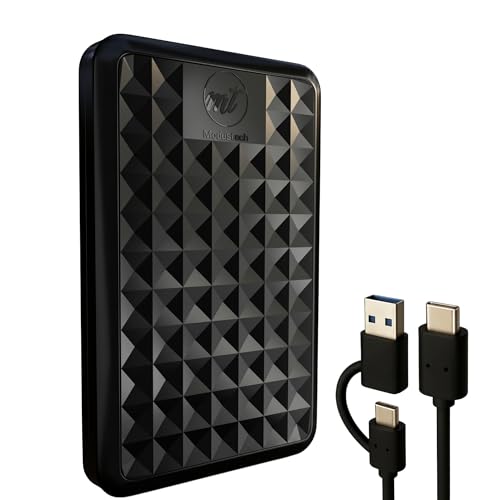
- Preformatted exFAT for instant Mac/Windows use
- USB-C and USB-A cable included
- Slim, bus-powered 2.5-inch portable design
Best For: MacBook users who want a simple plug-and-play backup drive with broad compatibility.
Best for Plug-and-Play Compatibility
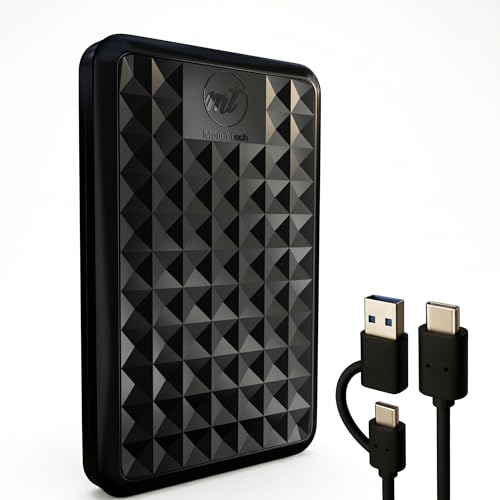
- Works immediately with Mac and Windows
- Includes USB-C and USB-A connectivity
- Slim bus-powered design for easy travel
Best For: MacBook users who want an easy, portable backup drive with broad compatibility.
Best for Mac Time Machine Backups – WD 5TB My Passport Ultra for Mac
If you want one of the more straightforward macbook external hard drives for backup, this 5TB WD My Passport Ultra for Mac is built around easy setup, Mac formatting, and everyday portability. It connects over USB-C or USB 3.1, comes ready for macOS use, and adds password protection plus hardware encryption for an extra layer of security.
Best For: Mac users who want a ready-to-use portable backup drive for Time Machine, travel, and routine file protection.
Pros:
- Formatted for Mac and compatible with Time Machine out of the box
- USB-C and USB 3.1 support makes it easy to plug into newer Macs
- 5TB capacity gives you plenty of room for backups and archives
- Password protection and 256-bit AES hardware encryption add security
Cons:
- Portable HDD speeds are slower than SSD alternatives
- Backup software features may be more than some users need
- Single-drive design means it is not a redundant backup solution
For shoppers comparing macbook external hard drives for backup, this WD model stands out for its Mac-friendly setup, high capacity, and security-focused extras. It is a practical pick if you want a portable drive that works well for Time Machine and everyday file backups without much fuss.
Best for Easy Backup – Seagate Portable 2TB External Drive
If you want a simple, affordable option among macbook external hard drives for backup, the Seagate Portable 2TB is built for drag-and-drop use with no software setup required. It’s a straightforward pick for storing Time Machine-style backups, photo libraries, and everyday files when you need reliable extra space in a compact drive.
Best For: Mac users who want a no-fuss portable backup drive with easy plug-and-play setup.
Pros:
- 2TB of portable storage for routine Mac backups and file transfers
- USB 3.0 connection with included cable for quick plug-and-play use
- Works with Mac and Windows for flexible cross-device storage
- Compact design makes it easy to carry in a laptop bag
Cons:
- Spinning HDD is slower than an SSD
- May need formatting for the best Mac backup workflow
- Not the most rugged option for rough travel
For buyers comparing macbook external hard drives for backup, this Seagate model stands out for its simplicity and value rather than speed. It’s a practical everyday backup drive if you want a large-capacity, easy-to-use option without paying SSD prices.
Best for Backups – WD My Passport 5TB Portable Hard Drive
If you want one of the more practical macbook external hard drives for backup, the WD My Passport 5TB is built around easy portable storage and included backup software. It offers plenty of space for photos, video, documents, and Time Machine-style archive needs, while adding password protection and hardware encryption for extra peace of mind.
Best For: MacBook users who want a simple, high-capacity portable drive for regular backups and offsite file storage.
Pros:
- 5TB capacity gives you lots of room for full-device backups and media libraries
- Included Acronis software helps automate backups and adds ransomware defense
- Password protection and hardware encryption improve file security
- USB 3.1/USB 3.0 compatibility keeps it broadly usable with modern Macs
Cons:
- Requires a format/setup step before it’s ready for Mac backup use
- Portable HDD speeds are slower than SSD alternatives
- The software bundle is useful, but not as seamless as Apple-native tools for some users
For shoppers comparing macbook external hard drives for backup, this model stands out for capacity, security features, and straightforward portability rather than raw speed. It’s a sensible pick if you want a dependable backup drive that can travel with your laptop.
Best Budget – 500GB Slim External HDD for Mac Backups
If you want a straightforward, low-cost option for macbook external hard drives for backup, this 500GB portable HDD covers the basics: plug-and-play on Windows and a simple reformat step for Mac use. It’s compact, lightweight, and fast enough for routine Time Machine-style backups, media storage, and file transfers.
Best For: Mac users who need an affordable, portable backup drive and don’t need SSD-level speed.
Pros:
- Compact 500GB design is easy to carry and store
- USB 3.0 speeds are solid for everyday backup and file copies
- Wide compatibility includes Mac, Windows, Linux, and game consoles
- Low-friction setup once formatted for Mac with ExFAT
Cons:
- Mac users must reformat the drive before first use
- Mechanical HDD is slower than an SSD for large transfers
- 500GB may feel small if you’re backing up lots of photos or video
As a simple backup drive, this model makes sense for macbook external hard drives for backup when price and portability matter more than top-end speed. It’s a practical pick for light everyday protection rather than heavy professional storage.
Best for Secure Backups – WD My Passport 2TB Portable Drive
If you want one of the more practical macbook external hard drives for backup, the WD My Passport 2TB is a straightforward pick: compact, portable, and built with backup software plus extra security features. It gives Mac users a simple way to store Time Machine archives, file copies, and media without taking up much desk space.
Best For: MacBook users who want a portable backup drive with password protection and ransomware defense.
Pros:
- Slim, travel-friendly design that slips easily into a laptop bag
- Included backup software with ransomware defense adds peace of mind
- Password protection and hardware encryption help secure sensitive files
- USB 3.1/USB 3.0 compatibility keeps setup flexible
Cons:
- Requires software download and setup for the full backup feature set
- Mechanical drive speed is fine for backups, but not as fast as SSDs
- 2TB may feel limited if you store large video libraries
Overall, the My Passport is a dependable choice for macbook external hard drives for backup when security and portability matter more than raw speed. It’s a sensible everyday drive for students, remote workers, and anyone who wants a simple backup routine.
Best for Everyday Backup – YOTUO 1TB Portable External Hard Drive
If you want a simple, portable option in the world of macbook external hard drives for backup, the YOTUO 1TB drive is built for basic storage expansion, file transfers, and keeping important documents or media close at hand. It’s a practical pick if you need plug-and-play convenience, decent speed over USB 3.0, and a compact drive you can toss in a bag.
Best For: MacBook users who need a straightforward, portable backup drive for documents, photos, and everyday file storage.
Pros:
- USB 3.0 and USB-C support for easy MacBook connection
- Compact 1TB capacity for documents, photos, and media backups
- Patented silicone sleeve adds extra drop protection
- Lightweight design makes it easy to travel with
Cons:
- 1TB may fill up quickly for larger video or photo libraries
- Not ideal if you want a high-performance SSD-style backup option
- Mac users may need to reformat the drive for full compatibility
For shoppers comparing macbook external hard drives for backup, this YOTUO model stands out more for portability and ease of use than raw speed or premium features. It makes sense if you want a low-fuss drive for routine backups and extra storage.
Best High-Capacity Portable Backup – WD My Passport 6TB Portable Drive
If you want a simple, travel-friendly option among macbook external hard drives for backup, this WD My Passport stands out for its huge 6TB capacity and built-in backup tools. It’s a practical pick for users who need to protect photos, videos, documents, and project files without moving up to a desktop drive.
Best For: Mac users who need a compact external drive with lots of space, password protection, and ransomware-aware backup software.
Pros:
- Massive 6TB capacity in a slim 2.5-inch portable design
- Includes Acronis True Image for Western Digital backup software
- Password protection plus hardware encryption for added file security
- USB 3.1 / USB 3.0 compatibility for easy MacBook connectivity
Cons:
- Still a mechanical hard drive, so it’s slower than an SSD
- May require formatting or setup depending on your Mac workflow
- Backup software features may feel more than casual users need
For buyers comparing macbook external hard drives for backup, this model is a strong choice when capacity matters more than speed. It’s especially appealing if you want a compact drive that can store a full photo library or multiple backups while adding basic security features.
Best for Simple Plug-and-Play Backup – Seagate Portable 1TB External Hard Drive
If you want one of the most straightforward macbook external hard drives for backup, the Seagate Portable 1TB keeps things simple: plug it in, drag and drop your files, and get on with your day. It works with Mac and Windows computers, uses USB 3.0 for quick everyday transfers, and includes a compact cable for easy travel.
Best For: Mac users who want an easy, no-fuss backup drive for documents, photos, and light media storage.
Pros:
- Simple plug-and-play setup with no software required
- USB 3.0 connection for convenient everyday backups
- Compact 1TB size is easy to carry with a laptop
- Works with Mac after reformatting if needed
Cons:
- Reformatting may be required for Mac use
- 1TB may feel limited for large photo or video libraries
For shoppers comparing macbook external hard drives for backup, this Seagate drive is a practical pick when you value ease of use over advanced features. It is a solid everyday option for quick local backups and portable storage, especially if you want a drive that is ready for basic use with minimal setup.
Best for Easy Mac Setup – Facet 500GB Portable USB-C Hard Drive
If you want one of the more straightforward macbook external hard drives for backup, the Facet keeps things simple: plug it in, start copying files, and skip the setup hassle. Its exFAT formatting and included USB-C/USB-A cable make it a practical option for MacBooks, while the slim, bus-powered design is easy to carry in a laptop bag.
Best For: MacBook users who want a plug-and-play portable backup drive that also works across PC, console, and TV setups.
Pros:
- Preformatted exFAT for immediate use with Mac and Windows
- USB-C/USB-A cable included for wider compatibility
- Slim, lightweight 2.5-inch design with bus-powered operation
- Works with PS4, Xbox One, and supported Smart TVs
Cons:
- HDD speeds are slower than SSD alternatives
- 500GB may feel limited for large photo or video libraries
For everyday macbook external hard drives for backup, this is a simple, no-fuss pick if you value compatibility and portability over top-end speed. It is a strong fit for routine file backups, media storage, and general travel use.
Best for Plug-and-Play Compatibility – Facet 1TB External Hard Drive
If you want a straightforward backup drive, the Facet is a practical option to consider among macbook external hard drives for backup. It comes preformatted in exFAT, supports both USB-C and USB-A with the included 2-in-1 cable, and is designed to work without extra drivers or setup.
Best For: MacBook users who want a simple, bus-powered external drive for everyday file backups and cross-device use.
Pros:
- Plug-and-play on Mac, Windows, Chromebooks, and laptops
- USB-C and USB 3.1 support with included adapter cable
- Slim, portable 2.5-inch design that’s easy to carry
- Useful for backups, media storage, and light gaming expansion
Cons:
- HDD speeds are slower than an SSD
- May need reformatting for some console or TV uses
- Not the best fit if you need the fastest transfer times
For Mac users who value convenience over raw speed, this drive covers the basics well. It fits naturally into a shortlist of macbook external hard drives for backup thanks to its simple setup, flexible connectivity, and portable design.
How We Picked These Macbook External Hard Drives for Backup
We focused on models that are practical for MacBook owners who want dependable local backups. Priority went to drives with straightforward setup, portable designs, enough storage for modern laptops, and features such as password protection or backup software where available. We also considered brand reputation, compatibility with Mac systems, and whether the capacity makes sense for Time Machine and general file archiving.
Quick Comparison
For most users, 1TB to 2TB works well for basic document and photo backups, while 4TB to 6TB is better if you keep large media libraries, design files, or want room for multiple backup snapshots. Smaller 500GB drives are only a fit for light use or secondary copies. Portable USB drives are the most convenient choice for daily MacBook use, especially if you want something easy to unplug and carry.
Key Buying Factors for Macbook External Hard Drives for Backup
Capacity
Buy more space than you think you need. A backup drive should have enough room for your current data plus future growth and versioned backups. If your MacBook contains photos, video, or creative project files, 2TB or higher is usually the safer choice.
Mac Compatibility
Make sure the drive works cleanly with macOS and Time Machine. Some drives are marketed for PC and Mac, but you may still need to reformat them before use. That is normal, but it is worth checking before buying.
Security and Software
For sensitive files, look for password protection and encryption features. Bundled backup software can also help if you want guided setup, though many Mac users will rely on Time Machine instead.
Portability and Connection Type
USB 3.0 and USB-C are both practical for fast backups on modern MacBooks. A compact drive is easier to travel with, but a slightly larger model may offer more capacity and better value.
Who Should Buy Which Macbook External Hard Drives for Backup?
If you want the simplest everyday backup drive, choose a mid-range portable model in the 1TB to 2TB range. If you have a large photo library, video projects, or want a more future-proof backup setup, step up to 5TB or 6TB. Light users with mostly documents may be fine with 500GB, but that size leaves less room for long-term backup history. If security matters most, prioritize models with password protection and backup software over the cheapest option available.
