
If you want a cleaner MacBook desk setup without giving up speed, a dock with 2.5GbE can be a smart upgrade. It adds faster wired networking for backups, streaming, and large file transfers while expanding your ports in one hub.
In this roundup, we focus on practical options for Mac users who want reliable charging, display support, and better connectivity for work, home office, or creative builds.
Best 10 Macbook Docking Stations with 2 5gbe Picks for 2026
Best for Triple Displays
iVANKY FusionDock Pro 1+ 14-in-1 Dock

- Triple HDMI output up to 4K@60Hz with DisplayLink
- 2.5GbE Ethernet and multiple 10Gbps USB ports
- 180W power adapter with up to 96W laptop charging
Best For: MacBook users who want triple 4K displays, 2.5GbE networking, and a high-port-count dock for a serious home office or workstation.
Best Thunderbolt 5 Powerhouse
UGREEN Maxidok TB5 Docking Station

- Thunderbolt 5 with up to 120Gbps bandwidth
- Built-in M.2 NVMe slot supports up to 8TB SSDs
- 2.5GbE, 140W charging, and dual 6K Mac display support
Best For: Power users who want a feature-rich Thunderbolt 5 dock for a Mac or Windows workstation.
Best for Mixed Mac/Windows Teams
StarTech USB4 Docking Station with 2.5GbE

- Driverless USB4 support for Mac and Windows
- Dual 4K 144Hz or single 8K 60Hz display output
- 2.5GbE, 100W charging, PXE boot, and Wake-on-LAN
Best For: IT teams and MacBook users who need one reliable dock for mixed-device environments.
Best for Single-Cable MacBook Setup
UGREEN Thunderbolt 4 Dock 13-in-1 with 2.5GbE

- 2.5GbE wired networking for faster file transfers and stable internet
- Dual 4K@60Hz or single 8K display support over Thunderbolt 4
- 90W charging plus SD/TF 4.0 and 13-in-1 expansion
Best For: MacBook users who want a Thunderbolt dock with 2.5GbE, strong display support, and one-cable convenience.
Best for Heavy-Duty Workflows
40Gbps MacBook Dock, Dual 4K/2.5GbE
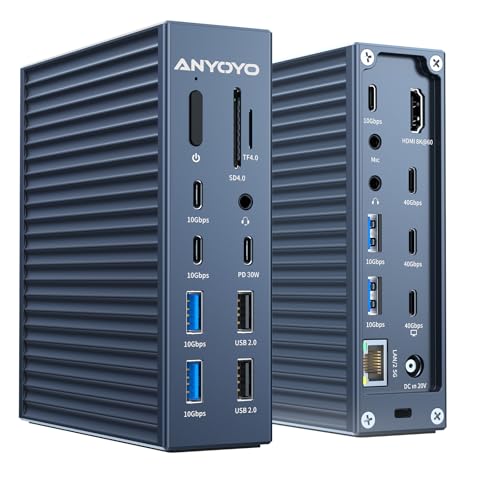
- 2.5GbE Ethernet for faster wired networking
- Dual 4K or single 8K display support
- Wide 21-in-1 port selection with 90W charging
Best For: MacBook Pro and Thunderbolt users who need fast wired networking, dual displays, and lots of expansion in one dock.
Best for Mac Power Users
iVANKY FusionDock Max 2 Thunderbolt 5 Dock

- Thunderbolt 5 with up to 120Gbps transfer
- Triple-display support on compatible Mac chips
- Built-in 2.5GbE plus cooling fan for stable use
Best For: MacBook Pro or Mac Studio users who want a high-end, Mac-only dock with 2.5GbE and multi-display support.
Best for Driverless Dual-Display Macs

- Dual 4K HDMI output with driverless Mac support
- 100W charging and 13-port expansion
- Includes USB-C, USB-A, SD/microSD, and Ethernet
Best For: MacBook Air and Pro users who want a simple dual-monitor dock with strong everyday expansion.
Best for 140W Power Users
StarTech Triple Monitor USB-C Docking Station

- 2.5GbE networking with PXE boot and Wake-on-LAN
- Triple 4K 60Hz display support for Mac and Windows
- Up to 140W charging for high-performance laptops
Best For: MacBook users and IT teams needing fast networking, triple displays, and strong charging.
Best for Thunderbolt 5 Power Users

- Dual HDMI 2.1 with up to 8K 60Hz / 4K 144Hz
- 140W charging and six USB-C ports
- Built-in 2.5GbE, UHS-II readers, and fanless design
Best For: MacBook Pro and Thunderbolt 5 users who want a high-end dock for dual displays, fast charging, and wired networking.
Best for Triple Displays – iVANKY FusionDock Pro 1+ 14-in-1 Dock
If you want one of the more capable macbook docking stations with 2 5gbe for a multi-monitor desk setup, the iVANKY FusionDock Pro 1+ is built around DisplayLink and broad port expansion. It’s a strong fit for MacBook users who need triple 4K output, fast wired networking, and plenty of high-speed USB ports without juggling multiple adapters.
Best For: MacBook users who want triple 4K displays, 2.5GbE networking, and a high-port-count dock for a serious home office or workstation.
Pros:
- Three HDMI outputs support up to 4K@60Hz with the right DisplayLink driver installed
- Includes 2.5GbE Ethernet plus a mix of 10Gbps USB-C and USB-A ports for fast peripherals
- 180W adapter and up to 96W laptop charging help simplify a busy desk
- SD/TF 4.0 card slots add useful media workflow convenience
Cons:
- DisplayLink driver setup is required, especially for full dual- and triple-monitor use
- Only one Ethernet speed is listed, so it is not a true 5GbE dock
- Triple-display support depends on compatible Mac models and software configuration
For buyers comparing macbook docking stations with 2 5gbe, this dock stands out more for its triple-display flexibility and strong port selection than for raw network speed. If your priority is a Mac-friendly workstation dock that can handle several 4K monitors and a wired 2.5GbE connection, it’s an easy model to shortlist.
Best Thunderbolt 5 Powerhouse – UGREEN Maxidok TB5 Docking Station
If you want one of the most fully loaded macbook docking stations with 2 5gbe-style networking performance for a modern desk setup, this UGREEN dock is built for speed, storage, and heavy multitasking. It combines Thunderbolt 5 bandwidth, an integrated 8TB-capable M.2 slot, multi-display support, and a 2.5GbE port in a single aluminum enclosure.
Best For: Power users who want a Thunderbolt 5 dock with built-in fast storage, strong display output, and wired networking for a clutter-free Mac or Windows workstation.
Pros:
- Thunderbolt 5 connectivity with up to 120Gbps bandwidth for demanding workflows
- Built-in M.2 NVMe slot supports up to 8TB of fast external storage
- 2.5GbE port plus 140W charging keeps a high-performance laptop connected and powered
- Supports dual 6K displays on Mac and single 8K output for compatible setups
Cons:
- Likely overkill if you only need basic ports and simple charging
- Thunderbolt 5 performance and advanced display modes depend on a compatible laptop
- M.2 SSD is sold separately
This is a strong pick if you need one dock to handle storage, networking, charging, and displays at once. Among macbook docking stations with 2 5gbe, it stands out more for its Thunderbolt 5 speed and integrated SSD bay than for being the cheapest or smallest option.
Best Dual-Monitor Mac Dock – TobenONE 18-in-2 Dock
If you’re comparing macbook docking stations with 2 5gbe, this TobenONE dock stands out for Mac users who want a true desktop-style setup with dual-display support, fast wired networking, and lots of ports in one hub. It’s built for newer MacBook Pro and Air models with a practical mix of 4K video, 2.5G Ethernet, and high-speed USB connections.
Best For: MacBook users who want a plug-and-play dual-monitor dock with fast Ethernet, strong charging, and plenty of expansion.
Pros:
- Supports dual 4K@60Hz displays for a cleaner multi-monitor workflow
- Includes 2.5G Ethernet for faster, more stable wired networking
- Offers 18-in-2 expansion with 7 USB ports, SD 4.0, and audio
- 150W adapter and up to 100W MacBook charging keep desk power simple
Cons:
- M1/M2/M3 base chips only support a single external monitor
- Made for MacBooks only, not Windows laptops or desktop Macs
For buyers focused on macbook docking stations with 2 5gbe, this is a strong all-in-one option if you need dual displays and a fast wired connection in a single Mac-friendly dock. It’s especially appealing for remote work, content creation, and desk setups that need fewer dongles.
Best for Mixed Mac/Windows Teams – StarTech USB4 Docking Station with 2.5GbE
If you need macbook docking stations with 2 5gbe that can serve both Macs and Windows laptops without driver headaches, this StarTech USB4 dock is built for exactly that kind of mixed environment. It combines dual 4K display support, 2.5GbE networking, and 100W charging in a driverless design that fits well in hot-desking, office, and IT-managed setups.
Best For: IT teams, shared workstations, and MacBook users who want a single plug-and-play dock with fast wired networking and strong dual-display support.
Pros:
- Driverless USB4 setup works across macOS and Windows
- Supports dual 4K 144Hz displays or a single 8K 60Hz display
- Includes 2.5GbE, 100W charging, PXE boot, and Wake-on-LAN
- Lock slots and mounting options help secure shared desks
Cons:
- Requires USB4 or Thunderbolt 4/5 host support for full features
- Overkill if you only need basic charging and one monitor
This is a strong fit for macbook docking stations with 2 5gbe when reliability and fleet-wide consistency matter more than a bargain price. It leans heavily toward business use, but the plug-and-play behavior and high-end display support make it appealing for power users too.
Best for Single-Cable MacBook Setup – UGREEN Thunderbolt 4 Dock 13-in-1 with 2.5GbE
If you want one of the more capable macbook docking stations with 2 5gbe for a clean desk and fast wired networking, this UGREEN Thunderbolt 4 dock is built for exactly that kind of setup. It combines a 40Gbps Thunderbolt connection, dual 4K@60Hz or single 8K display support, 90W laptop charging, and SD/TF 4.0 card readers in one hub.
Best For: MacBook users who want a single-cable Thunderbolt dock with 2.5GbE, strong display support, and plenty of ports for daily work.
Pros:
- Includes 2.5GbE for faster wired networking than standard Gigabit docks
- Supports dual 4K@60Hz or a single 8K display over Thunderbolt 4
- 90W charging helps keep a MacBook powered through one cable
- 13-in-1 layout adds SD/TF 4.0 and useful expansion for peripherals
Cons:
- Premium feature set means a higher price than basic USB-C docks
- Best performance depends on a Thunderbolt 4 or compatible USB4 laptop
For buyers comparing macbook docking stations with 2 5gbe, this dock stands out as a practical all-in-one option: strong networking, serious display support, and enough power delivery to replace a pile of adapters without feeling underbuilt.
Best for Heavy-Duty Workflows – 40Gbps MacBook Dock, Dual 4K/2.5GbE
If you want one hub that handles displays, fast networking, storage, and peripherals, this is a strong option for macbook docking stations with 2 5gbe. It combines a 2.5GbE port, dual-monitor support, and a wide mix of high-speed USB-C connections, making it a practical desk upgrade for power users.
Best For: MacBook Pro and Thunderbolt users who need fast wired networking, dual displays, and lots of expansion in one dock.
Pros:
- 2.5GbE Ethernet is a clear step up from standard 1GbE for faster NAS and network transfers.
- Supports a single 8K display or dual 4K monitors for more flexible workstation setups.
- Loads of connectivity, including 40Gbps ports, 10Gbps USB-C/A, SD/TF, and audio.
- 90W charging helps keep a connected laptop powered through a single cable.
Cons:
- Bulky feature set may be more than casual users need.
- Dual-display behavior depends on host device and monitor compatibility.
- Maximum networking benefits require compatible 2.5GbE equipment.
For buyers comparing macbook docking stations with 2 5gbe, this dock stands out for sheer connectivity rather than minimalism. It is a good fit if you want a workstation-style hub with fast Ethernet and serious expansion in one unit.
Best for Mac Power Users – iVANKY FusionDock Max 2 Thunderbolt 5 Dock
If you want one of the most fully loaded macbook docking stations with 2 5gbe for a desk-heavy Mac setup, the iVANKY FusionDock Max 2 stands out for its triple-display support, Thunderbolt 5 bandwidth, and built-in cooling. It is a strong fit for creators and professionals who need lots of ports, fast storage, and stable wired networking in a single Mac-only dock.
Best For: MacBook Pro or Mac Studio users who want a high-end, all-in-one Thunderbolt dock with triple-display support and 2.5GbE.
Pros:
- Thunderbolt 5 performance with up to 120Gbps data transfer
- Supports up to triple 6K@60Hz displays on compatible Mac configurations
- Includes 2.5GbE, SD/TF 4.0, and 10 USB ports for a full workstation setup
- Active cooling helps maintain stability during heavy use
Cons:
- Mac-only compatibility; not for Windows or Chrome laptops
- Display support varies by Mac chip and model
- Locked to one Mac, so it is not ideal for switching between multiple machines
This is a specialized dock rather than a universal pick, but for Mac users shopping macbook docking stations with 2 5gbe, it delivers rare expandability and serious display output in one unit. The tradeoff is strict Mac-only support, so it makes the most sense when you need maximum performance from a single workstation.
Best for Driverless Dual-Display Macs – Plugable Thunderbolt 4 Dock
If you want macbook docking stations with 2 5gbe features, this Plugable Thunderbolt 4 dock is a strong fit for Mac users who care more about reliable display support, fast expansion, and simple plug-and-play setup than niche networking extras. It delivers dual 4K HDMI output, 100W laptop charging, and a broad mix of USB, card reader, and Ethernet ports in a compact aluminum chassis.
Best For: MacBook Air and Pro users who need an easy, driverless dock for dual monitors, everyday peripherals, and clean desk setups.
Pros:
- Driverless Thunderbolt 4 setup works cleanly with supported M4/M5 and Pro/Max MacBooks
- Dual 4K HDMI outputs make it easy to run two external displays without dongles
- 100W charging and 13 total ports cover most home office and creative workflows
- Includes SD/microSD, USB-C, USB-A, and Ethernet for flexible expansion
Cons:
- Not a 2.5GbE dock; Ethernet is standard gigabit only
- Base M1/M2 MacBooks have display limitations compared with Pro/Max models
- Dual-display support depends on Mac model and mode, especially on base M3 systems
This is a better match for buyers comparing macbook docking stations with 2 5gbe who realize they also need dependable monitor support and a no-fuss Mac experience. If 2.5GbE is your main requirement, look elsewhere; if stable dual displays and charging matter most, this dock is the smarter buy.
Best for 140W Power Users – StarTech Triple Monitor USB-C Docking Station
If you want macbook docking stations with 2 5gbe that can also handle serious display output, this StarTech dock is built for mixed Mac and Windows workspaces. It supports up to three 4K 60Hz monitors, includes 2.5GbE networking, and can deliver up to 140W over USB-C for high-powered laptops.
Best For: MacBook users, IT teams, and hybrid offices that need triple-monitor support, fast wired networking, and strong charging in one dock.
Pros:
- 2.5GbE port for faster file transfers, cloud work, PXE boot, and Wake-on-LAN
- Supports triple 4K 60Hz displays with DisplayLink plus USB-C video output
- Up to 140W USB-C charging for demanding laptops
- Broad compatibility across macOS, Windows, and ChromeOS
Cons:
- DisplayLink drivers may be a drawback for users who want a fully native setup
- More expensive and feature-heavy than basic single-monitor docks
- Maximum display setup depends on host OS and connection type
For buyers comparing macbook docking stations with 2 5gbe, this model stands out for combining enterprise-friendly networking with high-end display and charging specs. It makes the most sense if you need one dock that can cover a mobile MacBook, a shared workstation, and an IT-managed environment.
Best for Thunderbolt 5 Power Users – Plugable Thunderbolt 5 Dock
If you want one of the more capable macbook docking stations with 2 5gbe-adjacent speed and modern display support, this Plugable Thunderbolt 5 dock is built for heavy multitasking. It combines dual HDMI 2.1 output, 140W laptop charging, six USB-C ports, and 2.5GbE in a fanless design, making it a strong fit for high-end MacBook Pro and Thunderbolt 5 setups.
Best For: MacBook Pro users and Thunderbolt 5 laptop owners who want a high-bandwidth dock for dual displays, fast charging, and wired networking.
Pros:
- Dual HDMI 2.1 with up to 8K 60Hz or 4K 144Hz on Thunderbolt 5 hosts
- 140W charging and six USB-C ports for modern accessory-heavy desks
- 2.5GbE plus UHS-II card readers for faster wired networking and media workflows
- Driverless, fanless, and TAA-compliant for cleaner deployment
Cons:
- Overkill if you only need a basic USB-C hub
- MacBook base M1/M2/M3 models are limited to a single external display
- Top performance depends on Thunderbolt 5 or newer-supported systems
This is a polished choice for buyers prioritizing display bandwidth, charging, and port density in one dock. If you’re comparing macbook docking stations with 2 5gbe support and want the fastest, most future-ready option here, this one stands out.
How We Picked the Best Macbook Docking Stations with 2 5gbe
We prioritized docks that combine dependable 2.5GbE Ethernet with features MacBook buyers actually use: stable charging, monitor support, and enough USB, card, or audio ports to reduce dongle clutter. We also considered chipset maturity, Mac compatibility, and whether the dock is a better fit for basic office use or heavier multi-display workflows.
Quick Comparison
Most buyers will find the right match by starting with three questions: do you need one or two external displays, how much charging wattage does your MacBook require, and whether you want Thunderbolt 4, Thunderbolt 5, or USB4 performance. In general, Thunderbolt 5 models are best for demanding bandwidth and newer Macs, while Thunderbolt 4 and USB4 options are often the better value for everyday productivity.
Key Buying Factors for MacBook Docking Stations with 2.5GbE
Display Support
Mac display output can vary by model, especially on base M-series chips. If you use multiple monitors, check whether the dock relies on native Thunderbolt video output or DisplayLink, since that affects how many displays you can run and what resolution or refresh rate you can expect.
Charging Power
Look for enough Power Delivery to match your MacBook. Air models often do fine with lower wattage, but Pro models and workstation-style setups benefit from 90W to 140W or more, especially when the machine is connected to several peripherals.
Port Mix and Expansion
A strong dock should balance 2.5GbE with the ports you use most: USB-A for legacy accessories, USB-C for newer devices, SD or microSD for creators, and audio if you still use wired headsets or speakers. If you frequently move large files, additional high-speed USB or NVMe support can be useful.
Mac Compatibility and Setup
Some Macbook Docking Stations with 2 5gbe are driverless, while others may need DisplayLink software for expanded monitor support. Confirm compatibility with your exact MacBook chip and macOS version before buying, especially if you want plug-and-play simplicity.
Who Should Buy Which Macbook Docking Stations with 2 5gbe?
If you want the simplest upgrade for a home office, choose a dock with 2.5GbE, solid charging, and at least dual-display support. Creators and power users should lean toward Thunderbolt 5 or higher-bandwidth docks for better headroom with storage, displays, and accessories. If your priority is value, a Thunderbolt 4 or USB4 dock with 2.5GbE usually delivers the best mix of price, speed, and everyday usability.
