
A good dock can turn a MacBook into a cleaner, faster home office workstation. With the right model, you can run external displays, charge your laptop, and keep all your accessories connected without constant plugging and unplugging.
This roundup focuses on practical macbook docking stations for home office use, with an emphasis on monitor support, USB expandability, and everyday reliability for remote work.
Best 10 Macbook Docking Stations for Home Office Picks for 2026
Best for Desk Organization
Tobenone MacBook Docking Stand
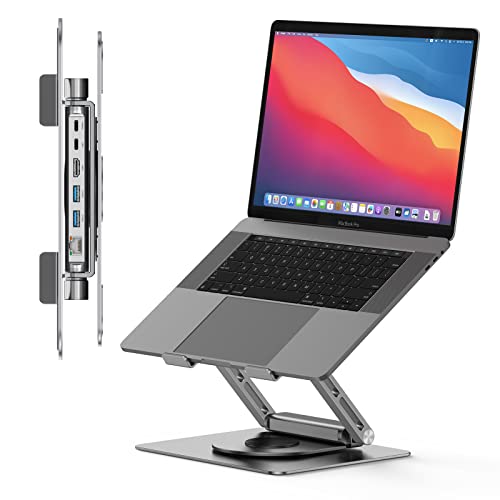
- 6-in-1 hub with 4K HDMI, USB 3.0, Ethernet, and 100W PD
- 360° rotating, foldable stand helps with meetings and desk sharing
- Ergonomic aluminum build improves laptop height and airflow
Best For: Remote workers who want an all-in-one MacBook dock and stand for a cleaner home office.
Best for Triple Displays
Anker Nano 13-in-1 Docking Station

- 13-in-1 port selection with Ethernet, SD/TF, audio, and USB
- Detachable 6-in-1 hub for desktop and mobile use
- Up to 100W charging and 10 Gbps USB-C data
Best For: Home-office users who want a highly connected dock with flexible monitor support and a detachable travel hub.
Best for Everyday Use
LIONWEI 13-in-1 USB-C Docking Station

- 13-in-1 hub with HDMI, DisplayPort, Ethernet, audio, and USB ports
- Dual 4K output and triple-display support on Windows
- 100W Power Delivery passthrough for docked laptop charging
Best For: Home office users who want a versatile dock with lots of ports and wired networking.
Best for Dual-Display Mac Workstations

- Dual 4K@60Hz monitor support
- 100W PD input with up to 87W MacBook charging
- Vertical stand design saves desk space
Best For: MacBook users building a tidy home office setup with dual monitors and lots of ports.
Best for Dual 4K + Wired Speed
TobenONE 17-IN-2 MacBook Docking Station

- Dual 4K@60Hz HDMI for two-monitor productivity
- 17-in-2 hub with 7 USB ports and 2.5G Ethernet
- 150W power adapter with 30W PD charging ports
Best For: MacBook users who want a powerful desk dock for dual displays, wired networking, and charging.
Best for Dual 4K Mac Setups – TobenONE Dual 4K MacBook Docking Station
If you want a dock that turns a MacBook into a full desktop command center, this TobenONE model is built for practical multitasking. It stands out among macbook docking stations for home office use thanks to dual 4K@60Hz monitor support, lots of USB expansion, and built-in charging that keeps your desk cleaner.
Best For: MacBook users who want dual-monitor productivity, fast wired networking, and a single-cable setup for a home office.
Pros:
- Supports dual 4K@60Hz displays for a more efficient multitasking layout.
- Includes 7 USB ports plus a 20W USB-C charging port for accessories and devices.
- Built-in 100W pass-through power and 2.5Gbps Ethernet reduce cable clutter.
- Designed specifically for compatible MacBook models, including newer Pro/Max systems.
Cons:
- Not compatible with Windows laptops.
- Many M1/M2/M3 non-Pro/Max MacBooks can only extend one external monitor.
- Does not support Apple Monitor setups.
For Mac users who need a wired, all-in-one desk hub, this is a strong fit for macbook docking stations for home office setups. The tradeoff is that compatibility is narrower than a universal dock, but within the right MacBook lineup it offers a lot of ports and strong display support.
Best for Desk Organization – Tobenone MacBook Docking Stand
If you want one of the more space-saving macbook docking stations for home office use, this Tobenone stand combines a USB-C hub, laptop riser, and rotating base in a single desktop setup. It adds the essentials—4K HDMI, USB 3.0, Ethernet, and pass-through charging—while helping keep your MacBook at a more ergonomic height.
Best For: Remote workers who want a tidy, all-in-one MacBook dock and stand with easy screen sharing and strong everyday connectivity.
Pros:
- 6-in-1 hub adds HDMI, USB, Ethernet, and 100W PD charging
- Foldable stand with 360° rotating base is useful for meetings and shared viewing
- Ergonomic aluminum design helps lift your laptop and improve airflow
Cons:
- Requires a USB-C port with DisplayPort Alt Mode for video output
- Best suited to users who want a stand-dock combo, not a portable mini hub only
For home-office setups that need both organization and expansion, this is a smart middle-ground pick among macbook docking stations for home office. It’s especially appealing if you want fewer cables, a cleaner desk, and a dock that also works as a laptop riser.
Best for Dual 4K Monitors – TobenONE 16-in-2 Dual 4K Dock
If you want one of the more capable macbook docking stations for home office use, this TobenONE 16-in-2 dock is built for a desk setup that leans on multiple displays and plenty of wired peripherals. With dual 4K@60Hz HDMI support, seven USB ports, and Ethernet, it gives MacBook users a clean way to turn a laptop into a more permanent workstation.
Best For: MacBook users who want a high-port-count dock for a dual-monitor home office setup with fast, wired connectivity.
Pros:
- Dual HDMI outputs support two 4K@60Hz monitors for a roomy desktop setup
- Seven USB ports plus Ethernet make it easy to connect accessories and stay wired in
- 16-in-2 design reduces adapter clutter on a busy home office desk
Cons:
- Dual-display support may depend on your MacBook model and setup
- More features can mean more cable management than a simpler dock
For buyers comparing macbook docking stations for home office use, this model stands out most when productivity depends on dual monitors and lots of peripherals. It is a strong fit if you want a dock that feels closer to a desktop hub than a basic USB-C adapter.
Best for Triple Displays – Anker Nano 13-in-1 Docking Station
If you want a feature-rich hub for macbook docking stations for home office use, this Anker dock stands out with triple-display support, a detachable travel hub, and enough ports to keep a desktop setup tidy. It’s a strong fit if you regularly switch between a full workstation and a more mobile setup.
Best For: Home-office users who need lots of ports, dual/tri-monitor flexibility, and a dock that can double as a grab-and-go hub.
Pros:
- 13-in-1 layout covers monitors, networking, storage, audio, and USB peripherals
- Detachable 6-in-1 hub adds convenience for mobile work
- Up to 100W laptop charging with 10 Gbps USB-C data transfer
- Includes 2 HDMI and 1 DisplayPort for flexible desk setups
Cons:
- On macOS, external displays mirror rather than extend independently
- Video output is limited to HDMI or DisplayPort on Mac
- More dock than casual users may need for a simple single-monitor setup
Overall, this is one of the more versatile macbook docking stations for home office buyers who want a crowded port selection and a dock that can adapt between desk and travel use. Just make sure the macOS display limitations still fit your workflow before you buy.
Best for Easy Setup – TobenONE 16-in-1 MacBook Docking Station
If you need one of the most capable macbook docking stations for home office use, this TobenONE dock is built around lots of ports, dual-monitor output, and included power. It turns a single MacBook connection into a full workstation with HDMI, USB, Ethernet, card readers, and audio—useful if you want a cleaner desk and fewer dongles.
Best For: Mac users who want a plug-and-play dock for dual 4K displays, wired networking, and plenty of accessory ports at home.
Pros:
- Dual HDMI output supports two 4K displays at 60Hz on compatible MacBook models
- Includes a 100W power adapter, so you can charge while using the dock
- Seven USB ports plus SD/microSD and Gigabit Ethernet cover most home office needs
- Plug-and-play setup keeps desk setup simple with no driver install
Cons:
- M1/M2/M3 MacBooks only extend to one monitor
- Not compatible with Windows laptops
- Front USB-C port is data-only, not display output
This is a strong fit for macbook docking stations for home office buyers who want a true desktop-style setup without juggling adapters. The main tradeoff is display compatibility, but for supported Macs it offers excellent port expansion and a tidy all-in-one design.
Best for Everyday Use – LIONWEI 13-in-1 USB-C Docking Station
If you want one hub that adds serious desk connectivity, this LIONWEI dock is a practical pick for macbook docking stations for home office setups that need more ports and a cleaner workspace. It combines dual 4K HDMI, DisplayPort, Ethernet, audio, and multiple USB-A/USB-C connections in a single plug-and-play unit.
Best For: Home office users who want a compact dock with lots of ports and the option to connect multiple monitors.
Pros:
- 13-in-1 layout covers displays, wired internet, audio, and legacy USB devices.
- Supports dual 4K output and triple-display setups on Windows.
- 100W Power Delivery passthrough helps keep a MacBook charged while docked.
- 10Gbps USB-C and USB-A ports are useful for fast everyday transfers.
Cons:
- MacBook users can only extend one external monitor in extend mode.
- Power delivery shares some wattage with the dock itself, so charging headroom is reduced.
For buyers comparing macbook docking stations for home office use, this is strongest if you value broad port selection and wired networking more than full multi-monitor support on macOS. It’s a capable all-in-one dock, but Mac users should note the display limitation before buying.
Best for Dual-Display Power Users – TobenONE 18-in-2 MacBook Dock
If you want one of the more fully loaded macbook docking stations for home office use, this TobenONE dock is built to turn a MacBook into a real desktop setup. It adds dual-monitor support, plenty of USB ports, fast Ethernet, and built-in charging, so you can keep your laptop connected to displays, storage, and accessories with less cable clutter.
Best For: MacBook users who want a high-port-count dock for a clean dual-monitor home office setup.
Pros:
- Supports dual 4K@60Hz displays for a more productive workspace
- 18-in-2 design combines video, USB, Ethernet, card reader, and audio ports
- 150W adapter and PD charging help power your MacBook and accessories
- 2.5GbE and SD 4.0 are useful for remote work, file transfers, and media tasks
Cons:
- Mac M1/M2/M3 models only support single-monitor expansion, not dual
- Not compatible with Windows laptops or several Mac desktop models
- Feature-rich design may be more than casual users need
For buyers comparing macbook docking stations for home office setups, this model stands out most for its desktop-style connectivity and monitor flexibility. Just make sure your MacBook chip supports the dual-display mode before buying.
Best for Dual-Display Mac Workstations – TobenONE Dual 4K MacBook Dock
If you want one of the more capable macbook docking stations for home office use, this TobenONE dock is built for a full desktop-style setup. It combines dual 4K monitor support, lots of extra ports, and a vertical stand design, making it a strong fit for users who want fewer cables and more screen space.
Best For: MacBook users who want a tidy home office dock with dual-monitor support, built-in charging, and plenty of connectivity for daily work.
Pros:
- Supports dual 4K@60Hz output for a sharper multi-monitor workflow
- Includes 100W PD input and up to 87W charging for MacBooks
- Offers a wide port selection, including HDMI, VGA, USB, Ethernet, SD, and audio
- Vertical stand design helps save desk space and reduce clutter
Cons:
- M1/M2/M3 MacBooks only support single-screen expansion
- VGA and HDMI2 mirror content, so they are not true independent displays
This is a practical choice if you need a dock that does more than just add ports. For macbook docking stations for home office setups, it stands out by combining display expansion, charging, and organization in one desktop-friendly unit.
Best for Dual 4K + Wired Speed – TobenONE 17-IN-2 MacBook Docking Station
If you want one of the more capable macbook docking stations for home office use, the TobenONE 17-in-2 is built for serious multitasking. It combines dual 4K monitor support, plenty of USB ports, fast Ethernet, and built-in charging, so you can turn a MacBook into a cleaner, more efficient desktop setup without juggling extra adapters.
Best For: MacBook users who want dual-monitor productivity, wired networking, and lots of peripherals in one plug-and-play dock.
Pros:
- Dual 4K@60Hz HDMI output for a true two-monitor workflow
- 17-in-2 design with 7 USB ports, SD/microSD, and 2.5G Ethernet
- 150W adapter plus 30W PD ports help keep devices charged
- MacBook-focused plug-and-play setup reduces desk clutter
Cons:
- Only works with MacBook models, not Windows or ChromeOS laptops
- M1/M2/M3/Neo MacBooks are limited to single-monitor extension
- Bulkier than a simple travel dock, so it’s mainly for desk setups
For a home office where speed, cable management, and monitor expansion matter, this is a strong pick among macbook docking stations for home office. It makes the most sense for users who want a desktop-style MacBook setup with fewer dongles and more connectivity.
Best for Dual 4K Workstations – TobenONE 18-in-2 MacBook Dock
If you want one of the more capable macbook docking stations for home office use, this TobenONE unit is built for serious screen expansion and cable cleanup. It combines dual 4K@60Hz monitor support, a strong port mix, and included laptop stand functionality to turn a MacBook into a compact desktop setup.
Best For: MacBook users who want dual-monitor productivity, fast wired networking, and a neatly organized desk in a home office.
Pros:
- Supports dual 4K@60Hz output for a sharper, more flexible multitasking setup
- Includes 18-in-2 connectivity with HDMI, DisplayPort, USB, Ethernet, audio, and card readers
- 150W adapter enables up to 100W laptop charging plus a 20W front USB-C charging port
- Built-in dock stand helps reduce desk clutter and keeps the MacBook upright
Cons:
- Not a fit for Windows laptops or Mac Studio
- M1/M2/M3 base-chip MacBooks are limited to a single external display
- Large feature set may be more dock than casual users need
This is a strong pick if your priority is turning a MacBook into a full home-office hub. For macbook docking stations for home office, it stands out because it blends display support, charging, and wired connectivity into one desk-friendly package.
How We Picked the Best Macbook Docking Stations for Home Office
For Macbook Docking Stations for Home Office use, the best options balance display output, port variety, charging power, and compatibility with modern MacBooks. We prioritized docks that support at least one external monitor, offer enough USB ports for keyboards, mice, drives, and headsets, and include Ethernet or card readers where they add real value.
We also looked for models that are useful in a real desk setup, not just as a travel hub. That means stable power delivery, strong multi-monitor support, and feature sets that reduce cable clutter rather than add to it.
Quick Comparison
If you need a simple setup, a smaller dock or hub may be enough. If you want a full desktop-style workstation, choose a higher-port model with dual 4K outputs, more USB-A and USB-C connections, and a wired network port. Stand-style docks can also be a smart pick for users who want to combine ergonomics and connectivity in one accessory.
Key Buying Factors for Macbook Docking Stations for Home Office
Display Support
Check whether the dock supports one or two external displays, and confirm the maximum resolution and refresh rate. Many home office users benefit from dual 4K@60Hz support, but Mac compatibility can vary by chip and operating mode.
Power Delivery
Look for enough wattage to charge your MacBook while you work. Higher-wattage power delivery helps prevent battery drain when you are running monitors, accessories, and video calls at the same time.
Ports You Actually Need
Choose the right mix of USB-C, USB-A, HDMI, DisplayPort, Ethernet, SD card slots, and audio based on your workflow. A dock with extra ports is only useful if those ports match your devices.
Desk Setup and Form Factor
Some users want a compact hub, while others prefer a vertical stand dock that saves space and keeps the laptop at a better viewing height. The best choice depends on whether your priority is portability, ergonomics, or a more permanent desk setup.
Who Should Buy Which Macbook Docking Stations for Home Office?
If you use one monitor and basic accessories, a simpler USB-C hub is usually enough. If your workday includes dual displays, external storage, wired internet, and charging through one cable, step up to a full-featured dock with stronger power delivery and more video outputs. Power users, creatives, and anyone building a true desktop replacement should focus on the most expandable models in this list.
For most home office buyers, the safest choice is the dock that matches your display needs first, then adds only the ports you will use every day.
