
When it comes to maximizing the capabilities of your Mac Studio, choosing the right Thunderbolt hub can make all the difference. With a variety of options available, each hub offers unique features tailored for your specific needs. From high-speed data transfer to extensive display support, these hubs can greatly enhance your workflow. Let’s explore which ones stand out and help you elevate your connectivity and performance to the next level.
Belkin USB C Hub, 5-Port Multiport Adapter
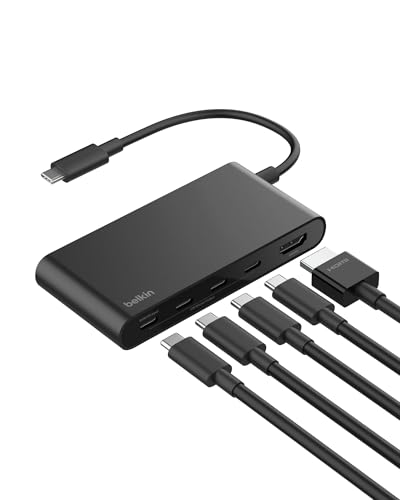
If you’re looking for a versatile solution for your Mac Studio, the Belkin USB C Hub, 5-Port Multiport Adapter is a top contender. This compact hub features five ports, including a 4K HDMI output at 60Hz, making it perfect for high-definition displays. With up to 10Gbps data transfer speeds, it’s twice as fast as USB 3.0. Plus, the 100W Power Delivery allows you to charge your devices efficiently, even while transferring data. Constructed with 75% recycled materials, it’s both eco-friendly and built for safety. Enjoy a reliable connection wherever you go with this lightweight, travel-friendly adapter.
Best For: Those seeking a reliable and high-performance multiport adapter for their USB-C devices, especially for professionals who need to connect to high-definition displays and charge devices simultaneously.
Pros:
- High-Speed Data Transfer: Offers up to 10Gbps data transfer speeds, significantly faster than USB 3.0.
- 4K HDMI Support: Allows for stunning high-definition display capabilities at 60Hz.
- Eco-Friendly Design: Made with 75% post-consumer recycled materials, promoting sustainability.
Cons:
- Limited Port Variety: Only includes USB-C ports, which may not accommodate older USB devices without additional adapters.
- Size Constraints: While compact, it may still be cumbersome for users with limited space.
- Price Point: Higher cost compared to basic USB hubs on the market.
Belkin Connect Thunderbolt 4 Docking Station (5-in-1 USB-C Multiport Core Hub)

The Belkin Connect Thunderbolt 4 Docking Station stands out as an ideal choice for professionals and creatives who demand high performance and versatility from their devices. This compact 5-in-1 USB-C hub includes a Thunderbolt 4 cable and power supply, ensuring seamless compatibility with Mac, Windows, and various laptops. With three upstream and one downstream Thunderbolt 4 USB-C ports, you can daisy-chain up to six devices, enjoying data transfer speeds of up to 40G. Plus, it supports dual monitors at 4K or a single 8K display. Enjoy fast charging with 96W power delivery, keeping your devices powered while you work.
Best For: Professionals and creatives seeking a high-performance, versatile docking solution for their laptops and displays.
Pros:
- High-speed data transfer: Achieves up to 40G speeds with Thunderbolt 4 connectivity.
- Dual monitor support: Allows for dual 4K displays or a single 8K display, enhancing productivity and visual experience.
- Fast charging capability: Provides 96W power delivery for quick device charging while in use.
Cons:
- Limited to Thunderbolt 4 devices: May not be suitable for users with older USB standards.
- Compact design may limit port availability: The 5-in-1 configuration may not meet all connectivity needs for some users.
- Potentially higher price point: Compared to standard USB hubs, Thunderbolt 4 docks may come with a premium cost.
Plugable Thunderbolt 4 Dock with 100W Charging (TBT4-UD5)
For anyone looking to maximize their Mac Studio setup, the Plugable Thunderbolt 4 Dock with 100W Charging (TBT4-UD5) stands out as an exceptional choice. With 40Gbps speeds, it supports dual 4K 60Hz or a single 8K display, making it perfect for high-resolution tasks. You’ll appreciate the extensive 13-port design, including multiple USB options, HDMI outputs, and Gigabit Ethernet. It’s compatible with various systems, ensuring versatile use. Plus, the robust 100W Power Delivery keeps your devices charged efficiently. With its award-winning performance and 4.3-star rating from customers, this dock is a reliable addition to any Mac Studio.
Best For: Professionals and creatives using high-resolution displays who require versatile connectivity and efficient charging for their devices.
Pros:
- Supports dual 4K 60Hz or single 8K display, ideal for graphic design, video editing, and other high-resolution tasks.
- Comprehensive 13-port design offers extensive connectivity options including HDMI, USB, and Ethernet.
- 100W Power Delivery efficiently charges laptops and peripherals, reducing cable clutter.
Cons:
- Higher price point compared to standard docks may not be suitable for budget-conscious users.
- Limited macOS compatibility for base M1 and M2 models, which only support a single display.
- Bulky design may take up more desk space compared to smaller docking solutions.
iVANKY 23-in-1 Thunderbolt 5 Docking Station

Designed specifically for Mac users, the iVANKY 23-in-1 Thunderbolt 5 Docking Station offers an impressive 120Gbps data transfer speed, making it an ideal choice for creative professionals and power users alike. You can easily connect multiple devices with three Thunderbolt 5 ports and ten USB ports, while the SD/TF card slot supports rapid 312Mb/s transfers. With support for triple displays, you can enjoy stunning visuals on dual 6K@60Hz and a single 4K@60Hz. Plus, its hybrid cooling system guarantees peak performance. Enjoy peace of mind with a 24-month warranty and responsive customer support.
Best For: Creative professionals and power users who need high-speed data transfer and multiple display capabilities for their Mac devices.
Pros:
- Supports triple displays, allowing for expansive workspace with dual 6K and single 4K resolutions.
- High-speed data transfer with 120Gbps via Thunderbolt 5 ports and 10Gbps through USB ports.
- Robust cooling system ensures optimal performance during intensive tasks.
Cons:
- Incompatible with Windows and Chrome laptops, limiting its user base.
- Higher price point may not be suitable for casual users or basic needs.
- Ranking and customer reviews indicate some potential quality concerns compared to other docking stations.
OWC StudioStack Enclosure Thunderbolt 5 Dual-Drive Hybrid Storage Hub

With its impressive real-world performance of up to 6302MB/s, the OWC StudioStack Enclosure Thunderbolt 5 Dual-Drive Hybrid Storage Hub stands out as an exceptional choice for creative professionals seeking high-speed data transfer and expansive storage options. You’ll appreciate the dual-drive design, allowing up to 8TB NVMe SSD and 24TB HDD. Its three Thunderbolt 5 ports enable lightning-fast connectivity, while the robust aluminum construction guarantees durability and efficient heat dissipation. Plus, the near-silent operation means you can focus on your work without distraction. With upgradeable options and a 1-Year OWC Limited Warranty, this hub is a reliable investment for your setup.
Best For: Creative professionals and tech enthusiasts who require high-speed data transfer and ample storage capacity for demanding projects.
Pros:
- High performance: Achieves up to 6302MB/s real-world speeds for efficient data handling.
- Ample storage options: Supports up to 8TB NVMe SSD and 24TB HDD for extensive data requirements.
- Durable design: Constructed from aircraft-grade aluminum for ruggedness and effective heat dissipation.
Cons:
- Price point: May be considered expensive for casual users or those with minimal storage needs.
- Limited compatibility: Primarily optimized for Thunderbolt 5/4 and may not be fully utilized with older connections.
- DIY assembly: While upgradeable, the “build your own” aspect may not appeal to all users, especially those preferring a ready-to-use solution.
Satechi Mac mini Hub & Stand with SSD Enclosure

The Satechi Mac mini Hub & Stand with SSD Enclosure stands out for users who crave efficient storage solutions and seamless connectivity. This sleek silver hub is compatible with Mac Mini M2/M1 and Mac Studio, offering 7-in-1 expansion ports, including USB-C and USB-A options, plus Micro/SD card readers. It supports M.2 SSDs with speeds up to 10Gbps and features built-in air vents for peak cooling. Weighing just 403 grams, it maintains a clean workspace while enhancing your Mac’s performance. Plus, it comes with a 2-year warranty, ensuring you get reliable support for your investment.
Best For: Users seeking an efficient storage solution and versatile connectivity for their Mac Mini M2/M1 or Mac Studio.
Pros:
- 7-in-1 expansion ports provide a variety of connectivity options, enhancing productivity.
- Supports high-speed M.2 SSDs with speeds up to 10Gbps, ensuring fast data transfer.
- Built-in air vents promote effective cooling and heat dissipation, maintaining optimal performance.
Cons:
- Not compatible with M4 models, limiting its use for some users.
- SSD not included, requiring an additional purchase for complete functionality.
- Recommended to connect one bus-powered device at a time, which may restrict usage in some scenarios.
Anker USB C Hub for MacBook (7-in-2)

If you’re looking to maximize your MacBook’s potential, the Anker USB C Hub (7-in-2) is a fantastic choice. This hub expands your MacBook’s connectivity by transforming two USB-C ports into a versatile setup that includes a multi-function USB-C port, two USB-A ports, an HDMI port, and both SD and microSD card slots. Enjoy stunning visuals with 4K@60Hz HDMI support and impressive data transfer speeds of up to 40 Gb/s. Designed specifically for MacBook Pro and Air (M1/M2), it seamlessly integrates without blocking the MagSafe port. Plus, it comes with an 18-month warranty for peace of mind.
Best For: Users of MacBook Pro and MacBook Air (M1/M2) looking to enhance their device’s connectivity and functionality.
Pros:
- Versatile connectivity with multiple ports, including HDMI, USB-A, and card slots for various devices.
- High performance with data transfer speeds up to 40 Gb/s and support for 4K@60Hz video output.
- Seamless design that avoids obstructing the MagSafe port, ensuring ease of use and charging.
Cons:
- Limited compatibility as it does not work with MacBook Neo.
- M1 and M2 MacBooks can’t support dual external displays, which may limit multi-monitor setups.
- Potential heat generation during heavy usage, which might affect performance or comfort.
Anker Prime TB5 Docking Station (14-in-1 Thunderbolt 5)

For professionals seeking a powerful and versatile docking solution, the Anker Prime TB5 Docking Station stands out with its impressive 14-in-1 configuration. You’ll appreciate the 120Gbps max transfer speed, allowing you to send a 150GB file in just 25 seconds. With dual display support for up to 8K@60Hz, your visuals will be stunning. The active cooling system guarantees your devices won’t overheat during heavy use. Plus, the 140W max charging capability keeps your gear powered efficiently. With multiple ports—including Thunderbolt 5, USB-C, and Ethernet—you’ll enjoy ultimate connectivity for all your professional needs.
Best For: Professionals and power users who require high-speed data transfer and versatile connectivity options for their Thunderbolt 5/4 laptops.
Pros:
- High transfer speed: Achieves 120Gbps max transfer speed, allowing for rapid file transfers, such as 150GB in just 25 seconds.
- Dual display support: Capable of supporting dual 8K displays at 60Hz for enhanced visual experiences.
- Active cooling system: Prevents overheating during heavy use, ensuring reliable performance.
Cons:
- Weight: At 2.4 pounds, it may be less portable compared to lighter docking solutions.
- Price: The advanced features may come at a higher price point, which could deter budget-conscious users.
- Limited compatibility: Full functionality may be restricted to Thunderbolt 5/4 laptops, potentially excluding users with older systems.
StarTech Thunderbolt 5 Docking Station

Designed for creative professionals and power users, the StarTech Thunderbolt 5 Docking Station elevates your Mac Studio experience with its impressive dual 6K 60Hz display support. You’ll appreciate its driverless compatibility with both Windows 11 and macOS 15/26. This dock allows you to connect multiple displays effortlessly; a MacBook Pro with M5 Pro can handle up to triple 4K 144Hz. With 140W power delivery, it charges high-powered laptops while providing a 30W USB-C port for your mobile devices. Plus, the 2.5GbE Ethernet guarantees fast file transfers, making it perfect for your productivity and creative workflows.
Best For: Creative professionals and power users seeking high-performance connectivity and display capabilities.
Pros:
- Supports dual 6K 60Hz displays for enhanced visual quality.
- 140W power delivery efficiently charges high-powered laptops.
- Fast file transfers with 2.5GbE Ethernet and built-in SD/microSD slots.
Cons:
- Higher price point compared to standard docking stations.
- Limited compatibility with older USB standards.
- Requires Thunderbolt 5/4 or USB4 host devices for optimal performance.
Belkin Thunderbolt 3 Dock Core (7-in-1 Docking Station)

The Belkin Thunderbolt 3 Dock Core (7-in-1 Docking Station) is an ideal choice for professionals seeking to enhance their Mac Studio experience with versatile connectivity options. This dock features a Thunderbolt 3 cable, ensuring high-speed data transfer up to 40 Gbps. You’ll appreciate the array of ports, including DisplayPort, HDMI, Gigabit Ethernet, USB-A, USB-C, and audio connections. Plus, it supports 60W upstream charging, keeping your devices powered. With dual monitor capability for ultra-high-definition 4K displays, it boosts your productivity. Backed by a 2-year warranty, this dock combines performance and reliability for your workspace needs.
Best For: Professionals seeking a versatile docking station to enhance productivity with multiple connectivity options for Mac and Windows laptops.
Pros:
- High-Speed Data Transfer: Supports data transfer speeds up to 40 Gbps for efficient file management.
- Multiple Ports: Offers a variety of connection options including DisplayPort, HDMI, USB-A, and USB-C.
- Dual Monitor Support: Enables ultra-high-definition 4K display capabilities for enhanced multitasking.
Cons:
- Average Customer Ratings: Holds a moderate average rating of 3.6 out of 5 stars.
- Limited USB Ports: Only three USB ports may not be sufficient for users with multiple peripherals.
- Weight: At 213.8 grams, it may be heavier compared to other lightweight docking station options.
Factors to Consider When Choosing Mac Studio Thunderbolt Hubs
When choosing a Thunderbolt hub for your Mac Studio, you need to contemplate a few key factors. Compatibility with your Mac model, the number of ports available, and power delivery capacity are essential for meeting your needs. Additionally, don’t overlook data transfer speed and display support options to guarantee peak performance.
Compatibility With Mac Studio
Choosing the right Thunderbolt hub for your Mac Studio is crucial to guarantee peak performance and compatibility. First, confirm the hub explicitly lists compatibility with the Mac Studio, as some may only support specific models. Next, check that it supports the latest Thunderbolt specifications, like Thunderbolt 4 or 5, to maximize your Mac’s capabilities. It’s also important to verify that the hub can handle high-resolution display outputs, supporting dual 6K displays or higher. Look for hubs offering sufficient power delivery, ideally 96W or more, to effectively charge your Mac Studio while using connected peripherals. By considering these factors, you’ll set up a robust and efficient connection tailored to your needs.
Number of Ports
Having established compatibility with your Mac Studio, it’s time to contemplate the number of ports available on your Thunderbolt hub. A higher port count offers greater connectivity options for your peripherals and devices. Thunderbolt hubs typically range from 5 to 23 ports, featuring various combinations of USB-A, USB-C, HDMI, and SD card slots. More ports enable simultaneous connections, allowing you to use multiple external displays, storage devices, and accessories without sacrificing performance. Pay attention to the types of ports, as differences in speed—like USB 3.2 Gen 2 (10Gbps) or Thunderbolt 4 (up to 40Gbps)—can greatly impact data transfer rates. Finally, prioritize hubs that support daisy-chaining, expanding your connectivity through a single Thunderbolt port.
Power Delivery Capacity
While exploring Thunderbolt hubs for your Mac Studio, don’t overlook the significance of power delivery capacity. This refers to the maximum wattage a hub can provide to charge your connected devices, which is essential for high-performance laptops like yours. Look for hubs with a power delivery capacity of 100W or more, as they’ll charge your laptop faster and keep it running efficiently when connected to multiple peripherals. Many Thunderbolt hubs allow for simultaneous charging and data transfer, guaranteeing your devices stay powered during intensive tasks like video editing or 3D rendering. Always check the power delivery specifications to verify they meet your Mac Studio’s charging requirements for peak performance.
Data Transfer Speed
When evaluating Thunderbolt hubs for your Mac Studio, data transfer speed should be a top priority, as it directly impacts your productivity. Thunderbolt hubs can achieve speeds up to 40 Gbps, far surpassing traditional USB 3.0 connections that max out at 5 Gbps. If you’re using the latest Thunderbolt 4 technology, you’ll maintain high-speed transfers even while daisy chaining multiple devices. Many hubs also support data rates of up to 10 Gbps for USB-C ports, allowing efficient connections with various peripherals. These high speeds are essential for tasks like video editing and transferring large files, where any delay can slow you down. Plus, compatibility with high-speed external storage enhances overall performance, ensuring quick access to your data.
Display Support Options
Choosing the right Thunderbolt hub for your Mac Studio involves careful consideration of display support options, especially if you’re aiming to enhance your productivity with multiple monitors. Look for hubs that support dual or triple displays, ideally offering dual 6K at 60Hz or higher resolutions. If you work with high-resolution tasks, hubs that can handle 8K output are a must. Verify the hub matches your Mac Studio’s maximum display output capabilities, as some models have limitations. Check for the number of HDMI and DisplayPort outputs, which determines how many monitors you can connect simultaneously. Additionally, consider hubs that allow daisy chaining multiple displays; this simplifies connections and minimizes cable clutter on your desk setup.
Build Quality and Design
The build quality and design of your Thunderbolt hub can greatly impact both performance and aesthetics in your Mac Studio setup. When choosing a hub, consider the materials used; premium options like aircraft-grade aluminum guarantee durability and effective heat dissipation. Look for designs that include built-in air vents or cooling systems to maintain peak performance during extended use. Compact and lightweight designs enhance portability, making it easier to transport or organize your workspace. A sleek aesthetic is essential too, as a well-designed hub can elevate your setup’s overall look. Additionally, features like a modular structure allow for stacking with other devices, promoting a tidy and organized workspace. These factors are key to achieving both functionality and style.
Warranty and Support
Investing in a quality Thunderbolt hub for your Mac Studio goes beyond just build quality and design; warranty and support can greatly influence your overall experience. Look for hubs that offer at least a 2-year warranty, which is standard and guarantees you’re protected against defects. A clear return policy of around 30 days is also essential, so you can return or exchange the hub if it doesn’t meet your needs. Pay attention to customer support availability; responsive service can be significant when troubleshooting issues. Finally, review user feedback and ratings to assess the reliability of the warranty and support experience, as higher ratings often indicate better customer service and thorough coverage for parts and labor.
Price and Value
When evaluating Thunderbolt hubs for your Mac Studio, price and value play an important role in your decision-making process. Prices typically range from $100 to over $300, largely depending on the features and port configurations. To make sure you’re getting value for your money, consider hubs with more ports—like multiple USB-C, USB-A, HDMI, and Ethernet—since these tend to be pricier but offer enhanced functionality. Look for high-performance data transfer rates, ideally supporting up to 40Gbps. Power delivery is also vital; hubs that provide 100W or more for charging can justify higher prices. Finally, don’t overlook warranty and customer support, as longer warranties often indicate reliability and can influence overall value appreciably.
