
If you want a cleaner desk and more usable ports, the right dock can turn your Mac Studio into a compact workstation hub. The best options add fast NVMe storage, monitor outputs, and everyday connectivity without adding clutter.
This guide focuses on practical picks for creators, power users, and home office setups that need speed, expandability, and a simple all-in-one layout.
Best 9 Mac Studio Docks with Nvme Storage Picks for 2026
Best for High-Speed NVMe Expansion
RayCue 10-in-1 80Gbps Dock for Mac Studio

- Dual NVMe bays with RAID 0/1 support and up to 16TB capacity
- 2x HDMI 2.1 plus DisplayPort 2.1 for multi-monitor setups
- CFexpress readers and USB-A ports suit creator workflows
Best For: Mac Studio users who want fast local storage and pro-level connectivity in one dock.
Best All-in-One Docking Hub
UGREEN Revodok NVMe Docking Station

- Built-in NVMe slot for local storage expansion
- 10Gbps ports with 100W PD charging
- 4K@60Hz HDMI, Ethernet, and SD/TF support
Best For: Mac and Windows users who want a single dock with storage expansion and broad connectivity.
Best Dual-Drive Expansion
Mate Studio Stand-A SSD Expansion Dock
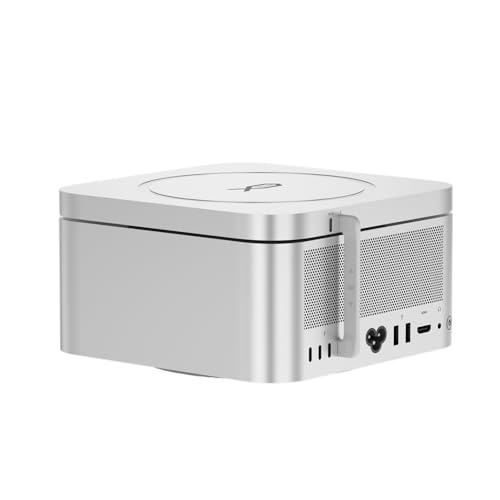
- Dual M.2 NVMe slots with up to 16TB capacity
- 80Gbps USB-C for fast external storage performance
- Aluminum stand design with PD 3.0 support
Best For: Creators and power users who want scalable NVMe storage in a compact Mac Studio stand.
Best for Mac mini/Studio Storage Expansion
Qwiizlab Mac mini Hub with Dual Drive Enclosure

- M.2 NVMe/SATA SSD support up to 8TB
- 10Gbps USB-C and USB-A ports for peripherals
- SD/microSD readers up to 104MB/s
Best For: Mac mini and Mac Studio owners who want integrated NVMe storage plus everyday hub ports.
Best for Mac mini Expansion
UGREEN Mac mini M4 Dock & NVMe Stand

- Up to 8TB M.2 NVMe storage support
- 11-in-1 hub with USB-A, USB-C, and SD/TF
- Compact stand keeps the desk setup clean
Best For: Mac mini M4 users who want expandable NVMe storage and extra ports in one tidy dock.
Best for Built-In NVMe Expansion
Mac mini Hub with M.2 NVMe Enclosure

- Built-in NVMe SSD enclosure up to 2TB
- 8-in-1 dock with USB, SD/TF, and audio
- Vertical stand helps reduce desk clutter
Best For: Mac mini owners who want one dock that adds ports and NVMe storage in a vertical stand.
Best for Maximum Expansion
ACASIS Mac mini M4 Dock with Dual NVMe
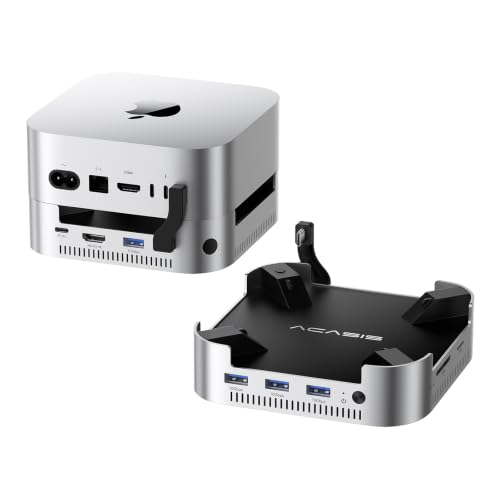
- Dual NVMe support with up to 16TB expansion
- 4K60Hz HDMI and multiple 10Gbps USB-A ports
- Active cooling and included 30W PD power
Best For: Mac mini M4 owners who need a dock with large NVMe storage expansion and extra desktop connectivity.
Best for High-Speed NVMe Expansion – RayCue 10-in-1 80Gbps Dock for Mac Studio
If you want one of the most capable mac studio docks with nvme storage, this RayCue dock stands out for turning your Mac Studio into a compact workstation with serious expansion. It combines dual NVMe bays, fast display outputs, and pro media connectivity in a precision-aluminum design that fits neatly under the machine.
Best For: Mac Studio users who need large, fast local storage plus multi-display support for creative work, media editing, and everyday desk organization.
Pros:
- Dual NVMe SSD bays support up to 16TB and RAID 0/1 for faster or safer storage setups
- Includes 2x HDMI 2.1 and 1x DisplayPort 2.1 for flexible multi-monitor workflows
- Built-in CFexpress Type A/B readers, USB-A ports, and 3.5mm Hi-Fi audio add real pro utility
- 80Gbps connection and passive cooling make it a strong fit for high-throughput desk setups
Cons:
- Designed for newer Mac Studio and Mac mini models, so compatibility is not universal
- Storage drives are not included, adding to the total setup cost
- 45W PD input is useful for the dock itself, but it is not a laptop-charging solution
For buyers comparing mac studio docks with nvme storage, this is a highly specialized option that prioritizes expansion, speed, and creator-friendly I/O over basic hub simplicity. It makes the most sense when your Mac Studio needs both desktop organization and serious internal-style storage performance.
Best All-in-One Docking Hub – UGREEN Revodok NVMe Docking Station
If you want one compact accessory that adds ports, display output, charging, and local SSD expansion, this is a strong fit for mac studio docks with nvme storage. It’s especially useful for setups that need a cleaner desk, faster file transfers, and a simple way to add extra storage without juggling multiple adapters.
Best For: Mac and Windows users who want a dock that combines 10-port expansion with built-in NVMe storage support.
Pros:
- Built-in M.2 NVMe slot adds fast local storage without a separate enclosure.
- 10Gbps USB-C/A ports and 100W power delivery cover demanding daily workflows.
- 4K@60Hz HDMI plus Gigabit Ethernet make it useful for desk-based productivity.
- SD/TF card slots help photographers and creators move files quickly.
Cons:
- NVMe storage is not included, so you’ll need to supply your own SSD.
- It may be more dock than some users need if they only want a few basic ports.
For buyers comparing mac studio docks with nvme storage, this model stands out because it combines expansion and storage in one unit instead of asking you to add a separate dock and SSD enclosure. That makes it a practical pick for compact, high-function setups.
Best Dual-Drive Expansion – Mate Studio Stand-A SSD Expansion Dock
If you want mac studio docks with nvme storage that add real capacity without cluttering your desk, the Mate Studio Stand-A is built for that job. It combines a Mac Studio stand with dual M.2 NVMe slots, making it a practical way to add fast external SSD storage in a compact aluminum chassis.
Best For: Creators and power users who need a Mac Studio dock with dual NVMe expansion, good cooling, and room to scale storage up to 16TB.
Pros:
- Dual M.2 2280 slots support up to 16TB total capacity.
- 80Gbps USB-C connection supports strong sequential speeds with the right SSDs.
- Aluminum stand design helps with heat dissipation and keeps the setup tidy.
- PD 3.0 support adds flexible power options for demanding drives.
Cons:
- Real-world speed depends heavily on the SSDs and host system.
- It is focused on storage expansion, so it is not a full-featured hub.
For buyers comparing mac studio docks with nvme storage, this model stands out for its dual-drive flexibility and workstation-friendly design. It is a strong fit if you care more about scalable SSD capacity and clean Mac Studio integration than extra ports or dock-style extras.
Best for Mac mini/Studio Storage Expansion – Qwiizlab Mac mini Hub with Dual Drive Enclosure
If you want one of the most practical mac studio docks with nvme storage, this Qwiizlab hub is built around storage expansion first and ports second. It adds room for an M.2 NVMe or SATA SSD, plus 2.5-inch SATA SSD/HDD support, while also giving you a useful USB and card-reader dock in a compact aluminum design.
Best For: Mac mini and Mac Studio owners who want to add NVMe storage and keep everyday ports close at hand.
Pros:
- Supports M.2 NVMe/SATA SSDs up to 8TB for internal-style expansion
- Includes fast 10Gbps USB-C and USB-A ports for accessories and transfers
- Built-in SD/microSD readers reach up to 104MB/s for quick media offloads
- Works with a wide range of Mac mini and Mac Studio models
Cons:
- Not a Thunderbolt dock, so it won’t match top-tier expansion speeds
- Best suited to users who specifically need integrated drive storage
For buyers comparing mac studio docks with nvme storage, this is a strong value if you want to combine extra SSD capacity with basic hub convenience in one clean setup. It’s especially appealing if your priority is adding fast local storage without cluttering the desk with multiple enclosures.
Best for Mac mini Expansion – UGREEN Mac mini M4 Dock & NVMe Stand
If you want one compact upgrade to add both fast storage and extra ports, this is a practical pick among mac studio docks with nvme storage. It combines an M.2 NVMe enclosure, a built-in stand, and a flexible USB hub so you can keep a Mac mini-style setup tidy while expanding capacity for backups, photo libraries, and everyday peripherals.
Best For: Mac mini M4 users who want a clean desk setup with expandable NVMe storage and useful high-speed ports.
Pros:
- Supports M.2 NVMe SSDs up to 8TB for fast local storage expansion
- 11-in-1 hub adds USB-A, USB-C data, and SD/TF card reading
- Compact stand design helps reduce clutter and match the Mac mini footprint
- 10Gbps data paths make it a strong fit for large file transfers and creative workflows
Cons:
- SSD is not included, so total cost depends on the drive you add
- Designed for Mac mini M4/M4 Pro rather than a universal desktop dock
- Multi-device setups may need an external power adapter for best performance
For buyers comparing mac studio docks with nvme storage, this UGREEN model stands out for combining storage expansion and connectivity in a single, desk-friendly unit. It is especially appealing if you want a simple way to add fast NVMe capacity without sacrificing a clean, minimal setup.
Best for Built-In NVMe Expansion – Mac mini Hub with M.2 NVMe Enclosure
If you want one dock that adds ports and fast local storage, this Mac mini hub is a strong fit for mac studio docks with nvme storage-style workflows on supported Mac mini models. It combines a vertical stand with a built-in M.2 NVMe enclosure, making it useful for creators who want a cleaner desk and quicker access to files, peripherals, and backups.
Best For: Mac mini users who want an all-in-one dock with NVMe storage expansion, extra USB connectivity, and a vertical stand for a tidier workspace.
Pros:
- Built-in M.2 PCIe NVMe slot supports up to 2TB and speeds up to 10Gbps
- 8-in-1 layout adds USB-C, USB-A, USB 2.0, SD/TF, and 3.5mm audio/mic connectivity
- Vertical stand design helps save desk space and improve airflow
- Works with Mac mini 2018, M1, M2, and M2 Pro models
Cons:
- Not compatible with Mac mini M4 2024
- USB ports are data-only and do not support charging or video output
- SSD is not included, and SATA drives are not supported
For buyers comparing mac studio docks with nvme storage, this is a practical value pick if you actually use a compatible Mac mini and want the dock plus SSD enclosure in one compact unit. It is less of a universal workstation dock and more of a smart storage-and-ports upgrade for a specific setup.
Best for Storage Expansion – ACASIS 40Gbps Mac mini M4 Dock with Dual NVMe
If you want one of the more capable mac studio docks with nvme storage for a compact Apple setup, this ACASIS dock is built around expansion first: it adds dual NVMe bays, extra USB-A ports, SD/TF card slots, and DisplayPort outputs while doubling as a stand for the Mac mini M4 or M4 Pro.
Best For: Mac mini users who want fast onboard-style SSD expansion, flexible display output, and a cleaner desktop with one dock doing most of the connectivity work.
Pros:
- Dual NVMe enclosure supports up to 16TB total and can reach high RAID 0 speeds.
- 40Gbps connection plus 3x 10Gbps USB-A ports for fast peripherals and storage access.
- Dual DisplayPort support helps drive up to two external monitors at 4K60Hz.
- Included power adapter and cooling fans are designed for steadier long-session use.
Cons:
- Performance depends on SSD choice, RAID mode, cable quality, and power stability.
- Not a plug-and-forget option if you frequently swap drives while the unit is powered.
- Primarily tailored to Mac mini M4/M4 Pro, so it is not a universal dock.
For buyers comparing mac studio docks with nvme storage, this model stands out as a space-saving way to add serious SSD capacity, extra ports, and monitor support in one aluminum dock. It is especially appealing if you want storage expansion without adding a separate drive enclosure to your desk.
Best for Desk Organization – Wokyis M5 Retro Dock for Mac mini M4
If you want one of the more practical mac studio docks with nvme storage-style setups for a Mac mini, the Wokyis M5 combines a built-in SSD bay, front-facing ports, and a retro display into a single desktop hub. It is designed to reduce cable clutter while adding expandable storage and quick access to everyday connections.
Best For: Mac mini users who want an all-in-one dock with NVMe expansion, extra USB ports, and a small built-in screen for glanceable info.
Pros:
- Built-in M.2 NVMe enclosure for fast expandable storage up to 8TB
- 5-inch HD display adds useful at-a-glance desktop information
- Multiple front ports, including USB-A, USB-C, card readers, and audio
- Integrated design helps keep the workspace cleaner and more compact
Cons:
- Display resolution is useful for status info, not full media work
- Performance depends on the installed SSD and the connected host speed
- Retro styling may not suit every desk setup
This is a strong choice if you want mac studio docks with nvme storage features in a space-saving form factor, especially when you value convenience and expansion over a minimalist look. It delivers a lot of functionality in one unit without turning your desk into a cable mess.
Best for Maximum Expansion – ACASIS Mac mini M4 Dock with Dual NVMe
If you want one of the more capable mac studio docks with nvme storage-style setups for a Mac mini, this ACASIS dock combines dual SSD expansion with a full hub of everyday ports. It adds up to 16TB of NVMe storage, 4K60Hz HDMI output, 10Gbps USB-A connections, and SD/TF slots, making it a practical all-in-one desktop upgrade for creators who need more room and better cable management.
Best For: Mac mini M4 owners who want a dock that adds high-capacity NVMe storage, external display support, and extra USB ports in one unit.
Pros:
- Supports dual NVMe SSDs with up to 16TB total capacity.
- Built-in 4K@60Hz HDMI plus multiple 10Gbps USB-A ports.
- Includes active cooling, PD power, and a stable aluminum stand design.
Cons:
- Only compatible with Mac mini M4/M4 Pro, not Mac Studio.
- Best performance depends on proper SSD installation and RAID setup.
- The fan noise may be noticeable in very quiet rooms.
This is a strong pick if your priority is storage expansion first and dock functionality second. For buyers comparing mac studio docks with nvme storage alternatives, it stands out for capacity and connectivity rather than broad workstation compatibility.
How We Picked the Best Mac Studio Docks with Nvme Storage
We focused on docks that solve the biggest Mac Studio pain points: extra high-speed storage, useful front and rear ports, display support, and a layout that works well on a desk. Priority went to models with strong USB-C performance, reliable NVMe expansion, and enough connectivity for accessories, card readers, and monitors.
Quick Comparison
In this category, the main tradeoff is usually between storage capacity, port variety, and display connectivity. Some Mac Studio Docks with Nvme Storage emphasize dual SSD bays and higher-end video outputs for heavier creative work, while others are simpler hubs that prioritize everyday USB access, SD card support, and compact placement.
Key Buying Factors for Mac Studio Docks with Nvme Storage
SSD Bay Count and Capacity
Single-bay docks are fine for adding one fast project drive, but dual-bay designs are better if you want to separate scratch, media, and archive storage. Check the maximum supported capacity and whether the enclosure supports the drive sizes you plan to use.
Connection Speed and Bandwidth
NVMe enclosures are only as useful as the link between the dock and your Mac. Faster interfaces can make a real difference when moving large video files or photo libraries. If your workflow is storage-heavy, pay close attention to bandwidth, not just the number of ports.
Display Outputs and USB Layout
If your setup uses multiple monitors, make sure the dock supports the ports you actually need, such as HDMI or DisplayPort, at the resolution and refresh rate you expect. Also check for a practical mix of 10Gbps USB-A and USB-C ports for drives, audio gear, and peripherals.
Power Delivery and Heat Management
Some docks add charging support or assist with cable cleanup, but cooling is just as important. An aluminum body, vented design, or stand-style format can help keep NVMe drives and the dock itself running more consistently during long sessions.
Who Should Buy Which Mac Studio Docks with Nvme Storage?
Choose a dual-bay, high-bandwidth dock if you edit video, manage large RAW libraries, or want separate working and backup drives in one unit. Pick a simpler hub-style model if your priority is SD card access, USB expansion, and a neat vertical setup without needing maximum storage expansion. For most buyers, the best choice is the dock that matches your monitor setup and storage workload first, then fills in the rest of your ports second.
