
If you’re looking to enhance your workspace efficiency, the right desk mount for your Mac Studio is essential. A well-chosen mount can help you optimize your setup, improve posture, and reduce clutter. With options ranging from under-desk holders to adjustable arms, there’s a solution for every need. But how do you choose the best one for your specific requirements? Let’s explore the top contenders that can transform your workspace.
Under Desk Mount Holder for Mac Studio (Compatible with M1/M2/M3/New M4 2025)

If you’re looking to maximize your workspace while keeping your Mac Studio secure and dust-free, the Under Desk Mount Holder is the perfect solution for you. This sturdy mount, compatible with M1, M2, M3, and the upcoming M4 models, offers a sleek design that blends seamlessly into your setup. Made from durable 2mm steel and alloy, it features a foam pad to prevent scratches and slips. Its thoughtful design guarantees proper heat dissipation, protecting your device from overheating. Weighing just 1.8 pounds, it’s easy to install and comes with a 2-year warranty, making it a reliable choice for any workspace.
Best For: Those seeking an efficient and organized workspace while ensuring the safety and functionality of their Mac Studio.
Pros:
- Space-saving design: Mounts under the desk to keep your workspace clutter-free.
- Durable materials: Constructed from robust 2mm steel and alloy, ensuring long-lasting use.
- Effective heat dissipation: Designed to prevent overheating by allowing proper airflow.
Cons:
- Limited color options: Available only in white and black, which may not suit all aesthetic preferences.
- Weight: At 1.8 pounds, it may be heavier than some alternative mounting solutions.
- Installation required: Users need to install the mount themselves, which may be challenging for some.
HumanCentric Under Desk Mount for Mac Studio

The HumanCentric Under Desk Mount for Mac Studio is the ideal solution for Mac Studio users seeking a tidy workspace. Designed specifically for the Mac Studio M1 Max and M1 Ultra, this mount optimizes your desk space by reducing clutter. Its open design provides easy access to ports and airflow, while included cable ties keep your cords organized. Made from durable alloy steel with silicone pads, it prevents scratches. Installation is a breeze with clear instructions and the necessary screws. With a customer rating of 4.6 stars, it’s a top choice for enhancing your workspace efficiency.
Best For: Users of the Mac Studio M1 Max and M1 Ultra looking to optimize their workspace by reducing clutter and improving organization.
Pros:
- Open design allows for easy port access and effective airflow.
- Lightweight construction with high-quality alloy steel and silicone pads to prevent scratches.
- Quick and straightforward installation process with clear instructions and included screws.
Cons:
- Not water-resistant, which may limit its use in certain environments.
- Requires a desk thickness of at least 3/4” for proper mounting.
- Limited color options available, as it only comes in black.
IFCASE Aluminum Under Desk Mount for Mac Studio

Designed specifically for Apple Mac Studio models, the IFCASE Aluminum Under Desk Mount is perfect for those who want to maximize their workspace. With a bracket height of 3cm, it enhances air ventilation, preventing overheating and extending your device’s lifespan. This sturdy mount saves valuable desk space by positioning your Mac Studio underneath, improving aesthetics and organization. Plus, the silicone anti-scratch pad protects against scratches and noise, while the hard aluminum material guarantees durability against rust and accidental damage. Installation is a breeze with included screws for desks or shelves at least 3/4” thick, making it a practical choice for any setup.
Best For: Individuals seeking to optimize their workspace while ensuring the safety and longevity of their Apple Mac Studio devices.
Pros:
- Enhanced air ventilation with a bracket height of 3cm, reducing the risk of overheating.
- Space-saving design allows for better organization and improved aesthetics by mounting the device underneath the desk.
- Durable construction with hard aluminum material and silicone anti-scratch pads to protect against damage and noise.
Cons:
- Limited compatibility as it is specifically designed for Apple Mac Studio models only.
- Requires a desk or shelf thickness of at least 3/4”, which may not suit all setups.
- Installation may require tools and some assembly, which could be inconvenient for some users.
Metal Mount for Mac Studio VESA Wall and Under Desk Mount

For Mac Studio users seeking a sleek and efficient workspace solution, the Metal Mount for Mac Studio VESA Wall and Under Desk Mount stands out as an ideal choice. It’s compatible with M4 Max, M3 Ultra, M2 Max, and M1 Max models, while offering versatile mounting options—behind your monitor, under your desk, or on the wall. Constructed from high-strength steel with a rust-resistant finish, it guarantees durability and protection from spills and pets. The minimalist design promotes heat dissipation, and anti-scratch pads prevent damage. Plus, included cable ties help keep your workspace organized and clutter-free. Installation is quick and easy!
Best For: Mac Studio users looking for a stylish and efficient way to mount their devices while maximizing desk space.
Pros:
- Compatible with multiple Mac Studio models, providing versatility in usage.
- Minimalist design enhances heat dissipation and protects against spills and pets.
- Quick and easy installation process, taking approximately 10 minutes.
Cons:
- Not compatible with Mac mini, iMac, or other non-Studio models.
- Limited to standard VESA mounts, which may not fit all setups.
- The weight of 3.2 ounces might require additional consideration for heavier setups.
ASUS ProArt Desk Mount Kit (ACL02) for 24” to 34” Displays

Looking to maximize your workspace while enhancing your viewing experience? The ASUS ProArt Desk Mount Kit (ACL02) is perfect for 24” to 34” displays, supporting popular models like the PA27DCE and PA32UCR. Its unobtrusive design allows for tilt, swivel, and height adjustments, giving you flexibility without sacrificing stability. The included C-clamp securely attaches to surfaces up to 10 cm thick, ensuring a firm grip. With easy setup, you can quickly enjoy a cleaner desk space and improved organization. This mount not only boosts productivity but also elevates your overall workspace aesthetics. Upgrade your setup today!
Best For: Professionals and creatives looking to optimize their desk space and enhance their display experience with adjustable mounts for 24” to 34” monitors.
Pros:
- Ergonomic adjustments allow for customizable viewing angles and improved comfort during long work sessions.
- C-clamp design provides a secure attachment to desks, ensuring stability for larger displays.
- Quick and easy installation minimizes downtime, allowing users to set up and start working immediately.
Cons:
- Limited compatibility as it only supports specific models of 24” to 34” displays.
- C-clamp may not be suitable for all desk types, particularly those with unusual thickness or shapes.
- Aesthetic preference may vary, as some users may prefer more integrated or built-in mount solutions.
StarTech.com Desk Mount Laptop Arm for Laptops or Monitors up to 34

If you need a versatile and sturdy solution for elevating your workspace, the StarTech.com Desk Mount Laptop Arm is ideal. This articulating arm supports laptops or monitors up to 34 inches, with a weight capacity of 17.6 pounds. Its ventilated tray and heavy-duty aluminum mount guarantee maximum airflow and stability. You’ll appreciate the full range of motion, allowing for effortless adjustments with a max height of 22 inches. Installation is straightforward with a C-clamp mount, and it comes with tools for tension adjustments. Plus, it’s backed by a 5-year warranty, making it a reliable choice for any setup.
Best For: Individuals seeking a flexible and durable solution for elevating laptops or monitors in their workspace.
Pros:
- Supports a wide range of devices, including laptops and monitors up to 34 inches.
- Offers extensive adjustability with a maximum height of 22 inches and full range of motion for optimal ergonomic positioning.
- Backed by a 5-year warranty, ensuring long-term reliability and customer satisfaction.
Cons:
- Installation may require some effort, particularly for those unfamiliar with mounting hardware.
- The weight capacity may limit use with larger, heavier monitors.
- C-clamp mounting might not be suitable for all desk thicknesses.
Under Desk Mount for Apple Mac Studio and Mac mini (2010-2023)

The Under Desk Mount for Apple Mac Studio and Mac mini (2010-2023) is an ideal choice for anyone wanting to maximize desk space while keeping their devices safe from dust. This aluminum bracket, designed for models M1, M2, M3, and M4, securely attaches to your desk using six wood screws. With dimensions of 8.1 x 8.3 x 4.9 inches, it fits neatly under your workspace. The removable holding tray simplifies cleaning and maintenance, ensuring your tech stays in top shape. Rated 4.5 stars by customers, it offers a one-year warranty for peace of mind.
Best For: Individuals looking to optimize desk space while protecting their Apple Mac Studio or Mac mini from dust accumulation.
Pros:
- Space-saving design keeps your workspace organized and clutter-free.
- Removable holding tray allows for easy cleaning and maintenance.
- Durable aluminum construction ensures long-lasting support for your devices.
Cons:
- Requires desk thickness of at least 3/4 inch for proper installation.
- Installation involves screws, which may not be suitable for everyone.
- Limited color options as it only comes in silver.
ASUS ROG Ergo Monitor Arm (AAS01) – Fully Adjustable Monitor Mount

For those seeking an ergonomic solution to enhance their workspace, the ASUS ROG Ergo Monitor Arm (AAS01) stands out as an ideal choice. It supports monitors up to 39 inches and 23.35 pounds, with a VESA mounting system for easy setup. The mechanical spring system allows for height, tilt, swivel, and pivot adjustments, catering to your comfort. Made from durable alloy steel and metal, it weighs just 9.9 pounds and undergoes rigorous reliability testing. With a 4.7-star rating from 152 reviews, it’s a trusted option to maximize your workspace efficiency and improve your overall productivity.
Best For: Those looking for an ergonomic and adjustable monitor mount to enhance their workspace efficiency and comfort.
Pros:
- Fully adjustable with height, tilt, swivel, and pivot features for personalized viewing angles.
- Compatible with a wide range of monitor sizes (14 to 39 inches) and types (flat or curved).
- Durable construction from alloy steel and metal, ensuring long-lasting reliability after extensive testing.
Cons:
- Weight limitations may restrict the use of larger curved monitors due to a lower weight capacity.
- Installation may require tools, which could be inconvenient for some users.
- Restocking fees may apply for returns based on misrepresented conditions or misuse.
MSI MAG MT101DG Gas Spring Dual Monitor Stand Arm
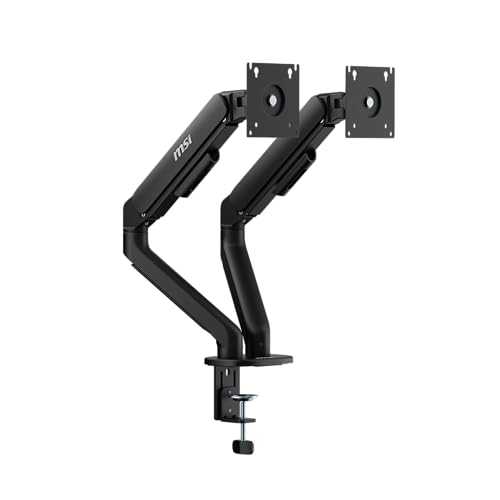
Designed for users who demand flexibility and ergonomic comfort, the MSI MAG MT101DG Gas Spring Dual Monitor Stand Arm is an excellent choice for those with dual monitor setups. It supports monitors ranging from 17 to 32 inches, accommodating up to 22 lbs per screen. Constructed from premium aluminum, it boasts durability and style. You can easily install it using either clamp or grommet bases. With VESA compatibility, a quick-release VESA plate, and full adjustability for tilt, swivel, and rotation, you’ll achieve the perfect viewing angles while enhancing your workspace efficiency. Enjoy seamless adjustments and ergonomic comfort!
Best For: Users with dual monitor setups seeking ergonomic comfort and flexibility in viewing angles.
Pros:
- Adjustable Features: Offers extensive tilt, swivel, and rotation capabilities for personalized viewing angles.
- Durable Construction: Made from premium aluminum, ensuring long-lasting durability and aesthetic appeal.
- Easy Installation: Versatile mounting options (clamp and grommet) and a quick-release VESA plate facilitate simple setup.
Cons:
- Weight Limitations: Each monitor can only weigh up to 22 lbs, which may not accommodate heavier screens.
- Compatibility Constraints: Limited to monitors with VESA mounts (75×75, 100×100 mm), excluding non-VESA monitors.
- Desktop Thickness Restrictions: Clamp and grommet bases have specific thickness requirements that may not fit all desks.
ASUS ZenScreen Stand MTS02D for Portable Monitors

Looking to enhance your portable monitor experience? The ASUS ZenScreen Stand MTS02D is your go-to solution. This ergonomic stand allows you to easily adjust tilt, pivot, and height, ensuring your monitor aligns perfectly with your eye level for maximum comfort. Weighing just 2 lbs, it supports portable monitors ranging from 1.3 to 2.5 lbs, making it versatile for any workspace. Plus, the 1/4” tripod socket increases compatibility with various setups. ASUS also focuses on sustainability, using eco-friendly packaging to reflect their commitment to the environment. Transform your work-from-home setup with this practical and stylish stand!
Best For: Professionals and students seeking an ergonomic and portable solution for enhancing their monitor experience while working from home or on the go.
Pros:
- Versatile tilt, pivot, and height adjustments for optimal ergonomic positioning.
- Lightweight design at 2 lbs, making it easy to transport and set up in various locations.
- Compatible with a wide range of portable monitors due to the 1/4” tripod socket.
Cons:
- Limited weight support, only accommodating monitors between 1.3 lbs to 2.5 lbs.
- May not provide stability for heavier monitors outside the specified weight range.
- The minimalist design might lack additional features that some users may prefer, such as built-in cable management.
Factors to Consider When Choosing Mac Studio Desk Mounts
When you’re picking a Mac Studio desk mount, you need to contemplate several key factors. Think about compatibility with your Mac model, how much space you want to save, and how easy the installation will be. Also, check the materials for durability and whether the mount offers good heat dissipation.
Compatibility With Mac Models
Choosing the right desk mount for your Mac Studio involves more than just picking a stylish design; you need to guarantee compatibility with the specific model you own. Confirm the mount supports your Mac Studio variant, whether it’s M1, M2, M3, or M4, as not all mounts are universally compatible. Some options cater specifically to the Mac Studio Max and Ultra versions, so double-check these details. If you have older models like the Mac mini (2010-2023), look for mounts that accommodate those as well. Review the specifications for necessary dimensions and weight limits to ensure a secure fit. Finally, consider the mounting style—under desk, wall, or VESA—and how it aligns with your workspace needs.
Space-Saving Design Features
After ensuring compatibility with your Mac Studio model, consider how a desk mount can optimize your workspace. Space-saving desk mounts are designed to position your device underneath the desk, freeing up valuable desktop space for other essentials. Many mounts feature a minimalist design that enhances the overall aesthetics of your workspace while keeping it organized. Some models even include removable trays for easy cleaning, ensuring a clutter-free environment. An under-desk solution reduces dust accumulation on air-intake holes, promoting better airflow and cooling for your device. Adjustable mounting options, like VESA compatibility, provide versatility in positioning, accommodating various desk sizes and configurations. This way, you can create a more efficient and functional workspace tailored to your needs.
Installation Ease and Requirements
While selecting a desk mount for your Mac Studio, it’s essential to contemplate installation ease and specific requirements to guarantee a smooth setup. First, check the desk mount’s compatibility with your desk thickness; most require a minimum of 3/4 inches for secure installation. Make sure the mounting brackets come with all necessary screws and clear installation instructions to simplify the process. A removable holding tray can also be beneficial for easy cleaning and maintenance after installation. Additionally, look for mounts that include cable management solutions, like cable ties, to keep your workspace tidy. Finally, consider the weight of the mount itself; lighter options are easier to handle, but sturdiness is vital for securely supporting your Mac Studio.
Material Durability and Strength
When setting up your Mac Studio desk mount, material durability and strength should be top of mind. The materials used in desk mounts greatly affect their performance. High-strength steel offers excellent resistance to bending and deformation, making it perfect for heavy-duty applications. On the other hand, aluminum mounts are lightweight and corrosion-resistant, guaranteeing longevity without sacrificing strength. Pay attention to the thickness of the material; for instance, 2mm steel plates can considerably enhance stability under stress. Additionally, mounts with foam pads can prevent scratches while providing extra grip and cushioning, further boosting durability. Choosing the right material will guarantee your Mac Studio setup remains secure and efficient for years to come.
Heat Dissipation Capabilities
Choosing a desk mount for your Mac Studio isn’t just about aesthetics; effective heat dissipation plays an essential role in maintaining your device’s performance. During intensive tasks, overheating can reduce efficiency and shorten your device’s lifespan. Look for desk mounts designed specifically for the Mac Studio, as they often feature open designs or ventilation gaps that enhance airflow and prevent heat buildup. Materials like aluminum or steel can also facilitate heat transfer away from your device. Make sure the mount maintains a distance from your desk’s surface to promote better airflow. Finally, avoid mounts that obstruct the Mac Studio’s air outlets, as blocked airflow considerably increases the risk of overheating. Prioritizing heat dissipation will keep your Mac Studio running smoothly.
Cable Management Solutions
Effective cable management is essential for creating a tidy workspace when you’re selecting a desk mount for your Mac Studio. Look for mounts that include features like cable ties or slots to secure and route your cables. This prevents tangling and accidental disconnections, keeping your setup organized. Proper cable management also promotes airflow around your devices, reducing the risk of overheating and ensuring peak performance. Some mounts offer easy access to ports while hiding cables, letting you connect without sacrificing aesthetics. Investing in mounts with integrated cable management systems simplifies maintenance, making rearranging or upgrading your equipment a breeze. A clean appearance not only enhances your workspace but also boosts your productivity.
Adjustability and Ergonomic Benefits
Adjustable desk mounts are key to creating an ergonomic workspace that enhances your comfort and productivity. By allowing height, tilt, and rotation adjustments, these mounts help reduce neck and back strain during extended use. Many models feature mechanical spring systems, making height changes smooth and effortless, accommodating users of various heights. Positioning your Mac Studio at eye level minimizes posture-related issues and boosts overall comfort. Improved adjustability also lets you easily switch between seated and standing positions, promoting better circulation and health. Additionally, mounts with full motion capabilities, like swivel and pivot, enable personalized viewing angles, enhancing productivity and reducing screen glare. Prioritizing these features will lead to a more efficient and comfortable working environment.
Aesthetic Considerations and Style
When selecting a desk mount for your Mac Studio, it’s important to contemplate how its design will fit your workspace’s aesthetic. Consider the design theme; minimalist styles often complement modern spaces beautifully. The color of the mount plays an essential role—options like black or white can seamlessly integrate with various office decors. Material matters too; aluminum or steel not only guarantees durability but also influences the visual weight of your setup. A sleek design enhances the perception of a clean, organized workspace, contributing to professionalism. Additionally, the mount’s form factor, whether tower-style or rectangular prism, can greatly impact the visual dynamics of your desk area, enhancing your overall user experience.
