
A Mac Studio needs room to draw in air and exhaust heat. A stand, filter case, or mount can help keep its vents clear, but the right choice depends on your desk, dust levels, and access needs.
These 10 options cover desktop risers, filtered stands, a vertical holder, and an under-desk mount. Here’s what to check before choosing one for your setup.
Best 10 Mac Studio Cooling Solutions Picks for 2026
Best Under-Desk Mount

- Frees up desk space
- Leaves air outlet unobstructed
- Steel bracket with foam padding
Best For: Under-desk placement with an open air outlet
Best Washable Filter Stand
Spigen Mac Studio Filter Case Stand

- Built-in PVC dust filter
- Detaches for rinsing
- Non-slip silicone padding
Best For: Washable dust protection on a desktop
Best Aluminum Desktop Stand

- Raises the Mac Studio
- Aluminum alloy construction
- Protective, non-slip silicone pads
Best For: Minimalist desktop elevation and underside clearance
Best Replaceable-Filter Stand
IFCASE Dust Proof Air Filter Stand

- Elevated, ventilated design
- Two spare filter sponges
- Anti-slip silicone corners
Best For: Dust filtering with included replacement sponges
Best for Easy Cleaning
Lonelyfox Mac Studio Mesh Stand

- Washable, removable dust filter
- Open-grid design promotes airflow
- Anti-slip support and storage space
Best For: Mac Studio owners who prioritize easy filter maintenance
Best Clear Design
HEWYIOS Acrylic Mac Studio Stand

- Transparent, polished acrylic
- Detachable, washable bottom filter
- Includes four filters and anti-slip pads
Best For: A clear Mac Studio setup with a cleanable filter
Best Aluminum Build
IFCASE Desktop Stand for Mac Studio

- Elevated design supports airflow
- Silver aluminum construction
- Silicone pads add grip
Best For: A minimal metal stand with anti-slip support
Best Walnut Stand
OCXLLEATLY Walnut Mac Studio M2 Stand

- Hollow base supports passive airflow
- Includes a dust filter
- Clearance for an SSD or hub
Best For: M2 Max or M2 Ultra owners seeking a walnut stand with dust protection
Best Easy-Reposition Stand
Sipnore White Mac Studio Stand
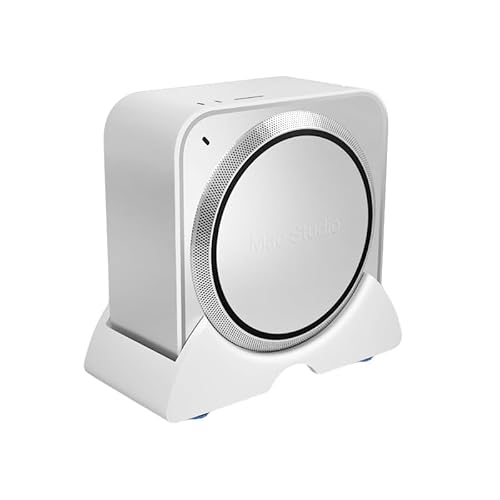
- Elevated design allows airflow
- Bottom sliders aid repositioning
- Ready to use without tools
Best For: Owners who frequently reposition their Mac Studio for cables or cleaning
Best Aluminum Stand
IFCASE Silver Mac Studio Stand

- Elevated for passive airflow
- Matte silver aluminum build
- Silicone pads add grip
Best For: Owners seeking a padded aluminum stand for a silver desktop setup
Best Under-Desk Mount – bylitco Mac Studio Holder
For shoppers comparing mac studio cooling solutions, this steel under-desk mount frees up desktop space while leaving the Mac Studio’s air outlet unobstructed. Foam padding helps hold the computer securely and protects it from scratches.
Best For: Mac Studio owners who want a clearer desk without blocking the air outlet.
Pros:
- Under-desk placement saves workspace.
- Designed to leave the air outlet open.
- 2 mm steel construction with protective foam padding.
Cons:
- Requires an under-desk mounting location.
- Does not include a fan or dust filter.
This is a placement-focused option rather than an active cooler: choose it if desk organization and an unobstructed outlet matter most.
Best Washable Filter Stand – Spigen Mac Studio Filter Case Stand
Among mac studio cooling solutions, the Spigen stand targets dust at the desktop with a built-in PVC filter. Its transparent case uses rubberized silicone padding to help keep a compatible Mac Studio from slipping.
Best For: Owners who prioritize a removable, washable dust filter.
Pros:
- Built-in filter helps limit dust buildup.
- Filter detaches for rinsing under water.
- Silicone padding provides a non-slip grip.
Cons:
- Filter needs periodic cleaning.
- Compatibility is limited to the listed Mac Studio models.
Pick this stand when easy filter maintenance is more important than adding an active cooling fan.
Best Aluminum Desktop Stand – SNANSHI Mac Studio Stand
If you prefer a simple raised platform among mac studio cooling solutions, this aluminum Mac Studio stand creates clearance beneath the computer for airflow. Its silver finish is designed to complement the Mac Studio, while silicone contact pads protect against scratches.
Best For: Mac Studio users seeking an elevated, minimalist desktop setup.
Pros:
- Raised design provides clearance beneath the Mac Studio.
- CNC-machined aluminum alloy construction.
- Top silicone pads and a non-slip bottom help protect the device and desk.
Cons:
- Designed only for Mac Studio.
- Does not provide a dust filter or powered fan.
This is a straightforward airflow-and-organization stand; its benefit comes from elevation, not active cooling.
Best Replaceable-Filter Stand – IFCASE Dust Proof Air Filter Stand
The IFCASE stand combines elevation with a replaceable dustproof sponge, making it a practical entry among mac studio cooling solutions for dusty workspaces. It is listed for Mac Studio M1–M5 Ultra/Max models and select 2020–2023 Mac minis.
Best For: Owners who want a filtered stand with spare replacement sponges.
Pros:
- Elevated design and large ventilation area support airflow.
- Includes two spare dustproof sponges.
- Anti-slip silicone corners help keep the device in place.
Cons:
- Filter sponges need replacement; the notes suggest roughly every six months, depending on conditions.
- Not compatible with the listed newer Mac mini models, including M4 and M4 Pro.
Consider this if dust control and replacement supplies matter, while allowing for routine filter upkeep.
Best for Easy Cleaning – Lonelyfox Mac Studio Mesh Stand
The Lonelyfox stand is a practical pick among mac studio cooling solutions if you want an elevated, open-grid base with a removable, washable dust filter. It is designed for M-series Mac Studio models.
Best For: Mac Studio owners who want airflow and straightforward filter maintenance.
Pros:
- Open-grid design promotes airflow around the computer.
- Removable filter can be washed and reinstalled.
- Anti-slip contact points help keep the Mac Studio in place.
Cons:
- Made specifically for Mac Studio, so it is not a general-purpose computer stand.
- Its PLA construction may not suit shoppers seeking a metal stand.
The open area beneath the riser also provides room for small accessories or cables. Choose it for an organized setup with a filter you can clean yourself.
Best Clear Design – HEWYIOS Acrylic Mac Studio Stand
For shoppers comparing mac studio cooling solutions that keep the device visible, this HEWYIOS stand pairs a transparent acrylic bracket with a detachable, washable bottom filter. Its tabletop design is tailored to Mac Studio.
Best For: Mac Studio owners who want a clear, low-profile stand with a cleanable filter.
Pros:
- Detachable bottom filter supports ventilation and can be washed.
- Comes with four filters and four anti-slip pads.
- Polished, transparent acrylic maintains a minimal look.
Cons:
- Designed only for Mac Studio, limiting use with other devices.
- The 0.55-inch-tall bracket provides a relatively low lift.
This is a good fit when appearance and filter access matter as much as raising the computer. Its listed dimensions are 7.7 by 7.7 by 0.55 inches, so check the footprint against your desk space.
Best Aluminum Build – IFCASE Desktop Stand for Mac Studio
The IFCASE aluminum stand is an option among mac studio cooling solutions for buyers who prefer a silver metal bracket. It elevates the device to improve airflow and uses silicone pads for a steadier grip.
Best For: Buyers who want a minimal aluminum desktop stand with anti-slip padding.
Pros:
- Elevated design helps airflow beneath the device.
- Aluminum construction has a silver finish.
- Silicone pads help prevent slipping and desk scratches.
Cons:
- No removable dust filter is listed.
- The supplied compatibility details mention multiple Mac models; confirm the fit for your specific device before ordering.
Pick this stand if a metal finish and simple setup are priorities. If a washable intake filter is essential, the product notes do not list one.
Best Walnut Stand – OCXLLEATLY Walnut Mac Studio M2 Stand
For shoppers comparing mac studio cooling solutions, this walnut stand raises a Mac Studio M2 Max or M2 Ultra on a hollowed-out base designed to allow passive airflow. Its natural wood finish also suits desks where appearance matters.
Best For: Mac Studio M2 Max or M2 Ultra owners who want a wood stand with dust protection and room underneath for accessories.
Pros:
- Hollow base provides a path for airflow beneath the computer.
- Includes a dust filter intended to limit particles entering the ventilation system.
- Elevated design leaves space for an SSD or external hub.
Cons:
- Specified for Mac Studio M2 Max and M2 Ultra, not the full Mac Studio lineup.
- Passive stand design does not include a fan.
Choose this one if you value walnut styling and a built-in dust filter alongside simple, fan-free elevation.
Best Easy-Reposition Stand – Sipnore White Mac Studio Stand
Among mac studio cooling solutions, this white Sipnore stand takes a straightforward approach: it raises the computer to provide more room for airflow and needs no tools to set up. Bottom sliders make it easier to reposition the stand for cable access or desk cleaning.
Best For: Owners who want an elevated Mac Studio holder they can slide into position without lifting the computer.
Pros:
- Elevated holder is designed to improve airflow around the Mac Studio.
- Four bottom sliders help with repositioning.
- No assembly or tools required.
Cons:
- Plastic construction may not suit buyers seeking a metal or wood stand.
- No dust filter is listed.
The sliding base is its most useful distinction. Check the fit against your exact Mac Studio model before buying, as the supplied compatibility descriptions are not entirely consistent.
Best Aluminum Stand – IFCASE Silver Mac Studio Stand
If you prefer metal mac studio cooling solutions, the IFCASE stand pairs an elevated layout with a matte silver aluminum build. Silicone pads help keep the computer in place while protecting contact surfaces from scratches.
Best For: Mac Studio owners who want a silver aluminum stand with a grippy, padded fit.
Pros:
- Elevated design is intended to improve airflow.
- Aluminum construction has a matte silver finish.
- Silicone pads provide grip and help guard against scratches.
Cons:
- No active fan or dust filter is listed.
- At a listed 2.5 pounds, it is heavier than some shoppers may expect from a compact stand.
This is a practical choice for matching a silver desktop setup, with passive ventilation rather than powered cooling.
How We Picked These Mac Studio Cooling Solutions
We focused on accessories that address a practical setup issue: clearance around the Mac Studio’s vents, dust at desk level, or limited desk space. The selection spans open risers, stands with filters, a vertical holder, and an under-desk mount so you can compare different approaches rather than ten versions of the same stand.
These are accessories, not replacements for the Mac Studio’s internal cooling system. A stand may improve clearance, but it cannot guarantee lower temperatures. Fit, vent access, and placement matter more than a cooling claim on the box.
Quick Comparison: Which Style Fits Your Desk?
- Open desktop risers: Raise the Mac Studio off the desk while keeping its ports easy to reach. A straightforward choice if clearance is your main concern.
- Filtered stands and cases: Add a dust barrier near the intake. They suit dust-prone rooms, provided the filter is easy to remove and clean.
- Vertical holders: Use a different footprint to reclaim desk space. Check stability and make sure the orientation does not obstruct any vents.
- Under-desk mounts: Clear the desktop entirely, but require careful installation and enough surrounding space for airflow, cables, and access.
Key Buying Factors for Mac Studio Cooling Solutions
Vent Clearance and Placement
Before buying, look at where the accessory supports the computer and whether it leaves the Mac Studio’s intake and exhaust unobstructed. Leave open space around the machine rather than pushing it against a wall, enclosing it in a tight cabinet, or packing cables around the vents. A riser also helps separate the intake area from dust and debris on the desk.
Model Fit and Stability
Check the listing against your exact Mac Studio generation; several products in this roundup name specific M-series models or year ranges. The computer should sit securely without rocking, and any mount should support its weight. For under-desk installation, confirm the mounting surface is suitable and that you can still reach the power button, ports, and connected cables.
Filters, Materials, and Maintenance
A removable filter can reduce dust reaching the intake, but a clogged filter may restrict airflow. Choose one you can inspect and clean regularly. Aluminum, wood, acrylic, and mesh designs differ in durability and appearance; none should be treated as proof of better cooling on its own. Prioritize a stable design with open airflow over material-based promises.
Who Should Buy Which Mac Studio Cooling Solutions?
Choose a simple open stand if you want more desk-level clearance with minimal upkeep. Pick a filtered stand if dust is a recurring problem and you are willing to clean the filter. Consider a vertical holder when desktop footprint matters, after checking vent access and stability. An under-desk mount makes sense when freeing the desk is the priority and you have a secure place to install it. If your Mac Studio already has clear vents and ample surrounding space, you may not need an accessory at all.
