
If you’re looking to enhance your Mac Studio setup, the right accessories can make a significant difference. From improving performance to maintaining a sleek aesthetic, these tools help organize your workspace effectively. You’ll find options ranging from protective cases to efficient stands that promote heat dissipation. But how do you choose the best ones for your needs? Let’s explore the top 10 accessories that could transform your creative environment.
Under Desk Mount Holder for Mac Studio

If you own a Mac Studio, the Under Desk Mount Holder is an ideal accessory designed specifically for your device. This sleek tower, made from durable 2mm steel and alloy steel, fits perfectly under your desk while keeping your CPU dust-free. Weighing just 1.8 pounds, it’s easy to install and enhances your workspace’s minimalist aesthetic with its powder-coated finish in white or black. Plus, the foam pad prevents scratches and accidental drops, ensuring a secure hold. With excellent heat dissipation, it won’t block air outlets, making it a top choice for Mac Studio users. Enjoy a tidy, efficient setup!
Best For: Mac Studio users seeking a space-saving and stylish under-desk solution to keep their CPU dust-free and well-ventilated.
Pros:
- Durable Construction: Made from 2mm steel and alloy steel, ensuring longevity and stability.
- Efficient Heat Dissipation: Designed to prevent overheating by not blocking air outlets, keeping your Mac Studio running smoothly.
- Minimalist Aesthetic: Available in sleek white and black finishes that enhance the look of any workspace.
Cons:
- Limited Compatibility: Specifically designed for Mac Studio models, which may not suit users with other devices.
- Installation Required: Requires under-desk mounting, which may not be ideal for all users or setups.
- Weight: At 1.8 pounds, it might be heavier than alternative mounting solutions, potentially affecting easy transport or repositioning.
RLSOCO Hard Case for Apple Mac Studio

The RLSOCO Hard Case for Apple Mac Studio is ideal for creative professionals who need reliable protection for their valuable equipment. Designed specifically for the Mac Studio M4, M3, M2, and M1 models, it keeps your device, mouse, and cables organized and safe. Made from high-density EVA and 1680D materials, this case offers dust-free, shockproof, and water-resistant protection. The precise cut-out slots prevent damage, while the comfortable silicone handle makes it easy to carry. With double YKK zippers ensuring durability, you can trust this eco-friendly case, backed by a two-year warranty, to keep your gear secure for years to come.
Best For: Creative professionals looking for reliable protection and organization for their Apple Mac Studio and accessories.
Pros:
- High-density EVA and 1680D materials provide excellent dust, shock, and water protection.
- Designed with precise cut-out slots to keep equipment organized and prevent damage.
- Eco-friendly materials and a two-year warranty ensure long-lasting quality.
Cons:
- Case does not include the Mac Studio or any accessories, which must be purchased separately.
- Weight of 1 kilogram may be considered heavy for some users.
- Limited color options as it comes in a solid color design.
IFCASE Aluminum Desktop Mount Stand for Mac Studio and Mac mini

For Mac Studio and Mac mini users seeking a sleek and efficient workspace, the IFCASE Aluminum Desktop Mount Stand stands out with its precision-engineered design. Crafted from high-grade aluminum, it offers a polished finish and lightweight portability. This stand not only elevates your device, freeing up valuable desk space, but also enhances airflow for peak cooling. With aircraft-grade brackets and silicone pads, it guarantees stability and protection against slips and scratches. Rated 4.2 stars, it’s a favorite among users. Plus, you’ll enjoy a 1-year warranty and a hassle-free 30-day return policy. Elevate your setup effortlessly!
Best For: Users of Mac Studio and Mac mini looking for an elegant solution to organize their workspace while enhancing device performance.
Pros:
- Sleek Design: Precision-engineered aluminum construction offers a polished look that complements Mac devices.
- Enhanced Cooling: Elevated design improves airflow, which helps in maintaining optimal device temperature and longevity.
- Stability and Protection: Features aircraft-grade brackets and silicone pads to prevent slips and protect your desk from scratches.
Cons:
- Weight Limitations: Being lightweight may raise concerns about stability with heavier accessories.
- Single Color Option: Only available in silver, which may not match all desk aesthetics.
- Limited Compatibility: Specifically designed for Mac Studio and Mac mini, limiting its use with other devices.
GEEKRIA Chassis Stand for Apple Mac Studio
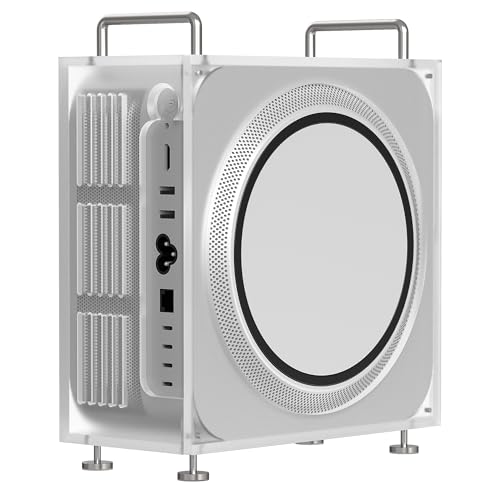
Designed specifically for Apple Mac Studio users, the GEEKRIA Chassis Stand is an ideal accessory that enhances both functionality and aesthetics. This stand, made from durable acrylic, prevents spills and dust from damaging your device while keeping your workspace tidy. Its upright design saves desktop space, and the non-slip mats guarantee stability during use. Plus, the magnetic opening allows for easy assembly and portability, making it a breeze to set up. With precise openings for power button access, it’s compatible with various Mac Studio models, assuring you can enjoy a clean, organized setup effortlessly.
Best For: Apple Mac Studio users looking to enhance their workspace organization and protect their devices.
Pros:
- Prevents spills and dust accumulation, ensuring device longevity.
- Upright design maximizes desktop space and keeps the area tidy.
- Magnetic opening allows for easy assembly and portability.
Cons:
- Limited to specific models of Apple Mac Studio, reducing versatility.
- Acrylic material may scratch more easily than metal alternatives.
- Slightly higher price point compared to basic stands on the market.
Transparent Acrylic Mac Studio Stand with Detachable Air Filter

Crafted specifically for Apple Mac Studio users, the Transparent Acrylic Mac Studio Stand with Detachable Air Filter enhances your workspace while providing essential cooling and dust protection. This stand is handmade from high-quality acrylic, ensuring durability and a sleek look that complements your Mac Studio. It features a detachable dustproof net and four filters to keep dust at bay while promoting ventilation. With easy disassembly, you can clean the filters effortlessly. Plus, the four anti-slip pads guarantee stability, preventing any unwanted movement. Elevate your setup with this elegant and functional accessory that perfectly aligns with your Mac Studio’s design.
Best For: Apple Mac Studio users seeking an elegant, functional stand that offers cooling and dust protection.
Pros:
- High-quality acrylic material provides durability and clarity, enhancing the aesthetic of your workspace.
- Detachable dustproof net and filters help maintain ventilation and keep dust accumulation at bay.
- Anti-slip pads ensure stability, preventing the stand from slipping or shaking during use.
Cons:
- Compatibility limited to only Apple Mac Studio models (M2 Max, M2 Ultra, M1 Max, M1 Ultra).
- Acrylic material may scratch more easily compared to metal or wood stands.
- Requires regular cleaning of the filters to maintain optimal performance.
Mac Studio Stand for M4/M2/M1 (2022–2024)
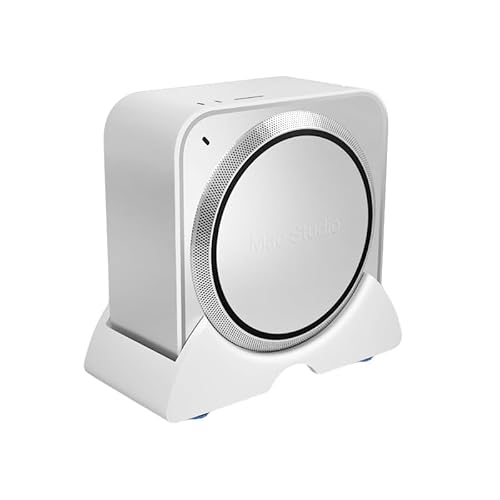
The Mac Studio Stand for M4/M2/M1 (2022–2024) is an ideal choice for users seeking to optimize their workspace while ensuring their Mac Studio remains cool and protected. This sleek white vertical desktop holder elevates your device, promoting airflow and enhancing heat dissipation, vital for peak performance. With a non-slip base and smooth sliders, repositioning is a breeze. Its space-saving design keeps your workspace tidy, safeguarding against spills and dust. Plus, it’s ready to use right out of the box—no tools needed. Elevate your setup with this essential accessory and enjoy a cleaner, more organized environment.
Best For: Users looking to enhance their workspace efficiency and protect their Mac Studio devices from dust and spills.
Pros:
- Elevated design promotes better airflow and cooling efficiency for optimal performance.
- Non-slip base with smooth sliders allows for easy repositioning without damaging surfaces.
- Tool-free setup means it’s ready to use right out of the box, saving time and effort.
Cons:
- Limited to Mac Studio models from 2022 to 2024, restricting compatibility with older devices.
- White color may show dust and fingerprints more easily than darker colors.
- Some users may prefer a more customizable stand with adjustable height or angles.
IFCASE Desktop Dust and Air Filter Stand for Mac Studio and Mac Mini

If you’re a Mac Studio or Mac Mini owner looking to keep your device clean and running efficiently, the IFCASE Desktop Dust and Air Filter Stand is an excellent choice. This minimalist stand is designed for Mac Mini (2020-2023) and Mac Studio (M1 to M4 Ultra/Max) models, boasting a large air contact area for ideal ventilation. It prevents 99.9% of dust while allowing airflow, and comes with two spare dustproof sponges for easy maintenance. With an anti-slip design and compact dimensions, it’s perfect for any setup. Plus, it has a 1-year warranty and a 30-day return policy for peace of mind.
Best For: Mac Studio and Mac Mini owners who want to maintain optimal performance and cleanliness for their devices.
Pros:
- Effective Dust Prevention: Prevents 99.9% of dust and yarn while allowing for adequate ventilation.
- Easy Maintenance: Comes with two spare dustproof sponges that are easy to replace every six months.
- Sturdy Design: Features an anti-slip design with silicone corners, ensuring stability on any surface.
Cons:
- Limited Compatibility: Not compatible with the Mac Mini M4 (2024) model.
- Regular Sponge Replacement: Requires maintenance with sponge replacements every six months based on environmental conditions.
- Size Limitations: Rectangular shape and fixed dimensions may not suit all desk setups or preferences.
Satechi Mac mini Hub & Stand with SSD Enclosure

Designed for Mac Mini M2/M1 and Mac Studio users, the Satechi Mac mini Hub & Stand with SSD Enclosure elevates your workspace while boosting connectivity. This sleek silver hub supports M.2 SSDs with speeds up to 10Gbps, offering 7-in-1 expansion ports, including USB-C and USB-A, plus Micro/SD card readers. Built with air vents, it guarantees effective cooling and heat dissipation, keeping your setup tidy. Weighing just 403 grams, it’s compact yet powerful. With a 2-year warranty and included user support, you can confidently enhance your workspace. Elevate your productivity by integrating this essential accessory into your Mac setup.
Best For: Users of Mac Mini M2/M1 and Mac Studio looking to enhance connectivity and workspace organization.
Pros:
- Versatile connectivity with 7-in-1 expansion ports, including USB-C, USB-A, and Micro/SD card readers.
- Efficient cooling design with built-in air vents to maintain optimal temperature and performance.
- Compact and stylish aluminum construction that complements Mac setups while saving desk space.
Cons:
- Not compatible with CD readers, Apple SuperDrive, or iPad charging.
- Requires SSD purchase separately, as the enclosure does not include an SSD.
- Recommended to connect only one bus-powered device at a time, which may limit simultaneous usage.
Lebakort Storage Case for Apple Mac Studio

For Mac Studio users seeking superior protection and portability, the Lebakort Storage Case stands out as a top choice. Crafted from durable nylon and hard EVA, this case shields your Mac Studio from bumps, scratches, and dust. Its thoughtful design includes a solid hand strap and a removable adjustable shoulder strap, making travel effortless. With a zippered mesh pocket for accessories and a custom-molded interior, you’ll find everything fits snugly and securely. Keep your setup organized and safe while on the go. Just remember, this case is sold separately from your Mac Studio and accessories.
Best For: Users of Apple Mac Studio who need a protective and portable storage solution for their devices.
Pros:
- Durable materials: Made from sturdy nylon and hard EVA, providing excellent protection against physical damage.
- Convenient portability: Features a hand strap and adjustable shoulder strap for easy carrying.
- Organized storage: Includes a zippered mesh pocket and custom-molded compartments for efficient organization of accessories.
Cons:
- Case only: Does not include the Mac Studio or any accessories, which must be purchased separately.
- Bulkiness: May be bulkier compared to other storage options, making it less ideal for minimalist users.
- Limited color options: Available in a limited range of colors, which may not appeal to all users.
IFCASE Desktop Dust and Air Filter Stand for Mac Studio and Mac Mini

The IFCASE Desktop Dust and Air Filter Stand is perfect for Mac Mini and Mac Studio users who want to keep their devices clean and well-ventilated. Designed to fit models from 2020 to 2023, it prevents 99.9% of dust while allowing peak air circulation. Its minimalist design maximizes ventilation, and anti-slip silicone corners guarantee stability on your desk. With two spare dustproof sponges included, maintenance is a breeze—just replace them every six months. Rated 4.2 out of 5 stars, this stand is a must-have accessory that combines functionality and style, helping you protect your setup effortlessly.
Best For: Users of Mac Mini (2020-2023) and Mac Studio (M1, M2, M3, M4 Ultra/Max) who want to maintain a clean and ventilated workspace.
Pros:
- Dustproof Design: Effectively prevents 99.9% of dust and yarn, ensuring your devices stay clean.
- Easy Maintenance: Comes with two spare dustproof sponges for hassle-free upkeep, with replacements needed only every six months.
- Stability: Features anti-slip silicone corners that prevent sliding, providing a secure setup on your desk.
Cons:
- Limited Compatibility: Not compatible with Mac Mini M4 (2024), which may limit its usability for future upgrades.
- Maintenance Requirement: Regular sponge replacement is necessary for optimal performance, adding to upkeep responsibilities.
- Moderate Customer Ratings: With a rating of 4.2 out of 5 stars, there may be some room for improvement based on customer feedback.
Factors to Consider When Choosing Mac Studio Accessories
When choosing Mac Studio accessories, you’ll want to take into account factors like compatibility with your devices and how well they protect and endure daily use. Look for space-saving solutions that also promote heat dissipation and are easy to install. Making the right choices can enhance your setup and guarantee it meets your needs.
Compatibility With Devices
Choosing the right accessories for your Mac Studio is essential to guarantee compatibility and peak performance. Make certain the accessories you select are specifically designed for your Mac Studio model, whether it’s M1, M2, M3, or M4. Look for products that explicitly state compatibility with these versions to avoid issues related to size, port access, or device stability. Features like custom moldings or cut-outs are important for best utilization, so check for those. If you’re considering mounting solutions, confirm they support your specific model to prevent overheating. Finally, verify that storage or carrying cases have dedicated compartments to protect your Mac Studio and its accessories during transport. This attention to detail keeps your setup functioning smoothly.
Protection and Durability
Selecting the right accessories for your Mac Studio isn’t just about compatibility; protection and durability play a significant role too. Prioritize materials like high-density EVA and 1680D fabric, which guard against dust, shocks, and water. Look for products with precise cut-out slots and side fixed covers to keep your accessories organized and shielded from impact. Strong zippers, especially double high-quality YKK ones, enhance the longevity and functionality of your carrying cases. Dustproof designs are essential too, as they can prevent up to 99.9% of dust accumulation while ensuring proper ventilation. Finally, choose options backed by warranties, typically around two years, to secure protection against defects and guarantee your accessories will last.
Space-Saving Solutions
To maximize your workspace efficiency, consider incorporating space-saving solutions into your Mac Studio setup. Under-desk mounting options keep your CPU off the surface, reducing dust buildup and optimizing your workspace. Vertical stands elevate devices, enhancing airflow while freeing up valuable desk space. Look for accessories with non-slip bases to guarantee stability and prevent accidental slips. Many of these stands also feature added functionality, like dust filters and cable management systems, which boost organization and cleanliness. Compact designs contribute to a minimalist aesthetic, keeping your workspace tidy and professional. By choosing the right space-saving accessories, you’ll create an efficient environment that enhances productivity and elevates your overall Mac Studio experience.
Heat Dissipation Features
While optimizing your workspace with space-saving solutions, don’t overlook the importance of heat dissipation features in your Mac Studio accessories. Effective heat management is essential for maintaining your device’s performance and longevity, especially during heavy workloads that generate excess heat. Look for accessories designed with elevated structures that enhance airflow, preventing overheating and improving cooling efficiency. Some products include optimized venting systems to keep air outlets unobstructed, promoting better heat management. Materials like aluminum or specially designed plastics can also regulate temperature effectively. Accessories with dedicated cooling features help prolong the lifespan of your Mac Studio components, mitigating risks associated with thermal stress and overheating. Make heat dissipation a priority to keep your setup running smoothly.
Ease of Installation
When considering Mac Studio accessories, ease of installation can make a notable difference in your overall experience. Look for products that require no tools for setup, allowing you to get started quickly and without hassle. Accessories that come ready to use out of the box minimize the time and effort needed to integrate them into your workspace. Clear and straightforward installation instructions are essential; they can greatly reduce errors during setup. Opt for minimalist designs, which often prioritize user convenience and simplicity, making installation easier. Finally, choose accessories with a secure fit that won’t shift after installation, enhancing your overall user experience and ensuring everything stays in place while you work.
Material Quality Considerations
Choosing the right materials for Mac Studio accessories can greatly enhance your overall experience, just like ease of installation. Opt for high-quality materials such as EVA, aluminum, and acrylic, which offer durability and protection against dust, water, and shock. Make certain the materials are eco-friendly and certified by organizations like RoHS or SGS, showing a commitment to sustainability. Look for features like reinforced stitching or robust zippers in carrying cases to guarantee longevity and functionality. Weigh the portability of materials—lighter options like aluminum deliver strength without adding unnecessary bulk. Finally, consider ease of cleaning; smooth surfaces like polished acrylic not only maintain a neat appearance but also prolong the life of your accessories.
Design Aesthetics and Style
Design aesthetics play an essential role in selecting Mac Studio accessories, as they can greatly enhance your workspace’s overall vibe. You’ll want to choose accessories that emphasize minimalist styles, which perfectly complement the sleek look of Apple products. Look for items in colors like white and silver that align with your Mac Studio’s design, creating visual harmony throughout your setup. High-quality materials such as aluminum and acrylic not only elevate the aesthetic appeal but also guarantee durability. Elegant finishes like powder coating and hand polishing enhance visual impact while providing protection. Plus, consider functional design elements that optimize airflow and prevent dust, making sure your accessories are both stylish and practical.
