
Mac mini docks with SD card reader can turn Apple’s compact desktop into a much more practical workstation. The right dock adds front-access storage, extra USB ports, and cleaner cable management without cluttering your setup.
In this roundup, we focused on docks that balance speed, compatibility, and useful expansion features so you can choose one that fits your workflow, whether you edit media, move files often, or just want a tidier desk.
Best 10 Mac Mini Docks with Sd Card Reader Picks for 2026
Best for Storage Expansion
Satechi Mac mini M4 Hub & Stand

- Adds an NVMe SSD enclosure for up to 4TB of extra storage
- Includes a UHS-II SD card reader and 3 USB-A ports
- Compact aluminum stand with self-cooling design
Best For: Mac mini M4 users who want a dock that combines storage expansion and front-access ports.
Best for Fast Dual-Card Transfers

- Reads SD and microSD cards simultaneously.
- USB-C and USB-A plugs suit Mac mini and laptop setups.
- 5Gbps transfer speed for quick media imports.
Best For: Creators and Mac users who want a compact dual-slot card reader for fast SD and microSD transfers.
Best for Power Users
UGREEN Mac mini M4 Dock with SSD

- M.2 NVMe enclosure for up to 8TB of extra storage
- SD/TF reader plus 10Gbps USB-A and USB-C ports
- 4K display support up to 144Hz on M4 and 240Hz on M4 Pro
Best For: Mac mini M4 owners who need expandable storage and fast card access in one hub.
Best for 4K Output
Anker 7-in-1 USB-C Hub with SD/TF Card Reader

- 4K@60Hz HDMI for crisp external display use
- Built-in SD and TF card slots for quick media transfer
- Three 5Gbps data ports plus up to 85W charging support
Best For: Mac users who need a compact hub for monitor output, card reading, and extra USB ports.
Best for High-Speed Card Offload
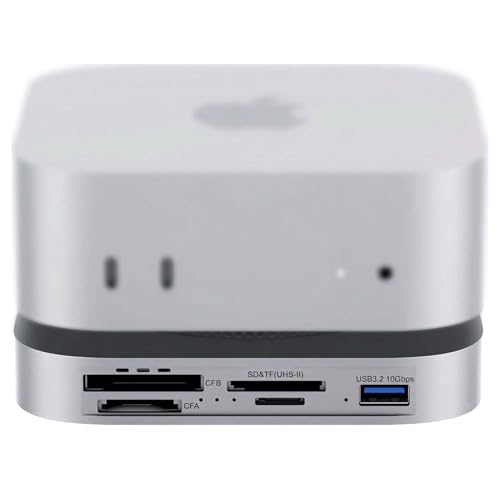
- UHS-II SD/microSD and CFexpress Type A/B readers
- 80Gbps USB4 2.0 with Thunderbolt 5/4 support
- Internal PCIe 4.0 NVMe slot up to 7000MB/s
Best For: Photographers and video editors who want fast card offload and NVMe expansion in one Mac mini dock.
Best for Fast Media Transfers
Mac mini M4 Dock & Hub with SD/TF Reader

- 4x 10Gbps USB ports for speedy accessories and storage
- SD/TF slots can read both cards at the same time
- Compact Mac mini M4 fit helps reduce desk clutter
Best For: Creators and Mac mini M4 users who move photos or video files often.
Best for Pro Card Workflows

- 80Gbps USB4v2 / Thunderbolt 5 bandwidth
- CFexpress Type A, SD 4.0, and microSD readers
- 7000MB/s NVMe slot with 8K@60Hz output
Best For: Photographers and editors who need the fastest card-reader dock with storage expansion.
Best for Creators
UGREEN Mac mini M4 Dock with NVMe SSD

- Up to 8TB NVMe expansion
- 3× USB-A 10Gbps plus USB-C ports
- Built-in UHS-I SD/TF card reader
Best For: Creators and power users who want fast storage expansion and card access in one compact dock.
Best for Dual Card Access
JESWO 6-in-1 USB-C Dock for Mac mini M4

- SD and microSD slots for fast media imports
- 4K@60Hz HDMI plus 3 USB 3.0 ports
- Compact design made for Mac mini M4/M4 Pro
Best For: Mac mini M4 owners who need easy SD and microSD access with basic desk expansion.
Best All-in-One Expansion
Stouchi Mac mini M4 Dock Stand

- 8TB SSD enclosure with NVMe/SATA support
- SD/TF reader plus HDMI, audio, and USB-A ports
- Built-in power button and Wi-Fi-friendly design
Best For: Mac mini M4 owners who want storage expansion and card-reader convenience in one dock.
Best for Storage Expansion – Satechi Mac mini M4 Hub & Stand
If you want one of the most complete mac mini docks with sd card reader, this Satechi hub adds front-facing ports and an NVMe enclosure in a compact stand design. It’s a practical pick for Mac mini M4 owners who need faster media transfers, extra USB-A connectivity, and room to expand storage without cluttering the desk.
Best For: Mac mini M4 users who want an all-in-one dock with SSD expansion, SD access, and a clean desktop footprint.
Pros:
- Built-in NVMe enclosure supports up to 4TB of extra internal storage
- Includes a UHS-II SD card reader plus three USB-A ports for everyday peripherals
- Self-cooling aluminum design helps manage heat while matching the Mac mini aesthetic
- Convenient front-access layout and integrated power button for easier daily use
Cons:
- SSD is not included, so you’ll need to buy your own drive separately
- Not compatible with heatsink-equipped or double-sided NVMe drives
- USB-A ports don’t support charging or some legacy accessories like SuperDrive
Overall, this is a strong option if you’re comparing mac mini docks with sd card reader and want more than just a few ports. The added NVMe storage and tidy stand format make it especially useful for creators and power users who want a cleaner, faster Mac mini setup.
Best for Fast Dual-Card Transfers – Acer USB-C SD Card Reader
If you need a simple add-on for mac mini docks with sd card reader support, this Acer dual-slot reader is a practical pick. It gives you USB-C and USB-A connectivity, reads SD and microSD cards at the same time, and moves files at up to 5Gbps for quick photo and video offloads.
Best For: Creators, photographers, and everyday Mac users who want a compact, plug-and-play card reader for fast transfers from SD and microSD cards.
Pros:
- Dual SD and microSD slots let you work with both card types at once.
- USB-C and USB-A connectors make it easy to use with Mac mini setups and other devices.
- 5Gbps transfer speed is fast enough for routine media imports and backups.
- Compact aluminum build with port covers makes it travel-friendly.
Cons:
- Does not support CFexpress, XQD, MS, or Memory Stick formats.
- Thick cases may keep the plug from seating fully.
- Cords and protective covers add convenience, but it is still a basic reader rather than a hub.
For buyers comparing mac mini docks with sd card reader options, this is the straightforward accessory to choose when you mainly want reliable card access without paying for a larger dock. It is a good fit if speed, portability, and easy compatibility matter more than extra ports.
Best for Power Users – UGREEN Mac mini M4 Dock with SSD
If you want one of the most capable mac mini docks with sd card reader, this UGREEN stand adds storage, display output, and front-access ports in a single clean base. It is a strong fit for users who need faster file handling, external media access, and a tidier Mac mini setup without giving up desktop space.
Best For: Mac mini M4 owners who want built-in SSD expansion, SD/TF card access, and a high-performance hub for creative or workstation use.
Pros:
- Built-in M.2 NVMe enclosure supports up to 8TB of extra storage
- Includes SD/TF card reader plus 10Gbps USB-A and USB-C ports
- 4K display support up to 144Hz on M4 and 240Hz on M4 Pro
- Matches the Mac mini form factor with a power-button lever and anti-slip pads
Cons:
- SSD is not included, so the full setup costs more
- Best features depend on using compatible NVMe drives and high-speed cables
Overall, this is a standout option if you want mac mini docks with sd card reader functionality plus real storage expansion in one compact accessory. It makes the most sense for creators, editors, and anyone who regularly moves large files between cards, drives, and the Mac mini.
Best for 4K Output – Anker 7-in-1 USB-C Hub with SD/TF Card Reader
If you want one compact add-on that handles display output, storage cards, and basic desk expansion, this Anker hub is a smart fit for mac mini docks with sd card reader. It pairs a 4K@60Hz HDMI port with dual card slots and extra USB ports, making it useful for creators and everyday Mac users who need a cleaner, all-in-one setup.
Best For: Mac users who need a compact hub for 4K HDMI, SD/TF card access, and a few extra USB ports.
Pros:
- 4K@60Hz HDMI is ideal for a sharp external monitor connection.
- Built-in SD and TF card readers are handy for photo and video workflows.
- Three 5Gbps data ports add useful expansion for drives and peripherals.
- 85W charging support helps reduce cable clutter on a busy desk.
Cons:
- The USB-C video output is data-only, so HDMI is your only display option.
- It offers solid basics, but not the broad port selection of larger docks.
- Charger not included, so full PD charging depends on your own adapter.
This Anker hub is a practical pick if you want mac mini docks with sd card reader features without overcomplicating your setup. It covers the essentials well, especially if HDMI, card access, and a few fast USB connections are the main priorities.
Best for High-Speed Card Offload – 80Gbps Mac mini M4 Dock
If you want one of the fastest mac mini docks with sd card reader setups for creative work, this 80Gbps USB4 2.0 dock is built for heavy media workflows. It combines a UHS-II SD/microSD reader, CFexpress Type A/B slots, and an internal NVMe bay, making it a strong choice for quick ingest, expanded storage, and desk-friendly Mac mini expansion.
Best For: Photographers, videographers, and Mac mini M4 Pro users who need fast card readers plus NVMe storage in one dock.
Pros:
- 80Gbps bandwidth with USB4 2.0 and Thunderbolt 5/4 compatibility
- Built-in UHS-II SD/microSD plus CFexpress Type A/B readers
- Internal PCIe 4.0 NVMe slot rated up to 7000MB/s
- Dual PWM fans and auxiliary power support for sustained workloads
Cons:
- More expensive than basic Mac mini hubs
- Overkill if you only need a simple SD card reader
For creators who routinely offload large camera files, this is one of the most capable mac mini docks with sd card reader options because it stacks fast media readers, high-speed storage expansion, and active cooling into a single compact dock.
Best for Fast Media Transfers – Mac mini M4 Dock & Hub with SD/TF Reader
If you want one of the most practical mac mini docks with sd card reader options for creative workflows, this Mac mini M4 dock adds fast expansion without cluttering the desk. It combines four 10Gbps USB ports with an SD/TF card reader, making it a solid fit for users moving photos, video, and everyday peripherals.
Best For: Photographers, video editors, and Mac mini M4 users who need fast USB expansion plus dual card support in a compact setup.
Pros:
- 4x 10Gbps ports: 2 USB-A and 2 USB-C for fast peripherals and external storage
- SD and TF slots support simultaneous card access up to 170MB/s
- Snug bottom-mount design keeps the Mac mini M4 tidy and stable
- Driver-free on macOS for simple plug-and-play use
Cons:
- Made specifically for the Mac mini M4, so it is not a universal dock
- No display output or Ethernet port for users who need a fuller desktop hub
For creators who regularly offload camera or drone footage, this is one of the more useful mac mini docks with sd card reader support because it balances speed, convenience, and a clean integrated form factor.
Best for Pro Card Workflows – 80Gbps USB4v2 Mini Dock
If you want one of the fastest mac mini docks with sd card reader support for creative work, this 8-in-1 hub stands out for its USB4v2/Thunderbolt 5 bandwidth, built-in NVMe slot, and pro-grade media readers. It is aimed at users who regularly move large photo or video files and need a compact dock that can do more than basic port expansion.
Best For: Photographers, video editors, and power users who need fast SD/CFexpress transfers plus high-speed storage expansion in one dock.
Pros:
- 80Gbps USB4v2 / Thunderbolt 5 performance with up to 7000MB/s NVMe support
- Built-in CFexpress Type A, SD 4.0, and microSD readers for creator workflows
- 8K@60Hz output with flexible power options for desk or on-the-go use
- CNC aluminum build and active cooling help maintain sustained speeds
Cons:
- Likely overkill if you only need a simple hub for basic peripherals
- Requires compatible high-speed devices and cards to fully benefit from its top-end specs
For buyers comparing mac mini docks with sd card reader support, this model makes the most sense when transfer speed and media handling matter more than price. It is a strong fit for demanding workflows, but casual users may not need all of its advanced features.
Best for Creators – UGREEN Mac mini M4 Dock with NVMe SSD
If you want one of the most capable mac mini docks with sd card reader, this UGREEN stand adds both high-speed expansion and a built-in NVMe enclosure without cluttering your desk. It’s a strong fit for users who move large files, edit media, or want extra front-access ports in a tidy Mac mini M4 setup.
Best For: Creators and power users who want fast storage expansion, multiple USB ports, and an SD/TF card reader in one compact dock.
Pros:
- Built-in NVMe enclosure supports up to 8TB of fast expandable storage
- Includes 3× USB-A 10Gbps ports plus additional USB-A and USB-C connections
- UHS-I SD/TF card reader is convenient for cameras, backups, and transfers
- Compact stand design helps keep the Mac mini setup clean and organized
Cons:
- SSD is not included, so total cost rises if you add storage
- Best performance may require an external power adapter for multi-device use
- SD reader speed is solid, but not as fast as higher-end card readers
For buyers comparing mac mini docks with sd card reader, this UGREEN model stands out because it combines docking, storage expansion, and workspace-friendly design in one unit. If you need a practical all-in-one upgrade for the Mac mini M4, it covers the essentials well.
Best for Dual Card Access – JESWO 6-in-1 USB-C Dock for Mac mini M4
If you want one of the more practical mac mini docks with sd card reader support, this JESWO 6-in-1 hub covers the essentials without adding much clutter. It gives the Mac mini M4 a built-in USB-C expansion point, HDMI output for a second display, and both SD and microSD slots for quick photo or video transfers.
Best For: Mac mini M4 owners who regularly move files from SD or microSD cards and want a simple all-in-one dock with extra USB ports.
Pros:
- Includes both SD and microSD card readers for flexible media transfer
- Adds 3 USB 3.0 ports plus 4K@60Hz HDMI in one compact unit
- Designed to match the Mac mini M4 and M4 Pro setup
- Useful for everyday peripherals like keyboards, drives, and printers
Cons:
- Only offers 5Gbps USB 3.0 speeds, not faster USB-C data ports
- Primarily tailored to Mac mini M4/M4 Pro users
- No Ethernet or audio ports for more advanced desk setups
For buyers comparing mac mini docks with sd card reader support, this JESWO model is a strong fit if you value straightforward expansion and easy card access over premium networking extras. It is a tidy, task-focused dock that makes the Mac mini feel more workstation-ready.
Best All-in-One Expansion – Stouchi Mac mini M4 Dock Stand
If you want mac mini docks with sd card reader capability and a tidy desk setup in one piece, this Stouchi stand is built around convenience. It combines an SSD enclosure, front-facing port expansion, HDMI, audio, and a power button into a single dock made specifically for the Mac mini M4.
Best For: Mac mini M4 owners who want a full-featured dock with extra storage, card slots, and easy daily access.
Pros:
- Built-in NVMe/SATA SSD enclosure supports up to 8TB for fast extra storage
- Includes SD/TF card reader, 4K@60Hz HDMI, audio, and multiple USB-A ports
- Integrated power button makes it easier to turn on the Mac mini without lifting it
- Designed to help maintain stable Wi-Fi with shielding and a low-interference build
Cons:
- SSD is not included, so you’ll need to buy storage separately
- Made for the Mac mini M4/Pro 2024, so it is not a universal dock
- Plastic construction is practical, but not as premium as some metal alternatives
This is a strong fit if you want mac mini docks with sd card reader support and a compact way to add storage at the same time. It is especially appealing for users who want fewer cables, easier power access, and a more complete Mac mini desktop setup.
How We Picked the Best Mac Mini Docks with Sd Card Reader
We prioritized docks that combine reliable SD or TF card access with genuinely useful expansion, such as USB-A/USB-C ports, NVMe enclosure support, and stable Mac mini integration. We also looked for options that make everyday workflows easier rather than adding features that sound impressive but rarely matter.
Quick Comparison
Some Mac Mini Docks with Sd Card Reader are best for simple file transfers and basic desktop expansion, while others add high-speed NVMe storage, faster USB data ports, or video output for more demanding setups. If you mainly import camera cards, a simpler dock can be enough. If you edit large media files or want fewer external drives, an NVMe-equipped model is usually the better fit.
Key Buying Factors for Mac Mini Docks with Sd Card Reader
Card Reader Speed and Format Support
Look for SD, microSD, or UHS-II support depending on your cards. Faster readers matter if you regularly copy large photo or video files. Basic readers are fine for casual backups, but creators should pay close attention to transfer speed claims and supported card types.
Port Selection
Think about your real peripherals. A good dock should cover the ports you use most, such as USB-A for older accessories, USB-C for newer devices, and sometimes HDMI, audio, or extra data ports. If you rely on external drives, more high-speed data ports are worth prioritizing.
Storage Expansion
Some of the best Mac Mini Docks with Sd Card Reader include an NVMe slot, which can be a major advantage if you want local scratch storage or a fast working drive. If you store large libraries or edit directly from external storage, this feature can save desk space and simplify your setup.
Display and Power Needs
If your dock also handles video output, check the resolution and refresh rate support carefully. For a dock that sits under or around the Mac mini, make sure the design leaves airflow unobstructed and fits your desktop layout.
Who Should Buy Which Mac Mini Docks with Sd Card Reader?
Choose a simpler hub if you mainly need card access and a few extra ports. Pick an NVMe-equipped dock if you want one device to handle storage expansion and desktop connectivity. Creators, photographers, and anyone who regularly offloads memory cards will usually benefit most from higher-speed readers and more flexible port layouts.
If you want the cleanest setup possible, look for a dock that matches your accessory mix today while leaving room for future devices. That balance matters more than chasing the longest spec sheet.
