
Mac mini docks with NVMe slot turn a compact desktop into a far more flexible workstation. They add fast external storage, useful ports, and a tidier footprint without giving up the Mac mini’s small size.
If you want quicker project access, easier device charging, and a cleaner desk, the right dock can make a big difference. The best choice depends on your storage needs, display setup, and how many peripherals you use every day.
Best 10 Mac Mini Docks with Nvme Slot Picks for 2026
Best for Pro Media Offload
80Gbps Mac mini Dock with NVMe
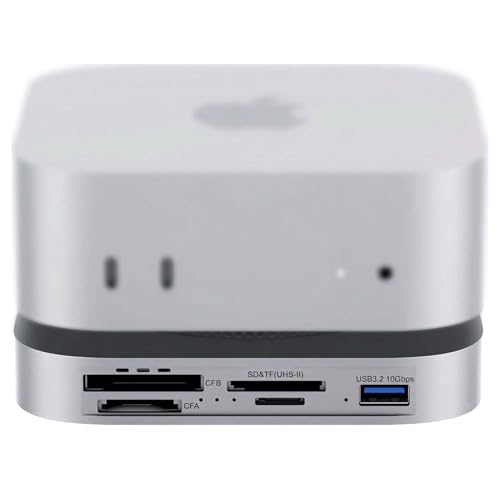
- 80Gbps USB4 2.0 with Thunderbolt 5/4 support
- M.2 NVMe slot up to 7000MB/s
- CFexpress A/B plus UHS-II SD/microSD readers
Best For: Mac mini M4/M4 Pro owners who need fast storage expansion and pro-grade card offload.
Best for SSD Expansion
Mac mini M4 Dock with NVMe Slot

- Built-in NVMe/SATA SSD enclosure up to 8TB
- 10Gbps USB-A and USB-C for fast data transfer
- 4K60Hz HDMI plus SD/TF, audio, and charging
Best For: Mac mini owners who want extra internal-style storage and a compact all-in-one dock.
Best for Modular Expansion
13-in-1 Docking Station with NVMe Slot

- Four modular expansion bays for customizable I/O
- Built-in PCIe 3.0 NVMe slot for fast local storage
- 2.5Gb Ethernet and DisplayPort 1.4 for pro workflows
Best For: Creators and power users who want a customizable dock with fast storage and card-reader flexibility.
Best for All-in-One Expansion
UGREEN Mac mini M4 Dock with NVMe

- Up to 8TB NVMe storage expansion
- 11-in-1 hub with USB-A, USB-C, and SD/TF
- Compact stand with power button lever
Best For: Mac mini M4 users who want storage expansion and a desktop hub in one tidy dock.
Best for Thunderbolt 5 Speed
80Gbps USB4v2 Mini Dock with NVMe Slot

- 80Gbps USB4v2 / Thunderbolt 5 bandwidth
- Up to 7000MB/s NVMe SSD slot
- CFexpress Type A, SD 4.0, and microSD readers
Best For: Creators who want the fastest storage-focused dock with pro card readers and 8K output.
Best Dual-Bay Storage
ACASIS Mac mini M4 Dual-Bay NVMe Dock
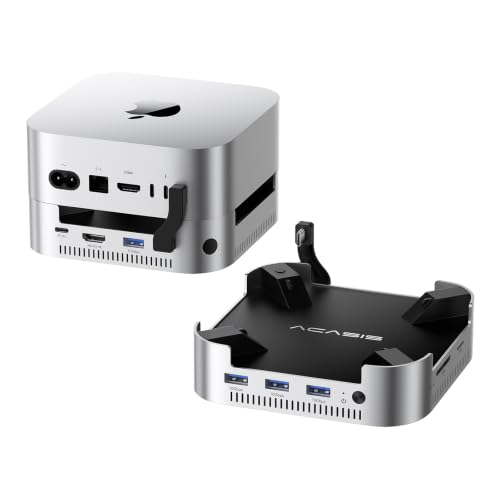
- Dual NVMe bays for up to 16TB of storage
- 4K60Hz HDMI plus 10Gbps USB-A and SD/TF
- Aluminum dock with cooling fans and stable power
Best For: Mac mini owners who want a high-capacity dock with built-in NVMe expansion and clean desktop connectivity.
Best for Built-In NVMe Expansion
Satechi Mac mini M4 Hub & Stand with NVMe

- Adds NVMe storage in a compact dock-and-stand design
- Includes USB-A ports and an SD card reader
- Self-cooling layout helps keep the setup tidy and practical
Best For: Mac mini M4 owners who want a single hub, stand, and NVMe storage upgrade.
Best Heavy-Duty Pick
UGREEN Mac mini M4 Dock with NVMe SSD Enclosure

- Adds an internal NVMe slot for up to 8TB of expansion
- Includes 10Gbps USB-A/USB-C, SD/TF, audio, and DP
- Built as a matching stand with power-button access
Best For: Mac mini users who want integrated SSD expansion and a tidy all-in-one dock.
Best Simple Pick
Stouchi Mac mini M4 Dock Stand

- 8TB NVMe/SATA SSD enclosure built into the dock
- 10Gbps USB-A, HDMI, SD/TF, and audio ports
- Bottom power button and stable, tidy Mac mini fit
Best For: Mac mini M4 users who want storage expansion and a full hub in one compact stand.
Best for Pro Media Offload – 80Gbps Mac mini Dock with NVMe
If you want one of the most capable mac mini docks with nvme slot support, this 80Gbps dock is built for serious storage expansion and media workflows. It combines a PCIe 4.0 NVMe bay with CFexpress Type A/B and UHS-II card readers, making it a strong fit for creators who move large files all day.
Best For: Mac mini M4 or M4 Pro users who need fast NVMe expansion plus built-in card readers for photo and video work.
Pros:
- 80Gbps USB4 2.0 design with Thunderbolt 5/4 compatibility
- Built-in M.2 NVMe slot rated up to 7000MB/s for fast local storage
- CFexpress Type A/B plus UHS-II SD and microSD readers in one dock
- Dual PWM cooling fans and auxiliary power support for heavier workloads
Cons:
- More expensive than basic USB-C Mac mini hubs
- Best performance depends on a high-end SSD and compatible host port
For photographers and editors, this is a notably specialized option among mac mini docks with nvme slot storage: it prioritizes speed, card access, and cooling over minimalism. If you need a compact desk dock that doubles as a media ingest station, it stands out.
Best for SSD Expansion – Mac mini M4 Dock with NVMe Slot
If you want one of the most flexible mac mini docks with nvme slot support, this aluminum stand-and-hub is built to add storage, ports, and a cleaner desktop layout in one step. It pairs a built-in M.2 enclosure with 4K60Hz HDMI, fast USB-A/USB-C data ports, SD/TF card slots, audio, and USB-C power passthrough for a practical all-in-one setup.
Best For: Mac mini M4 and M4 Pro owners who want extra SSD storage plus a compact dock with useful everyday connectivity.
Pros:
- Built-in M.2 NVMe/SATA enclosure supports up to 8TB
- Includes 10Gbps USB-A and USB-C ports for fast transfers
- 4K@60Hz HDMI output covers single-monitor setups
- Aluminum stand design helps keep the Mac mini desktop tidy
Cons:
- Only one HDMI output, so no dual-display support
- May need USB-C charging connected for stable SSD performance
- Best fit is Mac mini M4/M4 Pro; broader compatibility is secondary
For buyers comparing mac mini docks with nvme slot, this model stands out because it combines storage expansion and a useful hub without adding much clutter. It is a strong choice if you want to turn the Mac mini into a more capable desktop workstation while keeping the footprint small.
Best for Modular Expansion – 13-in-1 Docking Station with NVMe Slot
If you want one of the most flexible mac mini docks with nvme slot support, this 13-in-1 station stands out for its modular expansion bays and built-in PCIe 3.0 NVMe storage option. It is a strong fit for creators and power users who need fast file access, Ethernet, display output, and multiple device connections in one desktop hub.
Best For: Mac users who want a highly configurable dock with room for fast local storage and media-card expansion.
Pros:
- Four modular bays let you add the card readers and ports your workflow actually needs
- Built-in NVMe slot supports fast storage expansion up to 2800 MB/s
- Includes 2.5Gb Ethernet, DisplayPort 1.4, USB-C, and daisy-chain support
- Works with Thunderbolt 3/4 and USB4 systems for broad compatibility
Cons:
- Expansion modules are sold separately
- USB-A ports are limited to USB 2.0 speeds
- Requires a compatible Thunderbolt 3/4 or USB4 laptop, not a true universal dock
For buyers comparing mac mini docks with nvme slot options, this model is especially appealing if you value customization and storage speed over simplicity. It is less of a basic plug-and-play dock and more of a scalable desktop hub for demanding workflows.
Best for All-in-One Expansion – UGREEN Mac mini M4 Dock with NVMe
If you want one of the most practical mac mini docks with nvme slot support, this UGREEN stand combines extra storage, fast data ports, and a clean footprint in a single accessory. It adds an M.2 NVMe enclosure for up to 8TB of expansion, plus a useful mix of USB-A, USB-C, and SD card connectivity for everyday desk use.
Best For: Mac mini M4 owners who want to add high-speed NVMe storage and a full desktop hub without cluttering the setup.
Pros:
- Built-in NVMe enclosure supports 2230/2242/2260/2280 drives up to 8TB
- Includes 11-in-1 connectivity with fast USB-A, USB-C, and SD/TF card access
- Compact stand design helps keep the Mac mini setup tidy and organized
- Power button lever makes it easier to start the Mac without lifting it
Cons:
- SSD is not included, so total cost depends on the drive you add
- Best performance may require an external power adapter for multi-device use
For buyers comparing mac mini docks with nvme slot, this model stands out because it balances expansion, speed, and desk organization rather than focusing on just one feature. It is a strong fit if you want storage growth and extra ports in one neatly integrated dock.
Best for Thunderbolt 5 Speed – 80Gbps USB4v2 Mini Dock with NVMe Slot
If you want one of the fastest mac mini docks with nvme slot options available, this 8-in-1 USB4v2 hub is built for heavy media work, fast local storage, and high-resolution displays. It combines an internal NVMe bay, pro-grade card readers, and 8K output in a compact dock that makes sense for creators who regularly move huge files.
Best For: Video editors, photographers, and power users who need ultra-fast storage expansion plus a premium card-reader workflow.
Pros:
- 80Gbps USB4v2 / Thunderbolt 5 support with up to 7000MB/s NVMe performance
- CFexpress Type A, UHS-II SD 4.0, and UHS-II microSD readers for fast ingest
- 8K@60Hz video output plus cooling-focused CNC aluminum construction
- Flexible bus-powered or auxiliary power operation for different setups
Cons:
- Overkill if you only need basic USB ports and occasional storage expansion
- Full performance depends on a compatible high-bandwidth host device
- Fans and premium hardware likely make it pricier than simpler docks
For buyers comparing mac mini docks with nvme slot, this model stands out for raw speed and creator-friendly I/O rather than minimalism. It is a strong fit if you value fast local scratch storage, quick card offloads, and display flexibility in one compact dock.
Best for Desk Clutter Control – M5 Retro Dock for Mac mini M4
If you want one of the more distinctive mac mini docks with nvme slot support, this retro-style dock turns a Mac mini into a compact all-in-one workstation. It adds a built-in 5-inch HD display, multiple USB ports, SD/microSD readers, audio, and expandable NVMe storage, making it a strong fit for users who want both cleaner cable management and extra functionality.
Best For: Mac mini owners who want a space-saving dock with built-in display, fast storage expansion, and a more desktop-friendly hub layout.
Pros:
- Built-in M.2 NVMe enclosure supports up to 8TB for fast local storage expansion
- Integrated 5-inch HD display adds useful at-a-glance information without extra clutter
- Multiple 10Gbps USB ports plus SD/microSD and audio jack cover everyday peripherals
- Retro integrated design helps streamline the Mac mini setup and reduce desk clutter
Cons:
- The built-in display is useful, but small for serious multitasking
- Thunderbolt 5 / 80Gbps version is not the standard option and arrives later
- Best suited to users who want a docked setup rather than a minimalist standalone Mac mini
This is a smart pick if you want mac mini docks with nvme slot functionality plus extra front-facing convenience features in one compact chassis. It is less about raw workstation expandability than about creating a tidy, practical desktop hub with storage built in.
Best Dual-Bay Storage – ACASIS Mac mini M4 Dual-Bay NVMe Dock
If you want one of the most capable mac mini docks with nvme slot support, this ACASIS stand-out combines a dual-bay SSD enclosure with a 4K60Hz HDMI hub and high-speed USB expansion. It’s a practical pick for users who need both extra storage and desk-friendly connectivity in one aluminum dock.
Best For: Mac mini users who want maximum internal-style storage expansion plus a clean all-in-one dock for peripherals and display output.
Pros:
- Dual NVMe bays support up to 16TB of fast expandable storage
- Includes 4K@60Hz HDMI, 3x 10Gbps USB-A ports, and SD/TF slots
- 30W power delivery and dual fans help keep the dock stable and cool
- Aluminum build and Mac mini-shaped design make it look tidy on the desk
Cons:
- Requires installing your own NVMe drives
- Not ideal if you only need a simple USB hub
- Performance depends on SSD mode and setup
This is a strong fit if your main priority is storage expansion, since many mac mini docks with nvme slot options only add a single drive bay. The ACASIS model goes further with dual-bay capacity, making it especially appealing for creators, file-heavy workflows, and anyone trying to keep a Mac mini setup compact.
Best for Built-In NVMe Expansion – Satechi Mac mini M4 Hub & Stand with NVMe
If you want one of the most capable mac mini docks with nvme slot options, this Satechi hub is built to add fast storage and everyday connectivity without turning your desk into a cable mess. It combines an NVMe SSD enclosure with USB-A ports, an SD card reader, and an elevated stand design that keeps the Mac mini M4 neat and accessible.
Best For: Mac mini M4 owners who want a tidy all-in-one dock with local NVMe storage expansion for media, projects, and backups.
Pros:
- Integrated NVMe enclosure adds internal-style storage expansion
- Two USB-A ports up to 10Gbps plus a separate USB-A data port
- SD card reader is handy for camera imports and quick file transfers
- Optimized self-cooling design helps manage heat during heavier use
Cons:
- SSD is not included, so you’ll need to buy your own NVMe drive
- Designed specifically around the Mac mini M4 shape and layout
This is a strong pick if you want one of the more practical mac mini docks with nvme slot support, especially if you value desk-friendly storage expansion over extra display outputs or advanced networking. It’s a clean, focused setup for users who want more ports and fast local storage in a single compact base.
Best Heavy-Duty Pick – UGREEN Mac mini M4 Dock with NVMe SSD Enclosure
If you want one of the most practical mac mini docks with nvme slot, this UGREEN stand adds both desktop organization and real storage expansion in a single unit. It gives the Mac mini M4/M4 Pro a cleaner footprint while adding an M.2 NVMe bay, fast USB data ports, SD/TF card access, audio, and DisplayPort support for a more capable everyday setup.
Best For: Mac mini users who want a dockable stand with NVMe storage, extra ports, and a tidy all-in-one desk setup.
Pros:
- Built-in M.2 NVMe slot supports multiple SSD sizes for up to 8TB expansion
- Fast 10Gbps USB-A and USB-C ports plus SD/TF card reader and audio jack
- DisplayPort supports up to 4K@144Hz on M4 and 4K@240Hz on M4 Pro
- Designed to match the Mac mini shape with a power-button lever and anti-slip pads
Cons:
- SSD is not included, so you’ll need to buy storage separately
- DisplayPort output alone may not cover every multi-monitor layout
- NVMe install adds a little setup compared with a simple pass-through dock
This is a strong pick if you want mac mini docks with nvme slot functionality without adding a separate SSD enclosure to your desk. It combines storage, connectivity, and a stable stand in a compact package, making it especially appealing for users who want a cleaner Mac mini workstation.
Best Simple Pick – Stouchi Mac mini M4 Dock Stand
If you want one of the most practical mac mini docks with nvme slot support, this Stouchi stand is built to combine extra storage, everyday ports, and a cleaner desktop in one package. It adds an internal SSD bay, USB connections, card readers, HDMI, audio, and a handy bottom power button, making it a solid fit for a Mac mini M4 setup that needs more flexibility without a pile of adapters.
Best For: Mac mini M4 owners who want a tidy all-in-one dock with fast SSD expansion and plenty of ports.
Pros:
- Supports an M.2 NVMe or SATA SSD up to 8TB for built-in extra storage
- Includes 10Gbps USB-A ports, SD/TF card readers, HDMI, and 3.5mm audio
- Bottom-mounted power button makes turning on the Mac mini easier
- Designed to help keep Wi-Fi stable while multiple devices are connected
Cons:
- SSD is not included, so you’ll need to buy your own drive
- Made specifically for Mac mini M4/Pro 2024, so it has limited compatibility
Overall, this is a strong pick if you want mac mini docks with nvme slot support that feels more like an integrated workstation than a basic hub. It is especially appealing if you value storage expansion, easy access to ports, and a neater setup in a single accessory.
How We Picked the Best Mac Mini Docks with Nvme Slot
We focused on docks that combine practical expansion with strong real-world usability: NVMe enclosure speed, port variety, display output support, build quality, and compatibility with Mac mini M4 and M4 Pro setups. Priority went to models that balance storage performance with day-to-day convenience, not just headline specs.
Quick Comparison
Use a simpler dock if you mainly want one fast SSD and a few extra ports. Choose a more advanced model if you need higher-speed USB4 or Thunderbolt-class connectivity, dual-bay storage, or specialty readers like SD, microSD, or CFexpress. Many Mac Mini Docks with Nvme Slot are aimed at creators and power users, while others are better for general productivity and home office use.
Key Buying Factors for Mac Mini Docks with Nvme Slot
NVMe Enclosure Speed and Capacity
Check whether the dock supports the speeds and drive sizes you actually plan to use. A faster interface helps with large files, video editing, and backups, while capacity matters if you want the dock to replace a separate external SSD.
Port Selection
Look for the mix of USB-A, USB-C, card readers, audio, and video output that matches your setup. If you use cameras, tablets, or legacy peripherals, extra USB-A ports can be more valuable than another high-spec connector.
Display Output
Some docks prioritize HDMI, while others use DisplayPort or newer USB4/Thunderbolt connections for higher refresh rates and resolutions. Match the dock to your monitor so you do not pay for display performance you will never use.
Power and Thermals
Confirm whether the dock supports bus-powered use, external power delivery, or both. Good cooling and an aluminum build can help maintain SSD performance and keep the dock stable during long sessions.
Who Should Buy Which Mac Mini Docks with Nvme Slot?
Buy a streamlined dock if you mainly want a cleaner Mac mini setup with a single fast SSD and a few daily-use ports. Choose a creator-focused dock if you need card readers, stronger display support, or faster file transfers. Pick a dual-bay or premium USB4 option if you work with large media libraries, frequent backups, or multiple external devices.
If your priority is convenience, any of the better Mac Mini Docks with Nvme Slot can simplify your workspace. If your priority is speed and expansion, spend more on interface bandwidth and storage flexibility first.
