
If you want a cleaner desk and more storage from a single accessory, mac mini docks with dual drive bays are a smart upgrade. They can add NVMe expansion, extra ports, and a more desktop-friendly setup without taking much space.
In this roundup, we focused on practical options for creators, power users, and anyone who wants faster external storage alongside a better Mac mini workflow.
Best 10 Mac Mini Docks with Dual Drive Bays Picks for 2026
Best for Storage Expansion
ACASIS Mac mini M4 Dual-Bay Dock
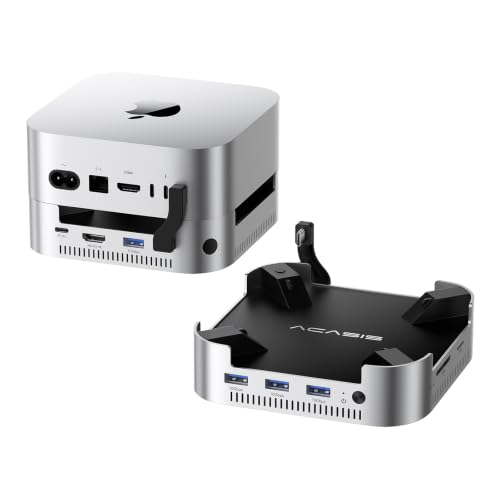
- Dual NVMe bays with up to 16TB expansion
- 4K@60Hz HDMI and 10Gbps USB-A ports
- Aluminum stand with dual-fan cooling
Best For: Mac mini users who need dual-SSD storage expansion with a dock-and-stand design.
Best for High-Bandwidth Expansion
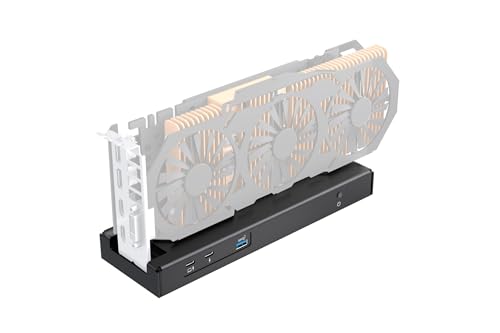
- 80Gbps Thunderbolt 5 / USB4 bandwidth
- Up to 140W PD charging and daisy chaining
- Flexible SFX, ATX, FLEX, and DC power support
Best For: Power users who need an external GPU dock with fast connectivity and flexible power options.
Best for Swappable Drive Access

- Dual bays for 2.5-inch and 3.5-inch bare drives
- USB-C with up to 522MB/s speeds
- Independent power switches for simultaneous use
Best For: Users who need fast, easy access to bare drives for backup, cloning, and transfers.
Best for One-Cable Expansion
TobenONE 13-in-1 Mac mini M4 Dock

- Built-in NVMe enclosure supports up to 8TB
- 4K@144Hz DisplayPort and 4K@60Hz HDMI
- 5 USB ports, SD/microSD, audio, and power button
Best For: Mac mini M4 owners who want a tidy dock/stand with fast storage and versatile display support.
Best for Photographers
80Gbps Mac mini Dock with NVMe & Card Readers
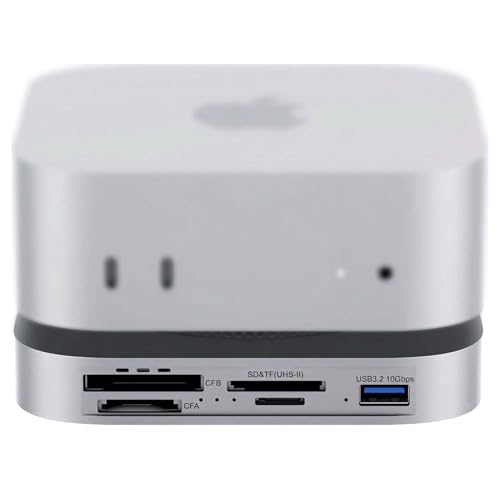
- 80Gbps USB4 2.0 / Thunderbolt 5-ready connectivity
- Internal NVMe slot plus CFexpress A/B and UHS-II readers
- Dual PWM cooling fans for steadier heavy transfers
Best For: Photo and video creators who need fast card offloads and high-speed storage expansion.
Best for High-Speed Expansion
Mate Mini-A 80Gbps Mac mini Dock

- Dual PCIe SSD bays with up to 16TB expansion
- 80Gbps USB-C plus 2.5G LAN and SD 4.0
- Compact dock-and-stand design with active cooling
Best For: Mac mini users who want fast storage expansion and a full-featured desktop hub.
Best for Dual-Display Power Users
ACASIS 40Gbps Mac mini M4 Dock
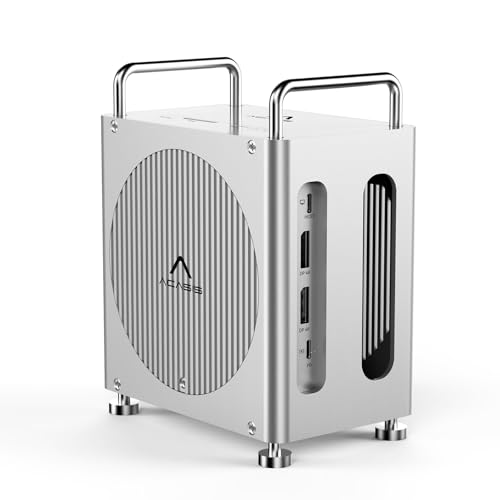
- Dual NVMe bays with RAID support
- 40Gbps host connection for fast transfers
- Dual DisplayPort plus USB-A, SD, and TF ports
Best For: Mac mini M4 owners who want fast dual-drive expansion and multi-display flexibility.
Best for Single-SSD Expansion
UGREEN Mac mini M4 Dock & Stand

- Up to 8TB NVMe expansion
- Three 10Gbps USB-A ports
- SD/TF reader and compact stand
Best For: Mac mini M4 users who want fast storage expansion and extra ports in one tidy dock.
Best Simple Pick

- 40Gbps NVMe enclosure with up to 8TB support
- Dual HDMI for 2× 4K@60Hz displays
- 4× 10Gbps USB-A ports plus active cooling
Best For: Users who want fast SSD expansion, dual monitors, and a compact Mac mini M4 dock.
Best for Storage Expansion – ACASIS Mac mini M4 Dual-Bay Dock
If you want one of the most storage-focused mac mini docks with dual drive bays, this ACASIS stand turns a Mac mini M4 or M4 Pro into a compact hub with room for two NVMe SSDs, 4K60 HDMI, and fast USB-A peripherals. It’s a practical pick for users who need extra capacity, cleaner cable management, and a stable self-powered setup.
Best For: Mac mini owners who want dual-SSD expansion, 4K display output, and a dock that doubles as a tidy stand.
Pros:
- Dual NVMe bays support up to 16TB of added storage
- 4K@60Hz HDMI plus 3 USB-A 10Gbps ports for everyday connectivity
- Aluminum body and dual fans help manage heat during long sessions
- Includes power adapter, cable, thermal pad, and install tools
Cons:
- SSD installation and setup take more effort than a simple plug-in hub
- Requires careful handling since SSDs should not be swapped while powered on
For buyers comparing mac mini docks with dual drive bays, this model stands out for combining real storage expansion with useful ports and cooling in a single under-desk-friendly footprint. It’s especially appealing if your main goal is to add capacity without giving up a clean Mac mini layout.
Best for High-Bandwidth Expansion – TREBLEET 80Gbps eGPU Dock
If you’re shopping for mac mini docks with dual drive bays, this isn’t that kind of dock—but it is a strong pick if your setup needs serious external bandwidth, power delivery, and expansion flexibility. The TREBLEET 80Gbps eGPU enclosure is built around Thunderbolt 5 and USB4, making it a practical choice for users who want desktop-class graphics performance from a compact Mac or Windows system.
Best For: Power users who need an external GPU dock with fast 80Gbps connectivity, charging support, and flexible PSU options for demanding workstation or gaming setups.
Pros:
- 80Gbps JHL9480 controller for very fast Thunderbolt 5 / USB4 performance
- Supports up to 140W PD charging with daisy-chain capability
- Works with SFX, ATX, FLEX, and DC power input options
- Compatible with Intel and AMD systems, plus laptops and handheld PCs
Cons:
- Requires a compatible host with USB4 or Thunderbolt support
- Not a storage dock, so it won’t add dual drive bays to a Mac mini
- DIY setup and driver checks may be intimidating for casual buyers
This is a niche expansion dock rather than one of the mac mini docks with dual drive bays, but it stands out for users who care more about external GPU performance than onboard storage. If your priority is graphics horsepower, charging, and flexibility, it’s a capable specialty option.
Best for Swappable Drive Access – OWC Drive Dock Dual Bay
If you need one of the more practical mac mini docks with dual drive bays, the OWC Drive Dock is a straightforward way to read and swap 2.5-inch or 3.5-inch drives without opening a case. Its USB-C connection, independent power switches, and support for simultaneous operation make it a strong fit for quick backups, drive cloning, and working with multiple bare drives on a Mac mini.
Best For: Users who want easy access to bare drives for backup, transfer, and drive-to-drive workflows on Mac or PC.
Pros:
- Dual drive bays support 2.5-inch and 3.5-inch bare drives
- USB-C connectivity with up to 522MB/s transfer speeds
- Independent power switches let you run both drives at once
- Mac and PC compatible for flexible cross-platform use
Cons:
- Not a dock in the traditional hub-and-ports sense
- Bulky compared with single-bay or portable drive enclosures
- Best suited to drive workflows, not general desktop expansion
For buyers comparing mac mini docks with dual drive bays, this model stands out as a reliable tool for direct drive access rather than a general-purpose accessory hub. It is especially useful if you regularly swap bare drives, clone storage, or need a simple two-bay setup with strong compatibility.
Best for One-Cable Expansion – TobenONE 13-in-1 Mac mini M4 Dock
If you want one of the more capable mac mini docks with dual drive bays in spirit—plus monitor outputs, card readers, and extra USB ports—this TobenONE dock is built for a busy desk. It adds a built-in NVMe SSD enclosure, supports up to 8TB, and gives you a cleaner all-in-one setup for storage, displays, and everyday peripherals.
Best For: Mac mini M4 owners who want a compact hub/stand with fast external storage, dual-monitor flexibility, and easy desktop access to ports.
Pros:
- Built-in M.2 NVMe enclosure supports up to 8TB of fast extra storage
- DisplayPort 4K@144Hz plus HDMI 4K@60Hz for flexible multi-monitor setups
- Includes five USB ports, SD/microSD readers, and a 3.5mm audio jack
- One-touch power button and stand design help keep the desk tidy
Cons:
- Only includes one SSD enclosure, not true dual-drive-bay storage
- SSD is not included, so you’ll need to buy your own NVMe drive
- Best suited to the Mac mini M4/M4 Pro ecosystem rather than universal use
For buyers comparing mac mini docks with dual drive bays, this model stands out more for its polished all-in-one design and strong display support than for maximum storage expansion. It’s a smart pick if you want a tidy dock/stand combo with room for one high-speed SSD and plenty of connectivity.
Best for Photographers – 80Gbps Mac mini Dock with NVMe & Card Readers
If you want one of the most capable mac mini docks with dual drive bays-style storage expansion for a media-heavy setup, this 80Gbps dock is built for speed and workflow flexibility. It pairs an internal NVMe slot with dedicated CFexpress and SD/microSD readers, making it a strong fit for editors, photographers, and anyone moving large files off a Mac mini M4 or M4 Pro.
Best For: Photo and video pros who need fast offloads, internal NVMe expansion, and plenty of memory card connectivity in one dock.
Pros:
- 80Gbps USB4 2.0 support for very fast data transfers on compatible Macs
- Built-in M.2 NVMe slot plus CFexpress Type A/B and UHS-II SD/microSD readers
- Dual PWM cooling fans help keep sustained write speeds more stable
- Includes USB-A and auxiliary power options for a more complete desktop hub
Cons:
- Overkill if you only need basic USB ports and external storage
- Top speed depends on your SSD, card type, and host connection
- More expensive and specialized than simpler dock options
For buyers comparing mac mini docks with dual drive bays, this model stands out less for raw storage capacity than for its pro-grade card access and high-bandwidth NVMe support. It makes the most sense when your Mac mini is part of a content-creation workstation rather than a general-purpose desk setup.
Best for Dual-Storage Power Users – ACASIS 40Gbps Mac mini M4 Dock with Dual NVMe
If you want one of the most capable mac mini docks with dual drive bays, this ACASIS stand is built for serious expansion. It adds two NVMe slots, dual DisplayPort outputs, fast USB-A ports, and SD/TF 4.0 in a compact aluminum enclosure that keeps the Mac mini M4 organized and cool.
Best For: Mac mini M4 and M4 Pro users who need high-capacity SSD expansion plus extra display and peripheral connectivity in one desktop dock.
Pros:
- Dual NVMe bays support up to 16TB of expandable storage
- 40Gbps-class dock with dual DisplayPort output and 4K60Hz dual-display support
- Three 10Gbps USB-A ports plus SD/TF 4.0 for fast workflow transfers
- Aluminum build with dual fans and included 30W power adapter for stability
Cons:
- Requires careful setup, and SSDs should not be swapped while powered on
- Best performance may depend on using the recommended higher-wattage adapter and compatible cables
For buyers comparing mac mini docks with dual drive bays, this ACASIS model stands out for its mix of storage capacity, display support, and practical desktop expansion. It is especially appealing if you want the dock and SSD enclosure in a single, tidy footprint.
Best for High-Speed Expansion – Mate Mini-A 80Gbps Mac mini Dock
If you want one of the most capable mac mini docks with dual drive bays, the Mate Mini-A is built for speed and expansion first. It combines dual SSD slots, 2.5G Ethernet, SD card support, and a compact stand design that turns a Mac mini M4 setup into a more flexible desktop hub.
Best For: Mac mini users who need fast external storage, wired networking, and a tidy dock-and-stand combo for demanding creative or productivity workflows.
Pros:
- Dual PCIe SSD bays support up to 16TB of extra storage
- 80Gbps USB-C connectivity is ideal for large files and heavier workflows
- Includes 2.5G LAN, SD 4.0, USB-A ports, and PD 3.0 passthrough
- Built-in cooling helps maintain performance in a compact footprint
Cons:
- SSD drives are not included
- Most advanced features are best matched with Mac mini M4 Pro or USB4/Thunderbolt systems
- More of a performance dock than a simple space-saving stand
This is a strong pick if your priority is storage expansion and fast I/O, not just desk organization. Among mac mini docks with dual drive bays, it stands out for its unusually high bandwidth and workstation-style feature set.
Best for Dual-Display Power Users – ACASIS 40Gbps Mac mini M4 Dock
If you want one of the most feature-packed mac mini docks with dual drive bays, this ACASIS model is built for heavy multitasking, fast external storage, and a cleaner desk setup. It combines a 40Gbps host connection, dual M.2 NVMe bays, and dual DisplayPort output so you can expand a Mac mini M4 or M4 Pro without relying on a pile of dongles.
Best For: Mac mini owners who want RAID-capable dual SSD storage, dual-monitor support, and a single dock that can handle creative or productivity workflows.
Pros:
- Dual NVMe bays with RAID 0, RAID 1, JBOD, and default modes
- 40Gbps host connection for fast overall throughput
- Dual DisplayPort support plus USB-A, SD, and TF expansion
- Good fit for desktop setups that need storage and I/O in one unit
Cons:
- RAID and dual-display use can reduce SSD performance in some setups
- Premium feature set makes it more complex than a basic hub
- Best suited to Mac mini M4/M4 Pro owners, not universal use
This is a strong pick if you care about speed, storage flexibility, and monitor expansion in one enclosure. Among mac mini docks with dual drive bays, it stands out for its RAID support and true workstation-style port mix.
Best for Single-SSD Expansion – UGREEN Mac mini M4 Dock & Stand
If you want mac mini docks with dual drive bays-style expansion without a bulky footprint, this UGREEN dock is a strong fit for the Mac mini M4 setup. It combines a built-in NVMe enclosure, multiple 10Gbps USB ports, and a card reader in a compact stand that helps keep your desk organized.
Best For: Mac mini M4 owners who want fast NVMe storage expansion, extra USB connectivity, and a clean all-in-one desktop dock.
Pros:
- Built-in NVMe enclosure supports up to 8TB of fast SSD storage
- Three 10Gbps USB-A ports plus USB-C data access for peripherals
- SD/TF card reader is handy for photo and video workflows
- Compact stand design helps reduce desk clutter
Cons:
- Only includes one SSD bay, not true dual-drive storage
- SSD is not included
- Best performance may require an external power adapter with multiple devices attached
This is a practical pick if you mainly want storage plus ports in one Mac mini accessory. It won’t satisfy buyers who need actual dual-drive bays, but for streamlined expansion it covers the core needs well and keeps the setup tidy.
Best Simple Pick – ANYOYO Mac mini M4 Dock
If you want one of the more capable mac mini docks with dual drive bays-style expansion, the ANYOYO Mac mini M4 Dock is built for users who need fast external storage, dual-display support, and a tidy all-in-one desk setup. Its 40Gbps NVMe enclosure and 10-port hub make it a strong fit for productivity-heavy Mac mini M4 and M4 Pro builds.
Best For: Creators, power users, and Mac mini owners who want fast SSD expansion plus a compact dual-monitor dock.
Pros:
- 40Gbps NVMe enclosure supports up to 8TB for fast storage expansion
- Dual HDMI outputs handle two 4K@60Hz displays, with a third via the Mac mini
- Includes 4× 10Gbps USB-A ports plus 2× USB 2.0 for accessories and receivers
- Active cooling and Wi-Fi-friendly design help maintain stable performance
Cons:
- Only supports NVMe SSDs, not SATA drives
- PD30W is useful for docking, but it is not a high-power charging solution
- Designed specifically for Mac mini M4 and M4 Pro, so compatibility is limited
This dock stands out if your priority is fast storage and dual-display flexibility rather than a basic hub. Among mac mini docks with dual drive bays, it leans more toward performance-focused expansion with strong cooling and a clean, integrated footprint.
How We Picked the Best Mac Mini Docks with Dual Drive Bays
We prioritized docks that combine useful expansion with reliable Mac mini compatibility, sensible port layouts, and real-world storage flexibility. The best models should offer stable NVMe performance, good cooling or metal construction, and enough connectivity to replace multiple adapters.
Quick Comparison: What Matters Most
Some docks lean toward storage capacity, while others emphasize video output, card readers, or high-speed USB ports. If your main goal is large media libraries or scratch storage, put SSD support first. If you need a cleaner workstation, look harder at display outputs, 10Gbps USB ports, and Ethernet options.
Key Buying Factors for Mac Mini Docks with Dual Drive Bays
Storage Type and Capacity
Check whether the dock supports one or two NVMe drives, the maximum capacity per slot, and whether it works best with PCIe 3.0 or PCIe 4.0 drives. Dual-bay designs are ideal when you want one drive for active projects and another for backup or bulk storage.
Speed and Connection Standard
Connection bandwidth matters. A 40Gbps or 80Gbps dock can better support fast SSD transfers and higher-end workflows, while USB-C models may still be enough for general productivity. Match the dock’s top speed to your actual use case so you do not overpay for performance you will not use.
Ports and Display Support
Look at the number of USB-A ports, USB-C data ports, card readers, audio jacks, Ethernet, and monitor outputs. For many buyers, the best dock is the one that reduces cable clutter without forcing compromises on display or peripheral connections.
Cooling, Build, and Noise
Because dual-drive setups can generate heat, an aluminum body or well-ventilated design is a plus. Passive cooling is often quieter, but it should still be sturdy enough for daily use.
Who Should Buy Which Mac Mini Docks with Dual Drive Bays?
If you edit video, work with large photo libraries, or need fast local storage, choose one of the higher-bandwidth Mac Mini Docks with Dual Drive Bays. If your needs are simpler, a dock with strong USB expansion and a single SSD enclosure may be the better value. For most buyers, the right choice comes down to whether storage speed, port count, or display flexibility matters most.
Either way, focus on the combination of capacity, connectivity, and build quality rather than the biggest spec sheet. That is what separates a useful desktop hub from a dock you outgrow quickly.
