
A good Mac mini dock puts everyday ports within reach and can add room for an SSD without taking over your desk. The harder part is finding one that fits your exact Mac mini and supports the connections you actually use.
These 10 options span compact stands, display-focused hubs, and docks with one or two SSD bays. Use the guide below to narrow the field by compatibility, storage, and monitor needs.
Best 10 Mac Mini Docking Stations Picks for 2026
Best HDMI Pick
RayCue Mac mini Dock and SSD Stand

- 4K@60Hz HDMI output
- NVMe or SATA SSD support up to 8TB
- 10Gbps USB-A and USB-C data ports
Best For: A single HDMI display and flexible SSD options
Best Streamlined Stand
Satechi Mac mini Hub with NVMe Enclosure

- Front-facing USB-A and UHS-II SD ports
- NVMe enclosure supports up to 4TB
- Vented aluminum stand with power button
Best For: Accessible ports and integrated storage without display outputs
Best DisplayPort Pick

- DisplayPort output up to 4K@30Hz
- NVMe enclosure supports up to 8TB
- Five USB data ports plus SD/TF readers
Best For: Mac mini M4 setups needing DisplayPort and multiple USB ports
Best Dual-Display Dock
TobenONE 13-in-1 Mac mini Dock

- DisplayPort 4K@144Hz and HDMI 4K@60Hz
- NVMe enclosure supports up to 8TB
- USB, card readers, audio, and power button
Best For: Two dock-connected monitors and high-capacity NVMe storage
Best for HDMI Displays

- HDMI supports up to 4K at 144Hz
- NVMe or SATA M.2 enclosure supports up to 8TB
- 20W power adapter included
Best For: High-refresh HDMI setups with expandable storage
Best for Everyday Use

- DP supports 4K/144Hz on M4, 4K/240Hz on M4 Pro
- NVMe enclosure supports up to 8TB
- 10Gbps USB-A/C ports and SD/TF slots
Best For: High-refresh DisplayPort monitors and NVMe expansion
Best for USB Expansion

- Seven USB ports across 10Gbps and 5Gbps options
- NVMe enclosure supports up to 8TB
- SD/TF reader rated up to 170MB/s
Best For: Multiple USB accessories plus compact SSD expansion
Best for Dual NVMe Storage
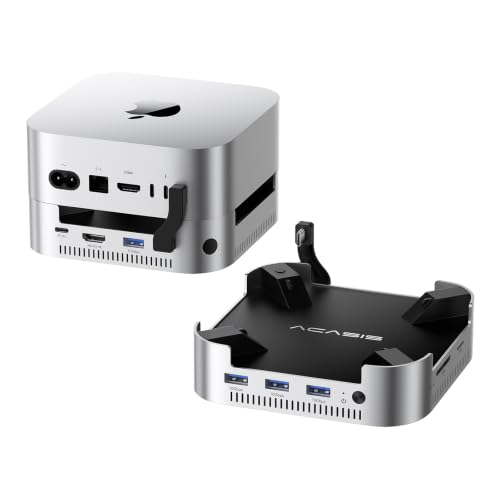
- Two NVMe bays support up to 16TB in RAID 0
- 4K/60Hz HDMI, USB-A, and SD/TF slots
- Powered dock with dual cooling fans
Best For: Mac mini users expanding storage with two NVMe drives
Best for Older Mac minis

- Supports M.2 and 2.5-inch SATA drives
- USB-C, USB-A, and SD/microSD connections
- Listed for Intel, M1, and M2 Mac minis
Best For: Storage expansion on compatible older Mac minis
Best for Wired Networking

- Built-in 2.5Gbps Ethernet
- Four USB ports, including three at 10Gbps
- Simultaneous SD/TF access and audio jacks
Best For: M4 or M4 Pro setups needing wired networking
Best HDMI Pick – RayCue Mac mini Dock and SSD Stand
Among mac mini docking stations, the RayCue is a practical choice if you want an HDMI connection, accessible USB ports, and SSD storage in one stand. Its aluminum enclosure supports M.2 NVMe or SATA drives up to 8TB.
Best For: Mac mini users who want a 4K@60Hz HDMI output and flexible SSD compatibility.
Pros:
- Supports M.2 NVMe and SATA SSDs in 2230, 2242, 2260, and 2280 sizes.
- Includes 10Gbps USB-A and USB-C data ports, plus two 5Gbps USB-A ports.
- Adds SD/TF readers and an audio connection.
Cons:
- Its single HDMI port supports only one external monitor through the dock.
- The maker recommends connecting the rear USB-C power input when using a drive to avoid disconnections.
Choose this model for its combination of 4K@60Hz HDMI and NVMe/SATA storage support. Plan on providing extra power for reliable drive use.
Best Streamlined Stand – Satechi Mac mini Hub with NVMe Enclosure
If you prefer mac mini docking stations that keep everyday connections within reach, the Satechi stand focuses on front-facing ports and NVMe storage. Its aluminum body has bottom vents and a recessed top designed to preserve airflow around the Mac mini.
Best For: Mac mini users who prioritize an integrated stand, SD access, and a tidy set of front-facing ports.
Pros:
- Houses an M.2 NVMe SSD up to 4TB, with transfer rates up to 10Gbps.
- Provides two 10Gbps USB-A ports, a USB-A 2.0 port, and a UHS-II SD reader.
- Includes a dedicated power button and a two-year limited warranty.
Cons:
- SSD is not included; drives with heatsinks and double-sided drives are incompatible.
- USB-A ports cannot charge an iPad or support an Apple SuperDrive, and only one bus-powered device should be connected at a time.
This is a focused storage-and-peripherals stand rather than a display-expansion dock. Check your SSD type and USB device needs before buying.
Best DisplayPort Pick – BENFEI Mac mini M4 Dock
The BENFEI stands out among mac mini docking stations if your Mac mini M4 or M4 Pro setup calls for DisplayPort rather than HDMI. It combines a DisplayPort output, five USB data ports, card readers, and an NVMe enclosure.
Best For: Mac mini M4 and M4 Pro owners who need DisplayPort and room for an NVMe SSD.
Pros:
- Supports an M.2 NVMe SSD up to 8TB in 2230, 2242, 2260, or 2280 size.
- Offers 10Gbps USB-C and USB-A ports plus three 5Gbps USB-A ports.
- Includes SD and TF readers rated up to 170MB/s.
Cons:
- DisplayPort tops out at 4K@30Hz, though it supports 2K@60Hz and 1080p@120Hz.
- SSD is sold separately; listed compatibility is limited to the 2024 Mac mini M4 and M4 Pro.
Its appeal is the range of USB connections alongside DisplayPort and storage expansion. If 4K@60Hz output is essential, its stated 4K@30Hz limit matters.
Best Dual-Display Dock – TobenONE 13-in-1 Mac mini Dock
For shoppers comparing mac mini docking stations with display expansion in mind, the TobenONE pairs HDMI and DisplayPort outputs with an NVMe enclosure and a broad mix of peripheral ports. It is designed as a stand for the listed Mac mini M4, M4 Pro, M5 Pro, and M6 models.
Best For: Mac mini users who want to connect two monitors through the dock while adding local SSD storage.
Pros:
- Provides DisplayPort up to 4K@144Hz and HDMI up to 4K@60Hz for two dock-connected monitors.
- Supports an M.2 NVMe SSD up to 8TB at a stated 10Gbps.
- Includes two 10Gbps USB-A ports, SD/microSD readers, a 3.5mm audio jack, and an accessible power button.
Cons:
- SSD is not included, and SATA drives are not supported.
- The rear USB-C port handles data, not video output.
This is the most display-oriented option in the group: you can connect two monitors through its HDMI and DisplayPort outputs, with a third connected to a native Mac mini port as described by the maker.
Best for HDMI Displays – iVANKY 13-in-1 Mac mini Dock
Among mac mini docking stations, this iVANKY dock is a strong fit if you want HDMI output, extra ports, and SSD storage in one compact setup. Its HDMI port supports up to 4K at 144Hz, while the M.2 enclosure accepts NVMe or SATA drives up to 8TB.
Best For: Mac mini users who want a high-refresh HDMI connection alongside expandable storage and peripheral ports.
Pros:
- 13-in-1 selection includes HDMI, USB-A, USB-C, SD/TF, and audio connections.
- 10Gbps M.2 enclosure supports NVMe and SATA SSDs in 2230 through 2280 sizes.
- Includes a 20W power adapter for improved stability with multiple power-hungry accessories.
Cons:
- SSD must be purchased separately.
- Using several data ports at once can reduce transfer speeds.
The included adapter and ventilated design make this a practical all-in-one choice. For a second display, plan to use the Mac’s Thunderbolt port alongside the dock’s HDMI output.
Best for Everyday Use – UGREEN Mac mini DP Dock
If DisplayPort is a priority when comparing mac mini docking stations, this UGREEN dock deserves a look. Its DP output is rated for up to 4K at 144Hz with the Mac mini M4 or 4K at 240Hz with the M4 Pro, and its built-in enclosure accommodates an M.2 NVMe SSD.
Best For: Mac mini owners with a high-refresh DisplayPort monitor who also want accessible data ports and SSD expansion.
Pros:
- DisplayPort supports the listed high-refresh resolutions for M4 and M4 Pro.
- NVMe enclosure accepts 2230, 2242, 2260, and 2280 SSDs up to 8TB.
- Includes 10Gbps USB-A/C data connections, SD/TF slots, and audio.
- Power-button lever lets you start the Mac without lifting it.
Cons:
- SSD is not included.
- A multi-screen setup requires using a Mac Thunderbolt port in addition to the dock’s DP output.
Choose this model for its stated DisplayPort capabilities rather than assuming every Mac mini will reach 4K at 240Hz; that figure is specified for the M4 Pro.
Best for USB Expansion – UGREEN 11-in-1 Mac mini Stand
For shoppers comparing mac mini docking stations mainly to add USB connections, this UGREEN dock-and-stand offers an 11-in-1 hub with seven USB ports, an SD/TF reader, and an M.2 NVMe enclosure. Its short included cable helps keep the setup tidy.
Best For: Mac mini users connecting several USB accessories while adding compact NVMe storage.
Pros:
- Includes three 10Gbps USB-A, two 5Gbps USB-A, and two 10Gbps USB-C ports.
- M.2 NVMe enclosure supports 2230 through 2280 drives up to 8TB.
- Power-button lever provides access without lifting the Mac mini.
- SD/TF reader is rated up to 170MB/s.
Cons:
- SSD is sold separately.
- An external power adapter is recommended for setups with multiple devices.
This is the port-focused pick of the three: its specified strengths are USB connectivity, card access, and storage. Budget for an SSD—and potentially an external adapter—if you plan to use the expansion fully.
Best for Dual NVMe Storage – ACASIS Mac mini Dock & Hub
Among mac mini docking stations, the ACASIS dock stands out for its two NVMe SSD bays. It is designed for Mac mini M4, M4 Pro, and the listed M6, pairing storage expansion with USB ports, card readers, and HDMI.
Best For: Mac mini users who want two internal NVMe drives and an additional 4K display connection.
Pros:
- Supports two NVMe SSDs with up to 16TB of stated capacity in RAID 0 mode.
- Includes 10Gbps USB-A ports, SD/TF readers, and 4K at 60Hz HDMI.
- Comes with a 65W power adapter, aluminum housing, and dual cooling fans.
Cons:
- SSDs must not be installed or removed while the dock is powered on.
- The fans may be noticeable in a quiet workspace; the stated noise level is approximately 52dB.
Choose this model when drive capacity and HDMI matter more than a silent, fanless setup. Check your SSD requirements before buying, and plan to power down for drive changes.
Best for Older Mac minis – Qwiizlab UH25 Pro Dock
If you have an Intel, M1, or M2 Mac mini, this Qwiizlab model is one of the mac mini docking stations worth considering for storage flexibility. Its enclosure supports an M.2 SATA or NVMe SSD and a 2.5-inch SATA drive, alongside everyday USB and card-reader connections.
Best For: Owners of supported older Mac minis or Mac Studios who want to add M.2 and 2.5-inch storage.
Pros:
- Supports M.2 SATA or NVMe SSDs up to 8TB and 2.5-inch SATA SSDs up to 8TB.
- Provides a 10Gbps USB-C port, a 10Gbps USB-A port, two 5Gbps USB-A ports, and SD/microSD readers.
- Lists compatibility with 2018 Intel, 2020 M1, and 2023 M2/M2 Pro Mac minis, plus several Mac Studio models.
Cons:
- The supplied compatibility list does not include Mac mini M4 or later.
- No display output or Ethernet port is listed.
This is a practical choice if you already have a compatible Mac mini and want options for both M.2 and 2.5-inch drives. For a newer Mac mini, confirm compatibility before ordering.
Best for Wired Networking – ORICO Mac mini Dock & Stand
For shoppers comparing mac mini docking stations with built-in networking, the ORICO dock puts a 2.5Gbps Ethernet port alongside four USB ports, SD/TF readers, and separate headphone and microphone jacks. Its supplied specifications list Mac mini M4 and M4 Pro compatibility.
Best For: Mac mini M4 or M4 Pro users who prioritize wired Ethernet and accessible peripheral ports over built-in drive storage.
Pros:
- Includes 2.5Gbps Ethernet for a wired network connection.
- Offers two 10Gbps USB-A ports, one 10Gbps USB-C port, and one 5Gbps USB-A port.
- SD and TF slots can be used simultaneously, with separate 3.5mm headphone and microphone jacks.
Cons:
- No SSD enclosure or internal storage expansion is listed.
- No HDMI or other display output is listed.
Pick the ORICO if network access and front-of-desk connections are your priorities. If you need added storage or another monitor output, the listed ports do not cover those jobs.
How We Picked These Mac Mini Docking Stations
We prioritized practical differences buyers can check before ordering: supported Mac mini generations, port selection, external-display outputs, SSD enclosure type, and whether the dock also serves as a stand. The selection includes models aimed at newer Mac mini designs and an option listed for M1, M2, and Intel machines. Product names and advertised specifications are a starting point, not proof of real-world speed or compatibility; confirm the current listing and your Mac mini’s exact model before buying.
Quick Comparison: Start with Your Main Need
For a tidy desk and accessible ports, start with a stand-style hub such as the Satechi, RayCue, ORICO, or UGREEN stand option. If adding storage is the priority, compare the single-SSD docks with the ACASIS two-bay and Qwiizlab dual-SSD designs; check which bays accept NVMe, SATA, or both. For a monitor-focused setup, look closely at the BENFEI DisplayPort hub, UGREEN DP hub, and IVANKY dock. The TobenONE is worth comparing if you want a broader 13-in-1 port layout. These are starting points, not interchangeable recommendations: connector types and supported Mac mini models vary.
Key Buying Factors for Mac Mini Docking Stations
Fit and Model Compatibility
Check the exact Mac mini generation and case design, not just the “M-series” label. A dock shaped for a newer chassis may obstruct ports or vents on another model. Also check where its host cable plugs in and whether that leaves the Mac’s other ports usable.
SSD Type and Speed
An enclosure may accept NVMe, SATA, or both, and an M.2 slot does not automatically support every M.2 drive. Match the drive format, size, and stated capacity limit. USB 10Gbps is a connection rating, not a guaranteed file-transfer speed; enclosure design, SSD choice, and heat can affect sustained transfers. Budget for an SSD separately unless the listing explicitly includes one.
Display and Port Support
Check the output connector, resolution, and refresh rate against your monitor. An advertised 4K/144Hz port does not guarantee that every Mac mini and display combination will run at that setting. More importantly, a dock does not necessarily increase the number of external displays your Mac supports. Verify display support for your specific Mac and whether the dock uses native video output or requires additional software. Count the USB-A, USB-C, card-reader, and audio connections you will use at the same time.
Power, Cooling, and Desk Layout
Mac mini docks generally expand connections rather than replace the computer’s power cord. Check whether the dock needs a separate power adapter, especially if you plan to attach storage and several peripherals. Keep vents clear, and consider whether front-facing ports or a low-profile stand better suits your desk.
Who Should Buy Which Mac Mini Docking Stations?
Choose a simple stand hub if you mainly want easier access to peripherals. Pick an NVMe-equipped model if fast, removable storage is the goal; consider two bays only if you will use both. Prioritize verified display specifications for a high-refresh monitor, and choose a dock explicitly listed for M1, M2, or Intel if you own an older Mac mini. When in doubt, buy for your exact computer and required ports—not the longest feature list.
