
If you’re looking to create a sleek and productive workspace with your Mac Mini, you’re in the right place. The right desk setup can greatly enhance both functionality and aesthetics. From innovative dock stands to effective cable management solutions, there are various options to contemplate. Let’s explore the top 10 setups that not only elevate your productivity but also transform your workspace into a stylish haven.
Under Desk Mount for 2024 Mac mini M4/M4 Pro

If you own the 2024 Mac Mini M4 or M4 Pro, the Under Desk Mount is a perfect choice for optimizing your workspace. This mount’s upgraded single-piece injection-molded design guarantees durability, outlasting typical 3D-printed versions. It’s compatible with VESA mounting patterns and can be easily installed under your desk, on the wall, or behind your monitor. By hanging your Mac Mini, you’ll save valuable desktop space, reduce clutter, and maintain an ergonomic setup. Plus, it offers full access to all ports and buttons while keeping your device protected from spills and accidental damage, making it a smart investment for any workspace.
Best For: Individuals looking to optimize their workspace with a durable and space-saving mount for the 2024 Mac Mini M4 or M4 Pro.
Pros:
- Durable design: Made from an upgraded single-piece injection-molded material, ensuring long-term reliability.
- Space-saving solution: Frees up desktop space by allowing the Mac Mini to be mounted under the desk or on a wall.
- Easy access: Provides full access to power buttons and output jacks while keeping the device safely out of reach from potential damage.
Cons:
- Limited compatibility: Specifically designed for the 2024 Mac Mini M4 and M4 Pro, not suitable for other models.
- Installation required: May need drilling or adhesive, which could damage certain desk surfaces.
- Potential visibility issues: Depending on the mounting location, the mount could still be visible or obstruct other items in the workspace.
Under Desk Mini PC Mount Bracket – Height Adjustable CPU Holder

The Under Desk Mini PC Mount Bracket is an ideal solution for anyone looking to enhance their workspace, especially those using a Mac Mini or similar compact PCs. This height-adjustable CPU holder lets you customize your setup from 1.8″ to 3.3″, ensuring maximum airflow and easy access. Its flexible side brackets allow for width adjustments, making it compatible with various devices like Xbox and Intel NUC. Made from sturdy metal with a reinforced steel frame, it provides long-lasting support. The included installation kit simplifies the setup process, while the under-desk design frees up valuable desk space for a cleaner workspace.
Best For: This product is best for individuals who want to maximize their desk space while securely mounting compact PCs like Mac Mini, Xbox, or Intel NUC.
Pros:
- Height adjustable for optimal airflow and accessibility.
- Sturdy metal construction with a reinforced steel frame ensures durability and support.
- Includes installation kit with screws and a positioning template for easy setup.
Cons:
- Limited to smaller devices, may not accommodate larger CPUs.
- Installation required, which may be challenging for some users.
- Height range may not suit all preferences, depending on desk configuration.
TobenONE 13-in-1 Mac mini M4 Dock with 8TB SSD Enclosure

For creative professionals and students managing large files, the TobenONE 13-in-1 Mac mini M4 Dock with 8TB SSD Enclosure stands out as a game-changer. With its 13 essential ports, including high-speed USB and dual display capabilities, you can seamlessly multitask while editing 4K videos or managing RAW images. The 8TB NVMe SSD guarantees quick access and eliminates reliance on slow external drives. Plus, its minimalist design enhances your workspace aesthetic. The one-touch power button and anti-slip features offer added convenience and stability. Rated 4.6 stars, this dock is perfect for anyone seeking efficiency and style in their Mac mini setup.
Best For: Creative professionals, photographers, video editors, and students who need efficient handling of large files and a seamless multitasking experience.
Pros:
- 13 essential ports including high-speed USB and dual display capabilities enhance productivity and connectivity.
- 8TB NVMe SSD provides quick access to large files, eliminating the need for slow external drives.
- Minimalist design and one-touch power button create a stylish and convenient workspace.
Cons:
- Compatibility limited to 2024 Mac mini M4/M4 Pro, restricting use for older models.
- Weight of 7.02 ounces may feel heavier than some alternative docks.
- Price point may be higher compared to basic docking solutions, potentially limiting budget-conscious buyers.
Mac mini M4 Dock with HDMI Hub and SSD Enclosure

Ideal for creative professionals and tech enthusiasts, the Mac mini M4 Dock with HDMI Hub and SSD Enclosure offers a powerful 10-in-1 solution that enhances your workspace. It features a sleek aluminum design and supports up to 8TB of storage. With 4K60Hz HDMI output, you can easily mirror or extend screens to your favorite displays. The dock’s super-speed data transfer capabilities, with 10Gbps USB-A and USB-C ports, make connecting drives and peripherals a breeze. Just remember to use the additional USB-C charging port for peak performance when running hard drives, ensuring a seamless experience while you work.
Best For: Creative professionals and tech enthusiasts seeking an efficient, multi-functional docking solution for their Mac mini M4 or M4 Pro.
Pros:
- 10-in-1 functionality providing versatile connectivity options, including HDMI, USB-A/C, and card slots.
- High data transfer speeds of up to 10Gbps, ideal for fast access to external drives and peripherals.
- Sleek aluminum design that complements the Mac mini aesthetic while ensuring durability.
Cons:
- Requires additional power via USB-C charging port for optimal performance with hard drives, which may be inconvenient.
- Limited compatibility primarily designed for M4/M4 Pro Mac mini 2024 and other USB-C laptops, possibly excluding older models.
- Price point may be higher compared to simpler docking solutions on the market.
IVANKY 13-in-1 Mac mini M4 Dock

With 13 versatile ports, the IVANKY 13-in-1 Mac mini M4 Dock is perfect for creative professionals and gamers alike. It offers robust connectivity, featuring 4K@144Hz HDMI, multiple USB ports, and an SD/TF card reader. You can easily connect dual displays for enhanced productivity. The dock supports M.2 NVMe SSDs up to 8TB, ensuring speedy data transfers at 10Gbps. Plus, the 20W PD power adapter keeps your devices powered while the top-vent design promotes cooling. With a 24-month warranty and responsive support, this dock elevates your Mac mini experience to new heights.
Best For: Creative professionals and gamers seeking robust connectivity and enhanced productivity with their Mac mini M4.
Pros:
- Versatile connectivity with 13 ports, including 4K@144Hz HDMI and multiple USB options.
- Supports dual displays for improved multitasking and productivity.
- Fast data transfer speeds of up to 10Gbps and compatibility with M.2 NVMe SSDs up to 8TB.
Cons:
- Limited compatibility with devices other than Mac mini M4, affecting cable length and dual-screen functionality.
- SSD not included, requiring separate purchase for full functionality.
- Potential variations in transfer speed based on host device and simultaneous port usage.
Lonelyfox Mac mini M4 & M4 Pro Dock Stand

The Lonelyfox Mac mini M4 & M4 Pro Dock Stand is perfect for users who crave both functionality and style in their workspace. Its convenient front power button access makes operation a breeze, while the open-base design enhances airflow and cooling. Weighing just 0.07 kilograms, it’s lightweight yet sturdy, featuring an anti-slip design with durable ABS plastic and soft silicone pads. Plus, you can personalize your setup with interchangeable button caps. Gift-ready packaging means it’s an excellent choice for any Mac enthusiast. With a one-year warranty and glowing customer reviews, it’s a solid addition to your Mac mini setup.
Best For: Users looking to enhance their Mac mini M4/M4 Pro experience with a stylish, functional, and customizable dock stand.
Pros:
- Convenient front power button access for easy operation.
- Open-base design promotes better airflow and heat dissipation.
- Includes interchangeable button caps for personalization.
Cons:
- Limited color option (only available in yellow).
- Designed specifically for Mac mini M4/M4 Pro, not compatible with other devices.
- Lightweight design may not be as sturdy for heavy usage scenarios.
AKKYAJAURE Mac mini M4 Dock Stand

For those who own the new Mac mini M4 or M4 Pro, the AKKYAJAURE Mac mini M4 Dock Stand is a game-changer. Custom-molded for a perfect fit, this premium aluminum stand not only matches your Mac’s aesthetic but also enhances cooling with its elevated design. You’ll appreciate the easy access to the power button and the organized desk space it provides. With anti-slip silicone padding, it protects your device from scratches while holding it securely. Weighing just 0.18 kg, it’s a lightweight addition to your setup. With a 4.8-star rating, you can trust its quality for your workspace.
Best For: Individuals looking to enhance their Mac mini M4 or M4 Pro setup with improved cooling, organization, and aesthetic appeal.
Pros:
- Premium aluminum construction matches the Mac mini’s design, ensuring a seamless look.
- Optimized heat dissipation helps maintain device performance and longevity.
- Easy access to the power button and organized desk space promotes efficiency.
Cons:
- Limited compatibility, specifically designed only for Mac mini M4 and M4 Pro models.
- Lightweight design may lead to stability issues if not placed on a secure surface.
- Higher price point compared to basic stands may not appeal to budget-conscious consumers.
TotalMount for Mac mini (Wall, Monitor, or Desk Mount)
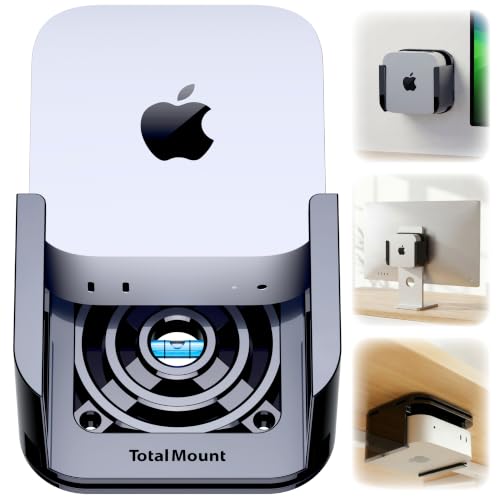
If you’re looking to save space and enhance your setup, the TotalMount for Mac mini is an ideal choice for anyone using the latest 2024, 2025, and 2026 models. This premium mount offers versatile installation options—wall, monitor, or desk—without blocking your Mac mini’s Wi-Fi antenna. Its heavy-duty design features rubber inserts to protect against scratches and patented ventilation channels for maximum cooling. Plus, you’ll enjoy easy access to your Mac mini’s power button. Installation is a breeze with included screws and straps, making it the perfect addition to any sleek and productive workspace.
Best For: Users of the 2024, 2025, and 2026 Mac mini models seeking to optimize their workspace with a versatile and stylish mounting solution.
Pros:
- Heavy-duty design ensures durability while avoiding interference with Wi-Fi signals.
- Patented ventilation channels promote cooling, preventing performance throttling.
- Easy installation options for wall, desk, or monitor without the need for specialized tools.
Cons:
- Not compatible with Mac mini models purchased before October 2024.
- Mac mini is not included with the mount, requiring a separate purchase.
- Limited to specific installation methods, which may not suit all setups.
Minisopuru All Aluminum Mac mini M4 Dock and Vesa Mount

Designed specifically for the Mac mini M4 and M4 Pro 2024, the Minisopuru All Aluminum Dock enhances your desk setup with its sleek VESA mount capability. Enjoy stunning visuals with 4K@60Hz HDMI output, perfect for editing or video calls. The dock offers ample connectivity, including three 10Gbps USB-A ports and an M.2 SSD slot for expanded storage. Its durable aluminum alloy construction guarantees longevity, while adjustable side shelves help keep your workspace organized. With effective heat dissipation and a 24-month warranty, it’s a reliable addition to your setup. Experience a clutter-free, productive environment with this essential dock.
Best For: Individuals seeking to enhance their Mac mini M4/M4 Pro 2024 setup with a versatile and efficient docking solution.
Pros:
- Extensive connectivity options with multiple USB-A ports and an M.2 SSD slot for expanded storage.
- Sleek and durable aluminum alloy construction that enhances the aesthetic of any workspace.
- Effective heat management through a perforated backplate, ensuring optimal performance during heavy use.
Cons:
- Limited to Mac mini M4/M4 Pro 2024, making it incompatible with other models.
- M.2 SSD not included, requiring an additional purchase for storage expansion.
- Installation may require VESA compatibility, which could limit mounting options for some users.
Mac Mini M4 VESA/Wall/Under Desk Mount

The Mac Mini M4 VESA/Wall/Under Desk Mount is perfect for users looking to maximize their workspace efficiency while keeping their Mac Mini M4 or M4 Pro securely positioned. Made from high-quality steel, it offers superior durability and load-bearing capacity compared to plastic options. You can easily mount it behind a monitor, under your desk, or on a wall. Plus, it features anti-scratch and anti-slip strips to protect your device. With a convenient pen holder included, you’ll keep small items organized. Installation is straightforward, as all necessary screws are provided, making it a hassle-free addition to your setup.
Best For: Users of the Mac Mini M4 or M4 Pro who want to save space and keep their devices securely mounted.
Pros:
- Durable Construction: Made from high-quality steel, offering greater strength and longevity compared to plastic mounts.
- Versatile Mounting Options: Can be installed behind monitors, under desks, or on walls to fit various workspace setups.
- Additional Features: Includes a pen holder for convenient organization of small items and comes with all necessary installation screws.
Cons:
- Limited Compatibility: Only works with the Mac Mini M4 and M4 Pro (mid 2024), not compatible with earlier models like M1 or M2.
- Fixed Positioning: The mount is a fixed movement type, which limits adjustment options once installed.
- Weight Consideration: At 0.4 kilograms, it may be slightly heavier than some users prefer for wall mounting.
Factors to Consider When Choosing Mac Mini Desk Setups
When you’re setting up your Mac Mini desk, there are several key factors to keep in mind. Think about space efficiency, ergonomic design, and how you’ll manage cables to create a clean look. Don’t forget to contemplate aesthetics and how easily you can access your devices for a smooth workflow.
Space Efficiency Solutions
To create an efficient workspace with your Mac Mini, consider how you can maximize space while maintaining functionality. Utilizing under-desk mounts can greatly free up valuable desktop area, reducing clutter and enhancing organization. Adjustable CPU holders let you customize height settings, optimizing airflow and accessibility. VESA-compatible mounts enable flexible installation options, allowing you to securely attach your Mac Mini behind monitors or under desks, maximizing your surface area. Implementing a dock with multiple connectivity options streamlines cable management, keeping your workspace neat and providing easy access to essential ports. Finally, investing in space-saving solutions like aluminum stands enhances both the aesthetics and functionality of your workspace, promoting a minimalist design that keeps distractions at bay.
Ergonomic Design Importance
Maximizing space efficiency naturally leads to the importance of ergonomic design in your Mac Mini desk setup. An ergonomic workspace can greatly reduce strain on your neck, shoulders, and back, promoting better posture and comfort during long hours of computer use. Set your monitor at eye level, ideally 20 to 30 inches away, to minimize eye strain. Consider adjustable desk mounts or stands to enhance accessibility, allowing for easier interaction without awkward reaching or bending. Incorporating under-desk mounts for your Mac Mini frees up valuable desktop space, fostering a cleaner workspace. Finally, ergonomic accessories like keyboard trays and monitor risers can boost your comfort, increase focus, and lower the risk of repetitive strain injuries.
Cable Management Techniques
Although it may seem like a minor detail, effective cable management can greatly enhance your Mac Mini desk setup. Utilizing cable clips and organizers helps bundle cables together, reducing clutter and making them easier to access. Consider using cable sleeves or wraps to protect and conceal multiple cables, creating a clean look on your desk. Implementing under-desk cable trays keeps cables off the floor, improving aesthetics and safety by reducing tripping hazards. Color-coded cables or labels can simplify identifying connections, making troubleshooting a breeze. Finally, Velcro straps offer adjustable cable management, allowing you to modify your setup easily without damaging your cables. With these techniques, you’ll enjoy a more organized and efficient workspace.
Aesthetic Considerations
When designing your Mac Mini desk setup, it’s essential to prioritize aesthetic considerations that enhance both functionality and visual appeal. Embrace a minimalist design with clean lines and a cohesive color palette to complement the sleek look of your Mac Mini. Opt for materials like aluminum or high-quality steel for stands and mounts, ensuring durability while elevating the overall aesthetic. Choose accessories that match or provide a stylish contrast to your Mac Mini’s finish, creating an inviting arrangement. Aim for symmetry and balance in your peripheral setup, like monitors and docks, to maintain visual harmony. Finally, add decorative elements like plants or art to enrich your workspace without causing clutter, making it a more pleasant environment for productivity.
Access and Usability
To guarantee your Mac Mini desk setup is both functional and user-friendly, consider how you can enhance access and usability. Make certain any mounting solution provides full access to the power button, output jacks, and cables for convenience. Height-adjustable mounts can optimize airflow and accessibility, boosting performance. Look for designs that allow ergonomic access, making it easy to remove and reinstall your Mac Mini without straining. Choose stable and secure mounts to prevent accidental movement, assuring reliable operation. Finally, select setups that minimize clutter and free up desk space, improving overall organization. By focusing on these factors, you’ll create a workspace that’s not only sleek but also incredibly efficient and comfortable to use.
Durability and Material Quality
Selecting a durable desk setup for your Mac Mini is vital, as the right materials can greatly affect its longevity and performance. Prioritize options like aluminum and reinforced steel, which provide better support than plastic alternatives. Look for products made from high-quality materials, such as injection-molded designs, offering enhanced structural integrity over 3D-printed options. Anti-scratch and anti-slip features in mounting solutions protect your Mac Mini and guarantee stability during use. Rust-resistant coatings on metal stands are essential to prevent corrosion, especially in varying environments. Finally, consider setups with a warranty of 24 months or more, as this often indicates a manufacturer’s confidence in the durability and quality of their product. Invest wisely for long-lasting performance!
Compatibility With Accessories
Confirming your Mac Mini desk setup is compatible with all your accessories is essential for a seamless experience. When choosing items like docks and mounts, make certain they’re specifically designed for the 2024 Mac Mini M4 and M4 Pro. Look for accessories that support VESA mounting patterns (75×75mm and 100×100mm) for flexible installation options. Verify that docking stations or hubs offer necessary ports such as USB-A, HDMI, and audio outputs to meet your peripheral needs. Height-adjustable mounts or stands can enhance airflow and provide easy access to power buttons. Finally, choose accessories made from durable materials like reinforced steel or high-quality aluminum to confirm longevity and secure support for your Mac Mini.
Cooling and Ventilation Needs
While confirming compatibility with accessories is important, you can’t overlook the cooling and ventilation needs of your Mac Mini desk setup. Adequate airflow is essential for maintaining performance and longevity; overheating can cause throttling during intensive tasks. Look for mounts and stands specifically designed for the Mac Mini, as many feature ventilation channels or perforated designs to enhance airflow. An elevated setup can further improve cooling efficiency by allowing heat to dissipate more effectively. Make sure that no accessories obstruct the Mac Mini’s vents, as this could lead to overheating issues. Regularly monitor operating temperatures and maintain unobstructed airflow, especially during prolonged usage or demanding applications, to keep your setup running smoothly.
