
A crowded desk or poorly placed mount can make it harder for a Mac mini to move air through its vents. The right accessory gives the computer a stable home without blocking its cooling path.
These seven options cover simple stands, ventilated mounts, a filter case, and an actively cooled holder. The best choice depends on your Mac mini model, placement, and whether you want easier access to its power button.
Best 7 Mac Mini Cooling Accessories Picks for 2026
Best for Power-Button Access
AKKYAJAURE Aluminum Mac mini Stand

- Raises the Mac mini for airflow
- Opening for underside power button
- Silicone pads help protect surfaces
Best For: Minimal desktop setups needing button access
Best for Dust Protection
Spigen Ultra Hybrid Filter Case

- Built-in PVC dust filter
- Clear, detachable shell
- Accessible port cutouts
Best For: Dust-prone desks where the Mac mini stays visible
Best for Flexible Mounting
TotalMount Ventilated Mac mini Mount
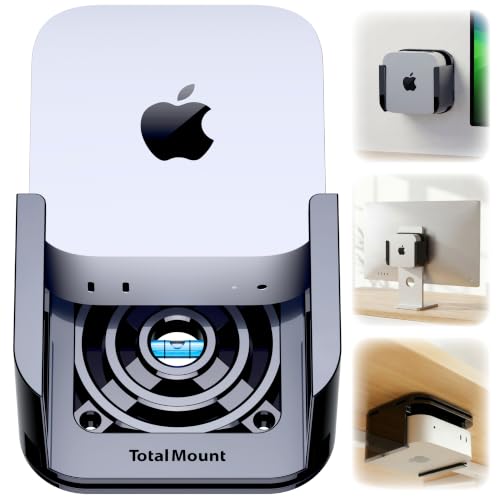
- Ventilation channels for airflow
- Wall, under-desk, or monitor mounting
- Metal-free body and protective inserts
Best For: Getting a 2024–2026 Mac mini off the desk
Best for Desk Clearance

- Raises M4/M4 Pro above the desk
- Bottom ventilation openings
- Silicone padding on both sides
Best For: Passive airflow and space beneath an M4 or M4 Pro
Best for Playful Desks

- Front-access power button
- Open base with dust filter
- Two interchangeable button caps
Best For: M4/M4 Pro owners who want easy power access and playful styling
Best for Open Airflow
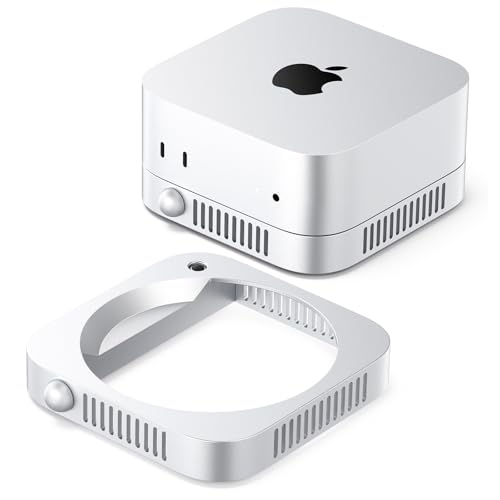
- Through-airflow stand design
- Built-in power switch
- Compact silver ABS construction
Best For: Users seeking passive ventilation and convenient power control
Best for Active Cooling

- TEC cooler with seven-blade fan
- 90 alloy cooling fins
- Transparent holder with RGB lighting
Best For: M4/M4 Pro users seeking powered cooling
Best for Power-Button Access – AKKYAJAURE Aluminum Mac mini Stand
Among mac mini cooling accessories, this AKKYAJAURE stand is a straightforward way to raise a compatible Mac mini for better airflow without adding a fan or a bulky enclosure. Its aluminum finish is designed to complement the computer.
Best For: A tidy desktop setup where easy access to the underside power button matters.
Pros:
- Elevated design leaves room for airflow beneath the Mac mini.
- Opening in the stand provides access to the bottom power button.
- Silicone pads help prevent slipping and scratches.
Cons:
- Passive stand only; it does not include a fan.
- Listed compatibility focuses on the newer M4/M5/M6 design, so check your Mac mini model before buying.
This is a sensible pick if you want a minimal stand that addresses airflow and button access together, rather than a dock with extra connections.
Best for Dust Protection – Spigen Ultra Hybrid Filter Case
If dust control is your priority among mac mini cooling accessories, the Spigen Ultra Hybrid combines a clear protective shell with a built-in PVC filter over the ventilation area. It is intended to maintain airflow while helping keep dust out.
Best For: Keeping a compatible Mac mini visible and protected in a dust-prone desk setup.
Pros:
- Integrated filter helps block dust from ventilation slots.
- Transparent case leaves the Mac mini’s finish visible.
- Detachable construction allows washing, and port cutouts keep connections accessible.
Cons:
- The filter adds a cleaning task over time.
- It is a protective case, not an active cooling fan.
Choose this one for filtration and everyday protection rather than added cooling power; confirm the listed Mac mini compatibility before ordering.
Best for Flexible Mounting – TotalMount Ventilated Mac mini Mount
The TotalMount is a versatile choice among mac mini cooling accessories when you want the computer off your desktop. Its ventilation channels are designed to leave room for cooling airflow, with hardware supplied for under-desk and wall mounting plus straps for monitor mounting.
Best For: Mounting a 2024–2026 Mac mini under a desk, on a wall, or behind a monitor.
Pros:
- Ventilation channels allow air to flow around the Mac mini.
- Includes screws and monitor straps for multiple mounting options.
- Metal-free construction avoids blocking the Wi-Fi antenna; rubber inserts help protect the computer.
- Leaves space to reach the underside power button.
Cons:
- Not compatible with Mac mini models purchased before October 2024.
- Under-desk and wall installations use screws rather than an adhesive-only attachment.
Its main advantage is placement flexibility without enclosing the Mac mini tightly. Pick the mounting method that fits your workspace and verify your model year first.
Best for Desk Clearance – Hagibis MMS03 Aluminum Stand
For shoppers comparing mac mini cooling accessories that keep a clean desktop look, the Hagibis MMS03 raises the Mac mini M4 or M4 Pro above the desk. Its bottom ventilation openings and added clearance are intended to support passive heat dissipation.
Best For: M4 and M4 Pro owners who want space beneath the computer for airflow or a docking station.
Pros:
- Elevated design creates clearance beneath the Mac mini.
- Bottom vents help support airflow.
- Silicone padding on both sides helps stabilize and protect the device.
- Anodized aluminum finish is styled to match the Mac mini aesthetic.
Cons:
- No fan or active cooling is included.
- Detailed compatibility lists M4 and M4 Pro; check fit for other generations.
This stand makes the most sense if you value passive ventilation and usable space beneath the computer over added ports or active cooling.
Best for Playful Desks – Lonelyfox M4 Cooling Stand
Lonelyfox Mac mini M4 Stand, Front Power Button Access, Cooling Base | Compatible with M4 Pro
Check Price On AmazonAmong mac mini cooling accessories, the Lonelyfox stand pairs an open cooling base with a front-access power button for the Mac mini M4 and M4 Pro. It raises the computer off the desk and includes a dust filter for the base.
Best For: M4 or M4 Pro owners who want easier power-button access and a personalized desktop setup.
Pros:
- Front button access avoids reaching behind the Mac mini.
- Open base supports airflow and includes a dustproof filter.
- Interchangeable Duck Mouth and Sausage Lips button caps add a playful touch.
Cons:
- Designed specifically for the Mac mini M4 and M4 Pro.
- Passive stand design does not include a fan.
Choose this if everyday button access matters as much as a tidier, elevated setup; its cooling approach relies on open airflow rather than powered hardware.
Best for Open Airflow – ORICO ST01 Mac mini Stand
The ORICO ST01 is a passive option among mac mini cooling accessories, using a through-airflow design to keep ventilation unobstructed. Its built-in power switch and silver metallic-look finish also suit a streamlined desk.
Best For: Mac mini users who prefer an elevated, ventilated stand with convenient power control.
Pros:
- Through-airflow design leaves room for ventilation around the device.
- Built-in switch allows power control without lifting the Mac mini.
- Compact ABS stand has a silver metallic-paint finish.
Cons:
- Passive ventilation does not provide fan-assisted cooling.
- No dust filter is specified in the supplied details.
This is a sensible pick when airflow and quick power access are the priorities. ORICO states compatibility with all Mac mini models, though the stand is presented specifically for M4 and M4 Pro setups.
Best for Active Cooling – Fallinep TEC Mac mini Stand
For shoppers comparing powered mac mini cooling accessories, this Fallinep stand combines a TEC semiconductor cooler with a seven-blade fan and alloy cooling fins. Its transparent acrylic holder and magnetic RGB LED cooler give it a more conspicuous desktop look than a basic stand.
Best For: M4 or M4 Pro users who specifically want a powered cooler rather than a passive airflow stand.
Pros:
- Combines TEC cooling, a fan, and 90 alloy fins.
- Offers two cooling settings.
- Transparent holder and RGB lighting create a distinctive display.
Cons:
- Requires powered cooling hardware rather than simple passive ventilation.
- Claims about frost formation and below-25 dB operation are supplied specifications, not independently verified results.
Consider this model if active cooling is the deciding feature. The supplied information describes the cooling components but does not provide measured Mac mini temperature reductions.
How We Picked the Best Mac Mini Cooling Accessories
We focused on accessories that address a practical part of a Mac mini setup: keeping vents clear, lifting the computer off a desk, mounting it out of the way, limiting dust exposure, or adding active cooling. We also considered stated model compatibility, access to ports and the power button, mounting style, and whether a product adds power requirements or moving parts. A stand or mount can improve the space around a Mac mini, but it should not be treated as a guaranteed fix for high temperatures or performance problems.
Quick Comparison
For a straightforward desktop setup, the AKKYAJAURE, Hagibis, Lonelyfox, and ORICO stands offer different approaches to elevation and access. TotalMount is the option to consider if you would rather position the Mac mini away from the desktop. The Spigen filter case is aimed at dust management rather than raising the computer. The acrylic holder with a semiconductor cooler is the most involved option: consider it only if you specifically want an active cooling accessory and are comfortable with its power, noise, and placement requirements.
Key Buying Factors for Mac Mini Cooling Accessories
Confirm the Exact Model Fit
Check the product listing against the model and dimensions of your Mac mini before buying. Sellers may group several generations in a title even when the computers differ in size, vent layout, or button placement. Verify whether a mount supports your particular model securely and leaves its connections usable.
Keep the Airflow Path Open
Look at where your Mac mini takes in and expels air, then check that the accessory does not cover those openings. A raised stand can create clearance, but clearance alone does not prove better cooling. Leave room around the computer, especially if it will sit near a wall, under a shelf, or among other warm devices. A filter may help with dust, but it can also add airflow resistance as it gets dirty; plan to inspect and clean it.
Consider Access, Stability, and Upkeep
Make sure you can reach the power button and connect cables without straining ports. For mounts, check the mounting surface, installation method, and room for cable routing. For stands, prioritize a stable fit and a base that will not slide or scratch the desk. Active coolers add another device to power and maintain, and their real-world benefit depends on the setup; check return terms if cooling performance is your main reason to buy.
Who Should Buy Which Mac Mini Cooling Accessories?
Choose a simple ventilated stand if you mainly want desk clearance and easy everyday access. Pick TotalMount if freeing desk space matters more and you have a suitable place to mount the Mac mini. Consider the Spigen case if dust is your priority and you are willing to maintain its filter. The ORICO and Lonelyfox options are worth a closer look if power-button convenience drives your choice. If you are considering the active cooler, start by checking your Mac mini’s placement and vents first; it is a more complex purchase than a passive stand. The best Mac Mini Cooling Accessories are the ones that fit your exact computer and solve a real setup problem without obstructing airflow.
