
A well-chosen mac mini accessory kit can turn Apple’s compact desktop into a far more capable workstation. The right bundle adds storage, improves connectivity, and helps keep your setup neat.
In this roundup, we focus on options that make daily use easier, from hub-and-stand designs to protective mounts and practical add-ons.
Best 10 Mac Mini Accessory Kit Picks for 2026
Best for SSD Expansion
Mac mini M4 Dock with SSD Enclosure

- M.2 NVMe/SATA bay supports up to 8TB
- 4K60 HDMI plus 10Gbps USB-A/USB-C
- Aluminum stand keeps the Mac mini setup tidy
Best For: Mac mini M4 owners who want a hub, stand, and internal SSD expansion in one accessory.
Best Multi-Device Repair Kit
22-Piece Precision Screwdriver Set

- Covers Mac mini, MacBook, iPhone, iPad, Apple Watch, and Switch
- Includes 10 bits plus spudgers, tweezers, magnetizer, and cleaning tools
- S2 steel bits and rotating anti-slip handle add durability and control
Best For: DIY users who want one compact toolkit for Mac mini maintenance and other Apple device repairs.
Best SSD Expansion Hub

- Adds internal M.2 SSD storage
- 7-in-1 front-facing port expansion
- Aluminum stand improves airflow and desk organization
Best For: Mac mini M1/M2 users who want storage expansion and a cleaner all-in-one dock.
Best for a Seamless Desk Setup
AKKYAJAURE Mac mini M4 Dock Stand

- Precision-fit stand for Mac mini M4
- Improves airflow while saving desk space
- Matching aluminum look with anti-slip padding
Best For: Mac mini M4 users who want a tidy, cooled, and premium-looking desktop setup.
Best for Vertical Organization
AFOOYO Mac Mini Vertical Stand

- Space-saving vertical holder for Mac mini setups
- Silicone pads and grip design add stability
- Also works as a phone, tablet, or laptop stand
Best For: Users who want a compact stand to organize a Mac mini and free up desk space.
Best for All-in-One Expansion
Acer Gadget Mac mini M4 Dock with 8TB SSD Bay

- Up to 8TB SSD expansion with NVMe/SATA support
- 10Gbps USB-C/USB-A, SD/TF, HDMI 2.1, and audio
- Aluminum stand improves airflow and desk organization
Best For: Mac mini M4/M4 Pro owners who want a dock, stand, and SSD enclosure in one.
Best for Cooling
Qwiizlab Aluminum Stand for 2024 Mac mini
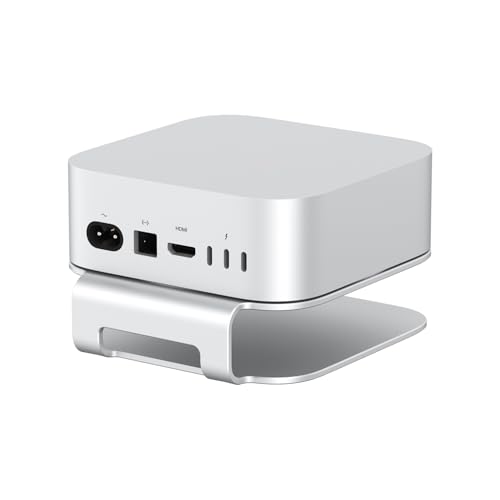
- Raises the Mac mini to improve airflow
- Aluminum build with anti-scratch, anti-slip pads
- Keeps the bottom power button accessible
Best For: Mac mini M4/M4 Pro owners who want a cooler, tidier desktop setup.
Best for Storage Expansion
BENFEI Mac mini M4 Dock with NVMe

- Adds up to 8TB via NVMe enclosure
- 10Gbps USB-C/USB-A speeds for fast transfers
- Includes DisplayPort and SD/TF card readers
Best For: Mac mini M4 owners who want storage expansion and extra ports in one compact dock.
Best for Portability

- Dock, stand, and silicone case in one
- 3 USB-A 3.0 ports plus SD/TF card slots
- 5Gbps transfer speed for everyday use
Best For: Mac mini M4 and M4 Pro owners who want a cleaner setup with quick-access ports and light protection.
Best Simple Pick
TobenONE 13-in-1 Mac mini M4 Dock

- Combines hub, stand, and NVMe enclosure in one unit
- Supports 8TB NVMe storage expansion at 10Gbps
- 4K DisplayPort and HDMI help power multi-monitor setups
Best For: Mac mini M4 owners who want storage, ports, and a cleaner desk in one accessory.
Best for SSD Expansion – Mac mini M4 Dock with SSD Enclosure
If you want a mac mini accessory kit that does more than add ports, this dock is built to turn the Mac mini M4 into a compact workstation. It combines a stand, HDMI hub, fast USB connectivity, SD/TF slots, audio, and an internal M.2 SSD enclosure in one aluminum unit.
Best For: Mac mini M4 and M4 Pro users who want extra storage, cleaner cable management, and a single hub for everyday peripherals.
Pros:
- Built-in M.2 NVMe/SATA enclosure supports up to 8TB for major storage expansion.
- 4K@60Hz HDMI, 10Gbps USB-A/USB-C, SD/TF, and audio cover most desk setups.
- Aluminum stand design matches the Mac mini and helps keep the setup tidy.
- Useful all-in-one option for users assembling a mac mini accessory kit around one dock.
Cons:
- Only one HDMI output, so it supports a single external display.
- May need the rear USB-C power connection for stable SSD operation.
- More expensive than a basic USB hub because of the built-in SSD bay.
This is a smart pick if storage expansion is your priority and you want a mac mini accessory kit that keeps the desk setup minimal. It is especially appealing for users who need fast file transfers and a cleaner, stand-based layout in one package.
Best Multi-Device Repair Kit – 22-Piece Precision Screwdriver Set
If you want a practical mac mini accessory kit that also covers the rest of your Apple gear, this 22-piece precision set is a strong all-in-one choice. It includes the bits and handheld tools needed for Mac mini, MacBook, iPhone, iPad, Apple Watch, Switch, and other small electronics, making it a useful grab-and-go repair bundle.
Best For: DIY users who want one compact toolkit for Mac mini maintenance, Apple device repairs, and small electronics.
Pros:
- Includes Mac mini-compatible bits like T5/T6/T8 alongside iPhone and MacBook drivers
- Comes with helpful extras such as tweezers, suction cup, spudgers, magnetizer, and cleaning brush
- S2 steel bits and an anti-slip rotating handle improve durability and control
- Useful for multiple devices, so it can replace several separate repair kits
Cons:
- Not a specialized pro repair kit for heavy daily use
- Some buyers may not need the extra tools if they only service one device
- Tool organization is basic compared with premium branded kits
Overall, this set makes sense if you want a flexible mac mini accessory kit that can also handle common Apple and console repairs. It’s especially appealing for budget-conscious users who prefer one toolkit instead of buying device-specific drivers separately.
Best SSD Expansion Hub – Satechi Mac mini Hub & Stand
If you want a tidy mac mini accessory kit that adds both storage and ports, Satechi’s hub-and-stand is one of the most practical upgrades for M1 and M2 Mac mini owners. It combines a precision-fit aluminum stand with an internal M.2 SSD enclosure and front-facing connectivity, so you can expand without cluttering your desk.
Best For: Mac mini M1/M2 users who want an all-in-one hub, stand, and SSD enclosure for a cleaner desktop setup.
Pros:
- Built-in M.2 NVMe/SATA SSD enclosure adds fast expandable storage
- Front ports include USB-C, USB-A, card readers, and a headphone jack
- Aluminum stand helps match the Mac mini aesthetic and improve airflow
- Useful all-in-one design reduces cable clutter on the desk
Cons:
- Not compatible with Mac mini M4
- SSD is not included
- Some USB-A limitations may rule out certain bus-powered devices
This is a strong choice if you want a mac mini accessory kit that does more than just add a few ports. It’s especially appealing for users who need extra storage and a cleaner, more integrated setup, though M4 owners will need to look elsewhere.
Best for a Seamless Desk Setup – AKKYAJAURE Mac mini M4 Dock Stand
If you want a mac mini accessory kit piece that feels purpose-built rather than generic, this dock stand is a strong fit. It lifts the Mac mini M4 off the desk for better airflow, keeps the footprint tidy, and preserves easy access to the power button.
Best For: Mac mini M4 owners who want a cleaner, more organized desktop with improved cooling and a matching aluminum look.
Pros:
- Custom fit for the Mac mini M4 for a secure, integrated look
- Aluminum construction matches the Mac mini’s finish for a cohesive setup
- Elevated design improves airflow and helps with heat dissipation
- Includes silicone padding to help prevent slipping and scratches
Cons:
- Only works with the Mac mini M4/M4 Pro, not older models
- Doesn’t add ports or expand connectivity like a hub-style dock
As part of a mac mini accessory kit, this is the kind of add-on that solves a few everyday problems at once: desk clutter, blocked airflow, and awkward power-button access. It’s a practical choice if you care more about fit and finish than extra features.
Best for Vertical Organization – AFOOYO Mac Mini Vertical Stand
If you want a tidy, space-saving mac mini accessory kit upgrade, this vertical stand is an easy way to store your Mac mini, improve airflow, and keep your desk more organized. Its gravity-locking design and soft silicone pads help the device stay secure while protecting the finish.
Best For: Buyers who want a compact, multi-device stand that can also pull double duty for a phone, tablet, or small laptop.
Pros:
- Holds the Mac mini vertically to save desk space
- Pre-installed silicone pads help prevent scratches and slipping
- Broad compatibility with Mac Mini models from 2010 to 2024
- Can also be configured for phones, tablets, or laptops
Cons:
- Not a full accessory bundle on its own
- Vertical orientation may not suit every desk setup
For shoppers building a practical mac mini accessory kit, this stand stands out for its simple footprint and added versatility. It’s a smart pick if your priority is organization and airflow rather than extra ports or cable management features.
Best for All-in-One Expansion – Acer Gadget Mac mini M4 Dock with 8TB SSD Bay
If you want a mac mini accessory kit that turns the M4 into a more capable desktop hub, this Acer Gadget dock goes far beyond a simple stand. It adds internal SSD support, extra front-and-side ports, card readers, audio out, and better airflow, making it a practical pick for power users who want fewer dongles and a cleaner desk.
Best For: Mac mini M4 and M4 Pro owners who want storage expansion, fast connectivity, and a neater all-in-one setup.
Pros:
- Supports up to 8TB SSDs with NVMe and SATA compatibility for major storage expansion
- Includes 10Gbps USB-C/USB-A, SD/TF readers, HDMI 2.1, and 3.5mm audio
- Elevated aluminum design helps airflow and keeps the Mac mini easy to access
- Comes with a power adapter, cable, screwdriver, and thermal pad for setup
Cons:
- SSD is not included, so total cost depends on the drive you add
- To get the most stable performance, the included 5V/3A power requirement matters
- Best features are most useful for users who actually need extra storage and ports
This is a strong mac mini accessory kit for buyers who want one dock to handle expansion, connectivity, and desktop organization at once. It is especially compelling if you plan to edit media, move large files, or build a more streamlined Mac mini workstation.
Best for Cooling – Qwiizlab Aluminum Stand for 2024 Mac mini
If you want a practical mac mini accessory kit addition that improves airflow and tidies your desk, this aluminum stand is a simple fit for the 2024 Mac mini M4 and M4 Pro. It lifts the machine, leaves room underneath for storage, and keeps the power button reachable.
Best For: Users who want a sturdy stand that improves ventilation, protects the base, and saves desktop space.
Pros:
- Raises the Mac mini to help with airflow and cooling
- Built from aluminum with anti-scratch and anti-slip silicone pads
- Preserves access to the bottom-mounted power button
- Creates extra storage space beneath the computer
Cons:
- Only compatible with 2024 Mac mini M4/M4 Pro models
- Does not add ports, hubs, or cable management features
This is a useful pick if your mac mini accessory kit priority is cooling, stability, and a cleaner footprint rather than added connectivity. It’s a straightforward desk upgrade for the right model, but it’s not a universal Mac mini solution.
Best for Storage Expansion – BENFEI Mac mini M4 Dock with NVMe
If you want a mac mini accessory kit that adds useful ports and real storage expansion, this BENFEI dock is a strong all-in-one add-on. It combines a Mac mini stand with an NVMe enclosure, DisplayPort output, and a broad mix of USB and card-reader connections for a cleaner desk setup.
Best For: Mac mini M4 owners who want to add fast NVMe storage, extra USB ports, and display connectivity in one compact hub.
Pros:
- Built-in NVMe enclosure supports up to 8TB of additional storage
- 10Gbps USB-C and USB-A 3.2 ports for fast file transfers
- 4K DisplayPort output plus SD/TF card readers for flexible workflows
- Compact stand design helps keep the Mac mini setup tidy
Cons:
- SSD is not included, so storage upgrades cost extra
- DisplayPort tops out at 4K/30Hz, which may be limiting for some users
- Geared specifically to Mac mini M4/M4 Pro, not broader compatibility
For buyers who want a mac mini accessory kit that does more than just add a few ports, this dock stands out because it combines expansion, storage, and media access in one unit. It is especially practical if you want to simplify cable clutter while adding room to grow.
Best for Portability – 5-in-1 Dock for Mac mini M4
If you want a compact mac mini accessory kit that adds real utility without a lot of desk clutter, this 5-in-1 docking station is a practical all-in-one add-on. It combines a protective silicone case, stand, and front-facing USB/SD expansion for easier access to everyday ports.
Best For: Mac mini M4 and M4 Pro owners who want a cleaner setup with built-in protection and quick-access connectivity.
Pros:
- Combines a dock, stand, and silicone protective case in one unit
- Includes 3 USB-A 3.0 ports plus SD/TF card slots for convenient expansion
- 5Gbps transfer speed is solid for everyday peripherals and media transfer
- Helps keep the Mac mini setup organized and easy to access
Cons:
- Designed specifically for Mac mini M4/M4 Pro, so compatibility is limited
- Not a full-featured high-end dock for demanding workstation needs
As a mac mini accessory kit, it makes the most sense for users who value tidy cable management, basic expansion, and light protection over advanced pro-level connectivity. It’s a straightforward desk-friendly upgrade rather than a heavy-duty hub replacement.
Best Simple Pick – TobenONE 13-in-1 Mac mini M4 Dock
If you want a mac mini accessory kit that replaces a pile of adapters, the TobenONE 13-in-1 dock is a strong all-in-one pick. It combines a hub, stand, SSD enclosure, and power button into one desktop-friendly unit, making it easier to keep a Mac mini setup clean and organized.
Best For: Mac mini M4 owners who want integrated storage, multi-display support, and a tidier desk in one accessory.
Pros:
- 13-in-1 design reduces cable clutter and adds useful front-and-back connectivity
- Built-in NVMe enclosure supports up to 8TB for fast local storage expansion
- 4K@144Hz DisplayPort and 4K@60Hz HDMI suit dual- or triple-monitor setups
- One-touch power button makes daily startup easier on a Mac mini desk setup
Cons:
- SSD is not included, so you’ll need to buy your own NVMe drive
- Best value is tied to users who will actually use the storage and display outputs
This is a compelling mac mini accessory kit for users who want more than just extra ports. If you need storage expansion, monitor flexibility, and a cleaner footprint in one unit, it covers the core Mac mini pain points well.
How We Picked These Mac Mini Accessory Kits
We looked for accessories that solve the most common Mac mini pain points: limited ports, external storage needs, cable clutter, and airflow concerns. Priority went to bundles that combine useful functions without making the machine harder to access or use.
We also considered build quality, compatibility with recent Mac mini models, support for fast SSD expansion, and whether the design makes sense on a real desk.
Quick Comparison
Most buyers will fall into one of three camps. If you want the biggest upgrade in one piece, choose a dock-and-stand with an SSD enclosure. If your setup is already connected and you mainly want better positioning, a simple stand or mount may be enough. If you need maintenance tools or protective extras, a broader accessory kit can round out your workspace.
Key Buying Factors for a Mac Mini Accessory Kit
Storage Expansion
Many kits include an M.2 NVMe or SATA enclosure, which is the easiest way to add fast local storage for apps, files, and scratch space. Check the supported drive size and whether the enclosure is optimized for NVMe, SATA, or both.
Ports and Display Output
Look closely at USB-A, USB-C, HDMI, and DisplayPort options. If you use a high-refresh monitor or multiple peripherals, bandwidth matters more than raw port count. A good Mac Mini Accessory Kit should match your monitors and accessories without forcing compromises.
Cooling and Access
Stands should improve airflow rather than trap heat. It should also remain easy to reach the power button and unplug cables when needed.
Desk Fit and Build
Aluminum options usually feel more premium and stable, while ABS or silicone-focused kits may better suit light-duty protection and grip. Choose based on whether you value durability, portability, or a cleaner visual match.
Who Should Buy Which Mac Mini Accessory Kit?
Power users should prioritize a dock with SSD expansion and faster video output. Minimalists may prefer a simple stand that improves access and airflow. Budget-focused buyers should look for a practical hub with the ports they actually use instead of paying for extras they won’t need.
If you want the most complete upgrade, choose a kit that combines storage, connectivity, and a stable stand. If you mainly want organization, the simpler accessory options can still make a noticeable difference.
