
A Mac mini dock with an SSD enclosure can put extra storage and everyday ports within easy reach—without adding another box to your desk. But the right choice depends on your Mac mini model, the drives you own, and the connections you actually use.
These 10 options cover compact stands, vertical docks, display-focused hubs, and dual-drive designs. Use the guide below to narrow the field before choosing one.
Best 10 Mac Mini Accessory Dock with SSD Picks for 2026
Best for HDMI Setups
Stouchi Mac mini Dock with NVMe/SATA Storage

- Up to 8TB NVMe or SATA SSD support
- 4K@60Hz HDMI and two 10Gbps USB-A ports
- Accessible power button; SSD not included
Best For: HDMI users with an NVMe or SATA M.2 drive
Best Aluminum Stand
Satechi Mac mini Hub with NVMe Enclosure

- Up to 4TB NVMe storage at 10Gbps
- Aluminum stand with vents and power button
- UHS-II SD reader; check SSD compatibility
Best For: A tidy aluminum setup with front-facing USB-A and SD access
Best for USB-C Peripherals
RayCue Mac mini Dock with 8TB NVMe Support
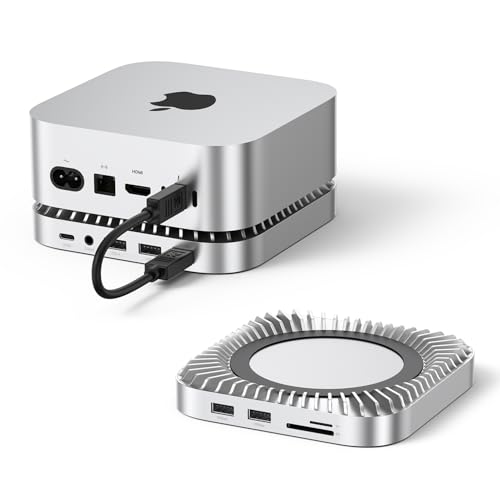
- Up to 8TB NVMe enclosure
- 10Gbps USB-C data and two 10Gbps USB-A ports
- SD/TF and audio; no listed display output
Best For: Connecting USB-C and USB-A peripherals alongside NVMe storage
Best for DisplayPort
BENFEI Mac mini M4 Dock with NVMe Enclosure

- Up to 8TB NVMe storage
- DisplayPort output up to 4K@30Hz
- 10Gbps USB-C and USB-A; for M4/M4 Pro
Best For: M4 or M4 Pro owners who need DisplayPort and SSD expansion
Best for Everyday Connectivity
UGREEN 11-in-1 Mac mini SSD Dock

- Up to 8TB in one NVMe enclosure
- USB-A, USB-C, and SD/TF connections
- External power recommended for multiple devices
Best For: Single-drive expansion with broad peripheral connectivity
Best for Display Expansion
UGREEN DisplayPort Mac mini SSD Dock

- DisplayPort supports up to 4K/240Hz on M4 Pro
- Up to 8TB NVMe expansion at 10Gbps
- SSD sold separately
Best For: High-refresh DisplayPort output plus single-drive storage
Best for Dual-Drive Storage
ACASIS 2-Bay Mac mini NVMe Dock
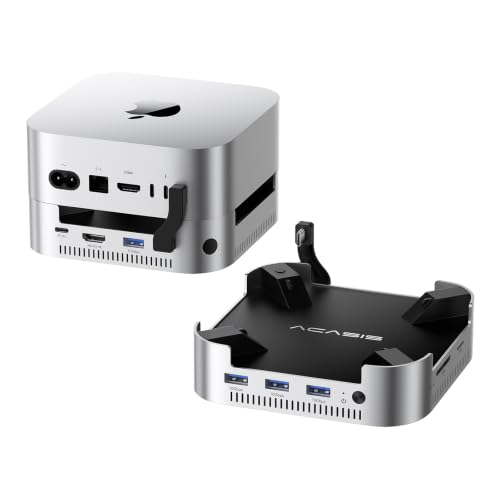
- Two NVMe bays support up to 16TB in RAID 0
- 4K/60Hz HDMI and 10Gbps USB-A ports
- Includes 65W adapter and dual cooling fans
Best For: Dual-drive capacity with HDMI connectivity
Best Vertical Stand

- Vertical stand for Mac mini M4/M4 Pro
- Up to 8TB M.2 NVMe expansion; SSD extra
- 10Gbps USB-A/C data and SD/TF slots
Best For: Upright setups needing storage and easy-access ports
Best Heavy-Duty Pick

- DisplayPort up to 4K/144Hz and HDMI up to 4K/60Hz
- Up to 8TB NVMe storage; SSD extra
- USB, card slots, and audio in one dock
Best For: Multi-display desks that also need local NVMe storage
Best for SSD Flexibility
Bslemon Vertical Mac mini Dock

- Supports NVMe and SATA M.2 SSDs up to 8TB
- Tool-free drive installation; SSD extra
- 4K/60Hz HDMI and 10Gbps USB data
Best For: Vertical setups using either NVMe or SATA storage
Best for HDMI Setups – Stouchi Mac mini Dock with NVMe/SATA Storage
The Stouchi is a mac mini accessory dock with ssd support that combines an M.2 enclosure, extra ports, and easier power-button access in one stand. It supports NVMe or SATA drives up to 8TB, making it a flexible choice if you already own an M.2 SSD.
Best For: Mac mini users who want HDMI output, removable-media slots, and NVMe or SATA storage in one dock.
Pros:
- Supports 2230, 2242, 2260, and 2280 NVMe or SATA SSDs, with up to 10Gbps transfers.
- Includes 4K@60Hz HDMI, two 10Gbps USB-A ports, SD/TF readers, and 3.5mm audio.
- Bottom-mounted power button and vented stand improve everyday access and airflow.
Cons:
- SSD is sold separately.
- Two of its four USB-A ports are USB 2.0, better suited to basic peripherals than fast storage.
Choose this one when HDMI and SATA compatibility matter more than having a USB-C data port on the dock.
Best Aluminum Stand – Satechi Mac mini Hub with NVMe Enclosure
The Satechi is a mac mini accessory dock with ssd expansion for buyers who prefer a compact aluminum stand and front-facing connections. Its NVMe enclosure supports up to 4TB and 10Gbps transfers, while the recessed top and bottom vents are designed to preserve airflow.
Best For: Mac mini owners prioritizing a tidy aluminum setup, SD card access, and convenient USB-A ports.
Pros:
- Two USB-A 3.2 ports offer up to 10Gbps, alongside a USB-A 2.0 port and UHS-II SD reader.
- Dedicated power button and aluminum, vented construction suit a streamlined desk setup.
- Includes SSD installation hardware and a two-year limited warranty.
Cons:
- SSD is not included; heatsink-equipped and double-sided SSDs are incompatible.
- USB-A ports have device and charging restrictions, and only one bus-powered device should be connected at a time.
This is the more focused pick if build and easy front access take priority over a broad selection of display and audio ports.
Best for USB-C Peripherals – RayCue Mac mini Dock with 8TB NVMe Support
The RayCue is a mac mini accessory dock with ssd expansion aimed at users connecting several peripherals at once. Its NVMe enclosure supports drives up to 8TB, and the port selection includes a 10Gbps USB-C data connection as well as fast USB-A ports.
Best For: Mac mini users who need USB-C data, multiple USB-A connections, card readers, and an SSD enclosure together.
Pros:
- Supports 2230, 2242, 2260, and 2280 NVMe SSDs with up to 10Gbps transfers.
- Provides one 10Gbps USB-C data port, two 10Gbps USB-A ports, two additional USB-A ports, and a USB-C charging port.
- Includes SD/TF readers, 3.5mm audio, and bottom ventilation.
Cons:
- SSD is not included.
- No display-output port is listed.
Pick RayCue for its mix of USB-C and USB-A connectivity; look elsewhere in this roundup if the dock itself needs to connect a monitor.
Best for DisplayPort – BENFEI Mac mini M4 Dock with NVMe Enclosure
The BENFEI is a mac mini accessory dock with ssd support for M4 and M4 Pro owners who specifically need DisplayPort. It pairs an up-to-8TB NVMe enclosure with USB-C, USB-A, and SD/TF connectivity in a stand designed for the 2024 Mac mini models.
Best For: Mac mini M4 or M4 Pro setups needing DisplayPort output and expandable NVMe storage.
Pros:
- Supports 2230, 2242, 2260, and 2280 NVMe SSDs at up to 10Gbps.
- DisplayPort supports up to 4K@30Hz, 2K@60Hz, or 1080p@120Hz.
- Offers 10Gbps USB-C and USB-A connections, three 5Gbps USB-A ports, and SD/TF readers.
Cons:
- SSD is not included.
- 4K DisplayPort output tops out at 30Hz.
- Listed compatibility is limited to Mac mini M4 and M4 Pro.
The DisplayPort connection is its clearest advantage, but check your monitor’s refresh-rate needs before choosing it for a 4K desk setup.
Best for Everyday Connectivity – UGREEN 11-in-1 Mac mini SSD Dock
If you want a mac mini accessory dock with ssd expansion and plenty of peripheral connections, this UGREEN stand combines an M.2 NVMe enclosure with an 11-port hub. It supports up to 8TB of storage and keeps the setup compact with an included short cable.
Best For: Mac mini users who need accessible USB ports and card readers alongside one NVMe drive.
Pros:
- Supports 2230, 2242, 2260, and 2280 NVMe SSDs with up to 10Gbps transfer speeds.
- Includes USB-A and USB-C data ports plus UHS-I SD/TF card readers.
- Power-button lever makes the Mac mini easier to turn on without lifting it.
Cons:
- SSD is not included.
- An external power adapter is recommended when several devices are connected.
Choose this model when ports and single-drive expansion matter more than adding a dedicated display output. Check your Mac mini model against the listed compatibility before buying.
Best for Display Expansion – UGREEN DisplayPort Mac mini SSD Dock
This mac mini accessory dock with ssd support adds a DisplayPort output to the usual storage and peripheral connections. Its M.2 NVMe enclosure supports up to 8TB, while the DP port supports up to 4K at 144Hz with a Mac mini M4 or 4K at 240Hz with an M4 Pro.
Best For: Mac mini users who want an additional high-refresh display connection alongside one NVMe drive.
Pros:
- DisplayPort output supports the stated 4K refresh rates for M4 and M4 Pro.
- Supports 2230, 2242, 2260, and 2280 NVMe SSDs at up to 10Gbps.
- Includes USB-A/C data ports, SD/TF slots, audio, and a power-button lever.
Cons:
- SSD is not included.
- Maximum DisplayPort refresh rate depends on the Mac mini model.
This is the more display-focused UGREEN option. For a multi-screen setup, the supplied notes recommend pairing its DisplayPort connection with a Mac mini Thunderbolt port.
Best for Dual-Drive Storage – ACASIS 2-Bay Mac mini NVMe Dock
If storage capacity is your priority in a mac mini accessory dock with ssd support, the ACASIS offers two NVMe bays. Its stated capacity reaches 16TB in RAID 0 mode, and it also adds a 4K/60Hz HDMI output, USB-A ports, and SD/TF slots.
Best For: Mac mini owners who want two NVMe drives and a dedicated HDMI connection in one dock.
Pros:
- Two NVMe bays support up to 16TB in RAID 0 mode.
- Includes a 65W power adapter for self-powered operation.
- Provides 4K/60Hz HDMI, 10Gbps USB-A ports, and SD/TF slots.
- Aluminum housing, side vents, and automatic dual fans help manage heat.
Cons:
- Do not insert or remove SSDs while the dock is powered on.
- The stated RAID 0 speed is 917MB/s; other modes are listed at 474MB/s.
- Its fans are specified at approximately 52dB, which may matter in quiet spaces.
Pick this dock when dual-drive capacity outweighs a minimal port-only setup. The included power adapter and installation accessories make its storage-focused design especially relevant for a fixed desk.
Best Vertical Stand – Minisopuru MINI218B PRO
If you want a mac mini accessory dock with ssd expansion that keeps your M4 or M4 Pro upright, the Minisopuru MINI218B PRO combines a vertical stand with an M.2 NVMe enclosure and everyday ports. It supports up to 8TB of storage over a 10Gbps connection; the SSD is sold separately.
Best For: Mac mini M4 or M4 Pro owners who want accessible USB and card-reader ports without a horizontal dock.
Pros:
- Supports 2230, 2242, 2260, and 2280 M.2 SSD sizes.
- Includes 10Gbps USB-C and USB-A data ports, SD/TF slots, and audio.
- Vertical design keeps the Mac mini power button within reach.
Cons:
- SSD is not included.
- USB-C and USB-A ports do not support video output or charging.
Choose this one for storage and peripheral access, not for adding a monitor through the dock. Its silicone pads also help hold the Mac mini in place and protect it from scratches.
Best Heavy-Duty Pick – 4URPC 13-in-1 Mac mini Dock
The 4URPC is a mac mini accessory dock with ssd expansion for buyers who also need monitor connections. Its 13-in-1 design pairs a 10Gbps M.2 NVMe enclosure supporting up to 8TB with DisplayPort, HDMI, USB ports, card slots, and audio.
Best For: Compatible Mac mini users building a multi-display desk setup with local SSD storage.
Pros:
- DisplayPort supports up to 4K at 144Hz; HDMI supports up to 4K at 60Hz.
- Accepts 2230, 2242, 2260, and 2280 NVMe SSDs.
- Provides four USB-A ports, a USB-C port, SD/microSD slots, and audio.
Cons:
- SSD is not included, and SATA SSDs are not supported.
- The listed USB-C peripheral port is USB 2.0.
This is the strongest fit of the three if dock-based video outputs matter. Check your Mac mini model and display setup against the dock’s stated compatibility before planning a multi-monitor workspace.
Best for SSD Flexibility – Bslemon Vertical Mac mini Dock
This Bslemon mac mini accessory dock with ssd enclosure stands the computer vertically while adding front-facing connections. Unlike the other options here, its tool-free M.2 slot supports both NVMe and SATA SSDs in 2230, 2242, 2260, or 2280 sizes, up to 8TB.
Best For: Mac mini users who want a vertical dock and the choice of an NVMe or SATA M.2 drive.
Pros:
- Tool-free SSD installation supports both NVMe and SATA M.2 drives.
- Includes 4K at 60Hz HDMI, 10Gbps USB data ports, SD/TF slots, and audio.
- Aluminum stand includes ventilation for the dock and installed SSD.
Cons:
- SSD is not included.
- The maker recommends a USB-C PD charger for full performance during heavy transfers.
Pick this dock if you value drive compatibility and an HDMI output in a vertical setup. Its USB-C PD input powers the dock, so account for the recommended charger when planning sustained transfers.
How We Picked the Best Mac Mini Accessory Dock with SSD
We focused on the practical differences that matter when a dock also houses an SSD: stated Mac mini compatibility, M.2 drive support, port selection, display outputs, and how the dock sits on a desk. We also considered whether a model is designed for one drive or two. Product names and listings can leave important details unclear, so treat advertised speeds and compatibility as specifications to verify against the current manufacturer documentation—not as performance results.
Quick Comparison: Choose by Use Case
For a straightforward single-drive setup, start with the Stouchi, Satechi, or UGREEN dock-and-stand options. If external display connectivity is a priority, compare the BENFEI DisplayPort model with the UGREEN DP hub and the vertical HDMI dock; confirm each model’s supported resolution and refresh rate with your specific Mac mini. The ACASIS two-bay design is the clearest fit here if you want room for two NVMe drives. Raycue and 4URPC advertise higher-capacity enclosure options, but check supported drive size and thickness before buying. The Minisopuru is another stand-style option worth comparing on ports and physical fit.
Key Buying Factors for a Mac Mini Accessory Dock with SSD
Match the Exact Mac Mini Model
Do not rely on a similar-looking chassis or a broad “Mac mini” label. Check the manufacturer’s compatibility list, connector placement, and whether the dock obstructs the computer’s power button or ventilation. Several listings use model labels that warrant extra scrutiny; verify the exact Mac mini you own before ordering.
Check SSD Type and Realistic Speed
M.2 describes a drive form factor, not a guarantee of compatibility. Confirm whether the enclosure accepts NVMe, SATA, or both, plus the supported drive lengths and maximum capacity. A 10Gbps USB connection has a lower real-world transfer ceiling than its headline number suggests, and performance may drop during long transfers if the drive or enclosure gets hot. Most docks do not include an SSD unless the listing explicitly says so.
Buy Ports You Will Actually Use
Count the USB-C and USB-A ports you need for accessories, then check their stated data rates. A USB-C charging port may not transfer data. If you use SD cards, audio devices, or a monitor, confirm those specific connections rather than assuming every hub includes them. For video, check the dock’s display specification alongside your Mac mini’s own external-display capabilities.
Consider Desk Fit and Power
A horizontal stand keeps the Mac mini footprint tidy; a vertical dock can free desk space but needs a stable base. Check cable clearance, airflow, and whether power delivery is intended for connected devices rather than powering the Mac mini itself.
Who Should Buy Which Mac Mini Accessory Dock with SSD?
Choose a simple single-SSD stand if your main goal is accessible storage and a few extra ports. Pick a display-focused dock only when its output matches your monitor and desired refresh rate. Choose the ACASIS two-bay option if separate drives or extra storage flexibility matter most. If you already own an M.2 SSD, make drive compatibility your first filter; if you have not bought one yet, choose the dock before selecting the drive.
