
If your Mac mini shares a tight workspace with a monitor, keyboard, and charging gear, the right accessories can make a huge difference. The best options help you reclaim surface area, improve airflow, and keep ports easier to reach.
Below, we focus on practical picks for compact setups, including stands, under-desk mounts, VESA solutions, and dock-style add-ons that suit real-world small desks.
Best 10 Mac Mini Accessories for Small Desks Picks for 2026
Best for Small Desks
AKKYAJAURE Mac mini M4 Dock Stand

- Precision-fit stand for Mac mini M4 and M4 Pro
- Elevates the Mac mini to save desk space and improve airflow
- Matched aluminum look with anti-slip silicone padding
Best For: Mac mini M4 owners who need a compact, tidy stand for a tight workspace.
Best for Power Users
TREBLEET 80Gbps eGPU Enclosure
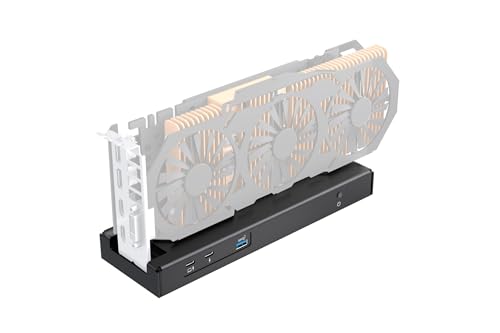
- 80Gbps Thunderbolt 5 / USB4 bandwidth
- 140W PD charging helps cut cable clutter
- Supports SFX, ATX, FLEX, and DC power
Best For: Compact Mac mini or mini-PC setups needing an external GPU dock with serious performance.
Best for Mounting
All-Metal Mac Mini M4 Mount Bracket

- All-metal construction for a firm hold
- Mounts under a desk or behind a monitor
- Soft padding helps prevent scratches and slipping
Best For: Compact desk setups that need to move the Mac Mini off the surface.
Best for Small Spaces
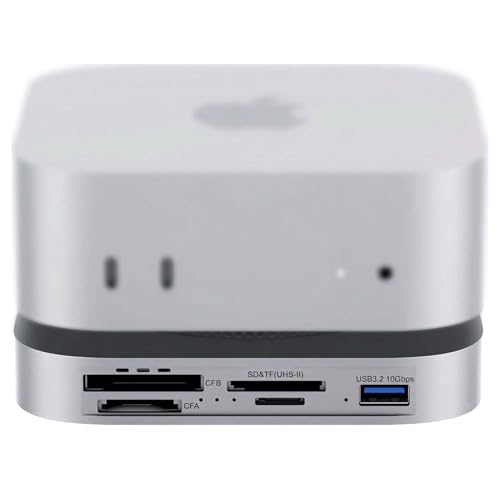
- 80Gbps USB4 2.0 speeds with Thunderbolt 5/4 support
- Built-in NVMe slot for fast Gen4 storage expansion
- CFexpress A/B and UHS-II readers for pro cameras
Best For: Creators and Mac mini owners who need a compact all-in-one dock with fast storage and pro card readers.
Best for Easy Setup
Under-Desk Adjustable Mini PC Mount

- 5-level height adjustment for better clearance and airflow
- Width-adjustable metal frame fits Mac mini and compact PCs
- Includes screws and a positioning template for easier install
Best For: People who want a tidy under-desk mount for a Mac mini or small PC with minimal guesswork.
Best for Vertical Storage
AFOOYO Mac Mini Vertical Stand

- Saves desk space with a vertical, upright design
- Compatible with Mac mini 2010-2024 including M1/M2/M4 Pro
- Silicone pads help prevent slipping and scratches
Best For: Compact desks where vertical storage and a cleaner footprint matter most.
Best for Vertical Mounting
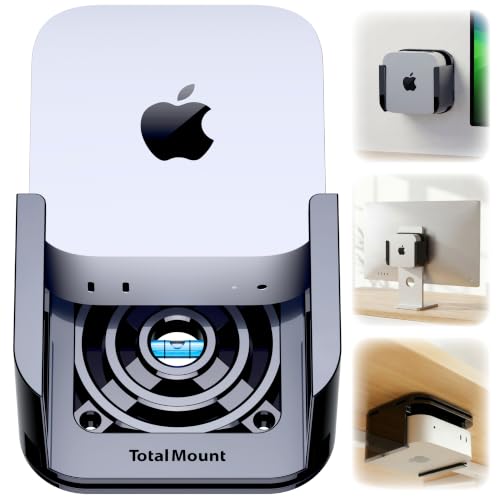
- Mounts under a desk, on a wall, or behind a monitor
- Metal-free build helps protect Wi‑Fi performance
- Ventilation channels support cooling airflow
Best For: Users who want a secure, space-saving mount for a newer Mac mini.
Best with Extra Features
Under-Desk/Monitor VESA Metal Mount for Mac mini

- Supports VESA, under-desk, and wall mounting
- All-metal 2mm steel build for durability
- Foam padding helps protect the Mac mini finish
Best For: People who want a sturdy off-desk mounting solution to save space on a small desk.
Best for Wall or VESA Mounting
Under-Desk Mount for 2024 Mac mini M4

- Durable one-piece molded design
- Works with desk, wall, and VESA mounting
- Keeps ports and power button accessible
Best For: People who want to mount a 2024 Mac mini off the desk to save space and reduce clutter.
Best for Under-Desk Mounting

- All-metal mount for better rigidity and durability
- Under-desk, wall, and VESA-compatible setup options
- Keeps Mac mini ports and buttons accessible
Best For: Small-desk setups that need a sturdy, space-saving mount for a 2024 Mac mini M4/M4 Pro.
Best for Small Desks – AKKYAJAURE Mac mini M4 Dock Stand
If you want mac mini accessories for small desks, this dock-style stand is a simple way to lift the Mac mini M4 off the surface, free up room, and keep the setup looking clean. It’s designed to match the new Mac mini closely while adding better airflow and easier desk organization.
Best For: Mac mini M4 owners who want a space-saving stand with a matched aluminum look and easier access on a crowded desk.
Pros:
- Precision-fit design tailored to the Mac mini M4 and M4 Pro
- Elevated stand helps improve airflow and cooling
- Matching aluminum finish creates a seamless desktop look
- Silicone padding helps prevent slipping and scratches
Cons:
- Only useful if you already own a Mac mini M4/M4 Pro
- Doesn’t add ports or storage like a full hub/dock
As mac mini accessories for small desks go, this is a practical pick if your main goal is reclaiming space without making the setup look add-on heavy. It’s especially appealing for users who want a clean, floating presentation and better cooling in one simple accessory.
Best for Power Users – TREBLEET 80Gbps eGPU Enclosure
If your setup needs serious external graphics muscle, this TREBLEET enclosure is a strong fit for mac mini accessories for small desks because it keeps the GPU off the desktop while adding high-bandwidth expansion through a single cable. It’s aimed at users who want a compact workstation feel without sacrificing performance, but it does require compatible hardware and a bit of setup know-how.
Best For: Compact Mac mini or mini-PC setups that need an external GPU dock with top-tier bandwidth and charging flexibility.
Pros:
- 80Gbps Thunderbolt 5 / USB4 support for faster external GPU performance
- 140W PD charging helps reduce cable clutter on small desks
- Flexible SFX, ATX, FLEX, and DC power support
- Works with many Windows devices, Macs, and USB4/Thunderbolt handhelds
Cons:
- Requires compatible drivers and host-device support
- More complex than a plug-and-play dock
- GPU and power supply are sold separately
For buyers comparing mac mini accessories for small desks, this is less about adding convenience and more about turning a tiny setup into a much more capable workstation. It’s a niche pick, but the high-speed connectivity and tidy single-cable charging make it compelling if you need both performance and desk efficiency.
Best for Mounting – All-Metal Mac Mini M4 Mount Bracket
If you want one of the most practical mac mini accessories for small desks, this all-metal bracket moves your Mac Mini off the work surface and into an under-desk or behind-monitor position. It’s a simple way to reclaim space while keeping the computer secure and easy to reach when needed.
Best For: Users who want a rigid, space-saving mount for a Mac Mini M4/M4 Pro setup on a compact desk.
Pros:
- All-metal build feels sturdy and long-lasting.
- Works under a desk or behind a monitor for flexible placement.
- Soft padding helps protect the Mac Mini from scratches and slipping.
- Includes different screw options for easier installation.
Cons:
- Only useful if you’re comfortable mounting the Mac Mini out of sight.
- Not as versatile as a universal desktop stand.
For small setups, this mount is a smart buy because it frees up valuable desk real estate without adding clutter. Among mac mini accessories for small desks, it stands out for doing one job well: keeping the machine securely mounted and out of the way.
Best for Small Spaces – 80Gbps Mac mini Dock
If you want one of the most capable mac mini accessories for small desks, this 80Gbps dock turns the Mac mini M4 or M4 Pro into a compact media hub without stacking extra adapters. It combines high-speed storage expansion, pro card readers, and cooling in a single footprint, which helps keep cable clutter under control.
Best For: Creators, photographers, and Mac mini owners who need fast storage, direct memory-card access, and a tidy all-in-one dock for a compact workspace.
Pros:
- 80Gbps USB4 2.0 performance with Thunderbolt 5/4 compatibility
- Built-in PCIe 4.0 NVMe slot for fast internal storage expansion
- CFexpress Type A/B plus UHS-II SD and microSD readers for pro workflows
- Dual PWM cooling fans and aluminum build help with sustained heavy use
Cons:
- More expensive than a basic USB hub or simple stand
- Requires your own NVMe SSD to use the storage slot
- Overkill if you only need a few extra USB ports
For buyers comparing mac mini accessories for small desks, this is a strong pick when you want to consolidate storage, card reading, and cooling into one unit. It is especially useful if your workflow involves large media files and you want fewer separate accessories on the desk.
Best for Easy Setup – Under-Desk Adjustable Mini PC Mount
If you want mac mini accessories for small desks that free up surface area without making installation complicated, this under-desk mount is a practical pick. The adjustable height and width make it easier to fit a Mac mini, small PC, or even a docked setup while keeping everything tucked away and accessible.
Best For: Users who want a secure under-desk mounting solution for a Mac mini or compact PC, especially when desk space is tight.
Pros:
- 5-level height adjustment helps balance airflow, clearance, and access.
- Width-adjustable brackets fit Mac mini, small PCs, and some docked setups.
- Metal construction feels sturdy enough for long-term under-desk use.
- Includes screws and a positioning template for cleaner installation.
Cons:
- Requires drilling, so it is not ideal for renters or temporary setups.
- Under-desk placement may be less convenient if you frequently swap cables or devices.
For buyers comparing mac mini accessories for small desks, this mount stands out because it trades desk clutter for a cleaner, more permanent layout. It is a smart choice if you value space savings and a tidy workstation over portability.
Best for Vertical Storage – AFOOYO Mac Mini Vertical Stand
If you need mac mini accessories for small desks, this vertical stand is a simple way to free up surface area while keeping your Mac mini easy to reach. The ABS body, silicone pads, and gravity-locking fit make it a practical pick for a compact setup, and the upright design can also help airflow around the device.
Best For: Users who want a compact, stable way to store a Mac mini vertically on a crowded desk.
Pros:
- Vertical orientation saves desk space and helps keep the setup tidy
- Wide compatibility for Mac mini 2010-2024, including M1, M2, and M4 Pro
- Non-slip silicone pads add stability and help prevent scratches
- Can also work as a phone, tablet, or small laptop holder with the included clips
Cons:
- Only useful if you’re comfortable storing the Mac mini upright
- Not a full docking solution, so you still need your own cables and peripherals
For shoppers comparing mac mini accessories for small desks, this is a straightforward space-saving accessory rather than a fancy add-on. It’s a good fit if your main goal is to organize the desktop, protect the machine, and reclaim room for other gear.
Best for Vertical Mounting – TotalMount for Mac mini
If you want mac mini accessories for small desks that free up space without adding clutter, this TotalMount is a practical pick. It lets you mount the Mac mini under a desk, on a wall, or behind a monitor while keeping vents open for cooling and preserving Wi‑Fi performance.
Best For: Buyers who want a secure, low-profile way to mount a 2024-2026 Mac mini on or under a desk.
Pros:
- Metal-free design helps avoid Wi‑Fi interference and reduces scratch risk
- Patented ventilation channels support airflow to help with heat management
- Includes hardware for under-desk, wall, and monitor mounting
- Secure screw-and-bumper mounting is more reliable than adhesive solutions
Cons:
- Only works with 2024, 2025, and 2026 Mac mini models
- Not a standalone desk accessory if you prefer to keep the Mac mini visible
For small workspaces, this is one of the more useful mac mini accessories for small desks because it shifts the computer out of the way while still prioritizing airflow and easy placement options. It’s especially appealing if you want a tidy setup without risking weak adhesive mounts.
Best with Extra Features – Under-Desk/Monitor VESA Metal Mount for Mac mini
If you want one of the most practical mac mini accessories for small desks, this all-metal mount helps move your Mac mini off the desktop and into unused space. It works with VESA monitor holes, can mount under a desk or on the wall, and adds a simple way to reduce clutter while keeping the device accessible.
Best For: Users who want a sturdy, space-saving way to mount a Mac mini under a desk, behind a monitor, or on a wall.
Pros:
- Fits standard VESA monitor mounting patterns for flexible placement
- Helps free up desk surface and keep the Mac mini dust-free
- 2mm steel construction feels sturdy and durable
- Foam padding adds scratch protection and a snug hold
Cons:
- Requires installation, so it is less plug-and-play than a stand
- Only useful if you actually want to mount the Mac mini off the desk
- Best suited to compatible monitor/desk/wall setups
For buyers comparing mac mini accessories for small desks, this mount stands out because it focuses on reclaiming space rather than adding another item to the desktop. If your goal is a cleaner setup with better organization, it is a strong fit.
Best for Wall or VESA Mounting – Under-Desk Mount for 2024 Mac mini M4
If you’re looking for mac mini accessories for small desks, this under-desk mount is a practical way to clear surface space while keeping the 2024 Mac mini M4 or M4 Pro easy to reach. It’s designed for quick installation on a desk, wall, or VESA-compatible monitor, with a fit that keeps ports and the power button accessible.
Best For: Users who want to mount a 2024 Mac mini under a desk or behind a monitor to reduce clutter and protect the device.
Pros:
- Single-piece injection-molded build offers better durability than older 3D-printed styles
- Supports under-desk, wall, and 75×75mm / 100×100mm VESA monitor mounting
- Full access to the Mac mini’s ports, power button, and cables
- Helps free up desk space and keeps the setup cleaner
Cons:
- Only fits the 2024 Mac mini M4 and M4 Pro
- Mounting hardware and adhesive installation may not suit every surface
- Not ideal if you prefer to keep the Mac mini fully portable on the desk
This is a strong pick for mac mini accessories for small desks if your main goal is reclaiming workspace without sacrificing access. It’s especially useful in compact home offices where mounting the Mac mini out of the way makes the setup feel less crowded.
Best for Under-Desk Mounting – All Metal Mac mini M4 Stand
If you’re shopping for mac mini accessories for small desks, this metal mounting stand is a smart way to clear surface clutter by moving your Mac mini under a desk or behind a monitor. It’s built for the 2024 Mac mini M4/M4 Pro and aims to keep ports accessible while freeing up valuable workspace.
Best For: Users who want a sturdy, space-saving under-desk or VESA-mounted setup for a 2024 Mac mini M4/M4 Pro.
Pros:
- All-metal construction feels sturdier than typical plastic or 3D-printed mounts
- Supports under-desk, wall, and 75×75 / 100×100 VESA monitor mounting
- Designed for full access to ports, buttons, and cables on the Mac mini M4
- Includes hardware and tape for a quick setup
Cons:
- Only fits the 2024 Mac mini M4 and M4 Pro
- Not as useful if you prefer to keep the Mac mini visible on the desk
For mac mini accessories for small desks, this is one of the more practical picks if your main goal is reclaiming space without giving up easy access. The metal build and flexible mounting options make it a solid choice for compact workstations.
How We Picked the Best Mac Mini Accessories for Small Desks
For this roundup of Mac Mini Accessories for Small Desks, we prioritized products that save visible desk space without making the computer harder to use. We looked for strong mounting options, stable construction, easy installation, and designs that preserve cooling and access to buttons and ports.
We also favored accessories that make sense for different setups: some users need a simple vertical stand, while others want an under-desk or VESA mount to clear the desktop entirely.
Quick Comparison
If you want the simplest upgrade, a vertical stand or compact dock keeps the Mac mini accessible on the desk. If your goal is maximum clearance, an under-desk or monitor-mounted bracket is usually the better choice. Power users who need more connectivity should lean toward dock solutions with fast storage, card readers, or external expansion support.
Key Buying Factors for Mac Mini Accessories for Small Desks
Mounting Style and Space Savings
Choose the format that matches your layout. Vertical stands are easiest to place and move, while under-desk and VESA mounts free up the most room. If your desk is already crowded, mounting the Mac mini off the surface is often the biggest improvement.
Cooling and Airflow
Small desks can trap heat around compact devices. Look for open designs, vent-friendly brackets, or stands that do not block intake and exhaust areas. Good airflow matters even more if the Mac mini sits near a monitor or other warm gear.
Access to Ports and Power Button
Some mounts make cable management cleaner but can hide the power button or front ports. Check whether the accessory leaves enough clearance for daily use, especially if you connect and disconnect drives often.
Build Quality and Stability
Metal mounts usually offer the firmest hold, while lightweight stands can be fine if you only need basic positioning. For a small desk, stability matters because a wobbling accessory defeats the purpose of a cleaner setup.
Extra Functionality
If you want more than storage, consider a docking station with USB4 support, NVMe expansion, or card readers. These are especially useful if your desk setup also handles content creation, backups, or frequent device transfers.
Who Should Buy Which Mac Mini Accessories for Small Desks?
Buy a vertical stand if you want a low-effort way to organize the Mac mini on the desk. Choose an under-desk or VESA mount if your main goal is to clear surface space. Pick a dock if you need faster connectivity and fewer separate adapters. For users building a compact, clutter-free workspace, the best Mac Mini Accessories for Small Desks are the ones that reduce footprint while keeping the machine easy to use every day.
