
If you want more speed, more ports, and more usable storage from your Mac mini, the right accessory can make a big difference. The best options combine an SSD enclosure with a dock or hub, so you can expand storage without clutter.
In this roundup, we focus on practical mac mini accessories for external storage that are built for everyday use, high-capacity upgrades, and tidy desk setups.
Best 10 Mac Mini Accessories for External Storage Picks for 2026
Best for Always-On Mac mini Storage

- Up to 40Gbps with speeds advertised up to 3000MB/s
- Supports 2230/2242/2260/2280 drives up to 8TB
- Snap-on Mac mini fit designed for 24/7 operation
Best For: Mac mini M4 and M4 Pro users who want fast, reliable external storage for always-on workflows.
Best for Front-Access Storage

- Front-facing ports for quick drive swaps
- 4× USB 3.2 10Gbps plus SD/TF card readers
- Clean, plug-and-play expansion for Mac mini M4
Best For: Creators and professionals who want easy front access to external drives and cards.
Best for Portable Drive Protection
LaCie Rugged Mini Case with Pockets
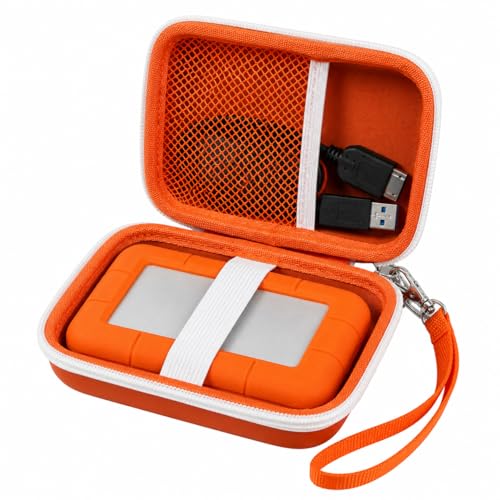
- Hard EVA shell protects against bumps, dust, and splashes
- Mesh pocket stores cables, SD cards, and small accessories
- Wrist strap and compact size make it easy to carry
Best For: Mac users who travel with a LaCie Rugged Mini and want organized protection for the drive and accessories.
Best for All-in-One Storage Expansion
Minisopuru MINI218B PRO Mac mini M4 Dock

- Up to 8TB NVMe SSD support
- 10Gbps USB-C and USB-A ports
- Vertical stand saves desk space
Best For: Mac mini M4 owners who want a compact dock with external SSD expansion and extra ports.
Best All-in-One Expansion
Satechi Mac mini M4 Hub & Stand

- NVMe enclosure adds up to 4TB of external storage
- Two USB-A 3.2 ports plus SD card reader
- Compact aluminum stand with optimized cooling
Best For: Mac mini M4 users who want storage expansion and front-facing ports in one clean dock.
Best for Storage Expansion
Mac mini M4 Dock with SSD Enclosure

- M.2 NVMe/SATA SSD enclosure built in
- 4K@60Hz HDMI and multiple USB ports
- SD/TF slots plus audio jack for convenience
Best For: Mac mini M4 owners who want a dock that doubles as external storage.
Best Dock-and-Storage Hub
UGREEN Mac mini M4 Dock & Stand with NVMe SSD

- Built-in NVMe SSD enclosure for external storage
- Three 10Gbps USB-A ports plus USB-C data
- Includes SD card reader and Mac mini stand design
Best For: Mac mini users who want a tidy all-in-one dock with external storage expansion.
Best with Extra Features
Mac mini M4 Dock with 4TB SSD Enclosure

- M.2 SSD enclosure supports external storage expansion
- 8-in-1 hub adds USB, SD/TF, and audio ports
- Vertical aluminum stand helps reduce desk clutter
Best For: Mac mini users who want external storage and extra ports in one compact stand.
Best Heavy-Duty Pick
BENFEI Mac mini M4 Dock with NVMe

- Adds up to 8TB via built-in NVMe enclosure
- 10Gbps USB-C/USB-A for faster transfers
- Includes 4K DisplayPort and SD/microSD readers
Best For: Mac mini M4 owners who want external storage plus a full-featured desk hub.
Best for Built-In SSD Expansion
Satechi Mac mini Hub & Stand with SSD Enclosure

- Built-in M.2 SSD enclosure for NVMe/SATA drives
- USB-C 10Gbps plus three USB-A ports
- Functions as a tidy stand and hub in one
Best For: Mac mini owners who want an all-in-one stand, hub, and SSD enclosure.
Best for Always-On Mac mini Storage – 40Gbps M.2 NVMe Enclosure
If you want mac mini accessories for external storage that feel built for a true desktop workflow, this 40Gbps M.2 NVMe enclosure is a strong fit. It adds fast, internal-style expansion to a Mac mini M4 or M4 Pro without opening the machine, and it’s aimed at users who leave their setup running for long stretches.
Best For: Mac mini M4 and M4 Pro owners who need fast, always-on external storage for editing, automation, or large local projects.
Pros:
- Up to 40Gbps performance with advertised speeds up to 3000MB/s
- Designed for 24/7 operation with stable airflow and a Mac mini-friendly fit
- Supports 2230, 2242, 2260, and 2280 M.2 NVMe drives up to 8TB
- Snap-on installation avoids opening the Mac mini or risking warranty concerns
Cons:
- Needs a fast NVMe Gen 4×4 SSD to reach top speeds
- Best results depend on Thunderbolt 4/3 or USB4-capable ports
For buyers comparing mac mini accessories for external storage, this enclosure stands out because it combines speed, capacity, and a purpose-built design for the Mac mini M4 family. It’s especially appealing if you want a tidy, high-performance setup that can stay connected all day.
Best for Front-Access Storage – Mac mini M4 6-in-1 Front Dock
If you’re looking for mac mini accessories for external storage, this front-access hub makes it much easier to plug in SSDs, card readers, and other high-speed peripherals without reaching behind the Mac mini. With 4× USB 3.2 10Gbps ports plus SD/TF 3.0 card slots, it’s a practical add-on for fast file transfers and a cleaner desktop layout.
Best For: Creators, developers, and office users who want fast front-facing access to external drives and everyday accessories on a Mac mini M4.
Pros:
- Front-facing ports make drive swaps and cable changes quick and convenient
- 4× USB 3.2 10Gbps connections suit external SSDs and other fast peripherals
- SD/TF 3.0 card readers are handy for photo and video workflows
- Plug-and-play setup keeps installation simple
Cons:
- Designed more for convenience than for adding advanced storage features
- Works best if you mainly need accessible ports rather than a full dock
For buyers comparing mac mini accessories for external storage, this is a strong fit if accessibility matters as much as speed. It won’t replace a dedicated storage enclosure, but it does streamline everyday workflows and keeps high-use connections right where you need them.
Best for Portable Drive Protection – LaCie Rugged Mini Case with Pockets
If you want one of the more practical mac mini accessories for external storage, this case is a simple way to keep a LaCie Rugged Mini drive and its small extras together. It’s built for travel, daily desk use, and protecting your backup drive from scratches, bumps, and dust.
Best For: Mac users who carry a LaCie Rugged Mini drive, cables, SD cards, or flash drives and want a compact storage case.
Pros:
- Hard EVA shell offers solid protection against drops, dust, and splashes.
- Mesh pocket and elastic strap help organize cables and small accessories.
- Detachable wrist strap makes it easy to carry in a bag or by hand.
Cons:
- Case only; the LaCie drive is not included.
- Designed specifically for LaCie Rugged Mini sizes, so it is not universal.
For anyone building a tidy storage setup, this is a straightforward pick that keeps essential backup gear protected and easy to grab. It’s especially useful if your mac mini accessories for external storage need to stay organized while moving between home, office, and travel.
Best for All-in-One Storage Expansion – Minisopuru MINI218B PRO Mac mini M4 Dock
If you want one of the most practical mac mini accessories for external storage, this Minisopuru dock combines an 8TB M.2 NVMe enclosure with extra USB and card-reader ports in a vertical Mac mini stand. It’s a tidy way to add fast SSD storage, keep your setup compact, and reduce cable clutter at the same time.
Best For: Mac mini M4 owners who want a vertical dock that adds external NVMe storage plus everyday USB expansion.
Pros:
- Supports up to 8TB M.2 NVMe SSDs for major storage expansion
- Includes 10Gbps USB-C and USB-A ports plus SD/TF card slots
- Vertical aluminum design helps save desk space and keep the Mac mini accessible
- Built-in silicone padding helps protect and stabilize the Mac mini
Cons:
- SSD is not included, so you’ll need to buy storage separately
- USB-C/A ports are data-only and do not support video or charging
- SD/TF speed is limited to UHS-I rather than faster pro-reader performance
For buyers comparing mac mini accessories for external storage, this is a strong all-in-one pick if you want both an NVMe enclosure and a hub in a single stand. It’s especially appealing for clean desktop setups that still need practical expansion.
Best All-in-One Expansion – Satechi Mac mini M4 Hub & Stand
If you want one of the most practical mac mini accessories for external storage, this Satechi hub and stand adds an NVMe SSD enclosure plus front-facing ports without cluttering your desk. It is built specifically for the Mac mini M4, making it a tidy way to add fast storage and everyday connectivity in one compact accessory.
Best For: Mac mini M4 owners who want a single dock that combines external SSD expansion, USB-A ports, and card reading in a clean desktop setup.
Pros:
- Built-in NVMe enclosure supports up to 4TB of extra storage
- Front ports include 2x USB-A 3.2, USB-A 2.0, and UHS-II SD card reader
- Aluminum design and self-cooling vents help maintain airflow
- Includes thermal pad, screwdriver, and installation hardware
Cons:
- SSD is not included
- Heatsink and double-sided NVMe drives are incompatible
- USB-A ports have device limitations and no iPad charging
For buyers comparing mac mini accessories for external storage, this stands out because it combines storage expansion and hub functionality in a single, Mac mini-specific design. It is a strong fit if you want a cleaner setup than a separate SSD enclosure and USB hub.
Best for Storage Expansion – Mac mini M4 Dock with SSD Enclosure
If you want one of the most practical mac mini accessories for external storage, this Mac mini M4 dock adds an M.2 NVMe/SATA SSD enclosure plus a useful set of front-and-side ports. It helps turn the Mac mini into a cleaner desktop setup while giving you faster access to external drives, media cards, and wired peripherals.
Best For: Mac mini M4 users who want a compact all-in-one dock with built-in external storage expansion and extra I/O.
Pros:
- Built-in M.2 NVMe/SATA SSD enclosure for external storage expansion
- 4K@60Hz HDMI plus USB-C and multiple USB-A ports for daily connectivity
- SD/TF card slots and audio jack add convenient desktop flexibility
Cons:
- Works best if you actually need the added storage bay and port expansion
- Aluminum stand design adds bulk compared with a simple hub
For buyers comparing mac mini accessories for external storage, this model stands out because it combines a dock, stand, and SSD enclosure in one unit. That makes it a strong fit if you want to reduce cable clutter and add storage without building a separate external drive setup.
Best Dock-and-Storage Hub – UGREEN Mac mini M4 Dock & Stand with NVMe SSD
If you want one of the most practical mac mini accessories for external storage, this UGREEN dock turns the Mac mini into a cleaner desktop hub while adding room for a fast NVMe SSD. It also bundles extra USB-A ports, a USB-C data connection, and an SD card reader, so it’s a smart way to expand both storage and connectivity without adding a pile of dongles.
Best For: Mac mini users who want an all-in-one dock, stand, and external SSD enclosure for a tidier desk setup.
Pros:
- Built-in NVMe SSD enclosure for fast external storage expansion
- Three 10Gbps USB-A ports plus a USB-C data port for peripherals
- SD card reader adds convenience for photo and media workflows
- Stand-style design helps keep the Mac mini setup compact and organized
Cons:
- Requires a separate NVMe SSD to use the storage enclosure
- More useful for desk setups than for portable use
- Feature-rich design may be overkill if you only need one extra port
This is a strong pick if you want mac mini accessories for external storage that also streamline your everyday connections. Instead of buying a hub and enclosure separately, you get a more integrated setup that makes the Mac mini feel like a complete workstation.
Best with Extra Features – Mac mini M4 Dock with 4TB SSD Enclosure
If you want mac mini accessories for external storage that also clean up your desk, this vertical dock is a practical two-in-one upgrade. It combines an M.2 SSD enclosure with extra USB, SD, and audio ports, so you can add fast local storage and keep everyday peripherals within reach.
Best For: Mac mini owners who want a space-saving hub with room for external storage, extra ports, and a vertical stand in one accessory.
Pros:
- Built-in M.2 SSD enclosure adds a neat path for external storage expansion
- 8-in-1 hub gives you USB-C, USB-A, SD/TF, and 3.5mm audio connectivity
- Vertical aluminum design helps organize the Mac mini setup and save space
Cons:
- SSD is not included, so you’ll need to buy storage separately
- More of a desk hub than a pure storage enclosure
- May be overkill if you only need a basic external drive dock
For buyers comparing mac mini accessories for external storage, this dock stands out because it merges expansion, connectivity, and a stand into one compact accessory. It’s a strong fit if you want to simplify your setup rather than add another standalone box to your desk.
Best Heavy-Duty Pick – BENFEI Mac mini M4 Dock with NVMe
If you want one of the more capable mac mini accessories for external storage, this BENFEI dock turns the Mac mini M4 into a compact hub with NVMe expansion, extra USB ports, and front card readers. It is a practical way to add fast local storage while also cleaning up your desk connections.
Best For: Mac mini M4 users who want a dock that combines external storage expansion, display output, and extra everyday ports in one unit.
Pros:
- Built-in NVMe enclosure supports up to 8TB of added storage
- 10Gbps USB-C and USB-A connections for faster file transfers
- Includes 4K DisplayPort plus SD/microSD card readers
- Compact dock design helps consolidate accessories around the Mac mini
Cons:
- SSD is not included, so total cost is higher once you add storage
- DisplayPort tops out at 4K@30Hz rather than 4K@60Hz
- Designed specifically for Mac mini M4/M4 Pro, not universal desktops
This is a smart pick if you want mac mini accessories for external storage that do more than just add capacity. It is especially appealing for users who need a dock, card reader, and SSD enclosure in one tidy setup.
Best for Built-In SSD Expansion – Satechi Mac mini Hub & Stand with SSD Enclosure
If you want one of the more capable mac mini accessories for external storage, this Satechi hub adds a built-in M.2 SSD enclosure plus extra front-facing ports in a compact stand. It’s a practical way to expand fast storage and keep your desk setup cleaner, especially if your Mac mini is doing everyday creative or file-heavy work.
Best For: Mac mini owners who want an all-in-one stand, hub, and NVMe/SATA storage enclosure for a tidy desktop setup.
Pros:
- Built-in SSD enclosure supports NVMe and SATA M.2 drives
- Adds USB-C 10Gbps plus three USB-A ports for accessories
- Works as a stand to improve cable management and desk organization
Cons:
- Not compatible with Mac mini M4 models
- External SSD speed depends on the drive you install
- May be more expensive than a simple hub or enclosure alone
For buyers comparing mac mini accessories for external storage, this is a strong pick when you want storage expansion and port access in one unit. It’s less about minimalism and more about convenience, making it especially useful if you prefer a dock-style solution over separate accessories.
How We Picked the Best Mac Mini Accessories for External Storage
We prioritized accessories that add real storage value to a Mac mini setup, not just extra ports. That means strong SSD support, sensible port selection, stable build quality, and compatibility with modern Mac mini models. We also favored designs that suit always-on desks, front-access workflows, and compact setups.
Quick Comparison
Most Mac Mini Accessories for External Storage fall into three groups: dock-and-enclosure combos, hub-and-stand designs, and storage holders. Dock-enclosure models are best if you want internal-drive-style expansion in a single unit. Hub-and-stand options are a better fit if you need front-facing USB, card readers, and display outputs along with storage. Simple holders are the most basic choice for protecting an existing external drive.
Key Buying Factors for Mac Mini Accessories for External Storage
SSD Support and Capacity
Check whether the accessory supports NVMe, SATA, or both, and confirm the maximum capacity. If you expect to grow over time, choose a model with headroom so you do not outgrow it quickly.
Connection Speed
For faster file transfers, look for USB 10Gbps or higher, especially if you move large media libraries, backups, or project files. Real-world performance also depends on the SSD you install and the cable used.
Thermals and Build
Storage enclosures generate heat. Aluminum designs and good internal thermal management help maintain steady performance during long transfers and extended use.
Ports and Workflow
If your desk needs card readers, USB-A, USB-C, HDMI, or audio, pick a dock that matches your workflow. If storage is the main goal, a simpler enclosure may offer a cleaner, more focused solution.
Compatibility
Make sure the accessory is listed for your exact Mac mini generation, especially M4 and M4 Pro models. Some products also support broader Mac and PC use, which can be useful if you switch systems.
Who Should Buy Which Mac Mini Accessories for External Storage?
If you want the cleanest high-capacity upgrade, choose an enclosure-first dock with NVMe support. If you need a better desktop workstation, choose a hub-and-stand model with front-access ports and a card reader. If you already own a portable hard drive and just want safe storage on your desk, a compact holder is enough.
For most buyers, the best Mac Mini Accessories for External Storage are the ones that balance speed, expandability, and everyday convenience without adding unnecessary bulk.
