
Building a cleaner, more capable Mac mini workspace starts with the right accessories. The best options do more than hold the computer in place—they improve airflow, free up desk space, and make ports easier to reach.
Below, we focus on the most useful mac mini accessories for desk setup, from stands and under-desk mounts to dock-style expanders that add storage and connectivity.
Best 10 Mac Mini Accessories for Desk Setup Picks for 2026
Best for Cooling & Cable Control
AKKYAJAURE Mac mini M4 Dock Stand

- Improves airflow with an aluminum stand design
- Makes the power button easier to reach
- Helps keep the desk layout cleaner and simpler
Best For: Mac mini M4 owners who want a cleaner desk and better cooling without extra hub features.
Best Mounting Flexibility
Metal Mac mini Mount with Pen Holder

- Fits behind a monitor, under a desk, or on a wall
- Steel build with anti-slip, anti-scratch protection
- Built-in pen holder helps reduce desk clutter
Best For: Mac mini owners who want a versatile, space-saving mount for a cleaner setup.
Best for Storage-First Setups

- Up to 8TB M.2 NVMe expansion
- 2.5G LAN, USB-A, USB-C, and SD4.0
- Compact aluminum stand keeps the desk tidy
Best For: Mac mini users who want integrated storage expansion and everyday desk connectivity.
Best for Wall or Underside Mounting
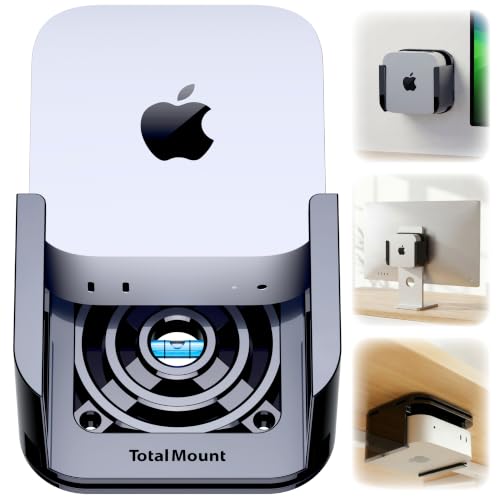
- Mounts under a desk, on a wall, or behind a monitor
- Cooling-vent design supports airflow
- Wi-Fi safe and space-saving
Best For: People who want to hide their Mac mini and keep a clean, uncluttered desk.
Best for Vertical Storage

- Saves desk space with a vertical, upright layout
- Fits Mac mini models from 2010-2024, including M1/M2/M4 Pro
- Silicone pads help protect the device and improve stability
Best For: Users who want a compact, upright Mac mini stand for a tidier desk.
Best for Hidden Desk Mounting
Under-Desk Mac mini VESA Mount

- VESA-compatible for monitor mounting
- Supports under-desk or wall installation
- All-metal build with foam padding
Best For: People who want to free up desk space by mounting a Mac mini out of sight.
Best for Fast Storage Expansion
- Includes a pre-installed 2TB NVMe SSD
- Expands up to 8TB with an M.2 PCIe slot
- Adds 80Gbps USB-C, 2.5G LAN, and SD4.0
Best For: Mac mini users who want a dock that doubles as a high-speed storage upgrade.
Best for Hidden Mounting
All Metal Mac Mini Mount Bracket

- All-metal construction for a solid, durable feel
- Mounts under a desk or behind a monitor
- Soft padding helps protect the Mac Mini from scratches
Best For: People who want to hide the Mac Mini and reclaim desk space.
Best for Space-Saving Desk Organization
Metal Stand for 2024 Mac mini M4/M4 Pro

- Vertical design saves valuable desk space
- Sturdy metal build with soft protective padding
- Open frame improves cable access and airflow
Best For: People who want a compact, organized Mac mini desk setup with easy port access.
Best Simple Pick
Under-Desk Mac mini M4 VESA Mount

- Hides the Mac mini under a desk, on a wall, or behind a monitor
- Supports 75x75mm and 100x100mm VESA patterns
- Keeps ports and power button easy to reach
Best For: People who want a cleaner, space-saving Mac mini mount for a tidy desk setup.
Best for Cooling & Cable Control – AKKYAJAURE Mac mini M4 Dock Stand
If you want one of the more practical mac mini accessories for desk setup, this aluminum dock stand helps lift the Mac mini off the desk, improve airflow, and keep the footprint organized. It’s a simple way to make the M4 or M4 Pro feel more integrated into a clean workspace.
Best For: Mac mini M4 and M4 Pro owners who want better cooling, easier power-button access, and a tidier desktop layout.
Pros:
- Aluminum stand design helps with airflow and heat management
- Raises the Mac mini for easier access to the power button
- Creates a cleaner, more organized desk footprint
- Matches the Mac mini’s compact, minimal look
Cons:
- Doesn’t add extra ports or storage expansion
- Only useful if you want a stand-style accessory
- Fit is limited to the new Mac mini M4 family
For buyers comparing mac mini accessories for desk setup, this stand is a straightforward pick if your priorities are cooling, accessibility, and keeping the desktop clean rather than adding hub features.
Best Mounting Flexibility – Metal Mac mini Mount with Pen Holder
If you want mac mini accessories for desk setup that free up space and keep your mini PC secure, this metal mount is a practical pick. It can be used behind a monitor, under a desk, or on a wall, and the built-in pen holder adds a small but useful touch for tidy workstations.
Best For: Mac mini users who want a versatile, space-saving mount for a cleaner desk or monitor setup.
Pros:
- Supports monitor VESA, under-desk, and wall mounting
- Steel construction feels sturdier than typical plastic mounts
- Anti-slip and anti-scratch pads help protect the Mac mini
- Pen holder adds handy storage for small desk items
Cons:
- Not compatible with Mac mini M4
- Requires checking size limits before buying
- Installation is simple, but still requires mounting hardware and alignment
This is a strong choice if your goal is a cleaner, more organized Mac mini setup without taking up valuable desktop real estate. For shoppers comparing mac mini accessories for desk setup, it stands out for flexibility rather than flash.
Best for Storage-First Setups – Mate Mini-B Mac mini M4 Dock
If you want mac mini accessories for desk setup that add both organization and real expansion, this Mac mini M4 dock is a strong pick. It combines an aluminum stand with an M.2 NVMe slot, fast front ports, 2.5G Ethernet, and SD card support, making it more than just a riser.
Best For: Mac mini users who want a cleaner desk, faster wired networking, and built-in SSD storage expansion in one accessory.
Pros:
- Supports up to 8TB M.2 NVMe storage for large files, backups, and media libraries
- Includes useful desk-friendly ports: USB-A, USB-C, 2.5G LAN, and SD4.0
- Aluminum stand helps keep the Mac mini setup compact and organized
- Can power low-draw peripherals directly, with PD support for higher-demand accessories
Cons:
- SSD is not included, so total cost depends on the drive you add
- Top transfer speeds depend on host compatibility and connected hardware
- PC users may need an additional USB4 cable for full compatibility
This is a practical choice if you want mac mini accessories for desk setup that do more than save space. It’s especially appealing for users who need extra storage, quick card access, and better wired connectivity in a single desktop-friendly dock.
Best for Wall or Underside Mounting – TotalMount for Mac mini
If you want mac mini accessories for desk setup that free up surface space, this TotalMount bracket is a practical way to tuck the Mac mini out of sight while still keeping access and airflow in mind. It’s designed to mount under a desk, on a wall, or behind a monitor, making it a flexible option for cleaner cable management and a more organized workspace.
Best For: Users who want a secure, space-saving mount for a Mac mini in a tidy desk or monitor-based setup.
Pros:
- Mounts under a desk, on a wall, or behind a monitor for flexible placement
- Cooling-vent design helps preserve airflow around the Mac mini
- Wi-Fi safe construction is helpful when positioning the device out of the way
- Great for reducing desk clutter in compact workspaces
Cons:
- Not as simple as a drop-in stand if you want zero installation
- Best suited for users comfortable with mounting hardware
For buyers comparing mac mini accessories for desk setup, this is a strong choice if your priority is reclaiming desktop space without sacrificing accessibility. It’s especially useful in minimalist setups where mounting the Mac mini neatly matters more than keeping it on the desk.
Best for Vertical Storage – AFOOYO Mac Mini Stand
If you want one of the more practical mac mini accessories for desk setup, this vertical stand turns your Mac mini into a slimmer footprint on the desk while helping keep cables and nearby devices more organized. The ABS frame and silicone padding are designed to hold the Mac mini securely, and the vertical layout can also improve airflow around the unit.
Best For: Desk setups that need to save space and keep a Mac mini upright, stable, and easy to access.
Pros:
- Vertical design helps free up valuable desk space
- Compatible with Mac mini models from 2010-2024, including M1, M2, and M4 Pro
- Non-slip silicone pads add grip and reduce scratch risk
- Can also work as a holder for a phone, tablet, or laptop
Cons:
- Only useful if you want a vertical Mac mini orientation
- ABS construction is functional, but not a premium metal finish
- Accessory clips may take a moment to configure for non-Mac uses
This is a simple, space-saving pick for anyone building mac mini accessories for desk setup around a cleaner, more vertical layout. It is especially appealing if you want the Mac mini to stay stable, accessible, and out of the way.
Best for Hidden Desk Mounting – Under-Desk Mac mini VESA Mount
If you want mac mini accessories for desk setup that free up surface area, this all-metal mount is a practical way to tuck your Mac mini out of sight while keeping it easy to access. It works with standard VESA monitor holes, can mount under a desk or on a wall, and includes foam padding to help protect the device.
Best For: Users who want a simple, space-saving mounting solution for a Mac mini M1/M2 Pro on a monitor, desk, or wall.
Pros:
- VESA-compatible for clean monitor-mounted setups
- Under-desk or wall mounting helps reclaim desk space
- Foam padding adds grip and helps prevent scratches
- 2mm steel construction feels sturdy and durable
Cons:
- Only useful if you want to mount the Mac mini off the desk
- Installation depends on having compatible VESA holes or mounting points
- Not the right choice if you need frequent access to ports and cables
This is a smart pick for mac mini accessories for desk setup when your main goal is a cleaner, more open workspace rather than added features. It keeps the Mac mini secure, discreet, and out of the way.
Best for Fast Storage Expansion – Mate Mini-B 2TB Mac mini Dock
If you want one of the more capable mac mini accessories for desk setup, this dock does more than just raise your Mac mini—it adds fast storage, better wired networking, and useful front/rear ports in one slim aluminum body. The pre-installed 2TB NVMe SSD means you can start using it right away, while the expandable M.2 slot gives you room to grow later.
Best For: Mac mini users who want an all-in-one dock, stand, and high-speed storage upgrade for a cleaner workspace.
Pros:
- Pre-installed 2TB NVMe SSD with expansion up to 8TB
- 80Gbps USB-C, 2.5G LAN, USB-A 3.0, and SD4.0 ports
- Slim aluminum design fits neatly with a Mac mini M4
- Can be stacked above or below the Mac mini for flexible placement
Cons:
- Higher price than a simple hub or stand
- To power demanding peripherals, you may need an external PD adapter
For buyers who want more than basic cable management, this is a strong fit among mac mini accessories for desk setup because it combines organization, speed, and real storage expansion in one accessory. It makes the Mac mini M4 feel more like a complete desktop station without adding extra clutter.
Best for Hidden Mounting – All Metal Mac Mini Mount Bracket
Bylitco All Metal Mount Holder Bracket for Mac Mini M4/M4 Pro 2024, Under Desk or Behind The Monitor
Check Price On AmazonIf you want mac mini accessories for desk setup that free up surface space, this all-metal mount is an easy way to tuck your Mac Mini under a desk or behind a monitor. It helps keep the compact system out of sight while still leaving it accessible and supported.
Best For: Users who want a sturdy, low-profile mounting solution for a cleaner workspace and less desk clutter.
Pros:
- All-metal build feels durable and dependable for long-term use
- Space-saving design keeps the Mac Mini off the desktop
- Includes different screws for under-desk or monitor mounting
- Soft padding helps reduce scratches and slipping
Cons:
- Not ideal if you prefer frequent access to the Mac Mini
- Requires installation, so it is less plug-and-play than a simple stand
For buyers comparing mac mini accessories for desk setup, this bracket is a practical pick if your main goal is a cleaner, more minimal workspace. It is especially useful when you want to mount the Mac Mini securely without giving up valuable desktop real estate.
Best for Space-Saving Desk Organization – Metal Stand for 2024 Mac mini M4/M4 Pro
If you want mac mini accessories for desk setup that free up room while keeping your mini easy to access, this vertical metal stand is a practical pick. It lifts the Mac mini upright to reduce clutter, while the open frame helps with airflow and cable routing.
Best For: Users who want a compact, organized Mac mini desk setup with simple access to ports and better space efficiency.
Pros:
- Vertical design saves desk space and keeps the Mac mini neatly out of the way.
- Solid metal build feels sturdy and adds long-term durability.
- Soft cushioning helps protect the Mac mini from scratches.
- Open sides make cables and ports easier to reach.
Cons:
- Only useful if you prefer a vertical orientation for your Mac mini.
- Black finish may not match every desk aesthetic.
For anyone comparing mac mini accessories for desk setup, this stand is a smart organization upgrade rather than a flashy add-on. It focuses on better space use, protection, and everyday convenience, which makes it especially appealing for compact workstations.
Best Simple Pick – Under-Desk Mac mini M4 VESA Mount
If you want cleaner cable management and more open room on your desk, this is a practical pick for mac mini accessories for desk setup. It mounts the 2024 Mac mini M4 or M4 Pro under a desk, on a wall, or behind a monitor using standard VESA patterns.
Best For: Users who want to free up desk space and keep a Mac mini securely tucked out of sight.
Pros:
- Single-piece injection-molded design feels sturdier than older 3D-printed mounts.
- Fits 75x75mm and 100x100mm VESA setups for flexible placement.
- Leaves the power button, ports, and cables accessible for daily use.
- Simple install with screws and double-sided tape included.
Cons:
- Only made for the 2024 Mac mini M4 and M4 Pro.
- Mounting choice depends on your desk, wall, or monitor VESA setup.
This is a smart space-saving accessory if you want mac mini accessories for desk setup that make a workstation look cleaner and feel more organized. It is especially useful for anyone who prefers a hidden, fixed location instead of keeping the Mac mini on the desk surface.
How We Picked the Best Mac Mini Accessories for Desk Setup
We prioritized accessories that solve real desk-setup problems: stable mounting, better cooling, easy access to the power button and ports, and clean cable management. Compatibility matters too, so we looked for models that clearly support recent Mac mini generations, especially M4 and M4 Pro, plus broader backward support where relevant.
Quick Comparison
If you want the simplest setup, a vertical stand or desktop dock is usually the easiest win. If your goal is to reclaim desk space, an under-desk or monitor mount is better. For users who need more ports, faster wired networking, or built-in SSD expansion, dock-style accessories are the strongest upgrade. In short: choose based on whether your priority is mounting, expansion, or both.
Key Buying Factors for Mac Mini Accessories for Desk Setup
Mounting Style
Decide where the Mac mini should live. Desktop stands are easiest to install, while under-desk and VESA/monitor mounts create the cleanest look and free the most surface area. Wall mounts can work well, but only if your cable routing is planned in advance.
Cooling and Airflow
Good ventilation is a must, especially if the Mac mini sits behind a monitor or under a desk. Look for open-frame designs, cooling vents, or raised stands that avoid blocking intake and exhaust.
Expansion Needs
If your workflow uses external drives, Ethernet-heavy networking, SD cards, or lots of peripherals, a dock can simplify everything. For many buyers, SSD expansion and extra ports are the most valuable upgrades among Mac Mini Accessories for Desk Setup.
Build Quality and Protection
Metal mounts and stands often feel more secure and last longer, but padded contact points matter to prevent scratches and slipping. Check for anti-slip materials and a fit that keeps the Mac mini stable during cable changes.
Who Should Buy Which Mac Mini Accessories for Desk Setup?
Choose a desktop stand if you want quick setup, easier access, and a modest improvement in organization. Choose an under-desk or VESA mount if your main goal is a minimalist workspace with more open surface area. Choose a dock with SSD support if you want one accessory to handle storage expansion and connectivity at the same time. For most buyers, the best option is the one that fits the desk layout first and the feature set second.
