
If you use a Mac mini for editing, design, photography, or content production, the right add-ons can make a noticeable difference in speed and day-to-day convenience.
This roundup of the best Mac Mini accessories for creators focuses on practical upgrades like docks, hubs, SSD enclosures, card readers, and stands.
Best 10 Mac Mini Accessories for Creators Picks for 2026
Best for All-in-One Storage
Satechi Mac mini M4 Hub & Stand

- Adds up to 4TB NVMe expansion in one compact dock
- Includes front USB-A ports plus a UHS-II SD card reader
- Aluminum stand helps keep the Mac mini M4 setup tidy
Best For: Creators who want extra storage and easy-access ports in a single Mac mini M4 accessory.
Best for Maximum Expansion
TREBLEET 80Gbps eGPU Enclosure
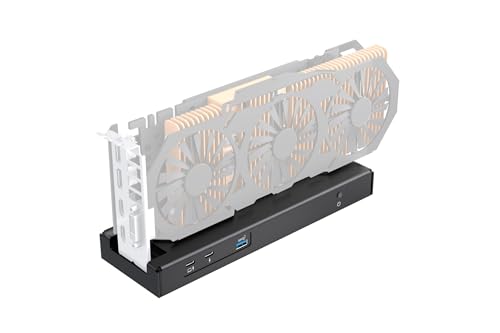
- 80Gbps Thunderbolt 5 / USB4 bandwidth
- Supports 140W PD charging and daisy chaining
- Flexible SFX, ATX, FLEX, and DC power options
Best For: Creators who need an external GPU enclosure for a Mac mini-style workstation and can handle advanced setup.
Best for Front-Access Workflow
Mac mini M4 6-in-1 Front-Access Hub

- Front-facing ports for quick access
- 4× USB 3.2 10Gbps expansion
- SD/TF 3.0 card readers included
Best For: Creators and professionals who want faster front-access connections for drives, cameras, and cards.
Best for Space-Saving Desk Setups
JOKItech Aluminum Stand for Mac Mini

- Premium aluminum finish that pairs well with Apple setups
- Vertical stand design helps save valuable desk space
- Stable base with silicone padding for device protection
Best For: Creators who want a tidy, space-saving stand for a Mac mini, laptop, or iPad Pro.
Best for High-Speed Creative Transfers
RayCue MiniPack Dock for Mac mini M4

- 10Gbps USB-C and USB-A ports for quick transfers
- SD/microSD reader supports camera and media workflows
- Plug-and-play hub keeps a Mac mini M4 desk clean
Best For: Creators who need fast card access, extra ports, and a tidy Mac mini M4 setup.
Best For Mac mini Desk Organization
NEEWER Basics Mac mini Stand with SSD Holder

- Built-in SSD holder for cleaner storage access
- Aluminum alloy body with a neat, durable finish
- Raises the Mac mini to save space and aid airflow
Best For: Creators with a Mac mini M4 or M4 Pro who want a compact stand with SSD storage.
Best All-in-One Docking Station
TobenONE 13-in-1 Mac mini M4 Dock

- 13-in-1 hub with stand and NVMe SSD enclosure
- Up to 8TB storage expansion for creator files
- 4K multi-display support with 10Gbps USB ports
Best For: Creators who want a streamlined Mac mini dock with built-in storage and lots of ports.
Best for Media Offload
80Gbps Docking Station for Mac mini M4
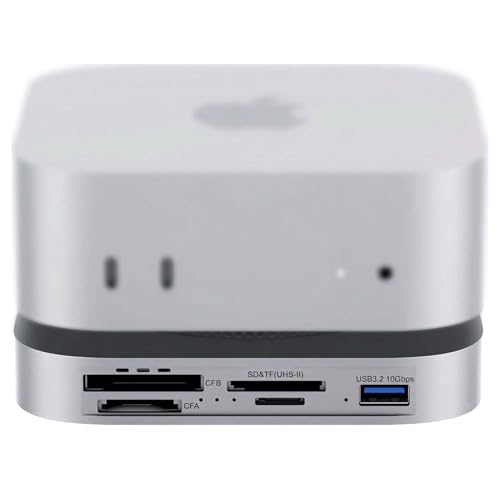
- 80Gbps USB4 2.0 and Thunderbolt 5/4 support
- NVMe slot with claimed speeds up to 7000MB/s
- CFexpress A/B and UHS-II SD/microSD reader support
Best For: Photographers and video editors who need one dock for fast ingest, storage, and peripherals.
Best for Expanding Storage
UGREEN Mac mini M4 Dock & Stand

- Adds NVMe SSD expansion for fast creator storage
- Combines USB, USB-C, and SD card connectivity
- Keeps the Mac mini setup compact and organized
Best For: Creators who want a dock that adds both storage and everyday connectivity to a Mac mini M4 setup.
Best for High-Speed Offload
80Gbps USB4v2 8-in-1 Mini Dock

- 80Gbps USB4v2/Thunderbolt 5-class throughput
- Built-in NVMe slot up to 7000MB/s
- CFexpress Type A, SD 4.0, and microSD readers
Best For: Creators who need a compact dock for fast media offload, external storage, and monitor output.
Best for All-in-One Storage – Satechi Mac mini M4 Hub & Stand
If you want one of the most practical mac mini accessories for creators, this Satechi hub and stand adds front-facing ports, SD card access, and room for an NVMe SSD without cluttering your desk. It’s a strong fit for Mac mini M4 setups that need quick media transfers and expandable local storage in a single, tidy unit.
Best For: Creators who want a Mac mini M4 dock with built-in SSD expansion, easy-access ports, and a clean desktop footprint.
Pros:
- Built-in NVMe enclosure supports up to 4TB of extra storage
- Front USB-A ports and UHS-II SD reader are handy for cameras and peripherals
- Aluminum design improves airflow and keeps the Mac mini setup compact
Cons:
- SSD is not included, so you’ll need to buy storage separately
- Not compatible with heatsink or double-sided NVMe drives
This is a smart add-on if your workflow relies on photo imports, video offloads, or extra scratch storage. Among mac mini accessories for creators, it stands out for combining docking convenience with expandable SSD capacity in one purpose-built unit.
Best for Maximum Expansion – TREBLEET 80Gbps eGPU Enclosure
If you want one of the more powerful mac mini accessories for creators, this TREBLEET eGPU enclosure is built for serious external graphics expansion over Thunderbolt 5 or USB4. It’s a niche pick, but the 80Gbps JHL9480 controller, 140W PD support, and broad power-supply compatibility make it a strong fit for demanding editing, rendering, and multi-display workflows.
Best For: Creators who need desktop-class GPU performance from a Mac mini setup and are comfortable handling eGPU compatibility and power-supply details.
Pros:
- 80Gbps bandwidth with Thunderbolt 5 / USB4 support for high-throughput workflows
- 140W Power Delivery can charge a connected laptop while the dock runs
- Flexible SFX, ATX, FLEX, and DC power options for different builds
- Works with NVIDIA and AMD PCIe cards, plus select USB4/TB devices
Cons:
- Requires compatible host hardware and driver setup
- Not a plug-and-play pick for beginners
- GPU and power supply are sold separately
For mac mini accessories for creators, this enclosure makes sense only if you specifically need external GPU headroom for rendering or demanding visual work. It’s powerful and flexible, but it’s best suited to users who are willing to trade simplicity for performance.
Best for Front-Access Workflow – Mac mini M4 6-in-1 Front-Access Hub
If you want mac mini accessories for creators that make everyday file transfers and device swaps less annoying, this front-access hub is a practical add-on. It puts the most-used ports on the front of your Mac mini M4, adds fast 10Gbps USB expansion, and keeps your desk cleaner than reaching around the back for every camera card or SSD.
Best For: Creators, editors, and professionals who regularly connect drives, cameras, card readers, and dongles and want faster access without clutter.
Pros:
- Front-facing ports make plugging in accessories quick and convenient
- 4× USB 3.2 10Gbps ports support fast external drives and peripherals
- SD/TF 3.0 card readers are handy for photographers and video workflows
- Plug-and-play setup keeps installation simple with no drivers needed
Cons:
- Designed mainly as a convenience hub, not a full workstation dock
- Only useful if you often connect devices from the front of the Mac mini
- May be more port-focused than some creators need for minimal setups
This is a smart pick if you value speed, desk organization, and easy access over extra frills. For mac mini accessories for creators, it stands out as a simple way to streamline daily workflows without adding much bulk.
Best for Space-Saving Desk Setups – JOKItech Aluminum Stand for Mac Mini
If you want simple, sturdy mac mini accessories for creators, this JOKItech aluminum stand is a practical desk organizer that also works as a vertical dock for laptops and iPad Pro. Its compact footprint and all-metal build make it a good fit for minimalist studio setups where cooling, cable management, and desk space all matter.
Best For: Creators who want a clean, space-saving stand that can support a Mac mini, laptop, or iPad Pro on a busy desk.
Pros:
- Aluminum construction gives it a premium look that matches Apple gear.
- Vertical design helps free up desk space and reduce clutter.
- Heavy base and silicone padding add stability and help protect devices.
- Works with a wide range of laptops plus Mac mini and iPad Pro.
Cons:
- Primarily a stand, so it does not add ports or hub functionality.
- Not the most specialized option if you only need a Mac mini-specific dock.
For creators building a tidy workstation, this is a straightforward way to improve organization without adding bulk. It stands out among mac mini accessories for creators because it emphasizes desk efficiency, compatibility, and a clean Apple-style finish.
Best for High-Speed Creative Transfers – RayCue MiniPack Dock for Mac mini M4
If you want mac mini accessories for creators that add real workflow speed, the RayCue MiniPack Expansion Dock is built around fast file transfers and everyday expansion. Its 10Gbps USB-C and USB-A ports, plus SD/TF card readers, make it a practical fit for photo, video, and mixed-device setups.
Best For: Creators who need quick card access, fast external storage, and a tidy plug-and-play hub for a Mac mini M4 desk setup.
Pros:
- Dual 10Gbps USB-C plus 10Gbps USB-A ports for fast peripherals and storage
- Built-in SD/microSD reader is useful for cameras, drones, and media cards
- Plug-and-play design keeps the Mac mini setup simple and clutter-free
- Compact dock format integrates cleanly with the Mac mini M4
Cons:
- Not a full docking station with video outputs or Ethernet
- Best value is for users who will actually use the card reader and extra ports
For creators who move large files often, this is one of the more useful mac mini accessories for creators because it prioritizes speed, card access, and desk organization over gimmicks. It is a solid pick if your Mac mini M4 needs more ports without adding setup friction.
Best For Mac mini Desk Organization – NEEWER Basics Mac mini Stand with SSD Holder
If you want a simple way to tidy up a Mac mini setup, this NEEWER Basics stand gives you a compact aluminum dock with an integrated SSD holder. It’s a practical pick for mac mini accessories for creators who want to save desk space, keep an external drive close at hand, and maintain a cleaner workstation.
Best For: Creators using a Mac mini M4 or M4 Pro who want a space-saving stand with room for an SSD.
Pros:
- Integrated SSD holder keeps your external storage organized and within reach.
- Aluminum alloy build looks clean and adds a more finished desktop setup.
- Snug, curved-bottom fit with sponge protection helps reduce scratches.
- Elevated design can improve airflow and free up desk space.
Cons:
- Only compatible with Mac mini models using M4 or M4 Pro chips.
- Very utilitarian design may feel too basic if you want extra features.
This is a straightforward organization upgrade rather than a flashy accessory, but that makes it useful for mac mini accessories for creators who care about keeping their desk efficient and uncluttered. If your workflow relies on fast access to an SSD and a stable Mac mini footprint, it’s an easy fit.
Best All-in-One Docking Station – TobenONE 13-in-1 Mac mini M4 Dock
If you want one of the most capable mac mini accessories for creators, this TobenONE dock turns the Mac mini M4 into a cleaner, faster desktop hub. It adds 13-in-1 connectivity, built-in SSD expansion, and support for multiple displays, making it a practical pick for editing, design, and multitasking setups.
Best For: Creators who want a dock, stand, and high-capacity storage expansion in one compact Mac mini setup.
Pros:
- Built-in NVMe enclosure supports up to 8TB for large project files and media libraries
- DisplayPort 4K@144Hz and HDMI 4K@60Hz help support smooth multi-monitor workflows
- Five USB ports, SD/microSD, and audio add plenty of creator-friendly connectivity
- One-touch power button and stand design help keep the desk neat and easy to use
Cons:
- SSD is not included, so you’ll need to buy storage separately
- SATA drives are not supported, which limits upgrade options
- It’s more of a full desk dock than a simple low-cost accessory
This is a strong fit for mac mini accessories for creators because it combines storage expansion, display flexibility, and everyday connectivity in a single desktop solution. If you want to reduce clutter while keeping fast access to media and peripherals, it covers the essentials well.
Best for Media Offload – 80Gbps Docking Station for Mac mini M4
This 80Gbps dock turns the Mac mini M4 or M4 Pro into a faster media hub, making it a strong pick for mac mini accessories for creators who move large photo, video, and project files all day. With NVMe storage, pro card readers, and USB4 2.0 support, it targets workflows that need speed more than simple port expansion.
Best For: Photographers and video editors who want one dock for fast offloads, external storage, and everyday peripherals.
Pros:
- 80Gbps USB4 2.0 and Thunderbolt 5/4 compatibility for high-speed transfers
- Built-in NVMe slot with up to 7000MB/s claimed support for scratch or project storage
- CFexpress Type A/B plus UHS-II SD and microSD readers for creator workflows
- Dual PWM fans and auxiliary power support for heavier sustained use
Cons:
- More expensive than basic USB hubs
- Peak NVMe speed depends on the SSD and host connection
- Overkill if you only need a few extra ports
If your setup revolves around fast ingest and external storage, this is one of the more capable mac mini accessories for creators who need a dock that can keep up with pro media work.
Best for Expanding Storage – UGREEN Mac mini M4 Dock & Stand
If you want one of the most practical mac mini accessories for creators, this UGREEN dock adds fast storage and useful front-facing ports without making your desk feel crowded. It’s a smart way to turn a Mac mini M4 into a more capable editing or production station, especially if you work with large media files and cards.
Best For: Creators who need built-in NVMe storage, easy-access ports, and a tidy all-in-one dock for a Mac mini M4 or M4 Pro setup.
Pros:
- Supports an M.2 NVMe SSD for up to 8TB of expandable storage
- Includes 11-in-1 connectivity with fast USB-A, USB-C, and SD/TF card reader ports
- Compact stand design helps keep the Mac mini stable and the desk uncluttered
- Power button lever and short cable make everyday use more convenient
Cons:
- SSD is not included, so total cost depends on the drive you add
- Best performance may require an external power adapter for heavier setups
This is a strong pick for mac mini accessories for creators who want storage expansion and hub-style convenience in one compact unit. It’s especially appealing if your workflow involves media cards, backups, and lots of peripherals, though it’s less useful if you already have external storage and a separate USB hub.
Best for High-Speed Offload – 80Gbps USB4v2 8-in-1 Mini Dock
If you want one compact hub that can handle storage, card imports, and display output, this is a strong fit for mac mini accessories for creators. It combines USB4v2/Thunderbolt 5-level bandwidth with an NVMe slot and pro card readers, so it’s built for fast turnaround in photo and video workflows.
Best For: Creators who need a compact all-in-one dock for rapid media offload, external storage, and high-resolution monitor support.
Pros:
- 80Gbps USB4v2 bandwidth and an internal NVMe slot for very fast transfers
- CFexpress Type A, UHS-II SD 4.0, and UHS-II microSD readers for creator workflows
- 8K@60Hz output plus extra USB-A and USB 2.0 ports for peripherals
- Aluminum build with active cooling helps with sustained heavy workloads
Cons:
- Likely overkill if you only need basic ports and simple charging
- Maximum speeds depend on compatible host hardware and drives
- Bus-powered use is convenient, but heavier workloads may benefit from auxiliary power
For mac mini accessories for creators, this dock stands out when your priority is speed, card compatibility, and a tidy desk setup. It makes the most sense for users who regularly move large photo or video files and want fewer adapters in the chain.
How We Picked the Best Mac Mini Accessories for Creators
We looked for accessories that improve real creative workflows rather than just adding ports on paper. Priority went to strong data speeds, reliable card support, sensible layouts for front access, and designs that keep the Mac mini cool, stable, and easy to use on a desk.
We also favored products that help creators move files quickly from cameras and drives, expand fast local storage, and reduce cable clutter without sacrificing compatibility.
Quick Comparison of the Main Types
Most Mac Mini Accessories for Creators fall into a few useful categories: docks with NVMe SSD slots for fast project storage, hubs with USB-A and USB-C for peripherals, card-reader docks for camera workflows, and stands that improve desk organization. Some options combine several of these in one unit, which is ideal if you want fewer devices and cleaner cable management.
Best for Speed
USB4 and Thunderbolt-class docks are the strongest choice for creators who work with large video files, scratch disks, or high-resolution media. They offer the highest headroom for fast storage and external devices.
Best for Convenience
Front-access hubs and stands are the easiest way to keep cards, drives, and accessories within reach. They are especially helpful for photographers and editors who move between ingest, edit, and export stages all day.
Key Buying Factors for Mac Mini Accessories for Creators
Storage expansion: If you edit video, manage large photo libraries, or use cache-heavy apps, an NVMe enclosure can be one of the most valuable upgrades. Look at maximum supported SSD speed and capacity.
Port mix: Creators typically benefit from both USB-C and USB-A. USB-A remains useful for legacy drives, tablets, audio interfaces, and dongles, while USB-C is better for newer accessories and faster transfers.
Card-reader support: If you work with cameras, choose a dock with SD and, if needed, CFexpress support. UHS-II matters for faster offloads from modern cameras.
Display output: Some creators need 4K or higher refresh rates for smooth timelines, color-critical work, or multi-monitor setups. Check the video ports carefully if your workflow depends on external displays.
Power and stability: A sturdy stand with good ventilation can keep your setup organized and help maintain consistent performance. If the dock powers connected devices, make sure the charging and passthrough specs fit your needs.
Who Should Buy Which Mac Mini Accessories for Creators?
Video editors: Choose a dock with fast NVMe support and strong display output for large project files and external monitors.
Photographers: Prioritize card readers, especially SD and CFexpress, plus fast USB ports for drives and backups.
Designers and general creators: A balanced hub-and-stand combo is often the best value, especially if you want more ports without a bulky desk footprint.
Power users: If your workflow involves multiple high-speed devices at once, a Thunderbolt 5 or USB4 v2 dock offers the most future-ready flexibility.
In short, the best choice depends on whether you value storage speed, camera ingest, desk organization, or maximum expansion. Pick the accessory that removes the biggest bottleneck in your current setup, and your Mac mini will feel much more capable from day one.
