
A printer can claim wireless support yet still make scanning from a Mac harder than it should be. The right all-in-one should fit your desk, handle your usual documents or photos, and offer a scanning workflow you can live with.
These 10 options cover compact home printers, office-oriented models with document feeders, and refillable-tank machines for higher print volumes. Here’s what matters before you choose.
Best 10 Mac Compatible Printers with Scanner Picks for 2026
Best for Mixed Media

- AirPrint and wireless printing
- 20-sheet ADF plus flatbed scanner
- Five inks and two paper feeds
Best For: Photos and varied home-office tasks
Best for Cloud Workflows

- Cloud print-and-scan options
- 20-sheet single-sided ADF
- 150-sheet tray and auto duplex
Best For: Cloud-based home-office documents
Best Compact All-Rounder

- AirPrint and dual-band Wi-Fi
- ADF and auto duplex printing
- Compact design with OLED display
Best For: Small workspaces and mixed printing
Best for High Ink Yields

- Up to 6,000 black or 7,700 color pages
- Flatbed scanner; no ADF listed
- Verify macOS compatibility
Best For: Frequent printing and occasional flatbed scans
Compact Duplex Pick

- Automatic two-sided printing
- Flatbed scan and copy
- Dual-band Wi-Fi and AirPrint
Best For: Compact home or hybrid-work setups
Office Workflow Pick
- 35-page one-sided scan feeder
- Automatic duplex printing
- Verify current macOS support
Best For: Document-heavy office workflows
Home Office Workhorse
Brother Work Smart MFC-J1410DW

- 20-sheet single-sided document feeder
- Automatic two-sided printing
- Wi-Fi, USB, and cloud-app options
Best For: Home offices scanning multipage paperwork
Compact Home Pick

- Flatbed scanner for occasional copies
- Dual-band Wi-Fi and Apple AirPrint
- Automatic duplex printing
Best For: Home users printing documents and occasional photos
Refillable Ink Option

- Refillable ink tanks replace cartridges
- Flatbed scanner and copier
- Wi-Fi, Ethernet, and USB connections
Best For: Users prioritizing refillable ink over print speed
Best for Mixed Media – Canon PIXMA TR8620a
Among mac compatible printers with scanner, the Canon PIXMA TR8620a is a practical choice if you also print photos and handle home-office paperwork. Apple AirPrint supports printing from Apple devices, while the flatbed and 20-sheet automatic document feeder (ADF) cover different scanning jobs.
Best For: Households that want photo printing, multi-page scanning, and fax in one printer.
Pros:
- Five individual ink tanks and borderless printing up to 8.5 x 11 inches.
- 20-sheet ADF, automatic two-sided printing, and fax capability.
- Two paper feeds provide a combined 200-sheet capacity.
Cons:
- Its 1,000-page duty cycle points toward lighter workloads.
- Alexa ink reordering requires enrollment in Smart Reorders.
The TR8620a offers more media and office flexibility than a basic print-scan-copy model. Choose it when those extras matter more than a printer dedicated to high-volume documents.
Best for Cloud Workflows – Brother Work Smart 1360
The Brother Work Smart 1360 belongs on a shortlist of mac compatible printers with scanner when cloud files and everyday documents drive your workflow. Its specifications list a Mac print resolution, and its 1.8-inch color display provides access to supported cloud apps for printing and scanning.
Best For: Home-office users who want cloud-connected scanning and a compact document printer.
Pros:
- Print from and scan to supported services including Google Drive, Dropbox, Box, and OneDrive.
- 20-sheet ADF and automatic two-sided printing.
- 150-sheet tray, Wi-Fi and USB connections, and speeds up to 16 ppm in black.
Cons:
- The ADF handles single-sided originals, so it does not automatically scan both sides.
- The listed Mac print resolution is lower than the listed Windows maximum.
This is a strong fit for routine reports and schoolwork, particularly if your files live in cloud storage. Its automatic duplex feature saves paper when printing, but not when scanning two-sided originals.
Best Compact All-Rounder – Canon PIXMA TR7120
If you are comparing mac compatible printers with scanner for a smaller workspace, the Canon PIXMA TR7120 pairs Apple AirPrint with a compact all-in-one design. It prints, copies, and scans, with an automatic document feeder (ADF) for multi-page originals.
Best For: Hybrid workers who want AirPrint, document scanning, and occasional photo printing without a large printer.
Pros:
- Dual-band Wi-Fi supports 2.4 GHz and 5 GHz connections.
- ADF and automatic two-sided printing help with routine paperwork.
- Supports borderless photos up to 8.5 x 11 inches and has a 1.42-inch OLED status display.
Cons:
- 100-sheet maximum paper capacity calls for more frequent refills than larger-tray models.
- Its two-cartridge ink system offers less individual-color replacement flexibility than separate color tanks.
The TR7120 balances useful document features with photo options and easy mobile printing. It makes the most sense when desk space and straightforward setup take priority over paper capacity.
Best for High Ink Yields – Canon MegaTank G3290
For buyers considering mac compatible printers with scanner to reduce ink changes, the Canon MegaTank G3290 offers refillable ink bottles and wireless print, copy, and scan functions. The supplied specifications do not explicitly confirm Mac compatibility, so check your macOS version before purchasing.
Best For: Households that print regularly and mostly scan single pages or books on a flatbed.
Pros:
- Rated for up to 6,000 black-and-white or 7,700 color pages per set of inks.
- Automatic two-sided printing and a 2.7-inch color touchscreen.
- Flatbed scanning plus Wi-Fi and USB connectivity.
Cons:
- No automatic document feeder is listed for multi-page scanning.
- Color print speed is listed at 6 ppm.
The G3290 is the ink-yield pick here, especially if you print far more often than you scan. Its flatbed-only scanning setup is less convenient for stacks of paperwork, and Mac support deserves verification.
Compact Duplex Pick – Canon PIXMA TS6520
Among mac compatible printers with scanner, the Canon PIXMA TS6520 is a practical compact option for home printing, scanning, and copying. Apple AirPrint support makes printing from Apple devices convenient, while automatic two-sided printing helps reduce paper use.
Best For: Home users and hybrid workers who want a compact color all-in-one with automatic duplex printing.
Pros:
- Automatic two-sided printing and a built-in flatbed scanner.
- Dual-band Wi-Fi, USB, and Apple AirPrint support.
- Prints documents and borderless photos up to letter size.
Cons:
- Flatbed scanner is less convenient for scanning stacks of pages than an automatic document feeder.
- Maximum supported media size is letter, not legal.
The TS6520 is the balanced choice here if desk space and automatic duplex printing matter more than batch-scanning capability.
Basic Home Pick – Canon PIXMA TS3720
If you are comparing mac compatible printers with scanner for occasional home use, the Canon PIXMA TS3720 covers printing, copying, and flatbed scanning without a complicated feature set. Apple AirPrint and dual-band Wi-Fi provide straightforward wireless printing options.
Best For: Occasional home printing and scanning when automatic two-sided printing is not essential.
Pros:
- All-in-one print, copy, and scan functions.
- Dual-band Wi-Fi and Apple AirPrint support.
- Supports legal-size paper and borderless photos up to 5 by 7 inches.
Cons:
- Single-sided printing only.
- Rated at approximately 7.7 black and 4 color images per minute, making it less suited to larger print jobs.
The TS3720 makes sense for light household tasks, but choose a duplex-equipped model if you regularly print multi-page documents.
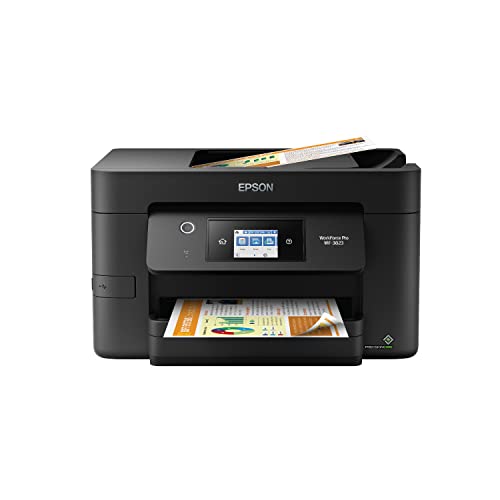
Office Workflow Pick – Epson WorkForce Pro WF-3823
For shoppers comparing mac compatible printers with scanner for a busier workspace, the Epson WorkForce Pro WF-3823 offers office-oriented print and scan features. Its 35-page automatic document feeder handles one-sided scans, while a 250-sheet paper capacity and automatic two-sided printing support larger document workloads. The supplied specifications do not confirm Mac compatibility, so verify the current macOS driver before buying.
Best For: Office users who need faster document printing and an automatic feeder for one-sided scanning.
Pros:
- Rated at 21 black and 11 color ISO pages per minute.
- 35-page automatic document feeder and automatic two-sided printing.
- 250-sheet paper capacity, Ethernet, wireless networking, and Wi-Fi Direct.
Cons:
- The document feeder scans one side at a time.
- Designed for Epson genuine cartridges; non-genuine ink may cause damage not covered by the limited warranty.
The WF-3823 is the strongest fit of these three for document-heavy work, provided its current Mac software support meets your needs.
Home Office Workhorse – Brother Work Smart MFC-J1410DW
Among mac compatible printers with scanner functionality, the Brother Work Smart MFC-J1410DW offers a practical mix of document handling and color printing. It prints, copies, scans, and faxes, with wireless or USB connectivity and a 2.7-inch color touchscreen.
Best For: Home offices that regularly scan multipage documents and print on both sides of the page.
Pros:
- 20-sheet automatic document feeder simplifies scanning stacks of pages.
- Automatic duplex printing and a 150-sheet paper tray support everyday office work.
- Touchscreen access to supported cloud apps and Brother’s mobile app adds workflow flexibility.
Cons:
- The document feeder handles single-sided originals; two-sided scanning is not specified.
- Ink cartridges need replacing rather than refilling from bottles.
Choose this model if document-feeding convenience matters more than a refillable-ink setup. Its stated Mac print resolution is up to 1,200 x 3,600 dpi, rather than the higher Windows figure in the specifications.
The Canon PIXMA TS4320 is a compact option to consider when shopping for mac compatible printers with scanner features. Its listed Apple AirPrint support, flatbed scanner, and automatic two-sided printing suit routine home documents and occasional photos.
Best For: Home users who want basic scanning and flexible wireless printing without a document feeder.
Pros:
- Dual-band Wi-Fi supports 2.4 GHz and 5 GHz connections.
- Automatic duplex printing can reduce paper use.
- Supports borderless photos and documents up to letter size.
Cons:
- The flatbed scanner is less convenient than a document feeder for multipage originals.
- Maximum listed media size is 8.5 x 11 inches, not legal size.
This is the simpler choice for occasional scanning and everyday color output. If you routinely digitize stacks of pages, a model with an automatic document feeder will be more convenient.
For shoppers comparing mac compatible printers with scanner features, the Epson EcoTank ET-4800 stands out for its refillable ink tanks rather than cartridges. It combines color printing with a flatbed scanner and copier, and offers Wi-Fi, Ethernet, and USB connectivity.
Best For: Home or office users who prefer refillable ink and can work with modest print speeds.
Pros:
- High-capacity tanks refill using Epson EcoFit ink bottles.
- Flatbed scanner and color display support copying and navigation.
- Wi-Fi, Ethernet, and USB provide multiple connection options.
Cons:
- Two-sided printing is manual rather than automatic.
- Listed speeds of 10 ppm black and 5 ppm color may feel slow for larger jobs.
The ET-4800 makes sense when avoiding cartridge replacements is the priority. Its supplied specifications do not explicitly confirm Mac compatibility, so check Epson’s current macOS support for your version before purchasing.
How We Picked the Best Mac Compatible Printers with Scanner
We considered the features most likely to affect everyday Mac use: available wireless printing and scanning options, document handling, size, and ink system. The lineup spans basic home models, printers with automatic document feeders (ADFs), and refillable-tank options. Features can vary by model and software version, so confirm the current macOS requirements and scanning methods on the manufacturer’s support page before buying.
Quick Comparison: Match the Printer to the Job
- Occasional home printing: The Canon PIXMA TS3720 or TS4320 suits shoppers who want basic print, copy, and scan functions without paying for office extras.
- Compact printer with duplexing: The Canon PIXMA TS6520 adds automatic two-sided printing; the TR7120 also lists an ADF for multipage originals.
- Home-office paperwork: Compare the Canon PIXMA TR8620a, Epson WorkForce Pro WF-3823, and Brother Work Smart 1360 or 1410 for the controls and document-handling features you need.
- Frequent printing: The Canon MegaTank G3290 and Epson EcoTank ET-4800 use refillable ink tanks rather than conventional cartridges.
Key Buying Factors for Mac-Compatible Printers with Scanner
Check Both Printing and Scanning Support
AirPrint can simplify printing from a Mac, but it does not by itself confirm how you will scan. Check whether the printer works with macOS Image Capture, the manufacturer’s Mac app, or another supported scanning method. Verify compatibility with your specific macOS version, especially if you use a recently updated Mac or need advanced scan settings.
Choose the Right Paper and Document Handling
An ADF saves time when scanning or copying multipage documents; a flatbed is useful for books, IDs, and delicate originals. Automatic duplex printing reduces paper use, but it does not necessarily mean the printer can scan both sides of a page automatically. Check the specifications separately if duplex scanning matters to you.
Look Beyond the Purchase Price
Cartridge inkjets may cost less upfront and suit lighter use. Refillable-tank printers usually cost more initially but can be worth comparing if you print often. Check replacement ink prices, stated page yields, and whether you need color or photo output. Also measure the printer with its paper trays open, and confirm it supports your home network setup.
Who Should Buy Which Mac Compatible Printers with Scanner?
Pick a basic PIXMA TS model if space and occasional use matter most. Choose an ADF-equipped model if you routinely scan forms or stacks of pages. Consider the Brother Work Smart models or the Epson WorkForce Pro for general home-office use, comparing their exact paper-handling features before deciding. If your household prints regularly, compare the MegaTank G3290 and EcoTank ET-4800 against cartridge-based alternatives using your expected monthly page count. The best choice is the one that supports your Mac’s scanning workflow and matches the work you actually do.
