
A small office printer needs to fit the work you actually do: everyday documents, color handouts, scans, or a steady stream of shipping labels. For Mac users, straightforward connectivity matters as much as print quality.
These 10 picks span all-in-one inkjets, monochrome lasers, refillable-tank models, and dedicated thermal label printers. Use the guide below to narrow the field by workflow and ongoing cost.
Best 10 Mac Compatible Printers for Small Office Picks for 2026
Best for Precise Labels
MUNBYN RW403B Thermal Label Printer

- Auto-calibrates label alignment
- Prints 1.57–4.25-inch-wide labels
- Ink-free monochrome output
Best For: Mac-based offices printing varied shipping and inventory labels
Best for Custom Label Designs

- Browser editor with 2,000+ templates
- Handles 1.57–4.3-inch-wide labels
- May not support UPS thermal paper
Best For: Businesses creating customized shipping and branding labels
Best for Flexible Label Stock
JADENS JD268BT Shipping Label Printer

- Mac Bluetooth and USB options
- Accepts rolls and fanfold labels
- Recalibration needed after size changes
Best For: Online sellers switching between roll and fanfold labels
Best for Everyday Documents
Brother DCP-L2640DW Laser All-in-One

- Prints, scans, and copies
- 36 ppm with automatic duplex
- Confirm macOS support before buying
Best For: Offices handling black-and-white documents and multi-page scans
Best for Photos and Paperwork

- Print, scan, copy, and fax
- AirPrint and borderless photo printing
- 20-sheet ADF and automatic duplex
Best For: Small offices mixing documents, photos, and occasional faxing
Best for Busy Color Printing
- 21 black/11 color ISO ppm
- 250-sheet paper capacity
- Ethernet, Wi-Fi, and Wi-Fi Direct
Best For: Offices printing frequent color documents
Best for Fast Black-and-White Jobs

- Up to 35 black-and-white ppm
- Listed Mac and AirPrint support
- 250-sheet tray and automatic duplex
Best For: Small teams focused on monochrome documents
Best for Low-Cost Color Printing

- Refillable, cartridge-free ink tanks
- Print, scan, and copy with a flatbed scanner
- Manual duplex; 100-sheet capacity
Best For: Regular color printing with modest paper-handling needs
Best Tank Printer with Auto Duplex

- Refillable tanks with high stated page yields
- Automatic two-sided printing
- 100-sheet capacity; 11 ppm black
Best For: Color printing with automatic double-sided output
Best for Multi-Page Office Work

- 225-sheet tray and one-sided ADF
- Automatic duplex; up to 20 ppm black
- Blocks cartridges with non-HP chips
Best For: Document-heavy home offices needing an ADF
Best for Precise Labels – MUNBYN RW403B Thermal Label Printer
Among mac compatible printers for small office shipping, the MUNBYN RW403B is a dedicated monochrome label printer rather than an everyday document printer. It handles direct-thermal labels from 1.57 to 4.25 inches wide for shipping, inventory, and barcode tasks.
Best For: Mac-based offices that print varied labels and want automatic alignment.
Pros:
- DAC auto-calibration helps reduce label misalignment.
- Supports label widths from 1.57 to 4.25 inches.
- Direct-thermal printing requires no ink cartridges.
Cons:
- Prints labels only, not standard office documents.
- Monochrome output cannot produce color labels.
Choose this model if accurate, varied label printing matters more than scanning or document printing. Its Mac connection notes address the Bluetooth indicator, but do not make it a substitute for a general-purpose office printer.
Best for Custom Label Designs – MUNBYN RealWriter 130B
If you are comparing mac compatible printers for small office labeling, the MUNBYN RealWriter 130B stands out for its browser-based label editor. On a laptop or desktop, its Chrome-based editor offers templates, fonts, and design elements for shipping labels and business stickers.
Best For: Small businesses that frequently customize shipping, pricing, or branding labels.
Pros:
- Chrome-based editor offers more than 2,000 templates and 80 fonts.
- Supports label widths from 1.57 to 4.3 inches.
- Thermal printing eliminates ink and toner purchases.
Cons:
- 203 dpi monochrome printing is limited to labels, not color documents.
- May not work with UPS thermal paper; MUNBYN recommends its own labels.
This is a practical pick when label design flexibility is a priority. Check your intended label stock before buying, especially if you already use UPS thermal paper.
Best for Flexible Label Stock – JADENS JD268BT Shipping Label Printer
For buyers seeking mac compatible printers for small office shipping, the JADENS JD268BT offers a useful choice between Bluetooth and USB printing on a Mac. This 203 dpi thermal model accepts both fanfold and roll labels, with widths from 1.57 to 4.1 inches.
Best For: Small online sellers using a mix of roll and fanfold shipping labels.
Pros:
- Supports Bluetooth printing on Mac and USB on macOS 10.9 or newer.
- Works with both roll and fanfold thermal labels.
- Requires no ink or toner.
Cons:
- You need to recalibrate with the feed button when changing label sizes.
- Prints monochrome labels only, not office documents.
Its dual label-feed options make it especially handy if your shipping supplies vary. Plan for a quick calibration step whenever you switch label sizes.
Best for Everyday Documents – Brother DCP-L2640DW Laser All-in-One
For a small office that needs more than shipping labels, the Brother DCP-L2640DW is a monochrome laser printer, scanner, and copier. When weighing mac compatible printers for small office use, note its Wi-Fi, Ethernet, and USB connection options, but confirm macOS support before purchasing because the supplied specifications do not explicitly list it.
Best For: Offices that print black-and-white documents and regularly scan or copy multi-page paperwork.
Pros:
- Prints up to 36 black-and-white pages per minute.
- Automatic duplex printing and a 50-page document feeder help with routine paperwork.
- Offers dual-band Wi-Fi, Ethernet, and USB connections.
Cons:
- Does not print in color.
- Mac compatibility is not explicitly confirmed in the supplied specifications.
This is the most versatile document machine in the group, particularly if scanning and copying matter. Verify compatibility with your Mac setup before ordering.
Best for Photos and Paperwork – Canon PIXMA TR8620a
Among mac compatible printers for small office use, the Canon PIXMA TR8620a is a versatile choice when you need color documents and photos alongside everyday paperwork. It prints, copies, scans, and faxes, with AirPrint support for printing from Apple devices.
Best For: Small offices that want one printer for documents, photos, and occasional faxing.
Pros:
- Five individual ink tanks and borderless printing up to 8.5 x 11 inches suit photo projects.
- 20-sheet automatic document feeder simplifies multipage scanning and copying.
- Automatic two-sided printing and 200-sheet capacity split between two feeds add flexibility.
Cons:
- Its stated 1,000-page duty cycle may not suit heavier office workloads.
- The 20-sheet document feeder is relatively small for long scan jobs.
Choose this model if mixed media and all-in-one functions matter more than high-volume output. Its two paper feeds are particularly useful when switching between document and photo paper.
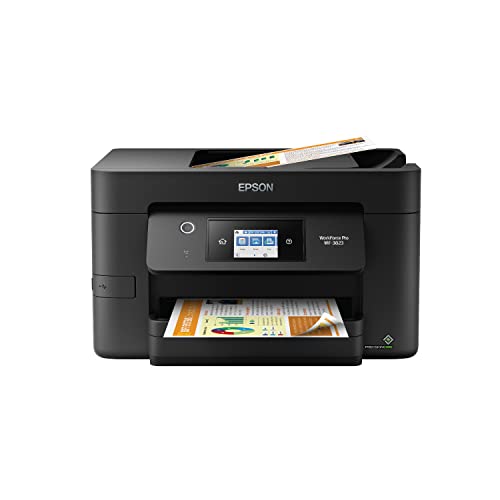
Best for Busy Color Printing – Epson WorkForce Pro WF-3823
If you are comparing mac compatible printers for small office work, the Epson WorkForce Pro WF-3823 is worth considering for its stated 21-page-per-minute black and 11-page-per-minute color ISO print speeds. Its 250-sheet tray and wired and wireless networking support a shared office workflow; confirm the Mac setup you need before buying.
Best For: Offices that print frequent color documents and want a larger paper tray.
Pros:
- 250-sheet paper capacity reduces refill interruptions.
- Automatic two-sided printing and a 35-page, single-sided document feeder help with routine jobs.
- Ethernet, built-in wireless, and Wi-Fi Direct offer several connection options.
Cons:
- The document feeder is described as single-sided, so it is not a shortcut for scanning both sides automatically.
- Epson specifies genuine Epson cartridges; damage from non-genuine ink may not be covered by its limited warranty.
This is the productivity-focused color option in the group, especially if tray capacity and network flexibility matter. Check current Mac driver and software requirements for your office before committing.
Best for Fast Black-and-White Jobs – HP LaserJet Pro 3101fdw
For teams seeking mac compatible printers for small office documents, the HP LaserJet Pro 3101fdw offers explicitly listed Mac and AirPrint support. This monochrome laser all-in-one prints, scans, copies, and faxes, with speeds of up to 35 black-and-white pages per minute for single-sided printing.
Best For: Teams of up to seven people primarily printing black-and-white reports and forms.
Pros:
- Automatic two-sided printing and a document feeder streamline office paperwork.
- 250-sheet paper capacity supports shared use.
- Wi-Fi, Ethernet, and HP Wolf Pro Security address connectivity and security needs.
Cons:
- Monochrome output cannot handle color charts or photos.
- Its stated maximum media size is letter, so verify support for any larger paper you use.
Pick the HP when fast, professional-looking black-and-white output is the priority. Its listed Mac compatibility removes some guesswork, but color-dependent offices should choose another model.
Best for Low-Cost Color Printing – Epson EcoTank ET-4800
Among mac compatible printers for small office use, the Epson EcoTank ET-4800 is worth considering if you print color documents regularly and want refillable ink tanks instead of cartridges. Its Wi-Fi, Ethernet, and USB connections offer several ways to fit it into a workspace, though the supplied specifications do not explicitly confirm macOS support.
Best For: Small offices prioritizing refillable ink and occasional scanning or copying.
Pros:
- Refillable tanks eliminate disposable ink cartridges.
- Prints, scans, and copies; the flatbed scanner handles individual documents.
- Wi-Fi, Ethernet, and USB connectivity provide flexible setup options.
Cons:
- Two-sided printing is manual.
- 100-sheet capacity and rated speeds of 10 ppm black and 5 ppm color may limit busy offices.
The ET-4800 makes sense when ink-tank convenience matters more than fast, automated paper handling. Confirm compatibility with your Mac and preferred connection method before buying.
Best Tank Printer with Auto Duplex – Canon MegaTank G3290
For shoppers comparing mac compatible printers for small office tasks, the Canon MegaTank G3290 combines refillable ink with automatic two-sided printing. It prints, copies, and scans over Wi-Fi or USB, but the supplied notes do not explicitly verify macOS compatibility.
Best For: Small teams that want an ink-tank printer for color documents and automatic double-sided pages.
Pros:
- Included ink is rated for up to 6,000 black-and-white or 7,700 color pages per set.
- Automatic duplex printing saves manual page flipping.
- 2.7-inch color touchscreen and support for varied media, including envelopes and labels.
Cons:
- 100-sheet capacity may require frequent refills.
- Rated speeds of 11 ppm black and 6 ppm color are modest.
The G3290 is a practical choice if ink yield and automatic duplexing outweigh speed and tray size. Check Canon’s current Mac software support before committing.
Best for Multi-Page Office Work – HP OfficeJet Pro 8125
If you are evaluating mac compatible printers for small office workflows, the HP OfficeJet Pro 8125 stands out for its 225-sheet tray, one-sided automatic document feeder, and automatic two-sided printing. It prints, scans, and copies, but macOS support is not explicitly stated in the supplied notes, so verify it for your setup.
Best For: Home offices handling frequent document batches, reports, and color presentations.
Pros:
- Rated at up to 20 ppm black and 10 ppm color.
- 225-sheet input tray, automatic duplex printing, and an ADF simplify document work.
- Dual-band Wi-Fi and a 2.7-inch color touchscreen support everyday operation.
Cons:
- The ADF scans only one side of a document at a time.
- Instant Ink incurs a monthly fee after the included three-month trial unless canceled.
- Designed to block cartridges using non-HP chips or circuitry.
The OfficeJet Pro 8125 offers stronger paper handling than the two 100-sheet tank models here, but cartridge restrictions and ongoing ink costs deserve attention before purchase.
How We Picked the Best Mac Compatible Printers for Small Office
We focused on the jobs a small office is likely to handle: printing documents, copying and scanning paperwork, producing color materials, and shipping orders. The selection includes conventional office printers alongside dedicated 4-by-6-inch thermal label printers because those serve different needs. We considered the listed features—such as duplex printing, automatic document feeders (ADFs), wireless connectivity, and refillable ink—and grouped similar options by workflow rather than treating them as interchangeable. One MUNBYN listing appears twice in the selected lineup; confirm whether the two entries differ before comparing prices.
Quick Comparison
For mostly black-and-white paperwork, start with the Brother DCP-L2640DW or HP LaserJet Pro 3101fdw. For color documents and general office tasks, compare the Epson WorkForce Pro WF-3823, HP OfficeJet Pro 8125, and Canon PIXMA TR8620a. The Epson EcoTank ET-4800 and Canon MegaTank G3290 are worth considering if refillable ink tanks suit your print volume. The MUNBYN and JADENS models are specialized shipping-label printers, not replacements for a letter-size document printer.
Key Buying Factors for Mac-Compatible Printers for Small Office Use
Check the Exact Mac Connection Method
Do not assume that “wireless” or “Bluetooth” means a printer will work from every Mac app. Confirm current macOS support, the connection method, and any required driver or desktop software on the manufacturer’s support page. AirPrint can simplify setup when a specific model supports it. For thermal models, check how labels are created and printed from your shipping platform on macOS.
Match Features to Your Daily Work
An all-in-one makes sense when you regularly scan or copy. An ADF helps with multipage documents, while automatic duplex printing saves paper on two-sided jobs; verify each feature on the exact configuration you buy. A monochrome laser is a sensible fit if color is unnecessary. Choose an inkjet when color output matters, or a thermal label printer when the main task is producing shipping labels without ink or toner.
Budget Beyond the Purchase Price
Compare the price and stated yield of replacement toner or ink, or the cost of refill bottles for tank models. Estimate your monthly printing before deciding whether a lower upfront price or lower running cost matters more. Thermal printing avoids ink and toner but still requires compatible labels. Also check paper capacity, supported media sizes, and available desk space.
Who Should Buy Which Mac Compatible Printers for Small Office?
Choose a monochrome laser for a document-heavy office that rarely needs color. Pick a color all-in-one if you also produce presentations, forms, or occasional graphics; prioritize an ADF if scanning stacks is routine. Consider an EcoTank or MegaTank model if you print enough to justify comparing refill costs carefully. If you ship products regularly, add a MUNBYN or JADENS thermal printer for labels—and keep a conventional printer for documents. The best Mac Compatible Printers for Small Office workflows are the ones that support your Mac setup and your most frequent print job without charging you for features you will not use.
