
If your NVMe drive is running hot, the right heatsink can help sustain speed and reduce thermal throttling. That matters most in compact cases, high-performance builds, and any system with limited airflow around the M.2 slot.
Below, we’ve narrowed the field to 10 practical options that balance fit, cooling design, and installation simplicity for modern motherboard M.2 slots.
Best 10 M 2 SSD Heatsink for Motherboard Slot Picks for 2026
Dual-Sided Cooling Pick
M.2 2280 SSD Heatsink for PC/PS5
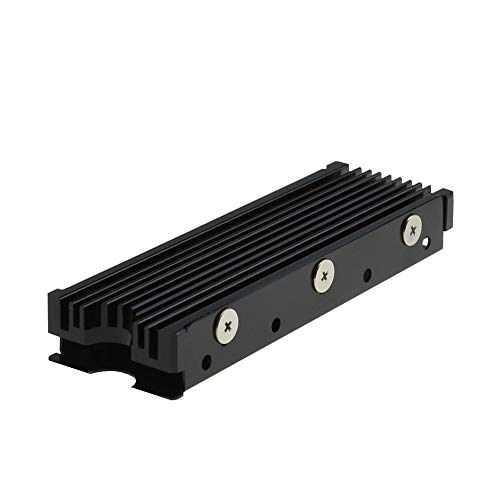
- Works with M.2 2280 NVMe and SATA SSDs
- Double-sided clip design with adjustable height screws
- Aluminum alloy body with claimed 10°C to 30°C cooling
Best For: Users wanting a versatile, adjustable heatsink for PC or PS5
Compact Aluminum Option
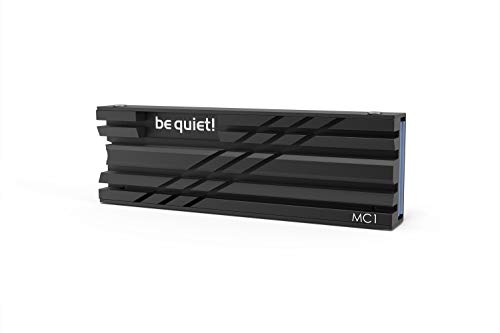
- Fits single- and double-sided M.2 2280 modules
- Compact aluminum design for low-profile installs
- Made to help SSDs run at full performance longer
Best For: Buyers wanting a compact, straightforward heatsink for 2280 drives
Value 2-Pack Choice
GLOTRENDS M.2 SSD Heatsink Kit

- Two aluminum heatsinks included in the kit
- Fits all 2280 M.2 SSDs for PC and PS5 use
- Mounting hardware includes clasps, rubber bands, and pads
Best For: Budget shoppers who want a two-pack for 2280 SSD cooling
Compact Click-Mount Cooling
ARCTIC M2 Pro M.2 2280 SSD Heatsink
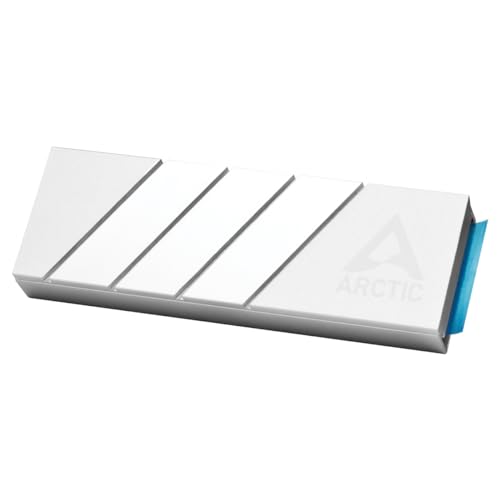
- Click mount with no screws or rubber bands
- Works with single- and double-sided M.2 2280 SSDs
- Includes TP-3 thermal pads for uneven component heights
Best For: PC and PS5 builds needing simple, tidy SSD cooling
Heavy-Duty Fin-and-Pipe Cooling
Thermalright HR-09 2280 SSD Heatsink

- 6 mm heat pipe with 32 fins and aluminum alloy body
- Double-sided cooling and 4500 mm² dissipation area
- Adjustable height screws help fit different SSD heights
Best For: Users wanting aggressive cooling and flexible fit adjustment
Premium Black Heatpipe Cooling
be quiet! MC1 Pro M.2 SSD Cooler

- Integrated heatpipe helps move heat away efficiently
- Fits single- and double-sided M.2 2280 NVMe drives
- Black aluminum finish pairs well with modern builds
Best For: Clean-looking builds needing a heatpipe-based 2280 SSD cooler
Budget 4-Pack Cooling Kit

- 4-pack bundle for multiple 2280 SSDs
- Double-sided groove design with thermal pads
- Metal clips and rubber bands included
Best For: Multi-drive buyers who want an affordable 2280 heatsink kit
High-Performance Desktop Cooler
Thermalright TR-M.2 2280 Type A B

- Double-sided aluminum design with thermal silicone film
- Includes 4 screws for a tighter SSD fit
- Designed to avoid PCI-E slot interference
Best For: Desktop M.2 users who want secure fitment and good clearance
Simple Clip-On SSD Cooler
Black Double-Sided 2280 Heatsink

- Clip-mount design for easy installation
- Aluminum alloy body with thermal pads
- Rated for 10°C-20°C cooling effect
Best For: PC and PS5 builders who want a simple clip-on 2280 heatsink
Dual-Sided Cooling Pick – M.2 2280 SSD Heatsink for PC/PS5
If you need an m 2 ssd heatsink for motherboard slot use, this M.2 2280 cooler is built for desktop PCs and PS5 setups and focuses on broad compatibility. Its aluminum alloy groove design and double-sided clip layout are aimed at improving heat dissipation on 2280 NVMe and SATA drives while keeping installation straightforward.
Best For: Builders who want a versatile, double-sided M.2 cooler for 2280 SSDs in a PC or PS5.
Pros:
- Designed for M.2 2280 SSDs, including PCIe NVMe and M.2 SATA models
- Double-sided cooling design with aluminum alloy groove construction
- Claims 10°C to 30°C cooling effect depending on conditions
- Adjustable-height screws and clip design help with fit and stability
Cons:
- Minimum installation height requirement is 12mm
- Cooling results vary depending on the environment
Overall, this is a practical all-around heatsink if you want a compact, adjustable solution for a 2280 SSD. The included nano thermal pad and easy-install design make it a solid fit for users who value convenience and broad compatibility.
Premium Copper Build – SABRENT Rocket M.2 2280 Heatsink
This SABRENT model is a strong choice if you want an m 2 ssd heatsink for motherboard slot installation with a more premium material mix. It is designed for desktop computers and supports single- and double-sided M.2 2280 SSDs, with copper and aluminum intended to maximize cooling performance.
Best For: Desktop users who want a robust, easy-to-install M.2 2280 heatsink with included tools.
Pros:
- Copper and aluminum construction for maximum performance
- Compatible with single-sided and double-sided M.2 2280 SSDs
- Includes thermal tape, screws, screwdriver, and installation guide
- Designed specifically for desktop computers
Cons:
- Built for desktop use, so it may not suit every device
- Heavier than simpler aluminum-only designs
If you want a heatsink that feels complete out of the box, the included mounting hardware is a real advantage. The copper-heavy build also makes it a compelling option for users who prioritize maximum cooling potential over a minimal design.
Compact Aluminum Option – be quiet! MC1 M.2 SSD Cooler
The be quiet! MC1 is a streamlined pick for anyone shopping for an m 2 ssd heatsink for motherboard slot cooling without extra bulk. It is made for single- and double-sided M.2 2280 modules and uses an aluminum heatsink design meant to help the SSD maintain full performance for longer.
Best For: Users who want a compact aluminum cooler for M.2 2280 drives in a PC or PS5.
Pros:
- Supports both single- and double-sided M.2 2280 modules
- Aluminum construction in a compact 2.91 x 0.94 x 0.39 inch size
- Designed to reduce temperatures for extended full-performance operation
- Also suited for PS5 M.2 SSD expansion
Cons:
- More minimalist than heavier multi-material coolers
- Does not include extra mounting accessories in the supplied notes
The MC1 is a sensible choice if you want effective cooling in a simple, compact form factor. Its dimensions make it easy to plan around, while the broad 2280 compatibility keeps it flexible for common desktop and console upgrades.
Value 2-Pack Choice – GLOTRENDS M.2 SSD Heatsink Kit
If you want an m 2 ssd heatsink for motherboard slot use case on a budget, this GLOTRENDS kit focuses on simple passive cooling for 2280 SSDs. It is built for desktop PCs and PS5/PS5 Slim installations, and the included mounting options give you some flexibility when fitting the heatsink to your drive.
Best For: Budget-minded users who want two aluminum heatsinks for 2280 SSD upgrades.
Pros:
- Two-pack value with aluminum heatsink bodies
- Compatible with all 2280 M.2 SSDs
- Includes thermal pads plus metal clasps and rubber bands for mounting
- Designed for desktop PC and PS5/PS5 Slim use, not laptops
Cons:
- Passive cooling only, so performance depends on system conditions
- Cooling claims are temperature-dependent and not fixed
This kit stands out mainly for value and flexibility rather than premium materials. If you need multiple heatsinks or want a straightforward option for common 2280 drives, it offers an easy way to add cooling without overcomplicating the build.
Compact Click-Mount Cooling – ARCTIC M2 Pro M.2 2280 SSD Heatsink
If you want an m 2 ssd heatsink for motherboard slot that stays simple and low-fuss, the ARCTIC M2 Pro is built around easy installation and steady thermal control. It uses aluminum construction, TP-3 thermal pads, and a click mechanism to support both single- and double-sided M.2 2280 SSDs without screws or rubber bands.
Best For: PC or PS5 builds that need straightforward M.2 2280 cooling with a clean click-mount setup.
Pros:
- Click-mount installation with no screws or rubber bands
- Compatible with single- and double-sided M.2 2280 SSDs
- Includes two TP-3 thermal pads for controller, RAM, and NAND height differences
- Designed to reduce thermal throttling during intensive read and write use
Cons:
- Made specifically for M.2 2280 SSDs, so it is not a universal drive cooler
- Cooling approach relies on a compact heatsink design rather than a large fin-and-pipe layout
The M2 Pro is a practical pick if you want an easy-to-fit SSD cooler that focuses on reliable everyday performance. Its PS5-compatible design and simple mounting make it especially appealing for builders who prefer a tidy, fast installation.
Heavy-Duty Fin-and-Pipe Cooling – Thermalright HR-09 2280 SSD Heatsink
For an m 2 ssd heatsink for motherboard slot focused on maximum cooling hardware, the Thermalright HR-09 2280 uses a heat pipe, double-sided aluminum fins, and a large 4500 mm² heat dissipation area. It is built for M.2 2280 SSDs and includes adjustable height screws plus a thermal silicone pad to help it fit a range of drive heights.
Best For: Builders who want a more aggressive SSD cooler with a heat-pipe design and broad adjustment options.
Pros:
- Built-in 6 mm heat pipe for more advanced heat transfer
- Double-sided cooling design with 32 fins and 4500 mm² dissipation area
- Adjustable height screws support different M.2 SSD heights
- Includes a thermal silicone pad designed to work with uneven surfaces
Cons:
- Bulkier than simpler low-profile SSD heatsinks
- Chassis mount design may not suit every motherboard or space-constrained build
The HR-09 is the most hardware-intensive option here, so it makes sense when you want a cooler built around fins, a heat pipe, and adjustable fit. It is a strong match for users prioritizing thermal headroom over a minimalist footprint.
Premium Black Heatpipe Cooling – be quiet! MC1 Pro M.2 SSD Cooler
If you’re comparing an m 2 ssd heatsink for motherboard slot use, the be quiet! MC1 Pro stands out for its integrated heatpipe, black aluminum finish, and support for both single- and double-sided M.2 2280 drives. It is aimed at keeping NVMe temperatures down so the drive can maintain read and write speed under heavier workloads.
Best For: Clean-looking PC builds that need a heatpipe SSD cooler for 2280 NVMe drives.
Pros:
- Integrated heatpipe for stronger heat dissipation
- Compatible with single- and double-sided M.2 2280 SSDs
- Black aluminum design suits modern builds
- Simple mounting system for quick installation on an M.2 slot
Cons:
- Designed for 2280 NVMe drives only
- Focuses on performance cooling rather than extra installation accessories
The MC1 Pro is a solid middle ground between sleek looks and serious cooling hardware. If you want a tidy black heatsink with a built-in heatpipe and broad SSD compatibility, it is the most style-conscious pick in this group.
Budget 4-Pack Cooling Kit – ELUTENG 2280 M.2 Heatsink Set
If you want an m 2 ssd heatsink for motherboard slot use that covers multiple drives, this ELUTENG 4-pack is a practical value pick. The double-sided groove design expands the cooling area, and the included thermal pads plus two mounting methods make it easy to install on a compatible M.2 2280 SSD.
Best For: Users who want a low-cost multi-pack heatsink for several 2280 SSDs, or a spare set for PC and PS5-style installs.
Pros:
- Double-sided groove design is rated for a 10°C-25°C cooling effect, depending on conditions.
- Comes with thermal pads and both metal clips and rubber bands for installation flexibility.
- 4-pack bundle is useful if you are outfitting multiple M.2 drives at once.
- Aluminum alloy build adds durability, corrosion resistance, and heat resistance.
Cons:
- Primarily sized for 2280 drives, so it is not a universal fit for every M.2 length.
- Rubber-band mounting may not appeal to every builder, even with the included clip option.
- Best suited to standard thermal load use rather than premium, heavy-duty cooling setups.
This ELUTENG kit makes sense when you need an affordable heatsink solution with enough pieces for multiple drives. It is especially appealing if you want a simple, included-accessories bundle rather than a single premium cooler.
High-Performance Desktop Cooler – Thermalright TR-M.2 2280 Type A B
For a more performance-focused m 2 ssd heatsink for motherboard slot installations, the Thermalright TR-M.2 2280 is built around a double-sided aluminum design with thermal silicone film for stronger contact and heat transfer. It is aimed at desktop M.2 interface use and is shaped to avoid interfering with PCI-E slot devices.
Best For: Desktop builders who want a compact 2280 SSD cooler with strong fitment and PCI-E slot clearance.
Pros:
- Double-sided heat sink design uses thermal silicone film for improved cooling contact.
- Aluminum alloy body with anodized treatment is rated for a 10°C-30°C cooling effect, depending on conditions.
- Includes 4 screws and installation guidance for a tighter, more secure mount.
- Designed for desktop M.2 interfaces and noted not to interfere with PCI-E slot devices.
Cons:
- Made specifically for M.2 2280 SSDs, so it is not the right choice for shorter modules.
- Single-unit package offers less value if you need to cool several drives.
- Its bracket-and-screw design may take a bit more setup than clip-only options.
This Thermalright cooler stands out if you care about fit, stability, and desktop compatibility more than bundle quantity. It is a solid option for a clean motherboard-slot install where PCI-E clearance matters.
Simple Clip-On SSD Cooler – Black Double-Sided 2280 Heatsink
This black double-sided cooler is a straightforward m 2 ssd heatsink for motherboard slot setups when you want easy installation and broad desktop compatibility. The aluminum alloy body, thermal pads, and clip design are meant to help keep a 2280 NVMe drive in a safer temperature range without adding much complexity.
Best For: PC and PS5 users who want a compact, easy-to-install 2280 SSD heatsink with clip mounting.
Pros:
- Double-sided clip design supports stable installation across different SSD heights.
- Aluminum alloy construction with anodic oxidation and silver plating treatment.
- Rated for a 10°C-20°C cooling effect, depending on the environment.
- Compatible with desktop PCs, PS5, and specific M.2 NVMe SSDs.
Cons:
- Package details list included components as none, so accessories may be minimal.
- Compatibility is described for specific M.2 NVMe SSDs rather than every drive model.
- Cooling performance is good for general use, but not the highest in this group.
If you want a simple cooler that is easy to mount and fits standard 2280 SSD builds, this model is a reliable middle-ground option. It favors convenience and broad use over extra bundle features.
How We Picked the Best M 2 SSD Heatsink for Motherboard Slot
For an M 2 SSD Heatsink for Motherboard Slot, the most important factors are compatibility, clearance, and real cooling ability. We prioritized models that fit common 2280 drives, work with single- and double-sided SSDs where possible, and use thermal pads or heatpipe designs that can actually move heat away from the controller and NAND.
We also looked for options that are practical for everyday builders: easy mounting, durable materials, and designs that are less likely to interfere with nearby GPU shrouds, chipset heatsinks, or motherboard armor.
Quick Comparison: What Matters Most
Not every heatsink is built for the same scenario. Slim aluminum models are usually best for tight motherboard clearances and standard desktop airflow. Larger heatpipe designs tend to suit high-end NVMe drives that run hotter under sustained transfers. Some products are also aimed at PS5 use, which can overlap with PC builds but may affect width and height.
If your motherboard already includes an M.2 cover, check whether it’s removable and whether the SSD label and thermal pad arrangement will still allow a proper fit. In many cases, the best choice is the one that matches your slot clearance first and cooling ambition second.
Key Buying Factors for an M.2 SSD Heatsink for Motherboard Slot
Compatibility and Thickness
Most buyers should confirm 2280 support first, then check whether the heatsink works with single-sided or double-sided SSDs. Double-sided drives need more internal clearance, and some motherboard slots sit very close to other components.
Thermal Pad Quality
Thermal pads are not just accessories; they’re the bridge between the drive and the cooler. Look for pads with good coverage and enough compression to maintain contact without excessive pressure.
Material and Design
Aluminum is common because it’s lightweight and efficient for passive cooling. Heatpipe-based designs can perform better for heavier workloads, but they usually take up more space and may be overkill for light desktop use.
Airflow and Case Layout
A heatsink works best when the surrounding area has some airflow. If your M.2 slot sits under a graphics card or behind a shielded cover, choose a model that prioritizes low profile and broad contact rather than flashy height.
Who Should Buy Which M 2 SSD Heatsink for Motherboard Slot?
If you want the safest all-around pick, choose a low-profile aluminum heatsink for a standard desktop motherboard slot. If you regularly move large files, edit video, or push a fast PCIe 4.0 drive hard, a larger heatpipe model may be worth the extra space.
Builders with tight cases or stacked M.2 layouts should focus on slim compatibility first. And if you’re shopping for a console or a mixed PC/PS5 setup, verify the exact dimensions before buying so the cooler clears the enclosure and still makes full thermal contact.
