
A low-profile mechanical keyboard for office work can deliver faster, more comfortable typing without the bulk of a full-height board. The best options balance quiet switches, clean desk aesthetics, and reliable multi-device connectivity.
Below, we focus on models that make sense for shared spaces, long work sessions, and mixed laptop-or-desktop setups.
Best 10 Low Profile Mechanical Keyboard for Office Work Picks for 2026
Ultra-Slim Silent Pick
Keychron B1 Pro for Office Work
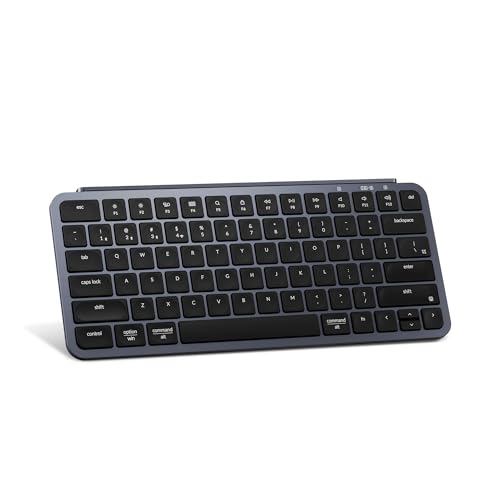
- Quiet scissor-switch typing
- 2.4 GHz, Bluetooth, and wired modes
- Up to 1200 hours of battery life
Best For: Quiet office typing and multi-device setups
Slim Metal Workhorse

- Ultra-thin 0.87-inch design
- Quiet, responsive low-profile speed switches
- Aluminum housing with integrated stand
Best For: Wired office setups that want a premium metal build
Compact Productivity Favorite
Keychron K3 Version 2 for Work

- 75% ultra-slim layout
- Bluetooth for up to 3 devices
- Tactile low-profile mechanical switches
Best For: Productivity and Mac/Windows multitasking
Multi-Device Office Pick
Cherry KW 550 MX LP for Office

- 96% low-profile mechanical layout
- Connects to up to 4 devices
- Durable PBT keycaps and metal plate
Best For: Busy desks and multi-device workflows
Premium Workhorse Pick
IQUNIX MQ80 Low Profile Keyboard
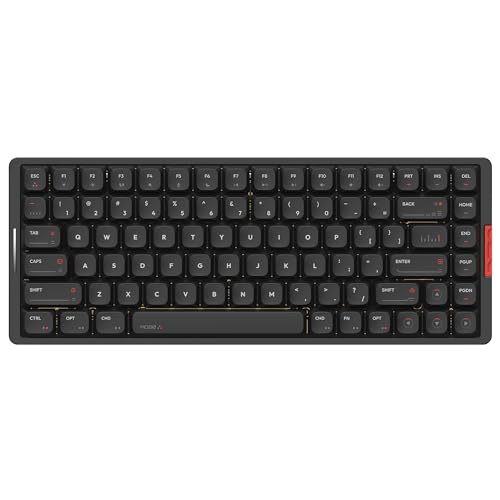
- 0.40-inch front height for wrist comfort
- CNC aluminum body with premium stability
- Up to 350 hours battery life and VIA support
Best For: Professionals wanting a premium, customizable office keyboard
Ultra-Slim Silent Pick – Keychron B1 Pro for Office Work
If you want a low profile mechanical keyboard for office work that stays quiet and keeps your desk clean, the Keychron B1 Pro is built around those priorities. Its scissor-switch design, ultra-slim body, and multi-device wireless support make it a practical fit for shared spaces and hybrid setups.
Best For: Quiet office typing, compact desks, and users who switch between multiple devices.
Pros:
- Silent scissor-switch keys are well suited to quiet office environments.
- Supports 2.4 GHz wireless, Bluetooth 5.2, and wired connection.
- Can be programmed with the Keychron Launcher web app or ZMK firmware.
- Very slim profile with long battery life rated up to 1200 hours.
Cons:
- Uses scissor switches rather than a traditional mechanical switch feel.
- 84-key layout may feel compact if you rely on a full-size board.
Overall, the B1 Pro is a strong office-first option if your top priorities are low noise, portability, and easy device switching. It leans more toward productivity than enthusiast keyboard features, which is exactly what many work setups need.
Slim Metal Workhorse – Cherry MX 10.0N RGB for Work
The Cherry MX 10.0N RGB is a low profile mechanical keyboard for office work that favors a slim shape and a solid metal build. Its low-profile speed switches and integrated stand make it a polished wired option for people who want a cleaner, more premium desk setup.
Best For: Office users who want a thin wired keyboard with a sturdy aluminum feel.
Pros:
- Ultra-thin 0.87-inch profile keeps the keyboard compact on the desk.
- Cherry MX low profile speed switches are linear, quiet, and responsive.
- Aluminum housing and built-in stand add durability and ergonomic flexibility.
- RGB backlighting offers customizable lighting effects.
Cons:
- Wired-only design may not suit wireless-first office setups.
- Full 108-key layout takes more space than compact alternatives.
This model stands out if you want a premium, low-profile board with a more substantial metal construction. It is especially appealing for workspaces that value durability and a slim mechanical typing feel.
Compact Productivity Favorite – Keychron K3 Version 2 for Work
If you need a low profile mechanical keyboard for office work that balances portability and typing comfort, the Keychron K3 Version 2 is an easy candidate. Its 75% layout, multi-device Bluetooth support, and tactile low-profile switches make it a practical everyday board for mixed Mac and Windows use.
Best For: Productivity-focused workers who want a slim, compact keyboard with tactile feedback.
Pros:
- Ultra-slim 75% layout saves desk space without feeling too minimal.
- Connects to up to 3 devices with Bluetooth 5.1 and also supports wired use.
- Low-profile mechanical switches are thinner and faster to trigger than standard switches.
- Includes Mac layout support plus extra keycaps for Mac and Windows.
Cons:
- White backlight is single-color rather than RGB.
- Tactile Brown switches may not be as quiet as scissor-switch office boards.
The K3 Version 2 makes sense if you want a slimmer mechanical board that still feels more tactile than a typical laptop-style keyboard. It is a versatile office choice for users who move between devices and operating systems.
Multi-Device Office Pick – Cherry KW 550 MX LP for Office
The Cherry KW 550 MX LP is a low profile mechanical keyboard for office work that focuses on flexibility and a tidy, compact layout. With support for up to four devices, PBT keycaps, and low-profile linear switches, it fits well in workspaces where you regularly jump between machines.
Best For: Multi-device office users who want a slim mechanical keyboard with a compact 96% layout.
Pros:
- Supports up to 4 devices through Bluetooth channels or cable.
- 96% format keeps important keys while staying more compact than full-size boards.
- MX Low Profile 2.0 Ivory switches deliver a smooth, direct linear feel.
- PBT keycaps and a metal plate add durability.
Cons:
- White illumination is fixed to a limited style rather than full RGB lighting.
- Battery life is described in weeks, but exact runtime depends on usage.
This is a practical office-friendly choice if you want a thinner mechanical keyboard with more connectivity flexibility than most. The mix of a compact layout, durable materials, and multi-device switching makes it especially convenient for busy desks.
Ultra-Slim Office Pick – Keychron K1 Max Ultra-Slim Wireless TKL
If you want a low profile mechanical keyboard for office work that still feels premium and versatile, the Keychron K1 Max is a strong fit. Its ultra-slim 80% TKL layout saves desk space, while 2.4 GHz, Bluetooth 5.1, and wired USB-C give you flexible connectivity for a modern work setup.
Best For: Users who want a slim, customizable keyboard with multi-device switching and Mac/Windows/Linux support.
Pros:
- Ultra-slim TKL design keeps the desk footprint compact without dropping essential keys.
- Triple connection options support 2.4 GHz, Bluetooth, and wired use.
- QMK and Launcher support make remapping and macros straightforward.
- Hot-swappable low-profile switches let you adjust the feel without soldering.
Cons:
- Key legends are not shine-through, so backlight visibility is limited there.
- This version only supports Gateron/Keychron low-profile switches for swaps.
Overall, the K1 Max is a well-rounded office keyboard if you value a slim body, flexible connections, and deep customization. It leans more toward productivity control than flashy extras, which makes it easy to recommend for a clean workspace.
Quiet Full-Size Choice – Arteck Mechanical Low Profile Full-Size
The Arteck Mechanical is a practical low profile mechanical keyboard for office work if you prefer a full-size layout and a quieter tactile switch feel. Its stainless steel build, brown switches, and simple 2.4G USB wireless connection make it a straightforward desktop keyboard for everyday typing.
Best For: Office users who want a full-size low-profile keyboard with tactile brown switches and easy wireless setup.
Pros:
- Tactile brown switches provide a mechanical feel with less noise.
- Full-size 110-key layout includes the number pad and extra function coverage.
- Low-profile keys are designed for more comfort during longer typing sessions.
- Rechargeable battery is rated for up to 6 months per charge based on light daily use.
Cons:
- Uses USB wireless only, so it lacks Bluetooth and wired mode flexibility.
- No RGB lighting; backlighting support is single-color only.
This model is best if you want an uncomplicated office keyboard with a traditional full-size layout and a restrained typing sound. It is less feature-rich than some premium options, but its ease of use and battery life are appealing for workstations.
Feature-Rich Multi-Device Pick – NuPhy Node75 Low Profile Wireless
If you need a low profile mechanical keyboard for office work that can also handle heavy multitasking, the NuPhy Node75 stands out with tri-mode connectivity and support for up to five devices. Its 75% layout, gasket-mounted typing feel, and sound-dampening materials aim to keep the desk setup compact and comfortable.
Best For: Multi-device users who want a compact, customizable low-profile keyboard with a softer typing feel.
Pros:
- Tri-mode connectivity includes Bluetooth, 2.4 GHz, and USB-C.
- Supports up to five paired devices for quick switching.
- Gasket mount and damping materials are designed for a quieter, softer typing experience.
- Hot-swappable switches and NuPhyIO customization add flexibility.
Cons:
- 75% layout removes the numpad, which may not suit spreadsheet-heavy users.
- Touch-based volume and brightness control may be less familiar than a physical knob.
The Node75 is a strong choice if you want a premium-feeling office keyboard with more customization and multi-device convenience. It balances compact size, long battery life, and sound tuning in a way that should appeal to users who spend all day typing.
Quiet Office Pick – AUSDOM Silent Office Keyboard
If you want a low profile mechanical keyboard for office work that keeps noise down without losing mechanical feel, the AUSDOM Airkey 98 is built for that lane. Its pre-lubed silent linear switches, soundproof silicone, and low-profile key design aim to make long typing sessions more comfortable and less distracting.
Best For: Quiet shared offices, multitaskers who switch between several devices, and anyone who wants a low-profile board with number pad convenience.
Pros:
- Pre-lubed silent linear switches are designed for whisper-quiet typing.
- Low-profile keys and a 4°/8° kickstand support a more natural wrist angle.
- Tri-mode connectivity works over Bluetooth 5.0, 2.4GHz, or USB-C wired.
- Supports up to 5 connected devices and includes hot-swappable switches.
Cons:
- Illuminated white backlighting may be unnecessary if you prefer a minimal office setup.
- At 16 inches wide, the full-size layout takes more desk space than compact models.
Overall, this is a strong practical choice if your priority is a quieter typing experience with flexible connectivity and office-friendly ergonomics. The number pad and hot-swap support add real utility for daily work.
Comfortable Typing Pick – Flow Lite Low-Profile 100-Key Keyboard
The Flow Lite is a low profile mechanical keyboard for office work that leans into comfort, quieter feel, and customization. It combines a low front height, Specter full POM linear switches, and a gasket-mounted design to create a softer typing experience for long sessions.
Best For: Typists who want a relaxed wrist angle, a cushioned feel, and flexible wireless connectivity for Windows, Mac, or travel use.
Pros:
- Low-profile layout is designed to reduce wrist strain during long typing sessions.
- Specter full POM linear switches use a lighter 40gf operating force.
- Gasket design and sound-dampening layers add a softer, richer keystroke feel.
- Triple connectivity supports Bluetooth, 2.4GHz, and wired Type-C use.
Cons:
- ABS body material is a step down from the aluminum used on higher-end boards.
- Textured office look is practical, but less premium than metal alternatives.
For office workers who spend hours typing, the Flow Lite focuses on comfort first while still offering strong connection options and customization tools. It’s a sensible pick if you want a modern low-profile board without overpaying for a metal chassis.
Premium Workhorse Pick – IQUNIX MQ80 Low Profile Keyboard
If you’re shopping for a low profile mechanical keyboard for office work and want a more premium feel, the IQUNIX MQ80 stands out with its CNC aluminum body and very low front height. It is designed for all-day comfort, long battery life, and easy customization through VIA.
Best For: Professionals who want a refined low-profile keyboard with a premium build, excellent battery life, and remapping support.
Pros:
- 0.40-inch front height and low-profile Kailh POM switches support comfortable typing.
- CNC-machined aluminum body gives the keyboard a stable, high-end feel.
- Up to 350 hours of battery life reduces charging interruptions.
- Hot-swappable switches and VIA support make customization easy.
Cons:
- RGB lighting may be more than some office users need.
- Its premium aluminum build is likely less budget-friendly than simpler alternatives.
The MQ80 is the most polished option here if you value materials, battery endurance, and workstation-level customization. It’s especially appealing for office users who want a keyboard that feels substantial while still staying low and comfortable.
How We Picked the Best Low Profile Mechanical Keyboard for Office Work
For this roundup, we prioritized office-friendly typing feel, noise control, build quality, and everyday usability. We also looked for practical features that matter in a Low Profile Mechanical Keyboard for Office Work, such as wireless flexibility, stable keycaps, compact layouts, and battery life that can handle a full workweek or more.
We gave extra weight to boards that support Bluetooth and 2.4 GHz connections, since switching between a laptop, desktop, and tablet is a major convenience in modern offices.
Quick Comparison
In simple terms, smaller layouts save desk space, full-size or near-full-size layouts are better if you use numbers often, and quieter switch types are better for shared offices. Premium aluminum boards tend to feel sturdier, while lighter plastic models are usually easier to carry or move between workstations.
Key Buying Factors for a Low Profile Mechanical Keyboard for Office Work
Noise and Switch Feel
For office use, quiet linear switches, scissor-style mechanisms, or carefully tuned low-profile mechanical switches are usually the safest choice. If you type all day near coworkers, avoid anything that sounds sharp or overly clicky unless you know noise won’t be an issue.
Layout and Size
Choose a layout based on your workflow. A 75% or TKL board saves space and keeps the mouse closer, while a 96% layout or numpad-equipped board is better for spreadsheets, data entry, and administrative work.
Connectivity
Tri-mode boards are the most flexible because they can connect by Bluetooth, 2.4 GHz, or cable. If you switch between devices often, multi-device pairing is especially valuable.
Ergonomics and Profile
Low-profile designs can reduce finger travel and help some users type more comfortably over long sessions. Look for a board with a sensible key angle, stable feet, and a layout that matches your hand size and typing habits.
Battery Life and Charging
Wireless convenience only matters if the battery lasts. Longer battery life is a real productivity feature, particularly for people who don’t want to think about charging every few days.
Who Should Buy Which Low Profile Mechanical Keyboard for Office Work?
If you want the quietest, most office-appropriate option, focus on models with silent or low-noise switches and wireless flexibility. If you care most about a premium feel and a refined desk setup, aluminum models are worth a look. If you need maximum productivity, choose a board with a number pad or 96% layout. And if you want the best balance of portability and typing comfort, a compact 75% or TKL keyboard is usually the sweet spot.
For most buyers, the best Low Profile Mechanical Keyboard for Office Work is the one that fits your space, keeps noise down, and supports the devices you use every day.
