
A low-profile mechanical keyboard can give you a shorter, flatter typing position without giving up the distinct feel of mechanical switches. For gaming, the right choice also depends on layout, connection, and whether you prefer smooth linear keys or more noticeable tactile feedback.
These 10 picks span compact and full-size layouts, wired and wireless designs, and options for both gaming-first and mixed-use setups.
Best 10 Low Profile Mechanical Keyboard for Gaming Picks for 2026
Slim Wired Pick

- 0.87-inch slim profile
- Linear Cherry MX Low Profile Speed switches
- Aluminum housing with fold-out stand
Best For: Full-size wired gaming and work setups
Compact Control Pick

- 75% layout with display and knob
- Bluetooth, 2.4GHz, and USB-C
- Dampened, top-mounted construction
Best For: Compact setups needing flexible connections and controls
Wireless Tactile Pick

- Low-profile tactile GL Brown switches
- LIGHTSPEED, Bluetooth, and wired modes
- Double-shot PBT keycaps
Best For: Tenkeyless wireless gaming with tactile feedback
Full-Size Macro Pick
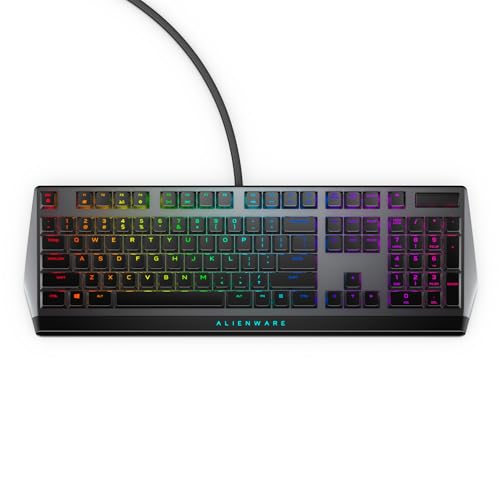
- Cherry MX Low Profile Red switches
- Programmable keys with onboard memory
- Per-key RGB and USB passthrough
Best For: Full-size wired gaming with custom key assignments
Best Wireless Linear Pick
Logitech G515 LIGHTSPEED TKL Linear

- Smooth, factory-lubed linear switches
- LIGHTSPEED, Bluetooth, and wired modes
- Tenkeyless layout with PBT keycaps
Best For: Wireless gaming with a smooth linear feel
Best Hot-Swap Compact Pick

- 68-key layout with low-profile Red switches
- Hot-swappable switches and included tools
- Aluminum case with customizable RGB
Best For: Compact wired setups and switch customization
Best for Comfort
Logitech G515 LIGHTSPEED TKL Tactile
- Factory-lubed GL Brown tactile switches
- LIGHTSPEED, Bluetooth, and wired modes
- PBT keycaps and programmable controls
Best For: Wireless gaming with tactile key feedback
Best Full-Size Wired Pick

- 23 mm-high full-size design
- Linear switches with 1.3 mm actuation
- Nine G keys and programmable controls
Best For: Full-size wired gaming with a numpad and dedicated controls
Best Mac-Friendly Compact Pick

- Compact 84-key, 75% layout
- Bluetooth for three devices plus USB-C
- QMK remapping and Mac/Windows keycaps
Best For: Compact Mac and Windows setups that mix typing with casual gaming
Best Customizable Wireless Pick

- 87-key TKL layout and tactile switches
- 2.4 GHz, Bluetooth, and USB-C modes
- 3-pin hot-swap sockets and TFT display
Best For: Compact wireless gaming with switch and control customization
Slim Wired Pick – Cherry MX 10.0N RGB
The Cherry MX 10.0N RGB is a low profile mechanical keyboard for gaming that also suits a work desk. Its 0.87-inch height, aluminum housing, and linear Cherry MX Low Profile Speed switches pair a slim build with smooth keypresses.
Best For: Buyers who want a slim, full-size wired keyboard for gaming and everyday work.
Pros:
- Linear low-profile switches provide a smooth, responsive feel.
- Aluminum housing and fold-out support bar add durability and positioning options.
- Customizable RGB backlighting.
Cons:
- Wired connection only.
- Full-size layout takes more desk space than a compact keyboard.
Choose this model if a thin metal build and full-size layout matter more to you than wireless connectivity.
The RK Royal Kludge N80 is a low profile mechanical keyboard for gaming that puts controls within easy reach. Its 75% layout combines low-profile linear switches with a small display, a multifunction knob, and Bluetooth, 2.4GHz, or USB-C connectivity.
Best For: Gamers who want a compact wireless layout with convenient on-keyboard controls.
Pros:
- Three connection modes make it adaptable to different devices and setups.
- Display shows information such as battery status and connection mode; the knob controls volume and lighting.
- Top-mounted construction, a sturdy base, and sound-dampening layers support a firm, quieter typing feel.
Cons:
- 75% layout omits a dedicated number pad.
- Listed QWERTZ layout may not suit buyers expecting QWERTY.
The N80 makes sense when compactness and built-in controls are priorities; check the key layout before ordering.
The Logitech G515 LIGHTSPEED TKL is a low profile mechanical keyboard for gaming with a tenkeyless footprint and tactile GL Brown switches. It supports LIGHTSPEED wireless, Bluetooth, and wired use, with double-shot PBT keycaps and customizable RGB lighting.
Best For: Players who want tactile feedback and a compact wireless gaming setup.
Pros:
- Three connection options, including LIGHTSPEED wireless.
- Factory-lubed tactile switches and durable double-shot PBT keycaps.
- KEYCONTROL programming and LIGHTSYNC RGB customization through G HUB.
Cons:
- Tenkeyless layout has no dedicated number pad.
- Rated battery life is up to 36 hours and varies with use.
This is the tactile option of the group for buyers who value wireless gaming features and are comfortable without a number pad.
The Alienware AW510K is a low profile mechanical keyboard for gaming that keeps a full-size layout and adds programmable keys. Its Cherry MX Low Profile Red switches are linear, while per-key AlienFX RGB, media controls, and USB passthrough round out the wired setup.
Best For: Gamers who want a full-size wired keyboard with customizable keys and lighting.
Pros:
- Linear low-profile Cherry switches offer short travel and smooth actuation.
- Programmable keys and onboard memory retain key assignments.
- Per-key RGB, media controls, and USB passthrough add desk-side convenience.
Cons:
- Wired USB connection only.
- Full-size, 18.4-inch width needs more desk space than a compact layout.
Pick the AW510K if you prefer a spacious layout and stored custom commands over a smaller wireless board.
Best Wireless Linear Pick – Logitech G515 LIGHTSPEED TKL Linear
If you want a low profile mechanical keyboard for gaming without giving up wireless flexibility, the Logitech G515 LIGHTSPEED TKL Linear is a strong fit. Its slim tenkeyless layout combines factory-lubed linear switches with LIGHTSPEED wireless, Bluetooth, and wired data mode.
Best For: Gamers who prefer a smooth linear key feel and want to switch between wireless and wired connections.
Pros:
- Factory-lubed low-profile linear switches offer a smooth feel.
- LIGHTSPEED wireless supports a 1 ms report rate; Bluetooth and wired modes add flexibility.
- Double-shot PBT keycaps and KEYCONTROL customization add durability and control.
Cons:
- Tenkeyless layout omits the number pad.
- Rated battery life is up to 36 hours and varies with use.
Choose this version if you favor a linear switch feel. The compact layout saves desk space, while the three connection modes make it easier to use across different setups.
Best Hot-Swap Compact Pick – Ranked G65 Guardian 65%
The Ranked G65 Guardian is a low profile mechanical keyboard for gaming that puts switch swapping and a compact footprint first. Its 68-key, 65% layout uses Gateron Low Profile Red switches, a matte aluminum case, and a wired USB connection.
Best For: Gamers who want a small wired keyboard with hot-swappable switches and room to customize.
Pros:
- Hot-swappable switches can be changed without soldering using the included tools.
- Aluminum case and pre-lubed stabilizers support a solid typing feel.
- Software supports macros, key rebinding, and RGB lighting customization.
Cons:
- Wired USB only; no wireless connection is listed.
- The 65% layout leaves out a number pad.
This is the pick for buyers who value hardware customization over wireless convenience. The compact layout frees desk space, and the included removal tools make switch changes more approachable.
Best for Comfort – Logitech G515 LIGHTSPEED TKL Tactile
The Logitech G515 LIGHTSPEED TKL Tactile suits anyone looking for a low profile mechanical keyboard for gaming with noticeable key feedback. Its factory-lubed GL Brown tactile switches sit in a slim tenkeyless design with LIGHTSPEED wireless, Bluetooth, and wired data transfer.
Best For: Gamers who want tactile feedback alongside flexible wireless and wired connectivity.
Pros:
- Low-profile GL Brown switches provide discernible tactile feedback.
- LIGHTSPEED wireless offers a 1 ms report rate, with Bluetooth and wired modes available.
- Double-shot PBT keycaps, KEYCONTROL programming, and LIGHTSYNC RGB offer customization.
Cons:
- Tenkeyless design has no number pad.
- Battery life is rated up to 36 hours and varies with use.
Compared with the linear G515, this version is the better match if you want to feel a distinct response at each keypress. It retains the same practical mix of a compact layout and multiple connection options.
Best Full-Size Wired Pick – Logitech G915 X Wired
If you want a low profile mechanical keyboard for gaming without giving up a numpad or dedicated controls, the Logitech G915 X Wired is a strong fit. Its linear GL switches have a 1.3 mm actuation point, and the keyboard stands 23 mm high.
Best For: Players who want a slim, full-size wired keyboard with extensive command controls.
Pros:
- Linear low-profile switches pair 1.3 mm actuation with 3.2 mm total travel.
- KEYCONTROL supports up to 15 functions per key; nine G keys add dedicated options.
- Double-shot PBT keycaps, an aluminum top plate, media controls, and a volume roller round out the build.
Cons:
- The full-size layout takes more desk space than a compact keyboard.
- Wired USB-A connectivity is less flexible for switching between devices.
Choose this model if a numpad, programmable controls, and a slim wired setup matter more to you than portability.
Best Mac-Friendly Compact Pick – Keychron K3 Version 2
The Keychron K3 Version 2 is a low profile mechanical keyboard for gaming and everyday typing when desk space and device flexibility matter. Its 75% layout keeps 84 keys in a slim frame, with tactile Brown switches and both Bluetooth 5.1 and USB-C wired connectivity.
Best For: Mac and Windows users who want a compact keyboard for casual gaming, typing, and multiple devices.
Pros:
- Pairs with up to three devices over Bluetooth and also offers a wired mode.
- QMK support and Keychron Launcher enable key remapping, macros, and shortcuts.
- Mac-focused layout includes Windows keycaps, and the compact body leaves more room for a mouse.
Cons:
- White backlighting does not offer RGB color customization.
- The 75% layout omits a numpad.
This is the more versatile pick for mixed-device setups, though its feature set emphasizes typing and connectivity rather than dedicated gaming controls.
Best Customizable Wireless Pick – Hexgears Immersion A3
For a low profile mechanical keyboard for gaming that offers several connection options, the Hexgears Immersion A3 combines an 87-key TKL layout with tactile Kailh low-profile switches. Its 27.7 mm profile and compact footprint suit desks where mouse space is a priority.
Best For: Players who want a compact wireless setup with switch swapping, RGB, and programmable controls.
Pros:
- Offers 2.4 GHz wireless, Bluetooth 5.0, and USB-C wired connections for up to five devices.
- Hot-swappable 3-pin sockets let you change compatible switches without soldering.
- HexDrive software supports remapping, macros, and RGB customization; a TFT display shows keyboard status.
Cons:
- The tenkeyless layout leaves out a numpad.
- Hot-swap options are limited to switches compatible with its 3-pin sockets.
Pick the A3 if you value wireless flexibility and hands-on customization; check switch compatibility before planning an upgrade.
How We Picked the Best Low Profile Mechanical Keyboard for Gaming
We focused on keyboards with low-profile mechanical switches or slim mechanical designs, then compared the features that affect everyday gaming: switch type, layout, connection, desk space, and controls. This list includes several switch and color variants of the Logitech G515. Treat those as choices within the same keyboard family, not as fundamentally different designs. Availability and exact specifications can vary by configuration, so check the listing before buying.
Quick Comparison
Start with the shape of your setup. The Logitech G515 Lightspeed TKL models offer a tenkeyless layout and wireless connectivity; choose between linear and tactile versions based on key feel. The Logitech G915 X is a wired option for buyers who want a full-size layout. The Keychron K3 Version 2 pairs a compact 75% layout with wireless use and QMK customization. The Ranked G65 Guardian goes smaller with a 65% layout and hot-swappable design.
For other priorities, the Cherry MX 10.0N RGB emphasizes a slim aluminum build and MX Low Profile Speed switches. The Alienware AW510K adds per-key RGB, media controls, and USB passthrough to a wired setup. The RK Royal Kludge N80 stands out for its smart display, while the Hexgears Immersion A3 is another wireless, tactile option.
Key Buying Factors for a Low-Profile Mechanical Keyboard for Gaming
Switch Feel and Compatibility
Linear switches move smoothly without a tactile bump, which some players prefer for repeated inputs. Tactile switches provide feedback at actuation and can make mixed gaming and typing feel more deliberate. Neither is automatically faster for every player. If you plan to change switches, verify hot-swap support and compatible low-profile switch types; a hot-swappable keyboard will not necessarily accept standard-height switches.
Layout and Desk Space
Full-size boards keep the number pad, while tenkeyless models free up more mouse room. A 75% layout retains a function row in a tighter footprint; a 65% board saves more space but relies more on shortcuts. Check whether you regularly use dedicated navigation keys before downsizing.
Connection and Extras
Wired models avoid charging and keep setup simple. Wireless models reduce cable clutter, but check which connection modes they support and whether your preferred mode works well for gaming. RGB, media controls, displays, and USB passthrough can be useful, but prioritize reliable key feel and a layout you like over features you will rarely use.
Who Should Buy Which Low Profile Mechanical Keyboard for Gaming?
Choose a G515 TKL if you want a slim wireless gaming layout and can decide between linear and tactile feel. Pick the G915 X or AW510K if you prefer a wired board with more room for dedicated controls. Consider the K3 Version 2 for a compact keyboard that also suits customization and general work; look at the G65 Guardian if a smaller footprint and switch swapping matter most. The Cherry MX 10.0N suits buyers drawn to low-profile Speed switches and an aluminum housing, while the N80 or Immersion A3 may appeal if a display or wireless tactile setup, respectively, tops your list. Whichever you choose, confirm the exact switch, layout, and connection on the product page.
