
Choosing a local LLM PC is about more than raw specs—it’s about matching model size, memory, storage, and power draw to the way you actually want to run AI.
Whether you need a compact desktop for private inference, an all-in-one mini server, or a workstation that can grow with heavier workloads, this roundup focuses on practical options for 2026.
Best 8 Local LLM PC Picks for 2026
Best for Fast, Ready-to-Run AI Labs
Compact Local AI Server with RTX 5060 Ti
- Out-of-box local model serving with Ubuntu and browser UI
- Preloaded with LLMs, RAG, OCR, embeddings, and databases
- RTX 5060 Ti 16GB for private inference and AI workflows
Best For: Small businesses, developers, and power users building a turnkey on-prem AI server.
Best for Local AI Workstations

- 55 TOPS NPU for local LLMs and on-device AI tasks
- Upgradeable to 256GB RAM and 8TB total SSD
- Oculink, USB4, Wi-Fi 7, and dual 2.5GbE connectivity
Best For: Developers and creators who want a compact local AI workstation with strong expansion room.
Best for Easy Local AI Setup
Compact AI Server with Pre-Installed LLMs
- Pre-installed 14B LLM gets you started quickly
- One-click model switching and downloads
- Includes RAG framework and embedding models
Best For: Users who want a ready-to-run local AI server for private model testing and document workflows.
Best for Serious Local Inference
Acer Veriton AI Mini Workstation GN100

- 1 PFLOP FP4 AI performance for large local models
- 128GB unified memory reduces CPU/GPU bottlenecks
- DGX OS stack supports CUDA, PyTorch, NIM, and NeMo
Best For: Researchers and AI teams that need powerful private inference and model development on the desktop.
Best for Local AI Workloads
CyberGeek RTX 5060 Ti 16GB GDDR7

- 16GB GDDR7 memory for local LLM inference and multitasking
- 759 AI TOPS with 5th Gen Tensor Cores for AI creation tasks
- Includes a GPU holder plus dual-fan cooling for stability
Best For: Builders who want one GPU for private AI use, creator tools, and solid 1080p/1440p gaming.
Best for Private AI Storage

- Local LLM-ready with Ryzen 7 PRO 8845HS and GPU bay
- Up to 132TB ZFS storage with ECC support
- Dual 10GbE and USB4 for fast shared workflows
Best For: Developers and small teams needing a private AI workstation with massive on-prem storage.
Best for Comfort

- 97 TOPS AI hardware for local inference
- Dual M.2 slots for large model storage
- USB4 and triple-display support
Best For: Compact AI mini PC buyers running local models, productivity apps, and multi-monitor workflows.
Best for Fast, Ready-to-Run AI Labs – Compact Local AI Server with RTX 5060 Ti
If you want a local llm pc that’s ready to serve models almost immediately, this compact AI mini PC stands out for its out-of-box setup and browser-based management. It comes preloaded with popular LLMs, RAG, OCR, and database tools, so you can get to private inference, document search, and internal AI workflows without assembling a software stack from scratch.
Best For: Small businesses, developers, and power users who want a turnkey on-prem AI box for private model serving and retrieval workflows.
Pros:
- Pre-installed Ubuntu, vLLM, TensorRT LLM, and multiple local model options for quick startup
- Built-in RAG, OCR, embeddings, rerankers, and databases reduce setup complexity
- RTX 5060 Ti 16GB plus 32GB RAM and 1TB SSD provide solid local inference headroom
- Web UI and one-click model switching make it accessible for non-specialists
Cons:
- Monitor, keyboard, and mouse are not included
- Premium hardware means it’s not an entry-level budget option
- Focused on serving and experimentation, not a general-purpose desktop bargain
This is a strong pick if you want a local llm pc that prioritizes speed to deployment, integrated tooling, and private on-prem AI workflows over DIY tinkering.
Best for Local AI Workstations – BOSGAME AI 9 Mini PC
If you want a compact local llm pc that can handle serious AI experimentation without leaning on the cloud, the BOSGAME AI 9 Mini PC is built for exactly that job. Its Ryzen AI 9 HX 470, Radeon 890M graphics, and large memory/storage ceiling make it a strong fit for creators and developers who need a small desktop with upgrade room.
Best For: Developers, power users, and creators who want a compact local AI workstation with strong expansion options.
Pros:
- Ryzen AI 9 HX 470 with 55 TOPS NPU is well suited to local LLMs and on-device AI tasks.
- Upgradeable to 256GB RAM and 8TB total SSD across triple M.2 slots.
- Oculink, USB4, Wi-Fi 7, and dual 2.5GbE make it flexible for fast peripherals and networking.
- Quad-display support helps with multitasking, editing, and monitoring AI workflows.
Cons:
- Premium specs likely put it well above basic mini PC pricing.
- Integrated graphics are strong, but demanding GPU-heavy LLM workloads may still benefit from an external GPU.
For buyers shopping for a local llm pc, this BOSGAME model stands out because it balances AI-friendly CPU/NPU performance with unusually deep expandability. It is a practical pick if you want a small system that can grow with your models, storage needs, and peripheral setup.
Best for Easy Local AI Setup – Compact AI Server with Pre-Installed LLMs
If you want a local llm pc that can start working right away, this compact AI server is built around convenience. It ships with pre-installed LLMs, a ready-to-use RAG framework, and embedded model support, so you can skip most of the usual setup work and get straight to testing models locally.
Best For: Developers, researchers, and AI enthusiasts who want an out-of-the-box local machine for running models, experimenting with RAG, and keeping data off the cloud.
Pros:
- Pre-installed 14B LLM and multiple models make first-time setup much easier.
- One-click model switching and downloads help you stay flexible as new models appear.
- RAG and embedding tools are included for local document workflows.
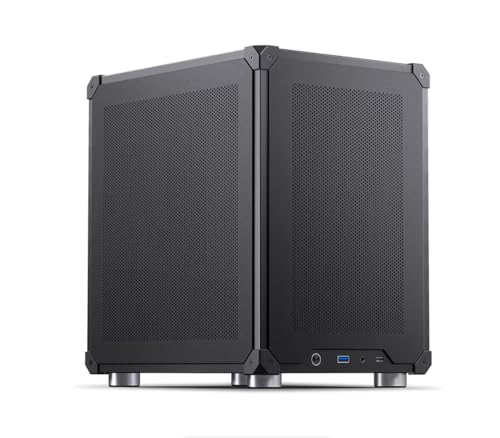
- Compact mini ITX case with mesh panels supports airflow in a small footprint.
Cons:
- More specialized than a general-purpose desktop PC.
- May be overkill if you only need basic chat or light AI tasks.
- Compact hardware can limit upgrade flexibility compared with larger towers.
This is a smart pick if you want a local llm pc that prioritizes immediate usability over tinkering. The main appeal is the ready-made software stack, which makes it easier to evaluate local AI workflows without depending on cloud services.
Best for Serious Local Inference – Acer Veriton AI Mini Workstation GN100
If you need a local llm pc that can run large models without leaning on the cloud, the Acer Veriton AI Mini Workstation GN100 stands out for sheer on-device AI muscle. Its GB10 Grace Blackwell Superchip, 128GB of unified memory, and DGX OS software stack make it a practical desktop option for prototyping, inference, and private model work.
Best For: Researchers, developers, and lab teams that want high-capacity local inference, private data handling, and a compact workstation built around NVIDIA’s AI stack.
Pros:
- 1 PFLOP FP4 performance and support for 200B+ parameter models with sparsity.
- 128GB coherent unified memory helps avoid the usual CPU/GPU bottlenecks.
- DGX OS with CUDA, PyTorch, NIM, and NeMo support speeds up AI workflows.
- Dual 200Gbps ConnectX-7 ports make it easier to scale into clusters.
Cons:
- Very expensive for buyers who only need basic local inference.
- Arm-based platform may not fit every legacy software workflow.
- Overkill unless you truly need high-end local LLM performance.
Overall, this is a specialized choice for teams that want a compact, server-class local llm pc with serious memory, networking, and software support. If your priority is running large models privately and consistently, it is one of the strongest desktop-scale options available.
Best for Local AI Workloads – CyberGeek RTX 5060 Ti 16GB GDDR7
If you want a graphics card that can do more than just game, the CyberGeek GeForce RTX 5060 Ti is a strong fit for a local llm pc. Its 16GB of GDDR7 VRAM, 759 AI TOPS, and modern Blackwell-based Tensor Core support make it a practical option for running private AI tools, creative workflows, and 1080p to 1440p gaming from a single build.
Best For: Builders who want a midrange GPU for local LLM inference, AI-assisted content creation, and high-refresh gaming without relying on cloud services.
Pros:
- 16GB GDDR7 memory gives local models more headroom for inference and multitasking.
- 759 AI TOPS and 5th Gen Tensor Cores help speed up AI editing and generative workflows.
- 3x DisplayPort 2.1b plus HDMI 2.1b supports up to four displays for productive setups.
- Includes a GPU holder and dual-fan cooler for easier, more stable installs.
Cons:
- 16GB VRAM is helpful, but still limits larger models compared with higher-memory cards.
- Performance and thermals depend heavily on case airflow and the rest of the system.
- More of a balanced AI/gaming card than a no-compromise workstation GPU.
For a local llm pc that also needs solid gaming and creator performance, this card hits a useful middle ground. It offers enough VRAM and AI acceleration to run private workloads comfortably while still staying relevant for modern games and multi-monitor setups.
Best for Private AI Storage – Nimo AI NAS / AI Server
If you want a local llm pc that doubles as a serious storage server, the Nimo AI NAS stands out for its Ryzen 7 PRO 8845HS, room for a full-size GPU, and up to 132TB of ZFS-based storage. It is built for on-premise AI work, private data handling, and always-on automation without depending on cloud services.
Best For: Developers, power users, and small teams that need a private AI workstation plus high-capacity NAS in one box.
Pros:
- Ryzen 7 PRO 8845HS is strong enough for local AI inference and coding tasks
- Up to 132TB with ZFS, ECC memory support, and hybrid NVMe/HDD storage
- Dual 10GbE, USB4, and GPU bay make it flexible for studio or lab workflows
- Open-source ZimaOS keeps data on-premise for better privacy control
Cons:
- Large, expensive, and overkill for basic home file storage
- Full potential depends on adding drives and possibly a discrete GPU
- Not a simple plug-and-play desktop for casual buyers
For buyers shopping for a local llm pc, this is less of a compact mini PC and more of a private AI appliance with workstation-class storage and networking. If you need both model execution and long-term data management in one secure system, it is a compelling niche pick.
Best for Comfort – GMKtec K17 AI Mini PC
The GMKtec K17 is a compelling local llm pc if you want a compact machine with serious AI hardware built in. With Intel Core Ultra, a dedicated NPU, and Intel Arc graphics, it’s aimed at running inference, creative tools, and everyday multitasking without leaning entirely on the cloud.
Best For: Buyers who want a compact AI-focused mini PC for local model work, productivity, and multi-display setups.
Pros:
- 97 TOPS combined AI performance for faster local processing
- Intel Arc graphics add useful headroom for AI and media work
- Dual M.2 expansion supports large local model and dataset storage
- Triple-display output and USB4 make it easy to build a flexible desk setup
Cons:
- 16GB onboard memory may feel limiting for larger models
- Best results depend on workloads that fit compact iGPU/NPU systems
- Premium AI features may be more than casual users need
For a local llm pc in a small form factor, the K17 stands out because it balances AI acceleration, fast storage options, and modern connectivity. It’s a strong fit if you want to experiment with on-device AI while keeping the system quiet, compact, and versatile.
Best for Heavy Local LLM Workloads – KAMRUI Hyper H2 Mini PC
If you want a compact local llm pc with real headroom, the KAMRUI Hyper H2 stands out for its HX-class Intel Core i5-14450HX processor, 32GB of RAM, and fast 1TB PCIe 4.0 SSD. It’s a strong fit for running multiple apps at once, handling coding and Docker tasks, and keeping everyday AI workflows responsive without taking up much desk space.
Best For: Developers, power users, and small-office buyers who want a compact mini PC for local AI tools, multitasking, and 4K productivity.
Pros:
- HX-class i5-14450HX offers strong multi-core performance for demanding workloads
- 32GB DDR4 memory and 1TB PCIe 4.0 SSD give it a solid starting point for AI and multitasking
- Triple 4K display support is great for coding, dashboards, and content-heavy setups
- USB-C, WiFi 6, and plenty of USB ports make it easy to build a full workstation
Cons:
- Not the best pick if you want a fanless or ultra-quiet system
- Integrated graphics limit it to lighter visual and GPU-accelerated workloads
- Memory is good, but serious local model work may still call for a dedicated GPU machine
For buyers who need a small but capable local llm pc for productivity-first AI use, this KAMRUI model offers an appealing mix of CPU strength, memory, and storage. It’s especially compelling if your workflows are mostly text-based, development-focused, or spread across several apps and displays.
How We Picked These Local LLM PC Options
We prioritized systems that make sense for on-device AI first: enough memory bandwidth, modern CPUs or accelerators, fast NVMe storage, and thermals that can sustain long inference sessions. We also looked for a useful mix of form factors, because the best Local LLM PC for a developer desk is not always the best choice for a home lab or small office.
Other factors included upgrade headroom, operating system readiness, connectivity, and whether the system is better suited for inference, light fine-tuning support, or broader AI workstation tasks.
Quick Comparison
As a fast rule: compact AI mini PCs are best for convenience and quieter setups, AI servers and NAS-style systems are better for always-on shared use, and GPU-focused or workstation-class builds are the strongest fit when you want higher throughput or plan to run larger models locally.
For a Local LLM PC, memory capacity matters as much as CPU speed. Storage is important too, especially if you keep multiple model files, datasets, or container images on the machine.
Key Buying Factors for a Local LLM PC
Memory and Bandwidth
LLM inference benefits from more RAM and faster memory. If you want smoother performance with larger models, prioritize higher-capacity systems and avoid configurations that feel comfortable for general productivity but cramped for AI workloads.
GPU or NPU Support
Some buyers will be better served by integrated AI acceleration, while others need a discrete GPU for higher token throughput and broader framework support. If your goal is serious local inference, GPU capability often becomes the deciding factor.
Storage and Expandability
Model files are large, and your setup will grow. Look for at least one fast SSD, preferably more than one drive option, plus enough room for future upgrades.
Thermals, Noise, and Power
A Local LLM PC may run under load for hours. Compact systems are convenient, but they need strong cooling to avoid throttling. If the machine will sit in an office or living space, noise matters too.
Networking and Always-On Use
If the system will serve models to multiple users or devices, reliable Ethernet and stable uptime are more important than flashy specs.
Who Should Buy Which Local LLM PC?
Choose a compact mini PC if you want the simplest path to private AI on a desk or shelf. Choose a workstation-style system if you care about higher performance, expansion, or mixed creative workloads. Choose an AI server or NAS-oriented model if you want shared storage, model hosting, or an always-on home lab setup.
For most buyers, the best Local LLM PC is the one that balances memory, cooling, and upgradeability without overspending on power you won’t use every day.
