
Choosing the right live streaming computer can make the difference between a smooth, professional broadcast and a choppy mess. The best systems handle gaming, chat, alerts, and encoding without breaking a sweat.
Below, we focus on prebuilt options that balance performance, value, and upgrade potential for streamers at different budgets.
Best 10 Live Streaming Computers Picks for 2026
High-Performance Streaming Tower
Ryzen 7 RTX 5060 Gaming Desktop

- Ryzen 7 4700LE for streaming and multitasking
- RTX 5060 8GB for 1080p/1440p gaming
- 1TB NVMe SSD with WiFi 6 and 6 RGB fans
Best For: Streamers who also want a gaming and creator desktop
Compact Creator Mini PC
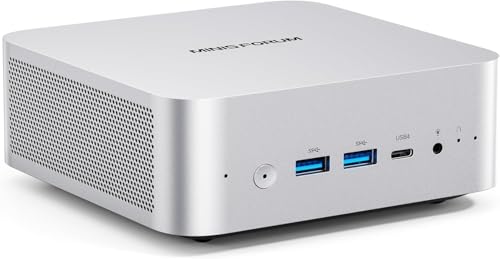
- 32GB DDR5 RAM with 1TB SSD storage
- USB4, HDMI, DP, and 2.5G LAN connectivity
- Ryzen 7 255 with Radeon 780M for light gaming
Best For: Compact streaming, editing, and multitasking setups
Budget Streaming Desktop

- Ryzen 7 4700LE for streaming and multitasking
- RTX 3050 8GB dedicated graphics
- WiFi 6 plus 6 RGB cooling fans
Best For: Budget-friendly streaming and everyday gaming
Refurbished Workhorse Desktop

- i7-7700 with 32GB RAM for multitasking
- 1TB SSD and Windows 11 Pro included
- Dual-monitor support in a compact SFF design
Best For: Practical renewed desktop use with streaming basics
Compact Creator Pick
KAMRUI Ryzen 7 Mini PC for Multitasking

- Ryzen 7 7735HS with 8 cores / 16 threads
- Triple-display support with 4K@60Hz output
- 2.5GbE, Wi‑Fi 6, and expandable M.2 storage
Best For: Compact streaming and multitasking setups
Budget Gaming Streamer
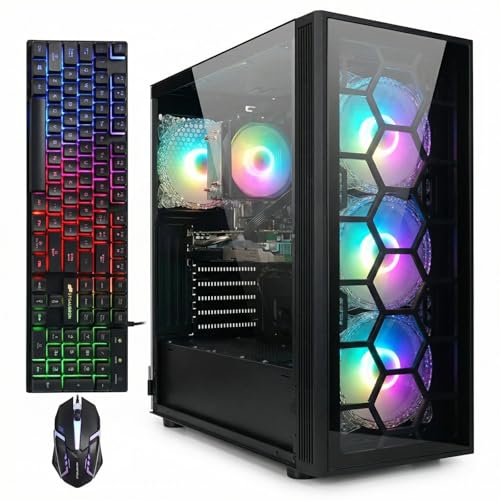
- Ryzen 7 5700X paired with RTX 3050 6GB
- 16GB DDR4 memory and 1TB SSD
- Wi‑Fi 6, Bluetooth 5.2, keyboard, and mouse included
Best For: Ready-to-use streaming and gaming desktop
High-End Streaming Beast
MINISFORUM G1 Pro RTX 5060 Mini PC
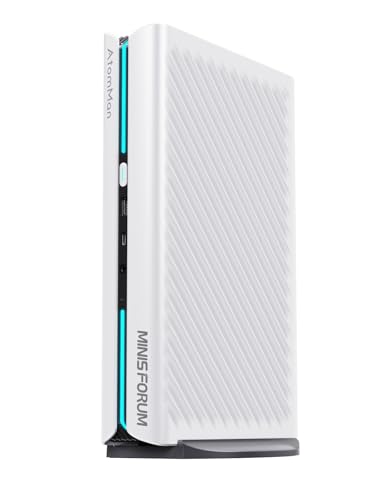
- Ryzen 9 8945HX with 16 cores / 32 threads
- Dedicated RTX 5060 8GB graphics
- Four-display support with Wi‑Fi 7 and 5G LAN
Best For: Power users needing compact performance
Value Streaming Pick
STGAubron Core i7 / GTX 1660 Super

- Core i7 with 32GB RAM for multitasking
- 1TB SSD for quick loads and storage
- Wi-Fi 6, Bluetooth 5.0, HDMI, DisplayPort
Best For: Streamers wanting a ready-to-use budget-friendly desktop
Balanced Streaming Build
Ryzen 5 5500 / RTX 3050 Prebuilt

- Ryzen 5 5500 with 6 cores and 12 threads
- RTX 3050 6GB for 1080p gaming and streaming
- 1TB NVMe SSD and built-in Wi-Fi
Best For: Gamers and streamers wanting a simple plug-and-play tower
Budget-Friendly Streamer

- Core i5 with 16GB RAM and 1TB SSD
- RX 590 8GB with HDMI and DisplayPort
- Wi-Fi 6, Bluetooth 5.0, Windows 11 Home
Best For: Budget-conscious buyers needing a capable streaming desktop
High-Performance Streaming Tower – Ryzen 7 RTX 5060 Gaming Desktop
If you want a live streaming computer that can also handle gaming and creative work, this Ryzen 7 tower is built for that mix. The 8-core, 16-thread processor, RTX 5060 8GB graphics, and 16GB DDR4 memory give it the core hardware needed for gaming, streaming, video editing, and multitasking without feeling overly specialized.
Best For: Streamers who want a prebuilt desktop for gaming, content creation, and everyday multitasking.
Pros:
- Ryzen 7 4700LE supports gaming, live streaming, rendering, and multitasking
- RTX 5060 8GB is positioned for smooth 1080p/1440p gameplay
- 1TB NVMe SSD helps with fast boot times and quicker file loading
- 6 RGB fans and WiFi 6 add cooling and low-latency connectivity
Cons:
- Ships with DOS, so you may need to set up your own operating system
- 16GB RAM is solid, but heavy creators may want more later
This is a practical pick if you need a ready-to-use tower with stronger graphics than entry-level stream boxes. Its balance of storage, cooling, and connectivity makes it suitable for long sessions in a gaming or creator setup.
Compact Creator Mini PC – Ryzen 7 Mini PC With Wi‑Fi 7
This mini PC is a strong option for live streaming computers when you want a smaller footprint without giving up modern connectivity. The Ryzen 7 255, 32GB DDR5 memory, and 1TB SSD provide a capable base for heavy office work, light gaming, and multimedia editing, while USB4, Wi‑Fi 7, and 2.5G LAN support flexible, low-latency setups.
Best For: Users who want a compact streaming and editing PC with strong connectivity options.
Pros:
- Ryzen 7 255 and Radeon 780M handle multitasking, light gaming, and multimedia editing
- 32GB DDR5 RAM and 1TB SSD support fast startup and app loading
- USB4, HDMI, DP, and 2.5G LAN offer versatile connection options
- Wi‑Fi 7, Bluetooth 5.4, and dual speakers make it convenient for modern setups
Cons:
- Designed more for light gaming than demanding high-end gaming
- OCuLink eGPU support depends on compatible storage-slot requirements
For creators who value a compact chassis and a broad port selection, this is an appealing choice. It looks especially practical for desks where space is tight but streaming, editing, and multiple displays still matter.
Budget Streaming Desktop – Ryzen 7 RTX 3050 Prebuilt
If you are comparing live streaming computers on a tighter budget, this Ryzen 7 and RTX 3050 desktop covers the essentials well. It combines an 8-core, 16-thread processor with 16GB DDR4 memory, a 512GB NVMe SSD, and WiFi 6, making it suitable for gaming, streaming, content creation, and everyday use.
Best For: Budget-minded buyers who want an all-around desktop for streaming and general gaming.
Pros:
- Ryzen 7 4700LE supports gaming, streaming, and multitasking
- RTX 3050 8GB provides dedicated graphics for games and visual tasks
- 6 RGB cooling fans help with heat dissipation during long sessions
- WiFi 6, LAN, HDMI, DVI, and USB ports support flexible setups
Cons:
- 512GB SSD is smaller than 1TB options for large game libraries
- RTX 3050 is a step down from newer higher-end graphics cards
This model is best viewed as a balanced starter desktop rather than a premium creator machine. It offers enough hardware for streaming and daily productivity while keeping the feature set straightforward.
Refurbished Workhorse Desktop – Dell OptiPlex 7050 SFF
For buyers looking at live streaming computers in a compact and affordable form, this renewed Dell OptiPlex 7050 keeps things simple. The i7-7700, 32GB of RAM, and 1TB SSD provide a solid base for streaming workflows, everyday productivity, and dual-monitor use, while Windows 11 Pro and included accessories make it easy to get started.
Best For: Streamers and general users who want a renewed small-form-factor desktop with strong storage and memory.
Pros:
- Intel i7-7700 and 32GB DDR4 support everyday productivity and multitasking
- 1TB SSD offers fast boot times and plenty of storage
- Dual monitor support and DisplayPort/HDMI expand desktop flexibility
- Includes keyboard, mouse, WiFi adapter, and Windows 11 Pro
Cons:
- Older 4-core processor is less powerful than newer streaming-focused systems
- Small form factor design may limit upgrade headroom
This is a sensible renewed desktop if you want a straightforward machine for basic streaming, office work, and media use. It is less of a performance pick and more of a practical, ready-to-run option for modest workloads.
Compact Creator Pick – KAMRUI Ryzen 7 Mini PC for Multitasking
If you want live streaming computers in a tiny footprint, this KAMRUI mini PC is built around the Ryzen 7 7735HS and focuses on steady everyday performance. It pairs 16GB LPDDR5 memory with a 512GB SSD, adds 2.5GbE and Wi‑Fi 6 for smoother connectivity, and can drive up to three 4K@60Hz displays for multitasking.
Best For: Streamers, creators, and office users who want a compact machine with strong multitasking and triple-display support.
Pros:
- Ryzen 7 7735HS with 8 cores and 16 threads for responsive multitasking
- Supports 3 displays at once, including 4K@60Hz output
- 2.5GbE Ethernet plus Wi‑Fi 6 for fast, stable connectivity
- Expandable storage with dual M.2 slots and up to 4TB support
Cons:
- Integrated Radeon graphics are better suited to light gaming than heavy graphics work
- 512GB SSD may feel modest for large media libraries without expansion
Overall, this is a practical pick if you need a small, efficient system for streaming, collaboration, and general productivity. Its best strengths are compact size, display flexibility, and solid everyday responsiveness.
Budget Gaming Streamer – STGAubron Ryzen 7 RTX Desktop
For live streaming computers with a more traditional tower design, this STGAubron desktop combines a Ryzen 7 5700X, RTX 3050 6GB, 16GB of memory, and a 1TB SSD. The built-in Wi‑Fi 6, Bluetooth 5.2, and included RGB keyboard and mouse make it easy to set up for gaming, streaming, and everyday work.
Best For: Streamers and gamers who want a ready-to-use desktop with dedicated graphics and included accessories.
Pros:
- Ryzen 7 5700X and RTX 3050 6GB for gaming and streaming use
- 16GB DDR4 memory and 1TB SSD for everyday speed and storage
- Wi‑Fi 6 and Bluetooth 5.2 for modern wireless connectivity
- Includes RGB keyboard and mouse for plug-and-play convenience
Cons:
- Large tower design takes more desk space than a mini PC
- RTX 3050 6GB is solid for mainstream use, but not the most powerful GPU option here
This is a straightforward choice if you want a desktop that can cover streaming, games, and general productivity without extra shopping. Its main appeal is the balanced spec sheet and the fact that it arrives ready to use.
High-End Streaming Beast – MINISFORUM G1 Pro RTX 5060 Mini PC
If you need live streaming computers with serious headroom, the MINISFORUM G1 Pro goes far beyond a basic mini PC. It uses a Ryzen 9 8945HX, 32GB DDR5 memory, a 1TB PCIe 4.0 SSD, and a dedicated RTX 5060 8GB graphics card, making it aimed at demanding multitasking and graphics-heavy workloads.
Best For: Power users who want a compact system for streaming, editing, and multi-monitor productivity.
Pros:
- Ryzen 9 8945HX with 16 cores and 32 threads for heavy multitasking
- Dedicated RTX 5060 8GB with ray tracing and DLSS support
- Supports four displays with 2x HDMI and 3x DisplayPort outputs
- Wi‑Fi 7, Bluetooth 5.4, and 5G Ethernet for fast connectivity
Cons:
- Higher-end hardware makes it a more specialized and likely pricier option
- Storage and memory are expandable, but the base configuration already targets advanced users
For buyers who want a compact machine but do not want to compromise on performance, this model stands out. It is especially well suited to streaming, video work, and multi-monitor setups where graphics capability matters.
Value Streaming Pick – STGAubron Core i7 / GTX 1660 Super
If you want one of the more affordable live streaming computers that can also handle everyday gaming and editing, this STGAubron desktop gives you a strong mix of CPU, memory, and storage. The Core i7, 32GB RAM, and 1TB SSD make it a practical setup for streaming, multitasking, and fast load times.
Best For: Streamers who want a ready-to-use desktop for gaming, study, editing, and multitasking.
Pros:
- Intel Core i7, 32GB memory, and 1TB SSD support smooth multitasking.
- GTX 1660 Super 6GB is suitable for popular games at 60+ FPS per the listing.
- Wi-Fi 6, Bluetooth 5.0, HDMI, and DisplayPort offer flexible connectivity.
- Includes RGB mouse and keyboard plus Windows 11 Home for plug-and-play use.
Cons:
- GTX 1660 Super is older hardware than newer streaming-focused GPUs.
- Best suited to 1080p-style use rather than high-end creator workloads.
This is a sensible live streaming computer if you value a bigger RAM and SSD package over cutting-edge graphics power. It looks built for straightforward setup and broad general-purpose use rather than a premium enthusiast build.
Balanced Streaming Build – Ryzen 5 5500 / RTX 3050 Prebuilt
This prebuilt tower is a balanced choice among live streaming computers, especially if you want a system that can handle gaming, editing, and day-to-day multitasking without much setup. The Ryzen 5 5500, RTX 3050 6GB, 16GB RAM, and 1TB NVMe SSD give it a practical mix of performance and speed.
Best For: Gamers and streamers who want a plug-and-play PC for 1080p play, editing, and multitasking.
Pros:
- Ryzen 5 5500 6-core/12-thread CPU is built for multitasking.
- RTX 3050 6GB supports high-frame-rate 1080p gaming and ray tracing per the listing.
- 16GB DDR4 RAM and 1TB NVMe SSD deliver fast loading and storage.
- Wi-Fi, multiple USB ports, HDMI, and DisplayPort make setup easy.
Cons:
- 16GB RAM is solid, but power users may want more headroom later.
- Focused on 1080p performance rather than higher-resolution gaming.
Overall, this is the most straightforward all-around option here if you want a prebuilt that can cover streaming and gaming in one box. Its cooling and connectivity features also make it appealing for longer sessions.
Budget-Friendly Streamer – STGAubron Core i5 / RX 590
If you need a lower-cost entry into live streaming computers, this STGAubron desktop offers a practical mix of Core i5 performance, 16GB RAM, and a 1TB SSD. The RX 590 8GB graphics card and Windows 11 Home make it a straightforward option for gaming, streaming, and everyday work.
Best For: Buyers who want an affordable desktop for streaming, schoolwork, business use, and 1080p gaming.
Pros:
- Core i5, 16GB RAM, and 1TB SSD cover core streaming and multitasking needs.
- RX 590 8GB gives you dedicated graphics with HDMI and DisplayPort output.
- Wi-Fi 6 and Bluetooth 5.0 support modern wireless connectivity.
- Includes RGB mouse and keyboard, plus lifetime tech support per the listing.
Cons:
- Older RX 590 graphics are not as strong as newer cards for demanding games.
- Uses DDR3 memory per the supplied details, which is less current than DDR4 systems.
This desktop makes sense if you want a functional streaming PC without stepping up to a newer, pricier GPU platform. It leans more toward practical value than premium gaming headroom.
How We Picked These Live Streaming Computers
We looked for systems that can handle real-world streaming workloads: stable CPU performance, enough RAM for multitasking, modern GPU hardware for encoder support, fast SSD storage, and practical connectivity for capture cards, webcams, microphones, and multiple displays. We also considered form factor, noise potential, and value for streamers who want an easy setup.
Quick Comparison
For most buyers, the best Live Streaming Computers fall into three groups. Gaming desktops with newer RTX graphics are the safest all-around choice for streaming and gaming together. Mini PCs are a strong fit for lightweight streaming, productivity, or OBS-based setups where space matters. Older refurbished towers can still work well for budget-focused buyers, especially for webcam, podcast, or console capture streaming.
Key Buying Factors for Live Streaming Computers
CPU and Multitasking
Streaming uses more than one app at once, so a capable multi-core CPU matters. Look for at least 6 cores for basic streaming, with 8 cores or more preferred if you game, run browser tabs, and manage overlays simultaneously.
GPU and Encoder Support
A strong graphics card helps with game performance and hardware encoding. NVIDIA GPUs are especially popular for Live Streaming Computers because of their efficient encoder support, while modern AMD options can also work well depending on your workflow.
Memory and Storage
16GB of RAM is the practical minimum for most creators, while 32GB gives more breathing room for heavier multitasking. A 1TB SSD is ideal so you have room for games, recordings, project files, and streaming software.
Ports, Displays, and Connectivity
Make sure the system has enough USB ports for peripherals, stable wired networking if possible, and support for the number of monitors you plan to use. Mini PCs may be compact, but the best ones still offer HDMI, DisplayPort, or USB4 output flexibility.
Cooling and Noise
Long streaming sessions generate heat. Better cooling helps maintain performance and keeps fan noise lower, which matters if your microphone is close to the PC.
Who Should Buy Which Live Streaming Computers?
If you stream and game on the same machine, prioritize a newer desktop with a modern CPU and dedicated GPU. If your stream is lighter, or you mainly broadcast console gameplay through capture hardware, a compact mini PC may be enough. Budget buyers can consider refurbished towers, but only if the specs match their streaming plan and the seller offers a clear return policy.
In short, the best Live Streaming Computers are the ones that match your workload, not just your budget. Choose enough CPU headroom, enough RAM, and a graphics card that supports the kind of content you actually produce.
