
Choosing the right PC for remote work and live streaming comes down to more than raw speed. You need stable performance, reliable video output, strong connectivity, and enough headroom for calls, screen sharing, and multitasking.
This roundup of the best live streaming computers for remote work in 2026 focuses on compact desktops and mini PCs that balance value, portability, and everyday creator-ready performance.
Best 10 Live Streaming Computers for Remote Work Picks for 2026
Creator-Ready Mini PC

- Ryzen 5 7640HS with Radeon 760M graphics
- 16GB DDR5 RAM and 1TB SSD
- Dual 2.5GbE LAN plus triple-display support
Best For: Remote workers and streamers who want a compact, wired-friendly workstation
Budget Webcam Pick
Pro HD 1080p Webcam with Tripod

- 1080p/30fps video with auto focus
- Dual noise-cancelling microphones
- Includes clip mount, privacy shutter, and tripod
Best For: Remote meetings and starter streaming setups
Business Mini Desktop

- Intel Core i5-1340P with 16GB RAM
- Up to 4-monitor support
- Wi-Fi 6E, Bluetooth 5.3, and 2.5Gb Ethernet
Best For: Professionals needing a compact, multi-monitor Windows desktop
Premium 4K Webcam Upgrade
Pro UHD USB-C Webcam with Tripod

- 4K/30fps video with USB-C connection
- Dual noise-cancelling microphones
- Auto focus, low-light correction, and tripod included
Best For: Remote workers and streamers wanting a sharper 4K camera
Value-Focused Remote Work Mini PC
Getorli Ryzen 5 7430U 16GB/512GB

- Ryzen 5 7430U with 6 cores and 12 threads
- Triple 4K display support for multitasking
- Dual 2.5G LAN, WiFi 6, and Bluetooth 5.3
Best For: Remote workers who want an affordable compact desktop for productivity and streaming
High-Performance Streaming Workstation
MINISFORUM AI X1-255 Ryzen 7 255
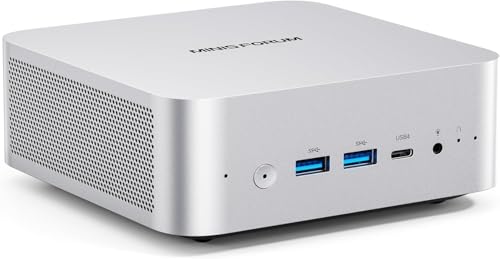
- Ryzen 7 255 with 8 cores and 16 threads
- 32GB DDR5 RAM and 1TB SSD included
- USB4, Wi-Fi 7, and 4-screen display support
Best For: Remote professionals who need stronger performance for streaming and multitasking
Budget Dual-Monitor Remote Work PC

- Intel N95 processor for everyday tasks
- Dual HDMI 2.0 with 4K@60Hz support
- 8GB RAM, 256GB SSD, and WiFi 5 connectivity
Best For: Budget buyers who want a small PC for basic remote work and dual monitors
Performance-Focused Pick

- Intel Core i5-12600H with 12 cores and 16 threads
- Dual 2.5G LAN for stable wired connectivity
- Supports four 4K displays via HDMI and USB-C
Best For: Remote work users who need stronger multitasking and multi-monitor support
Budget-Friendly Streaming Pick

- Ryzen 5 3501U for everyday office and video-call tasks
- Supports dual or triple displays for a cleaner setup
- WiFi 6 and Bluetooth 5.3 for easy connectivity
Best For: Light remote work and compact setups on a tighter budget
Creator-Ready Mini PC – GMKtec M6 Ultra Ryzen 7640HS
If you need live streaming computers for remote work that can also handle everyday multitasking, this GMKtec mini PC is built for a flexible home office setup. The Ryzen 5 7640HS, DDR5 memory, triple-display support, and USB4 output make it a practical compact workstation for video calls, streaming, and light content creation.
Best For: Remote workers, streamers, and home-office users who want a compact PC with strong connectivity.
Pros:
- Ryzen 5 7640HS with Radeon 760M graphics supports office work, multitasking, and casual 1080p gaming.
- 16GB DDR5 RAM and 1TB SSD help with fast boot times and quick app loading.
- Dual 2.5GbE LAN ports are useful for stable wired networking, streaming, and home lab or NAS setups.
- Triple-display support with HDMI, DisplayPort, and USB4 helps build an efficient workstation.
Cons:
- 16GB RAM is solid, but power users may want to expand for heavier workloads.
- Integrated graphics are suitable for light creation, not demanding creative production.
Overall, this is a well-rounded mini PC for remote work if you value fast networking, multiple monitors, and a small footprint. It offers plenty of practical features without taking over your desk.
Budget Webcam Pick – Pro HD 1080p Webcam with Tripod
For live streaming computers for remote work, the webcam often matters more than the PC itself when it comes to looking polished on camera. This 1080p USB webcam is aimed at straightforward video calls and casual streaming, with auto focus, low-light correction, and a tripod included for easier positioning.
Best For: Remote meetings, online classes, and entry-level live streaming setups.
Pros:
- 1080p at 30fps provides smooth video for calls, webinars, and streaming.
- Dual noise-cancelling microphones help keep your voice clear and reduce background noise.
- Auto focus, low-light correction, and a wide-angle lens improve everyday webcam use.
- Includes both a clip mount and a telescopic aluminum tripod for flexible placement.
Cons:
- 1080p is good for meetings, but not as detailed as 4K options.
- USB-only connectivity may be limiting if you specifically want a USB-C camera.
This is a practical, no-fuss webcam for remote work setups that need better audio and video without much setup. The included tripod and privacy shutter make it an easy desk upgrade.
Business Mini Desktop – ASUS NUC 13 Pro Tall i5-1340P
If you’re comparing live streaming computers for remote work, this ASUS NUC 13 Pro is a strong business-focused option with broad display support and modern connectivity. Its Intel Core i5-1340P, Wi-Fi 6E, Thunderbolt 4, and Windows 11 Pro make it a compact desktop for work calls, office apps, and multi-monitor productivity.
Best For: Professionals who want a small Windows 11 Pro desktop for remote work and multi-monitor use.
Pros:
- Intel Core i5-1340P with 16GB RAM supports everyday business and multitasking use.
- Up to 4-monitor support helps create a larger remote-work workspace.
- Two HDMI 2.1 ports plus two Thunderbolt 4 USB-C ports offer flexible display and peripheral connections.
- Wi-Fi 6E, Bluetooth 5.3, 2.5Gb Ethernet, and Windows 11 Pro suit a modern office setup.
Cons:
- 512GB SSD is enough for many users, but not especially large for heavy local storage needs.
- Integrated graphics are fine for work, but not meant for demanding gaming or creation.
As a compact business desktop, this NUC focuses on stability, connectivity, and efficient day-to-day use. It is especially appealing if your workflow depends on multiple displays and a clean desk footprint.
Premium 4K Webcam Upgrade – Pro UHD USB-C Webcam with Tripod
When you want live streaming computers for remote work to look more polished on camera, a sharper webcam can make a big difference. This USB-C model delivers 4K/30fps video, dual microphones, auto focus, and a tripod, making it a strong pick for remote meetings, webinars, and streaming setups that need a cleaner image.
Best For: Remote workers, presenters, and streamers who want a sharper 4K webcam with USB-C.
Pros:
- 4K at 30fps delivers detailed video for professional-looking calls and streams.
- Dual noise-cancelling microphones help keep speech clear in meetings and recordings.
- Auto focus, low-light correction, and a wide-angle lens improve everyday framing.
- USB-C connectivity and the included tripod make it easy to place on modern desks.
Cons:
- 4K resolution may be more than many basic video call users need.
- Like most webcams, image quality still depends on lighting and camera placement.
This webcam is a sensible upgrade if your remote work presence matters and you want a cleaner, more detailed image. It balances useful features with simple setup for work, teaching, and live streaming.
Value-Focused Remote Work Mini PC – Getorli Ryzen 5 7430U 16GB/512GB
For live streaming computers for remote work, this Getorli mini PC offers a balanced mix of everyday speed, multi-screen support, and dependable connectivity. The Ryzen 5 7430U, 16GB RAM, and 512GB SSD should handle office apps, video calls, and browser-heavy workflows without taking much desk space.
Best For: Remote workers who want an affordable small desktop for productivity, streaming, and multi-monitor setups.
Pros:
- Ryzen 5 7430U 6-core/12-thread processor with up to 4.3GHz boost for steady daily performance.
- Triple 4K display output via HDMI, DP 1.2, and Type-C, which helps with split-screen work.
- Dual 2.5G LAN plus WiFi 6 and Bluetooth 5.3 for flexible wired and wireless connectivity.
- Upgradeable memory and storage, with support up to 64GB RAM and 4TB SSD.
Cons:
- Built for daily office use and light gaming, not the strongest choice for heavier creative workloads.
- Expansion is good, but the base configuration is still positioned as a value setup.
This is a practical pick if you want a compact machine that can support remote work routines and a clean multi-display desk setup. The cooling-focused aluminum alloy design and warranty add peace of mind for long-term use.
High-Performance Streaming Workstation – MINISFORUM AI X1-255 Ryzen 7 255
If you need one of the more capable live streaming computers for remote work, the MINISFORUM AI X1-255 stands out with a Ryzen 7 255, 32GB of DDR5 memory, and broad connectivity. It is aimed at heavier office use, smoother media handling, and flexible display setups, while staying compact enough for a home desk.
Best For: Remote professionals who want stronger performance for streaming, multitasking, and demanding office workloads.
Pros:
- Ryzen 7 255 processor with 8 cores and 16 threads for stronger multi-threaded performance.
- 32GB DDR5 RAM and 1TB SSD provide a roomy, fast base for large files and quick loading.
- HDMI, DP, and USB4 support up to 4-screen output, including 4K@120Hz over USB4.
- 2.5G LAN, Wi-Fi 7, Bluetooth 5.4, dual speakers, and a built-in mic for modern connectivity and communication.
Cons:
- More advanced than a basic office mini PC, so it may be more than casual users need.
- OCuLink expansion is tied to a compatible setup, so not every buyer will use that feature.
Overall, this model is the strongest performer in the group for multitasking-heavy remote work and streaming-friendly use cases. Its quiet cooling design and USB4 flexibility make it a compelling desktop replacement for demanding users.
Budget Dual-Monitor Remote Work PC – GMKtec G3S Intel N95
The GMKtec G3S is a compact entry-level option for live streaming computers for remote work when your needs are mostly everyday productivity and light media use. Its Intel N95 processor, 8GB RAM, and 256GB SSD are modest, but the dual HDMI outputs and wired networking make it easy to set up for a simple office station.
Best For: Budget buyers who want a small, practical PC for basic remote work and dual-monitor use.
Pros:
- Intel N95 processor offers a simple boost over older low-power mini PC options.
- Dual HDMI 2.0 ports support two 4K@60Hz displays for a productive work layout.
- USB 3.2, Gigabit Ethernet, WiFi 5, and Bluetooth 5.0 cover essential connectivity.
- AV1 decoding and 4K playback support make it suitable for basic streaming and media viewing.
Cons:
- 8GB RAM and 256GB SSD are fine for basics, but not ideal for heavier multitasking.
- WiFi 5 and Gigabit Ethernet are more standard than the faster networking found on pricier models.
This is the most budget-oriented option here, so it makes sense if you want a compact remote-work PC without paying for extra power you may not use. It is best viewed as a straightforward productivity machine rather than a performance-focused workstation.
Performance-Focused Pick – MINISFORUM NAB6 Lite
If you want live streaming computers for remote work that can also handle multitasking, the MINISFORUM NAB6 Lite stands out with its Intel Core i5-12600H, dual 2.5G LAN, and support for four 4K displays. It is a practical choice for users who need a compact desktop that keeps video calls, browser tabs, and streaming tools moving smoothly.
Best For: Remote workers who want stronger processing power, dual wired networking, and multi-monitor productivity in a small desktop.
Pros:
- Intel Core i5-12600H offers 12 cores and 16 threads for heavier multitasking.
- Dual 2.5G RJ45 ports support stable wired networking and advanced setups.
- 2 x HDMI plus 2 x USB-C allow up to four 4K displays.
- Includes 16GB DDR4 memory and a 500GB PCIe 4.0 SSD.
Cons:
- More power than some basic office users may need.
- Storage and memory are good to start, but advanced users may still want upgrades.
Overall, this mini PC is the strongest all-around option in the group for remote work and streaming tasks that benefit from extra CPU headroom and flexible display support.
Budget-Friendly Streaming Pick – Glorlin GT100 Mini PC
For live streaming computers for remote work on a simpler budget, the Glorlin GT100 focuses on everyday responsiveness rather than high-end specs. Its Ryzen 5 3501U, 8GB RAM, and 256GB SSD make it a compact option for web browsing, office work, and video calls, with triple-display support if you want a tidier workspace.
Best For: Light remote work, video calls, and users who want a compact mini PC with multiple display support.
Pros:
- Ryzen 5 3501U handles daily computing and video calls.
- 8GB DDR4 RAM and 256GB SSD provide quick startup and basic smoothness.
- Supports dual or triple displays through HDMI and USB-C.
- Includes WiFi 6, Bluetooth 5.3, Ethernet, and multiple USB ports.
Cons:
- 8GB RAM is modest for heavier multitasking.
- Best suited to light office and streaming use rather than demanding workloads.
This is a sensible pick if you want a small, easy-to-place computer for remote work basics without paying for extra power you may not use.
Expandable Workstation Pick – C4 SE Upgradeable Mini PC
If your live streaming computers for remote work need strong connectivity and room to grow, the C4 SE is built around a Ryzen 5 3500U with dual Gigabit Ethernet and triple-display output. It is aimed at work, study, and home office users who want a compact machine that can be upgraded over time.
Best For: Remote workers who want a compact, upgradeable mini PC with stable wired networking and triple-monitor support.
Pros:
- Ryzen 5 3500U delivers smooth performance for office apps, video meetings, and everyday use.
- Dual Gigabit LAN supports stable wired networking and more flexible setups.
- Triple display support via HDMI, DisplayPort, and USB-C improves multitasking.
- Two SODIMM slots and an extra M.2 slot make upgrades easier.
Cons:
- WiFi 5 is less current than WiFi 6 alternatives.
- 8GB RAM and 256GB SSD are modest starting specs for heavier workloads.
This model is a strong choice if you value wired networking, expansion options, and a compact footprint more than cutting-edge wireless features.
How We Picked These Live Streaming Computers for Remote Work
We prioritized systems that can handle video conferencing, browser-heavy work, light content creation, and streaming-related multitasking without constant slowdowns. Key factors included CPU class, memory capacity, SSD speed, display support, wired networking options, and overall suitability for compact home offices.
Because Live Streaming Computers for Remote Work often need to do more than one job at once, we gave extra weight to models with modern processors, at least 16GB of RAM when possible, and connectivity that supports stable calls and external monitors.
Quick Comparison: What Matters Most
For basic remote work and lighter streaming, entry-level mini PCs with modest processors can be enough. For smoother multitasking, stronger 12th- and 13th-gen Intel chips or Ryzen 5 and Ryzen 7 systems are better suited to running chat tools, browsers, OBS, and conferencing apps together.
If you plan to use multiple monitors, stream at higher resolutions, or keep lots of apps open, look for 16GB to 32GB of RAM, a 500GB to 1TB SSD, and video outputs that match your monitor setup.
Key Buying Factors for Live Streaming Computers for Remote Work
Processor and Core Count
The CPU is the biggest performance driver. For smooth everyday use, choose a modern Intel Core i5 or Ryzen 5 class processor or better. If you want more breathing room for streaming, editing, or heavy multitasking, step up to Ryzen 7 or higher-core-count Intel H-series options.
Memory and Storage
16GB of RAM is the practical baseline for most buyers, while 32GB is a smart choice for more demanding workflows. A fast SSD improves boot times, app launches, and general responsiveness, which matters when switching between camera tools, slides, chat, and browser tabs.
Connectivity and Video Output
Stable wired networking is valuable for Live Streaming Computers for Remote Work, especially if you need dependable upload performance. Dual LAN, 2.5G Ethernet, USB4, and multiple display outputs can make setup easier and more reliable.
Webcam and Accessory Needs
If your chosen PC doesn’t include a webcam, budget for one separately. For professional calls and streaming, webcam resolution, frame rate, and tripod support can matter just as much as the computer itself.
Who Should Buy Which Live Streaming Computers for Remote Work?
Choose a smaller, budget-friendly mini PC if your work is mostly meetings, documents, and browser-based tasks. Pick a midrange Ryzen 5 or Intel Core i5 system if you want the best balance of price and performance for daily streaming and remote work. Go with a higher-end Ryzen 7 or 32GB configuration if you regularly multitask, run creative apps, or want extra longevity.
If you’re building a simple streaming desk, a separate webcam plus a capable mini PC is often the most flexible setup. If you want more polish and fewer compromises, prioritize stronger networking, more memory, and enough ports for your monitors and peripherals.
