
Choosing live streaming computers for professionals means balancing CPU power, GPU acceleration, RAM, storage, and reliable connectivity for demanding broadcast workflows.
This roundup focuses on systems that can handle encoding, scene switching, chat monitoring, capture cards, and background apps without slowing your stream.
Best 10 Live Streaming Computers for Professionals Picks for 2026
Premium Workstation for Live Production

- Intel Ultra 7-265 with RTX 5060
- 32GB DDR5 and 1TB NVMe SSD
- Thunderbolt 4, HDMI, DisplayPort, SD card reader
Best For: Creators who want a full-size Windows 11 Pro workstation for streaming and multitasking
Budget-Friendly Streaming Tower

- Ryzen 7 4700LE with 8 cores / 16 threads
- RTX 3050 8GB dedicated graphics
- 16GB DDR4, 512GB NVMe, 6-fan cooling
Best For: Entry-level streamers who want an affordable all-around desktop for gaming and streaming
Creator-Ready Business Desktop
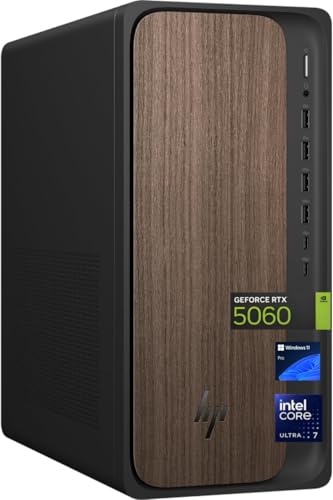
- Core Ultra 7 265 with RTX 5060
- 32GB DDR5 and 2TB SSD
- Wi-Fi 6, Bluetooth 5.4, 8 USB ports
Best For: Professional streamers and business users who need a polished Windows 11 Pro desktop
Compact High-Performance Mini PC

- Ryzen 9 8945HX with RTX 5060
- 5GbE, Wi-Fi 7, and quad 4K support
- 32GB DDR5, 1TB SSD, expandable to 96GB/8TB
Best For: Power users who need a compact, high-performance desktop for streaming and multi-monitor setups
Business-Ready Tower

- Supports four FHD or two 4K displays
- Core Ultra 7 with built-in AI features
- Tool-less upgrades and TPM security
Best For: Work-focused streaming setups needing security and multi-monitor support
Compact Powerhouse
MINISFORUM G1 Pro Ryzen 9 Mini PC
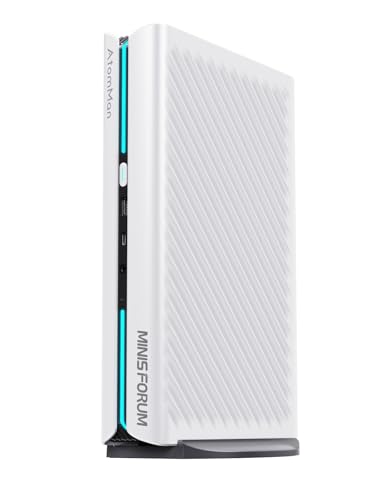
- Ryzen 9 8945HX with 16 cores and 32 threads
- RTX 5060 8GB graphics for demanding visuals
- Five outputs support four UHD monitors
Best For: Compact high-performance streaming and editing setups
Ultra-Compact Pro

- Intel i7-1360P with 12 cores and 16 threads
- Supports up to four 4K displays
- Windows 11 Pro in a compact mini PC
Best For: Space-saving professional streaming and multi-monitor work
Workstation Powerhouse

- 20-core Intel Core i7-14700
- 32GB DDR5 RAM and 1TB SSD
- RTX 2000 ada 16GB graphics
Best For: streamers who want workstation-class performance
Compact Multi-Display Pick
ASUS NUC 13 Pro Tall Mini Desktop

- Compact mini PC with Windows 11 Pro
- 4 monitor outputs via HDMI and Thunderbolt
- 32GB RAM and 1TB SSD
Best For: small streaming desks with multi-monitor needs
All-in-One Creator Option

- 27-inch all-in-one with built-in webcam
- Intel Core Ultra 7, 32GB DDR5, 1TB SSD
- WiFi 7 and wireless keyboard/mouse
Best For: streamers who want an integrated, space-saving setup
Premium Workstation for Live Production – Dell Tower Plus EBT2250
If you need live streaming computers for professionals, this Dell Tower Plus is built more like a modern workstation than a basic desktop. Its Intel Ultra 7-265 processor, RTX 5060 graphics, 32GB of DDR5 memory, and 1TB PCIe NVMe SSD give it the kind of headroom that helps with streaming, multitasking, and other demanding production work.
Best For: Streamers, editors, and creators who want a Windows 11 Pro workstation with strong expansion and 4K-ready output options.
Pros:
- Intel Ultra 7-265 and RTX 5060 provide strong performance for streaming and graphics workloads.
- 32GB DDR5 memory and 1TB NVMe SSD support smooth multitasking and fast loading.
- Wide port selection includes Thunderbolt 4, HDMI, DisplayPort, SD card reader, and USB-C.
- Includes USB keyboard and mouse for a quick setup.
Cons:
- Only a 460W power supply, so it is not aimed at extreme component expansion.
- It is a full tower desktop, so it takes more space than a mini PC.
This is a practical choice if you want a capable, connected tower for live production rather than a compact system. The mix of modern CPU, dedicated GPU, and productivity-focused ports makes it a solid fit for demanding creator setups.
Budget-Friendly Streaming Tower – Ryzen 7 RTX3050 Desktop
For buyers comparing live streaming computers for professionals on a tighter budget, this Ryzen 7 RTX3050 desktop covers the basics well. The Ryzen 7 4700LE, RTX 3050 8GB, 16GB DDR4 memory, and 512GB NVMe SSD give it enough performance for gaming, streaming, and day-to-day content tasks.
Best For: Entry-level streamers and home creators who want a capable all-round tower with good cooling and easy connectivity.
Pros:
- Ryzen 7 4700LE with 8 cores and 16 threads supports multitasking and streaming.
- RTX 3050 8GB adds dedicated graphics for gaming and visual workloads.
- 6 RGB cooling fans are designed to help with heat dissipation under load.
- WiFi 6, LAN, HDMI, DVI, and multiple USB ports improve connection flexibility.
Cons:
- Comes with DOS instead of a preinstalled modern operating system.
- 16GB RAM and 512GB storage are fine to start, but may feel limited for heavier creator workflows.
This desktop makes sense if you want a lower-cost streaming setup that still offers a dedicated GPU and solid core specs. It is more of a practical starter workstation than a high-end production rig.
Creator-Ready Business Desktop – HP OmniDesk M03-0060
The HP OmniDesk is a strong option if you want live streaming computers for professionals with business-friendly polish. It pairs an Intel Core Ultra 7 265 processor, RTX 5060 graphics, 32GB of DDR5 RAM, and a 2TB SSD, giving it the storage and responsiveness that matter for streaming, editing, and multitasking.
Best For: Professional streamers and business users who want a 4K-capable desktop with plenty of storage and modern wireless support.
Pros:
- Core Ultra 7 265 and RTX 5060 provide strong performance for creator and business workflows.
- 32GB DDR5 memory and 2TB SSD offer ample room for apps, media, and projects.
- Wi-Fi 6, Bluetooth 5.4, Ethernet, and 8 USB ports support a well-connected setup.
- Windows 11 Pro and included wired keyboard and mouse make it ready for work.
Cons:
- Video output is listed through USB Type-C, so display planning may be less straightforward than on towers with multiple HDMI/DP ports.
- The 400W power supply is efficient, but it is not positioned as a high-expansion machine.
Overall, this OmniDesk fits users who want a modern, professional desktop with extra storage and dependable connectivity. It is especially appealing if you prefer a streamlined business tower that can still handle creator tasks.
Compact High-Performance Mini PC – MINISFORUM G1 Pro Mini PC
If compact live streaming computers for professionals are what you need, the MINISFORUM G1 Pro stands out with desktop-class parts in a small chassis. Its Ryzen 9 8945HX processor, full-power RTX 5060 graphics, 32GB DDR5 memory, and 1TB SSD are aimed at demanding gaming, streaming, and creative workloads.
Best For: Power users who want a small-footprint streaming PC with quad 4K support and strong upgrade potential.
Pros:
- Ryzen 9 8945HX and RTX 5060 deliver strong performance for heavy multitasking and GPU workloads.
- 5GbE, Wi-Fi 7, and multiple USB 3.2 Gen2 ports support fast modern connectivity.
- Up to five display outputs with support for quad 4K setups make it flexible for production desks.
- Supports up to 96GB DDR5 memory and dual M.2 SSD expansion up to 8TB.
Cons:
- Compact 3.8L design may be less convenient for users who prefer easy internal access.
- The high-performance focus and 245W release make it more specialized than a simple everyday mini PC.
This is one of the most compelling compact options in the group if space is tight but performance still matters. It brings serious CPU and GPU power to a small chassis without giving up serious connectivity or display support.
Business-Ready Tower – Dell Core Ultra 7 Desktop
If you want live streaming computers for professionals that feel more like an office workstation than a flashy creator rig, this Dell tower is built around practicality. The Intel Core Ultra 7 processor, Windows 11 Pro, and support for multiple monitors make it a solid fit for streaming setups that also need day-to-day business stability.
Best For: Professionals who want a secure, upgrade-friendly desktop for multitasking and multi-monitor streaming work.
Pros:
- Supports up to four FHD monitors or two 4K displays.
- Intel Core Ultra 7-265 with built-in AI features for productivity.
- Tool-less entry and removable side panel make upgrades easier.
- Hardware TPM chip and lock options add business-focused security.
Cons:
- Integrated Intel UHD Graphics may not suit graphics-heavy production.
- 16GB RAM is workable, but not as roomy as higher-memory systems.
This is a straightforward professional tower that emphasizes monitor support, security, and maintainability over flashy extras. For streaming workflows that depend on reliable multitasking and a clean desk setup, it checks the right boxes.
Compact Powerhouse – MINISFORUM G1 Pro Ryzen 9 Mini PC
Among live streaming computers for professionals, this MINISFORUM mini PC stands out for packing a Ryzen 9 8945HX and RTX 5060 graphics into a compact desktop. It is aimed at demanding users who want strong processing power, multi-display support, and fast connectivity in a smaller footprint.
Best For: Professionals who need a compact system for multitasking, streaming, and graphics-heavy workloads.
Pros:
- AMD Ryzen 9 8945HX offers 16 cores and 32 threads.
- Dedicated RTX 5060 8GB graphics for strong visual performance.
- Supports four ultra-high-definition monitors across five outputs.
- Wi-Fi 7, 5G LAN, and Bluetooth 5.4 provide modern connectivity.
Cons:
- Mini PC form factor may limit internal expansion versus a full tower.
- OS is listed generically as “OS” rather than a specific edition.
If your workflow includes streaming, editing, or heavy multitasking, this machine offers the most raw muscle in the group. The tradeoff is that it is built for performance density rather than easy internal flexibility.
Ultra-Compact Pro – ASUS NUC 13 Pro Mini Desktop
For professionals looking at live streaming computers for professionals in a small form factor, this ASUS NUC 13 Pro keeps the focus on efficient multitasking and display flexibility. With an Intel i7-1360P, Windows 11 Pro, and support for up to four 4K displays, it fits well in desks where space is limited but productivity demands are high.
Best For: Business users and streamers who want a compact Windows Pro system with strong multi-display support.
Pros:
- Intel Core i7-1360P delivers 12 cores and 16 threads.
- Supports up to four 4K displays via HDMI and Thunderbolt 4.
- Windows 11 Pro adds business-friendly security and management tools.
- Compact mini desktop design is ideal for tight setups.
Cons:
- 16GB RAM and 512GB SSD are adequate but modest for larger workloads.
- Less expandable than a full tower desktop.
This NUC is a sensible pick when desk space, display expansion, and business features matter more than raw size. It is especially appealing for professional workflows that need a neat, dependable computer without a bulky case.
Workstation Powerhouse – Dell Precision 3680 Tower
For live streaming computers for professionals, this Dell Precision 3680 Tower is built for heavier workloads that need dependable CPU and GPU headroom. The Intel Core i7-14700, 32GB of DDR5 RAM, and 1TB SSD give you a strong base for running streaming software, browser sources, and production tools while keeping the system responsive.
Best For: Professionals who want a tower workstation for demanding streaming setups and multitasking.
Pros:
- Intel Core i7-14700 20-core processor for robust multitasking
- 32GB DDR5 RAM helps handle streaming apps and other workloads
- NVIDIA RTX 2000 ada 16GB adds serious graphics and video output capability
- 1TB SSD provides fast storage for projects and software
Cons:
- Larger tower design takes more desk or floor space
- No monitor is included in the supplied configuration
If you need a desktop that leans more toward workstation-grade performance than a basic office PC, this Precision tower is the strongest fit in the group. Its hardware mix is the most suitable here for professional live streaming setups that also involve editing, encoding, or other intensive tasks.
Compact Multi-Display Pick – ASUS NUC 13 Pro Tall Mini Desktop
This ASUS NUC 13 Pro Tall is a smart choice if you want live streaming computers for professionals in a compact form factor. It pairs a 32GB RAM / 1TB SSD configuration with four display outputs, making it well suited to a multi-monitor streaming desk where space is limited.
Best For: Professionals who need a small desktop with multiple monitor connections for streaming and production.
Pros:
- Compact mini PC design saves space on crowded desks
- 4 monitor ports, including 2 HDMI and 2 Thunderbolt 4
- 32GB RAM and 1TB SSD provide a solid day-to-day streaming base
- Wi-Fi 6E and Ethernet support flexible network setups
Cons:
- Integrated Intel UHD Graphics is not as strong as a discrete GPU
- No keyboard or mouse included
If your stream setup depends more on portability, desk efficiency, and multiple displays than on heavy graphics processing, this NUC fits well. It is especially practical for creators who want a professional Windows 11 Pro mini desktop without a bulky tower.
All-in-One Creator Option – HP OmniStudio 27 Inch AIO
The HP OmniStudio is a practical all-in-one option for live streaming computers for professionals who want an integrated setup. With an Intel Core Ultra 7 processor, 32GB DDR5 RAM, and a 1TB NVMe SSD, it has the core specs needed for smooth multitasking, while the 27-inch display and wireless keyboard and mouse keep the workspace clean.
Best For: Professionals who want a tidy all-in-one streaming and work computer with a built-in display.
Pros:
- All-in-one design reduces cable clutter and saves space
- 32GB DDR5 RAM and 1TB NVMe SSD support responsive multitasking
- 27-inch display with built-in webcam suits streaming and meetings
- WiFi 7 and Bluetooth 6.0 offer modern wireless connectivity
Cons:
- Integrated Intel Xe graphics are less capable than a discrete GPU
- Fixed all-in-one design is less flexible to upgrade than a tower
For creators who value an uncluttered workspace and an integrated screen, this HP stands out as the most convenient option here. It is best when your streaming workflow favors simplicity, general content creation, and business use over maximum graphics expansion.
How We Picked the Best Live Streaming Computers for Professionals
For Live Streaming Computers for Professionals, we prioritized strong multi-core processors, at least 16GB of RAM, fast NVMe storage, and modern networking. We also looked for GPU support where it matters for game streaming, effects, and hardware encoding, plus expansion options for capture cards, extra monitors, and external audio gear.
Quick Comparison
In general, tower desktops offer the best cooling, upgrade room, and sustained performance. Mini PCs are appealing when desk space is limited, but they rely more on efficient component matching and may have fewer upgrade paths. All-in-one systems are tidy and simple, yet they are usually less flexible for future expansions.
Key Buying Factors for Live Streaming Computers for Professionals
CPU and Multitasking
Streaming stacks are often CPU-heavy because they run your game, encoder, browser tabs, chat tools, and recording software at once. Look for modern Core Ultra, Core i7, Ryzen 7, or better class processors if you want smoother multitasking and more headroom for long sessions.
GPU and Encoding
A dedicated GPU can improve live stream quality and reduce CPU strain, especially for creators who stream games or use effects-heavy workflows. If you rely on software encoding alone, make sure the processor is strong enough to sustain it without thermal throttling.
Memory and Storage
16GB RAM is a practical minimum, but 32GB is a better target for Live Streaming Computers for Professionals who keep multiple apps open. A 1TB SSD is a smart starting point, and 2TB is even better if you record locally or store large project files.
Connectivity and I/O
Check for enough USB ports, display outputs, and fast networking. Wi-Fi is useful, but wired Ethernet is preferred for stable streams. Thunderbolt, USB-C, and multi-monitor support are especially valuable for creators using cameras, microphones, capture devices, and control panels.
Who Should Buy Which Live Streaming Computers for Professionals?
If you want the best balance of power and expandability, choose a tower desktop. If your setup needs to stay compact, a mini PC with strong CPU performance and multiple display outputs can be a smart pick. If you want a clean all-in-one setup for light-to-moderate streaming, an all-in-one may fit, but it is usually the least flexible long term.
For most professionals, the best choice is the system that matches your workload: towers for maximum performance, mini PCs for space savings, and all-in-ones for simplicity. Focus on stable thermals, sufficient RAM, and dependable connectivity before cosmetic features.
