
A liquid-cooled prebuilt can save you the work of choosing parts and installing a CPU cooler. But cooling alone will not make a gaming PC fast: the graphics card, processor, memory, and price still determine whether it is a good buy.
These six desktops range from an RTX 5070 system to older RTX 3060 and RX 580 builds. Use the comparisons below to narrow your shortlist, then check each listing’s current price and exact configuration before ordering.
Best 6 Liquid Cooled Prebuilt Gaming PCs Picks for 2026
Best 1440p Showcase Build

- Ryzen 7 7700X and RTX 5070 12GB
- 360mm ARGB AIO and 32GB DDR5
- 1TB Gen4 SSD and 850W Gold PSU
Best For: Showcase-style 1440p gaming
Best Ready-to-Use Setup
- Ryzen 7 8700F and RTX 4060 Ti
- Liquid cooling with nine ARGB fans
- Windows 11 Pro; keyboard and mouse included
Best For: Gaming setup with included peripherals
Best Ryzen 7 5800X Option
CyberpowerPC Gamer Supreme SLC8260A8

- Liquid-cooled Ryzen 7 5800X
- RTX 3060 12GB; 16GB DDR4
- 1TB NVMe SSD; Windows 11
Best For: Buyers seeking a Ryzen 7 5800X and Windows 11
Best Windows 10 Configuration
CyberpowerPC Gamer Supreme SLC8260A5
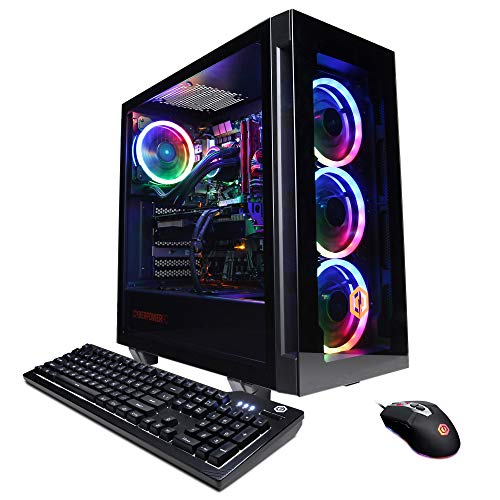
- Liquid-cooled Ryzen 7 3800X
- RTX 3060 12GB; 1TB NVMe SSD
- Windows 10; HDMI and DisplayPort
Best For: Gamers who prefer Windows 10 preinstalled
Best Windows 11 3800X Pick
CyberpowerPC Gamer Supreme SLC8260A6
- Liquid-cooled Ryzen 7 3800X
- RTX 3060 12GB; 16GB DDR4
- 1TB NVMe SSD; Windows 11
Best For: Buyers seeking a 3800X system with Windows 11
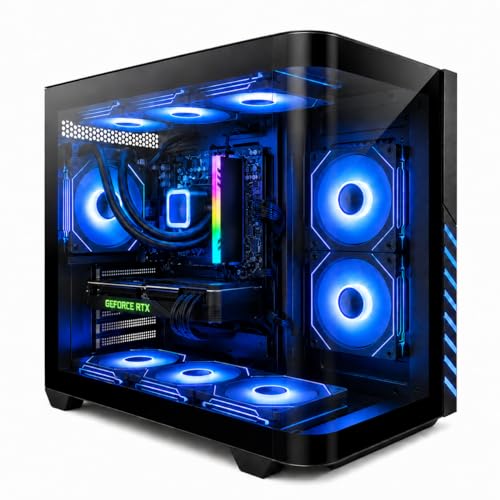
Best 1440p Showcase Build – Skytech O11 Vision RTX 5070
Among liquid cooled prebuilt gaming pcs, this Skytech pairs a 360mm ARGB AIO with a Ryzen 7 7700X and RTX 5070 12GB. Its Lian Li O11 Vision case puts the build on display, while 32GB of DDR5 memory gives you room for gaming and multitasking.
Best For: Buyers seeking a showcase-style desktop for 1440p gaming without assembling the PC themselves.
Pros:
- Ryzen 7 7700X and RTX 5070 12GB are a strong pairing for the listed 1440p gaming use.
- 360mm ARGB AIO, 32GB DDR5-5600, and an X670 motherboard.
- 1TB Gen4 NVMe SSD, 850W Gold ATX 3 PSU, and a one-year parts-and-labor warranty.
Cons:
- 1TB of storage may fill quickly with a large game library.
- The graphics card brand and ports beyond the promised HDMI and DisplayPort outputs may vary.
This is the most feature-rich gaming configuration of the three, especially if the visible case and 360mm CPU cooler matter to you. Check the final GPU and port configuration before ordering.
Best Ready-to-Use Setup – Evounic Ryzen 7 RTX 4060 Ti
If you want liquid cooled prebuilt gaming pcs with peripherals included, this Evounic desktop comes with a mechanical keyboard and mouse. It combines a Ryzen 7 8700F, RTX 4060 Ti, liquid cooling, and nine ARGB fans in a Windows 11 Pro system.
Best For: Players who want an included keyboard and mouse for a 1080p or 1440p gaming setup.
Pros:
- Ryzen 7 8700F and RTX 4060 Ti suit the listing’s gaming and streaming use cases.
- Liquid cooling and nine ARGB fans provide a cooling-focused build.
- 1TB NVMe SSD, Wi-Fi 6, Windows 11 Pro, and included mechanical keyboard and mouse.
Cons:
- 16GB DDR5-4800 is less memory than the other two listed systems.
- The title says “RTX 4060 Ti 16GB DDR5 RAM,” while the detailed specifications list 8GB of graphics memory; confirm the GPU configuration before buying.
This is a practical all-in-one option if you need peripherals as well as the tower. Verify the graphics memory specification with the seller rather than reading the title’s 16GB figure as GPU memory.
Best Dual-Storage Option – Evounic Xeon E5 RX 580
This entry among liquid cooled prebuilt gaming pcs focuses on storage and included accessories rather than a newer gaming platform. The listed build pairs a 12-core Xeon E5 and Radeon RX 580 8GB with a 512GB NVMe SSD, 1TB hard drive, liquid cooling, and nine ARGB fans.
Best For: Buyers prioritizing dual-drive storage and lighter 1080p gaming in a ready-to-use desktop.
Pros:
- 512GB NVMe SSD plus 1TB HDD separates faster everyday storage from bulk capacity.
- Liquid cooling and nine ARGB fans.
- Wi-Fi 6, Bluetooth 5.4, Windows 11, and included RGB keyboard and mouse.
Cons:
- The RX 580 is better matched to the listing’s 1080p and esports focus than to demanding modern games at high settings.
- Memory specifications conflict: the title and bullets say 32GB, while the details also list 64GB installed and 32GB maximum.
Consider this one for its dual-drive layout and complete accessory bundle, but confirm the installed RAM before purchasing. Its stated gaming focus is 1080p, not the higher-end 1440p use highlighted for the other builds.
Best Ryzen 7 5800X Option – CyberpowerPC Gamer Supreme SLC8260A8
Among these liquid cooled prebuilt gaming pcs, the SLC8260A8 pairs a liquid-cooled Ryzen 7 5800X with an RTX 3060 12GB. It also comes with 16GB of DDR4 memory, a 1TB NVMe SSD, and Windows 11 Home.
Best For: Buyers who want the Ryzen 7 5800X configuration with Windows 11 already installed.
Pros:
- Eight-core Ryzen 7 5800X and dedicated RTX 3060 12GB graphics.
- 1TB NVMe SSD and 16GB DDR4 provide a practical starting configuration.
- Includes Wi-Fi, a gaming keyboard, an RGB mouse, and a one-year parts-and-labor warranty.
Cons:
- CPU cooling is specified as liquid cooled; the notes do not identify the cooler model or radiator size.
- Ships with 16GB of RAM, so buyers who need more will have to upgrade it.
Choose this model if the 5800X is your priority; the listed RTX 3060, storage, and included accessories make it a ready-to-set-up configuration without requiring a separate keyboard or mouse.
Best Windows 10 Configuration – CyberpowerPC Gamer Supreme SLC8260A5
The SLC8260A5 is one of the liquid cooled prebuilt gaming pcs here for buyers who specifically want Windows 10 Home. Its liquid-cooled Ryzen 7 3800X, RTX 3060 12GB, 16GB DDR4, and 1TB NVMe SSD cover the core hardware without making you source parts individually.
Best For: Gamers who prefer a Windows 10 system with a Ryzen 7 3800X and RTX 3060.
Pros:
- Eight-core Ryzen 7 3800X with liquid cooling and RTX 3060 12GB graphics.
- 16GB DDR4 and a 1TB NVMe SSD are included.
- Includes 802.11ac Wi-Fi, a keyboard and mouse, and a one-year parts-and-labor warranty.
Cons:
- Ships with Windows 10 Home rather than Windows 11 Home.
- The listed graphics connections include one HDMI and one DisplayPort, fewer DisplayPorts than the other two models here.
This configuration makes the most sense when Windows 10 is a deliberate choice. If you want Windows 11 preinstalled or two listed DisplayPort outputs, compare it with the other systems before buying.
Best Windows 11 3800X Pick – CyberpowerPC Gamer Supreme SLC8260A6
For shoppers comparing liquid cooled prebuilt gaming pcs with Windows 11, the SLC8260A6 combines an eight-core Ryzen 7 3800X and liquid CPU cooling with an RTX 3060 12GB. Its 16GB DDR4 memory and 1TB NVMe SSD round out the listed configuration.
Best For: Buyers who want the Ryzen 7 3800X and RTX 3060 pairing with Windows 11 Home preinstalled.
Pros:
- Liquid-cooled Ryzen 7 3800X and dedicated RTX 3060 12GB graphics.
- Includes 16GB DDR4, a 1TB NVMe SSD, and Windows 11 Home.
- Listed with Wi-Fi, one HDMI and two DisplayPort outputs, plus a keyboard and mouse.
Cons:
- Uses a Ryzen 7 3800X rather than the Ryzen 7 5800X found in the SLC8260A8.
- The notes specify liquid cooling but do not provide cooler or radiator details.
Pick this version over the Windows 10-equipped 3800X model if having Windows 11 out of the box matters to you. Check the exact video connections on the unit before purchase, as the supplied details list HDMI alone in one field but HDMI plus two DisplayPorts in the product bullets.
How We Picked the Best Liquid Cooled Prebuilt Gaming PCs
We compared the six selected configurations by their listed GPU, CPU, RAM, storage, and platform—not by the number of fans or the presence of liquid cooling alone. We also considered likely upgrade flexibility and the questions a buyer should resolve before checkout. This is a specification-based comparison, not a claim that we independently benchmarked these exact desktops. Retail listings can change, so verify the final parts list and warranty with the seller.
Quick Comparison
The Skytech O11 Vision pairs a Ryzen 7 7700X with an RTX 5070, 32GB of DDR5, and a 1TB SSD; it is the strongest listed choice for buyers prioritizing modern GPU performance. The Ryzen 7 8700F and RTX 4060 Ti system is another contemporary option, but confirm its RAM capacity and storage configuration before comparing prices. The Xeon E5 and RX 580 build lists 32GB of RAM and two drives, yet its older graphics card makes it a budget-only consideration for gaming.
The three CyberPowerPC Gamer Supreme listings all specify RTX 3060 12GB graphics, 16GB of DDR4, and 1TB NVMe SSDs. One lists a Ryzen 7 5800X; two list a Ryzen 7 3800X with otherwise similar headline specifications. Check their exact configurations and prices rather than treating them as three distinct performance tiers.
Key Buying Factors for Liquid-Cooled Prebuilt Gaming PCs
Prioritize the GPU and Your Display
Start with the games, resolution, and settings you intend to use. An RTX 5070, RTX 4060 Ti, RTX 3060, and RX 580 are not interchangeable simply because their desktops are liquid cooled. Look for benchmarks of the specific GPU in your games; the cooler primarily manages CPU heat and does not compensate for an undersized graphics card.
Check the Platform, Memory, and Storage
The Skytech’s DDR5-based Ryzen platform offers a different upgrade starting point from the DDR4 Ryzen 3000/5000 systems and the older Xeon configuration. Confirm motherboard model, available memory slots, and supported CPU upgrades if you plan to keep the PC for years. Verify RAM capacity on the 8700F listing, and consider whether the included SSD has enough space for your game library.
Verify the Cooling Hardware
Ask what size radiator and cooler are installed, how the case is ventilated, and whether replacement parts are standard sizes. An all-in-one liquid cooler can simplify ownership, but its pump and fans still need to work reliably. Check the power supply model, warranty coverage, return policy, and seller support alongside the cooling specification.
Who Should Buy Which Liquid Cooled Prebuilt Gaming PCs?
Choose the RTX 5070 Skytech if its current price fits your budget and you want the most capable listed GPU. Consider the RTX 4060 Ti build if it costs meaningfully less and its missing configuration details check out. Compare the RTX 3060 CyberPowerPC variants on final price, condition, and warranty; favor the 5800X version when those factors are similar. Treat the RX 580/Xeon machine as an inexpensive choice for lighter or older games, not a substitute for the newer gaming builds.
