
If you need a Linux-ready system that can handle CUDA, AI inference, 3D work, and serious multitasking, the right workstation matters more than raw specs alone.
This roundup focuses on 10 best-in-class options with NVIDIA graphics, covering towers, compact desktops, and portable workstations for different budgets and workloads.
Best 10 Linux Workstations with Nvidia Gpus Picks for 2026
Best for AI-heavy Pro Workloads
Lenovo ThinkStation P3 Tower Gen 2

- RTX 4000 Ada with 20GB VRAM for pro graphics and AI
- 256GB DDR5 and 2TB Gen 5 SSD for huge projects
- vPro, Wi‑Fi 7, and dual 2.5GbE suit business setups
Best For: Developers, creators, and engineering users who need a high-end tower for AI, visualization, and heavy multitasking.
Best for Local AI Development
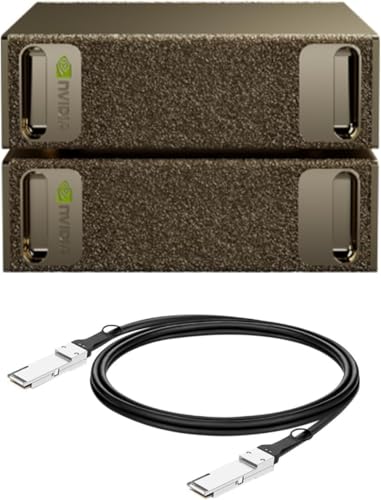
- Up to 1 petaFLOF of AI performance
- 128GB unified memory per unit
- Built for the full NVIDIA AI software stack
Best For: AI teams and power users who want desktop NVIDIA horsepower for local model work.
Best Compact AI Workstation
Lenovo ThinkStation P3 Ultra SFF Gen 2 with RTX 4000

- RTX 4000 SFF Ada with 20GB GDDR6 for pro GPU and AI workloads
- 64GB DDR5-6400 RAM plus 2TB PCIe Gen 5 SSD
- Tiny SFF chassis with vPro, WiFi 7, and Windows 11 Pro
Best For: AI inference, 3D work, and pro users who need a compact workstation with NVIDIA graphics and enterprise-class features.
Best for Local AI Workloads
ASUS Ascent GX10 Compact AI Supercomputer

- 128GB unified LPDDR5X memory for large models
- Integrated NVIDIA Blackwell GPU with DGX OS
- Compact, high-connectivity AI-focused design
Best For: Developers and researchers needing a compact Linux AI workstation for local inference and experimentation.
Best High-Refresh RTX Laptop
Acer Predator Helios Neo 16 AI

- RTX 5070 Ti for NVIDIA GPU acceleration and AI workloads
- 240Hz WQXGA display with G-SYNC for smooth motion
- Core Ultra 9 275HX plus 1TB Gen 4 SSD for fast performance
Best For: Users who want a high-refresh NVIDIA laptop for gaming, content creation, and GPU-accelerated Linux work.
Best for Local AI Model Runs
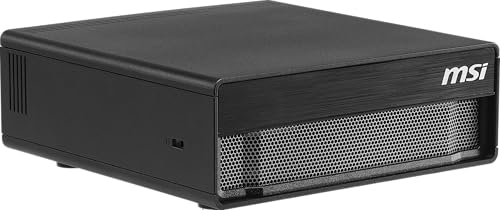
- 128GB unified memory for large local AI models
- NVIDIA DGX OS for Linux-based AI workflows
- 4TB Gen5 SSD and WiFi 7 in a compact desktop
Best For: AI developers and research teams needing a Linux desktop for local inference and edge deployment.
Best for Entry-Level RTX 50 Performance
Acer Nitro V 16S AI Gaming Laptop

- RTX 5060 Laptop GPU with DLSS 4 support
- 32GB DDR5 RAM and 1TB Gen 4 SSD
- 16-inch 180Hz display with 100% sRGB color
Best For: Buyers who want a midrange NVIDIA laptop for gaming, creator work, and Linux GPU acceleration.
Best with Extra Features
ASUS Ascent GX10 AI Supercomputer

- 1 petaFLOP-class AI performance
- 128GB LPDDR5x for large local models
- Built for agentic AI and private inference
Best For: AI developers and researchers who want a compact Linux-first system for local model work.
Best Refurbished Workstation Deal
Dell Precision 5820 w/ Quadro RTX 4000

- Quadro RTX 4000 with 8GB GDDR6
- 64GB RAM and dual NVMe SSDs
- Renewed workstation with Xeon W CPU
Best For: Linux users who want a refurbished pro workstation with strong GPU support and lots of memory.
Best for AI-heavy Pro Workloads – Lenovo ThinkStation P3 Tower Gen 2
If you want one of the more capable linux workstations with nvidia gpus for AI, 3D, and engineering tasks, this ThinkStation P3 Tower Gen 2 brings serious headroom. The combination of an Intel Core Ultra 9, NVIDIA RTX 4000 Ada graphics, and 256GB of DDR5 memory makes it a strong fit for demanding professional workloads that need reliable compute and graphics acceleration.
Best For: Developers, creators, and engineering teams that need a powerful tower workstation for AI inference, visualization, and multitasking.
Pros:
- NVIDIA RTX 4000 Ada delivers workstation-class GPU performance with 20GB of VRAM
- Huge 256GB DDR5-6400 memory pool is ideal for large projects and heavy multitasking
- Fast 2TB PCIe Gen 5 SSD helps keep boot times and app launches snappy
- Business-friendly features like dual 2.5GbE, Wi-Fi 7, and vPro add flexibility
Cons:
- Windows 11 Pro is preinstalled, so Linux users will need to manage setup themselves
- Premium specs make it expensive for buyers who do not need this much power
For buyers comparing linux workstations with nvidia gpus, this Lenovo stands out because it pairs a top-tier professional GPU with a very large memory ceiling and enterprise-oriented hardware. It is less about portability and more about dependable, high-end desktop performance for serious production work.
Best for Local AI Development – NVIDIA DGX Spark 2 Pack
If you need one of the most capable linux workstations with nvidia gpus for local model work, the NVIDIA DGX Spark 2 Pack is built for serious AI development on the desktop. Its Grace Blackwell architecture, compact footprint, and unified memory make it a strong fit for fine-tuning, inference, and analytics without immediately leaning on cloud resources.
Best For: AI teams, researchers, and power users who want desktop-class NVIDIA performance for local experimentation and faster iteration.
Pros:
- Up to 1 petaFLOP of AI performance for demanding local workloads
- 128GB unified memory per unit helps with large-model experimentation
- Full NVIDIA AI software stack support streamlines development and deployment
- Compact, energy-efficient design fits a desk-based workstation setup
Cons:
- Far more specialized than a general-purpose Linux desktop
- Likely overkill if you only need a GPU for everyday productivity
- Two-pack configuration may be more machine than many buyers need
For builders comparing linux workstations with nvidia gpus, this is a niche but powerful option focused on AI throughput rather than traditional desktop balance. It makes the most sense when local model development, testing, and rapid prototyping matter more than price or general-purpose versatility.
Best Compact AI Workstation – Lenovo ThinkStation P3 Ultra SFF Gen 2 with RTX 4000
If you want one of the more capable linux workstations with nvidia gpus in a tiny chassis, this ThinkStation P3 Ultra is a strong fit. It pairs Intel Core Ultra 9 performance, NVIDIA RTX 4000 SFF Ada graphics, and fast Gen 5 storage in a business-ready system that should appeal to developers, creators, and engineering users who need serious compute without a full tower.
Best For: AI inference, 3D work, and pro users who need a compact workstation with NVIDIA graphics and enterprise-class features.
Pros:
- RTX 4000 SFF Ada with 20GB GDDR6 is well suited to pro apps, AI workloads, and Linux GPU compute
- 64GB DDR5-6400 memory and a 2TB PCIe Gen 5 SSD give it strong out-of-box speed
- Very small form factor makes it easier to fit into tight desks or lab spaces
- Business-focused build adds vPro, WiFi 7, and Windows 11 Pro for managed deployment
Cons:
- Not as expandable as a larger tower workstation
- Front USB-C ports are data-transfer only, not full docking/video ports
- Premium hardware means it is aimed at higher-budget buyers
For buyers comparing linux workstations with nvidia gpus, this model stands out because it packs real workstation graphics and high-end memory into a compact, enterprise-friendly system. It is a practical choice when space is limited but GPU acceleration still matters.
Best for Local AI Workloads – ASUS Ascent GX10 Compact AI Supercomputer
The ASUS Ascent GX10 is a very unusual entry among linux workstations with nvidia gpus, aimed less at traditional desktop use and more at compact local AI development. With an ARM v9.2-A GB10 CPU, integrated NVIDIA Blackwell graphics, 128GB of unified LPDDR5X memory, and a 1TB NVMe SSD, it’s built for fast on-device inference, model testing, and high-memory workflows in a small footprint.
Best For: Developers and researchers who want a compact DGX-class Linux box for local AI experimentation, inference, and GPU-accelerated workflows.
Pros:
- Massive 128GB unified memory is ideal for large local models and data-heavy tasks
- Integrated NVIDIA Blackwell graphics and DGX OS make it AI-focused out of the box
- Compact design with modern I/O, including USB-C, HDMI 2.1, 10GbE, and Wi‑Fi 7
Cons:
- Not a conventional desktop workstation, so upgrade and compatibility expectations differ
- ARM-based platform may not suit every Linux app or workflow
- Storage starts at 1TB, which may be tight for larger datasets and projects
This is a niche but powerful choice for linux workstations with nvidia gpus if your priority is compact AI performance over general-purpose PC flexibility. If your workflow centers on local model work and you’re comfortable with ARM and DGX OS, it stands out immediately.
Best High-Refresh RTX Laptop – Acer Predator Helios Neo 16 AI
If you want a portable machine that can pull double duty for gaming and demanding Linux workflows, the Acer Predator Helios Neo 16 AI is a strong pick among linux workstations with nvidia gpus. Its Core Ultra 9 CPU, RTX 5070 Ti, and fast 240Hz 16-inch display make it a good fit for users who care about both responsive visuals and serious compute headroom.
Best For: Users who want a high-refresh NVIDIA laptop for gaming, content creation, and GPU-accelerated Linux work.
Pros:
- RTX 5070 Ti brings strong NVIDIA CUDA and AI acceleration potential.
- 240Hz WQXGA panel with G-SYNC is great for smooth gaming and fast motion.
- Intel Core Ultra 9 275HX and 1TB Gen 4 SSD provide strong all-around performance.
- Wi-Fi 6E and Advanced Optimus add useful modern connectivity and graphics switching features.
Cons:
- 16GB RAM may feel light for heavier workstation multitasking.
- It is more gaming-laptop than traditional workstation, so battery life and weight may not be ideal.
- Linux support may require extra setup depending on your distro and NVIDIA driver stack.
For buyers comparing linux workstations with nvidia gpus, this model stands out more for high-refresh gaming performance and modern GPU features than for enterprise-class workstation design, but it still offers the horsepower many creators and developers need.
Best for Local AI Model Runs – MSI EdgeXpert AI Mini Desktop
If you want one of the more unusual linux workstations with nvidia gpus for serious local AI work, the MSI EdgeXpert brings DGX-based hardware into a compact desktop format. It pairs NVIDIA GB10 Grace Blackwell performance with Ubuntu-based DGX OS, so it’s aimed at developers who care more about model capacity, memory bandwidth, and fast storage than gaming features.
Best For: AI developers, researchers, and enterprise teams that want a Linux-based desktop for local inference, prototyping, and edge deployment.
Pros:
- Massive 128GB unified memory helps handle very large AI models locally.
- Ubuntu-based NVIDIA DGX OS is tuned for Linux AI workflows and deployment.
- Fast 4TB Gen5 SSD and WiFi 7 make it a responsive, modern workstation platform.
- Compact DGX platform design fits advanced compute into a small footprint.
Cons:
- It’s specialized for AI workloads, not a general-purpose workstation buy.
- Arm-based architecture may limit compatibility with some x86-only tools.
- Price and hardware configuration are likely overkill for lighter Linux tasks.
This is a strong fit if your priority is running large models locally on one of the more advanced linux workstations with nvidia gpus, especially when memory, storage speed, and Linux-first software support matter more than traditional desktop versatility.
Best for Entry-Level RTX 50 Performance – Acer Nitro V 16S AI Gaming Laptop
If you want a reasonably modern NVIDIA laptop for gaming, creator work, and lighter AI tasks, the Acer Nitro V 16S is a practical option to consider in linux workstations with nvidia gpus. Its RTX 5060 Laptop GPU, 32GB of DDR5 memory, and 1TB Gen 4 SSD give it a strong baseline for CUDA-friendly workloads and everyday multitasking.
Best For: Buyers who want a midrange NVIDIA laptop with solid memory and storage for gaming, content creation, and Linux-friendly GPU acceleration.
Pros:
- RTX 5060 Laptop GPU with Blackwell features and DLSS 4 support
- 32GB DDR5 RAM and 1TB PCIe Gen 4 SSD included
- 16-inch 1920 x 1200 display with 180Hz refresh rate and 100% sRGB
Cons:
- Still a gaming laptop, so battery life and thermals may not suit all workstation users
- Only one M.2 slot is available for future storage expansion
- Wi-Fi 6 is good, but not the latest wireless standard
Overall, this is a sensible pick if you want one of the more affordable linux workstations with nvidia gpus that still has enough memory and GPU muscle for modern graphics and AI-accelerated workflows. It is less of a pure workstation replacement than a mainstream performance laptop, but the specs are well matched to mixed-use buyers.
Best with Extra Features – ASUS Ascent GX10 AI Supercomputer
The ASUS Ascent GX10 is a strong fit if you want one of the more unusual linux workstations with nvidia gpus: a compact, developer-focused box built around NVIDIA’s GB10 Grace Blackwell Superchip. It’s aimed at local AI development, private inference, and long-running agentic workflows, with enough unified memory and connectivity to support serious model experimentation without leaning immediately on the cloud.
Best For: AI developers, researchers, and power users who want a compact local platform for model fine-tuning, inference, and workflow testing on Linux.
Pros:
- 1 petaFLOP-class AI performance and 128GB LPDDR5x memory for demanding local workloads
- Built for developer workflows with support for OpenClaw, NemoClaw, and governed, private inference
- NVLink-C2C and ConnectX-7 networking help it scale beyond a single box
- Ultra-small chassis with engineered cooling for sustained performance
Cons:
- Far more specialized than a general-purpose Linux desktop workstation
- Premium hardware targeting AI development, not typical productivity buyers
- Limited storage at 1TB may fill up quickly with datasets and models
For buyers comparing linux workstations with nvidia gpus, this stands out less as a conventional desktop and more as a desktop-scale AI appliance. If your priority is local model work, agentic experimentation, and dense NVIDIA-backed acceleration, it offers a compelling all-in-one approach.
Best Refurbished Workstation Deal – Dell Precision 5820 w/ Quadro RTX 4000
If you want a capable tower for linux workstations with nvidia gpus, this renewed Dell Precision 5820 is a practical pick thanks to its Xeon W-2223 CPU, Quadro RTX 4000 graphics, and generous storage. It is aimed at creators and engineers who need dependable workstation hardware without paying for a brand-new flagship build.
Best For: Developers, CAD users, and content creators who want a refurbished Linux-ready workstation with a pro Nvidia GPU and lots of memory.
Pros:
- Nvidia Quadro RTX 4000 with 8GB GDDR6 is well-suited to pro graphics and compute workloads.
- 64GB DDR4 RAM plus dual NVMe SSDs make multitasking and large project storage easy.
- Xeon W-2223 processor offers workstation-class stability for sustained use.
- Renewed unit can deliver strong value versus a new workstation tower.
Cons:
- No built-in Wi-Fi or Bluetooth, so wireless connectivity requires an add-on.
- Only a 4-core CPU, which may limit heavily threaded workloads.
- Renewed condition may not suit buyers who want a brand-new machine.
For buyers comparing linux workstations with nvidia gpus, this Dell stands out more for balanced pro-grade hardware and storage than for raw CPU muscle. It is a sensible middle ground if you want a proven workstation platform with a serious Nvidia GPU and room to grow.
Best Portable AI Creator – Acer Swift X 14 AI Copilot+ RTX 5060
If you want a thin-and-light option for linux workstations with nvidia gpus, the Acer Swift X 14 AI pairs an RTX 5060 Laptop GPU with 32GB of memory and a fast 1TB SSD in a portable 14.5-inch chassis. It is a strong fit for development, content creation, and GPU-accelerated tasks when you need a machine that can move between desk and bag.
Best For: Developers, creators, and power users who want a compact Windows laptop with strong NVIDIA GPU performance for portable workstation-style use.
Pros:
- RTX 5060 gives it real NVIDIA acceleration for creative apps and GPU-boosted workflows.
- 32GB LPDDR5X and a 1TB SSD make it well equipped for multitasking and local projects.
- 3K 120Hz OLED display with Gorilla Glass is excellent for visual work and everyday use.
- Portable 14.5-inch design is easier to carry than bulkier mobile workstations.
Cons:
- It is not a native Linux workstation and may require extra setup for Linux use.
- Thin-and-light cooling may limit sustained heavy GPU loads compared with larger laptops.
- Creator-focused design and pricing may be overkill if you only need basic Linux compatibility.
For buyers comparing linux workstations with nvidia gpus, this model stands out as a portable creator laptop with strong specs rather than a traditional workstation tower replacement. It makes the most sense if you want NVIDIA hardware in a compact, high-quality display-first machine and are comfortable handling any Linux compatibility work yourself.
How We Picked These Linux Workstations with Nvidia Gpus
We prioritized systems that make sense for Linux users first: strong NVIDIA GPU support, workstation-class cooling, dependable memory capacity, practical expansion, and configurations suited to professional software stacks. We also looked for a mix of desktop and mobile options so buyers can match performance to workspace and portability needs.
Quick Comparison: What Each Form Factor Is Best at
Tower workstations generally offer the best long-term upgrade headroom and sustained performance. Small-form-factor systems are better when desk space matters, but they can trade away some expansion and cooling. Compact AI desktops emphasize dense compute and simplified setup, while laptops make sense when you need Linux Workstations with Nvidia Gpus that can travel.
Key Buying Factors for Linux Workstations with Nvidia Gpus
GPU Model and VRAM
For CUDA, rendering, and local AI work, the GPU is usually the first filter. Higher-end RTX professional cards tend to be better for stability and certified software workflows, while GeForce options can deliver excellent raw performance for creator and AI tasks at lower cost.
CPU, Memory, and Storage
Pair the GPU with enough CPU cores and RAM to avoid bottlenecks. For heavy multitasking or large datasets, 64GB is a practical floor, with 128GB or more preferable for advanced AI or virtualization. Fast NVMe storage also helps when moving large projects, models, and caches.
Linux Compatibility and Driver Support
Check that the system’s GPU, wireless hardware, and storage controllers are well supported by your preferred distribution. NVIDIA proprietary drivers remain the safest choice for most professional graphics and AI workflows, so factor in driver version availability and update cadence.
Cooling, Power, and Upgradability
Sustained workloads are where many systems separate themselves. Look for chassis designs that can keep the GPU and CPU from throttling, plus enough PSU headroom and accessible internals if you plan to expand memory, storage, or accelerators later.
Who Should Buy Which Linux Workstations with Nvidia Gpus?
If you want maximum expandability and workstation stability, choose a tower-class desktop. If you need a smaller footprint without giving up too much performance, a compact SFF workstation is the better fit. For portable development or content work, a Linux-capable laptop with an NVIDIA RTX GPU is ideal. And if your main goal is AI experimentation, dense local inference, or fast model workflows, the newer compact AI desktop systems with large unified memory are worth a close look.
In short, the best option depends on whether your priority is long-term upgradeability, desk space, portability, or AI-focused compute. Matching the machine to the workflow will matter more than chasing a single headline spec.
