
When it comes to AI projects, having the right workstation can make all the difference in your workflow. You’ll want a machine that not only delivers power but also excels in performance to tackle demanding tasks. From the compact GMKtec Mini PC with its Intel Core i9 to the versatile ASUS NUC 14 Pro, the options are vast. But what factors should you consider before making a choice? Let’s explore the top contenders and their key features.
GMKtec Mini PC Workstation with Intel Core i9 13900HK

The GMKtec Mini PC Workstation with Intel Core i9 13900HK is perfect for AI developers and data scientists looking for unparalleled performance in a compact form factor. With a powerful 14-core processor reaching up to 5.4 GHz, you’ll experience enhanced processing capabilities. Its 32GB DDR5 RAM and 1TB PCIe SSD provide ample memory and storage for your demanding applications. Connectivity is a breeze with multiple USB ports, dual HDMI, and DisplayPort options, enabling quad-screen setups. Plus, the 2.5G Ethernet and WiFi6 guarantee fast, reliable internet access. Enjoy peace of mind with a 1-year warranty and responsive support.
Best For: AI developers and data scientists seeking high-performance computing in a compact design.
Pros:
- Powerful Performance: Features a cutting-edge Intel Core i9-13900HK processor with 14 cores and a max frequency of 5.4 GHz for demanding applications.
- Ample Expandability: Comes with 32GB DDR5 RAM and a 1TB PCIe SSD, with the option to expand storage up to 12TB.
- Versatile Connectivity: Offers multiple USB ports, dual HDMI outputs, and a DisplayPort for quad-screen setups, along with high-speed internet options.
Cons:
- Compact Design Limitations: May have limited upgrade options for certain components due to its mini PC form factor.
- Heat Management: Higher performance may lead to increased heat output, necessitating adequate ventilation.
- Price Point: Premium specifications come at a higher cost compared to standard desktop options.
GMKtec EVO-X1 AI Mini PC

For AI enthusiasts and professionals seeking powerful performance in a compact form, the GMKtec EVO-X1 AI Mini PC stands out with its AMD Ryzen AI 9 processor, capable of reaching speeds up to 5.1GHz. With 32GB LPDDR5X memory and a 2TB PCIe 4.0 SSD, it handles demanding tasks effortlessly. You’ll appreciate its triple-screen 8K support, enhanced by the AMD Radeon 890M iGPU, which excels in graphics performance. The innovative Hyper Ice Chamber 2.0 cooling system keeps things quiet and efficient. Plus, with robust connectivity options, it’s perfect for multitasking or running complex AI applications on Linux.
Best For: AI enthusiasts and professionals looking for a compact yet powerful mini PC that excels in performance and multitasking capabilities.
Pros:
- High-performance AMD Ryzen AI 9 processor with a speed of up to 5.1GHz.
- Supports triple 8K display output, ideal for multitasking and high-resolution projects.
- Efficient cooling system with multiple performance modes to suit various workloads.
Cons:
- Limited to a 1-year warranty, which may be shorter than some competitors.
- May require additional peripherals for optimal use, such as monitors and input devices.
- Compact size could lead to limited upgrade options compared to larger desktops.
ASUS NUC 14 Pro AI Mini PC
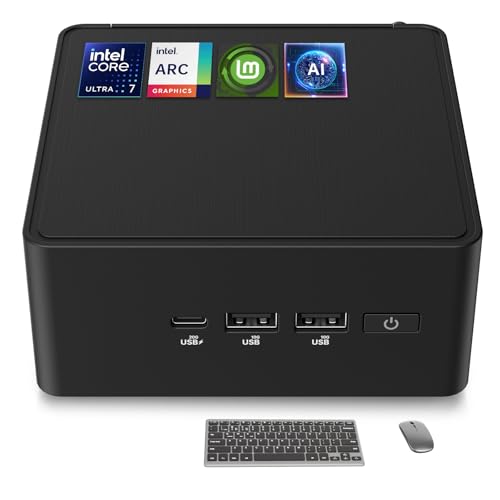
Designed with AI developers and researchers in mind, the ASUS NUC 14 Pro AI Mini PC delivers cutting-edge performance that’s hard to beat. Featuring an Intel Ultra 7 155H processor, 32GB DDR5 RAM, and a 1TB PCIe 4 SSD, it’s perfect for demanding projects. You can easily upgrade the memory up to 96GB and expand storage options for your needs. With Linux Mint pre-installed, you’ll enjoy a stable and clutter-free environment, while its efficient cooling guarantees reliable 24/7 operation. Plus, versatile connectivity options allow you to multitask seamlessly across multiple displays, making it an ideal choice for your AI endeavors.
Best For: The ASUS NUC 14 Pro AI Mini PC is best for AI developers, researchers, and power users seeking high performance and scalability in a compact form factor.
Pros:
- Cutting-edge performance with Intel Ultra 7 155H processor and expandable memory options.
- Lightweight and stable Linux Mint operating system, free of bloatware for a smooth user experience.
- Versatile connectivity with support for multiple displays and modern connectivity standards like WiFi 6E and Thunderbolt 4.
Cons:
- Limited native storage options may necessitate additional purchases for larger projects.
- Higher initial cost compared to entry-level mini PCs, which may be a barrier for casual users.
- Fanless design might not be suitable for all environments, particularly those requiring more robust cooling solutions.
BOSGAME P4 Light Gaming Mini PC

If you’re seeking a compact yet powerful machine for light gaming and AI tasks, the BOSGAME P4 Light Gaming Mini PC is an excellent choice. Featuring a Ryzen 7 5825U processor and 32GB of expandable DDR4 RAM, it handles demanding applications with ease. Its Radeon GPU delivers solid performance for games like PUBG and LOL, while supporting triple 4K displays at 60Hz. With dual 2.5GbE LAN, WiFi 6E, and versatile connectivity options, you’ll stay connected seamlessly. Plus, the 1TB PCIe SSD guarantees quick load times. Enjoy reliable support with a 3-year warranty and a 30-day return policy for peace of mind.
Best For: The BOSGAME P4 Light Gaming Mini PC is best for gamers and professionals seeking a compact yet powerful device for light gaming, design tasks, and AI applications.
Pros:
- High-performance Ryzen 7 5825U processor with 8 cores and 16 threads, offering excellent multitasking capabilities.
- Supports triple 4K displays at 60Hz, making it ideal for media streaming and design work.
- Reliable customer support with a 3-year warranty and 30-day return policy.
Cons:
- Limited to light gaming performance, may not handle high-end gaming demands effectively.
- The compact design may lead to limited upgrade options beyond RAM and storage.
- Potential thermal limitations due to mini PC form factor, especially under heavy loads.
GMKtec AI Mini PC with AMD Ryzen 9 HX-370

The GMKtec AI Mini PC with the AMD Ryzen 9 HX-370 stands out as an excellent choice for users who need a compact yet powerful workstation for everyday tasks, multimedia consumption, and light gaming. Weighing just 3.89 pounds and measuring 10.63 x 7.28 x 5.35 inches, it fits effortlessly into tight spaces. With its 32GB DDR5 RAM and 1TB SSD, you’ll enjoy smooth performance and quick load times. Plus, it supports triple 8K displays for immersive multitasking. While it’s not ideal for heavy AI tasks, its AI processing power and graphics performance make it a versatile option for most users.
Best For: Users seeking a compact and powerful mini PC for everyday tasks, multimedia consumption, and light gaming.
Pros:
- High performance: Equipped with AMD Ryzen 9 HX-370 and 32GB DDR5 RAM for smooth multitasking.
- Triple 8K display support: Ideal for immersive experiences in gaming and video editing.
- Compact design: Lightweight and small dimensions make it perfect for tight spaces.
Cons:
- Not ideal for heavy AI tasks: Better suited for general productivity and media consumption rather than intensive AI workloads.
- High temperatures reported: Some users have noted overheating issues with the WiFi card.
- Fan noise: While present, fan noise may not be effective for cooling, leading to potential discomfort during use.
Beelink SER9 Mini PC with AMD Ryzen 7 H 255, 32GB RAM, 1TB SSD

For AI developers and enthusiasts seeking a powerful yet compact solution, the Beelink SER9 Mini PC stands out with its AMD Ryzen 7 H 255 processor, which can reach speeds of up to 4.9GHz. With 32GB of LPDDR5X RAM and a 1TB PCIe 4.0 SSD, you’ll experience lightning-fast load times and multitasking capabilities. The integrated AMD Radeon 780M graphics handles demanding applications with ease. Plus, its triple-display support at 4K 240Hz guarantees stunning visuals. With 24/7 technical support and a dustproof design, the Beelink SER9 is perfect for your AI projects without compromising performance or reliability.
Best For: AI developers and enthusiasts seeking a powerful, compact solution with high-performance specifications for demanding applications.
Pros:
- Supports triple 4K displays at 240Hz for exceptional visual quality.
- Equipped with high-speed 1TB PCIe 4.0 SSD for rapid load times and efficient multitasking.
- Silent operation with efficient cooling design ensures stable performance during intensive tasks.
Cons:
- Limited to a maximum of 4TB for dual SSD slots, which may not suffice for heavy data users.
- The compact design may lead to potential thermal issues under prolonged heavy loads if not properly managed.
- Higher price point compared to entry-level mini PCs may be a barrier for budget-conscious consumers.
Reatan Mini Gaming PC with AMD Ryzen 9 7940HS
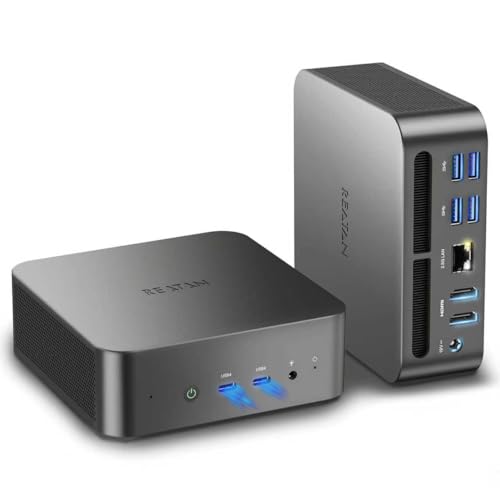
Equipped with the powerful AMD Ryzen 9 7940HS processor, the Reatan Mini Gaming PC stands out as an exceptional choice for AI enthusiasts and gamers alike. Its 8 cores and 16 threads, combined with a 64GB DDR5 RAM and 2TB M.2 SSD, guarantee lightning-fast performance for demanding applications. The AMD Radeon 780M graphics deliver smooth visuals, supporting 4K output across four displays. Weighing just 3.64 pounds, it’s compact yet powerful, perfect for any workspace. With advanced cooling technology and robust connectivity options, you’ll enjoy an efficient and versatile experience, whether you’re gaming or running AI projects.
Best For: Gamers and AI enthusiasts seeking high-performance computing in a compact form factor.
Pros:
- Powerful performance with AMD Ryzen 9 7940HS processor and 64GB DDR5 RAM, ideal for demanding applications.
- Versatile connectivity options including multiple USB ports and support for quad display with 4K output.
- Efficient cooling system featuring Cold Wave 2.0 technology, ensuring optimal performance during intense gaming or AI tasks.
Cons:
- Higher price point compared to standard gaming PCs, which may not be budget-friendly for all users.
- Limited upgradeability due to compact size, which might restrict future hardware enhancements.
- Weight may be considered heavy for a mini PC, potentially affecting portability for some users.
Generic Ubuntu Linux 24.04 LTS Bootable Live USB Flash Drive

With advanced threat protection and full-disk encryption, the Generic Ubuntu Linux 24.04 LTS Bootable Live USB Flash Drive is ideal for users prioritizing security and privacy in their AI workstation. This 64-bit version offers improved boot times and faster app loading, ensuring seamless performance. You’ll appreciate its compatibility with UEFI, Secure Boot, and major graphics cards. Pre-installed software like LibreOffice and Firefox enhances usability and accessibility. With a solid customer rating of 4.3 stars and a straightforward return policy, this USB drive is a reliable choice for anyone looking to elevate their AI projects securely and efficiently.
Best For: Users prioritizing security and privacy in their computing tasks who seek a reliable and efficient Linux operating system.
Pros:
- Advanced security features including full-disk encryption and a configurable firewall.
- Fast performance with improved boot times and quicker application loading.
- Wide compatibility with UEFI, Secure Boot, and various hardware components.
Cons:
- Limited support for certain proprietary software that may not be available on Linux.
- Potential learning curve for users unfamiliar with Linux operating systems.
- Dependence on hardware compatibility which may restrict use on older equipment.
Linux Mint 22 Cinnamon Bootable Live USB for PC/Laptop

Linux Mint 22 Cinnamon Bootable Live USB is an excellent choice for beginners and non-technical users who want to plunge into the world of Linux without the hassle of complex installations. Simply plug the USB into your PC, select it as the boot device, and you can explore Linux Mint instantly. It comes with essential software like LibreOffice, Firefox, and Thunderbird, saving you time on downloads. With a minimum of 4 GB RAM and a dual-core processor, it’s compatible with popular brands like Dell and HP. Plus, you can easily install it after testing. Enjoy a smooth Linux experience!
Best For: Linux Mint 22 Cinnamon Bootable Live USB is best for beginners and non-technical users looking to experience Linux without complex installations.
Pros:
- Easy to use with a simple plug-and-play setup for quick access to Linux Mint.
- Comes pre-installed with essential software such as LibreOffice, Firefox, and Thunderbird, reducing setup time.
- Offers a live boot option allowing users to test the OS before committing to installation.
Cons:
- Requires a minimum of 4 GB RAM and a dual-core processor, which may not be suitable for older hardware.
- Limited support for advanced users who may want more customization options.
- Some users may find the pre-installed software insufficient for their specific needs and may require additional downloads.
Beelink EQR6 Ai Mini PC with AMD Ryzen 7 6800H

If you’re looking for a compact yet powerful workstation for AI development, the Beelink EQR6 Ai Mini PC is a standout choice thanks to its AMD Ryzen 7 6800H processor. With 8 cores and 16 threads, it can reach speeds up to 4.7GHz. The 32GB LPDDR5 RAM and 500GB NVMe SSD guarantee smooth performance and ample storage. It supports dual 4K displays via HDMI and features a robust cooling system for quiet operation. Plus, with WiFi 6 and Bluetooth 5.2, connectivity is seamless. Weighing just 1.98 pounds, it’s an excellent option for on-the-go AI projects.
Best For: The Beelink EQR6 Ai Mini PC is best for professionals and enthusiasts seeking a compact yet powerful workstation for AI development, office tasks, and light gaming.
Pros:
- High Performance: Equipped with an AMD Ryzen 7 6800H processor and 32GB of RAM for efficient multitasking.
- Dual 4K Display Support: Capable of connecting to two 4K monitors for enhanced visual experiences.
- Compact and Portable: Lightweight design makes it easy to transport for on-the-go projects.
Cons:
- Non-upgradable RAM: The 32GB LPDDR5 RAM is welded and cannot be upgraded.
- Limited Storage Out of the Box: While it supports dual slots for larger storage, the initial 500GB SSD may be insufficient for some users.
- Price Point: Higher cost compared to other mini PCs with less powerful specifications.
Factors to Consider When Choosing Linux Workstations for AI
When you’re choosing a Linux workstation for AI, you need to take into account several key factors. Processor performance, memory and storage capacity, and graphics support will greatly impact your AI projects. Additionally, don’t overlook connectivity options and cooling efficiency, as these can affect overall system performance.
Processor Performance Requirements
Choosing the right processor for your AI workstation is essential, as it directly impacts performance and efficiency. Aim for a processor with at least 8 cores and 16 threads to effectively manage the parallel processing tasks typical in AI applications. A higher base clock speed, ideally above 4.0 GHz, will enhance the performance of algorithms that rely on rapid data processing. Consider advanced architectures, such as AMD Zen 5 or the latest Intel generations, as they offer better efficiency for AI tasks. Additionally, processors with dedicated AI processing capabilities can accelerate machine learning tasks and improve system responsiveness. Don’t forget to check the thermal design power (TDP) rating, as it affects power consumption and cooling, vital during intensive workloads.
Memory and Storage Capacity
To guarantee your AI workstation performs at its best, you’ll want to prioritize both memory and storage capacity. Aim for at least 32GB of RAM to guarantee smooth multitasking and efficient data processing. High-speed storage solutions like NVMe SSDs, with a minimum of 1TB capacity, are essential for quick data access and reduced loading times for large datasets. Consider systems with expandable memory options for future upgrades, accommodating the increasing demands of AI models. Look for workstations featuring dual or multiple storage slots to enhance overall capacity and redundancy. Finally, verify your chosen workstation supports the latest memory technologies, such as DDR5 or LPDDR5X, to maximize performance in your AI applications.
Graphics and Display Support
Optimizing your AI workstation doesn’t stop at memory and storage; graphics and display support play an essential role in enhancing your workflow. Look for workstations that support high-resolution displays, like 8K or multiple 4K outputs, to improve visual clarity and multitasking capabilities. Make sure the graphics capabilities include integrated GPUs or dedicated graphics cards that efficiently handle intensive graphical processing tasks. Models with advanced display technologies such as HDMI 2.1 or DisplayPort 2.1 offer higher bandwidth for smoother rendering. Evaluate the number of display outputs available; multiple ports create a more expansive workspace, boosting productivity in AI development. Finally, consider cooling systems, as high-performance graphics generate heat that can impact reliability and longevity during demanding tasks.
Connectivity Options and Ports
When you’re setting up a Linux workstation for AI tasks, connectivity options and ports can greatly impact your efficiency. Look for multiple USB ports, especially USB 3.2 for fast data transfer rates up to 10 Gbps, and USB 4 for even higher bandwidth at 40 Gbps. Dual HDMI or DisplayPort outputs are vital for multi-display setups, supporting 4K resolution or higher to enhance productivity. A 2.5G Ethernet port guarantees high-speed wired connectivity, essential for data-intensive applications. Additionally, consider workstations with WiFi 6 or higher for faster internet speeds and lower latency. Finally, Type-C ports can add versatility, allowing for both data transfer and display output, making it easier to connect various peripherals and monitors.
Cooling and Power Efficiency
As you immerse yourself in AI workloads on your Linux workstation, effective cooling and power efficiency become essential factors that can make or break your setup. Efficient cooling systems, such as heat pipes and silent fans, help prevent overheating during intense computations, maintaining peak performance. You’ll want to take into account power consumption, too; balancing high processing power with energy efficiency reduces operational costs and your carbon footprint. Advanced cooling solutions lower noise levels—around 35dB in quiet modes—enhancing your work environment. Look for workstations with peak power ratings, like 65W, to guarantee adequate performance without excessive energy usage. Finally, think about thermal management technologies, such as liquid metal cooling, which can greatly enhance the reliability and longevity of your workstation’s components.
