
The best laser projectors for professionals combine dependable long-term performance with the brightness, resolution, connectivity, and installation flexibility needed for demanding workplaces and venues.
We compared 10 strong options across business presentations, classrooms, event spaces, digital signage, simulation, and large-room entertainment to help you choose the right fit.
Best 10 Laser Projectors for Professionals Picks for 2026
Bright-Room Business Pick
- 4,600 lumens for well-lit rooms
- 1080p images up to 300 inches
- Wireless and dual-HDMI connectivity
Best For: Bright conference rooms and large business presentations
High-Brightness Installation Pick

- 7,000-lumen output
- WUXGA 1920 x 1200 resolution
- 1.6x zoom and six-point correction
Best For: Bright classrooms and meeting-room installations
Efficient Desk-Friendly Pick

- 4,000 ANSI lumens in Full HD
- 92% Rec.709 color coverage
- USB-C and SmartEco power savings
Best For: Office presentations and compact desktop setups
Flexible WUXGA Presentation Pick

- 5,200 lumens with WUXGA resolution
- 1.6x zoom and lens shift
- LAN and RS-232C control support
Best For: Detailed business presentations and flexible installations
Bright Full HD Pick

- 4,600-lumen native 1080p output
- Up to 30,000 hours of laser life
- 360-degree and portrait projection support
Best For: Bright, flexible Full HD projection in multipurpose spaces
Installation Value Pick
- 4,000 ANSI lumens for ambient-light spaces
- IP6X sealed, lamp-free laser engine
- 360-degree and portrait projection modes
Best For: Low-maintenance business and education installations
Short-Throw Space Saver

- Native Full HD 1080p resolution
- Short-throw design for compact rooms
- Up to 30,000 hours of laser life
Best For: Compact professional spaces needing large Full HD images
Bright Venue Workhorse

- 5,000 ANSI lumens with native 1080p
- 1.6x zoom and extensive image adjustment
- LAN control and 30,000-hour laser source
Best For: Bright meeting halls, classrooms, and managed installations
Short-Throw Simulation Specialist

- Short throw from 2.6 feet
- 4,200 ISO lumens and Full HD
- IP6X protection with 30,000-hour laser
Best For: Golf simulation and gaming in compact rooms
Best Simple Pick

- 5,500 ANSI lumens for bright spaces
- Native 1080p with 1.3x optical zoom
- 360-degree projection and four-corner adjustment
Best For: Bright classrooms, halls, and fixed professional setups
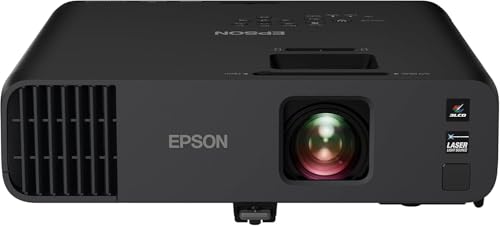
Bright-Room Business Pick – Epson Pro EX11000
For professionals comparing laser projectors for professionals, the Epson Pro EX11000 stands out when presentations need to remain clear in bright meeting rooms. Its 4,600 lumens, Full HD resolution, wireless features, and 20,000-hour laser light source suit conferences, spreadsheets, video, and large-group presentations.
Best For: Bright conference rooms, virtual meetings, and business presentations requiring strong color brightness.
Pros:
- 4,600 lumens of color and white brightness for well-lit spaces.
- 1080p images up to 300 inches with accurate 3-Chip 3LCD color.
- Miracast, two HDMI ports, USB power, Ethernet, and built-in Wi-Fi support flexible connections.
- 20,000-hour laser light source and built-in 16W speaker reduce maintenance needs.
Cons:
- Native resolution is Full HD rather than WUXGA.
- At 9.5 pounds, it is less lightweight than compact portable projectors.
The EX11000 is a practical professional option when brightness, wireless presentation support, and dependable laser operation matter more than ultra-high resolution.
High-Brightness Installation Pick – Panasonic PT-VMZ71
The Panasonic PT-VMZ71 is designed for professionals comparing laser projectors for professionals in classrooms and meeting spaces. Its 7,000-lumen output, WUXGA resolution, 1.6x zoom, lens adjustment, and screen-correction features help produce a clear, flexible image with the room lights on.
Best For: Classrooms, meeting rooms, and installations where high brightness and placement flexibility are priorities.
Pros:
- 7,000 lumens support presentations with lights on and blinds open.
- WUXGA 1920 x 1200 resolution provides detailed presentation imagery.
- 1.6x zoom, lens adjustment, and six-point screen correction accommodate challenging placement.
- Content can be supplied through mobile devices, USB flash drives, or wireless LAN QR-code access.
Cons:
- At 15 pounds, it is heavier than the other listed portable models.
- The supplied notes do not specify the laser light-source operating life.
Choose the PT-VMZ71 when maximum brightness and installation flexibility are more important than keeping the projector especially compact or light.
Efficient Desk-Friendly Pick – BenQ LH650
The BenQ LH650 is a compact business choice for professionals evaluating laser projectors for professionals who want straightforward Full HD presentation performance. It combines 4,000 ANSI lumens with 92% Rec.709 coverage, USB-C connectivity, wireless projection readiness, and SmartEco power savings.
Best For: Office presentations and desktop setups that benefit from accurate color, USB-C, and lower operating costs.
Pros:
- 4,000 ANSI lumens and 1080p resolution suit business presentations.
- 92% Rec.709 coverage supports wide-gamut, true-looking colors.
- USB-C with Alt Mode, HDMI, Bluetooth, and optional wireless projection provide flexible connectivity.
- 20,000-hour laser life and SmartEco technology help reduce maintenance and energy use.
Cons:
- Wireless presentation requires an optional Wi-Fi dongle.
- Maximum listed image size is 150 inches, smaller than some alternatives.
The LH650 is a strong fit for offices seeking a relatively light, energy-conscious projector with practical connectivity and dependable color performance.
Flexible WUXGA Presentation Pick – Panasonic PT-VMZ51S
Panasonic PT-VMZ51S WUXGA LCD Laser Projector, 5200 Lumens, No Digital Link, White
Check Price On AmazonThe Panasonic PT-VMZ51S gives professionals comparing laser projectors for professionals a flexible WUXGA option for charts, text, and video. Its 5,200-lumen output, 1.6x optical zoom, lens shift, control integration, and support for large 16:10 images make it well suited to installed or portable presentation environments.
Best For: Detailed business presentations requiring WUXGA resolution, flexible placement, and LAN or RS-232C control.
Pros:
- Native 1920 x 1200 WUXGA resolution and 5,200 lumens support detailed content.
- 1.6x zoom, vertical and horizontal lens shift, and a 30- to 300-inch image range ease setup.
- Two HDMI inputs support HDCP 1.4 and 4K/30p signals for display at native WUXGA resolution.
- Laser operation is rated for approximately 20,000 hours in Normal/Quiet mode or 24,000 in Eco mode.
Cons:
- Wireless connectivity requires an optional module.
- The supplied details list a 10W mono speaker rather than a more powerful audio system.
The PT-VMZ51S balances presentation detail and installation flexibility, making it a sensible choice when WUXGA workspace and control integration are key requirements.
Bright Full HD Pick – Optoma HZ41
Optoma HZ41 Full HD 1080p Compact Laser Projector | 4,600 Lumens for Home Entertainment and Gaming
Check Price On AmazonFor professionals seeking laser projectors for professionals that remain clear in ambient light, the Optoma HZ41 combines native 1080p resolution with 4,600 lumens. Its compact design, flexible mounting options, and long-life laser source suit meeting rooms, classrooms, training spaces, and multipurpose installations.
Best For: Bright, flexible Full HD projection in meeting rooms, classrooms, and multipurpose spaces.
Pros:
- Bright 4,600-lumen output with native Full HD 1080p resolution.
- Up to 30,000 hours of maintenance-free DuraCore laser operation.
- Supports 4K HDR input and offers 1.1x zoom, 360-degree, and portrait projection.
- Low 8.6ms input lag at 1080p/120Hz, plus dual HDMI and USB power.
Cons:
- Maximum listed resolution is 1920 x 1080, rather than native 4K.
- Its one-year projector warranty is shorter than the light-source warranty.
The HZ41 is a strong all-around professional option when brightness, Full HD sharpness, and installation flexibility matter more than native 4K resolution.
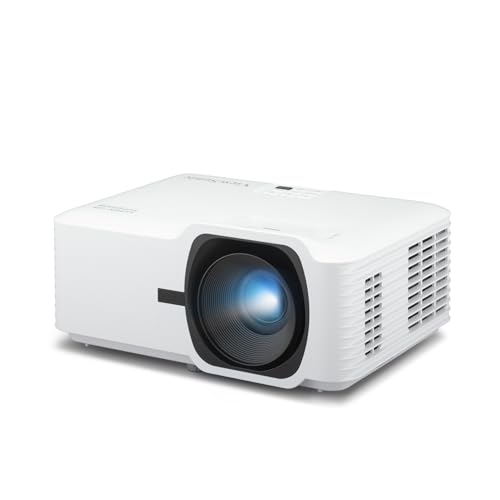
Installation Value Pick – ViewSonic LSD400W
The ViewSonic LSD400W is a practical choice for professionals comparing laser projectors for professionals for classrooms, conference rooms, and auditoriums. Its 4,000 ANSI lumens, WXGA resolution, compact installation design, and sealed laser engine emphasize dependable day-to-day operation.
Best For: Business and education installations needing bright WXGA images and low maintenance.
Pros:
- 4,000 ANSI lumens help images remain visible under moderate ambient lighting.
- IP6X-rated sealed engine helps block dust and avoids filter maintenance.
- Supports 360-degree projection, portrait mode, ceiling mounting, and LAN control.
- Laser operation lasts up to 30,000 hours and requires no bulb replacement.
Cons:
- WXGA resolution is less detailed than Full HD models.
- Connectivity is centered on HDMI, USB, and 3.5mm audio, with no listed wireless features.
Choose the LSD400W when installation flexibility, quick startup, and reduced maintenance are priorities. Its WXGA resolution is best suited to presentations, text, and general classroom or business visuals.
Short-Throw Space Saver – Optoma GT2000HDR
Professionals working in compact rooms can consider the Optoma GT2000HDR among laser projectors for professionals that make efficient use of limited space. This ultra-compact short-throw model delivers Full HD resolution, 3,500 lumens, and a laser light source designed for up to 30,000 hours.
Best For: Compact rooms, tabletop setups, and professional spaces that need short-throw Full HD projection.
Pros:
- Short-throw design supports large images from a relatively close position.
- Native 1920 x 1080 Full HD resolution with 3,500-lumen brightness.
- Ultra-compact, portable form factor with low power consumption.
- Laser light source is rated for up to 30,000 hours.
Cons:
- Brightness is lower than the 4,000- and 4,600-lumen alternatives here.
- Tabletop mounting and remote control may offer less installation flexibility.
The GT2000HDR is most compelling where space is restricted. Its short-throw design and Full HD output make it a focused solution for compact professional rooms, though brighter models may be preferable in stronger ambient light.
Bright Venue Workhorse – ViewSonic LS741HD
For professionals comparing laser projectors for professionals, the ViewSonic LS741HD is built for bright classrooms, meeting halls, and other larger spaces. Its native 1080p resolution, 5,000 ANSI lumens, 1.6x optical zoom, and broad image-adjustment options support polished presentations without requiring a dark room.
Best For: Bright professional venues, network-managed installations, and flexible ceiling or portrait-mount setups.
Pros:
- 5,000 ANSI lumens and native 1080p resolution help maintain clear images in ambient light.
- 1.6x optical zoom, horizontal/vertical keystone, and four-corner adjustment simplify installation.
- Supports 360-degree and portrait projection, plus professional LAN control through Crestron, AMX, Extron, and PJ Link.
- 30,000-hour laser light source and 24/7 operation support demanding schedules.
Cons:
- Its stationary form factor and ceiling-mount orientation may be excessive for small, portable setups.
- It offers Full HD rather than a higher native resolution.
The LS741HD stands out when brightness, installation flexibility, and remote management matter more than compact portability. Golf Mode is an added benefit for compatible simulation environments, while instant power functionality helps keep meetings moving.
Short-Throw Simulation Specialist – Optoma GT2400HDR
The Optoma GT2400HDR is a practical choice for buyers seeking laser projectors for professionals in space-constrained environments. Its short-throw design can produce a large image from as little as 2.6 feet, while Full HD resolution, 4,200 ISO lumens, IP6X-rated dust protection, and low input lag suit golf simulation and gaming-focused installations.
Best For: Short-throw golf simulators, gaming spaces, and installations where projector distance is limited.
Pros:
- Short-throw projection supports large images in rooms with limited depth.
- Full HD 1080p resolution and 4,200 ISO lumens provide detailed, bright visuals.
- 30,000-hour DuraCore laser light source reduces the need for frequent light-source replacement.
- IP6X-rated dust protection adds durability for suitable long-term installations.
Cons:
- Its 4,200-lumen rating is lower than the two ViewSonic options in this roundup.
- Connectivity is comparatively limited in the supplied specifications, with HDMI listed as the primary hardware connection.
- The warranty is shorter than the three-year coverage listed for the ViewSonic projectors.
The GT2400HDR makes the most sense when short-throw placement and responsive gaming or simulation use are priorities. It is less focused on networked business control, but its dust protection and long laser life support specialized installations.
Best Simple Pick – ViewSonic LS740HD
For professional presentations and large-screen video, the ViewSonic LS740HD combines native 1080p resolution with 5,500 ANSI lumens. Among laser projectors for professionals, it is especially suited to bright classrooms, meeting halls, and fixed installations that benefit from a 1.3x optical zoom and extensive alignment controls.
Best For: High-brightness business, education, auditorium, and golf-simulation installations.
Pros:
- Its 5,500 ANSI lumens rating helps keep presentations visible in bright rooms.
- Native 1080p resolution supports sharp Full HD presentations and video.
- 1.3x optical zoom, H/V keystone, four-corner adjustment, and 360-degree projection aid installation flexibility.
- Instant power, ceiling-mount compatibility, and a three-year limited parts-and-labor warranty support professional use.
Cons:
- The listed light-source life is 20,000 hours, shorter than the LS741HD and Optoma specifications.
- It lacks the LS741HD’s supplied LAN-control feature.
- Its stationary, ceiling-mount-oriented design is not aimed at frequent portable use.
The LS740HD is a strong fit when maximum brightness is the deciding factor. Its image alignment tools and Golf Mode broaden its usefulness, while the Full HD output keeps the projector focused on practical professional and simulation applications.
How We Picked the Best Laser Projectors for Professionals
We evaluated each model for the factors that matter most in professional environments: light output, resolution, laser longevity, setup flexibility, connectivity, portability, and total value. The lineup includes business-focused projectors, installation models, short-throw designs, and versatile units suitable for presentations or specialized entertainment.
Brightness claims are not directly interchangeable across manufacturers, so consider the room, screen size, ambient light, and content type rather than choosing by lumens alone. We also considered practical features such as wireless presentation support, USB-C, LAN control, lens shift, keystone correction, optical zoom, 360-degree projection, and built-in speakers.
Quick Comparison
| Best For | What to Prioritize | Models to Consider |
|---|---|---|
| Corporate presentations | Full HD or WUXGA, wireless connectivity, easy setup | Epson Pro EX11000, BenQ LH650 |
| Large rooms and venues | High brightness, installation controls, LAN management | Panasonic PT-VMZ71, ViewSonic LS741HD |
| Classrooms and training rooms | Readable resolution, flexible placement, reliable operation | Panasonic PT-VMZ51S, ViewSonic LSD400W |
| Short-throw spaces | Reduced shadowing, compact placement, strong contrast | Optoma GT2000HDR, Optoma GT2400HDR |
| Home theater or simulation | 1080p output, HDR support, low input lag | Optoma HZ41, ViewSonic LS740HD |
Key Buying Factors for Laser Projectors for Professionals
Brightness and Room Conditions
Choose enough brightness for the screen size and ambient light. A dim, controlled room can use less output, while conference rooms, classrooms, showrooms, and venues generally benefit from 4,000 lumens or more.
Resolution and Image Quality
Full HD is a practical minimum for detailed presentations, video, and simulation. WUXGA provides additional vertical resolution, which is useful for documents, spreadsheets, and content designed for 16:10 displays. Color accuracy and contrast also affect readability and perceived quality.
Placement and Installation
Short-throw models work well where space is limited and can reduce presenter shadows. For permanent installations, prioritize optical zoom, lens shift, keystone or four-corner adjustment, 360-degree projection, and LAN control. Optical adjustments are preferable to heavy digital correction when image quality matters.
Connectivity and Management
Check for the inputs your team actually uses, including HDMI, USB-C, wireless presentation, audio, and network control. Fleet managers should favor models with centralized monitoring and control features.
Operating Costs
Laser light sources typically reduce lamp replacements and startup delays, but compare rated life, warranty coverage, filter requirements, power consumption, and service availability before buying in quantity.
Who Should Buy Which Laser Projectors for Professionals?
Choose the Epson Pro EX11000 or BenQ LH650 for flexible business presentations and straightforward meeting-room use. The Panasonic PT-VMZ71 is better suited to larger, brighter spaces, while the PT-VMZ51S offers a balanced option for classrooms and training rooms.
For fixed installations, the ViewSonic LS741HD provides useful placement controls and LAN connectivity. Choose the ViewSonic LSD400W when WXGA resolution is sufficient and installation brightness is the priority. In compact rooms, the Optoma GT2000HDR or GT2400HDR can deliver a large image from a short distance, with the GT2400HDR being especially appealing for gaming or golf simulation.
The Optoma HZ41 and ViewSonic LS740HD are sensible choices for buyers who want professional brightness with home-theater flexibility. Before ordering, verify throw distance, mounting requirements, screen dimensions, input compatibility, and local support.
