
Choosing among laser projectors for beginners can be surprisingly difficult. Brightness claims, smart features, resolution, throw distance, and setup tools all affect how enjoyable a projector is in everyday use.
We selected 10 options spanning compact portable models, outdoor-ready designs, and brighter home-theater projectors. Use the guide below to match the right projector to your room, viewing habits, and budget.
Best 10 Laser Projectors for Beginners Picks for 2026
Best Portable Pick
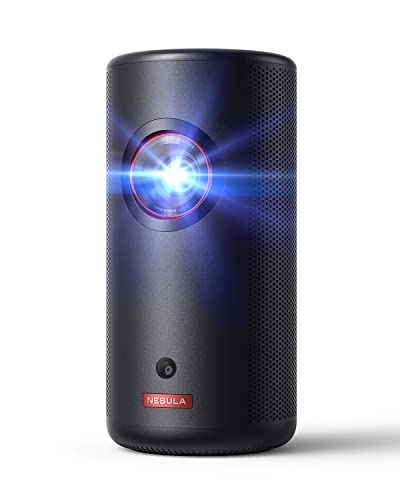
- 1080p laser projection with 300 ANSI lumens
- 2-pound design with up to 120-inch image
- Built-in battery, Google TV, and autofocus
Best For: Portable movie nights and beginner-friendly setup
Best Bright-Image Pick

- 5000 ANSI lumens for brighter viewing spaces
- Native 1080p with 4K HDR support
- TOF autofocus and automatic keystone correction
Best For: Bright-room home theater and outdoor movie setups
Best Large-Room Pick

- 5500 ANSI lumens for bright environments
- Native 1080p with 1.3x optical zoom
- Four-corner adjustment and flexible mounting options
Best For: Large rooms, presentations, and fixed installations
Best Smart-Feature Value

- Native 1080p with 4K support and 600 ANSI lumens
- Built-in Prime Video, YouTube, and app store
- Auto focus, auto keystone, Wi-Fi 6, and dual HDMI
Best For: Family entertainment and flexible beginner setups
Best Premium Bright-Room Pick

- 3300 ISO lumens for bright rooms and outdoor use
- Triple-laser native 4K with wide color coverage
- Google TV, Netflix, and automatic image setup
Best For: Beginners wanting premium brightness, 4K detail, and flexible placement
Best Portable Beginner Pick

- Compact laser projector with 1080p resolution
- Google TV includes Netflix, Google Cast, and voice control
- Auto setup and USB-C PD power support travel use
Best For: Beginners prioritizing portability and simple setup over maximum brightness
Easy-Setup Pick

- Autofocus and auto keystone simplify setup
- Built-in apps with WiFi 6 and Bluetooth 5.4
- 180-degree rotation and lightweight portable design
Best For: First-time users in small rooms who want built-in streaming
Budget-Friendly Pick
Rotating Projector with Soundbase

- 200 ANSI lumens with 4K input support
- Built-in 5W SoundBase speaker
- 180-degree rotation and Air Mouse remote
Best For: Casual bedroom, kids’ and outdoor viewing on a budget
Best Portable Pick – NEBULA Capsule 3 Laser
If you are looking for laser projectors for beginners, the NEBULA Capsule 3 Laser is a particularly approachable option for portable movie nights. Its 1080p resolution, autofocus, auto keystone correction, built-in battery, and Google TV simplify setup without requiring much projector experience.
Best For: Beginners who want a compact projector for travel, camping, presentations, or backyard viewing.
Pros:
- Native 1080p resolution with a 300 ANSI-lumen laser light source.
- Compact 2-pound design projects an image up to 120 inches.
- Built-in battery supports up to 2.5 hours of video playback.
- Includes Google TV, licensed Netflix, Google Assistant, Google Cast, and 8W Dolby Digital audio.
Cons:
- Its 300 ANSI lumens are better suited to dimmer environments than bright rooms.
- The compact built-in battery may not cover especially long movie sessions without recharging.
The Capsule 3 Laser stands out when convenience and portability matter more than maximum brightness. Beginners get useful automatic picture adjustments and built-in streaming features in a genuinely travel-friendly package.
Best Bright-Image Pick – AuKing 5000 ANSI Projector
For beginners comparing laser projectors for beginners, the AuKing 5000 ANSI projector offers a straightforward setup with strong brightness and automatic adjustments. Its native 1080p image, 4K HDR support, TOF autofocus, and automatic keystone correction are designed to reduce manual tweaking.
Best For: Home theater and outdoor viewers who need a bright image and quick setup.
Pros:
- Rated at 5000 ANSI lumens for use in brighter rooms or outdoor settings.
- Native 1080p resolution with 4K HDR support and HDR10+.
- TOF autofocus reportedly locks focus in 0.2 seconds.
- Licensed built-in apps include Prime Video and YouTube.
Cons:
- The supplied notes do not provide the projector’s weight or battery details, so it may be less convenient for travel than compact models.
- Its larger feature set may be more than a beginner needs for basic occasional viewing.
This AuKing model is a compelling beginner choice when brightness is the priority. Autofocus and automatic keystone correction make initial setup easier, while the built-in apps reduce the need for an additional streaming device.
Best Large-Room Pick – ViewSonic LS740HD 1080p Laser
The ViewSonic LS740HD is aimed at beginners who need a dependable, high-brightness installation rather than a portable projector. With native 1080p resolution, 5500 ANSI lumens, optical zoom, keystone controls, and four-corner adjustment, it offers practical flexibility for classrooms, meeting spaces, and home theaters.
Best For: Large rooms, presentations, home theaters, and golf simulation setups where brightness and installation flexibility matter.
Pros:
- 5500 ANSI lumens help maintain visibility in rooms with ambient light.
- Native 1080p resolution supports clear presentations and video content.
- 1.3x optical zoom, horizontal and vertical keystone, and four-corner adjustment simplify alignment.
- Supports screens up to 150 inches, plus 360-degree and portrait projection.
Cons:
- Its stationary, ceiling-mount-oriented design is less suitable for casual portable use.
- The supplied notes do not list built-in streaming apps or a battery.
- High brightness and installation features may be unnecessary for small, dim rooms.
The LS740HD is a strong fit for beginners who want a more permanent projector system and need consistent performance in larger or brighter spaces. Its adjustment tools can make installation less intimidating, though it is not the simplest choice for travel.
Best Smart-Feature Value – P62 Pro Smart Projector
The P62 Pro is a practical entry point for laser projectors for beginners who want smart features and simple image adjustments. It combines native 1080p output, 4K support, 600 ANSI lumens, built-in apps, auto focus, auto keystone correction, and broad connectivity for an easy all-in-one setup.
Best For: Families and beginners who want built-in streaming, flexible connections, and automatic picture setup.
Pros:
- Native 1080p resolution with 4K support, HDR10, and 600 ANSI lumens.
- Built-in Prime Video, YouTube, app store, and browser access.
- Auto focus, auto keystone, obstacle avoidance, screen alignment, and 50–100% zoom.
- Includes dual HDMI, dual USB, Wi-Fi 6, Bluetooth 5.2, and HDMI ARC.
Cons:
- 4K content is displayed at the projector’s native 1080p resolution.
- The projector does not include a carrying case.
- At 600 ANSI lumens, it may be better suited to dimmer environments than bright rooms.
The P62 Pro offers a beginner-friendly balance of convenience and connectivity. Its automatic setup tools and built-in apps reduce accessory requirements, while the multiple ports make it easy to connect consoles, laptops, storage devices, or audio equipment.
Best Premium Bright-Room Pick – JMGO N1S Ultimate 4K
For beginners seeking laser projectors for beginners that can handle more than a dark movie room, the JMGO N1S Ultimate combines 3300 ISO lumens, native 4K resolution, and automatic setup features. Its rotating gimbal also makes positioning easier in living rooms, bedrooms, or outdoor spaces.
Best For: Beginners who want premium picture quality, strong brightness, and flexible placement.
Pros:
- 3300 ISO lumens are suited to bright rooms and backyard viewing.
- Triple-laser 4K imaging offers 110% Rec. 2020 coverage, 10-bit color, and ΔE<1 accuracy.
- Google TV includes certified Netflix, Google Cast, voice control, and access to 10,000+ apps.
- Automatic focus and keystone correction simplify setup, while the gimbal supports broad projection angles.
Cons:
- Its premium features may be more than a first-time user needs.
- The 20W audio system may not replace a dedicated sound system for larger spaces.
The N1S Ultimate is the strongest all-around option here for beginners who prioritize bright, high-resolution images and minimal adjustment. It is especially practical when the projector needs to move between rooms or outdoor locations.
Best Value Smart Starter – X7 Native 1080P Projector
The X7 is a practical entry point for shoppers comparing laser projectors for beginners, offering native 1080p resolution, 2000 ANSI lumens, and built-in Android 14 features. Its AI calibration system is designed to reduce the usual setup work for first-time projector owners.
Best For: Beginners who want a bright, connected projector with automatic alignment and broad app support.
Pros:
- 2000 ANSI lumens are designed for visible images in daylight and outdoor settings.
- Native 1080p provides clear Full HD images, while 4K/8K content can be decoded.
- AI auto focus, keystone correction, obstacle avoidance, and screen fitting streamline setup.
- Android 14, Wi-Fi 6, Bluetooth 5.4, and built-in streaming apps support flexible viewing.
Cons:
- 4K and 8K input is displayed at the projector’s native 1080p resolution.
- Its larger feature set may require some initial app and connectivity setup.
The X7 emphasizes convenience and versatility rather than native 4K detail. For a beginner, its bright output, automatic calibration, and integrated apps make it a straightforward choice for home theater or backyard movie nights.
Best Portable Beginner Pick – NexiGo Nova Mini
For beginners who value portability, the renewed NexiGo Nova Mini is one of the more travel-friendly laser projectors for beginners. It provides 1080p resolution, Google TV, automatic image setup, and a compact design that can run from a USB-C power bank.
Best For: Beginners who want a lightweight projector for bedrooms, travel, and casual outdoor entertainment.
Pros:
- Compact design is under 2 inches thick and weighs about 3 pounds.
- Google TV offers Netflix, Google Cast, voice control, and access to 10,000+ apps.
- 1080p laser projection includes HDR10, HLG, 100% Rec.709 coverage, and active 3D support.
- Auto focus, keystone correction, obstacle avoidance, and screen alignment make setup simple.
Cons:
- Its 1200-lumen brightness is lower than the other listed projectors, so darker rooms may be preferable.
- This listing is for a renewed product.
The Nova Mini is the easiest recommendation for beginners who plan to carry their projector from place to place. Its lower brightness favors controlled lighting, but the small size, automatic setup, streaming platform, and USB-C power option add considerable convenience.
Easy-Setup Pick – Compact Smart Projector
For beginners exploring laser projectors for beginners, this compact smart projector emphasizes straightforward setup and flexible viewing. Autofocus, automatic vertical keystone correction, built-in apps, and a short-throw design make it practical for bedrooms, dorms, and smaller living spaces.
Best For: First-time buyers who want built-in streaming and an easy-to-carry projector for small rooms.
Pros:
- Autofocus and automatic vertical keystone correction simplify setup.
- Supports 1080P and 4K content, with a 0.8:1 short-throw ratio.
- Built-in Prime Video, YouTube, WiFi 6, and Bluetooth 5.4 reduce the need for extra devices.
- 180-degree rotation, approximately 25 dB operation, and a 2-year warranty add everyday convenience.
Cons:
- Its native resolution is 1280 x 720 rather than 1080P.
- At 200 ANSI lumens, it is better suited to darker viewing environments.
- The maximum listed image size is 86 inches.
This is a sensible beginner option when convenience matters more than high brightness or native Full HD resolution. Its lightweight design and flexible placement make it especially appealing for casual home viewing.
Feature-Rich Pick – Native 1080P Smart Projector
Among laser projectors for beginners, the XuanPad stands out for combining native 1080P resolution with automated positioning features. Its licensed Netflix compatibility, autofocus, 6D keystone correction, and 360-degree stand are useful for buyers who want a flexible projector without a complicated setup process.
Best For: Beginners who want a portable native-1080P projector for indoor movies, gaming, travel, or outdoor use.
Pros:
- Native 1080P resolution and support for 4K content provide a sharper foundation than 720P models.
- AI autofocus and one-touch 6D keystone correction help align the image quickly.
- Licensed Netflix compatibility, plus built-in YouTube and Prime Video support, reduces setup requirements.
- Its detachable 360-degree stand and 1.89-pound body support flexible placement and portability.
Cons:
- The supplied notes do not specify the projector’s ANSI brightness.
- Bluetooth is listed as version 5.2, rather than the newer 5.4 standard.
- The product is thicker and heavier than the smallest mini projectors in this group.
The XuanPad is the strongest choice here for buyers prioritizing native image resolution and broad placement flexibility. It offers more ambitious features than a basic starter projector, while autofocus and automatic correction keep the learning curve manageable.
Budget-Friendly Pick – Rotating Projector with Soundbase
For beginners comparing laser projectors for beginners on a budget, this Magcubic model focuses on casual entertainment and simple placement. It combines automatic vertical keystone correction, 180-degree rotation, built-in apps, and a 5W SoundBase speaker in a lightweight design.
Best For: Casual bedroom viewing, kids’ shows, gaming, and occasional outdoor movie nights.
Pros:
- 200 ANSI lumens and a 2000:1 contrast ratio suit casual movie and gaming use.
- The 5W SoundBase speaker can provide fuller audio without an external speaker.
- WiFi 6, Bluetooth 5.4, built-in apps, and an Air Mouse remote support convenient control.
- 180-degree rotation and multiple mounting options make placement flexible.
Cons:
- Its native resolution is 1280 x 720, although it supports up to 4K input.
- The supplied guidance recommends about 5.2 feet for an 80-inch screen, so placement distance matters.
- It carries a 1-year manufacturer warranty.
This model is a practical entry point for casual users who value portability, built-in sound, and flexible positioning. Buyers seeking native 1080P detail or brighter performance should consider a more advanced option.
How We Picked the Best Laser Projectors for Beginners
We focused on the features that make a first projector easier and more rewarding to use: dependable image quality, practical brightness, simple focusing and keystone correction, built-in streaming options, useful connectivity, and portability where applicable. We also considered whether each model suits a specific use case, such as bedroom movie nights, outdoor viewing, gaming, or a dedicated home theater.
Specifications can vary by seller and configuration, so confirm the current listing for native resolution, operating-system support, included apps, speaker output, and warranty details before buying. Advertised 4K support does not necessarily mean a native 4K display.
Quick Comparison
| Best For | Look For | Recommended Type |
|---|---|---|
| Small rooms and travel | Compact size, built-in battery, automatic setup | Portable mini laser projector |
| Outdoor movie nights | High brightness, strong speakers, flexible connectivity | Bright smart outdoor projector |
| Home theater | Full HD or 4K resolution, accurate image, low noise | Dedicated laser projector |
| Streaming convenience | Licensed apps, Google TV or another supported platform | Smart projector with onboard streaming |
| Gaming | Low input lag, suitable refresh rate, HDMI compatibility | Responsive Full HD or 4K model |
Key Buying Factors for Laser Projectors for Beginners
Brightness and Room Lighting
Brightness matters most when ambient light is present. A darker room allows a modestly bright projector to look impressive, while daylight, porch lighting, or large windows require substantially more output. Treat ANSI or ISO lumens as more useful comparison points than vague “lux” or marketing brightness claims.
Resolution and Image Size
Native 1080p is a strong starting point for movies, sports, and console gaming. A projector that accepts a 4K signal may offer compatibility without displaying native 4K detail. Also check the throw ratio and placement distance: a large image is not useful if the projector cannot fit your room.
Setup and Smart Features
Autofocus, automatic keystone correction, obstacle avoidance, and flexible digital positioning can make a major difference for beginners. Built-in streaming is convenient, but app availability may change. HDMI remains important for streaming sticks, game consoles, laptops, and Blu-ray players.
Sound, Portability, and Reliability
Built-in speakers are fine for casual viewing, but outdoor use often benefits from Bluetooth or wired audio output. Portable models should be judged by weight, power options, lens protection, and setup speed. Laser light sources generally offer long operating life and quick start-up, but they do not eliminate fan noise or the need for clear ventilation.
Who Should Buy Which Laser Projectors for Beginners?
Choose a Portable Mini Model
Pick a compact projector if you move between rooms, travel, or want occasional backyard viewing. Prioritize automatic setup and a reliable power solution over maximum brightness.
Choose a Bright Outdoor Projector
For regular outdoor movie nights, choose the brightest suitable model with useful audio and multiple inputs. Plan to use it after sunset; even powerful projectors struggle against direct daylight.
Choose a Dedicated Home-Theater Model
If the projector will stay in one room, spend more on native resolution, contrast, placement flexibility, and image consistency. This is usually the best route for larger screens and frequent movie watching.
Choose a Smart Google TV or App-Based Model
Smart features are worthwhile when you want fewer external devices, but verify that your preferred services are officially supported. Buyers who already own a streaming stick can prioritize image quality and connectivity instead.
