
If you want a printer that saves time, paper, and frustration, laser printers with duplex scanning are a smart upgrade. They handle two-sided documents more efficiently, making them ideal for busy homes, small offices, and teams that scan often.
In this roundup, we focused on models that balance scan quality, print speed, and day-to-day reliability so you can choose the right fit with confidence.
Best 10 Laser Printers with Duplex Scanning Picks for 2026
Best for Fast Office Duplex Scanning
Brother MFC-L2900DW All-in-One

- Single-pass duplex scanning for faster document workflows
- 36 ppm monochrome printing with automatic duplex output
- 50-page ADF plus Wi-Fi, Ethernet, USB, and cloud support
Best For: Small business teams that need quick black-and-white printing and efficient two-sided scanning.
Best for Small Offices
Brother DCP-L2640DW Compact Monochrome Laser MFP

- Automatic duplex scanning for two-sided document handling
- Compact wireless monochrome all-in-one design
- Print, copy, and scan with mobile support
Best For: Home offices and small workgroups needing compact black-and-white printing with duplex scanning.
Best for Fast 2-Sided Scanning

- One-pass duplex scanning with a 50-sheet ADF
- Fast 35 ppm color/mono printing
- Easy wireless setup with a 5-inch touchscreen
Best For: Small offices and home workspaces that need fast duplex scanning and dependable color printing.
Best for Small Spaces
Brother HL-L2480DW Compact Monochrome Laser Printer

- Compact 3-in-1 printer, scanner, and copier
- Automatic duplex printing to save paper
- Fast wireless, Ethernet, and mobile support
Best For: Home offices and small teams that need a space-saving monochrome printer for everyday document work.
Best for Easy Duplex Scanning
Canon Color imageCLASS MF665Cdw

- One-pass duplex scanning with a 50-sheet ADF
- Fast 26 ppm color and mono printing
- Easy wireless setup with strong mobile printing support
Best For: Small offices and home workspaces that need fast color printing with duplex scanning.
Best for High-Volume Duplex Scanning
Brother MFC-L8930CDW Color Laser All-in-One

- Duplex scans up to 104 ipm with 80-sheet ADF
- Fast 33 ppm printing/copying for office workflows
- Low-cost high-yield toner options and strong security
Best For: Busy teams that need fast two-sided scanning, color output, and secure network printing.
Best for Fast Home Office Setup
Canon Color imageCLASS MF662Cdw

- Up to 26 ppm print speeds in color and black-and-white
- Duplex printing with scan/copy all-in-one functionality
- Easy wireless setup with a 5-inch color touchscreen
Best For: Home offices and hybrid workers who want a fast, easy-to-use color laser all-in-one.
Best for Small Businesses
Brother MFC-L3780CDW Color All-in-One Printer

- Single-pass duplex scanning and copying
- Fast color printing for busy office workflows
- Flexible wireless, Ethernet, Wi-Fi Direct, and USB connectivity
Best For: Small offices that need speedy color printing with duplex scanning and all-in-one convenience.
Best for Fast Office Scanning
Canon imageCLASS MF462dw II Duplex Laser Printer
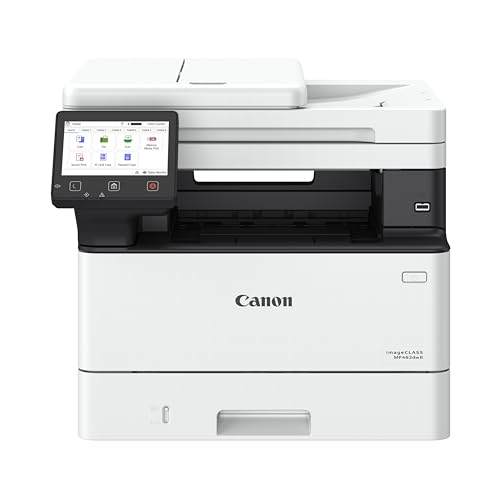
- 37 ppm printing with quick first-page output
- Duplex printing and scanning for efficient workflows
- Expandable paper capacity for busier offices
Best For: Small offices and home offices that need fast monochrome printing with duplex scanning and fax support.
Best for Small Office Productivity
Brother MFC-L3720CDW Color Laser All-in-One

- Automatic duplex printing for double-sided documents
- 50-sheet ADF for efficient scanning and copying
- Dual-band Wi-Fi plus Wi-Fi Direct for easy sharing
Best For: Small offices that need a reliable color laser all-in-one for fast printing and everyday document workflows.
Best for Fast Office Duplex Scanning – Brother MFC-L2900DW All-in-One
If you want laser printers with duplex scanning that can keep up with a busy office, the Brother MFC-L2900DW is built for speed and efficiency. It combines 36 ppm monochrome output, single-pass two-sided scanning, and a 50-page automatic document feeder in a compact all-in-one design.
Best For: Small business users who need fast black-and-white printing, reliable duplex scanning, and flexible wireless/cloud workflows.
Pros:
- Single-pass duplex scanning saves time on double-sided documents
- Fast 36 ppm print speed with automatic duplex printing
- 50-page ADF and 3.5-inch touchscreen improve daily productivity
- Dual-band Wi-Fi, Ethernet, USB, and mobile/cloud connectivity
Cons:
- Monochrome only, so it is not suited for color printing
- No automatic duplex printing at the scanner? Actually scanning is duplex, but it still relies on an ADF for multi-page jobs
- Touchscreen is useful but smaller than some office-class competitors
As one of the more capable laser printers with duplex scanning in this class, the MFC-L2900DW stands out for quick document handling rather than flashy extras. It is a practical fit when you need dependable two-sided scanning, solid print speed, and easy cloud access in a space-saving footprint.
Best for Small Offices – Brother DCP-L2640DW Compact Monochrome Laser MFP
If you want laser printers with duplex scanning for a home office or small team, the Brother DCP-L2640DW is a practical monochrome all-in-one that keeps the footprint compact while still covering print, copy, and scan tasks. Its wireless connectivity and mobile support make it easy to place on a shared desk without giving up convenience.
Best For: Home offices and small workgroups that need affordable black-and-white printing plus duplex scanning in a compact package.
Pros:
- Automatic duplex scanning helps streamline two-sided document workflows.
- Compact mono laser design fits neatly into tight office spaces.
- Wireless, mobile, and Alexa compatibility add flexible everyday use.
- Print, copy, and scan functions cover core office tasks in one unit.
Cons:
- Monochrome output only, so it is not suited for color printing.
- Not a feature-heavy model for users who need advanced finishing options.
For shoppers comparing laser printers with duplex scanning, this Brother model stands out as a straightforward value pick that balances size, convenience, and document handling. It is a solid choice if you mainly print text-heavy pages and want automatic two-sided scanning without paying for extras you may not use.
Best for Fast 2-Sided Scanning – Canon imageCLASS MF753Cdw II
If you want one of the more capable laser printers with duplex scanning for a small office or busy home workspace, the Canon Color imageCLASS MF753Cdw II is built to keep paperwork moving. It combines color printing, copying, faxing, and a 50-sheet duplex automatic document feeder with quick 35 ppm output and easy wireless setup.
Best For: Teams and home offices that need fast, reliable duplex scanning plus strong print speed, simple wireless use, and generous paper handling.
Pros:
- 50-sheet duplex ADF supports one-pass 2-sided scanning to save time.
- Fast up to 35 ppm printing in color and monochrome with a quick first page.
- 5-inch color touchscreen and easy app-based setup make it simple to use.
- Expandable paper capacity helps it scale with heavier workloads.
Cons:
- Higher upfront cost than basic mono laser all-in-ones.
- Toner replacement costs can add up if you print a lot of color pages.
Overall, the MF753Cdw II is a strong fit if duplex scanning is a priority and you also want fast color output in a dependable office machine. Among laser printers with duplex scanning, it stands out for balancing speed, ease of use, and a practical feature set for day-to-day document work.
Best for Small Spaces – Brother HL-L2480DW Compact Monochrome Laser Printer
If you want a compact workhorse for everyday document tasks, the Brother HL-L2480DW is a practical pick among laser printers with duplex scanning. It combines printing, copying, and scanning in one small footprint, while adding fast black-and-white output and automatic duplex printing to help reduce paper use.
Best For: Home offices and small teams that need a space-saving monochrome laser printer for frequent scanning, copying, and two-sided document handling.
Pros:
- Compact 3-in-1 design with flatbed scanning and copying
- Automatic duplex printing and up to 36 ppm print speeds
- Dual-band Wi-Fi, Ethernet, USB, and mobile app support
- 250-sheet tray helps handle heavier print loads
Cons:
- Monochrome only, so it is not suitable for color printing
- No automatic document feeder for faster multi-page scanning
- Duplex scanning is not listed, so double-sided scans may need manual handling
For buyers comparing laser printers with duplex scanning, this model stands out more for its compact size, reliable performance, and automatic duplex printing than for advanced scan automation. It is a strong fit if you need a simple, efficient office printer that keeps workflow moving without taking up much desk space.
Best for Easy Duplex Scanning – Canon Color imageCLASS MF665Cdw
If you want laser printers with duplex scanning for a small office or busy home workspace, the Canon Color imageCLASS MF665Cdw is a practical all-in-one that keeps everyday jobs moving. It combines color printing, automatic duplex scanning, and a 50-sheet ADF with a simple setup and a responsive touchscreen.
Best For: Small offices, hybrid workers, and home users who want fast color printing plus one-pass duplex scanning with minimal fuss.
Pros:
- Scans double-sided documents in one pass with a 50-sheet automatic document feeder
- Fast print speeds up to 26 ppm in color and monochrome
- Easy wireless setup and mobile printing support via Canon PRINT, AirPrint, and Mopria
- 5-inch color touchscreen makes common tasks quick and simple
Cons:
- Uses color toner, so running costs may be higher than basic mono models
- 250-sheet paper capacity is solid, but not ideal for heavier-volume offices
This model stands out if duplex scanning matters more than raw print volume. Among laser printers with duplex scanning, it offers a balanced mix of speed, convenience, and color output without adding much setup complexity.
Best for High-Volume Duplex Scanning – Brother MFC-L8930CDW Color Laser All-in-One
If you need one of the more capable laser printers with duplex scanning for a busy office, the Brother MFC-L8930CDW is built for speed, two-sided workflow, and dependable color output. It combines fast print/copy performance with a high-speed duplex scanner, a large ADF, and business-friendly security and connectivity features.
Best For: Teams that want a color laser all-in-one with fast two-sided scanning, strong security, and low-cost toner options.
Pros:
- Duplex scanning up to 104 ipm with an 80-page auto document feeder
- Fast 33 ppm print and copy speeds with sharp color and black output
- Low running costs with high-yield toner cartridge support
- Strong business extras like dual-band Wi‑Fi, Gigabit Ethernet, and NFC login
Cons:
- Bulkier than an entry-level home office printer
- Color toner replacements can still add up if you print heavily
For offices that prioritize throughput, document handling, and security, this Brother is an especially practical pick among laser printers with duplex scanning. It’s more than a basic MFP: it’s designed to keep multi-user workflows moving while controlling per-page costs.
Best for Fast Home Office Setup – Canon Color imageCLASS MF662Cdw
If you want one of the more practical laser printers with duplex scanning for a small office or hybrid workspace, the Canon Color imageCLASS MF662Cdw is built for speed and low-fuss use. It combines color printing, scanning, and copying with wireless connectivity, a simple setup process, and a 5-inch touchscreen that makes common tasks easy to reach.
Best For: Home offices and shared workspaces that need a fast, easy-to-use color laser all-in-one with wireless convenience and dependable everyday performance.
Pros:
- Fast output up to 26 ppm in both color and black-and-white
- Duplex printing plus scan/copy functionality in one compact device
- 5-inch color touchscreen and easy wireless/mobile printing support
- High-capacity toner options help reduce replacement frequency
Cons:
- Not ideal if you need heavy-duty office paper capacity
- Single multipurpose tray limits flexibility for frequent media changes
- Best suited to standard office tasks rather than high-volume scanning workflows
The MF662Cdw is a strong fit if you want a straightforward, color-capable multifunction printer that can keep up with everyday document work. For shoppers comparing laser printers with duplex scanning, it stands out for ease of setup, quick output, and a solid warranty-backed value proposition.
Best for Small Businesses – Brother MFC-L3780CDW Color All-in-One Printer
If you want a color office printer that can handle everyday scanning, copying, and faxing without slowing down your team, the Brother MFC-L3780CDW is a strong fit. It stands out among laser printers with duplex scanning thanks to its single-pass duplex scan and copy feature, fast output, and business-friendly connectivity options.
Best For: Small offices and home businesses that need fast, reliable color printing with duplex scanning and scanning/copying efficiency.
Pros:
- Single-pass duplex scanning and copying saves time on two-sided documents
- Fast print and scan speeds help keep up with office workloads
- Wireless, Ethernet, Wi-Fi Direct, and USB connectivity offer flexible setup options
- Laser-quality color output looks clean and professional on reports and handouts
Cons:
- Color laser toner costs are typically higher than inkjet running costs
- Larger footprint may be a challenge for very tight desks
- Best suited to office use rather than occasional home printing
For buyers comparing laser printers with duplex scanning, this Brother model offers a practical balance of speed, document handling, and office-ready features. It is a particularly good choice if you want one machine that can manage mixed workloads without adding extra steps.
Best for Fast Office Scanning – Canon imageCLASS MF462dw II Duplex Laser Printer
If you want laser printers with duplex scanning that can also handle everyday office output, the Canon imageCLASS MF462dw II is built for speed and convenience. It combines automatic duplex printing with a 4-in-1 design, a responsive color touchscreen, and wireless setup that makes it easy to fit into a busy home office or small workgroup.
Best For: Small offices and home offices that need a fast monochrome laser printer with duplex scanning, fax support, and expandable paper capacity.
Pros:
- Prints up to 37 ppm with a fast first-page output for quicker jobs.
- Duplex printing and scanning help cut paper use and speed up two-sided workflows.
- 250-sheet tray plus 100-sheet multipurpose tray, with optional expansion for heavier use.
- Wireless, mobile-friendly setup works with Canon PRINT, AirPrint, and Mopria.
Cons:
- Monochrome only, so it is not a fit for color printing needs.
- Best suited to text-heavy offices rather than graphics-focused work.
For buyers comparing laser printers with duplex scanning, this model stands out for balancing speed, easy setup, and practical paper handling. It is a solid pick if you want a dependable document machine that can keep up without adding much friction to daily workflows.
Best for Small Office Productivity – Brother MFC-L3720CDW Color Laser All-in-One
If you want laser printers with duplex scanning for a busy home office or small team, the Brother MFC-L3720CDW is built around speed, easy sharing, and low-friction document handling. It combines color laser printing with automatic duplex printing, a 50-sheet ADF, and strong wireless options, so everyday scan-copy-print workflows stay moving.
Best For: Small offices that need a reliable all-in-one color laser printer with fast scanning, duplex printing, and simple mobile access.
Pros:
- Automatic duplex printing helps cut paper use on double-sided jobs.
- 50-sheet auto document feeder supports smoother multi-page scanning and copying.
- Dual-band Wi-Fi, Wi-Fi Direct, and USB make it easy to connect multiple users.
- 3.5″ color touchscreen with cloud shortcuts streamlines common office tasks.
Cons:
- It’s a color laser model, so the upfront cost is higher than inkjets.
- No automatic duplex scanning, so two-sided scan jobs still need extra handling.
For buyers comparing laser printers with duplex scanning, this Brother stands out for balancing fast output, a capable ADF, and practical office connectivity. It’s a sensible pick if you want a dependable color MFP that can keep up with routine document workflows without adding complexity.
How We Picked These Laser Printers with Duplex Scanning
We prioritized models that make double-sided scanning practical, not just possible. That means looking at duplex scan support, automatic document feeders, print speed, paper handling, wireless connectivity, and overall value for the intended use case.
We also favored printers that are easy to live with: clear mobile app support, dependable paper paths, and features that reduce manual work for frequent scanning and copying.
Quick Comparison
The best choice depends on your workload. Monochrome models are usually the strongest value for text-heavy printing, while color models are better if you need presentations, charts, or mixed office documents. Compact units suit tighter spaces, while higher-capacity business models are better for shared environments and heavier scanning demands.
Key Buying Factors for Laser Printers with Duplex Scanning
Automatic Duplex Scanning
Look for true automatic two-sided scanning through the ADF. This is the feature that saves the most time when digitizing contracts, multi-page forms, and archived paperwork.
Scan Speed and ADF Capacity
If you scan often, compare scan speeds and how many sheets the feeder can hold. Faster scanners and larger feeders reduce interruptions and improve workflow.
Monochrome Vs. Color
Choose monochrome if you mainly print documents and want lower running costs. Choose color if your work includes brochures, slides, school materials, or client-facing documents.
Wireless and Mobile Printing
Wi-Fi, app-based printing, and cloud compatibility make these printers easier to share across devices. That matters in homes with multiple users and offices where people print from laptops and phones.
Paper Capacity and Duty Cycle
Higher paper capacity means fewer refills, while a stronger duty cycle is a better sign for frequent or heavier use. These are important if your printer will serve as a daily workhorse.
Who Should Buy Which Laser Printers with Duplex Scanning?
If you want the best value for everyday text printing, a compact monochrome model is usually the smartest pick. If you need sharper business graphics or more versatile office output, a color all-in-one is worth the extra cost. For shared workspaces or higher-volume scanning, choose a model with a larger feeder, faster throughput, and stronger security features.
In short, the best Laser Printers with Duplex Scanning are the ones that match your document volume, space, and color needs without adding unnecessary complexity.
