
A shared office printer needs to work for everyone, whether they use a Mac, a Windows PC, or a phone. The right choice also depends on what the team prints and whether anyone needs to scan, copy, or fax.
These 10 laser printers cover compact black-and-white models, color options, and all-in-ones. Use the buying guide below to narrow the field before checking each printer’s current compatibility and running costs.
Best 10 Laser Printers for Mac and Windows Offices Picks for 2026
Best for Document Workflows

- Prints up to 36 ppm in black and white
- 50-page feeder for scanning and copying
- Wi-Fi, Ethernet, and USB connectivity
Best For: Small offices handling frequent multipage documents
Best for Shared Printing

- Prints up to 35 ppm in black and white
- Automatic duplex printing
- Supports Microsoft and Mac devices
Best For: Small teams focused on shared document printing
Best for High-Volume Office Tasks
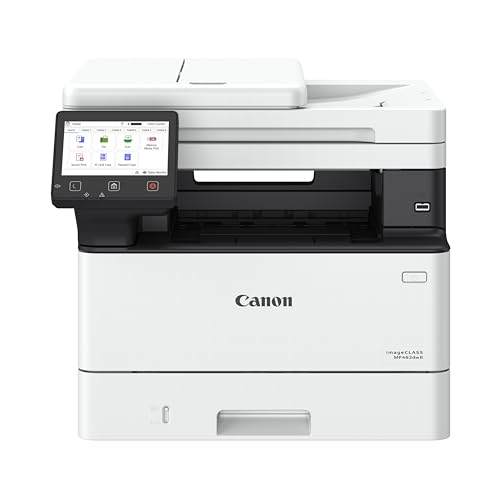
- Prints, scans, copies, and faxes
- One-pass, two-sided 50-sheet feeder
- Expandable paper capacity
Best For: Offices with demanding document and paper-handling needs
Best for Tight Desks

- Compact print, scan, and copy device
- Prints up to 21 ppm
- Supports Microsoft and Mac devices
Best For: One to three people with limited desk space
Best for Small Teams

- 35 ppm monochrome printing
- Print, scan, copy, and fax
- Automatic duplex and document feeder
Best For: Small teams sharing an all-in-one printer
Best for Color Documents
Canon Color imageCLASS LBP646Cdw

- 26 ppm color or monochrome
- Automatic two-sided printing
- 250-sheet cassette
Best For: Offices needing color printing without scanning
Best for Home Offices

- Up to 30 ppm, single-sided
- Dual-band Wi-Fi and USB
- 250-sheet tray; manual duplex
Best For: Compact home-office monochrome printing
Compact Monochrome Pick

- Up to 30 ppm black-and-white printing
- Automatic duplex; Wi-Fi, Ethernet and USB
- Print-only with a 150-sheet capacity
Best For: Small workspaces printing black-and-white documents
Color Document Pick

- Color and monochrome printing up to 19 ppm
- Automatic duplex and 250-sheet tray
- Wi-Fi, USB and mobile-printing support
Best For: Home offices printing color business documents
Monochrome All-in-One Pick

- Prints, copies, scans and faxes
- 50-page feeder and 250-sheet capacity
- Dual-band Wi-Fi, Ethernet and USB
Best For: Small offices handling black-and-white paperwork
Best for Document Workflows – Brother DCP-L2640DW
Among laser printers for Mac and Windows offices, the Brother DCP-L2640DW is a practical choice when a team needs black-and-white printing, scanning, and copying in one compact machine. It prints at up to 36 pages per minute and has a 50-page automatic document feeder for multipage jobs.
Best For: Small offices that regularly print documents and scan or copy stacks of pages.
Pros:
- Automatic two-sided printing and a 250-sheet paper capacity.
- Dual-band Wi-Fi, Ethernet, and USB connection options.
- 50-page document feeder reduces manual handling during scanning and copying.
Cons:
- Prints only in black and white.
- No fax function is listed.
Choose this Brother if scanning workflow matters as much as print speed. Its connection options make it flexible for a shared office, though buyers who need faxing should look elsewhere.
Best for Shared Printing – HP LaserJet Pro 3001dw
HP Laserjet Pro 3001dw Wireless Black & White Printer, Best-for-Office (3G65OF)
Check Price On AmazonThe HP LaserJet Pro 3001dw is a print-focused option among laser printers for Mac and Windows offices. HP lists support for Microsoft and Mac devices, and its up-to-35-page-per-minute black-and-white output suits small teams producing reports and everyday documents.
Best For: Teams of up to seven people that primarily need shared monochrome printing.
Pros:
- Automatic two-sided printing and a 250-sheet paper capacity.
- Wi-Fi, Ethernet, and USB connectivity, plus mobile printing support.
- HP Wolf Pro Security offers customizable security settings.
Cons:
- Black-and-white output only.
- Blocks cartridges that use non-HP chips or circuitry.
This model makes sense when printing and device connectivity take priority. Factor its cartridge restriction into the purchase decision, especially if toner flexibility matters to your office.
Best for High-Volume Office Tasks – Canon imageCLASS MF462dw II
For buyers comparing laser printers for Mac and Windows offices, the Canon imageCLASS MF462dw II stands out for its office workflow features: monochrome printing, scanning, copying, and faxing. It prints at up to 37 pages per minute and includes a 50-sheet, one-pass duplex document feeder.
Best For: Offices that need faxing, two-sided document scanning, and room to expand paper capacity.
Pros:
- 50-sheet feeder scans both sides of a document in one pass.
- 250-sheet cassette and 100-sheet multipurpose tray; optional cassette expands capacity.
- Five-inch color touchscreen and automatic two-sided printing.
Cons:
- Prints only in black and white.
- At 46.6 pounds, it is the heaviest model in this group.
The Canon earns its larger footprint with more paper-handling and document-processing options. Its supplied notes list Apple AirPrint and other mobile printing options; confirm the setup you need before choosing it for a particular computer fleet.
Best for Tight Desks – HP LaserJet MFP M140w
The HP LaserJet MFP M140w is the compact pick among laser printers for Mac and Windows offices when desk space is limited. It prints, scans, and copies in black and white, with listed support for both Microsoft and Mac devices and print speeds up to 21 pages per minute.
Best For: One to three people who need basic printing and occasional scanning or copying in a small workspace.
Pros:
- Compact 10.4-by-14.2-inch footprint.
- Wireless printing and USB connectivity.
- Can copy both sides of an ID card onto one side of a sheet.
Cons:
- No automatic two-sided printing.
- Slower listed print speed than the other models here.
- Blocks cartridges that use non-HP chips or circuitry.
Pick the M140w for its size rather than heavy-duty throughput. It covers everyday small-team tasks, but frequent two-sided or large print jobs are better served by a higher-capacity model.
Best for Small Teams – HP LaserJet Pro 3101fdw
For laser printers for Mac and Windows offices, the HP LaserJet Pro 3101fdw is a practical choice when a small team needs more than printing. It prints, scans, copies, and faxes black-and-white documents, with output speeds up to 35 pages per minute.
Best For: Teams of up to seven people that need a shared monochrome all-in-one.
Pros:
- Automatic two-sided printing and an automatic document feeder support everyday document workflows.
- Wi-Fi, Ethernet, and mobile printing offer flexible ways to connect.
- Includes customizable HP Wolf Pro Security settings.
Cons:
- Prints in black and white only.
- Uses cartridges with original HP chips or circuitry.
Choose this model if scanning and faxing matter as much as fast document printing; a print-only machine will be simpler if those functions would go unused.
Best for Color Documents – Canon Color imageCLASS LBP646Cdw
Canon Color imageCLASS LBP646Cdw Wireless Laser Printer, Duplex, 26 PPM, Print Only, White
Check Price On AmazonAmong laser printers for Mac and Windows offices, the Canon Color imageCLASS LBP646Cdw suits workplaces that need color output but not a scanner. This print-only model produces up to 26 pages per minute in color or black and white and supports Apple AirPrint for compatible devices.
Best For: Offices that print color documents and already have scanning covered.
Pros:
- Automatic two-sided printing helps reduce paper use.
- A 250-sheet cassette and one-sheet multipurpose tray handle routine jobs and occasional specialty feeds.
- Supports wireless setup, Canon PRINT, AirPrint, and Mopria mobile printing.
Cons:
- Cannot scan, copy, or fax.
- The multipurpose tray feeds one sheet at a time.
This is a focused color printer rather than an all-in-one. Confirm the connection method you plan to use with each office computer before buying.
Best for Home Offices – Brother HL-L2405W
For shoppers comparing laser printers for Mac and Windows offices, the Brother HL-L2405W is a compact option for straightforward black-and-white printing. It prints single-sided pages at up to 30 pages per minute and connects through dual-band Wi-Fi or USB.
Best For: Home offices that mainly print text documents and want a compact, print-only machine.
Pros:
- 250-sheet tray supports everyday document printing.
- Manual feed slot accommodates envelopes and specialty paper.
- Brother Mobile Connect enables printing and printer management from a mobile device.
Cons:
- Prints in black and white only, with no scanning or copying.
- Two-sided printing is manual rather than automatic.
Its appeal is simple document output in a compact footprint. If automatic duplexing is essential, consider a different model; check computer compatibility before setting up a mixed-device office.
Compact Monochrome Pick – Canon imageCLASS LBP122dw
For shoppers comparing laser printers for Mac and Windows offices, the Canon imageCLASS LBP122dw is a compact, print-only choice for black-and-white documents. It prints up to 30 pages per minute and supports automatic two-sided printing.
Best For: Small workspaces that need straightforward monochrome printing without scanning or copying.
Pros:
- Automatic duplex printing helps reduce paper use.
- Wi-Fi, Ethernet and USB offer flexible connection options.
- Compact design and a 150-sheet paper capacity suit personal use.
Cons:
- Print-only design has no scan, copy or fax functions.
- Monochrome output cannot produce color documents.
The LBP122dw makes sense when desk space and fast document printing matter more than multifunction features. Check compatibility with your specific computers and operating-system versions before buying.
Color Document Pick – Brother HL-L3220CDW
Among laser printers for Mac and Windows offices, the Brother HL-L3220CDW is worth considering when documents need color graphics as well as crisp text. It prints in color or black and white at up to 19 pages per minute and offers automatic duplex printing.
Best For: Home offices that print color business documents and want fewer paper-tray refills.
Pros:
- Color output supports documents with graphics.
- 250-sheet tray and manual feed slot accommodate routine and specialty media.
- Wi-Fi, USB and mobile-printing support provide connection options.
Cons:
- Print-only model cannot scan, copy or fax.
- Listed print speed is 19 ppm, slower than the monochrome models in this roundup.
Choose this Brother if color output and paper capacity matter more than all-in-one functions. Confirm support for your particular Mac or Windows setup before purchase.
Monochrome All-in-One Pick – Brother MFC-L2820DW
For buyers sorting through laser printers for Mac and Windows offices, the Brother MFC-L2820DW adds copying, scanning and faxing to monochrome printing. Its 50-page automatic document feeder helps with multipage paperwork, while automatic duplex printing handles two-sided output.
Best For: Small offices that regularly print and process black-and-white documents.
Pros:
- Print, copy, scan and fax functions consolidate office tasks.
- 50-page document feeder and 250-sheet paper capacity support multipage work.
- Dual-band Wi-Fi, Ethernet and USB offer flexible connections.
- 2.7-inch touchscreen provides access to supported cloud apps.
Cons:
- Prints only in black and white.
- At 22.5 pounds, it is heavier than the compact Canon print-only model listed here.
This is the most versatile option here for handling paper documents, provided color printing is not a requirement. Verify compatibility with your specific operating-system versions and workflow before ordering.
How We Picked the Best Laser Printers for Mac and Windows Offices
We focused on practical differences across the 10 selected models: black-and-white versus color output, print-only versus multifunction design, duplex printing, paper handling, and advertised wireless and mobile features. We also considered how each type of printer fits a shared office. A product name or feature list does not establish seamless Mac and Windows support, so confirm current driver, operating-system, and network requirements before buying.
Quick Comparison: Match the Printer to the Job
For basic black-and-white documents, start with the print-only Brother HL-L2405W, Canon imageCLASS LBP122dw, or HP LaserJet Pro 3001dw. If scanning and copying matter, compare the Brother DCP-L2640DW, HP LaserJet MFP M140w, HP LaserJet Pro 3101fdw, and Canon imageCLASS MF462dw II. The Brother MFC-L2820DW also lists faxing, which may help offices that still use it.
For color handouts or charts, look at the print-only Canon Color imageCLASS LBP646Cdw and the listed Brother color laser model. Compare their exact configurations and consumable prices; color printing adds supplies to track and replace.
Key Buying Factors for Laser Printers for Mac and Windows Offices
Compatibility and Shared Setup
Check the manufacturer’s support page for your exact macOS and Windows versions, especially if you need full scanning controls rather than print-only access. Confirm whether users can print through your preferred connection and whether the printer supports the mobile-printing methods your team uses. In an office with managed devices, ask IT to verify installation requirements before ordering.
Functions, Duplexing, and Paper
Choose a multifunction printer only if scanning or copying will get used; otherwise, a print-only model may be simpler to manage. If staff scan multipage documents, check for an automatic document feeder and whether it supports the kind of two-sided scanning you need. Duplex printing is useful for reports, but confirm that it is automatic on the specific model. Match tray capacity to how often your team is willing to refill paper.
Ongoing Costs
Compare replacement toner prices, cartridge yields, and any separate drum or maintenance supplies—not just the printer’s purchase price. Estimate cost per page using your expected monthly volume. Check whether a listed subscription is optional and what happens if you choose not to use it.
Who Should Buy Which Laser Printers for Mac and Windows Offices?
Buy a monochrome print-only model if most work is text and scanning happens elsewhere. Choose an all-in-one for shared paperwork; prioritize fax only when your workflow requires it. Pick color for teams that routinely print customer-facing charts or handouts, rather than occasional color jobs. For any of these Laser Printers for Mac and Windows Offices, verify current OS support, replacement-supply costs, and the features you need on the exact listing before you commit.
