
A 4TB SSD gives you room for large project files, media libraries, and years of documents without constantly managing free space. But capacity alone does not tell you whether a laptop will suit your workday.
These ten options span compact business machines, large-screen workstations, and lightweight premium designs. Pay particular attention to what is built into the laptop: several listings advertise 5TB total storage by adding a separate 1TB dock to a 4TB internal SSD.
Best 10 Laptops with Massive 4tb SSD Storage Picks for 2026
Best for Hybrid Work

- 4TB SSD and 64GB DDR5 RAM
- 16-inch 1920×1200 anti-glare display
- Ethernet, Wi-Fi 6E, and Windows 11 Pro
Best For: Business multitasking and large local files
Best Lightweight 17-Inch Pick

- 4TB internal SSD plus 1TB dock storage
- 17-inch 2560×1600 touchscreen
- Listed weight of 3.22 pounds
Best For: Large-screen work on the move
Best Touchscreen Multitasker

- 4TB SSD and 64GB DDR4 RAM
- 14-core Core 9 270H processor
- 15.6-inch Full HD touchscreen with numpad
Best For: Touch-enabled office multitasking
Best for Desk-Based Essentials

- 4TB SSD and 64GB RAM
- 17.3-inch Full HD anti-glare screen
- External CD/DVD drive included
Best For: Large-screen home-office work and physical media
Best Convertible

- 4TB laptop SSD plus separate 1TB dock
- 16-inch AMOLED convertible touchscreen
- 32GB RAM and two Thunderbolt 4 ports
Best For: Storage-heavy work in a touchscreen convertible
Best for Office Storage

- Listed 4TB PCIe SSD and 32GB RAM
- Anti-glare Full HD display and numeric keypad
- Conflicting 17.3-inch and 15.6-inch screen listings
Best For: Large office file libraries and everyday multitasking
Best for Heavy Multitasking

- 4TB laptop SSD plus separate 1TB dock
- 64GB RAM and Core 9 270H
- 15.6-inch Full HD touchscreen
Best For: Memory-intensive multitasking and large local files
Best for Modern Connectivity

- 4TB internal SSD plus 1TB storage dock
- 16-inch 1920 x 1200 touchscreen
- Core Ultra 9, 32GB RAM, and Wi-Fi 7
Best For: Touchscreen productivity with a bundled storage dock
Best Compact Business Pick

- 4TB SSD plus separate 1TB storage dock
- Core i7-13620H and 40GB DDR4 RAM
- 14-inch anti-glare FHD screen and Ethernet
Best For: Compact office work with large files and wired networking
Best Simple Pick
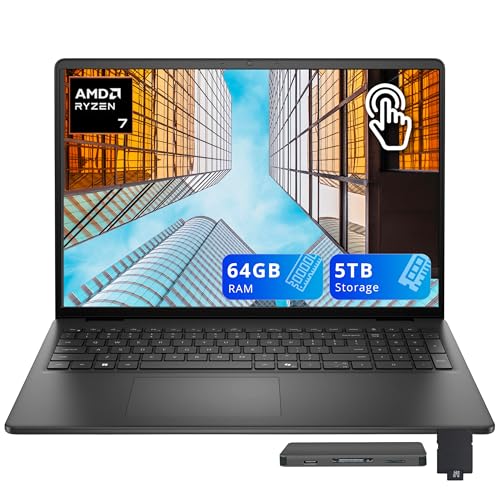
- 64GB DDR5 RAM and Ryzen 7 250
- 4TB SSD plus separate 1TB storage dock
- 16-inch 1920 x 1200 touchscreen
Best For: Memory-intensive multitasking on a large touchscreen
Best for Hybrid Work – Lenovo ThinkPad E16 Gen 2
Among laptops with massive 4TB SSD storage, the ThinkPad E16 Gen 2 is a practical pick for people juggling large files, many browser tabs, and business applications. Its Ryzen 7 7735HS, 64GB of DDR5 memory, and 16-inch WUXGA screen make it well suited to a busy desk setup.
Best For: Business users, developers, and students who want generous local storage and memory in a 16-inch laptop.
Pros:
- 4TB PCIe NVMe SSD and 64GB DDR5 memory provide ample room for files and multitasking.
- 1920×1200 anti-glare IPS display offers more vertical space than a standard 1080p screen.
- Wi-Fi 6E, Ethernet, USB-C, USB-A, and HDMI 2.1 offer flexible connections.
- Windows 11 Pro, fingerprint reader, IR camera, and privacy shutter support work use.
Cons:
- Integrated Radeon 680M graphics are not a substitute for a dedicated GPU in demanding graphics workloads.
- The 16-inch chassis takes up more bag and desk space than a compact laptop.
Choose this configuration if memory capacity and everyday connectivity matter as much as the 4TB drive. Its strongest case is productive, multi-application work rather than GPU-heavy tasks.
Best Lightweight 17-Inch Pick – LG Gram 17 Copilot+ PC
If you want laptops with massive 4TB SSD storage without giving up a large screen, this LG Gram 17 pairs a 4TB internal NVMe SSD with a 17-inch, 2560×1600 IPS touchscreen. The listing also includes a docking-station set with 1TB of additional storage; that extra terabyte is not part of the laptop’s internal SSD.
Best For: Frequent travelers who want a spacious touchscreen, substantial onboard storage, and a listed weight of 3.22 pounds.
Pros:
- 4TB internal SSD leaves plenty of space for files and applications.
- 17-inch WQXGA touchscreen provides a large, sharp workspace.
- Listed 3.22-pound weight is notably portable for a 17-inch laptop.
- Core Ultra 9 288V, 32GB LPDDR5X memory, Wi-Fi 7, and Windows 11 Pro suit modern work setups.
Cons:
- The advertised 5TB total includes 1TB in an external dock, not 5TB inside the laptop.
- The listing says the seal is opened for upgrades; upgraded RAM and SSD carry a separate one-year warranty.
The distinction between internal and bundled storage is key here. Pick the Gram for its combination of a roomy display, 4TB inside the laptop, and low listed weight—not because the full advertised 5TB travels as one internal drive.
Best Touchscreen Multitasker – MSI Modern 15 H
The MSI Modern 15 H earns a place among laptops with massive 4TB SSD storage by combining that capacity with 64GB of RAM and a 14-core Intel Core 9 270H. Its 15.6-inch Full HD touchscreen adds hands-on navigation to a configuration aimed at heavy everyday multitasking.
Best For: Office users who keep numerous applications and large files open and prefer a touchscreen and numeric keypad.
Pros:
- 4TB PCIe NVMe SSD and 64GB RAM accommodate large file libraries and multitasking.
- Core 9 270H has 14 cores and a listed boost speed up to 5.8GHz.
- 15.6-inch anti-glare touchscreen, backlit keyboard, and numpad add everyday convenience.
- Wi-Fi 6E, USB-C, three USB-A ports, HDMI, and a memory-card slot offer connection options.
Cons:
- Full HD screen is less sharp than higher-resolution alternatives, and its listed color coverage is 45% NTSC.
- Integrated Intel graphics limit its appeal for demanding GPU workloads.
- The listed battery life is six hours, so plan accordingly when away from outlets.
This MSI prioritizes processor, memory, and storage capacity over display resolution or color coverage. It makes the most sense as a productivity-focused touchscreen laptop, not a color-critical creative workstation.
Best for Desk-Based Essentials – HP Laptop 17
For shoppers comparing laptops with massive 4TB SSD storage, this HP Laptop 17 offers a straightforward big-screen setup: a 17.3-inch Full HD display, 64GB of RAM, and an AMD Ryzen 5 7430U. The package also lists an external CD/DVD drive and a wireless mouse for people who still use physical media.
Best For: Home-office users and students who want a large display, extensive local storage, and an included optical drive.
Pros:
- 4TB SSD and 64GB RAM provide substantial capacity for documents, media, and open applications.
- 17.3-inch anti-glare IPS display offers a spacious viewing area.
- External CD/DVD drive and wireless mouse are listed as included accessories.
- Windows 11 Pro, Wi-Fi 6, USB-C, USB-A, and HDMI cover common work needs.
Cons:
- The 1920×1080 resolution is modest across a 17.3-inch screen.
- At a listed 4.6 pounds, it is less convenient to carry than lighter large-screen options.
- Integrated Radeon graphics are not intended to replace a dedicated graphics card.
This is a sensible fit when screen size, file space, and the bundled optical drive take priority. If portability or a sharper display matters more, compare those trade-offs before choosing the HP.
Best Convertible – Samsung Galaxy Book5 Pro 360
Among laptops with massive 4tb ssd storage, the Galaxy Book5 Pro 360 stands out for its 16-inch 2880 x 1800 AMOLED touchscreen and 360-degree hinge. Its 4TB SSD is paired with a separate 1TB docking station; the advertised 5TB is not all built into the laptop.
Best For: Buyers who want substantial local storage in a touchscreen convertible for work and creative projects.
Pros:
- 16-inch AMOLED display supports touch and tablet-style use.
- Core Ultra 7 258V and 32GB LPDDR5X RAM suit demanding multitasking.
- Two Thunderbolt 4 ports, HDMI 2.1, USB-A, and a microSD reader offer flexible connections.
Cons:
- The extra 1TB comes in a separate dock, not the laptop’s SSD.
- The seller opens the seal for upgrades; upgraded RAM and SSD have a separate one-year seller warranty.
Choose this model if the display and convertible design matter as much as storage. Confirm the seller’s upgrade and warranty terms before ordering.
Best for Office Storage – HP Ryzen 5 Business Laptop
For shoppers comparing laptops with massive 4tb ssd storage, this HP pairs a listed 4TB PCIe SSD with 32GB DDR4 RAM and a six-core Ryzen 5 7430U. Its anti-glare Full HD display and numeric keypad make it a practical option for everyday office work.
Best For: Office users who keep large document libraries and want ample storage without relying on an external dock.
Pros:
- Listed 4TB PCIe SSD provides substantial built-in file storage.
- 32GB RAM supports multitasking across everyday applications.
- Full-size keyboard includes a numeric keypad; the listing also specifies Wi-Fi 6 and HDMI.
Cons:
- Integrated Radeon graphics are positioned for everyday work and light creative tasks, not dedicated-GPU workloads.
- Listing conflicts on screen size: the title says 17.3 inches, while the detailed specifications say 15.6 inches.
The storage and memory are the draw here, but verify the actual display size with the seller before buying.
Best for Heavy Multitasking – MSI Modern 15 H
The MSI Modern 15 H combines a 4TB SSD with 64GB DDR4 RAM, making it a notable choice among laptops with massive 4tb ssd storage for people who keep many apps and files close at hand. Its advertised 5TB total includes a separate 1TB docking station.
Best For: Buyers who prioritize generous memory and local storage for multitasking on a 15.6-inch laptop.
Pros:
- 64GB RAM and a Core 9 270H processor provide a strong multitasking configuration.
- 4TB laptop SSD is supplemented by a separate 1TB dock.
- 15.6-inch Full HD touchscreen, backlit keyboard, Wi-Fi 6E, and multiple USB ports.
Cons:
- The additional 1TB is in the docking station, not inside the laptop.
- Integrated Intel graphics may not suit buyers seeking dedicated graphics hardware.
- The seller opens the seal for upgrades; upgraded RAM and SSD carry a separate one-year seller warranty.
This is the memory-focused pick of the three, though its Full HD display and integrated graphics make it a better fit for multitasking than graphics-heavy work.
Best for Modern Connectivity – Dell Plus 16 Touchscreen
Among laptops with massive 4tb ssd storage, this Dell Plus 16 pairs a built-in 4TB SSD with a separate 1TB storage dock. Its 16-inch 1920 x 1200 touchscreen, Core Ultra 9 288V, and 32GB RAM make it a practical choice for large files and busy workdays.
Best For: Buyers who want a roomy touchscreen, Windows 11 Pro, and a bundled storage dock.
Pros:
- 4TB internal SSD plus a separate 1TB dock.
- Wi-Fi 7, two USB-C ports, HDMI, and a fingerprint reader.
- Backlit keyboard and 32GB RAM support everyday multitasking.
Cons:
- The advertised 5TB total includes external dock storage, not 5TB inside the laptop.
- The seal is opened for the upgrade; SnowBell covers upgraded RAM and SSD for one year.
Choose this model if its touch display and connectivity matter as much as capacity. Check the separate upgrade and manufacturer warranty terms before ordering.
Best Compact Business Pick – Lenovo V14 14-Inch
For shoppers comparing laptops with massive 4tb ssd storage, the Lenovo V14 puts a 4TB SSD in a 14-inch business laptop and bundles a separate 1TB storage dock. Its Core i7-13620H and 40GB DDR4 RAM suit work that involves many apps and large files.
Best For: Spreadsheet-heavy work and desk setups that benefit from Ethernet and a compact display.
Pros:
- 4TB internal SSD plus a separate 1TB dock.
- 40GB RAM and a 10-core Core i7-13620H.
- Anti-glare FHD display, RJ-45 Ethernet, HDMI, and USB-A ports.
Cons:
- The listed 5TB includes the external dock, not additional internal SSD space.
- Intel UHD integrated graphics and a 720p webcam are modest specifications.
- Ships with Windows 11 Home rather than Pro.
This is the compact option for buyers who value memory and wired connectivity over graphics capability. The upgraded RAM and SSD have a separate one-year warranty from the original components.
Best Simple Pick – Dell 16 Ryzen 7 Touchscreen
Among laptops with massive 4tb ssd storage, this Dell 16 stands out for its 64GB DDR5 RAM alongside a built-in 4TB SSD. The advertised 5TB total also counts a bundled 1TB storage dock, while the 16-inch 1920 x 1200 touchscreen gives work and media room to breathe.
Best For: Buyers running many applications who want abundant RAM and a large touch display.
Pros:
- 64GB DDR5 RAM and an AMD Ryzen 7 250 processor.
- 4TB internal SSD plus a separate 1TB storage dock.
- Backlit keyboard, HDMI, and Wi-Fi 6.
Cons:
- Part of the advertised 5TB capacity resides in the external dock.
- Integrated Radeon graphics are not a dedicated graphics card.
- The upgrade requires an opened seal and carries a separate one-year warranty for RAM and SSD.
Pick this configuration primarily for its memory headroom and touchscreen, not for dedicated-GPU work. It ships with Windows 11 Home.
How We Picked the Best Laptops with Massive 4tb SSD Storage
We focused on the ten selected listings and compared the details most likely to affect daily use: stated internal SSD capacity, processor and memory, screen size, portability, and whether extra advertised storage comes from an external dock. We did not treat a bundled 1TB dock as internal laptop storage. Specifications and bundles can change between sellers, so confirm the exact configuration before checkout.
Quick Comparison: Which Type Fits Your Work?
For a portable business setup, the 14-inch Lenovo V14 takes less desk and bag space, while the LG Gram 17 pairs a larger display with a listed weight of 3.22 pounds. The 16-inch Lenovo ThinkPad E16 Gen 2 and Dell business models offer more screen room without moving to a 17.3-inch chassis. If a spacious built-in display is the priority, compare the two HP 17.3-inch options. Touchscreen shoppers can look at the Samsung Galaxy Book5 Pro 360, Dell Plus 16, and MSI Modern 15 H listings; verify the exact panel and touch features on the seller page.
Key Buying Factors for Laptops with Massive 4tb SSD Storage
Internal Capacity Versus Bundle Capacity
A listing that says “5TB storage” may mean a 4TB SSD inside the laptop plus 1TB supplied through a docking station. That extra terabyte is useful for files you can keep at a desk, but it is not the same as onboard space when traveling. Check whether the 4TB SSD is factory-installed or seller-upgraded, and verify warranty coverage for the final configuration.
Memory, Processor, and Display
Match RAM and processing power to the files you actually use. The 64GB configurations may appeal to heavy multitaskers, while 32GB is already substantial for many office and creative workflows. Compare screen resolution as well as diagonal size: an FHD panel and a higher-resolution WQXGA-class panel can feel quite different when editing detailed documents or images. Do not infer gaming or demanding 3D performance from a large SSD; check graphics specifications separately.
Portability and Connections
Consider weight, charging needs, ports, and whether your workflow depends on the included dock. A 17-inch screen can reduce reliance on an external monitor, but a smaller laptop is easier to carry. If you need the full advertised storage capacity away from your desk, plan to carry the external device too.
Who Should Buy Which Laptops with Massive 4tb SSD Storage?
Choose the ThinkPad E16 Gen 2 or a 64GB MSI or Dell configuration if memory headroom is a priority. Consider the LG Gram 17 when you want a large screen without a typical large-laptop weight, or the Lenovo V14 when a compact footprint matters more. The Samsung Galaxy Book5 Pro 360 suits shoppers seeking a convertible-style touch experience; confirm its exact configuration first. For a straightforward big-screen office setup, compare the HP 17.3-inch models by their stated RAM, processor, included accessories, and seller terms. Whichever you choose, prioritize the verified 4TB internal SSD over a headline total that includes external storage.
