
If your ThinkPad feels slow under heavy multitasking, a memory upgrade is often the fastest and most cost-effective fix. The right kit can improve responsiveness for spreadsheets, browser tabs, creative apps, and business workloads.
This roundup focuses on compatible, buyer-friendly options for different ThinkPad generations, capacities, and speed requirements so you can choose with confidence.
Best 10 Laptop RAM Upgrade Kit for Lenovo Thinkpad Picks for 2026
High-Capacity DDR4 Pick
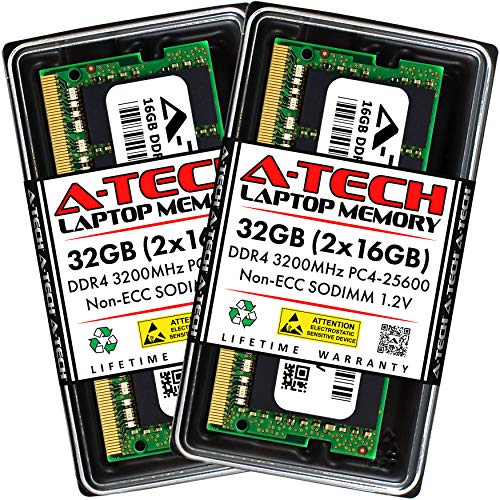
- 32GB total in 2x16GB SO-DIMMs
- DDR4 3200MHz, CL22, 1.2V
- Lifetime warranty and support
Best For: DDR4 ThinkPad users needing a large multitasking upgrade
Legacy DDR3L Option
Timetec 16GB DDR3L 1600MHz Kit

- 2x8GB DDR3L/DDR3 SO-DIMMs
- Runs at 1600MHz with 1.35V/1.5V support
- Lifetime warranty and U.S. support
Best For: Older ThinkPad models that require DDR3L memory
Trusted DDR3 Low-Voltage Upgrade

- 2x8GB DDR3/DDR3L SO-DIMMs
- 1600MHz at 1.35V
- Lifetime warranty and support
Best For: DDR3 ThinkPad owners wanting a stable low-voltage upgrade
High-Capacity Workstation Upgrade
64GB DDR4 for P1/P15/T15 Series

- 64GB kit with 2 x 32GB modules
- DDR4 2933MHz, 1.2V, non-ECC SO-DIMM
- Made for select ThinkPad workstation models
Best For: Compatible ThinkPad owners needing maximum memory
Model-Specific ThinkPad Upgrade
32GB DDR4 3200MHz for P15 Gen 2
- Built for ThinkPad P15 Gen 2
- 32GB kit with 2 x 16GB modules
- DDR4 3200MHz, 1.2V, non-ECC
Best For: P15 Gen 2 users wanting a matched 32GB kit
T480 Capacity Boost

- 2 x 16GB matched modules
- DDR4 2400MHz PC4-19200 SO-DIMM
- Lifetime warranty and U.S. support
Best For: ThinkPad T480 owners needing a matched 32GB upgrade
P51 Workstation Memory

- 2 x 16GB for 32GB total
- DDR4 2133MHz PC4-17000 SO-DIMM
- Lifetime warranty and free support
Best For: ThinkPad P51 buyers seeking a straightforward 32GB upgrade
E595 Everyday Upgrade

- 2 x 16GB matched sticks
- DDR4 2400MHz PC4-19200 SO-DIMM
- Lifetime warranty and technical support
Best For: ThinkPad E595 owners looking for a simple 32GB upgrade
High-Capacity DDR4 Pick – A-Tech 32GB DDR4 3200MHz Kit
If you want a laptop ram upgrade kit for lenovo thinkpad with plenty of headroom, this A-Tech 32GB kit is a strong DDR4 option for compatible systems. It uses 2x16GB SO-DIMM modules at 3200MHz and 1.2V, making it a practical choice for boosting multitasking and reducing load times on supported laptops.
Best For: Users with a DDR4 ThinkPad or other compatible laptop who want a straightforward 32GB upgrade for heavier multitasking.
Pros:
- 32GB kit in a dual-module 2x16GB configuration
- DDR4 3200MHz, PC4-25600, CL22, 1.2V
- Non-ECC unbuffered SO-DIMM design with easy at-home installation
- Backed by a limited lifetime warranty and tech support
Cons:
- Only works with systems that support DDR4 SO-DIMM memory
- Not suitable for DDR3 or older Lenovo ThinkPad models
This is a solid pick if your ThinkPad already uses DDR4 and you want a big capacity jump without a complicated setup. Just confirm your model supports 3200MHz DDR4 SO-DIMMs before buying.
Legacy DDR3L Option – Timetec 16GB DDR3L 1600MHz Kit
For an older laptop ram upgrade kit for lenovo thinkpad, this Timetec 16GB kit fits systems that use DDR3L or DDR3 SO-DIMM memory. The 2x8GB modules run at 1600MHz and 1.35V, so it’s aimed at older notebooks that need a dependable capacity bump rather than modern high-speed DDR4 performance.
Best For: Owners of older DDR3L ThinkPad models or similar laptops that need a compatible 16GB upgrade.
Pros:
- DDR3L/DDR3 1600MHz kit with 2x8GB modules
- Dual-voltage support at 1.35V or 1.5V
- Non-ECC unbuffered SO-DIMM format for laptops and notebooks
- Lifetime warranty plus U.S.-based technical support
Cons:
- Not compatible with DDR4 or DDR5 systems
- Lower capacity than 32GB kits for heavier workloads
This kit makes sense when your ThinkPad is limited to DDR3L and you need a simple, proven upgrade. It’s a better match for compatibility than speed, which is exactly what older systems usually need.
Modern Plug-and-Play Upgrade – PUSKILL 32GB DDR4 3200MHz Kit
This laptop ram upgrade kit for lenovo thinkpad is built for modern DDR4 systems that can benefit from a fast, easy memory bump. The PUSKILL 32GB kit uses 2x16GB modules at 3200MHz and 1.2V, and it’s designed to run at its advertised speed automatically after installation.
Best For: Lenovo ThinkPad users with compatible DDR4 laptops who want an easy dual-channel 32GB upgrade.
Pros:
- 32GB total capacity in a 2x16GB dual-channel kit
- DDR4 3200MHz, CL22, 1.2V, JEDEC compliant
- Plug-and-play setup with no BIOS tuning required
- Made for broad laptop compatibility, including Lenovo systems that support DDR4
Cons:
- Only fits laptops that use DDR4 SO-DIMM memory
- Compatibility depends on processor and system support
For buyers who want simplicity plus capacity, this is a strong modern upgrade path. It keeps installation straightforward while still delivering the bandwidth and dual-channel setup many productivity and gaming workloads can use.
Trusted DDR3 Low-Voltage Upgrade – A-Tech 16GB DDR3L 1600MHz Kit
If you need a laptop ram upgrade kit for lenovo thinkpad and your machine still uses DDR3, this A-Tech 16GB kit is aimed at exactly that kind of system. The 2x8GB SO-DIMMs run at 1600MHz and 1.35V, offering a practical memory increase for supported notebooks, mini PCs, and all-in-ones.
Best For: DDR3 ThinkPad users who want a dependable 16GB kit with low-voltage operation.
Pros:
- 16GB kit with 2x8GB DDR3/DDR3L modules
- 1600MHz speed and 1.35V low-voltage design
- Non-ECC unbuffered 204-pin SO-DIMM format
- Lifetime warranty with technical support
Cons:
- Not compatible with DDR4 or DDR5 laptops
- Limited to systems that support DDR3 SO-DIMM memory
This is a sensible upgrade if your ThinkPad is older and needs compatible memory more than cutting-edge speed. It offers a balanced capacity increase with straightforward plug-and-play installation.
High-Capacity Workstation Upgrade – 64GB DDR4 for P1/P15/T15 Series
If you need a laptop ram upgrade kit for lenovo thinkpad workstations, this A-Tech 64GB set is built for specific ThinkPad models and gives you a large memory bump for heavier multitasking, large projects, and smoother day-to-day responsiveness. It uses DDR4 2933MHz 260-pin SO-DIMM modules at 1.2V, so it fits the standard upgrade path for the supported systems.
Best For: Owners of compatible ThinkPad P1 Gen 3, P15 Gen 1, P15v Gen 1, T15g Gen 1, or T15p Gen 1 laptops who want a high-capacity upgrade.
Pros:
- 64GB total capacity from 2 x 32GB modules
- DDR4 2933MHz with non-ECC unbuffered design
- Built for specific Lenovo ThinkPad workstation models
- Backed by a limited lifetime warranty and tech support
Cons:
- Only compatible with the listed ThinkPad models
- May be more capacity than casual users need
This is the strongest option here if your priority is maximum memory for a supported ThinkPad workstation. It’s a straightforward way to expand capacity while staying within the model and speed specifications listed by the manufacturer.
Simple Everyday Memory Upgrade – 16GB DDR4 2400MHz SODIMM Kit
For a laptop ram upgrade kit for lenovo thinkpad-style systems or other supported notebooks, this Timetec 16GB kit is a simple plug-and-play option with two 8GB modules. It runs at DDR4 2400MHz, uses a 260-pin SO-DIMM layout, and is aimed at selected laptops, mini PCs, and all-in-one systems that support that spec.
Best For: Users who want a straightforward 16GB DDR4 SO-DIMM upgrade for a supported laptop or compact system.
Pros:
- 16GB kit includes 2 x 8GB modules
- DDR4 2400MHz, CL17, 1.2V design
- Plug-and-play installation with no expertise required
- Limited lifetime warranty and U.S.-based technical support
Cons:
- Not compatible with desktop DIMM slots
- Compatibility depends on your system supporting 260-pin DDR4 SO-DIMM memory
This kit makes sense when you need a practical capacity increase without moving to a workstation-specific memory upgrade. Just be sure your ThinkPad or other laptop supports DDR4 2400MHz SO-DIMM modules before buying.
Model-Specific ThinkPad Upgrade – 32GB DDR4 3200MHz for P15 Gen 2
If you’re shopping for a laptop ram upgrade kit for lenovo thinkpad P15 Gen 2, this A-Tech 32GB set is tailored to that exact machine family. It includes two 16GB DDR4 modules rated at 3200MHz, with a 260-pin SO-DIMM layout and 1.2V non-ECC unbuffered construction for the supported laptop.
Best For: ThinkPad P15 Gen 2 owners who want a matched 32GB upgrade built for their model.
Pros:
- Designed specifically for ThinkPad P15 Gen 2 laptops
- 32GB total capacity from 2 x 16GB modules
- DDR4 3200MHz with 260-pin SO-DIMM format
- Limited lifetime warranty with technical support
Cons:
- Only listed for the P15 Gen 2 machine types
- Not a universal ThinkPad memory kit
This is the most direct fit in the group if your laptop is a ThinkPad P15 Gen 2. The model-specific compatibility should make selection easier, while the 32GB capacity is a solid middle ground for demanding work without overbuying.
T480 Capacity Boost – 32GB DDR4-2400 Upgrade Kit
If you need a laptop RAM upgrade kit for Lenovo ThinkPad T480, this A-Tech 32GB set gives you two matched 16GB DDR4 SODIMMs rated at 2400MHz. It’s a straightforward option for users who want a higher-capacity, non-ECC memory upgrade with the same 1.2V SO-DIMM specs commonly used in compatible ThinkPad systems.
Best For: ThinkPad T480 owners wanting a matched 32GB DDR4-2400 kit for a capacity jump.
Pros:
- 32GB kit includes 2 x 16GB modules for balanced dual-channel upgrading
- DDR4 2400MHz PC4-19200, 260-pin SO-DIMM format
- Non-ECC, unbuffered memory with 1.2V operation
- Lifetime warranty and free U.S.-based technical support
Cons:
- Made specifically for the Lenovo ThinkPad T480, so compatibility is narrower than generic kits
- 2400MHz speed may not suit users looking for a faster-rated module
For a ThinkPad T480 memory upgrade, this kit focuses on the essentials: matched sticks, standard DDR4 specs, and a warranty-backed purchase. It’s best suited to users who want reliable capacity expansion without extra complexity.
P51 Workstation Memory – 32GB DDR4-2133 Kit
This laptop RAM upgrade kit for Lenovo ThinkPad P51 is a simple 32GB package built from two 16GB DDR4 modules running at 2133MHz. It uses standard 260-pin SO-DIMM, non-ECC, unbuffered memory, making it a practical pick for buyers who want a workstation memory upgrade with published Lenovo ThinkPad P51 compatibility.
Best For: ThinkPad P51 users who want a matched 32GB DDR4 kit with standard workstation-friendly specs.
Pros:
- 32GB total capacity with 2 x 16GB sticks
- DDR4 2133MHz PC4-17000 speed and 1.2V operation
- 260-pin non-ECC, unbuffered SO-DIMM format
- Lifetime warranty plus free U.S. technical support
Cons:
- 2133MHz is slower than some newer DDR4 upgrade kits
- Designed for the ThinkPad P51, so it is not a broad universal fit
This kit is a sensible choice if you want dependable capacity for a ThinkPad P51 without chasing higher-speed specs. The matched 16GB sticks and warranty support make it a clean, low-friction upgrade option.
E595 Everyday Upgrade – 32GB DDR4-2400 Kit
If you’re shopping for a laptop RAM upgrade kit for Lenovo ThinkPad E595, this A-Tech 32GB set provides two 16GB DDR4 modules at 2400MHz. It follows the common 1.2V, 260-pin SO-DIMM, non-ECC layout, so it fits the profile of a practical memory expansion for a compatible ThinkPad laptop.
Best For: ThinkPad E595 users wanting a matched 32GB DDR4-2400 memory kit.
Pros:
- 32GB kit with 2 x 16GB modules
- DDR4 2400MHz PC4-19200 SO-DIMM specification
- 1.2V, non-ECC, unbuffered memory design
- Lifetime warranty and free U.S.-based technical support
Cons:
- Compatibility is tailored to the ThinkPad E595 rather than all laptops
- No extra performance claims beyond the listed DDR4-2400 specification
For ThinkPad E595 owners, this is a practical capacity upgrade with the right core specs and a matched pair of modules. It’s best for shoppers who value a simple, warranty-backed kit over more specialized memory features.
How We Picked These Laptop RAM Upgrade Kit for Lenovo Thinkpad Options
We prioritized compatibility, capacity, speed, voltage, and module type first. For a Laptop RAM Upgrade Kit for Lenovo Thinkpad, matching DDR generation and supported speed matters more than chasing the highest specs on paper. We also favored non-ECC SODIMM kits from reputable memory brands with clear model support and practical capacity splits like 2x8GB and 2x16GB.
Quick Comparison: What Matters Most
If you want the shortest path to the right choice, start with your ThinkPad generation. Older systems often need DDR3L/DDR3 1600MHz or DDR4 2133/2400MHz, while newer performance models may support DDR4 2933MHz or 3200MHz. Capacity is the next decision: 16GB is a solid baseline for everyday productivity, 32GB suits heavier multitasking and professional work, and 64GB is best for demanding engineering, virtualization, or content creation workloads.
Key Buying Factors for Laptop RAM Upgrade Kit for Lenovo Thinkpad
1) DDR Generation and Pin Count
Make sure the kit matches your ThinkPad’s memory generation. DDR3L and DDR4 are not interchangeable, and the physical SODIMM standard must align with your laptop’s slot type. Check your model’s official memory support before buying.
2) Speed and Backward Compatibility
Installed RAM usually runs at the fastest speed your system supports, but only if the board, CPU, and BIOS allow it. For many ThinkPad users, DDR4 2400MHz or 3200MHz is a safe target, while legacy systems may need 1600MHz or 2133MHz.
3) Voltage and Stability
Most modern ThinkPad-compatible DDR4 kits use 1.2V, while many DDR3L modules use 1.35V. Stability is more important than peak speed, especially for business laptops that need dependable daily operation.
4) Capacity Needs
Choose based on workload, not just budget. 16GB works well for general office use, 32GB is a smart upgrade for power users, and 64GB is for memory-hungry professional tasks. If your ThinkPad has soldered RAM plus one slot, factor that in before purchasing.
Who Should Buy Which Laptop RAM Upgrade Kit for Lenovo Thinkpad?
If you use your ThinkPad for email, browsing, and standard office work, a 16GB kit is usually enough. If you run large Excel files, lots of tabs, Teams, VMs, or creative apps, 32GB is the best all-around choice. If you own a workstation-class ThinkPad and regularly handle simulation, rendering, or advanced multitasking, look at higher-capacity kits designed for supported models.
In short, the best upgrade is the one that matches your exact ThinkPad model and workload. Verify compatibility first, then choose the capacity that gives you enough headroom for the next few years.
