
Upgrading memory is one of the easiest ways to make a Dell XPS feel faster, smoother, and more capable under pressure. The right kit can improve multitasking, reduce slowdowns, and help demanding apps run more comfortably.
This roundup of the best laptop RAM upgrade kit for Dell XPS options in 2026 focuses on compatibility first, then speed, capacity, and value.
Best 10 Laptop RAM Upgrade Kit for Dell Xps Picks for 2026
Everyday DDR4 Pick
Crucial 32GB DDR4 3200 SODIMM Kit

- 32GB DDR4 kit with 2x16GB modules
- Downclocks to 2933MHz or 2666MHz
- 260-pin SODIMM, 1.2V, non-ECC
Best For: Dell XPS DDR4 laptops needing a dependable 32GB boost
High-Capacity Dell XPS Upgrade

- 64GB kit with 2x32GB DDR5 modules
- Up to 5200MHz, 1.1V JEDEC DDR5 standard
- Built for XPS 15 9530 and 17 9730
Best For: Confirmed DDR5 Dell XPS owners who want the largest capacity
Proven DDR4 Match
A-Tech 32GB Kit for Dell XPS 15

- Fits XPS 15 9550, 9560, and 9570
- 32GB total with 2x16GB DDR4 modules
- 2666MHz, 1.2V laptop memory
Best For: Older Dell XPS 15 owners needing a model-specific DDR4 upgrade
Modern DDR5 Choice
Crucial 32GB DDR5 5600 SODIMM Kit

- 32GB DDR5 kit with 2x16GB modules
- Runs at 5600, 5200, or 4800MHz
- 1.1V non-ECC with XMP 3.0 and EXPO support
Best For: Newer DDR5 Dell XPS laptops needing a flexible 32GB upgrade
Budget Dell XPS 15 9560 Boost
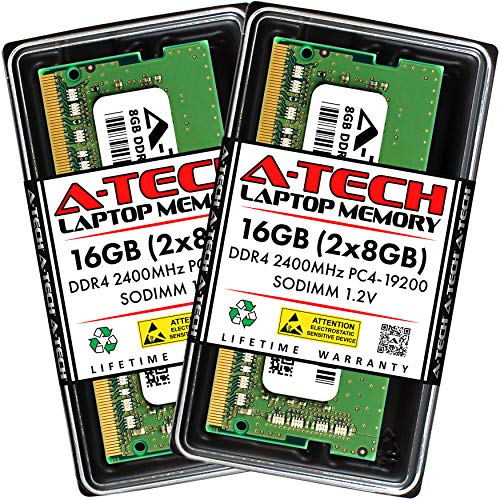
- Compatible with Dell XPS 15 9560
- 2 x 8GB DDR4 SO-DIMM at 2400MHz
- Plug-and-play, 1.2V non-ECC
Best For: Dell XPS 15 9560 users needing a simple 16GB upgrade
High-Capacity Laptop Upgrade
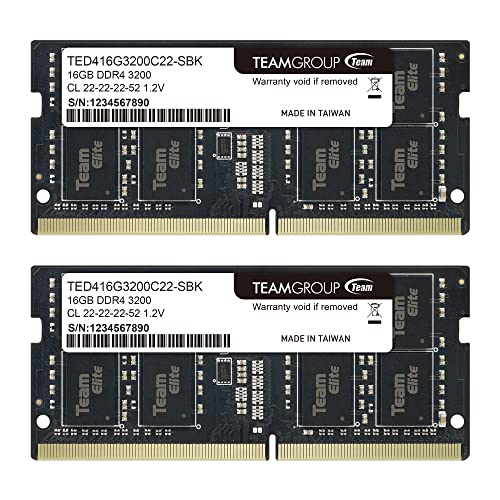
- 32GB kit with 2 x 16GB modules
- 3200MHz DDR4 SODIMM, may downclock
- Lifetime warranty with free support
Best For: Users wanting a larger-capacity laptop memory upgrade
DDR5 Dell XPS Performance Kit
32GB DDR5 5200MHz for 9530/9730

- Fits XPS 15 9530 DDR5 and XPS 17 9730
- 32GB DDR5 kit rated up to 5200MHz
- 1.1V non-ECC with lifetime warranty
Best For: Confirmed DDR5 Dell XPS owners needing a 32GB performance upgrade
Legacy DDR3 Upgrade Kit

- 2 x 8GB DDR3L modules for 16GB total
- 1600MHz, 1.35V, non-ECC SO-DIMM
- Best for select DDR3 XPS systems
Best For: Older XPS models that need a DDR3L 16GB memory upgrade
Dell XPS 9500/9700 Upgrade

- Built for XPS 15 9500 and XPS 17 9700
- 32GB kit with 2 x 16GB DDR4 modules
- 2933MHz, 1.2V, non-ECC SO-DIMM
Best For: XPS 15 9500 or XPS 17 9700 users wanting a model-specific 32GB upgrade
Earlier XPS 15 Memory Boost
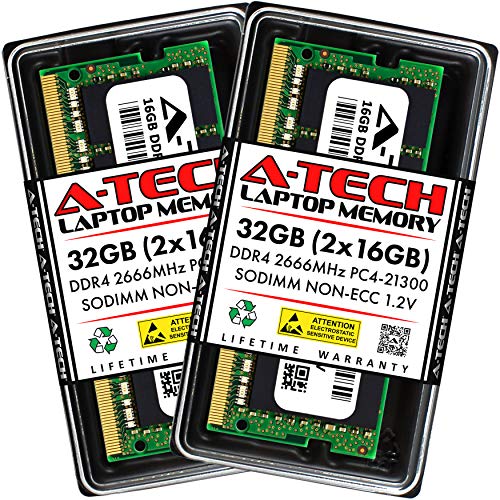
- Made for XPS 15 7590 and 9570
- 32GB kit with 2 x 16GB DDR4 modules
- 2666/2667MHz at 1.2V
Best For: XPS 15 7590 or 9570 owners upgrading to 32GB DDR4
Everyday DDR4 Pick – Crucial 32GB DDR4 3200 SODIMM Kit
If you’re shopping for a laptop ram upgrade kit for dell xps and your system uses DDR4 memory, this Crucial 32GB kit is a straightforward way to add more headroom for multitasking and general responsiveness. It runs at 3200MHz but can downclock to 2933MHz or 2666MHz, which helps it fit a wider range of compatible laptops.
Best For: Dell XPS laptops and other DDR4 systems that need a reliable 32GB capacity boost.
Pros:
- 32GB kit with 2x16GB modules for a meaningful upgrade in multitasking capacity
- Downclockable to 2933MHz or 2666MHz for broader DDR4 compatibility
- 260-pin SODIMM, 1.2V, non-ECC design for standard laptop use
- Backed by Micron testing and a limited lifetime warranty
Cons:
- DDR4 only, so it is not for DDR5-based Dell XPS models
- Compatibility should still be checked with Crucial’s scanner or selector
Overall, this is a practical, well-rounded memory kit if your Dell XPS supports DDR4 and you want a trusted 32GB upgrade without extra complexity. Its downclocking support makes it easier to match the speed your laptop expects.
High-Capacity Dell XPS Upgrade – A-Tech 64GB DDR5 Kit for XPS
For a laptop ram upgrade kit for dell xps that prioritizes maximum capacity, this A-Tech 64GB kit is built for Dell XPS 15 9530 and 17 9730 models that use DDR5. It offers two 32GB modules at up to 5200MHz, giving you plenty of memory for heavier workloads while staying within JEDEC DDR5 standards.
Best For: Dell XPS 15 9530 and 17 9730 owners who need a large DDR5 memory upgrade.
Pros:
- 64GB total capacity from 2x32GB modules
- DDR5 SODIMM kit rated up to 5200MHz at 1.1V
- Designed specifically for Dell XPS 15 9530 and 17 9730 models
- Limited lifetime warranty and quality control testing
Cons:
- Not for older XPS 15 9530 systems that use DDR3 memory
- Model verification is important before buying
This is the strongest capacity option in the group, but it only makes sense if your XPS model is confirmed to use DDR5. If that checks out, it delivers a simple plug-and-play path to a much larger memory pool.
Proven DDR4 Match – A-Tech 32GB Kit for Dell XPS 15
If you need a laptop ram upgrade kit for dell xps and you own a supported DDR4-era XPS 15, this A-Tech 32GB set is tailored to the 9550, 9560, and 9570. It runs at 2666MHz with standard 1.2V DDR4 specs, making it a focused choice for a compatible upgrade.
Best For: Dell XPS 15 9550, 9560, and 9570 users who want a matching DDR4 replacement or upgrade.
Pros:
- Made for Dell XPS 15 9550, 9560, and 9570 models
- 32GB total capacity from 2x16GB DDR4 modules
- 2666MHz PC4-21300 speed with 1.2V operation
- Lifetime warranty and toll-free technical support
Cons:
- Limited to specific Dell XPS 15 generations
- Not a fit for newer DDR5 XPS systems
This kit is a good choice when you want a memory upgrade that is closely aligned with older XPS 15 configurations. The model-specific design helps reduce guesswork if your laptop is one of the supported versions.
Modern DDR5 Choice – Crucial 32GB DDR5 5600 SODIMM Kit
For shoppers comparing a laptop ram upgrade kit for dell xps, this Crucial DDR5 kit is a strong option for XPS models that support modern DDR5 memory. It provides 32GB total across two 16GB modules and can run at 5600MHz, 5200MHz, or 4800MHz, which adds flexibility for compatible systems.
Best For: Dell XPS laptops with DDR5 support that need a balanced 32GB upgrade.
Pros:
- 32GB kit with 2x16GB DDR5 SODIMM modules
- Supports 5600MHz, 5200MHz, or 4800MHz operation
- 1.1V, non-ECC design with Intel XMP 3.0 and AMD EXPO support
- Backed by Micron testing and a limited lifetime warranty
Cons:
- Only appropriate for systems that use DDR5 memory
- Best suited to newer platforms, not older XPS generations
This is a good all-around DDR5 kit if your Dell XPS is already on the newer memory standard. Its downclocking flexibility and broad platform support make it an easy fit for many modern laptops.
Budget Dell XPS 15 9560 Boost – 16GB DDR4 2400MHz Kit
If you need a laptop ram upgrade kit for dell xps and you’re working with an XPS 15 9560, this 16GB A-Tech kit is a straightforward DDR4 option built for a plug-and-play upgrade. It uses 2 x 8GB SO-DIMM modules at 2400MHz, so it’s aimed at improving everyday responsiveness, reducing memory bottlenecks, and fitting the system’s supported DDR4 setup.
Best For: Dell XPS 15 9560 owners who want a simple 16GB memory upgrade with DDR4 compatibility and a lifetime warranty.
Pros:
- Compatible with the Dell XPS 15 9560 laptop
- 2 x 8GB DDR4 SO-DIMM modules at 2400MHz
- 1.2V non-ECC unbuffered design
- Simple plug-and-play installation
Cons:
- Only fits the XPS 15 9560 model listed by the manufacturer
- 16GB capacity may be limiting for heavier multitasking
This is a practical match for anyone upgrading a supported XPS 15 9560 without chasing extra features. The value here is in the confirmed compatibility, standard DDR4 specs, and included lifetime warranty support.
High-Capacity Laptop Upgrade – 32GB DDR4 3200MHz SODIMM Kit
If you’re comparing a laptop ram upgrade kit for dell xps or another supported notebook, this TEAMGROUP 32GB kit is built around a higher-capacity DDR4 SODIMM setup. It runs at 3200MHz but may operate at 2933MHz or 2666MHz depending on the host system, so it’s best viewed as a flexible memory upgrade for laptops that support this class of module.
Best For: Buyers who want a 32GB dual-channel laptop memory kit with broad notebook compatibility and lifetime coverage.
Pros:
- 32GB kit with 2 x 16GB modules
- DDR4 3200MHz SODIMM design with 1.2V operation
- Can run at 2933MHz or 2666MHz depending on system support
- Lifetime warranty and free technical support
Cons:
- Actual speed depends on CPU, motherboard, BIOS, and memory support
- Compatibility must be checked before purchase
This kit makes sense when capacity matters more than a model-specific fit list. Its main strengths are the 32GB total size, standard laptop SODIMM format, and the flexibility to downclock when a system requires it.
DDR5 Dell XPS Performance Kit – 32GB DDR5 5200MHz for 9530/9730
For a laptop ram upgrade kit for dell xps built for newer hardware, this A-Tech 32GB kit targets the Dell XPS 15 9530 with DDR5 and the XPS 17 9730. It uses 2 x 16GB DDR5 SO-DIMM modules at up to 5200MHz, with 1.1V operation and a non-ECC unbuffered layout for users who need a modern memory upgrade and have confirmed DDR5 support.
Best For: Owners of compatible DDR5 Dell XPS models who want a 32GB upgrade kit with current-generation memory specs.
Pros:
- Compatible with Dell XPS 15 9530 (DDR5) and XPS 17 9730
- 32GB kit with 2 x 16GB DDR5 modules
- Up to 5200MHz PC5-41600 speed at 1.1V
- Plug-and-play installation and lifetime warranty
Cons:
- Only for the DDR5 version of supported XPS models
- Manufacturer warns some older XPS 15 9530 models may use DDR3 instead
- Requires careful spec verification before purchase
This is the most future-facing option in the group, but it depends on exact model support. If your XPS is confirmed for DDR5, the combination of 32GB capacity, 5200MHz rating, and included warranty makes it a strong performance-focused upgrade.
Legacy DDR3 Upgrade Kit – A-Tech 16GB DDR3L 1600MHz Kit
If your Dell XPS uses DDR3 memory, this laptop ram upgrade kit for dell xps is a straightforward way to add capacity with a matched 16GB kit. The A-Tech DDR3L SO-DIMM modules run at 1600MHz, use 1.35V low-voltage DDR3/DDR3L standards, and are built for select DDR3 SODIMM-capable laptops and small form factor systems.
Best For: Older XPS owners who need a compatible DDR3L 16GB kit for a supported laptop configuration.
Pros:
- Matched 2 x 8GB kit for a 16GB total upgrade
- DDR3L 1.35V, 1600MHz, non-ECC unbuffered SO-DIMM
- Plug-and-play installation with no technical expertise required
- Backed by a limited lifetime warranty and technical support
Cons:
- Only for systems that specifically support DDR3/DDR3L SO-DIMM memory
- Not compatible with DDR4 or DDR5 laptops
- Capacity and form factor must be verified before buying
This is a dependable choice if your Dell XPS platform matches the DDR3L requirements, but compatibility is the deciding factor. Check your system memory type and supported capacity first, since this kit is not universal across XPS generations.
Dell XPS 9500/9700 Upgrade – A-Tech 32GB 2933MHz Kit
For a laptop ram upgrade kit for dell xps built around newer 10th-gen-era machines, this 32GB A-Tech kit is designed specifically for the XPS 15 9500 and XPS 17 9700. It uses DDR4 SO-DIMM modules rated up to 2933MHz at 1.2V, giving you a matched 2 x 16GB configuration for more headroom in multitasking and heavier workloads.
Best For: Owners of the Dell XPS 15 9500 or XPS 17 9700 who want a purpose-built 32GB memory upgrade.
Pros:
- Explicit compatibility with Dell XPS 15 9500 and XPS 17 9700
- 32GB total from a matched 2 x 16GB kit
- DDR4 2933MHz, 1.2V, non-ECC unbuffered SO-DIMM
- Simple plug-and-play installation with quality control testing
Cons:
- Limited to the listed XPS models
- Speed is dependent on system support and seating/channel setup
- Not intended for DDR3 or other non-DDR4 platforms
This is the most targeted option in the lineup if your XPS matches the supported model list. It pairs a high-capacity 32GB kit with the right DDR4 specification, making it a practical upgrade when you want a confident fit rather than a generic module.
Earlier XPS 15 Memory Boost – A-Tech 32GB 2666MHz Kit
This laptop ram upgrade kit for dell xps is aimed at the XPS 15 7590 and XPS 15 9570, giving you a matched 32GB configuration in DDR4 SO-DIMM format. With 2666/2667MHz speeds and 1.2V operation, it’s built for users who want more memory capacity in supported XPS 15 systems without dealing with a complicated install.
Best For: Dell XPS 15 7590 or 9570 owners who want a compatible 32GB DDR4 upgrade.
Pros:
- Designed for Dell XPS 15 7590 and 15 9570
- 32GB total from 2 x 16GB modules
- DDR4 2666MHz/2667MHz, 1.2V, non-ECC unbuffered
- Plug-and-play install with quality control testing
Cons:
- Only matches the listed XPS 15 models
- Speed and behavior depend on the system’s memory support
- Not suitable for DDR3-based laptops
If your XPS 15 is one of the supported models, this kit offers a clean, high-capacity upgrade path. The main advantage is its model-specific fit, which helps reduce guesswork when selecting a replacement or expansion kit.
How We Picked the Best Laptop RAM Upgrade Kit for Dell Xps
For a Laptop RAM Upgrade Kit for Dell Xps, compatibility matters more than raw speed claims. We prioritized kits that match common XPS generations, use the correct DDR type and form factor, and come in balanced dual-channel configurations where possible.
We also looked for clear capacity options, sensible timings, and speeds that make sense for the laptop generation. That means DDR3L for older systems, DDR4 for many mid-generation XPS models, and DDR5 for newer XPS machines that support it.
Quick Comparison
Think of the choices in three buckets: lower-capacity upgrades for basic responsiveness, 32GB kits for most power users, and 64GB kits for heavier creative, engineering, or virtual machine workloads. Newer XPS models with DDR5 support can benefit from higher bandwidth, while older systems should focus on matching the exact supported spec.
Key Buying Factors for Laptop RAM Upgrade Kit for Dell Xps
Compatibility by XPS Model
The most important step is matching the RAM to your exact Dell XPS generation. A kit built for an XPS 15 9560 will not be the right choice for an XPS 15 9530 or a newer DDR5-based model.
DDR Type and Speed
Check whether your laptop uses DDR3L, DDR4, or DDR5, then choose a kit that fits the platform. If the kit is rated above your laptop’s supported speed, it will usually downclock automatically, but only if the module type is correct.
Capacity Needs
16GB is enough for everyday productivity, but 32GB is the safer sweet spot for most buyers looking at a Dell XPS memory upgrade. If you edit large media files, run multiple heavy apps, or use virtual machines, 64GB may be worth it.
Dual-Channel Configuration
Matched pairs usually offer better performance and better stability than mixing separate sticks. For a Laptop RAM Upgrade Kit for Dell Xps, a 2x8GB or 2x16GB set is often the most practical path.
Who Should Buy Which Laptop RAM Upgrade Kit for Dell Xps?
Buy 16GB if you mainly browse, stream, and handle office work. Choose 32GB if you want a well-rounded upgrade for content creation, development, and heavy multitasking. Go to 64GB only if your workload regularly pushes memory usage hard and your specific XPS model supports it.
If you are unsure, verify your exact model number, current memory spec, and maximum supported capacity before ordering. That quick check prevents compatibility mistakes and helps you buy the right upgrade the first time.
