
When it comes to enhancing your workspace, having the right laptop stand can make a significant difference. You’ll want something that not only elevates your screen for better posture but also keeps your devices connected seamlessly. In this guide, we’ll explore ten top laptop stands with integrated USB hubs that balance comfort and functionality. Let’s uncover which options are worth considering for your setup.
USB C Laptop Docking Station Stand (8 in 1 Hub)

If you’re a busy professional or student using a laptop between 10 to 17 inches, the Mukiya USB C Laptop Docking Station Stand is the perfect accessory for you. This 8-in-1 hub enhances your workspace with features like 4K HDMI output, two USB 3.0 ports for fast data transfer, and SD/TF card slots. It not only serves as a docking station but also as an ergonomic stand, promoting better posture with its adjustable height. Made from premium aluminum, it’s lightweight and portable, making it ideal for travel. Enjoy improved connectivity and comfort wherever you work!
Best For: Busy professionals and students using laptops between 10 to 17 inches who need enhanced connectivity and ergonomic support.
Pros:
- Multiple connectivity options with 4K HDMI, USB 3.0 ports, and SD/TF card slots for versatile use.
- Ergonomic design with adjustable height to promote better posture and reduce strain during long working hours.
- Lightweight and portable construction, made from premium aluminum, ideal for travel and business trips.
Cons:
- Limited to USB-C compatibility, requiring confirmation that the laptop supports DisplayPort Alt-mode.
- Maximum power delivery of 100W, which may not be sufficient for high-power demanding devices.
- Adjustable height may not suit all users, as personal preferences for stand height can vary significantly.
Laptop Docking Station 11-in-1 USB C Hub

The Laptop Docking Station 11-in-1 USB C Hub is perfect for professionals and students who need a versatile and efficient workspace. With 11 ports, including USB-C PD charging, 4K HDMI, and Gigabit Ethernet, you can easily connect multiple devices. Its adjustable height and 360° rotation make screen sharing a breeze. Weighing just 2.09 pounds, it’s portable and built for stability. Users rave about its functionality and solid build quality, although some have reported charging limitations with certain laptops. Overall, this hub enhances your productivity while ensuring seamless connectivity for your devices.
Best For: Professionals and students seeking a versatile and efficient workspace with multiple connectivity options.
Pros:
- Versatile 11-in-1 design offers a wide range of ports for various devices.
- Adjustable height and 360° rotation enhance usability for screen sharing.
- Lightweight and portable, making it ideal for on-the-go use.
Cons:
- Some users report charging limitations with specific laptop models.
- Occasional product failures after a few months of use have been noted.
- Requires a 100W PD charger for optimal performance, which may not be included.
BoYata USB C Laptop Docking Stand (5-in-1 USB C Hub)

For anyone juggling multiple devices and seeking an ergonomic workspace, the BoYata USB C Laptop Docking Stand is an ideal solution. This 5-in-1 USB C hub is compatible with various laptops, including MacBook Pro and Dell, allowing you to connect up to five devices simultaneously. Its six-level adjustable height helps reduce neck and back discomfort, while the triangular support guarantees stability. Plus, the foldable design makes it easy to store and carry. Weighing only 239g, it promotes heat dissipation and features a sleek black finish. With a solid customer rating of 4.1 stars, it’s a reliable choice for any setup.
Best For: Those seeking an ergonomic and multifunctional solution to connect multiple devices while enhancing their workspace comfort.
Pros:
- Ergonomic design with six adjustable height levels to reduce neck and back strain.
- Compact and portable foldable design, making it easy to store and transport.
- Versatile connectivity allowing simultaneous connection of up to five devices.
Cons:
- Some concerns regarding size compatibility with wider laptops.
- Stability issues reported by a few users when using with heavier devices.
- Limited functionality for devices requiring higher power output through USB ports.
Adjustable Laptop Stand with USB Docking Station

Designed with versatility in mind, the Adjustable Laptop Stand with USB Docking Station is perfect for professionals and students who need a comfortable workspace on the go. This stand features a 360° rotating base and adjustable height, elevating your laptop to eye level while promoting healthy posture. With two USB 3.0 ports and a 4K HDMI output, you can connect multiple devices effortlessly. Its compact, foldable design makes it easy to transport, while the sturdy aluminum construction supports up to 22lbs. Enjoy efficient data transfer and fast charging, enhancing your productivity wherever you are.
Best For: Professionals and students seeking a portable and ergonomic workspace solution that enhances productivity.
Pros:
- Sturdy build with high-quality aluminum alloy construction supports up to 22lbs.
- Convenient additional ports with two USB 3.0 ports and a 4K HDMI output for versatile connectivity.
- Compact and foldable design makes it easy to transport, ideal for travel and limited desk space.
Cons:
- Some users report tight hinges that may affect the ease of adjustment.
- Port stability issues have been mentioned by a few customers, particularly with the HDMI connection.
- A few users have questioned the reliability of the HDMI port, indicating potential concerns with performance.
8-in-1 USB C Laptop Docking Station Stand
Experience seamless connectivity and enhanced productivity with the 8-in-1 USB C Laptop Docking Station Stand, perfect for remote workers and business travelers. This adjustable stand promotes proper posture, reducing neck and back strain during long hours. With extensive port expansion, including USB 3.0 and SD/TF card slots, you’ll enjoy effortless data access and connectivity. It supports 4K resolution for an impressive display and offers 100W Power Delivery for fast charging. Plus, its lightweight design and included storage bag make it easy to transport. Elevate your workspace with this high-quality aluminum alloy stand for peak performance anywhere you go.
Best For: Remote workers and business travelers seeking enhanced connectivity and ergonomic support during long hours of use.
Pros:
- Ergonomic design promotes proper posture, reducing neck and back strain.
- Comprehensive port expansion allows for multiple device connections without the need for various adapters.
- Lightweight and portable, making it easy to transport for on-the-go professionals.
Cons:
- Limited compatibility with devices that do not support USB-C connections.
- 4K output limited to 30Hz, which may not meet the needs of high-performance users.
- Storage bag may not provide enough protection during travel compared to hard-shell cases.
BENFEI Laptop Stand with USB C 6in1 Docking Station
The BENFEI Laptop Stand with USB C 6in1 Docking Station is perfect for professionals and students who need to maximize their workspace efficiency. With its adjustable height from 68mm to 178mm, you can find the ideal position for comfort. This stand features HDMI 4K@60Hz, four USB 3.0 ports for fast data transfer, and 100W power delivery, ensuring your devices stay charged and connected. Made from durable aluminum alloy and equipped with anti-skid silicone, it keeps your laptop stable. Plus, with an 18-month warranty, you can purchase confidently, knowing that support is just a call away.
Best For: Professionals and students seeking a versatile and ergonomic solution to enhance their workspace efficiency.
Pros:
- Ergonomic design allows for adjustable height, promoting better posture and comfort during use.
- Multi-functionality with HDMI 4K@60Hz and four USB 3.0 ports provides fast connectivity and charging options.
- Durable aluminum alloy construction ensures stability and longevity, while anti-skid silicone keeps laptops securely in place.
Cons:
- Weight of 2.75 pounds may be cumbersome for frequent travelers.
- Limited compatibility with non-USB-C devices may restrict usage for some users.
- Price point may be higher compared to basic laptop stands without docking features.
Tounee Laptop Stand with Detachable USB-C Hub

If you’re a creative professional or a frequent presenter, the Tounee Laptop Stand with Detachable USB-C Hub is a game-changer. This premium aluminum stand supports laptops from 10 to 17 inches and offers an adjustable viewing angle to reduce neck strain. The detachable USB-C hub provides versatile connectivity options, including USB-A and HDMI outputs for stunning 4K visuals. Weighing just 1.32 pounds, it’s perfect for home or on-the-go setups. Users love its stability and ergonomic design, although some suggest an external power source for the hub. Overall, it enhances your workspace while keeping you connected and comfortable.
Best For: Creative professionals and frequent presenters seeking an ergonomic and versatile laptop stand with connectivity options.
Pros:
- Premium aluminum construction ensures durability and stability.
- Adjustable viewing angle reduces neck and back strain for comfortable use.
- Detachable USB-C hub offers multiple connectivity options, including 4K HDMI output.
Cons:
- Some users report concerns about the longevity and performance of the USB hub.
- Caution is required to prevent tipping when using the stand at certain angles.
- An external power source for the USB hub is recommended for high-power devices.
Laptop Docking Station Stand with 4K HDMI, 8 in 1 USB C Hub

For professionals and creatives seeking a powerful yet compact solution, the Laptop Docking Station Stand with 4K HDMI and 8 in 1 USB C Hub offers unparalleled versatility. This multifunctional hub includes dual USB 3.0 ports for fast data transfer, a 4K HDMI output for stunning visuals, and USB-C PD 3.0 for rapid charging up to 100W. It’s compatible with a range of devices, including MacBook Pro and Dell laptops. The ergonomic design encourages better posture, while the SD/TF card slots simplify file management. Elevate your workspace with this essential docking station that combines efficiency and comfort seamlessly.
Best For: Professionals and creatives who require a powerful, multifunctional docking station to enhance their productivity and workspace ergonomics.
Pros:
- Versatile connectivity: Includes multiple ports such as dual USB 3.0, 4K HDMI, and USB-C PD for charging and data transfer.
- High-resolution output: 4K HDMI support delivers stunning visuals for presentations and creative work.
- Ergonomic design: Adjustable stand promotes better posture during prolonged use.
Cons:
- Compatibility limitations: Requires laptops to support DisplayPort Alt-mode for HDMI output.
- Power delivery cap: Maximum charging output may be limited to 85W, depending on device specifications.
- Size and portability: The docking station may be bulkier compared to simpler, more portable hubs.
Baseus 4K Laptop Docking Station

Designed for professionals and creatives who need seamless multitasking, the Baseus 4K Laptop Docking Station offers a robust 12-in-1 solution that enhances your workspace. With compatibility for devices like MacBook and Dell, you’ll enjoy triple 4K display support through dual HDMI and a DisplayPort. Its gigabit Ethernet guarantees stable internet, perfect for video calls. Plus, the 100W PD fast charging keeps your laptop powered during heavy use. Weighing just 12.6 ounces, this sleek silver dock features an ergonomic design for improved heat dissipation. Users rave about its performance, making it a valuable addition to any setup.
Best For: Professionals and creatives seeking a versatile docking station for seamless multitasking with multiple displays.
Pros:
- Triple 4K Display Support: Connect up to three monitors for enhanced productivity.
- Stable Wired Internet: Gigabit Ethernet ensures reliable internet connectivity for video calls and large downloads.
- Fast Charging Capability: 100W PD fast charging keeps your laptop powered during intensive tasks.
Cons:
- Potential Overheating: Some users reported minor overheating during full usage.
- USB-C Port Issues: Occasional problems with specific USB-C ports have been noted by users.
- Limited Port Variety: While it has many ports, some users may find the selection limiting for their specific needs.
Tobenone Laptop Docking Station Stand for MacBook and Other Laptops
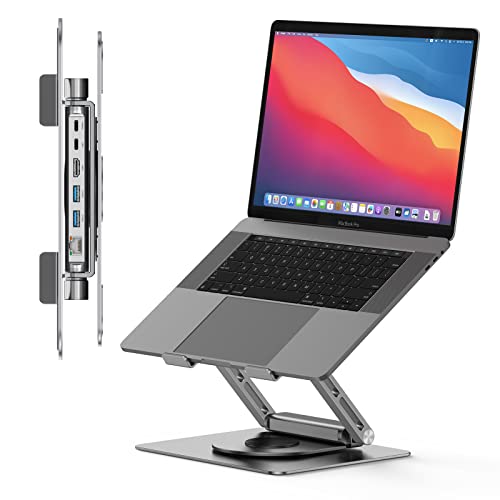
The Tobenone Laptop Docking Station Stand is an excellent choice for professionals seeking a versatile and efficient solution for their MacBook or other laptops. With support for multiple brands, it offers a 4K@60Hz HDMI output for stunning visuals. The plug-and-play design means you won’t need to fuss with drivers, while the multi-functional hub expands one USB-C port into six, including fast Ethernet and PD charging. Its portable, foldable design and sturdy aluminum alloy construction make it perfect for on-the-go use. Plus, efficient heat dissipation keeps your device cool, ensuring peak performance throughout your workday.
Best For: Professionals and tech enthusiasts seeking a portable and multifunctional docking solution for their laptops.
Pros:
- Supports multiple laptop brands with high-resolution 4K@60Hz HDMI output for stunning visuals.
- Detachable and foldable design enhances portability, making it ideal for business trips.
- Fast data transfer speeds up to 5Gbps via USB 3.0 ports and efficient heat dissipation for optimal performance.
Cons:
- Some users experience issues with full 4K resolution on ultra-wide monitors.
- Potential minor lag with I/O devices after extended use.
- Users need to ensure compatibility with additional USB hubs and power delivery requirements.
Factors to Consider When Choosing Lapstands With USB Hub
When choosing a lap stand with a USB hub, you should consider several key factors. Think about compatibility with your devices, the variety of ports available, and ergonomic design features that enhance comfort. Additionally, pay attention to data transfer speeds and power delivery capacity to guarantee peak performance.
Compatibility With Devices
Choosing a lapstand with a USB hub means considering its compatibility with your devices. Make certain the hub works with a range of laptops like MacBook Pro/Air, Dell, HP, Surface, and Lenovo to maximize usability. Check that it supports various laptop sizes, ideally from 10 to 17 inches. If you plan to use the USB-C port for video output, verify it supports DisplayPort Alt-mode. Confirm the number and types of ports available—USB 3.0, HDMI, Ethernet, and card readers should meet your connectivity needs. Finally, don’t overlook fast charging capabilities; the lapstand should provide at least 100W power delivery to efficiently charge your laptop. This way, you’ll enjoy seamless connectivity and comfort.
Port Variety and Functionality
A diverse array of ports can considerably enhance your experience with a lap stand featuring a USB hub. When choosing one, think about the number and types of ports available. Ports like USB-A, USB-C, HDMI, and Ethernet boost connectivity and compatibility with your devices. Make sure the USB hub supports high-speed data transfer, ideally USB 3.0, which offers speeds up to 5 Gbps for efficient file management. Look for models with power delivery (PD) capabilities, allowing you to charge your laptop while using multiple peripherals. Additionally, specialized ports like HDMI should support 4K at 60Hz for high-quality displays. Don’t forget card reader slots for quick access to storage devices, making data transfer seamless.
Ergonomic Design Features
Ergonomic design features are vital for anyone looking to maximize comfort and efficiency while using a lap stand with a USB hub. First, check for adjustable height settings that elevate your laptop to eye level, reducing neck strain and promoting better posture. Many stands also include a forward-tilt angle, aligning the screen with your line of sight and alleviating back and shoulder discomfort. Look for stable triangular support structures that enhance load-bearing capacity and prevent wobbling. Open designs promote airflow, preventing overheating during long usage sessions. Finally, non-slip silicone pads are important as they secure your laptop in place, ensuring a stable and safe working environment while avoiding scratches. Prioritize these features for an ideal experience.
Data Transfer Speeds
When selecting a lap stand with a USB hub, understanding data transfer speeds is crucial for improving your workflow. USB 3.0 ports can reach up to 5 Gbps, which greatly enhances file transfer efficiency compared to older standards. USB-C ports also support these speeds, making them perfect for quick access to external devices. If you plan to use SD and TF card slots, be aware that SD cards can operate at speeds up to 25 Mbps, while TF cards can reach 480 MB/s. To achieve peak performance, verify the USB hub’s ports match the capabilities of your devices. Remember, when using multiple devices, data transfer speeds may be divided among active ports, impacting individual performance.
Power Delivery Capacity
Understanding data transfer speeds sets the stage for another important aspect of lap stands with USB hubs: Power Delivery (PD) capacity. PD capacity refers to the maximum wattage a USB hub can supply, with common ratings like 60W, 85W, and 100W. A 100W capacity is ideal, allowing rapid charging of most laptops while powering other connected devices simultaneously. To maximize this capability, verify your laptop’s USB-C port supports Power Delivery. Higher PD capacity hubs offer efficient power distribution, enabling you to connect multiple high-power devices without performance loss. When selecting a lap stand with a USB hub, consider the PD capacity to verify it meets your laptop’s power requirements and any additional peripherals you plan to use.
Build Quality and Stability
Choosing a lap stand with a USB hub involves careful consideration of build quality and stability to guarantee a reliable workspace. Look for stands made from high-quality materials like aluminum alloy, which can support up to 40 lbs without wobbling. A triangular support structure enhances stability, reducing the risk of tipping or sliding during use. Adjustable height features allow you to maintain comfort while minimizing neck and back strain. Additionally, a non-slip silicone pad keeps your laptop secure and protects surfaces from scratches. Finally, opt for a solid base and a compact, foldable design—this assures sturdiness during use without sacrificing portability. Prioritize these factors to guarantee a dependable and efficient working environment.
Portability and Weight
Portability and weight are essential factors to take into account if you want a laptop stand with a USB hub that fits seamlessly into your mobile lifestyle. Options can weigh anywhere from 0.7 lbs to over 2.9 lbs, so choosing a lightweight model, ideally around 0.53 lbs, can make a significant difference when you’re commuting or traveling. Compact designs that fold down to dimensions like 10.5 x 2.2 x 0.9 inches enhance portability and ease of storage. Additionally, look for models that come with a portable storage bag to protect your stand and save space in your bag. Ultimately, you’ll want a balance between sturdiness and lightweight features to guarantee secure support without the added burden during transport.
Heat Dissipation Mechanism
When you’re on the go with your laptop stand and USB hub, effective heat dissipation becomes a key factor in maintaining your device’s performance. Prolonged use can lead to overheating, risking damage to internal components. Look for stands that feature an open design or ventilation openings, as these enhance airflow and keep your laptop cool. Aluminum alloy constructions are ideal due to their heat-conducting properties, outperforming plastic materials. Additionally, ergonomic designs that allow adjustable heights and angles promote better posture while enhancing ventilation around your laptop. Always choose stands that explicitly mention heat dissipation mechanisms, as this choice can greatly improve your device’s longevity and efficiency, ensuring you stay connected without sacrificing performance.
