
A camera cover offers a simple, visible way to block your laptop webcam when you are not using it. But the wrong cover can crowd the lens, interfere with a screen closing, or leave adhesive where you do not want it.
These 10 options include thin sliding covers, magnetic designs, reusable stickers, and multipacks. The best choice depends on your camera placement, device clearance, and how often you need to uncover the lens.
Best 10 Lapcamera Covers Picks for 2026
Slim Slide Pick

- Three sliding covers
- Listed at 0.027 inches thin
- Excludes newer MacBooks and protruding cameras
Best For: Basic privacy slides for compatible devices
Magnetic Option

- Magnetic closure
- 0.023-inch stainless-steel base
- Two covers included
Best For: A magnetic cover for compatible laptops or tablets
Restickable Sticker Pick

- Multiple sticker sizes
- Restickable low-tack vinyl
- No sliding opening
Best For: Covering varied devices with removable stickers
Multi-Size Value Pick
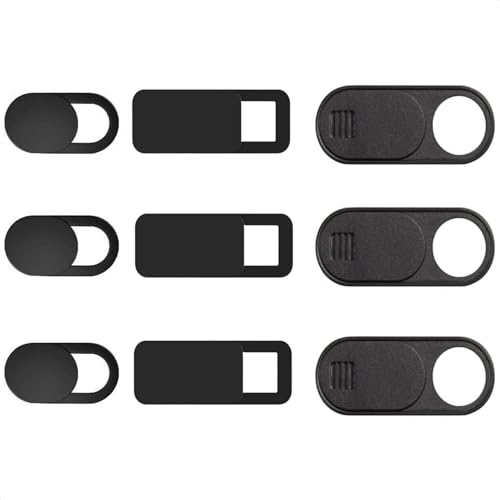
- Nine slides in three sizes
- 0.03-inch-thin design
- Large oval sized for Tesla cabin cameras
Best For: Covering several differently sized cameras
Best Adhesive-Free Option
Gadget Ray Slide-On Webcam Covers (4-Pack)

- Clips on without adhesive
- Four reusable covers
- Best fit on slim, uncased devices
Best For: Residue-free laptop or tablet privacy
Best Bulk Pack
QfwdfcTrenz Ultra-Thin Webcam Slides (50-Pack)

- 50 sliding covers
- 0.023-inch stated thickness
- Intended for laptops, PCs, and phones
Best For: Covering a large number of compatible devices
Best Extra-Large Shield
Brvlsoc Webcam Cover Slides (6-Pack)

- Extra-large sliding shield
- Six ultra-thin adhesive covers
- Not for full-screen or curved devices
Best For: Flat devices needing a larger camera shield
Best with Extra Features

- 25 black sliding covers
- 0.022-inch flexible ABS design
- Peel-and-stick installation
Best For: Covering cameras across multiple devices
Best Six-Pack Size Mix

- Three large and three small covers
- 0.027-inch ABS construction
- Requires a flat mounting surface
Best For: A few devices with different camera surrounds
Best Mid-Size Assortment

- Six large and six small covers
- 0.027-inch ABS slides
- Flat mounting surface required
Best For: Several devices with varying camera surrounds
Slim Slide Pick – Yilador 3-Pack Webcam Covers
For everyday laptop privacy, these Yilador lapcamera covers offer a simple sliding barrier in a three-pack. The cover is listed as 0.027 inches thin, so it is designed to let compatible laptop lids close normally.
Best For: Shoppers who want straightforward slide covers for multiple compatible devices.
Pros:
- Three covers for laptops, tablets, phones, or desktops.
- Sliding design lets you uncover the lens when needed.
- Adhesive installation requires only alignment and a brief press.
Cons:
- Not suitable for MacBooks released after 2023 or devices with protruding front cameras.
- Not compatible with full-screen or notch-style tempered glass screen protectors.
Check the camera area and any screen protector before ordering; this is a practical basic slide, but the stated fit exclusions matter.
Magnetic Option – CloudValley Upgrade 2-Pack
CloudValley’s magnetic lapcamera covers are an alternative to a conventional sliding shutter. This two-pack uses an upgraded magnet and a 0.023-inch stainless-steel base intended to suit thinner laptops.
Best For: Buyers who prefer a magnetic cover and want two for compatible laptops or tablets.
Pros:
- Upgraded magnet is intended to reduce covers dropping off.
- Thin base is designed not to prevent a compatible laptop from closing.
- Enlarged opening is intended to accommodate more camera layouts without blocking the indicator light.
Cons:
- Two covers may not be enough for a larger collection of devices.
- Camera placement still needs checking before installation.
The magnetic design is the main reason to choose this set. Align it carefully and press firmly for 15 seconds as directed.
Restickable Sticker Pick – Brvlsoc Vinyl Webcam Covers
These Brvlsoc lapcamera covers use solid-black vinyl stickers rather than a slide or magnet. Multiple sizes make the set worth considering for cameras across laptops, phones, tablets, smart TVs, and game consoles.
Best For: People who want movable, low-profile camera stickers for different device types.
Pros:
- Multiple sizes accommodate a range of devices.
- Low-tack vinyl is restickable and designed to remove without residue.
- Thin, soft material is designed to avoid scratching screens or lenses.
Cons:
- Unlike a slide, a sticker must be removed or repositioned to use the camera.
Choose this format when flexible placement matters more than one-motion camera access; select a sticker size that fully covers the lens.
Multi-Size Value Pick – California JOS 9-Pack Slides
If you need lapcamera covers for several devices, this California JOS nine-pack includes three each of large, medium, and small adhesive slides. The 0.03-inch-thin design offers more size choices than a single-shape pack.
Best For: Households covering multiple compatible cameras with different housing sizes.
Pros:
- Nine covers in three sizes and shapes.
- Slide design lets you open the camera without removing the cover.
- Adhesive is described as removable without leaving traces.
- Large oval is specifically designed for Tesla Model 3/Y interior cabin cameras.
Cons:
- Each shape comes in a quantity of three, so the mix may not match every device collection.
- Check lens diameter and surrounding space before attaching a slide.
This pack makes the most sense when you can use several of its sizes; clean and align each camera area before pressing a cover into place.
Best Adhesive-Free Option – Gadget Ray Slide-On Webcam Covers (4-Pack)
For shoppers comparing lapcamera covers but wanting to avoid adhesive, this four-pack clips over a laptop or tablet bezel instead of sticking to it. Slide the cover open for calls and closed afterward.
Best For: People who want a reusable, residue-free cover for a slim laptop or tablet.
Pros:
- No adhesive, tape, or sticky residue.
- Four covers for multiple devices or sharing.
- Flexible, USA-made material designed to grip without scratching.
Cons:
- Best suited to slim devices without heavy cases.
- Designed for use while the laptop is open; remove it before closing.
This is the practical pick if avoiding glue matters more than leaving a cover permanently attached.
Best Bulk Pack – QfwdfcTrenz Ultra-Thin Webcam Slides (50-Pack)
If you need lapcamera covers for many devices, this 50-piece pack offers sliding covers intended for laptops, desktop computers, and smartphones. Each uses a slim ABS design with a stated thickness of 0.023 inch.
Best For: Equipping multiple compatible devices with basic sliding camera covers.
Pros:
- 50 covers in one pack.
- Sliding mechanism lets you uncover the camera when needed.
- Slim, black ABS construction.
Cons:
- Check the space around each camera; the listing describes a fit for most standard camera sizes, not every device.
- The supplied details do not specify how the covers attach.
The main draw is quantity. Confirm your devices have room around their cameras before counting on the pack for every screen.
Best Extra-Large Shield – Brvlsoc Webcam Cover Slides (6-Pack)
These lapcamera covers emphasize a larger shield, with the listing claiming twice the shielding capacity of traditional covers. The six-pack uses an ultra-thin, adhesive-backed sliding design for compatible laptops, tablets, PCs, and smartphones.
Best For: Devices with enough flat space around the camera for an extra-large cover.
Pros:
- Extra-large shield offers more coverage than the brand’s traditional-cover comparison.
- Ultra-thin design is intended to avoid interfering with screen closure and indicator lights.
- Six adhesive-backed covers that the listing says can be removed without sticky residue.
Cons:
- Not suitable for full-screen or curved devices.
- Requires adhesive placement rather than clipping onto a bezel.
Choose this one for its larger coverage area, but check that the device has a suitable flat mounting spot first.
Best with Extra Features – 25 Ultra-Thin Webcam Covers
If you need lapcamera covers for several devices, this 25-pack provides plenty of black sliding covers for everyday use and spares. Each cover is 0.022 inches thick and made from flexible ABS plastic.
Best For: Households or shared workspaces covering multiple built-in cameras.
Pros:
- Includes 25 covers for multiple devices or replacements.
- Thin, flexible design is intended to allow laptop closure.
- Peel-and-stick installation takes a firm 10-second press.
Cons:
- All 25 covers are black; no alternate colors are listed.
- Check the space around each camera before applying the adhesive.
The large quantity is the main draw. These are a practical pick when you want simple physical camera coverage across a collection of devices.
Best Six-Pack Size Mix – Dual-Size Camera Cover Slides
These lapcamera covers come in a six-pack split between three large and three small slides, giving you options for different camera surrounds. At 0.027 inches thick, they are designed to let a laptop lid close without interference.
Best For: Buyers covering a few devices with different amounts of flat space around their cameras.
Pros:
- Includes three 1.10 × 0.43-inch covers and three 0.71 × 0.36-inch covers.
- Slides open and shut with one finger.
- Adhesive installation calls for a 15-second press; the seller says removal leaves no sticky residue.
Cons:
- Requires a flat mounting surface and is not suited to full-screen devices.
- The slider may separate from its base during installation, though it can be snapped back on.
Choose this set when six covers are enough and size flexibility matters more than bulk quantity. Confirm that each device has room for the cover before attaching it.
Best Mid-Size Assortment – ZUCUCUC 12-Pack Camera Covers
For lapcamera covers in more than one size, this ZUCUCUC set includes six large slides and six small ones. The 0.027-inch-thick ABS covers slide over built-in cameras and attach with adhesive.
Best For: Covering several laptops, tablets, or phones when camera-surround sizes vary.
Pros:
- Twelve covers provide six of each listed size: 1.10 × 0.43 inches and 0.71 × 0.36 inches.
- Slim design is intended not to interfere with laptop closure.
- One-finger sliding mechanism makes it easy to uncover the camera when needed.
Cons:
- Needs a flat surface and is not suitable for full-screen devices.
- The removable slider can separate from the base during installation and may need to be snapped back in.
This is a useful middle ground between a small assortment and a large bulk pack. Match the cover size to the available flat area before pressing it into place for 15 seconds.
How We Picked These Lapcamera Covers
We focused on practical differences buyers can assess before ordering: stated thickness, attachment method, size options, device compatibility, and pack count. The selection includes adhesive slides, a magnetic option, restickable stickers, and a no-adhesive design so there are choices for different devices and preferences. Listed dimensions and compatibility claims are useful starting points, but check your own camera area and screen clearance before applying any cover.
Quick Comparison: Which Style Fits Your Setup?
Sliding covers let you uncover the lens without removing the cover each time. They make sense if you use video calls regularly, provided the slider sits securely and does not block nearby sensors. Stickers offer a simpler way to keep a camera blocked, especially across devices with different shapes; opening the camera may require peeling one back. Magnetic and no-adhesive options appeal to buyers who want an alternative to a conventional adhesive slide, though their fit and removal process still depend on the product and device.
Pack size matters, too. A small pack suits one or two laptops; larger packs are more economical when you are covering several devices or sharing them with a household or team.
Key Buying Factors for Lapcamera Covers
Thickness and Closing Clearance
Several covers here are advertised at roughly 0.022 to 0.03 inches thick. A thinner listing can be promising, but it does not guarantee that a particular laptop will close safely with the cover attached. Check the manufacturer’s guidance for your device and avoid placing a cover where it puts pressure on the display.
Camera, Sensor, and Bezel Fit
Measure the space around the lens rather than assuming a “universal” cover will fit. Check for microphones, indicator lights, and other sensors near the camera, and make sure neither the frame nor the moving slider obstructs them. Multiple sizes or extra-large covers can help with unusual camera layouts, but bigger is not automatically better on a narrow bezel.
Attachment and Everyday Use
Consider whether you prefer an adhesive slide that stays in place, a removable sticker, or a no-adhesive alternative. Follow the installation instructions, apply only to a clean, suitable surface, and test that the camera opens fully before your next call. If you move a device in and out of a bag, check that the cover remains secure.
Who Should Buy Which Lapcamera Covers?
Frequent video callers: start with a thin sliding cover that is easy to operate without moving the whole piece. Owners of multiple devices: look at larger packs or assortments with several sizes. Buyers avoiding conventional adhesive: compare the magnetic, restickable, and no-adhesive choices, paying close attention to how each attaches. Anyone with a tight-closing laptop: confirm device-specific clearance guidance first; if a physical cover is not recommended, use your device’s built-in camera privacy controls instead.
