
A KVM switch can make a two-computer desk feel like one setup: press a button to move your monitors, keyboard, mouse, and other USB devices between PCs. At 4K and 144Hz, though, the details matter more than the headline resolution.
These 10 options cover dual-monitor DisplayPort setups, mixed HDMI and DisplayPort connections, and a few configurations for more computers or screens. Use the guide below to check what will actually fit your desk before you buy.
Best 10 Kvm Switch for Dual Computers 4K 144hz Picks for 2026
Best Powered Pick

- Two PCs, two monitors, four USB 3.0 ports
- Supports up to 4K at 144Hz
- Includes wired controller and 12V adapter
Best For: Dual-DisplayPort desks sharing multiple USB devices
Best for Three Monitors

- Switches three monitors between two PCs
- Supports up to 4K at 144Hz
- Four USB 3.0 ports and wired remote
Best For: Three-screen setups using HDMI and DisplayPort
Best Compact Option

- Compact 3.94-inch-wide metal unit
- Advertised 4K at 144Hz support
- Four USB 3.0 ports and wired remote
Best For: Space-conscious dual-DisplayPort workstations
Best for a Tidy Desk
Dual-Display DP KVM with Desktop Controller

- Up to 4K at 144Hz
- Four USB 3.0 ports
- Wired desktop controller
Best For: Two-DP-per-PC desks with a hidden KVM
DP-Only Pick

- Lists 4K at 144Hz
- Four USB 3.0 ports
- Needs two DP outputs per PC
Best For: Two-PC, dual-DP monitor setups
Best for Three PCs
Camgeet Dual-Monitor HDMI/DisplayPort KVM

- Shares two monitors across three computers
- Supports up to 4K at 144Hz
- Four USB 3.0 ports; wired remote included
Best For: Three-PC setups with HDMI and DisplayPort monitors
Best for Easy Restarts
Dual-Monitor DP 1.4/HDMI 2.1 KVM
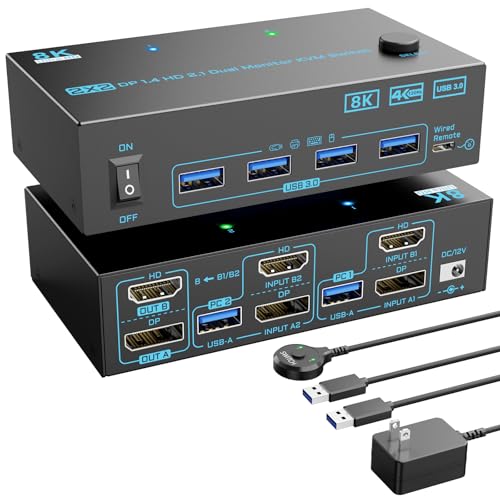
- Two computers share two monitors
- Supports up to 4K at 144Hz
- Separate power switch for restarting the KVM
Best For: Two-PC desks that value an accessible restart switch
Best Simple Pick
Camgeet Two-PC Dual-Monitor KVM

- Compact 3.94-by-2.56-inch footprint
- Supports up to 4K at 144Hz
- Four USB 3.0 ports; remote and adapter included
Best For: Compact two-PC setups with HDMI and DisplayPort outputs
Best Powered Pick – Dual-Display DP 1.4 KVM
If you need a kvm switch for dual computers 4k 144hz, this DisplayPort 1.4 model lets two PCs share two monitors and four USB 3.0 peripherals. It supports extended and mirrored displays, with a 12V adapter to power the switch.
Best For: Two-PC desks with dual DisplayPort monitors and several shared USB devices.
Pros:
- Supports up to 4K at 144Hz, subject to the rest of your display setup.
- Four USB 3.0 ports support up to 5Gbps transfers.
- Switch using the front button or included wired desktop controller.
Cons:
- Each computer needs two DisplayPort outputs; DisplayPort cables are not included.
- No keyboard-hotkey switching.
The included USB cables and desktop controller cover part of the setup, but budget for the DisplayPort cables needed to connect both PCs and monitors. The manufacturer recommends DP 1.4 cables no longer than 3.3 feet for stable operation.
Best for Three Monitors – HDMI and Dual-DP KVM
For shoppers comparing a kvm switch for dual computers 4k 144hz who need an extra display, this model switches three monitors between two PCs. Its HDMI-plus-two-DisplayPort layout supports extended or duplicated displays and is rated for up to 4K at 144Hz.
Best For: Two-computer workstations with one HDMI monitor and two DisplayPort monitors.
Pros:
- Shares three displays and four USB 3.0 ports between two computers.
- Advertised support for up to 8K at 60Hz or 4K at 144Hz.
- Includes a wired remote, two USB 3.0 cables, and a 12V power adapter.
Cons:
- Requires the right mix of HDMI and DisplayPort connections rather than three matching video ports.
- USB input must be connected to each computer for keyboard and mouse sharing.
Choose this one for its three-screen layout, not just its headline resolution. The seller recommends HDMI 2.1 and DP 1.4 cables and advises keeping cable runs short.
Best for Remote Switching – Dual-DP Desktop KVM
This kvm switch for dual computers 4k 144hz is a straightforward choice when both PCs have two DisplayPort outputs. It shares two monitors and four USB 3.0 devices, while the included wired desktop controller lets you keep the switch itself away from your main work area.
Best For: Dual-DisplayPort setups where a separate desk-side switching button is useful.
Pros:
- Supports extended or copied displays at up to 4K at 144Hz.
- Four USB 3.0 ports offer up to 5Gbps data transfer.
- Includes a wired controller, two USB 3.0 cables, and a 12V adapter.
Cons:
- Each computer needs two DisplayPort connections; DP cables are not included.
- Does not support keyboard-hotkey switching.
The controller is the practical differentiator here: it gives you one-button access without leaving the KVM in the middle of your desk. Check your PCs’ display outputs before buying, and connect each PC’s USB input to enable shared peripherals.
Best Compact Option – MLEEDA Dual-Monitor DP KVM
The MLEEDA is a compact kvm switch for dual computers 4k 144hz, measuring 3.94 by 2.56 by 0.79 inches. It connects two DisplayPort-equipped computers to two monitors and shares four USB 3.0 ports, with support for extended or mirrored displays.
Best For: Space-conscious dual-DisplayPort desks running Windows, Mac, or Linux.
Pros:
- Advertised support for 4K at 144Hz.
- Four USB 3.0 ports support up to 5Gbps data transfer.
- Includes a wired remote, two USB cables, and a USB power cable.
Cons:
- Each computer needs at least two DisplayPort outputs; this is not an HDMI KVM.
- The title lists 8K at 30Hz, while the notes also claim 8K at 60Hz, so the 8K refresh-rate specification is inconsistent.
This is worth considering for its small footprint and included remote. If 8K performance matters, verify the supported refresh rate before purchasing; for 4K at 144Hz, the seller recommends DP 1.4 cables no longer than 1.5 meters.
Best for a Tidy Desk – Dual-Display DP KVM with Desktop Controller
If you’re shopping for a kvm switch for dual computers 4k 144hz, this DisplayPort model lets two PCs share two monitors and four USB devices. It supports extended or mirrored displays and includes a small desktop controller so the main unit can sit out of the way.
Best For: Dual-DisplayPort PC setups that need accessible switching without keeping the KVM on the desk.
Pros:
- Supports up to 4K at 144Hz or 8K at 60Hz.
- Four USB 3.0 ports support transfers up to 5Gbps.
- Includes a wired desktop controller, USB cables, and a power adapter.
Cons:
- Each computer needs two DP connections; DP cables are not included.
- No keyboard-hotkey switching.
The remote button is the practical draw here. Confirm that both computers have two suitable DP outputs, and budget for four DP cables.
Highest Listed Refresh Rate – 4K 240Hz Dual-Monitor KVM
For buyers comparing a kvm switch for dual computers 4k 144hz, this model lists headroom up to 4K at 240Hz or 8K at 60Hz. Two PCs can share two monitors, a keyboard and mouse, and other devices through four USB 3.0 ports.
Best For: Dual-monitor PC setups seeking a listed 4K refresh-rate ceiling above 144Hz.
Pros:
- Lists support for up to 4K at 240Hz or 8K at 60Hz.
- Offers extended and copied display modes.
- Includes a wired switching controller, two USB cables, and a power adapter.
Cons:
- The supplied notes call for HDMI and DP connections per computer, so verify your available outputs.
- The seller recommends short 8K DP cables for a stable signal.
Its listed refresh-rate support is the main attraction, but check the HDMI-plus-DP wiring requirement against your computers and monitors before buying.
DP-Only Pick – 4K 144Hz Dual-Monitor KVM
This DP-only option is a straightforward kvm switch for dual computers 4k 144hz when each PC has at least two DisplayPort outputs. It shares two monitors and four USB 3.0 peripherals, with extended and mirrored display modes.
Best For: Two-PC setups with two DP outputs per computer and a need for wired-button switching.
Pros:
- Lists support for 4K at 144Hz.
- Provides four USB 3.0 ports rated for up to 5Gbps transfers.
- Includes a wired remote and two USB cables; supports Windows, Mac, and Linux.
Cons:
- Requires at least two DP outputs on each computer; it is not an HDMI KVM.
- The title lists 8K at 30Hz, while the bullets list 8K at 60Hz—verify 8K support before relying on it.
For a 4K/144Hz DP setup, the connection requirements are clear. Actual resolution still depends on the graphics cards, monitors, and cables.
Best for Three PCs – Camgeet Dual-Monitor HDMI/DisplayPort KVM
If your search for a kvm switch for dual computers 4k 144hz has expanded to a third PC, this Camgeet model lets three computers share two monitors and four USB peripherals. Its HDMI 2.1 and DisplayPort 1.4 connections support up to 4K at 144Hz, provided your hardware and cables can deliver it.
Best For: Three-computer workstations with one HDMI monitor, one DisplayPort monitor, and shared USB devices.
Pros:
- Supports extended or mirrored dual-monitor output.
- Four USB 3.0 ports support transfers up to 5Gbps.
- Includes a wired switching button and 12V power adapter.
Cons:
- Requires HDMI and DisplayPort connections rather than two matching monitor connections.
- Actual resolution depends on the connected computers, monitors, and cables.
The extra computer input is the reason to choose this over a two-PC switch. Check your video outputs before buying so both monitors can work as intended.
Best for Easy Restarts – Dual-Monitor DP 1.4/HDMI 2.1 KVM
This two-computer, two-monitor option fits a search for a kvm switch for dual computers 4k 144hz when your setup uses both DisplayPort and HDMI. It supports up to 4K at 144Hz and shares four USB 3.0 ports between the connected computers.
Best For: Two-PC desks that need dual displays, shared USB peripherals, and an accessible way to restart the switch.
Pros:
- DisplayPort 1.4 and HDMI 2.1 support up to 8K at 60Hz or 4K at 144Hz.
- Switches with a chassis button or wired remote.
- Separate power switch lets you restart the KVM if signal re-recognition is needed.
Cons:
- Each computer must connect by USB for peripheral data and KVM power.
- Check that both computers support multiple displays before connecting them through the KVM.
The dedicated power switch is a useful distinction if you want to restart the unit without unplugging cables. Plan for both HDMI and DisplayPort connections at each computer.
Best Simple Pick – Camgeet Two-PC Dual-Monitor KVM
For a straightforward kvm switch for dual computers 4k 144hz, this Camgeet unit shares two monitors and four USB 3.0 peripherals between two PCs. It supports extended or mirrored displays through HDMI 2.1 and DisplayPort 1.4, with a stated maximum of 4K at 144Hz.
Best For: Two-computer desks with HDMI and DisplayPort outputs that need a compact switch and shared USB devices.
Pros:
- Compact 3.94-by-2.56-inch footprint.
- Four USB 3.0 ports support transfers up to 5Gbps.
- Includes two USB cables, a wired remote, and a 12V adapter.
Cons:
- Each computer needs at least one HDMI and one DisplayPort output.
- Achievable resolution depends on your graphics cards, monitors, and cables.
This is a sensible fit when your computers already have the required mixed video outputs. The included USB cables and power adapter cover those listed connections, but verify your display cabling separately.
How We Picked the Best Kvm Switch for Dual Computers 4K 144hz
We focused on switches listed for 4K at 144Hz and compared the configurations that affect everyday use: computer inputs, monitor outputs, video connector types, USB ports, and control options. The selection includes mostly two-computer, dual-monitor models, plus options for a third computer or third display. A product title is not a compatibility guarantee, so check the detailed specifications for the exact resolution and refresh rate supported on each output with both monitors connected.
Quick Comparison: Match the Switch to Your Setup
- Two PCs and two DisplayPort monitors: Start with a dual-monitor DisplayPort model. This is the most direct fit if both computers have two compatible video outputs.
- Mixed HDMI and DisplayPort equipment: Look at the combination-port models, but inspect the input-to-output wiring diagram. A mixed-port KVM may require a specific HDMI or DisplayPort connection from each PC.
- Three computers or three monitors: Choose the model built for that count rather than assuming a two-by-two switch can expand later.
- Several shared USB devices: Check the number and speed of USB ports, along with how the switch connects to each computer.
Key Buying Factors for a KVM Switch for Dual Computers at 4K 144Hz
Video Bandwidth and Ports
Confirm 4K at 144Hz support for your connector type, not just an advertised maximum such as 8K at a lower refresh rate. Check the KVM’s port specifications against your PCs and monitors, including whether DisplayPort 1.4, HDMI 2.1, or a particular mix of inputs is needed. Features such as HDR, high color depth, and variable refresh rate may have separate limitations; verify them if they matter to you.
Cables and Computer Outputs
A dual-monitor setup generally needs two video connections from each computer, two connections to the monitors, and a USB upstream connection from each computer for shared peripherals. Make sure both PCs can drive both displays and budget for the required cables; suitable cables may not be included. Check cable specifications and keep runs within the manufacturer’s recommendations if you run into flicker or signal dropouts.
USB and Switching Behavior
USB 3.0 ports are useful for sharing devices beyond a keyboard and mouse, but port count does not tell you how well every peripheral will behave. If you use a webcam, audio interface, wireless receiver, or external drive, check the stated compatibility and consider whether disconnecting and reconnecting during a switch would interrupt your work. A wired remote can also make an under-desk KVM easier to reach.
Who Should Buy Which Kvm Switch for Dual Computers 4K 144hz?
For a straightforward two-PC gaming and work desk, prioritize a dual-monitor model with the right ports and explicit support for your intended 4K/144Hz configuration. Choose a mixed HDMI/DisplayPort option only after mapping every cable path. If you regularly use a third PC or monitor, buy for that layout from the start. Above all, confirm the full two-display operating mode before paying for a KVM switch for dual computers at 4K 144Hz.
